Current product scope · November 2026: Gimkit’s official hosting instructions describe selecting a kit, mode, options and joining route before starting. The game-options reference explains that options differ by mode, including question-reward balance in 2D modes. This guide recommends teaching decisions; it does not imply that every mode has the same cash, upgrades, timer, teams or settings.
Introduction
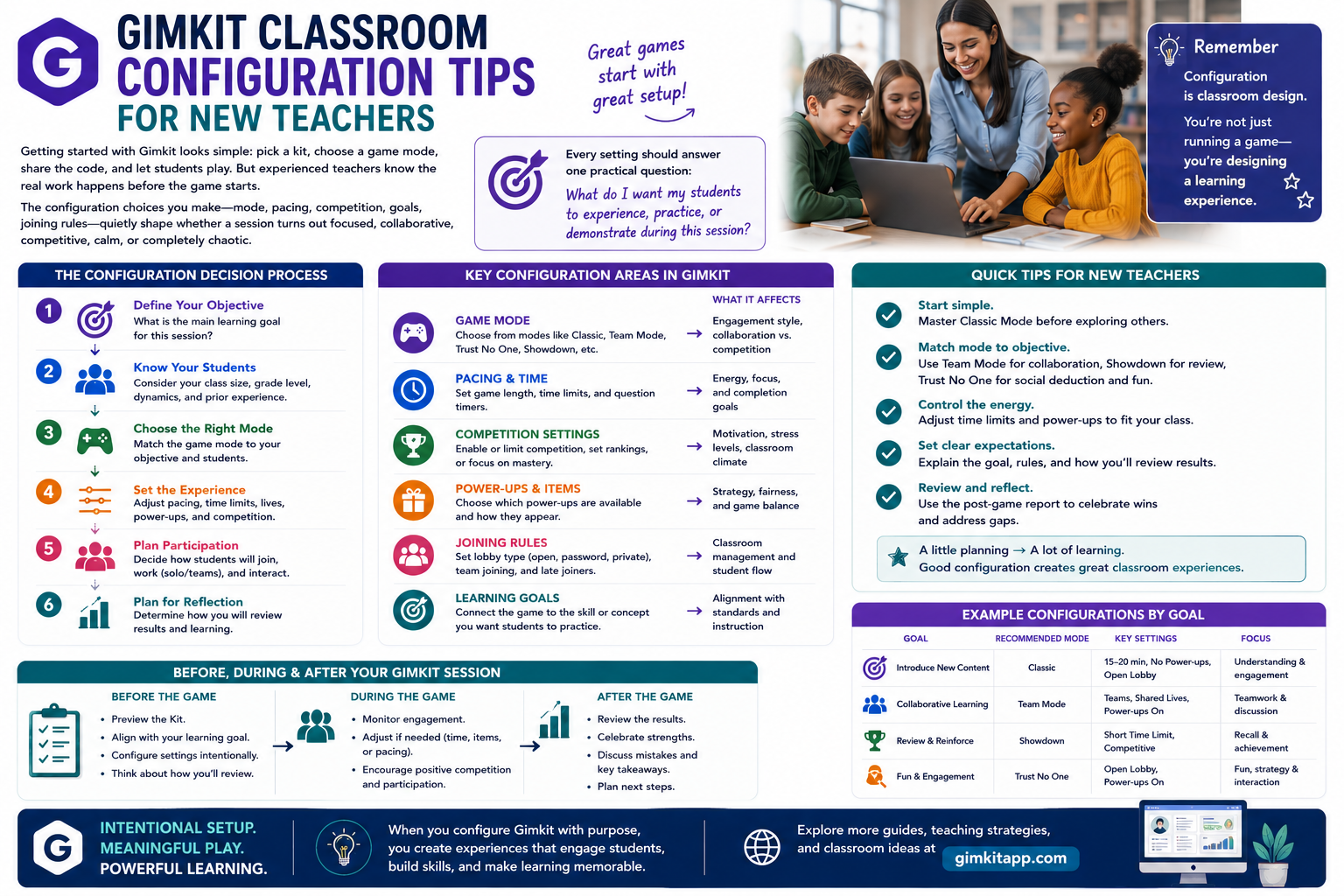
Gimkit Classroom Configuration tips for New Teachers | Getting started with Gimkit looks simple on the surface: pick a kit, choose a game mode, share the code, and let students play. But experienced teachers know the real work happens before the game starts. The configuration choices you make — mode, pacing, competition, goals, joining rules — quietly shape whether a session turns out focused, collaborative, competitive, calm, or completely chaotic.
That’s why new teachers shouldn’t treat Gimkit configuration as a checklist of buttons to click. It’s classroom design. Every setting should answer one practical question: what do I want my students to experience, practice, or demonstrate during this session? This guide walks through that entire decision process — from your very first setup to the post-game review — so you can configure Gimkit with intention instead of guesswork.
Looking for comprehensive classroom resources and educational technology insights? Explore GimkitApp for expert guides, teaching strategies, game modes, and the latest updates to enhance student engagement.
What Classroom Configuration Actually Means
Classroom configuration is the process of shaping the Gimkit experience around your specific students, lesson, objective, and available time. It goes well beyond picking a game mode. It includes decisions like:
Which mode actually fits this lesson
Whether students should work individually or in teams
What condition ends the game
Whether late joining stays open
How student names and identities are handled
How much gameplay competes with question-answering
How long the session should run
Whether the activity is practice, review, or assessment
Gimkit separates standard game options from mode-specific settings, so configuration is always partly dependent on the mode you select. There’s no single “correct” setup — only a setup that’s appropriate for the learning situation in front of you.
Build a Configuration Baseline First
New teachers often open the settings screen and start changing things immediately. That’s backwards. Before touching a single option, answer five questions:
Question
What It Determines
What am I teaching?
Content purpose
What should students do?
Learning behavior
Who are my students?
Difficulty and support level
How much time do I have?
Game duration
What will I do with the results?
How much configuration effort is worth it
A ten-minute vocabulary review doesn’t need the same setup as a forty-minute collaborative revision lesson, and a class’s first-ever Gimkit session shouldn’t automatically mirror the setup of a class that already knows the platform. Establishing this baseline prevents random, reactive customization.
Know Your Students Before You Know Your Settings
Your students aren’t a single setting — they’re the reason the settings exist. Before launching a game, think about their age, reading speed, subject familiarity, comfort with technology, competitiveness, independence, attention span, group dynamics, and prior Gimkit experience.
An experienced group of middle schoolers can usually handle a faster, more competitive configuration. A class using Gimkit for the very first time needs a simpler, calmer environment. The identical game mode can produce two completely different classroom experiences depending on who’s playing it. The rule worth remembering: configure for the students you actually have, not the students you wish you had.
Choose the Mode Based on the Lesson, Not the Excitement
Gimkit’s Mode Picker groups games by characteristics like collaboration, strategy, and calmer, low-pressure gameplay. Use those labels as a starting point — not a reason to pick whatever looks most exciting. Start with the lesson’s purpose instead:
Lesson Purpose
Configuration Priority
Quick review
Simplicity and pace
Practice
Repetition and sustained participation
Collaborative revision
Communication and teamwork
Independent work
Individual progress
High-energy review
Competition with clear boundaries
Reflective practice
Lower distraction
Skill reinforcement
Question frequency
Homework
Independence and manageable goals
The flashiest mode is rarely the most educational choice. Match the environment to what you actually want students to do, not to what looks best on the projector.
Balance Teacher Control With Student Freedom
One of the biggest early decisions is how much control to keep for yourself versus how much freedom to hand to students. Too much control makes an activity feel rigid; too little makes it hard to manage. The target is structured freedom — students feel like they’re playing and deciding, while you still control the elements that matter most for learning.
Keep these under your control: the kit, the game mode, the win condition, timing, class connection, joining rules, and any relevant mode-specific settings. Depending on the mode, students will still make meaningful decisions during gameplay — that’s fine, as long as those decisions support the lesson rather than distract from it.
Manage Cognitive Load, Pace, and Difficulty
A game can have great questions and still overwhelm students if it asks them to juggle too much at once — reading, answering, moving, strategizing, tracking rewards, competing, and communicating, all at the same time. That combination can energize an experienced group but turn into pure noise for beginners. If students are spending more effort figuring out the game than thinking about the subject, simplify the environment. The game should support the thinking, not replace it.
Pace matters just as much as complexity. Fast readers can make a class look successful even while slower readers quietly struggle, so judge your configuration by the middle and lower end of the class, not just the top performers. Use this quick diagnostic:
Observation
Likely Issue
Fast students dominate
Pace favors speed over comprehension
Many unanswered questions
Students need more processing time
Frequent guessing
Time pressure is too high
Careless reading
Pace is overpowering comprehension
Strong accuracy, low participation
Format is discouraging slower students
Difficulty deserves the same care. New teachers sometimes crank difficulty up to “challenge” students, but constant frustration isn’t the same as productive challenge. Aim for the gap between “this is too easy” and “I have no idea what I’m doing” — a session that moves from familiar territory into practice, then challenge, then reinforcement, rather than starting at maximum difficulty.
Configure Competition, Teams, and Rewards Without Losing the Lesson
Competition can sharpen attention, but it doesn’t affect every student the same way. Some students lock in; others get anxious, overly aggressive, or disengaged once they fall behind. Don’t assume a leaderboard motivates everyone by default — watch what happens after the first few students pull ahead. If trailing students keep answering thoughtfully, the balance is working. If they start guessing, quitting, or tuning out, dial the competitive intensity back.
The leaderboard should also never become the entire lesson. A student near the top isn’t automatically learning more than one sitting quietly in the middle answering carefully. A simple reframe for students — “your goal isn’t to finish first, it’s to improve your understanding while you play” — can meaningfully change how they approach the activity.
Teams can help when individual motivation is inconsistent, but before building a team structure, check whether everyone can genuinely contribute, whether one student might dominate, and whether students are explaining their reasoning to each other rather than just handing off answers.
Rewards shape behavior more than teachers often expect. If gameplay rewards strategy more heavily than correct answers, students will naturally chase strategy. Gimkit’s 2D-style modes let you adjust how much reward comes from answering correctly versus other gameplay actions — if a session starts to feel more like a game than a lesson, that reward balance is usually the first thing to check. In these modes, answering correctly typically earns a resource used for gameplay progression; if that link is too weak, questions feel disconnected from the game, and if it’s too strong, slower students can feel trapped.
Randomness is fine when it makes gameplay entertaining, but it becomes a problem when it starts determining learning opportunities rather than just outcomes. If two students end up with very different results purely because of in-game luck rather than understanding, remember that the score reflects gameplay — not necessarily mastery.
Match Session Length and Structure to the Type of Lesson
Time isn’t a technical afterthought — it’s part of instructional design. A short session creates urgency; a longer one allows repetition and depth. Neither is automatically better.
Short sessions work well for reviewing one concept, warming up, closing a lesson, or checking understanding quickly.
Medium sessions suit topic revision, structured practice, broader question sets, and collaborative work.
Longer sessions make sense when a mode needs more exploration or the activity is a major lesson component — but once attention drops, extra minutes bring diminishing returns.
For a 30-minute lesson, a workable structure looks like: explain the objective and joining process (minutes 1–4), let students join and confirm readiness (4–7), run the main activity (7–20), review key observations or run a focused second round (20–25), and discuss mistakes and next steps (25–30). For a full class period, break the time into stages instead of one long uninterrupted game: orientation, a first attempt at the configuration, a mid-lesson adjustment based on what you’re observing, a refined second attempt, and a reflection that connects the activity back to the content.
Different lesson types call for different priorities:
Warm-ups should activate prior knowledge with recognizable questions — the goal is finding out what students already remember, not maximizing struggle.
Practice sessions should prioritize repetition, feedback, manageable challenge, and sustained participation. Judge success by whether accuracy and confidence improve over time, not by final rank.
Review sessions can carry more energy and tolerate broader question sets, competitive formats, and team challenges — as long as review still reveals learning gaps rather than burying them under entertainment.
Assessment sessions need the opposite approach: reduce variables that aren’t related to knowledge. The more that speed, strategy, and game familiarity influence the score, the harder it is to treat that score as a measure of understanding.
Homework and independent practice through Gimkit Assignments removes you from the room, so instructions need to be unusually clear: what students are completing, when it’s due, what the goal means, and what to do if they get stuck.
Set Up Classes, Student Identity, and Joining Rules
If you run Gimkit regularly with the same group, setting up a Class is far more efficient than solving identity and organization problems from scratch every session. Gimkit’s Classes system keeps student names organized in live games, tracks assignment progress, and lets students appear under consistent names — which class settings take precedence over automatically. For informal or one-off groups, Gimkit’s Nickname Generator can assign safe names automatically instead, which is simpler when a permanent class roster isn’t necessary.
Late joining is one of the most underestimated settings. Real classrooms involve latecomers, dropped connections, and device switches, and Gimkit’s live games allow late joining by default through the Game Options screen. Keep it on when latecomers are common or your internet is unreliable and flexibility matters more than control. Turn it off when you need a tightly controlled assessment, or when students leaving and rejoining would disrupt the activity. Choose based on classroom management needs, not habit.
Support Every Learner in the Room
Mixed-ability classrooms need more deliberate configuration than single-level groups. The goal isn’t to make every student move at the same speed — it’s to keep different types of learners meaningfully involved. Give stronger students challenge, deeper questions, and extension opportunities; give developing students manageable pacing, repetition, and a competitive environment that doesn’t feel intimidating. Watch the middle of the leaderboard, not just the top — it usually gives the clearest read on whether the configuration is working for the class as a whole.
Quiet or low-confidence students often know the material but hesitate to answer under pressure. If the same students consistently land near the bottom, don’t assume it reflects understanding — look for patterns like slow answering, frequent answer changes, risk avoidance, or being overwhelmed by the mode itself before adjusting anything.
Advanced students disengage quickly when every question is predictable. “Harder” doesn’t automatically mean better — a stronger challenge usually involves application, comparison, reasoning, or multi-step thinking rather than simply obscure wording.
Reading speed and language processing deserve their own attention. A highly time-sensitive configuration can end up rewarding reading speed more than subject knowledge — a useful gut check is asking, “if I removed the game clock, would performance look meaningfully different?” If yes, speed may be carrying too much weight. For multilingual learners specifically, separate content difficulty from language-processing difficulty so the competition isn’t accidentally about who reads English fastest. In general, accessibility isn’t about lowering the intellectual bar — it’s about removing unnecessary friction: clear instructions, predictable procedures, readable questions, and enough time to think.
Get Technically Ready Before Students Join
Technology problems can derail momentum fast. Before starting, check the teacher device, classroom display, internet connection, student devices, browser access, and any audio requirements — a two-minute technical check upfront can prevent a ten-minute disruption mid-lesson. Have a simple backup plan ready for students who can’t join: confirm the code, check they’re on the correct joining page, refresh, verify their connection, and try the shared link or QR code while the rest of the class continues. Gimkit currently offers game codes, join links, and QR-code access, giving you multiple paths to get everyone in.
Treat the lobby as your final checkpoint, not dead time. Before starting, confirm the expected students are present, check for unexpected participants, review names, and remove anyone inappropriate — Gimkit allows teachers to remove players from the lobby or during a live game. It’s much easier to handle this before the activity is underway.
A short pre-launch pass covering content (kit selected, questions reviewed), mode (settings understood), game (goal, timing, late-joining decision), class (identity method confirmed), and technology (display, join method, connection checked) takes far less time than troubleshooting a runaway game after launch.
Read the Room: Adjusting Mid-Session
Not every decision has to be locked in before the first question. Gimkit’s live-hosting controls let teachers manage an active game and, in supported modes, add time — which makes you an active moderator rather than a passive observer. But don’t change settings just because the leaderboard looks unusual; change something when student behavior signals a real problem. If one student pulls far ahead, the better questions are whether others are still learning, whether the lead reflects genuine mastery or just game mechanics, and whether weaker students are still participating — the score is a clue, not a diagnosis.
Watch for positive signals like careful reading, discussion, self-correction, and subject-related questions, and warning signals like random clicking, obsessive focus on ranking, ignored questions, complaints about pace, or students giving up after falling behind. When warning signals show up, check the configuration before assuming the students are the problem. A strong diagnostic habit:
What You Observe
What to Investigate
Students are bored
Challenge level and pace
Students are guessing
Time pressure
Students are confused
Mode complexity
Students ignore questions
Question-to-gameplay balance
Students are too competitive
Competition intensity
Students stop participating
Accessibility and confidence
Students finish too fast
Difficulty
Students can’t keep up
Reading and pacing demands
Common Configuration Mistakes to Avoid
A few patterns show up repeatedly with new teachers, in both directions. On the “too aggressive” side: maximizing competition or difficulty by default, running games too long, layering on too many mechanics at once, over-focusing on the leaderboard, and changing every setting simultaneously between sessions (which makes it impossible to tell what actually helped). On the “left on default” side: never revisiting late-joining rules, class connection, goal selection, competitive intensity, mode fit, or session length, even when a class clearly needs something different. Defaults are starting points, not instructional recommendations.
It’s also worth asking directly: what behavior does this setup reward? If the incentive is fast guessing, students will guess. If it’s careful answering combined with smart strategy, they’ll do both. Watch for students who can describe their rank, resources, or strategy in detail but can’t explain what they actually learned — that’s a sign the configuration has become more entertaining than instructional. The better mindset isn’t “how do I make students want to win,” but “how can winning be tied to the behavior I actually want to see.”
If students repeatedly struggle with the same concept, don’t assume it’s a settings problem — check the kit itself. Ambiguous wording, multiple defensible answers, unnecessarily complex phrasing, or too few questions on an important concept can undermine even a perfectly configured game.
Review Results and Evolve Your Configuration Over Time
Don’t close the game and move straight on — spend two minutes reviewing what happened academically, behaviorally, socially, and technically, and identify one meaningful change worth testing next time rather than redesigning everything at once. Gimkit’s post-game reporting gives class- and student-level detail for live games, and assignment results can be filtered by status and class. Use that data to ask better questions: instead of “who won,” ask where students struggled; instead of “who scored highest,” ask which concepts need another pass.
Also resist equating a good configuration with a high score. A session where students attempted hard questions, stayed engaged, corrected mistakes, and identified their own gaps can represent stronger learning than one where everyone scored well because the questions were too easy.
Your best setup in September won’t be your best setup later in the year. As students get faster, more familiar with the platform, and more comfortable with competition, shift priorities — from clarity early on, to independence and challenge in the middle of the year, to more differentiated, strategically designed configurations later. Think of the whole process as a feedback loop: you configure the environment, students produce behavior, that behavior produces evidence, and you use the evidence to adjust — rather than copying another teacher’s favorite settings and hoping for the best.
A Simple Framework You Can Reuse Every Time
When in doubt, work through five steps: Objective (what should students learn or practice), Learner (what does this specific class need), Mode (which environment supports that need), Settings (which choices reinforce the objective), and Evidence (what will you observe afterward to judge whether it worked). This framework outlasts any individual setting, because Gimkit’s modes and options can change — the decision process doesn’t have to.
For your first several sessions with any new group, it also helps to focus on one thing at a time: session one for learning how the class responds to Gimkit generally, session two for pacing, session three for competition, session four for differentiation, and by session five you should have a working baseline — which modes fit, what pacing works, how much competition is healthy, and which students need extra support.
For the latest gaming news, expert reviews, and walkthroughs, readers can also visit , one of the world’s leading gaming websites.
Frequently Asked Questions
What should a new teacher configure first in Gimkit?
Start with your learning objective, then choose the game mode and set the game goal, class connection, joining rules, and any mode-specific options. Avoid opening every settings menu and changing things at random — a clear objective should drive each choice, not the other way around.
Should new teachers always use competitive game modes?
No. Competition works well for some groups and backfires for others. Before making it central to a session, consider your students’ confidence levels, classroom dynamics, and what the lesson is actually trying to accomplish. A calmer, less competitive mode is often the stronger choice for younger, newer, or lower-confidence classes.
Is a longer Gimkit game always better for learning?
Not necessarily. Longer sessions create more chances to practice, but attention naturally declines over time, so extra minutes don’t always translate into extra learning. Match the session length to the lesson’s purpose — a quick review doesn’t need the same runtime as a full practice block.
Should I turn off late joining?
Only when tighter control genuinely matters, such as during a formal assessment. For most everyday sessions, keeping late joining on gives you flexibility for latecomers, dropped connections, and device switches without disrupting the class.
How should Gimkit scores factor into grades?
Treat game scores carefully rather than as automatic grades. Because gameplay can involve strategy, speed, randomness, and familiarity with the mode alongside actual subject knowledge, a score reflects more than understanding alone — reduce those extra variables first if you need the result to double as an assessment.
Conclusion
A strong Gimkit classroom doesn’t come from finding the one “perfect” set of settings — it comes from observation, repeated over time. Your first configuration is a starting point; your second is an improvement; by the third, you’re working from real evidence instead of guesswork. Eventually, you’ll know your class well enough to configure sessions almost instinctively.
The underlying principle is worth holding onto: configure Gimkit for the classroom, not for the game. A mode is just an environment. A setting is just a tool. A leaderboard is only one signal, and a score is only one piece of evidence. Your job is to connect all of it back to actual learning — giving students a clear reason to participate, room to think, an appropriate level of challenge, and a genuine link between their answers and what they’re supposed to walk away understanding. Configure, teach, observe, adjust, and repeat — that’s how a new Gimkit teacher grows from simply running games into deliberately designing better classroom learning experiences.
This offline, browser-only planning helper combines a lesson objective, class energy and access conditions to suggest a setup direction. It does not connect to Gimkit, change account settings or generate a live game code. Teachers must confirm available options in the current mode picker before hosting.
Select your classroom conditions, then build a recommendation.
Recommendations are pedagogical suggestions, not automatically detected Gimkit capabilities or guaranteed outcomes.
Fifteen classroom situations and the configuration choices they require
1. Five-minute retrieval at the start of class
Start with a small kit containing the exact concepts students studied previously. Choose a mode that can be completed within the available time and confirm the game goal before displaying the join code. A brief session is useful only if there is time to review mistakes. Ask students to explain one answer afterward instead of interpreting a lively start as evidence of retention. If devices take three minutes to connect, a five-minute digital warm-up may be a poor use of the period; keep two paper retrieval prompts ready.
2. A lesson with a difficult new concept
Do not introduce the most visually complex game mode at the same moment students encounter unfamiliar content. Model the idea first, check vocabulary, then use a short activity to see whether students can apply it. The teacher should decide whether questions are intended to diagnose or reinforce understanding. In a complex 2D mode, lower question-reward intensity when available if gameplay is overwhelming the learning objective. If students need more explanation, stop the game and return to instruction rather than extending it automatically.
3. A class with several new students
New students may not know the joining process or classroom norms. Before the lesson, display a short routine: open the teacher’s link or official joining page, enter the code, confirm the displayed name and wait in the lobby. Avoid reading out private class identifiers or asking students to share passwords. If you use the Nickname Generator, explain how the teacher will identify participants for classroom management. Gimkit’s official hosting instructions show that QR codes, direct links and game codes can help students enter. Check that all students have joined before starting.
4. A class with unreliable internet access
Test the school connection before students arrive, and plan an alternate way to answer the same questions. An offline backup should assess the same objective, not serve as a punishment for students whose devices fail. Pairing can be useful when permitted, but it changes the evidence collected: one shared answer does not show what both students understand individually. Record which students completed the online task and which used the alternative, then avoid treating the two conditions as identical measures of individual speed or accuracy.
5. A highly competitive class that needs emotional safety
Competition can increase energy but also draw attention away from the subject. Set expectations for respectful language and avoid announcing individual failures. Choose a mode and settings that match the group’s maturity and the lesson’s purpose. Consider whether a collaborative option would support students who are reluctant to participate publicly. The teacher should emphasize explanation and improvement rather than only rank. If a leaderboard becomes distracting, use the available host controls appropriately and discuss the learning questions after the round.
6. A class with a wide range of reading fluency
Students may answer at different speeds because of reading demands, not because they understand the concept differently. Preview the kit for text length, unfamiliar vocabulary, diagrams and accessibility barriers. Give sufficient reading time, explain complex terms and provide a non-digital option when needed. Avoid using response speed as a universal proxy for knowledge. A short post-game explanation or paper response can help distinguish a reading obstacle from a content misconception. Teachers should also review the device display and keyboard requirements before the session.
7. A science lesson using diagrams
Preview every image and its legibility on a typical student screen. A diagram that looks clear on a teacher’s large monitor may become unreadable on a phone. If students must interpret an axis, label or small feature, provide an enlarged reference or display it on the board. Write distractors that reflect plausible scientific misconceptions rather than arbitrary wrong answers. After the game, ask students to explain what evidence in the diagram supports the correct answer. The game should reinforce scientific reasoning, not reward guessing tiny visual details.
8. A mathematics fluency session
Decide whether the target is accurate recall, flexible strategy or conceptual explanation. Short, focused questions may support retrieval, but rapid guessing can hide misunderstandings. Use a few parallel items and review the errors. If a game uses a resource economy, explain that earning game currency is not the same as demonstrating mathematical mastery. A separate quick question requiring students to show a method can provide stronger evidence. For a math-specific comparison, see our 99math teaching workflow, which addresses a different kind of fluency activity.
9. A history class with interpretation questions
Historical reasoning often requires evaluating sources, context and competing explanations. Avoid reducing every question to a single date or name. Use short source excerpts, carefully worded claims and discussion after the game. If the evidence is ambiguous, do not pretend a multiple-choice response settles the historical debate. A good configuration leaves time for students to justify an interpretation and consider a counterargument. The teacher should choose a mode that supports the pacing of this discussion, not a game that consumes the entire period.
10. A language-learning class with mixed confidence
Review pronunciation, reading load and whether answers require literal translation or context. Students may need time to decode a sentence before selecting a response. Make the objective explicit: vocabulary recognition, grammatical choice or reading comprehension. Avoid using one speed-based score to rank language proficiency. Invite students to explain why a distractor is wrong, then revisit the item in a different sentence. If the class includes multilingual learners, clarify instructions and allow appropriate language support without compromising the target skill.
11. A collaborative group that loses track of roles
Team play works best when each student knows how to contribute. Assign roles such as reader, explainer, checker or discussion facilitator when the mode and classroom routine permit. Rotate roles so that a confident student does not dominate every decision. If the selected mode has team mechanics, explain the actual victory condition from its mode description. Do not assume all modes share the same teamwork features. Pause to observe whether students are explaining answers or simply following the fastest teammate, then adjust group expectations accordingly.
12. A substitute teacher running a prepared lesson
Provide a concise handover with the kit name, mode, expected duration, joining procedure and backup activity. Avoid assuming the substitute has access to your account or knows your classroom’s technology rules. If hosting permissions are unavailable, a paper version of the same questions may be safer than sharing account credentials. Include the learning objective and the two most common misconceptions so the substitute can still lead a useful review. The lesson should remain coherent even if the game cannot be launched.
13. A teacher reviewing a previous game report
Gimkit’s official Game Reports guide describes student overview, general overview and question breakdown views for games hosted with a kit the teacher owns. Use question-level patterns to identify what needs reteaching. Do not equate the leaderboard with an assessment grade, because game objectives and reward systems vary. Ask whether the same misconception appears in written work or discussion. A report is useful when it leads to a specific instructional response, not merely when it is downloaded and archived.
14. An independent practice task after class
Gimkit’s Practice Mode lets learners review kit questions without game mechanics, due dates or reporting. That makes it a different tool from a tracked assignment. The official Assignments Explained documentation identifies assignments as a Gimkit Pro feature and describes mode restrictions. Teachers should choose based on whether they need informal practice or assigned completion evidence. Do not promise assignment reports from a practice link. If the activity is homework, explain how students will access it and what to do when a home connection is unavailable.
15. A final lesson review before an assessment
Use the game to locate unresolved misconceptions, not to certify exam readiness. Choose a manageable set of representative questions, include plausible distractors and leave time for corrections. Ask students to identify one topic they can now explain and one they need to revisit. The teacher can then plan targeted review for the next lesson. If the class has already completed several fast-paced games, a calmer written explanation may provide more valuable evidence than another leaderboard. Vary the activity format according to the learning need.
Before hosting: a seven-part configuration audit
Learning objective: Write what students should know or be able to do after the session. If the objective cannot be stated clearly, choose or revise the questions before choosing a game mode. The kit should not be a random collection of interesting facts unless broad retrieval is itself the intended purpose.
Mode fit: Read the current Mode Picker description and labels. Gimkit’s official Mode Picker guide explains that modes can emphasize different experiences, including strategy and collaboration. A mode that excites one group may distract another. Choose based on the class and objective, not on popularity alone.
Options: Confirm the actual settings available for the selected mode. The game goal, late joining, nickname behavior and mode-specific balance options may affect pacing. Do not copy settings from a different mode without checking them. A screenshot from an older version may not reflect the current interface.
Identity and access: Decide whether students will use a game code, direct link, QR code or class-based joining. Explain how to recognize the correct lobby and what to do if the link fails. For detailed joining instructions, see our Gimkit Join guide.
Accessibility: Preview text size, images, time pressure and device compatibility. Plan alternatives for students who need different response formats or additional support. Accessibility is not a last-minute accommodation; it should shape the choice of activity and the time available for it.
Evidence: Decide before starting which response pattern would lead you to reteach, extend or move on. Use the report and a short follow-up explanation to distinguish knowledge from game performance. Our assessment reports guide explores how to interpret question-level patterns.
Reflection: Reserve two minutes for students to articulate a correction, explain a concept or identify a remaining question. A game that ends exactly when the bell rings may leave no opportunity to consolidate learning. The final conversation is part of the lesson, not an optional afterthought.
Connecting classroom configuration to instructional decisions
New teachers can use a simple evidence loop: plan the question, host the activity, observe the response, ask for reasoning, then adjust the next lesson. The tool is one component of the loop. If the response distribution shows widespread confusion, a teacher might model a concept again and use a new example. If students answer accurately but cannot explain their choice, a written justification may be more useful than another fast-paced round. If only a few students need help, provide a targeted task and reassess without turning a single game score into a permanent label.
For a broader perspective, see our daily Gimkit integration guide, revision-session planning guide and classroom participation analysis. These address the teaching sequence around the game, rather than treating settings as an isolated technical checklist. The strongest configuration is one that teachers can explain in terms of student learning, inclusion and follow-up evidence.