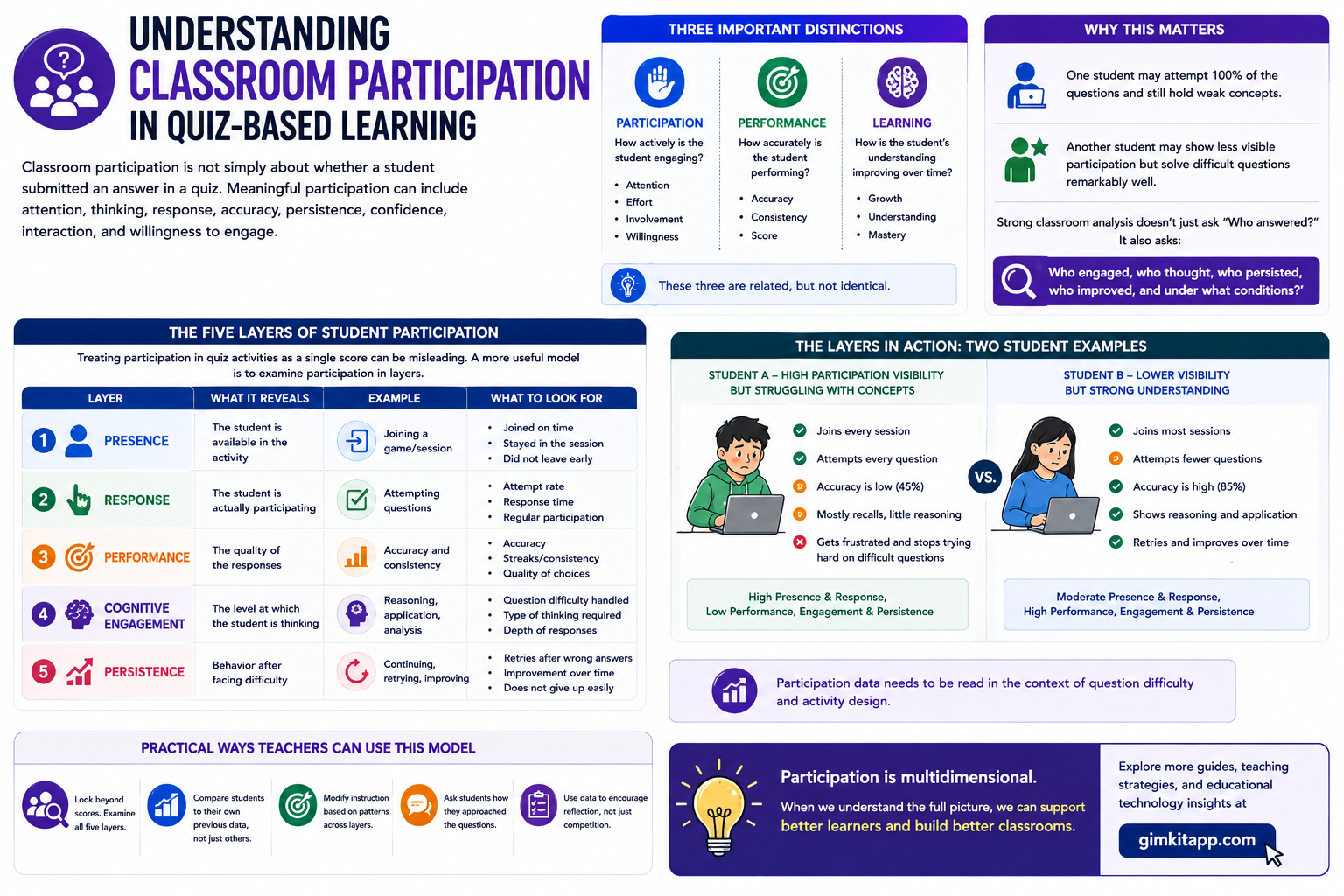
Understanding Classroom Participation in Quiz-Based Learning | Classroom participation is not simply about whether a student submitted an answer in a quiz. Meaningful participation can include attention, thinking, response, accuracy, persistence, confidence, interaction, and willingness to engage.
To better understand participation in quiz-based learning, a teacher should keep three things separate:
Participation → How actively is the student engaging?
Performance → How accurately is the student performing?
Learning → How is the student’s understanding improving over time?
These three are related, but they are not identical.
One student may attempt 100% of the questions and still hold weak concepts. Another student may show less visible participation but solve difficult questions remarkably well.
Looking for comprehensive classroom resources and educational technology insights? Explore GimkitApp for expert guides, teaching strategies, game modes, and the latest updates to enhance student engagement.
That is why strong classroom analysis doesn’t just ask “Who answered?” It also asks:
Who engaged, who thought, who persisted, who improved, and under what conditions?
The Five Layers of Student Participation
Treating participation in quiz activities as a single score can be misleading. A more useful model is to examine participation in layers.
Layer
What It Reveals
Example
Presence
The student is available in the activity
Joining a game/session
Response
The student is actually participating
Attempting questions
Performance
The quality of the responses
Accuracy and consistency
Cognitive Engagement
The level at which the student is thinking
Reasoning, application, analysis
Persistence
Behavior after facing difficulty
Continuing, retrying, improving
Why These Layers Matter
A student who joins a session but doesn’t attempt any questions cannot be treated the same as a student who thoughtfully attempts every question.
Similarly, 90% accuracy doesn’t automatically prove deep thinking. If the questions are mostly based on simple recall, high accuracy carries a different meaning.
Participation data needs to be read in the context of question difficulty and activity design.
Active Participation vs. Passive Participation
Active Participation
Active participation occurs when a student is mentally and behaviorally involved in the learning activity.
In a quiz environment, evidence of this can include:
Consistently attempting questions
Processing the question before answering
Maintaining effort on difficult items
Improving responses after feedback
Discussing explanations or reasoning
Re-engaging with a concept after an incorrect answer
Not disengaging in the face of challenge
Active participation doesn’t necessarily mean the student is always the fastest. Sometimes a slow but thoughtful student’s participation is more meaningful than fast guessing.
Passive Participation
In passive participation, the student is present in the activity environment, but meaningful cognitive involvement may be limited.
Examples:
Random guessing
Submitting answers purely for speed
Copying from classmates
Repeating the same mistakes without correction
Attempting easy questions but skipping difficult ones
Being present in a competition but ignoring learning feedback
That is why a teacher should avoid mistaking activity completion for learning engagement.
The Most Important Participation Signals
A strong participation framework combines multiple signals.
1. Response Rate
Response rate shows how many of the available questions the student attempted.
High response rate + high accuracy → Strong observable participation and performance
High response rate + low accuracy → High activity, but possible guessing, misunderstanding, or insufficient knowledge
Low response rate + high accuracy → Student potentially capable but less consistently engaged
Low response rate + low accuracy → Possible knowledge gap, confidence issue, disengagement, or difficulty mismatch
Response rate is useful, but it shouldn’t be treated as a standalone participation score.
2. Accuracy
Accuracy shows how correct the student’s responses are — but it needs to be interpreted alongside question difficulty. For example:
95% accuracy on basic recall
75% accuracy on application
60% accuracy on unfamiliar reasoning problems
These three results cannot be given the same educational meaning. Better participation analysis asks not only “How many were correct?” but also “What kind of thinking produced those answers?”
3. Response Speed
Speed is particularly visible in quiz environments, but fast ≠ intelligent, and slow ≠ weak.
A fast student may have strong recall, familiarity with the topic, efficient processing — or simply a tendency to guess. A slower student may be carefully evaluating choices, processing unfamiliar information, checking reasoning, or building confidence before responding.
Speed should usually be interpreted alongside accuracy and question complexity, which is why the two are best read together (see the table below).
4. Consistency
One excellent quiz does not necessarily demonstrate strong participation. Consistency looks at behavior across multiple activities. For example:
Session
Accuracy
Participation
Quiz 1
82%
High
Quiz 2
79%
High
Quiz 3
85%
High
Quiz 4
81%
High
This pattern tells a different story from:
Session
Accuracy
Participation
Quiz 1
95%
High
Quiz 2
61%
Low
Quiz 3
91%
High
Quiz 4
54%
Low
The second student may be capable but inconsistent, while the first demonstrates a more stable participation pattern. Repeated observations are generally more informative than one isolated result.
5. Persistence Under Difficulty
One of the most valuable signals appears after questions become difficult. Imagine a classroom where difficulty increases gradually:
Both participated, but their behavior under challenge is different. Persistence can offer useful evidence about engagement, confidence, frustration tolerance, willingness to retry, and response to feedback — though it should never be treated as a direct psychological or intelligence measurement.
Participation Is Not the Same as Intelligence
This distinction is essential when using quiz platforms to strengthen students’ thinking skills.
A quiz can exercise and reveal aspects of cognitive performance, such as recall, recognition, application, reasoning, problem-solving, decision-making, pattern detection, and error correction. But classroom quiz participation is not a standardized IQ test.
A student’s score can be affected by many factors beyond cognitive ability: prior knowledge, language proficiency, question familiarity, time pressure, device quality, internet reliability, anxiety, motivation, competition, reading speed, and accessibility needs.
So the responsible interpretation is: quiz participation can provide useful evidence about observable learning behaviors and performance, but it should not be used as a direct measurement of IQ. This distinction becomes particularly important when teachers compare students across different platforms.
The Speed–Accuracy Balance
Speed and accuracy are most informative when read together:
Student Pattern
Likely Observation
Fast + Accurate
Efficient performance
Fast + Inaccurate
Possible guessing or rushed responses
Slow + Accurate
Careful processing
Slow + Inaccurate
Possible knowledge or comprehension difficulty
Variable + Accurate
Performance may depend on question type
Variable + Inaccurate
Engagement or understanding may be inconsistent
These are observations, not diagnoses. A teacher should investigate the underlying reason instead of assigning a permanent label to a student.
💡 Pro Tip If a student repeatedly answers extremely quickly but makes avoidable errors, increasing competition may not solve the problem. A better intervention may be to introduce reasoning pauses, explanation prompts, or accuracy-focused rounds.
Individual Participation vs. Whole-Class Participation
A classroom can look highly active while individual participation remains uneven. Suppose a class of 30 students has 25 responding consistently, 3 responding occasionally, and 2 rarely participating. A teacher looking only at overall class activity might conclude that participation is excellent — but the individual-level view tells a different story: whole-class participation is strong, while participation distribution is uneven.
This distinction matters because highly active students can make a classroom appear more engaged than it actually is.
The Participation Distribution Problem
A useful classroom question is: is participation spread across the class, or concentrated among the same students?
In one classroom, most students participate regularly. In another, a small group dominates while many remain quiet. Both may produce a similar volume of total responses, but the first has a much healthier participation distribution.
This is why teachers should examine the number of active participants, participation frequency, which students repeatedly abstain, who participates only in easy or only in competitive tasks, and whose participation changes with difficulty.
Quiet Students Should Not Automatically Be Considered Disengaged
Visible participation and cognitive engagement are not always identical. A student may be quiet during discussion, slow to answer publicly, highly accurate in independent work, strong at written reasoning, or simply more comfortable with anonymous digital responses.
Digital quiz systems can make participation more visible because every student’s response is captured separately — but even digital participation needs context. A quiet student with strong accuracy and consistent attempts requires a very different instructional approach from a student who simply avoids difficult questions.
Five Student Participation Profiles
Profile
Typical Pattern
Teacher Question
The Consistent Participant
Regular attempts + stable performance
How can challenge be increased?
The Fast Responder
Very quick answers + variable accuracy
Is speed causing avoidable errors?
The Careful Thinker
Slower responses + strong accuracy
Is enough response time available?
The Reluctant Participant
Low attempt frequency
Is difficulty, confidence, or motivation limiting engagement?
The Challenge Drop-Off
Strong participation until difficulty rises
What happens when the student encounters failure?
These profiles are working observations, not fixed identities — a student can move between profiles depending on subject, question type, classroom environment, and platform design.
Participation Changes With Question Design
The platform is only one part of the equation; the question itself can dramatically change participation behavior. Compare “What is the capital of France?” with “A city has a specific geographic and political role in its country. Which option best fits the capital based on the information provided?” The first tests recall; the second requires interpretation and application.
That means two platforms can produce very different participation patterns even with identical student counts, question counts, and session length. The deeper model is:
This is one of the most important principles for making a fair cross-platform comparison.
Competition Can Increase Participation — But It Can Also Distort It
Competitive quiz environments create strong energy: students respond more frequently, pay closer attention, try harder, and react strongly to scores and rankings. But competition can also change why students participate — shifting focus from “How do I understand this?” to “How do I win?”
For cognitive-skill development, a teacher should distinguish between participation driven by competition and participation driven by genuine learning engagement. Both are useful, but they are not the same phenomenon.
Feedback Turns Participation Into a Learning Opportunity
A response becomes more educationally valuable when students understand what happens next:
Without meaningful feedback, repeated participation may simply produce repeated mistakes. With useful feedback, incorrect responses become learning opportunities — particularly for strengthening reasoning, problem-solving, conceptual understanding, error correction, and metacognition.
Participation Should Be Measured Across Time
A single quiz is a snapshot; a sequence of activities reveals a pattern. For example:
Week 1: 62% participation
Week 2: 69%
Week 3: 76%
Week 4: 83%
That trend is more informative than any single session. It also raises useful questions: did difficulty change, did feedback improve, did the platform change, did confidence grow, did routines become clearer, did students simply grow more familiar with the activity? This moves participation analysis from one-time scoring toward longitudinal observation.
A Better Classroom Participation Model
For practical analysis, participation can be viewed through six connected dimensions:
The important shift is from measuring activity alone to examining the entire participation cycle.
The Teacher’s Participation Dashboard
A useful comparison doesn’t need dozens of complicated metrics. Start with a compact set:
Measure
Basic Question
Participation Rate
Who is responding?
Attempt Completion
Who consistently attempts questions?
Accuracy
Who is getting answers right?
Response Speed
Who answers quickly or slowly?
Difficulty Response
What happens when questions become harder?
Consistency
Does behavior remain stable across sessions?
Feedback Response
Does performance change after feedback?
Participation Distribution
Are most students involved, or only a few?
This creates a much stronger foundation for comparing quiz platforms than simply ranking them by popularity.
A Practical Classroom Example
A teacher gives the same 20-question review to a mixed-ability class. Student A attempts 20/20, answers 17 correctly, and responds very quickly. Student B attempts 18/20, answers 16 correctly, but takes more time. Student C attempts 10/20 and answers 8 correctly.
A simple ranking would read A → B → C. But deeper analysis asks different questions: Student A may benefit from more challenging reasoning tasks since speed is already strong; Student B may need more response time while facing progressively harder questions; Student C needs investigation — the issue could involve confidence, knowledge gaps, difficulty, motivation, or the classroom environment. The data identifies a pattern; the teacher still needs context to explain it.
What Makes a Strong Participation Measurement System?
A reliable classroom approach should be:
Multi-dimensional — never depend on one number
Repeated — look across multiple activities
Contextual — consider question difficulty and subject matter
Individualized — examine student-level behavior
Balanced — consider both participation and performance
Improvement-focused — look for change over time
Non-diagnostic — don’t turn quiz behavior into unsupported claims about intelligence, personality, or ability
Participation Analysis Checklist
Before comparing any quiz platform, a teacher should be able to answer:
Are students actually attempting the activity?
Is participation distributed across the class?
Are students answering accurately?
Is speed affecting accuracy?
Do students continue when difficulty increases?
Do they respond to feedback?
Are the same students consistently dominating?
Are quieter students being captured through individual responses?
Are results changing across multiple sessions?
Is the question design appropriate for the cognitive skill being observed?
Are we measuring participation rather than incorrectly labeling it as IQ?
Once these questions are answered, platform comparison becomes far more meaningful — the next step is applying this same framework across major quiz platforms to see how their interaction designs shape participation.
Classroom Participation Changes With the Platform
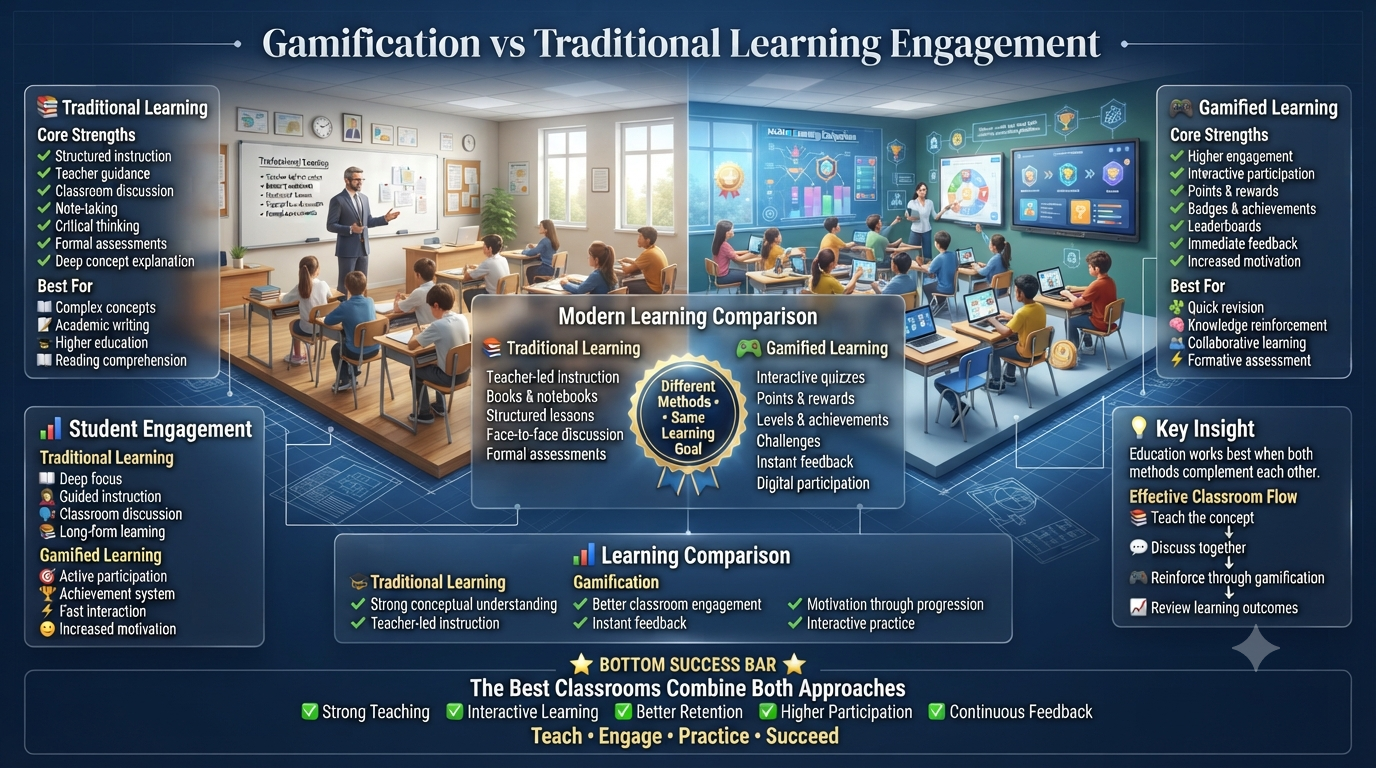
The same group of students can behave very differently when the activity moves from one quiz platform to another. The reason isn’t branding or interface — each platform creates a different participation environment through its interaction model, pacing, feedback, competition, collaboration, question formats, and reporting system. That makes platform selection an instructional decision rather than a purely technical one.
A teacher choosing between Gimkit, Kahoot!, Wayground (formerly Quizizz), Blooket, Quizlet, Nearpod, Socrative, Mentimeter, and ClassPoint is effectively choosing how students will enter the activity, respond to questions, experience feedback, interact with peers, and demonstrate understanding. The most useful comparison asks: what kind of participation does each platform naturally encourage, what evidence does it leave behind, and when is that model most useful?
The Participation Architecture of Major Quiz Platforms
Different platforms fall into several broad participation architectures:
Game-driven participation — students interact through competition, progression, rewards, or game mechanics
Assessment-driven participation — the objective is collecting structured responses and evaluating understanding
Collaborative participation — students participate through teams, shared goals, or peer interaction
Presentation-integrated participation — questions are embedded directly into teaching rather than a standalone quiz session
Conversation-driven participation — students contribute opinions, questions, or ideas rather than only selecting correct answers
Independent participation — students complete activities individually and often asynchronously
No single architecture is universally superior — the right choice depends on what the teacher wants the activity to accomplish.
Gimkit: Participation Through Game-Linked Learning
Gimkit creates a particularly game-oriented participation environment. Its live game options connect answering questions with game objectives, while teachers can adjust game-specific settings and, in 2D modes, control the balance between answering questions and gameplay. Gimkit also supports Classes and Assignments for tracking student activity beyond a single live session.
Gimkit doesn’t make the question itself the entire activity — the question becomes the input that powers another action inside the game, creating a loop:
Answer → Receive in-game consequence → Make another decision → Answer again → Progress
This can make participation feel less like a worksheet and more like continuous interaction with a learning environment. It’s particularly useful when a teacher wants high-frequency interaction, repeated practice, energy during review, competitive or strategic play, longer game-based sessions, individual or team formats, or homework-style independent activity — the Assignment system lets students play independently, while Classes helps track completion and multiple attempts.
The trade-off is that a highly engaging game environment can make participation hard to interpret without separating learning behavior from game behavior — a student may stay active simply because the game itself is motivating. That’s valuable for engagement, but a teacher evaluating deeper understanding should still inspect the underlying question performance. Overall, Gimkit earns its place in practice, review, and repetition — anywhere participation needs to feel like an ongoing activity rather than a simple response process.
Kahoot!: Participation Through Shared Live Experience
Kahoot! takes a different route. Its live experience places the class into a shared sequence of questions within a common classroom rhythm, and it currently offers multiple experiences — Classic, Accuracy, Confidence, Team, and other formats — depending on account and plan.
Kahoot! is particularly effective at making participation visible and collective. Instead of an isolated activity, the class experiences a shared event: teacher presents → students respond → the class sees progression → the next challenge appears. In a live classroom, participation is partly social — students see that an activity is happening now, that their response matters now, and that the group is moving together. That makes it especially valuable for whole-class review, lesson warm-ups, knowledge checks, revision sessions, competitive events, and fast formative questioning.
A deeper strength is that teachers aren’t limited to one style of interaction: Accuracy emphasizes getting answers right, Confidence has students express confidence in their answers, and team experiences shift participation toward group interaction — useful when a teacher wants to experiment with different reasons for participating rather than repeating the same format. Kahoot! also provides reports for examining player responses across sessions, so the excitement of the live moment can still feed into planning what happens next. In short, Kahoot! earns its place wherever a shared, live, whole-class moment is the goal.
Wayground (Quizizz): Participation Through Flexible Assessment
Wayground takes a broader assessment-oriented approach. Its current Assessment/Quizizz system supports live activities and homework, multiple question formats, multimedia, answer explanations, time limits, standards tagging, and multiple game modes — a different environment from a purely game-centered platform.
Wayground can make participation highly data-visible: its reports can show number of students, accuracy, completion rate, points and scores, average time per question, individual and question-level performance, and standards-related results, with sortable participant and question data. That shifts the teacher’s question from “Did students enjoy the quiz?” toward “What exactly happened during the activity?”
It also supports a broad range of question types beyond multiple-choice, including interactive and open-ended formats — some involving text, drawing, audio, video, or mathematical work, depending on plan and configuration. That matters because students aren’t always equally well represented by selecting A, B, C, or D; a student explaining an answer demonstrates a different kind of participation from one selecting an option. Its Passage activity can place reading material beside related questions, with annotation and highlighting available in reporting — moving participation beyond “read → choose answer” toward “read → interact → annotate → respond → demonstrate understanding.” Wayground pays off most when the goal is detailed assessment evidence rather than classroom excitement alone.
Blooket: Participation Through Game Variety
Blooket approaches participation primarily through game-based experiences. Its main educational value comes from changing the context in which questions are answered — instead of every activity feeling like the same quiz routine, different game environments alter the motivation surrounding the question. The same academic question can feel different when the surrounding participation system changes, letting a teacher use game variety to keep repeated review sessions from feeling mechanically identical.
This model fits especially well for review, vocabulary practice, recall practice, reinforcement, short competitions, and motivation during repetitive practice. The trade-off is that the stronger the game layer becomes, the more carefully a teacher should evaluate what students are actually learning — increased willingness to participate should not be mistaken for evidence of conceptual mastery. Even so, Blooket remains one of the stronger options for motivation and practice, especially where variety and game mechanics are what keep students involved.
Quizlet: Participation Through Retrieval and Collaboration
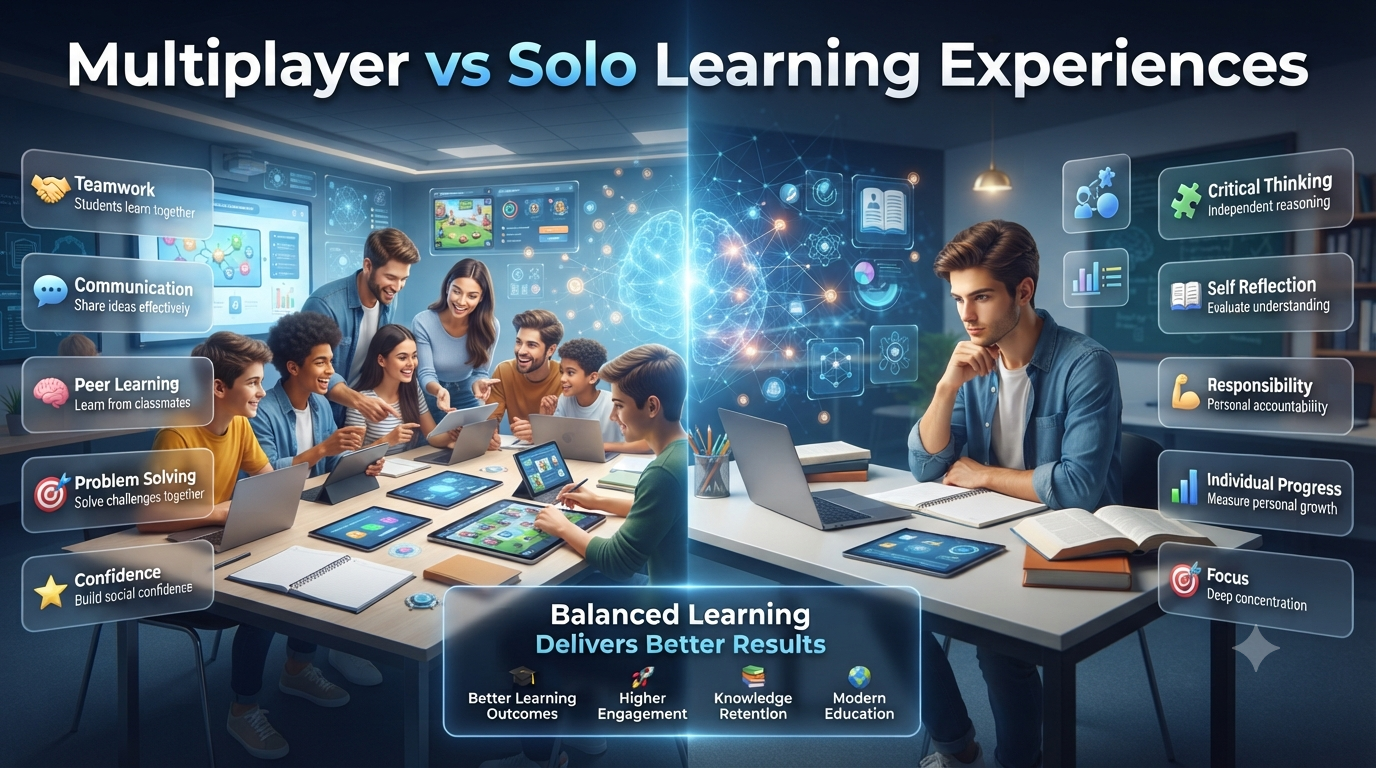
Quizlet has a different foundation from platforms built primarily around live quiz shows. It combines individual study modes with classroom experiences such as Quizlet Live, letting students move between personal practice and group activity within the same learning ecosystem.
Retrieval practice doesn’t always require a large live event — a student can repeatedly interact with material individually, then enter a collaborative activity where the same knowledge is used socially. This creates a useful progression: individual retrieval → repeated practice → collaborative application. Quizlet describes Live as a collaborative classroom game designed to help students practice both hard and soft skills, which is what makes the platform valuable when participation needs a social component rather than treating every learner as an isolated test-taker — bridging independent study and collaborative classroom practice.
Nearpod: Participation Inside the Lesson
Nearpod occupies a different position from a standalone quiz game: its strength is placing interactive responses inside a broader lesson experience. Instead of “start quiz → answer questions → finish quiz,” the structure becomes:
Students don’t always need a separate game to participate — a teacher explaining a concept can immediately insert an interaction to check understanding before continuing, making participation part of instructional decision-making rather than only assessment. This is particularly useful for introducing new concepts, guided instruction, formative checks, multimedia lessons, teacher-led discussion, remote or blended learning, and checking understanding before moving forward. Across all of these, Nearpod’s real strength is letting the student’s response shape the lesson itself, not just record it.
Socrative: Participation Through Structured Checking
Socrative takes a more assessment-centered approach. Students join a teacher’s room and complete activities such as quizzes, and teachers can generate reports afterward — including individual student reports and question-specific summaries showing the proportion of students answering each question correctly.
Socrative is useful when participation needs to be organized into interpretable evidence, without depending on an elaborate game layer for engagement. That structure lets a teacher ask which concept caused difficulty, which question produced the most errors, which students need follow-up, what should be retaught, and whether the lesson landed — without requiring a large competitive environment. Reports can include student-level PDFs and question-level summaries with correct/incorrect data and short-answer responses. That combination — structured questions plus interpretable evidence — is where Socrative does its best work.
Mentimeter: Participation Through Voice and Collective Input
Mentimeter has perhaps the clearest difference from traditional quiz platforms: its participation model isn’t restricted to “find the correct answer.” It supports live polls, quizzes, word clouds, open-ended responses, scales, Q&A, and other interaction types, emphasizing real-time responses that shape what happens next.
A student can participate by choosing, rating, writing, generating an idea, asking a question, or upvoting another participant’s question — useful when a teacher wants to capture student voice, not just correctness. A student who rarely raises a hand may still submit a digital response; anonymous, low-pressure participation can reveal opinions and questions that would otherwise stay invisible. That’s Mentimeter’s real value: participation as expression — ideas, opinions, questions, and reactions — not merely correctness.
ClassPoint: Participation Embedded Directly in PowerPoint
ClassPoint takes an unusually presentation-centered approach: rather than moving students into a separate quiz environment, it brings interactive questions into PowerPoint itself. Its tools include multiple-choice, word cloud, short answer, slide drawing, image upload, fill-in-the-blanks, audio, and video response types, and its Quiz Mode supports difficulty levels, automatic marking, and reports.
Because the lesson and interaction stay in the same environment, a teacher can explain a concept on a slide and immediately turn it into a response activity, producing a tight instructional loop:
Its Quiz Summary brings student responses together with participation rate, correct counts, stars earned, and answer speed — useful for teachers who already build lessons in PowerPoint and want participation folded into the presentation rather than treated as a separate event. Its advantage, ultimately, is low-friction participation inside a lesson teachers are already building.
Comparing Platforms by the Job You Need Done
Rather than asking which platform is “best,” it’s more useful to match each platform to the participation job it’s designed for:
Participation Job
Best-Fit Platform(s)
Dominant Architecture
Make review feel like a game
Gimkit, Blooket
Game-linked interaction / game variety
Create a shared live classroom event
Kahoot!
Shared live experience
Collect detailed assessment evidence
Wayground, Socrative
Flexible / structured assessment
Combine independent and group study
Quizlet
Retrieval + collaboration
Insert interaction directly into teaching
Nearpod, ClassPoint
Lesson-integrated / presentation-integrated
Capture opinions and student voice
Mentimeter
Voice + audience interaction
This table isn’t a ranking — it’s a map of which environment each platform is built to support, organized by what the teacher actually needs to accomplish.
What Happens Between Questions Matters More Than the Quiz Itself
A superficial comparison asks “Which platform has quizzes?” — but almost every major platform supports some form of questioning, so that question rarely reveals much. A better question is: what happens to the student between one question and the next?
In a game-linked platform like Gimkit, the answer feeds directly into the student’s game state and next decision. In a live platform like Kahoot!, it plays out inside a shared class rhythm everyone experiences together. In an assessment platform like Wayground or Socrative, it becomes part of structured evidence the teacher can analyze later. In a lesson-integrated tool like Nearpod or ClassPoint, it folds straight back into the next step of instruction.
That’s the real reason two platforms can feel completely different in the classroom even though both technically “contain quizzes.”
Same Question, Different Participation Environment
Consider one academic question: Which explanation best describes why a particular event occurred? The question can stay identical across platforms, but the surrounding environment changes what the student actually experiences.
In a game-centered platform, the student may answer because the response affects progression or game success.
In a live competitive platform, the student may answer because the whole class is moving through the challenge together.
In an assessment-focused platform, the student answers as part of a structured evaluation.
In a presentation-integrated environment, the question appears immediately after the teacher explains the concept.
In a discussion-oriented platform, the student may explain, vote, ask a follow-up question, or compare perspectives.
The question measures one thing; the participation architecture changes the context in which the student approaches it. That distinction is central to a fair platform comparison.
Which Platforms Are Better for Cognitive Challenge?
There’s no responsible universal ranking that says one platform automatically makes students “smarter.” Cognitive challenge depends heavily on question quality, task design, difficulty, feedback, time constraints, and instructional context — but platforms do differ in how easily they support particular forms of participation:
Rapid retrieval practice benefits from game-centered, fast-response environments.
Structured assessment benefits from platforms with stronger evidence collection.
Explanation and expression benefit from open-ended response systems, which give more room than simple multiple-choice games.
Collaborative thinking benefits from team-based environments that add a social layer.
Lesson-integrated reasoning benefits from presentation platforms that let teachers ask questions exactly when a concept needs checking.
Student voice benefits from polls, Q&A, and word clouds — forms of participation traditional quiz scoring can’t capture.
The important principle: a platform doesn’t create cognitive depth by itself. It provides an environment in which the teacher can design cognitively deeper tasks.
Platform Choice Should Follow the Learning Objective
A teacher planning a session can start with the desired outcome instead of the software:
For energetic review, choose an environment where game mechanics sustain repeated participation.
For immediate whole-class checking, choose a system built around fast shared responses.
For detailed assessment analysis, choose a platform with strong reporting and question-level evidence.
For student explanation, choose a platform that supports richer response formats.
For discussion and student voice, use formats that let students express ideas, not just select answers.
For lesson-integrated formative assessment, choose a platform that lets questions appear naturally inside instruction.
This approach prevents one of the most common technology mistakes: choosing a platform first and then trying to force the lesson to fit it.
This is considerably more useful than simply asking “Which quiz platform is the most popular?”
The Real Platform Comparison Begins With Evidence
A platform can produce thousands of responses without producing useful educational evidence. The teacher needs to distinguish between activity volume and instructional evidence — a large number of clicks is not automatically valuable, and a smaller number of well-designed responses may reveal far more about student understanding.
Platform comparison should ultimately examine four connected layers:
Layer
Core Question
Interaction
What can the student do?
Environment
What motivates or shapes that action?
Evidence
What does the teacher actually learn from the response?
Instructional Use
Can that evidence improve the next teaching decision?
The strongest platform isn’t necessarily the one that creates the most excitement — it’s the one whose participation model best matches the learning behavior the teacher is trying to produce and understand.
From Answering Questions to Building Thinking
A powerful quiz session should gradually move students through different kinds of mental work:
This doesn’t mean every question must be difficult — basic knowledge is often necessary before students can reason effectively with it. The goal is progressive cognitive demand, not maximum difficulty from the first question. For example, instead of teaching a science concept through ten recall-only questions:
Level 1 — Recall: What is evaporation?
Level 2 — Understanding: Which situation demonstrates evaporation?
Level 3 — Application: Why would wet clothes dry faster on a warm, windy day?
Level 4 — Analysis: Two identical shirts are placed in different conditions. Which will dry first, and what evidence supports your choice?
Level 5 — Transfer: How could the same principle explain another everyday observation?
The topic stays the same; the thinking required changes substantially.
A Cognitive Difficulty Ladder for Quiz Design
Teachers can use a five-stage ladder when building activities:
Stage
Student Mental Task
Example
1. Recall
Bring known information to mind
Identify a definition
2. Interpret
Understand meaning
Select the best explanation
3. Apply
Use knowledge in a situation
Solve a familiar problem
4. Analyze
Compare relationships or evidence
Determine why two outcomes differ
5. Transfer
Use knowledge in a new context
Solve an unfamiliar problem
This structure prevents the common mistake of assuming a quiz is automatically cognitively challenging simply because it contains many questions.
Retrieval Is Powerful — But Question Quality Determines Its Value
Active retrieval is a genuine learning mechanism: students attempt to bring previously learned information back from memory rather than merely rereading it. The U.S. Institute of Education Sciences notes that retrieval practice can improve later retention, while feedback is an important part of effective testing.
But “quiz” doesn’t automatically mean “good retrieval practice.” A weak retrieval activity might repeatedly ask What is the definition of X? A stronger sequence asks: What is X? → Which example represents X? → Why does this example qualify as X? → How would X behave if one condition changed? The student is no longer simply remembering a label — they’re retrieving, interpreting, applying, and manipulating knowledge.
EEF guidance similarly warns that retrieval activities can become too focused on factual recall, and emphasizes balancing challenge with opportunities for success.
The Question-Transformation Method
One of the easiest ways to increase cognitive depth is transforming the same knowledge into different question forms:
Basic: Which planet is known as the Red Planet?
Application: An astronomer observes a planet with a reddish surface. Which planet is the most likely candidate?
Comparison: Why does Mars appear different from Earth when viewed from space?
Reasoning: Which evidence would best support the explanation for Mars’s reddish appearance?
Transfer: If another planet developed similar surface conditions, what observation might you expect?
The content knowledge hasn’t necessarily broadened — the thinking task has deepened.
Use “Why” and “What If” to Break Guessing Habits
Multiple-choice questions can sometimes be answered through recognition alone. Teachers can raise cognitive demand by following selected questions with prompts like: Why? What evidence supports your answer? What would change your answer? What happens if one condition changes? Which option is almost correct, and why is it wrong? How would you solve this another way?
These prompts push students beyond answer selection and toward explanation and reasoning.
The Distractor Quality Test
In multiple-choice questions, incorrect options shouldn’t be random nonsense. Weak distractors are obviously wrong, unrelated to the question, eliminable without understanding, or give away the answer through wording. Strong distractors represent plausible misconceptions or common reasoning errors.
For a question like Why does ice float on water?, if three choices are obviously absurd, the student can succeed without understanding the science. A better question presents plausible alternatives that force students to distinguish between competing explanations — turning answer selection into a genuine reasoning task.
Build Questions Around Misconceptions
A particularly powerful approach is designing questions around known conceptual errors. Suppose students commonly believe “heavier objects always fall faster.” Instead of simply asking for the correct law, construct a scenario that exposes the misconception, then ask: What do you predict? Which explanation best supports the prediction? What evidence would challenge it? After seeing the result, how would you revise the explanation?
Now the quiz becomes a small reasoning exercise, and the teacher can identify which misconception students are selecting rather than just seeing that an answer was wrong.
Make Difficulty Progressive, Not Random
A good cognitive sequence should feel like a staircase:
Starting immediately with extremely difficult questions can overwhelm learners; keeping everything easy creates fluency without meaningful challenge. The productive zone sits between the two — enough difficulty to require genuine mental effort, with enough support for students to keep making progress. Research-informed guidance on retrieval practice emphasizes balancing challenge with opportunities for successful retrieval rather than making every question difficult.
Use Interleaving to Make Students Choose a Strategy
Instead of giving students 10 addition problems → 10 subtraction problems → 10 multiplication problems, mix the problem types. The student must first determine “What kind of problem is this, and which strategy should I use?” — adding another layer of thinking. IES describes interleaving as mixing different problem types so learners must select and apply the appropriate strategy rather than repeating the same procedure.
A platform can present questions quickly, but it’s the teacher who decides whether students simply repeat one pattern or must identify the correct approach each time — a distinction far more important than the number of questions completed.
Add Delayed Retrieval Instead of One-Time Testing
A student answering a question right after learning it may succeed because the information is still fresh; durable learning requires returning to it later. A stronger sequence is:
IES guidance recommends quizzes as one way to re-expose students to important content, with repeated retrieval and corrective feedback supporting retention. This is where quiz platforms become part of a learning system, rather than isolated classroom events.
Feedback Should Change What Happens Next
Simply showing “Correct ✅” is useful but limited. More powerful feedback helps students understand what was correct, what was incorrect, why the correct answer works, what misconception caused the error, and what to try next. The purpose isn’t just to reveal the answer — it’s to help the learner update the mental model behind it.
IES research on test-enhanced learning specifically identifies feedback as an important component, while EEF guidance warns that incorrect retrieval without appropriate feedback can reinforce misconceptions.
The Error-to-Learning Loop
A strong quiz system turns mistakes into another learning cycle:
Attempt
   ↓
Error
   ↓
Explanation
   ↓
Reconsider
   ↓
Second Attempt
   ↓
Correct Understanding
   ↓
Later Retrieval
That’s far more educationally valuable than a simple Wrong Answer → Next Question loop. The second model produces activity; the first produces an opportunity for conceptual correction.
Use “Second-Chance” Questions Strategically
After a difficult question, present a related question testing the same underlying concept differently. If a student chooses the wrong explanation for a scientific process, don’t repeat “Which statement is correct?” — instead, present a new situation and ask “Which explanation applies?” Now the learner must retrieve the concept again rather than recall the previous answer, helping distinguish “I remember the correct option” from “I understand the principle.”
Create Cognitive Challenge Without Creating Unnecessary Pressure
Difficulty and pressure aren’t the same thing. A teacher can create challenging questions without turning every activity into a high-stakes competition — through low-stakes practice, untimed reasoning rounds, individual thinking before team discussion, retry opportunities, explanation prompts, progressive difficulty, mixed formats, and delayed review. The objective isn’t to make students anxious; it’s to make them think productively.
Use Multiple Response Modes
A single response format can’t capture every type of thinking. Depending on the objective, teachers can rotate between:
Recognition — select an answer
Production — generate an answer without seeing options
Explanation — explain why the answer is correct
Comparison — choose between competing explanations
Prediction — predict an outcome before seeing it
Construction — create a response, diagram, solution, or argument
Reflection — explain what changed in your thinking
The U.S. Department of Education’s practice guidance notes that active-recall formats such as fill-in-the-blank and short answer can directly support retention, while research-informed teaching guidance also recommends pairing factual questions with application and deeper conceptual ones.
Build “Explain Your Answer” Moments
A particularly useful transition is Answer → Explain: “Which solution is correct?” followed by “What evidence made you choose it?” This reveals whether the student understands the concept, guessed correctly, recognized a familiar pattern, or can genuinely justify the decision — giving teachers far richer evidence than correctness alone.
Develop Transfer, Not Just Familiarity
A student may perform well when questions look familiar; transfer asks whether they can apply knowledge when the surface changes.
Familiar: Calculate the area of this rectangle.
Changed context: A gardener needs to cover a rectangular section of land with tiles. How many square units are required?
Transfer: The same amount of material is available, but the shape changes. Which design would maximize the covered area, and why?
The final task requires the student to identify which prior knowledge applies and adapt it — a much stronger test of flexible understanding.
The “Unknown Context” Challenge
Once students master familiar questions, introduce unfamiliar contexts where the subject stays related but the situation looks different: known concept → unfamiliar scenario → choose relevant knowledge → solve. This reduces the chance that students are succeeding purely through memorized question patterns, and builds a stronger bridge between classroom knowledge and real-world problem solving.
Encourage Metacognition After Difficult Questions
After a challenging question, occasionally ask How confident were you before seeing the answer?, then compare confidence to actual performance. A student may show high confidence with low accuracy, or low confidence with high accuracy — neither should automatically be treated as a personality trait, but both are useful starting points for teaching students to evaluate the quality of their own knowledge. IES research on test-enhanced learning notes that quizzing can support metacognition by informing students about the state of their own knowledge.
The Confidence Calibration Problem
Consider two students: Student A says “I was 95% sure” and gets it wrong; Student B says “I was only 55% sure” and gets it right. The teacher has discovered something more valuable than two scores — a potential confidence-calibration issue. A useful follow-up is What evidence would make you more confident in your answer? — shifting the focus from simply being right to knowing why you’re right.
Use Challenge Sets Instead of Endless Questions
More questions don’t automatically mean more learning. A better structure can be: 3 recall questions → 2 application questions → 2 reasoning questions → 1 challenge problem → 1 explanation → 1 delayed retrieval question. This provides more cognitive variety than 20 nearly identical questions. EEF guidance specifically cautions that retrieval activities need careful design and shouldn’t become long blocks of easy factual questions.
Match Platform Capabilities to Cognitive Tasks
Cognitive Task
Useful Platform Capability
Rapid recall
Fast-response quiz interaction
Repeated retrieval
Assignments, study modes, repeated activities
Application
Scenario-based questions
Explanation
Open-response formats
Student voice
Polls, Q&A, word clouds
Collaboration
Team-based experiences
Lesson-time checking
Embedded interactive questions
Error analysis
Question-level reporting
Delayed practice
Homework/assignment workflows
Reflection
Confidence or self-assessment prompts
The platform provides the environment; the teacher provides the cognitive architecture. That distinction prevents technology from becoming the lesson itself.
A Strong Cognitive Quiz Blueprint
For a 15-question activity, an educator could design:
Question
Purpose
1–3
Activate essential knowledge
4–5
Check conceptual understanding
6–8
Apply knowledge
9–11
Analyze scenarios
12
Identify a misconception
13
Solve an unfamiliar problem
14
Explain reasoning
15
Transfer the concept
This isn’t a mandatory formula — the exact distribution should shift with age, subject, prior knowledge, and lesson objective. The important principle is cognitive variety.
The Strongest Quiz Is Not the Hardest Quiz
A useful challenge is relevant (tests something worth learning), demanding (requires genuine mental effort), and recoverable (students have a realistic path to improvement after an error). An impossibly difficult activity produces frustration rather than productive learning; a consistently trivial one produces confidence without sufficient cognitive growth. The sweet spot is purposeful challenge.
What Teachers Should Stop Measuring in Isolation
Avoid treating any of the following as a complete measure of student cognitive ability: number of correct answers, number of questions attempted, fastest response, highest game score, leaderboard position, number of sessions completed, or number of points earned. Each can be useful, but none tells the entire story — combine them with question demand, response type, explanations, error patterns, and later performance.
The Cognitive Evidence Stack
A stronger interpretation can be built like this:
Answer
  ↓
Correct / Incorrect
  ↓
Question Type
  ↓
Difficulty
  ↓
Reasoning / Explanation
  ↓
Response to Feedback
  ↓
Later Retrieval
  ↓
Transfer to New Context
The higher the evidence moves through this stack, the more informative the observation becomes about the student’s learning process — though it still should never be converted into an IQ score.
Common Cognitive-Design Mistakes
Making every question recall-based — students may become excellent at remembering isolated facts without developing flexible application.
Making every question extremely difficult — difficulty without adequate foundations produces frustration rather than productive learning.
Using speed as intelligence — fast responses can reflect familiarity, guessing, or rapid recognition, not superior reasoning.
Repeating identical questions — creates familiarity with the question rather than understanding of the concept.
Giving answers without correction — students may remember an answer was wrong without understanding why.
Measuring only visible winners — the highest score may not reveal who made the greatest conceptual improvement.
A High-Value Cognitive Participation Cycle
The most useful classroom cycle isn’t Quiz → Score → Finish. It’s:
Challenge
   ↓
Attempt
   ↓
Feedback
   ↓
Explain
   ↓
Correct
   ↓
Reapply
   ↓
Delay
   ↓
Retrieve Again
   ↓
Transfer
This transforms a quiz from a simple assessment event into a repeated learning mechanism.
Frequently Asked Questions
Is classroom quiz participation the same as measuring IQ?
No. Quiz participation can provide evidence about observable skills such as recall, reasoning, application, decision-making, and problem-solving, but it is not a standardized IQ measurement. A student’s quiz performance can also be influenced by prior knowledge, language, confidence, time pressure, technology, and question familiarity.
Which quiz platform is best for improving student thinking?
There is no single platform that is best for every cognitive goal. The quality of the questions, difficulty progression, feedback, and instructional design usually matters more than the platform name itself. Different platforms are better suited to different classroom objectives.
Can fast quiz answers indicate higher intelligence?
Not by themselves. Fast answers may reflect strong recall or familiarity, but they can also result from guessing or rushing. A meaningful evaluation should consider accuracy, question difficulty, reasoning, and performance over time.
How can teachers make quiz questions more cognitively challenging?
Move beyond simple recall by introducing application, scenarios, comparison, reasoning, misconception-based questions, unfamiliar contexts, explanations, and transfer tasks. The objective is to make students use knowledge, not simply recognize the correct answer.
Should every quiz question be difficult?
No. Effective activities normally include a progression from foundational knowledge toward more demanding tasks. Students need sufficient prior knowledge and opportunities for successful retrieval before being pushed toward increasingly complex problems.
Does competition improve classroom participation?
Competition can increase energy and willingness to participate, but it does not automatically produce deeper learning. Teachers should distinguish between participation driven by game motivation and participation driven by meaningful engagement with the learning task.
Why are open-ended questions useful?
Open-ended questions require students to produce or explain an answer rather than simply recognize an option. They can provide additional evidence of reasoning, conceptual understanding, and the student’s ability to justify a decision.
How important is feedback after a wrong answer?
Very important. An incorrect answer becomes more educationally useful when students receive an opportunity to understand the error, reconsider the concept, and apply the corrected understanding to another question.
Should teachers use the same questions repeatedly?
Repeating important knowledge can support retrieval, but copying the exact same questions repeatedly may create familiarity with the question rather than genuine understanding. Changing the context or question structure can require students to retrieve and apply the underlying concept again.
How can teachers identify students who need more cognitive challenge?
Look for students who consistently demonstrate strong understanding on current-level tasks. Instead of simply giving them more questions, introduce greater reasoning complexity, unfamiliar scenarios, explanation tasks, and transfer problems.
Can quiz data show whether a student is improving?
It can provide useful evidence of changes in performance and participation across repeated activities. However, teachers should interpret trends alongside question difficulty, content familiarity, instructional changes, and other classroom evidence rather than relying on one score.
What is more important: participation or accuracy?
Neither should be considered sufficient alone. Participation shows whether students are engaging with the activity, while accuracy provides evidence about performance on the tasks presented. Combining both with question quality, difficulty, feedback response, and later performance gives a more useful picture.
Conclusion
Comparing classroom participation across quiz platforms becomes far more meaningful when the goal moves beyond counting answers.
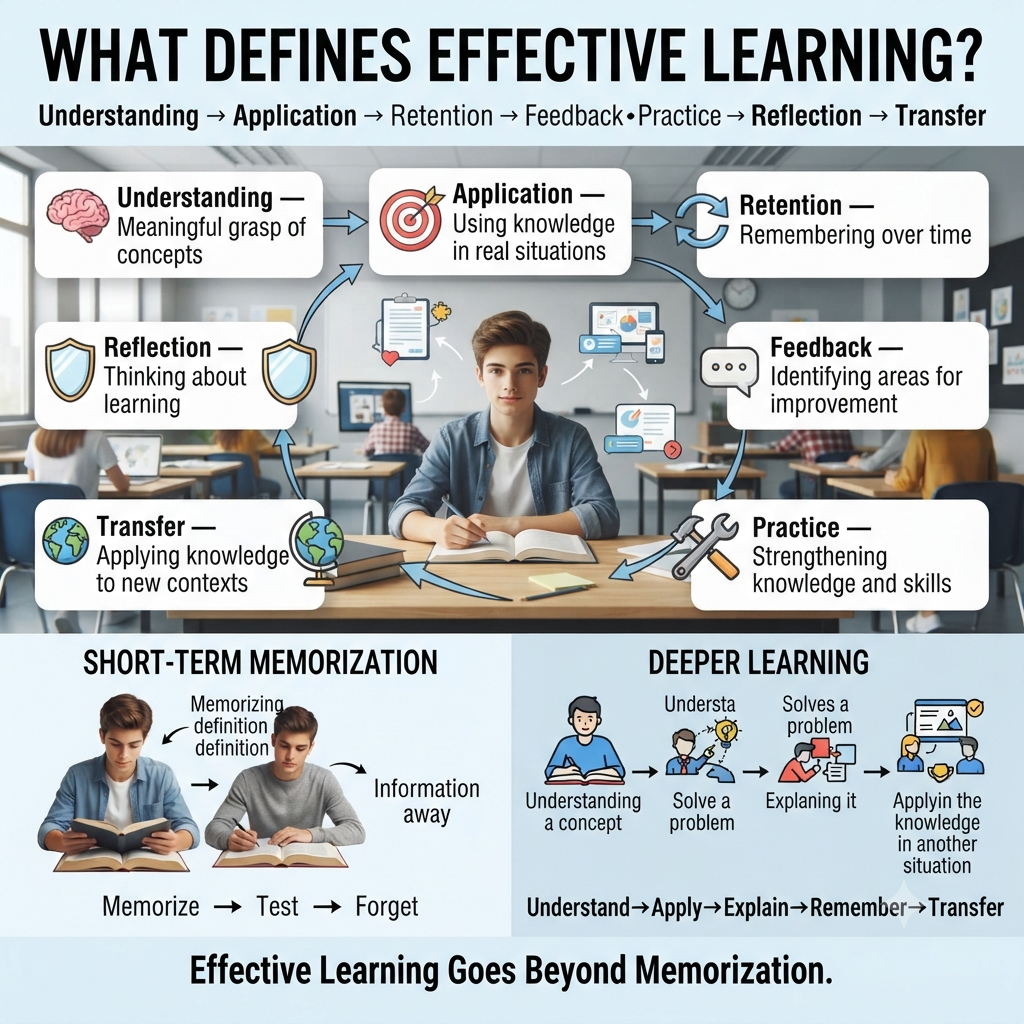
A strong learning environment asks whether students are retrieving knowledge, applying concepts, reasoning through unfamiliar situations, explaining decisions, learning from mistakes, and transferring knowledge to new problems.
Different platforms provide different environments for creating these experiences. But the platform itself is only one part of the equation. The teacher’s question design, cognitive progression, feedback strategy, and instructional purpose ultimately determine how much thinking the activity demands.
For the latest gaming news, expert reviews, and walkthroughs, readers can also visit IGN, one of the world’s leading gaming websites.
The most effective approach is therefore not to find one universally “best” quiz platform.
It is to match the platform and activity design to the type of thinking students need to practice.
When that happens, quiz participation can evolve from a simple classroom activity into a structured learning cycle:
That is the stronger standard for evaluating participation: not simply how many students clicked an answer, but what kind of learning the participation made possible.