Kahoot Team Gameplay Formats | Not every Kahoot session needs to pit individual against individual. Kahoot team gameplay formats restructure the entire competitive unit around the group instead, turning a session into a collaborative exercise where teammates have to communicate, agree, and act together rather than racing each other to the top of an individual leaderboard. For classrooms without one device per student, or for any group that specifically wants to build collaboration skills alongside content review, this is the format built for exactly that purpose.
This guide covers Kahoot team gameplay formats in full depth: the two distinct variants — Shared Devices and Personal Devices — how team formation and team talk actually work, how scoring is calculated when multiple people are answering under one team name, and the account-tier differences that affect which version of team play is available to a given host. It stays entirely within team-based gameplay itself, without wandering into the mechanics of the individual scoring formats or other experiences covered elsewhere in this series.
Looking for comprehensive classroom resources and educational technology insights? Explore GimkitApp for expert guides, teaching strategies, game modes, and the latest updates to enhance student engagement.
What Are Kahoot Team Gameplay Formats?
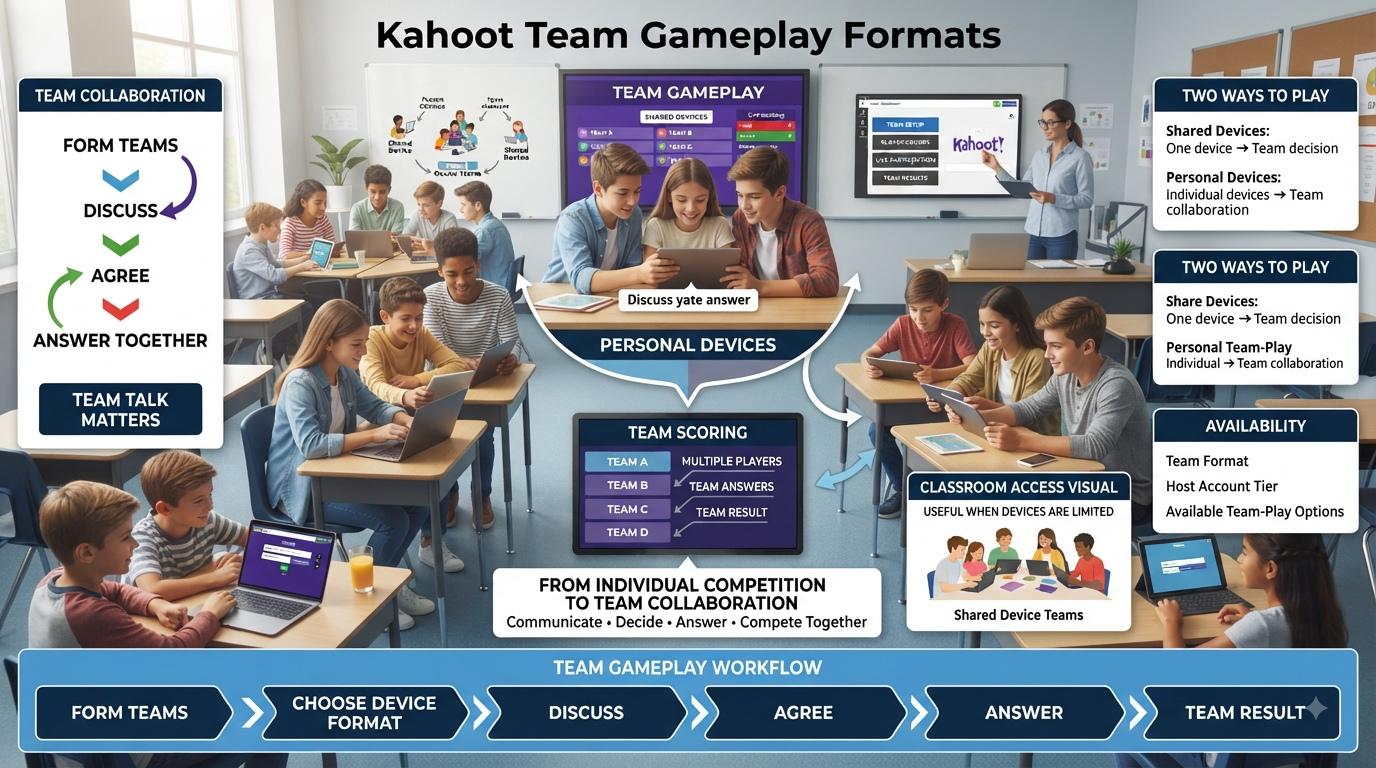
Kahoot team gameplay formats are live experiences where participants compete as organized groups rather than as individuals, with points, rankings, and podium placement all calculated at the team level instead of per player. Rather than every participant racing independently toward their own spot on the leaderboard, teammates work together toward a single shared outcome, discussing answers and submitting as a unit.
This structural shift changes what a Kahoot session actually measures and rewards. Individual formats reward personal speed and knowledge; team formats reward collective decision-making, communication under time pressure, and the ability to reach consensus quickly enough to still beat the clock. It’s a genuinely different skill set being exercised, which is exactly why team gameplay exists as its own distinct category within Kahoot’s broader experience library.
💡 Pro Tip: Before choosing a team format for a specific session, think about what you actually want the group to practice — content recall alone, or content recall combined with collaboration and communication under pressure. Team gameplay formats are built specifically for the second goal, and they lose some of their value if used purely as a workaround for limited device availability without leaning into the collaborative element at all.
Team vs. Team: Shared Devices
The Shared Devices variant of Kahoot team gameplay is built for situations where each team huddles around a single device to play together. Rather than every team member needing their own phone, tablet, or laptop, one shared screen per team is enough for the entire group to participate, discuss, and submit a collective answer.
In this format, each team nominates a leader who pins into the session and handles the actual answer input on behalf of the group. That leader can also add an individual nickname for every teammate, and those names appear throughout the game alongside the team’s overall identity, giving each player some individual visibility even though scoring happens at the team level.
📌 Quick Note: Shared Devices team play is specifically available to school, higher education, and personal account holders, but it’s currently unavailable to business account holders, who instead have access to the Personal Devices variant described below. This distinction is worth checking before planning a session, particularly for hosts working across different account types for different audiences.
For the latest gaming news, expert reviews, and walkthroughs, readers can also visit IGN, one of the world’s leading gaming websites.
Team vs. Team: Personal Devices
The Personal Devices variant flips the underlying hardware requirement: rather than one shared screen per team, every individual team member uses their own device to answer independently, with those individual responses then combined into a single team result. This format suits situations where device access isn’t a constraint but the host still wants the collaborative, group-based competitive structure that team play provides.
Personal Devices team play is particularly well suited to remote or hybrid situations where teammates might not be physically together in the same room at all. Because every player submits from their own device, geographically separated team members — colleagues joining a training session from different offices, or students participating from home — can still function as a single competitive unit despite not sharing physical proximity.
⭐ Expert Insight: With Personal Devices team play, accumulated points are typically calculated as an average across all team members’ individual responses and scores, meaning every player’s answer genuinely counts toward the team outcome regardless of location. This makes the format especially effective for bringing together participants who couldn’t otherwise be part of the same physical team.
How Team Formation Works
Kahoot team gameplay formats generally assign participants to teams automatically once they join a session, with teams also automatically rebalanced if a participant drops out partway through — a detail worth knowing for longer sessions where connectivity issues or early departures are a realistic possibility. Hosts retain manual control as well: participants joining a session can typically choose which team to join themselves, and a host can move a participant from one team to another directly by dragging their nickname between team groupings on the host screen.
Team names themselves depend on account tier. On plans without custom line-up or naming access, teams are represented using automatically generated names tied to creature-themed terms paired with an illustration, and hosts on these plans cannot edit these automatically assigned elements. On plans that do include custom line-ups and team names, participants see suggested team names that can be edited by either the participants themselves or the host — though once a host has specifically edited a given team’s name, participants lose the ability to further edit it themselves afterward.
✅ Best Practice: For a session where balanced skill distribution across teams actually matters — a competitive review before an assessment, for instance — don’t rely entirely on automatic team assignment. Take a moment before starting to manually move a few participants between teams if the automatic grouping looks lopsided, since automatic assignment optimizes for even team sizes rather than balanced skill levels.
Team Talk: The Built-In Discussion Window
A defining mechanic specific to Kahoot team gameplay formats is Team Talk, a short discussion window — typically around five seconds — given to each team before they can actually submit an answer to a question. This brief pause exists specifically to ensure teammates have a genuine, structured moment to discuss the question and reach some form of consensus before committing to a response, rather than the fastest or loudest team member simply answering on impulse.
Team Talk is enabled by default in Kahoot team gameplay formats, reflecting how central this collaborative discussion moment is to the format’s actual design intent. It can be disabled from the settings menu, accessible via the Settings button typically found in the bottom-right corner of the host or player screen during a session, for hosts who want a faster-paced team format without the built-in pause.
⚠ Common Mistake: Leaving Team Talk enabled by default during a video conference or remote hybrid session without considering the format’s fit for that context. Kahoot’s own guidance specifically recommends disabling Team Talk for video conference settings, since the discussion window can create awkward overlapping audio or lag issues that don’t arise in an in-person setting where teammates are physically clustered around a shared device.
Reconnection and Rejoining Limitations
Kahoot team gameplay formats carry a specific limitation around reconnecting mid-session that’s worth understanding before running a longer or higher-stakes team session. If a participant leaves the game — by closing the app or browser tab, or losing their connection entirely — it’s not possible to rejoin using the same nickname while retaining previously accumulated points. Anyone reconnecting after a drop has to provide a new nickname and begin accumulating points again from zero.
This matters more in team formats than it might in an individual session, since a dropped and reconnected player effectively starts fresh under a new identity within a team that has already been building a shared score. Teams playing a longer session are worth warning in advance about this limitation, particularly in Personal Devices sessions where individual connectivity issues are more likely simply because there are more devices and connections involved overall.
Account Tier and Plan Availability for Team Gameplay Formats
Access to Kahoot team gameplay formats varies meaningfully by account type and specific plan level, and it’s worth confirming availability directly before building a lesson or event plan around either variant. Shared Devices team play is available to school, higher education, and personal account holders, but not currently to business accounts. Personal Devices team play, conversely, has historically been positioned as a feature requiring an upgrade on certain plans, with some plans offering only a one-time trial of the format specifically to let a host evaluate whether it fits their needs before committing to an upgrade.
Custom team line-ups and editable team naming are similarly tied to specific plan tiers — hosts without access to these features see automatically generated, non-editable team names instead, which doesn’t prevent team play from functioning but does remove some of the personalization options available on higher tiers.
🔍 Did You Know? Some of Kahoot’s more advanced team capabilities, including support for a very high number of simultaneous teams, have been specifically positioned as enterprise or higher-tier offerings aimed at large-scale corporate or organizational events rather than typical classroom use — a detail worth knowing if planning a team-based session at unusually large scale.
How to Host a Kahoot in a Team Gameplay Format
Running a live session in either Kahoot team gameplay format follows a broadly similar sequence, with the main divergence happening at team setup:
Log in to your Kahoot account and locate the kahoot you want to host, from either your Library or the Discover page.
Click Host live on the kahoot’s details page to begin the hosting flow.
Select the appropriate team format — Team vs Team: Shared Devices or Team vs Team: Personal Devices — from the carousel of options, based on your device setup and whether participants are physically together or distributed.
Review the automatically generated teams, adjusting as needed by dragging participants between groups if manual rebalancing is worthwhile for this particular session.
Confirm or edit team names, if your plan includes that capability, before starting the game.
Decide whether to keep Team Talk enabled, particularly reconsidering this for remote or video-conference sessions where the discussion window may cause more friction than benefit.
Click Start once every team is settled, and progress through the game as normal, with each question preceded by the Team Talk window if enabled.
Reach the final podium, which ranks teams rather than individual players, closing out the session.
Scoring Mechanics Behind Team Gameplay Formats
Understanding exactly how points get calculated in Kahoot team gameplay formats helps explain some of the strategic dynamics that emerge during a session. In Shared Devices team play, since only one leader is actually submitting an answer per question, the team’s score follows the same underlying speed-and-accuracy logic as an individual score would, just attributed to the whole group rather than one player. The collaborative element happens entirely during the Team Talk window, before that single submission is made — the scoring itself doesn’t need to account for multiple simultaneous inputs.
Personal Devices team play works differently, since every team member submits their own individual response to the same question. Rather than counting only one input, the team’s result for that question is typically derived by combining or averaging every member’s individual score, meaning a team benefits when more of its members answer correctly and quickly, but isn’t automatically sunk by a single teammate’s wrong answer the way a Shared Devices team would be if their one designated leader got it wrong.
⭐ Expert Insight: This averaging mechanic in Personal Devices team play creates a subtly different strategic incentive than Shared Devices play. Because every individual response genuinely contributes to the team total, there’s real value in every team member trying their best on every question independently, rather than relying entirely on whichever teammate seems most confident — a distinction worth explaining explicitly to players unfamiliar with how the two formats’ scoring actually differs.
Managing Larger Groups in Team Gameplay Formats
As group size grows, a few practical considerations become more important for keeping a Kahoot team gameplay session running smoothly. With more teams in play, monitoring the host screen for dropped connections, stalled lobbies, or teams that haven’t yet settled on a name becomes a more active task than it would be with just a handful of teams. Building in a slightly longer setup window before starting — confirming every team has joined, named itself appropriately, and understands the Team Talk mechanic — pays off more noticeably at scale than it would in a small session where any confusion can be resolved almost instantly.
Larger sessions also benefit from being explicit about team size expectations before players even begin forming groups, rather than letting team sizes emerge organically and unevenly. A host who announces a target team size in advance — say, three to four members per team — tends to end up with a more balanced session than one who lets teams self-organize entirely, which often produces a mix of oversized and undersized groups that then need manual rebalancing anyway.
📌 Quick Note: For any session involving more teams than a host can comfortably track by eye on a single screen, it’s worth periodically pausing to scan the full team roster during natural breaks in the game — between questions, or right after the Team Talk window closes — rather than only checking in if something visibly goes wrong.
Team Gameplay Formats in Hybrid and Remote Settings
Kahoot team gameplay formats, particularly the Personal Devices variant, have a specific strength in hybrid settings where some participants are physically present and others are joining remotely. Because every player submits from their own device regardless of location, a hybrid team can genuinely include both in-room and remote members contributing equally to the same team score, without the remote participants being structurally disadvantaged the way they might be in a Shared Devices format built around physical proximity to a single screen.
This makes Personal Devices team play a particularly useful option for organizations or classes that regularly mix in-person and remote participation — a training session with some employees in the office and others working from home, for instance, or a class with a student joining virtually due to illness or travel. The team structure itself doesn’t need to change based on where each member happens to be physically located.
✅ Best Practice: For genuinely mixed in-person and remote team sessions, default to Personal Devices team play rather than trying to adapt Shared Devices play around a video call. Attempting to include a remote participant in a Shared Devices team — having them shout answers to an in-room teammate holding the actual device, for instance — tends to produce a noticeably worse experience than simply using the format built for distributed participation from the start.
Ideal Use Cases for Kahoot Team Gameplay Formats
Kahoot team gameplay formats are particularly well suited to a specific set of situations where collaboration itself is part of the goal, not just a workaround for limited resources:
Classrooms without one-to-one device access, where Shared Devices team play lets an entire class participate meaningfully without needing individual hardware for every student.
Building collaboration and communication skills directly, since the format inherently requires teammates to discuss and reach consensus under time pressure.
Bringing together geographically distributed participants, using Personal Devices team play to unite colleagues or students who aren’t in the same physical location into a single competitive unit.
Quiz bowl-style events and large-group review sessions, where a team structure naturally fits the format participants may already be familiar with from other contexts.
Corporate training and team-building activities, where the social and collaborative dynamics of team play align directly with broader organizational goals around workplace connection.
✅ Best Practice: For classroom use specifically, keep team sizes small enough that every member genuinely has a voice during the Team Talk window. A team of two or three tends to produce far more balanced participation than a team of six or more, where a handful of louder voices can easily dominate the discussion window while quieter teammates go unheard.
Situations Where Team Gameplay Formats May Not Fit
The collaborative structure that defines Kahoot team gameplay formats works against sessions where the specific goal is measuring individual understanding rather than group performance. A formative check meant to reveal exactly where each student personally stands on a topic loses that individual granularity entirely once scoring shifts to the team level, since a strong teammate can effectively carry a struggling one without that gap ever becoming visible in the results. Sessions requiring genuinely independent, uninfluenced individual responses should use one of Kahoot’s individual scoring formats instead.
⚠ Common Mistake: Using a team gameplay format for a session intended as individual assessment, then being surprised that the resulting report doesn’t offer meaningful insight into any specific student’s personal understanding. Team-level scoring is a feature of the format, not a limitation to work around — it’s simply the wrong tool for a purely individual assessment goal.
Common Mistakes When Hosting Team Gameplay Formats
Not disabling Team Talk for video conference sessions. The built-in discussion window can create real friction in a remote setting, and Kahoot’s own guidance specifically recommends turning it off for that particular context.
Assuming Personal Devices team play is available on every account without checking first. Because access varies by plan, and some tiers only offer a limited trial, confirming availability ahead of a planned session avoids a last-minute scramble in front of a live audience.
Building overly large teams for in-person Shared Devices sessions. A team crowded around one small screen with too many members tends to produce disengagement from anyone not close enough to see or reach the device, undermining the exact collaboration the format is meant to encourage.
Forgetting that a dropped participant can’t rejoin with accumulated points intact. In a longer team session, this can meaningfully affect a team’s outcome if a member’s device loses connection partway through, so setting expectations about this limitation upfront avoids confusion or frustration afterward.
Frequently Asked Questions
What’s the difference between Shared Devices and Personal Devices team play in Kahoot?
Shared Devices team play has each team gather around a single device, with one nominated leader submitting answers on behalf of the group. Personal Devices team play instead has every team member use their own individual device, with those separate responses then combined into one team result — making it better suited to remote or distributed teams that aren’t physically together.
Is Team Talk required in Kahoot team gameplay formats?
No, though it’s enabled by default. Team Talk gives teams roughly five seconds to discuss a question before submitting an answer, and it can be disabled through the settings menu for hosts who want a faster pace without the built-in discussion window — this is specifically recommended for video conference sessions, where the pause can cause more friction than benefit.
Can I edit team names in Kahoot team gameplay formats?
It depends on your account’s plan. Hosts without access to custom line-ups see automatically generated, non-editable team names based on creature-themed terms. Hosts on plans that include custom naming can edit suggested team names themselves, and participants can also edit their own team’s name unless the host has already made an edit, which locks further changes from the participant side.
Is Personal Devices team play available on every Kahoot account?
Not universally. Some plans offer full ongoing access, while others provide only a one-time trial specifically to let a host evaluate the format before deciding whether to upgrade. It’s worth checking your specific plan’s availability before building a session plan around this particular team format.
What happens if a team member loses connection during a team gameplay session?
They won’t be able to rejoin using their original nickname while keeping previously accumulated points. Anyone reconnecting after being disconnected has to enter a new nickname and start accumulating points again from zero, which is worth explaining to participants before a longer session in case a dropped connection occurs.
Professional Recomendations & Expert Reviews
Kahoot Team Gameplay Formats allow students to participate in interactive learning activities while working together toward shared goals.
Kahoot Team Gameplay Formats can create a more collaborative classroom experience than purely individual activities.
Kahoot Team Gameplay Formats encourage students to discuss questions before deciding on an answer.
Kahoot Team Gameplay Formats help learners practice communication while reviewing academic content.
Kahoot Team Gameplay Formats can make classroom revision more social and interactive.
Kahoot Team Gameplay Formats encourage students to contribute their knowledge to a shared activity.
Kahoot Team Gameplay Formats can help teachers introduce collaboration into quiz-based learning.
Kahoot Team Gameplay Formats give students opportunities to learn from classmates during gameplay.
Kahoot Team Gameplay Formats can support students who benefit from discussing difficult concepts with peers.
Kahoot Team Gameplay Formats encourage learners to listen to different ideas before reaching a decision.
Kahoot Team Gameplay Formats can strengthen teamwork skills alongside academic practice.
Kahoot Team Gameplay Formats help create opportunities for students to explain their reasoning to one another.
Kahoot Team Gameplay Formats can make review sessions feel more cooperative without removing the element of competition.
Kahoot Team Gameplay Formats encourage students to share responsibility for their team’s performance.
Kahoot Team Gameplay Formats can help quieter students become involved through smaller-group participation.
Kahoot Team Gameplay Formats support classroom activities where communication is an important learning objective.
Kahoot Team Gameplay Formats can be useful for reviewing material before an assessment.
Kahoot Team Gameplay Formats encourage students to combine individual knowledge with group discussion.
Kahoot Team Gameplay Formats can help learners recognize that classmates may approach the same question differently.
Kahoot Team Gameplay Formats support peer learning by allowing students to exchange explanations during activities.
Kahoot Team Gameplay Formats encourage teachers to establish clear expectations about respectful teamwork.
Kahoot Team Gameplay Formats can help prevent competition from becoming the only focus of the activity.
Kahoot Team Gameplay Formats give educators opportunities to observe how students communicate while solving academic questions.
Kahoot Team Gameplay Formats can reveal misconceptions through group discussions that might not appear during individual work.
Kahoot Team Gameplay Formats encourage students to justify answers rather than simply choosing an option quickly.
Kahoot Team Gameplay Formats can strengthen confidence among learners who may hesitate to answer independently.
Kahoot Team Gameplay Formats support a classroom environment where students can learn from both correct and incorrect responses.
Kahoot Team Gameplay Formats can introduce healthy competition while maintaining a strong emphasis on collaboration.
Kahoot Team Gameplay Formats encourage teachers to form groups thoughtfully when classroom circumstances require it.
Kahoot Team Gameplay Formats can provide variety when students have already completed several individual activities.
Kahoot Team Gameplay Formats help students practice decision-making in a shared environment.
Kahoot Team Gameplay Formats encourage learners to communicate clearly when time is limited.
Kahoot Team Gameplay Formats can develop patience because students must consider perspectives beyond their own.
Kahoot Team Gameplay Formats support active participation by giving each group a common objective.
Kahoot Team Gameplay Formats can make difficult revision topics more approachable through peer support.
Kahoot Team Gameplay Formats encourage educators to choose questions that provide useful opportunities for discussion.
Kahoot Team Gameplay Formats can support subjects where explanation and reasoning are more valuable than simple recall.
Kahoot Team Gameplay Formats help teachers combine academic review with interpersonal skill development.
Kahoot Team Gameplay Formats encourage students to celebrate team progress rather than focusing only on individual rankings.
Kahoot Team Gameplay Formats can create stronger classroom connections when students work toward shared outcomes.
Kahoot Team Gameplay Formats support flexible teaching because collaborative activities can be used during warm-ups, revision, reinforcement, or review.
Kahoot Team Gameplay Formats encourage students to take responsibility for contributing positively to their group.
Kahoot Team Gameplay Formats can help teachers identify students who naturally explain concepts or support their peers.
Kahoot Team Gameplay Formats provide opportunities to discuss challenging questions after the activity.
Kahoot Team Gameplay Formats can make post-game reflection more meaningful because students can compare how their teams approached difficult questions.
Kahoot Team Gameplay Formats encourage teachers to evaluate collaboration as well as academic performance.
Kahoot Team Gameplay Formats can support more inclusive participation when activities are structured carefully.
Kahoot Team Gameplay Formats demonstrate that interactive quizzes can develop both subject knowledge and collaborative abilities.
Kahoot Team Gameplay Formats become more effective when teachers balance competition, cooperation, clear instructions, and meaningful academic content.
Kahoot Team Gameplay Formats show that teamwork can turn a standard question-and-answer activity into an opportunity for communication, reasoning, peer learning, and shared problem-solving.
Summary
Kahoot team gameplay formats reorganize the platform’s core competitive structure around the group rather than the individual, offering two distinct variants — Shared Devices for teams physically clustered around one screen, and Personal Devices for teams whose members each use their own device, including distributed or remote participants. Automatic team formation with manual override options, the built-in Team Talk discussion window, and account-tier-dependent naming and access all shape how a specific team session comes together. For any goal centered on collaboration, communication, and group decision-making rather than purely individual performance, these formats give hosts a genuinely different tool than Kahoot’s individual scoring experiences are built to provide.