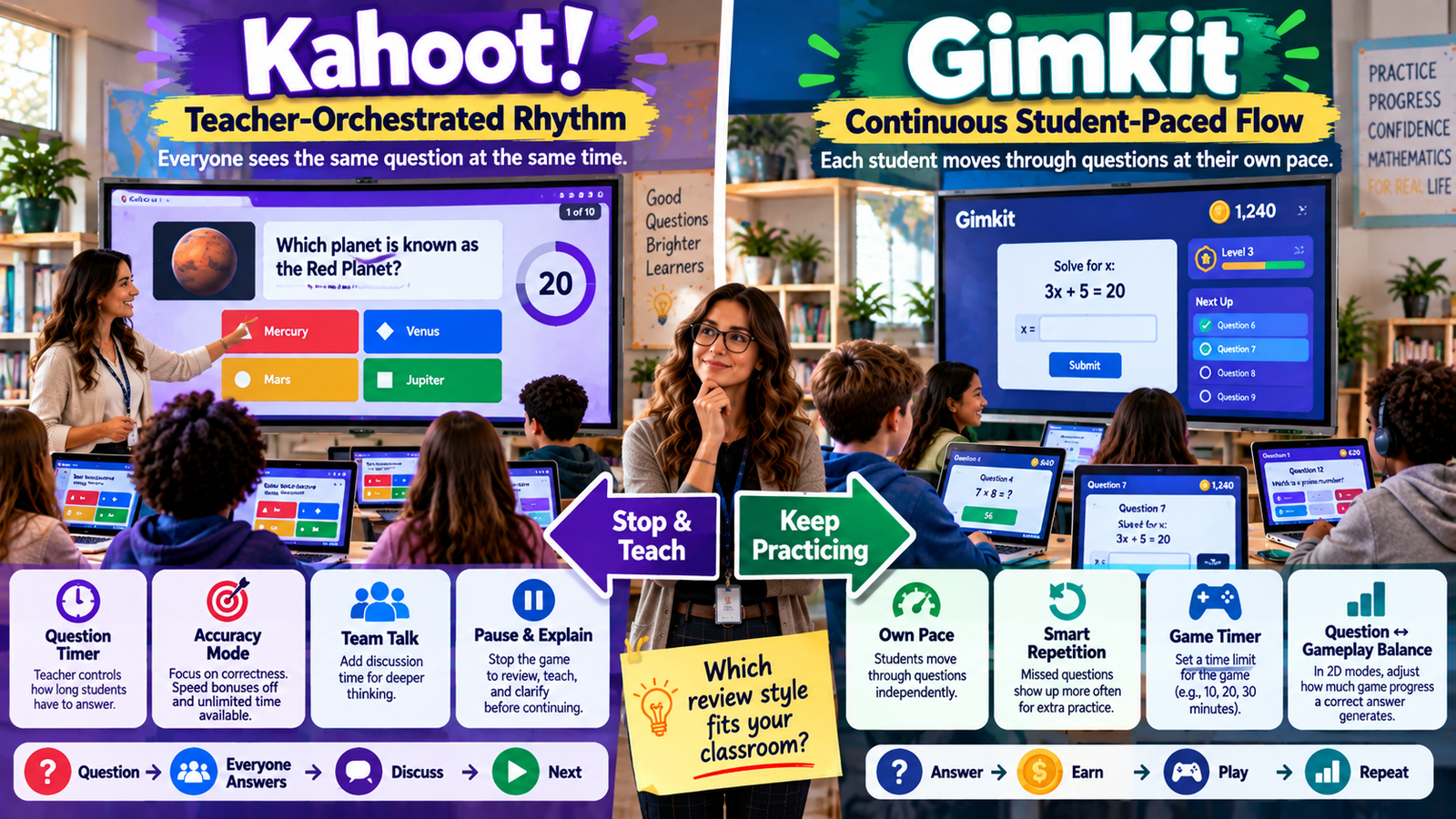
student answers → earns progress → plays → answers again → continues at an individual pace
Kahoot and Gimkit are built around these two different rhythms.
In Kahoot’s host-led live experiences, the teacher controls a shared activity. Kahoot currently allows hosts to adjust live-game settings before and during a session, including settings that affect time, team discussion, joining, answer display, autoplay, and other aspects of the activity. Kahoot! Help Center
Gimkit uses a more individualized question flow. Its official Smart Repetition documentation says questions are shown to each player at their own pace. Once a student has encountered all the questions, questions missed previously are more likely to appear again, and that repetition pattern is specific to each student. Gimkit Help
That creates the central distinction:
Kahoot is stronger when the teacher wants to conduct a shared classroom sequence.
Gimkit is stronger when the teacher wants students to remain continuously active at different individual question speeds.
Neither rhythm is right for every lesson.
The right choice depends on what you need the classroom to do during those minutes.
Gimkit App offers practical guides, resources, and tips for teachers and students exploring interactive learning and educational games.
Kahoot vs Gimkit at a Glance
Classroom Control Area
Kahoot
Gimkit
Core live-question rhythm
Shared host-led sequence
Student-specific question pace
Teacher controls individual question timing
Strong
Less central to the model
Students can answer at different natural speeds
Within teacher-set timing
Yes, inherently
Natural pause after a shared question
Strong
Not built into every student’s question cycle
Immediate whole-class misconception discussion
Strong
Requires teacher intervention outside the individual question flow
Automatic repetition of missed questions
Not the core live-session model
Smart Repetition
Overall game goals
Less central than question sequence
Time, questions, cash, difficulty and mode-specific goals
Late joining control
Lock game joining
Join in Late toggle
Extend live session during play
Session progression controlled by host
2D game time can be extended
End game early
Yes
Yes
Control question vs gameplay ratio
Not a comparable core issue
Explicit 2D game-balance controls
Teacher circulation while game continues
Possible
Particularly natural
Best-fit rhythm
Stop, inspect, discuss, continue
Continuous independent practice
Kahoot’s available experiences and settings can depend on account type and subscription level. Gimkit’s exact options also vary by game mode. Kahoot! Help Center
The Core Difference: One Shared Pace vs Many Individual Paces
The clearest way to understand Kahoot vs Gimkit classroom pacing is to imagine what happens after the teacher starts the game.
With a host-led Kahoot, the activity is fundamentally a shared sequence.
The class moves through the same hosted content.
The teacher can observe responses, use the moments between questions instructionally, change some live settings, and decide how quickly the session should progress. Kahoot explicitly allows some settings to be changed between questions and even during active gameplay. Kahoot! Help Center
Gimkit changes that relationship.
Gimkit says each player receives questions at their own pace. Gimkit Help
That means Student A may already be answering another question while Student B is still working through a previous one.
After their initial pass, the two students may also receive different repeated questions because Smart Repetition responds to their individual previous answers. Gimkit Help
The class is participating in the same overall activity.
But the academic sequence is no longer identical for every student.
Why Classroom Rhythm Matters
Pacing affects much more than how quickly a game finishes.
It changes:
how much students wait;
when the teacher can explain;
whether everyone is discussing the same idea;
how much pressure students feel;
whether faster learners can continue working;
how easily the teacher can circulate;
how much of the lesson is controlled from the front of the room;
how frequently students move between questions and game mechanics.
A platform can have excellent features and still produce the wrong rhythm for a particular instructional goal.
That is why teachers should not begin the comparison with:
“Which game do students prefer?”
A stronger starting question is:
“What should students and I be doing at the same time during this lesson?”
Kahoot Creates Natural Whole-Class Checkpoints
Kahoot’s biggest pacing advantage appears when the teacher wants to use individual questions as instructional checkpoints.
A live question produces a shared moment.
Students respond.
The teacher sees what happened.
Then the teacher can decide whether the class should continue.
That gives a teacher a natural opportunity to say:
“A lot of us selected the same incorrect answer. We need to address that before continuing.”
This kind of rhythm works particularly well when review is being used to diagnose learning in real time.
Kahoot’s live hosting guidance allows teachers to customize a session at multiple points, and its settings provide features such as Team Talk, Unlimited time in Accuracy, locking game joining, autoplay, and ending the game. Kahoot! Help Center
The teacher remains closely involved in the sequence.
Gimkit Reduces the Need for Shared Question Checkpoints
Gimkit is not built around the teacher advancing an identical question for everyone after every response cycle.
The platform instead allows each student to keep working through questions.
That creates a different advantage:
less waiting.
Imagine one student can answer a multiplication fact in four seconds.
Another needs twelve seconds.
In a shared timed system, one of two things happens:
The first student waits.
Or the second student feels pressure.
Gimkit’s student-specific pacing reduces this conflict because each student can continue according to their own rate. Gimkit Help
The teacher does not have to make one classwide timing decision fit every student on every question.
But Individual Pacing Changes Immediate Feedback
The tradeoff is important.
If everyone is answering a different question, the teacher does not automatically get the same moment after every item to say:
“Everybody stop. Let’s look at why Answer C was wrong.”
Some students may not have seen that item yet.
Others may have encountered it earlier.
Others may see it again later through Smart Repetition.
That makes Gimkit less naturally suited to constant whole-class interruption.
It is more naturally suited to continuous practice blocks.
The teacher can still stop students, provide instruction, or discuss common problems.
The point is that the game itself does not create an identical academic checkpoint for everyone after each question.
The Most Important Teacher Choice: Stop & Teach or Keep Practicing?
This creates a highly useful decision rule.
When students get something wrong, what do you want to happen?
If your preferred response is:
“Stop. I want everyone to understand this before we continue.”
Kahoot’s shared live rhythm fits naturally.
If your preferred response is:
“Keep working. I want individual students to continue practicing, and I want missed content to return.”
Gimkit’s rhythm fits naturally.
Gimkit’s Smart Repetition specifically gives greater repetition priority to questions students answered incorrectly on their first encounter. Gimkit Help
That difference is more meaningful pedagogically than comparing visual themes.
Kahoot Gives Teachers Question-Level Time Control
Kahoot lets teachers think about pacing at the level of the individual question.
Its current accessibility guidance says question time limits can be set as high as four minutes when additional processing time is needed. Kahoot! Help Center
This allows a teacher to design different pacing for different kinds of thinking.
A basic recall question may need little time.
A reading question may need significantly more.
A calculation problem may require working time.
A question involving interpretation may need discussion.
The teacher can therefore design the rhythm around the cognitive demand of the question.
That is an important strength.
Kahoot Accuracy Changes the Timing Pressure
Article #7 already owns the broader explanation of Kahoot’s review experiences, so this article only needs Accuracy for one specific reason:
timing control.
Kahoot’s current Accuracy experience removes speed bonuses and bases scoring on correctness instead of how fast the answer arrives. Kahoot! Help Center
That gives a teacher an important option.
The class can remain synchronized without turning every question into a race.
This is useful when the teacher wants:
shared pace without speed-driven competition.
That is fundamentally different from Gimkit’s solution.
Kahoot changes the rules of the shared pace.
Gimkit lets the pace become individualized.
Unlimited Time Pushes Kahoot Further Toward Careful Thinking
Kahoot’s current Accuracy experience also supports an Unlimited time accessibility option.
When enabled, students can take as long as they need to answer the current question. Kahoot! Help Center
This creates an interesting middle ground.
The whole class can still work on a shared question.
But the teacher does not impose a countdown.
That can be useful when:
careful reasoning matters;
reading load is substantial;
students need additional processing time;
speed would distort what the teacher is trying to measure.
Kahoot therefore does not force teachers to choose between synchronized participation and adequate thinking time.
Gimkit Solves the Same Problem in a Different Way
Gimkit does not need every student to fit into one shared question timer because the questions themselves are student-paced. Gimkit Help
Instead of making everyone wait for one long timer, Gimkit lets individual learners proceed naturally.
This can be especially useful in classrooms where students vary widely in retrieval speed.
The fundamental difference is:
Kahoot: make the common pace more flexible.
Gimkit: stop requiring one common question pace.
Both approaches can support learners who need different amounts of time.
They simply preserve different classroom structures.
Kahoot Is Stronger When the Teacher Wants Everyone Together
There are lessons where synchronized attention is not a problem.
It is the objective.
A teacher may want the whole class focused on:
one misconception;
one example;
one difficult distinction;
one test question;
one image;
one reasoning process.
Kahoot’s host-led structure makes it easier to pull everyone back to the same academic point repeatedly.
This can be especially useful when the game is functioning as interactive instruction, not merely practice.
Gimkit Is Stronger When Waiting Is the Problem
Other lessons have the opposite problem.
Students already understand the content.
They need repetition.
Stopping everybody after every question may add little value.
In that case, the goal might be:
“For the next ten minutes, answer as much meaningful practice as you can.”
Gimkit’s student-specific flow works particularly well here.
The faster learner continues.
The slower learner continues.
Nobody needs another student’s response speed to determine when the next question appears. Gimkit Help
Gimkit Smart Repetition Changes More Than Pace
Smart Repetition is not merely a timing feature.
It changes which questions appear next.
Gimkit says students first encounter each question, after which questions begin repeating. Previously missed questions receive more weight in the repetition process. Gimkit Help
That means two students can have:
different speeds;
different histories of correct and incorrect answers;
different repeated-question patterns.
So one live game can contain multiple individualized practice sequences.
This creates a classroom rhythm that is much less linear than a traditional quiz.
Smart Repetition Is Always Running
Teachers do not need to activate Smart Repetition manually.
Gimkit says it is on across live games and assignments. Gimkit Help
That matters because individualized repetition does not require the teacher to create separate remediation groups during the game.
A student who missed a question has a greater chance of seeing that item again.
Meanwhile, another student may receive different repeated content.
The teacher can allow the practice environment to keep moving.
Smart Repetition Does Not Replace Teaching
Automatic repetition can give a student another opportunity.
It cannot guarantee that repeating the same item will fix the underlying misunderstanding.
If a student repeatedly misunderstands a concept, the teacher may still need to intervene.
The key benefit is that Gimkit can automatically create another encounter with weak content.
The teacher still decides when the problem requires explanation rather than repetition.
That distinction keeps the platform in its proper role.
Kahoot Favors Immediate Collective Correction
Kahoot solves the missed-question problem differently.
Instead of automatically creating separate repetition patterns, a teacher can use the shared response moment to address the class.
That makes Kahoot especially useful when an error is likely to be:
widespread;
conceptual;
worth discussing immediately.
The teacher can recognize a classwide pattern before moving forward.
This keeps feedback close to the moment the misunderstanding occurred.
Question Clock vs Session Clock
Another useful way to understand Kahoot vs Gimkit is to ask which clock matters more.
For Kahoot, teachers often think:
How long should students get for this question?
For Gimkit, teachers often think:
How long should this game or practice block run?
Gimkit’s current standard game options can use different overall goals depending on the mode, including time, cash, investigations, difficulty level, or number of questions answered. Gimkit Help
That shifts the teacher’s planning perspective.
Gimkit Is Naturally Suited to Fixed Practice Blocks
Suppose a lesson plan contains:
12 minutes of independent retrieval practice.
Gimkit fits this mental model well.
The teacher chooses:
Kit;
mode;
game goal;
relevant mode settings.
The session runs inside that broader period.
Students move through questions individually.
In 2D games, the activity often ends when the game goal is reached, commonly including a time limit. Gimkit Help
The teacher is planning the activity window, not necessarily an exact shared sequence of eight questions.
Kahoot Is Naturally Suited to Planned Question Sequences
Now imagine the teacher has:
eight essential questions students must discuss before the lesson ends.
Kahoot fits that model naturally.
The teacher knows the content sequence.
Time can be adjusted through question settings and discussion.
The teacher can spend:
30 seconds on an easy question;
two minutes discussing a difficult one;
longer on another if the class needs explanation.
The sequence itself organizes the lesson.
Gimkit Lets Teachers Extend a 2D Game Live
Classrooms rarely follow plans perfectly.
Sometimes a productive activity needs another minute.
Gimkit’s current 2D host controls allow the teacher to click the game timer and add one minute during the session. Gimkit Help
Gimkit currently allows 2D game time to be extended up to its total game-duration limit of 59 minutes. Gimkit Help
This is a small feature with practical value.
The teacher can respond to the actual classroom instead of being trapped by the original setup.
Why One Extra Minute Can Matter
Imagine students are:
one minute from completing a collaborative objective;
finally using the strategy correctly;
highly engaged in productive retrieval;
just reaching the useful part of a mode.
Automatically ending at the original limit may waste momentum.
Adding a minute can preserve it.
However, the teacher should extend because the learning remains productive, not simply because students ask to keep playing.
The game should serve the lesson.
Gimkit Can Also End a Game Early
Gimkit allows hosts to end live games before the original goal is reached.
In 2D games, the host controls include a dedicated End Game control and confirmation step. Gimkit also documents early ending for most other live game modes. Gimkit Help
This matters when:
sufficient practice has already occurred;
lesson time is running short;
student behavior changes;
the class needs a transition;
the activity is no longer producing useful learning.
Teachers remain in control of the larger session.
Kahoot Can Also End a Live Activity Early
Kahoot’s current live settings include an End kahoot control.
The teacher can end the activity before every question has been completed. Kahoot! Help Center
So both platforms allow the teacher to reclaim lesson time.
The major difference is not whether they can stop.
It is how the learning is paced before they stop.
Late Joining Matters More Than It Appears
Real classrooms are messy.
Students may:
arrive late;
reconnect after Wi-Fi problems;
take longer to open the activity;
return from another service.
Both platforms give teachers control over late participation.
Gimkit’s standard game options include Join in late. Teachers can turn the option off when they do not want additional players entering after the game starts. Gimkit Help
Kahoot allows supported live participants to enter after a session begins while joining remains available, and hosts can use Lock game joining when they want to stop new entries. Kahoot! Help Center
Gimkit Late Joining Fits Its Individual Pace
Late entry is especially compatible with Gimkit’s basic question architecture.
A student does not need to “catch up” to the exact academic question everybody else is answering.
They begin their own question flow.
That does not mean joining late has no disadvantages.
They may have less time inside the activity.
But they are not entering halfway through one synchronized question sequence.
Kahoot Late Joining Has a Different Tradeoff
In supported Kahoot live experiences, a late participant can enter while joining remains open, but they may miss questions already completed. Kahoot! Help Center
That makes locking participation a meaningful instructional choice.
A teacher may leave joining available during the early part of a session when students are still connecting.
Then once the shared sequence is underway, the teacher may lock entry to preserve the activity’s flow.
Kahoot Team Talk Lets Teachers Insert Deliberate Thinking Time
Kahoot’s Team experience can use Team Talk.
The current live settings documentation says Team Talk gives teams a short interval to discuss their response before they can submit an answer. Kahoot! Help Center
This is another form of rhythm control.
The teacher is intentionally creating:
question → conversation → answer
rather than:
question → immediate click
This can be useful for questions where reasoning matters more than rapid recall.
Deliberate Slowness Can Be Good Teaching
Technology platforms often make speed look automatically desirable.
It is not.
For some learning tasks, productive slowness is valuable.
Students may need time to:
explain;
challenge an idea;
calculate;
reread;
justify;
reach agreement.
Kahoot gives teachers several ways to protect that time while preserving the shared structure.
That includes timing choices, Accuracy, Unlimited time where supported, and Team Talk. Kahoot! Help Center
Gimkit Teams Create a Different Kind of Collaboration
Gimkit also supports team and collaborative structures, but the rhythm is different.
Its official game-options guidance notes that team options can help keep students engaged when some learners are not keeping up. Gimkit Help
And specific 2D experiences such as One Way Out are built around a shared group objective while students continue answering questions to gain energy and progress. Gimkit Help
That means Gimkit collaboration often occurs inside a continuously running environment.
It is not necessarily a designated discussion pause before each shared answer.
This is one of the strongest features belonging specifically to Article #9.
Gimkit’s current 2D game options let hosts change the balance between answering questions and gameplay.
The platform describes it explicitly:
If there is too much gameplay and not enough learning, lower the reward students receive per correct question.
If students are not progressing enough, increase the reward. Gimkit Help
This is not merely game customization.
It changes the rhythm of academic work.
How Question-to-Gameplay Balance Works
Different Gimkit modes use different resources.
Official examples include:
snowballs in Snowbrawl;
bait in Fishtopia;
energy in modes including Tag: Domination, Capture the Flag, and Farmchain. Gimkit Help
If one correct answer generates a large amount of the required resource, students may spend more time playing before they need to answer another question.
If one correct answer generates less, students must return to questions more frequently.
That lets the teacher adjust:
question frequency relative to gameplay.
Few classroom game platforms expose that tradeoff so directly.
Why This Matters for Teachers
Game-based learning can fail when the game becomes disconnected from the learning.
Students may become highly engaged in:
movement;
collecting resources;
competing;
exploring;
while answering fewer academic questions than the teacher intended.
Gimkit’s 2D balance controls give the teacher a direct response.
The teacher does not have to abandon the engaging game mode.
They can change how frequently academic success is required to fuel it. Gimkit Help
Kahoot Has Less of a Game-vs-Question Problem
Kahoot’s host-led experiences remain much more question-centered.
The primary sequence itself is the questioning activity.
That means teachers generally do not need an equivalent control for:
“How much game resource should each correct answer generate?”
The gameplay is not separated from question answering in the same way as a Gimkit 2D world.
Kahoot’s pacing challenge is therefore more about:
how long and how deeply the class should stay with each question.
Gimkit’s challenge can additionally include:
how often students should return from gameplay to questions.
Teacher Role: Conductor vs Environment Manager
Another useful distinction is the role the teacher occupies.
During a traditional host-led Kahoot, the teacher often acts like a conductor.
The teacher manages:
transitions;
response time;
discussion;
pacing;
attention to the shared screen.
In Gimkit, the teacher can behave more like an environment manager.
The teacher sets:
game conditions;
goals;
mode-specific options;
join settings;
balance;
overall time.
Then students operate more independently within that environment. Gimkit Help
Gimkit Can Free the Teacher to Circulate
Because students are not waiting for the teacher to advance every academic item, a teacher can spend more time away from the front of the room.
That can make it easier to:
help an individual student;
watch a small group;
observe strategies;
manage classroom behavior;
check engagement.
Students continue working.
The teacher’s attention does not need to remain permanently attached to a “Next” button.
Kahoot Keeps the Teacher Closely Connected to Classwide Understanding
The opposite can also be an advantage.
With Kahoot, the teacher can remain highly aware of the class’s shared progress.
The class keeps returning to common points.
That makes it easier to use the activity as an ongoing diagnostic conversation.
If understanding suddenly collapses, the teacher sees it in the shared flow and can respond before proceeding.
This is especially useful when learning quality matters more than total question volume.
Autoplay Shows That Kahoot Can Give Up Some Teacher Control
Kahoot also allows hosts to use Autoplay.
Its current settings documentation says autoplay can start the game automatically after participants have joined and advance through result and leaderboard screens without manual host input. Kahoot! Help Center
That is useful in:
kiosks;
automated training;
unattended activities.
But it illustrates an important principle:
A feature that increases automation can reduce responsive teaching.
When the teacher wants to discuss misconceptions, manual progression is usually the more instructionally useful rhythm.
The value of manual hosting is not simply that the teacher controls a button.
It is that the next action can depend on the evidence that just appeared.
If students understand:
continue.
If they hesitate:
clarify.
If answers split:
discuss.
If there is a major misconception:
reteach.
That responsiveness is one of Kahoot’s strongest live-class advantages.
Gimkit Mode Selection Changes Classroom Energy
Gimkit also lets teachers choose the emotional rhythm of a session.
Its current Mode Picker uses descriptive labels to help teachers select experiences, including labels such as Calming, Strategic, and Collaborative. Gimkit Help
That means the same Kit does not have to produce the same kind of classroom energy.
A teacher can choose a calmer experience when the room needs focus.
A strategic experience may suit another lesson.
A collaborative mode may suit another group.
The important point for Article #9 is that mode selection becomes part of pacing design.
Not Every Gimkit Session Has the Same Rhythm
It would be inaccurate to talk about “Gimkit pacing” as though all modes are identical.
Some 2D modes are more complex or strategic.
Some emphasize collaboration.
Some are faster.
Some may involve substantial movement inside the game world.
Gimkit itself says 2D modes can be more complex and strategic than traditional modes. Gimkit Help
The teacher therefore controls rhythm partly by choosing the right mode before adjusting its settings.
A Five-Minute Warm-Up
Consider a five-minute opening activity.
Kahoot
The teacher may choose a handful of essential questions.
Everyone works through them together.
One unexpected misconception can immediately shape the next explanation.
This is strong when the warm-up is diagnostic.
Gimkit
The teacher can create a short practice window where students start answering at their own pace.
Nobody needs to wait after each question.
This is strong when the warm-up is retrieval practice.
The difference is not “fun vs serious.”
It is diagnosis vs continuous practice.
A Ten-Minute Review
In Kahoot, a teacher can divide those ten minutes dynamically.
Maybe Question 1 takes thirty seconds.
Question 2 reveals a problem and receives two minutes of discussion.
Question 3 goes quickly.
Question 4 requires a short explanation.
Time follows understanding.
In Gimkit, those ten minutes can be treated as one continuous practice block.
Students answer at different rates while the system handles individual repetition.
Time follows the activity window rather than a shared question sequence. Gimkit Help
A Twenty-Minute Reteach Session
For a session where students still have conceptual gaps, Kahoot’s structure is especially useful.
The teacher may need to repeatedly:
ask → diagnose → explain → check again
That is easiest when the room remains synchronized.
Kahoot’s host-led controls and shared sequence support that kind of active teaching. Kahoot! Help Center
A Twenty-Minute Fluency Session
Now imagine the material has already been taught.
Students need repetitions.
The teacher does not need to explain every question.
Gimkit becomes particularly attractive.
Students keep working.
Different learners progress at different speeds.
Missed questions are more likely to repeat for the student who missed them. Gimkit Help
The platform is being used as a practice environment, which fits its pacing model well.
Mixed-Readiness Classrooms
Mixed-readiness classrooms expose the difference especially clearly.
A synchronized system creates a recurring compromise.
Make the timer short and some students feel rushed.
Make it long and other students wait.
Kahoot addresses this with teacher-controlled time adjustments and lower-pressure options. Its current accessibility guidance supports longer timing and Unlimited time through Accuracy where appropriate. Kahoot! Help Center
The teacher must choose whether staying together or allowing separate pace matters more.
Students Who Need More Processing Time
Neither platform should be reduced to a simplistic claim.
It would be inaccurate to say:
“Gimkit is automatically better for slower students.”
Kahoot has real timing flexibility.
It would also be inaccurate to say:
“Kahoot automatically forces every student to rush.”
Accuracy and Unlimited time directly contradict that assumption. Kahoot! Help Center
The better question is:
Does this student benefit more from remaining with the class at a flexible shared pace, or from working through questions independently?
Students Who Work Quickly
Fast responders also create a pacing decision.
In Gimkit, they can keep going.
That may increase total retrieval.
In Kahoot, they remain with the class.
That may reduce total question volume, but it keeps them exposed to:
the teacher’s explanations;
class discussion;
peers’ reasoning.
Faster progression is not automatically more valuable.
The teacher should decide what the lesson needs.
Showing Kahoot Questions on Student Devices Can Reduce Friction
Kahoot currently lets hosts display questions and answer choices directly on participant devices during live games.
Kahoot specifically identifies this as useful for remote play, larger classrooms, and accessibility. Kahoot! Help Center
This can improve classroom rhythm because students do not need to repeatedly shift attention from:
projector → device → projector
just to read and answer.
The teacher retains the shared sequence while making the content easier to access individually.
Gimkit Is Already Device-Centered
Gimkit’s individual question flow is naturally built around the student’s own device.
The academic sequence occurs there.
In non-2D games, a leaderboard can still be projected, while in 2D games the host may participate or spectate. Gimkit Help
This makes the shared classroom display less central to the actual question sequence than it often is in Kahoot.
Again:
Kahoot repeatedly gathers attention.
Gimkit distributes attention across individual activity.
Remote Classes
This distinction also affects remote teaching.
Kahoot can preserve a shared hosted rhythm remotely, especially when questions and answers are shown on participant devices. Kahoot! Help Center
That is useful when the teacher still wants:
everyone together;
shared questioning;
live explanation.
Gimkit’s individual pacing may fit situations where students’ response speed or connection quality varies more substantially.
The academic sequence requires less precise synchronization.
Kahoot Assignments and Gimkit Assignments Are Separate From This Live Comparison
Both platforms can also move outside live classroom pacing.
Kahoot assignments allow learner-paced completion, with questions and answers appearing on participant devices. Kahoot! Help Center
Gimkit assignments allow students to play independently on their own time using compatible modes and teacher-selected assignment options; Gimkit currently limits Assignments to Pro members. Gimkit Help
But that is not the central territory of Article #9.
The important difference here is specifically what happens when the class is live together.
Gimkit Practice Mode Provides an Escape From Game Rhythm
Gimkit also provides a Practice mode containing no due dates, game modes, or game mechanics.
Students simply answer questions and receive correct/incorrect feedback. Gimkit Help
This matters because not every Gimkit use needs to involve a complex live-game rhythm.
If a teacher wants the Kit’s questions without the surrounding game, the content can still be used independently.
This strengthens the larger principle:
The best delivery mode is the one that fits the desired learning rhythm.
Classroom Control Is Not the Same as Maximum Teacher Intervention
More teacher intervention is not automatically better.
A teacher who constantly stops students may reduce productive practice.
Likewise, complete independence is not automatically better.
Students can practice a misconception repeatedly.
The best amount of teacher control depends on:
whether content is new;
whether misconceptions are likely;
whether practice is primarily fluency;
how ready students are;
whether discussion itself is part of the learning target.
Technology should help the teacher use the right amount of control, not the maximum possible amount.
When Kahoot’s Shared Rhythm Is Especially Useful
Kahoot fits particularly well when a teacher wants the class to move through important academic moments together.
For example:
A test-preparation session may include difficult distractors that deserve immediate explanation.
A science review may require the teacher to explain why one misconception is incorrect.
A history question may trigger a useful class discussion.
A mathematics problem may require everyone to see the reasoning before moving on.
The shared rhythm becomes an instructional feature.
When Gimkit’s Distributed Rhythm Is Especially Useful
Gimkit fits particularly well when the content has already been taught and students need sustained practice.
For example:
Vocabulary retrieval.
Math facts.
Terminology.
Concept-review questions.
Short factual recall.
The teacher may care less about everyone seeing Question 12 together.
The goal is sustained, repeated academic interaction.
Gimkit’s student-specific pacing and Smart Repetition align naturally with that objective. Gimkit Help
When Gimkit Gameplay Needs Tightening
A teacher should watch for one risk:
students may become more focused on the 2D world than the academic questions.
Gimkit provides a direct control for this problem.
Reduce the amount of game resource generated by each correct answer. Gimkit Help
Students must then return to the questions more often.
This is a particularly useful way to protect academic time without abandoning the mode entirely.
When Kahoot Timing Needs Relaxing
Kahoot’s corresponding risk is different.
Students may become overly focused on responding quickly.
The teacher can respond by:
increasing question time;
using Accuracy;
enabling Unlimited time in Accuracy where needed.
Those options reduce pressure without abandoning the shared class structure. Kahoot! Help Center
Each platform therefore has a different pacing problem—and different controls for solving it.
Practical Classroom-Rhythm Decision Table
If your lesson needs…
Stronger structural fit
Everyone on the same academic question
Kahoot
Individual response pace
Gimkit
Immediate whole-class explanation
Kahoot
Minimal waiting between questions
Gimkit
Shared review with reduced speed pressure
Kahoot Accuracy
Automatic repeated exposure to missed questions
Gimkit
Teacher-controlled question timing
Kahoot
Fixed practice window
Gimkit
Frequent teacher-led discussion
Kahoot
Continuous independent retrieval
Gimkit
Team discussion before submitting an answer
Kahoot Team Talk
Immersive team gameplay
Gimkit mode-dependent
Control over question vs gameplay frequency
Gimkit
Teacher circulation while academic flow continues
Gimkit
Highly responsive stop-and-reteach lesson
Kahoot
The table summarizes structural fit. It does not mean one platform is universally superior.
Common Pacing Mistakes Teachers Should Avoid
The first mistake is choosing based entirely on excitement.
Students enjoying a game does not mean its rhythm fits the lesson.
Another common mistake is using a highly speed-oriented Kahoot structure when careful reasoning is the actual objective. Longer timing or Accuracy may better match the task. Kahoot! Help Center
The reverse mistake is interrupting a Gimkit session so frequently that students never experience the continuous practice flow that makes individual pacing useful.
Teachers should also avoid allowing a 2D Gimkit mode to drift too far toward gameplay if the original objective was intensive question practice. Game-balance controls exist specifically to adjust that ratio. Gimkit Help
And extending a game simply because students ask for more time is not automatically a good decision.
The question should always be:
Will the extra time add useful learning?
A Simple Decision Framework
A teacher can choose quickly by answering four questions:
Question
If Yes
Do I need everyone discussing the same question?
Lean toward Kahoot
Do I want every student continuously answering at their own speed?
Lean toward Gimkit
Do I expect to stop frequently and reteach?
Lean toward Kahoot
Is the content already learned and the goal sustained practice?
Lean toward Gimkit
This keeps the decision tied to instruction rather than brand preference.
Frequently Asked Questions About Kahoot vs Gimkit
Is Kahoot or Gimkit better for classroom pacing?
They support different pacing models. Kahoot is particularly suited to a shared, host-led sequence in which the teacher controls the timing and can use question transitions as instructional checkpoints. Its current live settings include options affecting timing, Team Talk, joining, autoplay, and other aspects of the session. Kahoot! Help Center
Gimkit is particularly suited to continuous individual pacing. Its Smart Repetition documentation says each student receives questions at their own pace and later receives individualized repetition based on previous errors. Gimkit Help
So the question is whether you want one class pace or many individual question paces inside one activity.
Do Gimkit students answer the same question at the same time?
Generally, no. Gimkit says questions are shown to each player at their own pace. Once students have seen the full set, questions begin repeating, with questions previously answered incorrectly given greater repetition priority. The repetition pattern is individual to each student. Gimkit Help
Therefore, two students in the same Gimkit live game can be answering different questions at the same moment. That reduces waiting but also means the teacher does not automatically receive a whole-class discussion checkpoint after every academic item.
Can teachers slow Kahoot down?
Yes. Kahoot currently supports longer question time limits, with its accessibility guidance describing limits of up to four minutes per question where applicable. Kahoot! Help Center
Teachers can also use the Accuracy experience to remove speed bonuses, and Accuracy supports an Unlimited time setting for students who need as long as necessary to answer. Kahoot! Help Center
This lets teachers retain a shared whole-class rhythm without forcing every activity to become a speed contest.
What is Gimkit Smart Repetition?
Smart Repetition is Gimkit’s automatic system for bringing previously missed questions back more frequently.
Each student first encounters the questions in the Kit. After that, Gimkit uses an individualized repetition process that gives previously incorrect questions higher priority. Gimkit Help
The feature requires no teacher activation and works across Gimkit games and assignments. Its biggest classroom effect is that each learner’s later question pattern can become different from classmates’ patterns.
Does Gimkit let students work at their own pace during a live game?
Yes. Gimkit’s official Smart Repetition documentation explicitly says questions are shown to each player at their own pace. Gimkit Help
That means a faster student can continue answering without waiting for the whole class to finish the same question. A student who needs more time can continue at a slower pace without controlling everyone else’s question timer.
This makes Gimkit particularly useful for continuous practice where individual pacing is desirable.
Can Kahoot remove speed from scoring?
Yes. Kahoot’s Accuracy experience scores based on correctness rather than response speed. A correct answer receives one point, and speed bonuses are removed. Kahoot! Help Center
This makes Accuracy useful when the teacher wants the class to stay together while making correctness more important than reaction time.
That is different from Gimkit’s individual pacing model: Kahoot preserves the shared rhythm while changing the scoring pressure.
Can students have unlimited answer time in Kahoot?
Yes, in Kahoot’s Accuracy experience. Current live-game settings include an Unlimited time accessibility option, allowing participants as much time as necessary to answer the current question. Kahoot! Help Center
Kahoot also supports longer conventional question timers for students who need additional processing time. Kahoot! Help Center
This allows teachers to create a slower synchronized session without abandoning the live whole-class format.
Can teachers extend a Gimkit game after it starts?
In current 2D live games, yes. Gimkit says the host can click the game timer to add one minute at a time. Gimkit Help
Its live-hosting documentation says time can currently be added up to a total game duration of 59 minutes. Gimkit Help
This is useful when a productive game needs a small extension. Teachers should still base the extension on the lesson objective rather than game excitement alone.
Can a teacher end Gimkit early?
Yes. Gimkit currently provides an End Game control for live sessions. In 2D games it appears with the host’s game controls, and Gimkit also documents early-ending controls in other live modes. Gimkit Help
That gives teachers flexibility when enough practice has occurred or when lesson time needs to be redirected.
Can students join Gimkit after the game starts?
Gimkit’s standard game options include Join in late. Teachers can leave late joining available or turn it off before beginning the session. Gimkit Help
Late joining fits Gimkit’s student-specific pacing particularly well because a student entering later does not need to match the exact question currently being answered by the rest of the class.
Can students join Kahoot after the game starts?
In supported live experiences, yes, as long as joining remains available. Kahoot says late participants may use the current PIN, link, or QR code, although they may miss questions already completed. Kahoot! Help Center
Teachers can also use Lock game joining once they no longer want additional participants entering the session. Kahoot! Help Center
That lets the host decide when the group should become fixed.
What is Kahoot Team Talk?
Team Talk is a setting available with Kahoot’s Team experience. It gives teams a short discussion period after a question is shown and before they submit their response. Kahoot! Help Center
This intentionally slows the question cycle so students can discuss their thinking.
For teachers, Team Talk is useful when collaborative reasoning matters more than immediate individual response speed.
Can Gimkit teachers control how much time students spend answering questions versus playing?
Yes, particularly in 2D game modes.
Gimkit’s current game-balance options allow hosts to adjust how much in-game resource is generated by correct answers. Lower rewards require students to return to questions more frequently; larger rewards allow more game progression per correct answer. Gimkit Help
This gives teachers direct control over the academic-to-gameplay ratio, which is one of Gimkit’s most distinctive live-session controls.
Which platform is better when students answer at very different speeds?
Gimkit naturally handles different answer speeds because students receive questions independently at their own pace. Gimkit Help
Kahoot can support varied processing needs differently by increasing timers, using Accuracy, or enabling Unlimited time where appropriate. Kahoot! Help Center
Choose Gimkit when you want pace itself to be individualized. Choose Kahoot when you want the class to remain together but need to make that shared pace more flexible.
Which is better when I want to explain wrong answers immediately?
Kahoot’s shared live sequence is structurally better suited to immediate classwide explanation.
The teacher can use the common response moment as a signal to stop, discuss, and then continue.
Gimkit students are typically on individual question paths, so there is no guarantee everyone has just encountered the same item. Gimkit instead gives missed questions more chances to return through Smart Repetition. Gimkit Help
The choice is therefore between immediate collective correction and continued individualized repetition.
Which is better if I want to circulate around the classroom?
Gimkit can be particularly useful for this teaching style because students continue moving through questions without the teacher manually advancing each question.
Gimkit’s live host can manage the broader game while students continue at individual rates. In 2D games, hosts can also spectate players and manage the session through host controls. Gimkit Help
Kahoot can also support active circulation, but manually conducting a shared live question sequence generally keeps more teacher attention tied to classwide progression.
Does Kahoot have autoplay?
Yes. Kahoot’s current live settings include Autoplay. With it enabled, a session can progress automatically rather than requiring the host to manually advance every stage. Kahoot! Help Center
That can be useful for automated training or kiosk-style scenarios.
For responsive classroom instruction, however, manual progression gives the teacher more opportunities to react to student answers before continuing.
Which is better for a five-minute warm-up?
For a diagnostic warm-up, Kahoot often fits more naturally because a few shared questions can reveal what the class understands before the teacher begins instruction.
For a retrieval warm-up, Gimkit can fit more naturally because students can spend the entire practice block answering at individual rates without waiting for synchronized question transitions. Gimkit Help
The better choice depends on whether those five minutes should produce shared evidence for the teacher or more independent repetitions for students.
Which is better for longer practice sessions?
Gimkit has a strong structural fit for longer continuous practice. Individual pacing, Smart Repetition, mode-specific game goals, 2D game balance, live time extension, and immersive modes can keep the session running without constant teacher advancement. Gimkit Help
Kahoot can be stronger for longer sessions when the teacher expects regular explanation, discussion, or instructional intervention.
The difference is continuous practice versus teacher-guided interactive progression.
Final Takeaway
The central Kahoot vs Gimkit classroom-control difference is not whether teachers have controls.
Both platforms do.
The difference is what level of the learning experience those controls manage.
Kahoot gives teachers strong control over the shared instructional sequence.
The teacher can shape question timing, reduce speed pressure through Accuracy, provide extended or Unlimited time where appropriate, insert team discussion, control joining, react to classwide answers, and decide whether the session should advance manually or automatically. Kahoot! Help Center
That makes Kahoot especially well suited to:
Ask → observe → discuss → teach → continue.
Gimkit gives teachers strong control over the practice environment.
Students receive questions at individual speeds. Smart Repetition gives missed questions greater opportunities to return. Hosts can choose game goals, control late joining, adjust mode-specific settings, change the balance between questions and 2D gameplay, extend supported games, and end sessions when needed. Gimkit Help
That makes Gimkit especially well suited to:
Launch → practice continuously → adapt individually → keep moving.
So the useful conclusion is:
Choose Kahoot when classroom rhythm should remain teacher-orchestrated and shared.
Choose Gimkit when students should move continuously through questions at their own pace while the teacher manages the larger practice environment.
The better classroom tool is the one whose rhythm matches what students actually need to do during the lesson.