A classroom quiz can fail even when the questions themselves are excellent.
A student at the back cannot read the projector.
Another student is still looking at a laptop when the shared screen changes.
One student has already moved to another prompt.
Another is trying to understand which answer choice the teacher is discussing.
The teacher says:
“Look at Question 6.”
But half the class is no longer experiencing Question 6 in the same way.
That is why Kahoot vs Blooket becomes a much more useful comparison when the question is not simply:
Which platform has better games?
Instead ask:
Which platform makes one whole-class question easier for everyone to see, follow, answer, and discuss together?
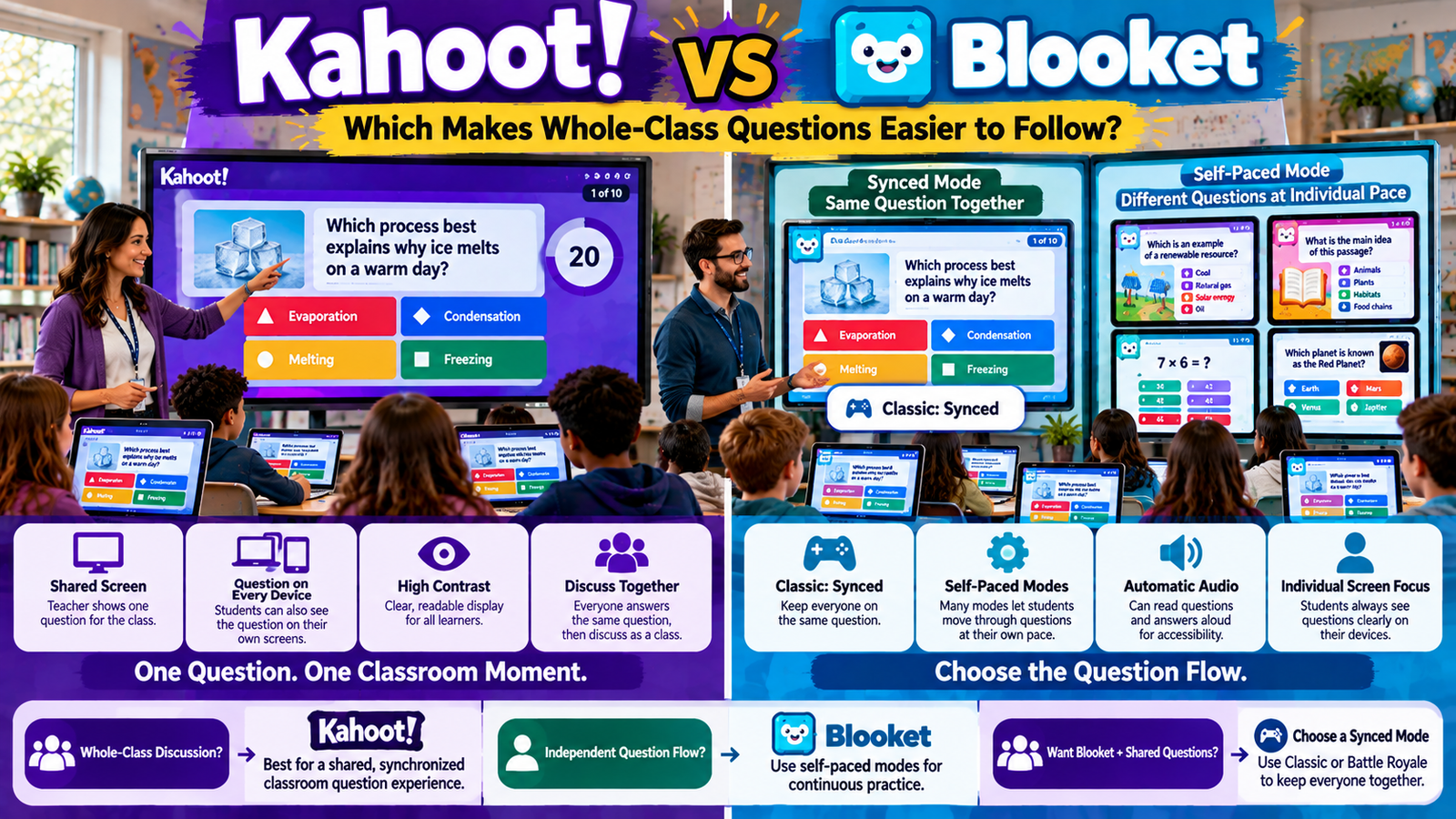
Kahoot currently has a strong shared-presentation model. In a live game, the teacher can use a projector or shared display, and Kahoot also provides a free Show questions & answers setting that places the question and answer choices directly on each participant’s device. Kahoot explicitly identifies large classrooms, remote learning, and accessibility as important use cases for this option. Kahoot! Help Center
Blooket uses a more mode-dependent structure. Its current game-mode catalog includes both synced prompting and self-paced prompting. For example, Classic and Battle Royale currently use synced prompting, while many modes—including Blook Rush, Café, Factory, Gold Quest, Racing, Monster Brawl, Tower Defense, and others—use self-paced prompting. Blooket
That creates the central difference:
Kahoot is more consistently built around a clearly shared whole-class question experience.
Blooket can create a synchronized whole-class question experience, but teachers need to choose a synced mode deliberately because much of the platform’s game catalog is self-paced.
That distinction matters whenever the teacher needs everyone to be looking at the same academic idea at the same moment.
Gimkit App offers practical guides, resources, and tips for teachers and students exploring interactive learning and educational games.
Kahoot vs Blooket at a Glance
Whole-class question need
Kahoot
Blooket
Shared host screen
Core live-game structure
Available as part of hosted games
Questions on student devices
Yes, dedicated free setting
Questions are answered on student devices
Consistent shared question sequence
Strong in host-led live experiences
Depends on mode
Synced question modes
Yes
Classic and Battle Royale are current examples
Self-paced live modes
Not the defining rhythm of host-led Classic-style play
Individual question screens reduce dependence on projector for answering
Whole-class discussion around one item
Strong
Strongest in synced modes
Automatic question/answer read-aloud
Mobile accessibility options in Kahoot ecosystem; screen readers supported
Automatic Audio can read questions and answers during games
Immediate correctness setting
Depends on Kahoot format/experience
Several Blooket modes let host choose whether answer correctness is shown immediately
Ordered vs random question sequence
Kahoot can randomize or preserve sequence
Several newer Blooket modes let hosts choose ordered or random
Best fit for everyone tracking one shared prompt
More consistent
Mode-dependent
The difference is not that Blooket cannot support synchronized review. It can. The issue is that synchronization is one Blooket mode characteristic among many, whereas shared question presentation is much closer to Kahoot’s core live-hosting identity. Blooket
What Does “Easy to Follow” Actually Mean?
A question is easy to follow when students can quickly answer five basic questions:
What question are we answering?
Where can I read it?
What response options do I have?
Is everyone discussing the same question as me?
Can I understand what the teacher is explaining after the answer?
This is not merely a user-interface issue.
It is an instructional issue.
If students cannot reliably follow the same prompt, whole-class discussion becomes harder.
A platform designed for independent pacing can be excellent for practice while being less suitable for a teacher who wants to analyze every question collectively.
A platform built around one shared question can be excellent for whole-class discussion while creating more waiting for students who could otherwise move faster.
Article #9 already owns that broader pacing issue.
Article #10 focuses on something narrower:
visual and academic alignment around the whole-class question.
Kahoot’s Shared-Screen Design Makes the Question a Classroom Event
A traditional live Kahoot begins with a host.
The host launches the activity and typically displays it on a projector, large screen, or screen-shared presentation.
Kahoot’s current hosting documentation explicitly lists a projector, large screen, or screen-sharing setup as part of live hosting, while also noting that questions can be displayed on participant devices. Kahoot! Help Center
This produces a recognizable classroom pattern:
teacher screen → common question → class response → common result
The question becomes part of the room.
Students know where the class’s attention is supposed to be.
That matters especially when the teacher wants to say:
“Everyone look at the wording of the question.”
or:
“Notice why answer B sounds plausible.”
The shared question is not merely an input form.
It becomes instructional material.
Kahoot Can Also Put the Same Question on Every Student’s Device
One of Kahoot’s most important current features for question visibility is Show questions & answers.
When the teacher enables it, participants can read the question and answer options directly on their own screens rather than depending entirely on the host’s display. Kahoot! Help Center
Kahoot specifically identifies several benefits:
remote play;
large classrooms;
accessibility;
reducing constant attention switching between the host display and the participant device. Kahoot! Help Center
This creates two visual access points for the same academic prompt:
shared classroom screen
and
individual student screen.
That is a strong whole-class design.
Everyone can still be participating in the same question while reading it at a comfortable physical distance.
Why Showing the Question on Both Screens Matters
Imagine a classroom with thirty students.
The teacher projects a question at the front.
A student in the first row can read it easily.
A student in the back may struggle with:
small text;
glare;
another student’s head blocking part of the display;
visual distance;
poor projector contrast.
If the question is also available on the student’s own device, the classroom can keep the shared academic moment without forcing every student to rely on the same physical viewing condition.
Kahoot’s current documentation explicitly frames participant-device question display as useful for large classrooms and accessibility. Kahoot! Help Center
That is not merely convenience.
It helps preserve whole-class synchronization when the room itself makes one shared display imperfect.
Without questions on individual devices, a student may need to follow this visual sequence:
look at projector → understand question → look down at device → find corresponding answer → look back up
That repeated movement can create friction.
With Kahoot’s device-display option enabled, the student can see both question and answer choices on the same screen used to submit the response. Kahoot! Help Center
The host’s screen still matters.
It can show:
classwide content;
results;
correct answers;
score information.
But students are less dependent on repeatedly moving their visual attention between two locations.
For a teacher asking:
“Can everyone follow the same question easily?”
this is one of Kahoot’s strongest practical advantages.
Kahoot Still Preserves the Shared Classroom Moment
Putting questions on participant devices does not turn a host-led Kahoot into thirty unrelated quizzes.
The class is still participating in the same hosted live activity.
Kahoot’s remote-hosting guidance notes that even when questions and answers appear on participants’ devices, the host screen still carries shared elements such as the scoreboard and correct-answer display. Kahoot! Help Center
So the system can combine:
individual readability
with
whole-class synchronization.
That combination is especially powerful for teachers who need both accessibility and common discussion.
Blooket Approaches the Whole-Class Question Differently
Blooket’s architecture varies much more by mode.
The platform currently says it has more than 25 modes across live, solo, and homework contexts, and its mode guide explicitly labels question prompting as either Synced or Self-Paced for many live modes. Blooket
This means the teacher cannot make a useful statement such as:
“Blooket questions are always synchronized.”
They are not.
Nor would it be accurate to say:
“Blooket is always self-paced.”
That is not true either.
The correct answer is:
Blooket question followability depends heavily on the selected mode.
That mode dependency is the heart of this article.
Blooket Classic Is the Clearest Whole-Class Question Mode
Blooket’s current mode guide describes Classic as:
For this article’s narrow search intent, synced prompting is the critical feature.
It means Classic is much better aligned with a teacher who wants the class operating around the same question timing than a self-paced mode such as Gold Quest or Factory.
The teacher who says:
“I need everyone on the same question because I want to discuss each one.”
should not treat all Blooket modes as interchangeable.
Classic is structurally much closer to that goal.
Battle Royale Also Uses Synced Prompting
Blooket’s current Battle Royale mode also uses synced prompting. Its official overview describes player-versus-player or team-versus-team showdowns and labels its question flow as synced. Blooket
That makes Battle Royale another relevant Blooket option when synchronized questions matter.
However, the mode adds its own competitive structure.
So teachers should distinguish:
question synchronization
from
instructional simplicity.
A mode can keep students on synchronized prompts while still surrounding those prompts with competitive mechanics that affect attention.
The teacher should choose based on whether that competition helps or distracts from the whole-class question objective.
Most Popular Blooket Experiences Are More Self-Paced
This is where the Blooket comparison changes significantly.
Current Blooket mode documentation labels many live modes as self-paced prompting, including examples such as:
This means a teacher can preserve one whole-class prompt without depending solely on projector size.
In a 35-student classroom, that can be more important than decorative game features.
If the student cannot read the question comfortably, nothing else in the activity matters.
Remote Classes Also Benefit From Kahoot’s Question Display
Kahoot’s current remote-hosting guidance recommends showing questions and answers directly on participants’ devices when playing through video conferencing. Kahoot! Help Center
That solves a common remote-learning problem.
Screen sharing can make text:
small;
compressed;
delayed;
difficult to read on phones.
If the question also loads on the participant’s own Kahoot screen, the student does not have to rely entirely on a video-call screen share.
The class can remain synchronized even when everyone is physically separated.
Device Display Has a Network Tradeoff
Kahoot’s documentation also notes an important limitation.
Showing rich question content on each participant device increases per-device network and processing demand, particularly when images or video must load individually. Older devices or slower connections may display content slightly later. Kahoot! Help Center
This means “show it everywhere” is not free.
In a school with:
older Chromebooks;
weak Wi-Fi;
limited bandwidth,
the teacher should test the setup first.
Accessibility and technical reliability need to be balanced.
Kahoot Provides a Preview for Both Host and Participant Views
Before a live session, Kahoot currently allows teachers to preview content in a split view showing:
This is highly relevant to whole-class question followability.
A teacher can verify:
whether text fits;
whether images are readable;
whether answer options make sense visually;
whether the student-device view is clear.
A question can be academically correct and still be poorly displayed.
Preview helps catch presentation problems before students encounter them.
Previewing Is an Underused Classroom-Control Step
Consider a question containing:
a long paragraph;
a chart;
four long answer choices.
On a large monitor it may look fine.
On a student phone it may become awkward.
The teacher who previews both views can decide to:
shorten the prompt;
simplify answer options;
use a clearer image;
split the concept into multiple questions.
This is not merely technical testing.
It is instructional design.
A question is easier to follow when its visual structure matches the screen students actually use.
Blooket Gives Students Their Questions Directly During Gameplay
Blooket’s accessibility documentation confirms that questions and answer options are presented within the player’s game experience strongly enough that students can enable Automatic Audio to have the questions and answers read aloud during any game. Blooket
That helps explain one Blooket strength.
Students are not dependent on reading only from the front of the room.
The question exists on their own device as part of the game.
For students who primarily need clear personal access to the prompt, this is useful.
The whole-class challenge is not readability on the student device.
It is whether everyone is on the same prompt at once.
Blooket Automatic Audio Is a Strong Accessibility Feature
Blooket currently allows students to enable Automatic Audio (Text to Speech) during games.
Once enabled, questions and answer choices are read aloud sequentially, and the text is underlined as it is read. Blooket
This can support students who benefit from:
auditory reinforcement;
decoding support;
reduced reading strain;
hearing the prompt while tracking the text visually.
For whole-class question access, this is important because “easy to follow” is not purely visual.
Some students understand a prompt better when they can hear and see it simultaneously.
Automatic Audio Is Student-Controlled Rather Than a Whole-Class Read-Aloud
The important distinction is that Blooket’s Automatic Audio operates on the student’s own game experience.
That means each learner can enable it as needed.
This is good for individualized accessibility.
But in a self-paced mode, two students can be hearing different questions at the same time.
It does not automatically create whole-class synchronization.
Again, accessibility and synchronization are separate design dimensions.
Kahoot Supports Screen Readers and Read-Aloud Workflows
Kahoot’s current live-hosting documentation says hosts and learners can use screen readers, and participants can use Read Aloud features in supported mobile-app contexts. Kahoot! Help Center
Combined with participant-device question display, this gives Kahoot multiple accessibility layers:
shared-screen visibility;
personal-device visibility;
screen-reader compatibility;
read-aloud support.
For a teacher who wants one common question accessible in several ways, this is valuable.
Contrast Matters on Projectors
Kahoot’s live-game settings currently include an Increase contrast accessibility option.
The platform specifically recommends it when using a projector because it adjusts answer-box colors to improve readability. Kahoot! Help Center
This is exactly the kind of small feature that matters in real classrooms.
Projectors often have:
weaker contrast than monitors;
washed-out colors;
bright-room visibility problems.
A whole-class question is only useful when its response options remain visually distinct.
Blooket Reduces Projector Dependence in Self-Paced Modes
Blooket takes a different route.
In many self-paced modes, the critical academic question is already on each student’s device.
The projector can become less important to the question-answering process.
That can be useful when:
the classroom projector is weak;
students sit far from the front;
the teacher wants students focused on their own devices.
But once again, the cost is that there may no longer be one universal question for the teacher to discuss.
Synced Blooket Modes Are Better for Whole-Class Followability
When the teacher’s goal is one common prompt, the Blooket mode list should be treated as a filter.
From the current official game-mode documentation, Classic and Battle Royale are the clearest examples explicitly labeled with synced prompting. Blooket
Teachers should not assume that choosing any Blooket live mode will preserve the same question sequence.
If whole-class question discussion is central to the lesson, check the mode’s prompt type before hosting.
This one decision can completely change the classroom experience.
Self-Paced Blooket Modes Are Better for Independent Followability
Self-paced Blooket modes include a broad range of experiences.
These modes can be excellent when the teacher wants students:
continuously engaged;
answering at their own rate;
less dependent on the whole class.
The important point is not that they are inferior.
It is that they solve a different classroom problem.
Blooket Question Frequency Also Changes How Easy the Academic Thread Is to Follow
Blooket’s current mode previews label modes with different question frequencies such as High Frequency or Normal Frequency. Blooket
That affects the relationship between academic questions and gameplay.
A high-frequency mode returns students to questions often.
A normal-frequency mode can leave more room for game mechanics between academic prompts.
For whole-class instruction, the teacher should consider:
How far apart are the questions?
The more gameplay separates them, the weaker the feeling of a continuous academic discussion may become.
A Mode Can Be Synchronized Yet Still Highly Competitive
This is important with modes such as Battle Royale.
Synced prompting means the questions line up more closely across players.
But the surrounding experience is competitive.
That can affect student attention.
Students may focus on:
opponents;
elimination;
winning;
team results.
If the teacher’s main objective is to closely analyze question wording, Blooket Classic may provide a cleaner academic feel than a more elaborate competitive synced mode.
The correct mode depends on what the teacher wants students noticing.
Kahoot’s Shared Result Moment Strengthens Question Followability
A question is easier to follow when students can see not only:
what was asked
but also:
what happened afterward.
In a traditional Kahoot flow, the class can move from one common question to common answer feedback and score/result information.
Kahoot’s hosting guidance explicitly encourages hosts to discuss answer results and elaborate on questions. Kahoot! Help Center
This keeps the academic thread visible:
question → responses → explanation
Students can connect the teacher’s explanation directly to what they just answered.
Blooket’s Feedback Is More Mode-Specific
Several newer Blooket modes now give hosts settings such as Show Answer Correctness.
For example, current documentation for Busy Bees, Star Grazer, and Mini Mine lets teachers decide whether players immediately see whether their answer was correct. Blooket
This can be useful.
Immediate correctness feedback helps students connect:
response → outcome
without waiting until the end of the game.
But the feedback remains part of each student’s own game flow rather than one universal classwide answer-result moment.
Showing Correctness Immediately Can Improve Individual Clarity
Suppose a student answers incorrectly.
If the platform immediately makes that clear, the student knows:
my answer was not accepted.
That can prevent confusion about whether the game outcome was caused by:
the answer;
a game event;
another player’s action.
In Blooket modes where the teacher can control immediate correctness feedback, leaving it visible can make the question-response relationship clearer for students.
However, the best choice can vary with the lesson.
Some teachers may prefer delayed feedback when they do not want students sharing answers immediately.
Blooket Incorrect-Answer Penalties Can Affect Question Attention
Some newer Blooket live modes also let hosts configure an incorrect-answer time penalty.
Busy Bees, Star Grazer, and Mini Mine currently support penalties from 3–15 seconds before the player can continue after an incorrect answer. Blooket
This changes the meaning of the question.
A wrong answer does not merely produce feedback.
It can temporarily slow game progress.
That may encourage careful answering.
But it may also increase competitive pressure.
Teachers should think about whether the penalty supports the learning objective.
Ordered Questions Matter When Whole-Class Discussion Has a Sequence
Some current Blooket modes let the host choose between Random and Ordered question sequences. Blooket
That is important when the Question Set has instructional progression.
For example:
easy concept → application → exception → final challenge
Randomization could destroy that sequence.
If a teacher wants students following an intentional academic progression, ordered questions are easier to discuss and reference.
The host should not automatically assume randomization is always better for game variety.
Kahoot Also Lets Teachers Control Question Randomization
Kahoot’s current live-game settings allow hosts to randomize question order or preserve the original sequence. Kahoot notes that question-order randomization is unavailable when the kahoot includes slides. Kahoot! Help Center
For whole-class followability, preserving sequence can be useful when:
questions build on one another;
the teacher references earlier items;
explanations depend on order.
Randomization can be useful for repeated practice.
But instructional coherence sometimes matters more than novelty.
Answer-Choice Randomization Has a Different Effect
This can reduce students memorizing positional patterns.
But teachers should be careful when verbally referring to answers.
Saying:
“The correct answer is the top-left box”
becomes less useful when participant-device layouts differ or answer positions are randomized.
For whole-class clarity, teachers should refer to the actual answer content, not only its position or color.
This is a simple classroom habit that makes digital questions easier to follow.
Whole-Class Questions Need Strong Teacher Language Too
Technology cannot solve everything.
Even with perfect display, teachers can make a question harder to follow by saying:
“Everybody look at the blue one.”
A stronger explanation is:
“The correct answer is evaporation because liquid water is becoming water vapor.”
The answer remains understandable regardless of:
device layout;
screen size;
color perception;
randomized order.
Good platform design and good teacher language work together.
Kahoot Is Stronger When the Shared Screen Is Part of the Teaching
Some teachers use the front display as more than a scoreboard.
They actively point to:
keywords;
diagrams;
answer choices;
visual evidence.
Kahoot’s host-led model supports this naturally.
The shared screen remains an instructional surface while participant devices can provide personal readability. Kahoot! Help Center
That is especially useful in lessons where the teacher’s explanation depends on everyone looking at the same visual object.
Blooket Is Stronger When the Shared Screen Should Be Less Important
In many Blooket modes, the student’s own device carries most of the individual game and question interaction.
That can help classrooms where:
students should focus independently;
the teacher does not want everyone staring at one projector;
individual practice matters more than collective explanation.
Blooket can therefore reduce the host screen’s importance.
Whether that is an advantage depends entirely on the lesson.
Younger Students May Need More Explicit Shared Orientation
Younger learners can benefit from clear answers to:
Where should I look?
What should I do now?
Are we all doing this together?
A highly self-paced game environment may require more initial instruction.
A shared-question system can reduce ambiguity because the teacher can repeatedly direct attention to one common prompt.
That does not mean younger learners cannot use Blooket.
It means the teacher should choose a mode with attention demands appropriate for the group.
Older Students May Handle Self-Paced Question Flow More Easily
Older students often need less teacher orchestration for every prompt.
They may be comfortable:
reading on their own screens;
progressing independently;
tracking game mechanics;
interpreting immediate feedback.
For them, Blooket’s self-paced modes may be highly efficient.
The decision should not be based purely on age, however.
The real factors include:
reading independence;
familiarity with the platform;
learning objective;
classroom management needs.
Students With Visual Access Needs
Whole-class projection can create barriers.
Kahoot’s ability to show questions and answers on participant devices directly addresses this problem, while its live settings also include increased contrast for projector readability. Kahoot! Help Center
Blooket’s individual device questions and Automatic Audio can also reduce dependence on a distant screen. Blooket
So both platforms offer useful accessibility paths.
The difference remains synchronization:
Kahoot can provide personal visibility of the shared prompt.
Blooket can provide personal visibility of each student’s current prompt, which may or may not be the same as everyone else’s.
Students Who Benefit From Audio Support
Blooket’s Automatic Audio is especially straightforward.
Students can enable the speaker option and have questions and answers read aloud during games. Blooket
Kahoot supports screen-reader use and mobile Read Aloud support in its accessibility ecosystem. Kahoot! Help Center
Teachers should test audio before class.
Potential concerns include:
multiple devices reading aloud simultaneously;
classroom noise;
headphones;
remote-learning audio overlap.
Accessibility features work best when the classroom environment supports them.
Headphones Can Change the Experience
In a quiet classroom, having several devices read different questions aloud can create confusion.
For individual audio support, headphones may be more practical.
In a synchronized whole-class environment, the teacher may instead choose to read the question aloud centrally.
The platform feature is only one part of the implementation.
A good accessibility plan asks:
Who needs the audio?
Where should it come from?
Will it interfere with other learners?
Projector Quality Should Influence Platform Settings
A bright modern display and an old classroom projector are not equivalent.
If the projector is:
dim;
low resolution;
washed out;
physically small,
Kahoot’s participant-device question display becomes especially useful. Kahoot! Help Center
If devices themselves are old or network capacity is weak, the teacher may need to test whether loading the full question content individually creates lag.
Whole-class question clarity depends on the actual classroom hardware, not only platform features.
Small Classroom Example
Imagine twelve students around one large display.
Everyone can easily read the screen.
The teacher wants to discuss every question.
In this setting:
Kahoot’s shared-question structure is extremely natural.
Blooket Classic could also work well because it uses synced prompting. Blooket
The difference between platforms becomes smaller because the physical room already supports shared visibility.
The teacher can choose based on the desired interaction style.
Large Classroom Example
Now imagine thirty-eight students.
Some are far from the projector.
The teacher wants everyone on the same question.
Kahoot’s Show questions & answers setting is particularly strong here because students can read the common prompt on their own devices while the teacher still conducts the shared session. Kahoot! Help Center
A synced Blooket mode can also keep prompting aligned, but Kahoot gives the teacher a more explicit shared-screen-plus-personal-screen configuration.
For whole-class readability, this is an important difference.
Computer Lab Example
Students sit at desktops facing away from the projector.
Constantly turning around is awkward.
Kahoot’s participant-device question display reduces that physical attention switching. Kahoot! Help Center
Blooket also works naturally on individual screens, particularly in self-paced modes.
The teacher’s decision becomes:
Do I need everyone following one question together?
If yes, Kahoot or synced Blooket.
If no, a self-paced Blooket mode may be more efficient.
Remote Classroom Example
Students join through a video call.
A shared-screen question may appear small inside the conferencing window.
Kahoot recommends displaying questions and answers on participant devices for remote hosting. Kahoot! Help Center
This preserves the common question while avoiding dependence on a compressed screen share.
Blooket can also work remotely through join links and individual student devices. Its official joining flow supports direct links as a convenient method for virtual classes. Blooket
The difference again is the desired level of synchronization.
Whole-Class Test Review Example
A teacher is reviewing twenty questions from an upcoming assessment.
Every distractor was intentionally designed around a common misconception.
The teacher wants to stop after each question and explain why each incorrect option is wrong.
The platform feature can help, but classroom management still matters.
Blooket Random Names and Visual Identity
Blooket lets hosts assign randomly generated names rather than allowing students to choose their own. Blooket
This does not directly affect the academic prompt, but it can reduce one kind of distraction during whole-class sessions.
Students may otherwise spend attention on:
funny names;
inappropriate names;
identifying classmates.
A whole-class question is easier to follow when peripheral interface elements are not competing for attention.
Blooket Can Also Restrict Blooks
Current Blooket hosting tools allow teachers to restrict which Blooks students can select and to disable custom Blooks in supported live modes. Blooket
Again, this is not an academic-question feature.
It is an attention-management feature.
If character selection is distracting a particular class, reducing customization can simplify the visual environment.
The broader principle is:
remove interface choices that do not serve the lesson.
Kahoot Also Provides Attention-Control Settings
Kahoot’s current live settings include options affecting:
Teachers do not need to use every engagement feature simply because it exists.
For a high-stakes review or a class that is easily distracted, a cleaner presentation may make questions easier to follow.
Good classroom technology often involves subtracting features, not adding more.
Full-Screen Mode Helps Reduce Visual Clutter
Kahoot’s live settings include a full-screen option that hides the browser interface. Kahoot! Help Center
This matters more on a projector than on an individual monitor.
Browser tabs, bookmarks, and toolbars can make the academic content smaller or visually noisy.
Full-screen presentation allows the question to occupy more of the display.
For whole-class readability, every extra pixel can matter.
Question Wording Still Matters More Than Platform Choice
No platform can rescue a poorly written question.
A question remains difficult to follow if it contains:
unnecessary wording;
ambiguous pronouns;
multiple ideas;
weak distractors;
unexplained abbreviations;
unreadable images.
Teachers should not interpret “Kahoot makes shared questions easier to follow” as permission to write worse questions.
The platform can improve delivery.
The teacher still owns clarity.
Keep Whole-Class Questions Short Enough to Scan
Students often need to:
read;
interpret;
compare answers;
submit.
Long prompts increase the burden.
For whole-class review, teachers should prefer concise wording unless the learning objective specifically involves reading a longer passage.
The question should contain enough context to be meaningful but not enough unnecessary text to turn interface reading into the main challenge.
Images Should Add Meaning
A large diagram can make a question much easier to understand.
A decorative image can do the opposite.
When designing whole-class questions, ask:
Does this image help students answer?
If not, it may be visual noise.
This principle applies to both Kahoot and Blooket.
The best technology cannot compensate for unnecessary visual clutter.
Do Not Rely Only on Color
Students may view:
washed-out projectors;
different display settings;
accessibility configurations.
Teachers should refer to answer content rather than saying only:
“Choose red.”
Kahoot’s Increase Contrast option can improve projector readability, but semantic answer labeling is still better classroom practice. Kahoot! Help Center
The answer should remain understandable without perfect color perception.
Read the Question Aloud When Language Load Is High
Even when technology provides text-to-speech or read-aloud options, teachers can still use central verbal presentation strategically.
Reading an important whole-class question aloud can:
focus attention;
clarify pronunciation;
support developing readers;
reduce ambiguity.
But avoid explaining the answer accidentally while reading.
The goal is access, not hinting.
Use Synced Questions When Discussion Is the Learning Activity
Sometimes discussion is not merely feedback.
It is the lesson.
For example:
Which argument is strongest and why?
Which operation should we use?
Which evidence disproves the claim?
In these situations, having everyone encounter the same prompt matters.
Kahoot’s shared host-led model fits naturally.
Blooket teachers should select a synced mode rather than assuming a popular self-paced mode will support the same conversation.
Use Self-Paced Questions When Repetition Is the Learning Activity
In other lessons, discussion adds little after every question.
Students may simply need:
vocabulary repetitions;
arithmetic facts;
definitions;
recognition practice.
Here, Blooket’s self-paced modes may be stronger because students can focus on their own question stream without waiting for a whole-class cycle.
“Easy to follow” now means:
my individual question is clear
rather than:
the whole room is on my question.
Different goal, different design.
A Practical Mode-Selection Rule for Blooket Teachers
Before hosting Blooket, check the mode’s question prompt style.
If the Blooket mode guide says:
Synced Prompting
use it when whole-class alignment matters.
If it says:
Self-Paced Prompting
use it when independent progression is acceptable or desirable. Blooket
This one check can prevent a major mismatch between teacher expectations and student experience.
A Practical Setting Rule for Kahoot Teachers
If students may have trouble seeing the front display, enable:
preserved question order where instructional sequence matters. Kahoot! Help Center
These settings improve followability without changing the content itself.
Kahoot vs Blooket for Whole-Class Questions: Decision Table
Classroom situation
Better fit
Teacher wants everyone discussing one question together
Kahoot
Students at back cannot easily read projector
Kahoot with participant-device question display
Teacher wants same prompt on shared and individual screens
Kahoot
Teacher wants Blooket but still needs synchronized prompts
Blooket Classic or another synced mode
Teacher wants everyone independently answering
Self-paced Blooket
Students should not wait for the class
Self-paced Blooket
Teacher wants question-specific class discussion
Kahoot
Teacher wants individual audio support
Blooket Automatic Audio is strong
Teacher needs projector contrast controls
Kahoot
Teacher wants minimal projector dependence
Blooket self-paced modes
Questions build in a deliberate sequence
Preserve ordered sequence on either platform where supported
Review is mostly rapid factual repetition
Blooket can fit well
Review centers on analyzing distractors together
Kahoot fits naturally
This is a fit comparison for one narrow instructional need, not a universal platform ranking.
Which Platform Is Easier for Students Sitting Far From the Screen?
Kahoot has a strong answer because its current Show questions & answers option lets students see the full prompt and answer choices on their own devices. Kahoot! Help Center
That allows the teacher to preserve whole-class synchronization without requiring every student to read the same distant display.
Blooket also gives students direct question access on their devices.
However, in many live modes students are self-paced.
So if the teacher specifically wants:
everyone far from the screen still seeing the same question
Kahoot’s current configuration is particularly well aligned.
Which Platform Is Better for Whole-Class Discussion?
For consistent question-by-question whole-class discussion, Kahoot has the stronger structural fit.
Its host-led activity can keep the room aligned around one question and one response moment.
Kahoot’s own live-hosting guidance encourages teachers to elaborate on questions and discuss answer results. Kahoot! Help Center
Blooket can support discussion when the teacher selects synced modes.
But because many popular Blooket modes use self-paced prompts, teachers need to make the mode choice intentionally. Blooket
Which Platform Is Better for Individual Question Accessibility?
Automatic Audio that reads questions and answers and visually underlines them during reading. Blooket
So the stronger accessibility configuration depends on the student need.
The key difference is not whether either platform supports accessibility.
It is how accessibility interacts with whole-class synchronization.
Which Platform Makes the Teacher’s Explanation Easier to Connect to the Question?
Kahoot.
When the class has just answered the same prompt, the teacher’s explanation can immediately reference:
the wording;
distractors;
image;
class response.
That creates a tight instructional chain.
In self-paced Blooket modes, teacher explanation may be conceptually relevant to everyone while not corresponding to every student’s exact current screen.
For whole-class explanation tied to one displayed item, synchronized presentation is more efficient.
Which Platform Is Better for Rapid Independent Practice?
Blooket’s self-paced modes.
This is where the comparison should not be misunderstood.
The fact that Kahoot is stronger for one shared prompt does not mean it is automatically superior for review.
If the teacher wants each student to remain focused on their own questions rather than following every classwide result, Blooket’s self-paced structures can be preferable.
Article #7 owns the broader review comparison.
Article #10’s conclusion applies specifically to whole-class question followability.
Frequently Asked Questions About Kahoot vs Blooket
Is Kahoot or Blooket easier for whole-class questions?
For a teacher who wants every student following the same question at the same time, Kahoot has the more consistent structure. Live Kahoot sessions are host-led, and teachers can display questions and answer choices on both the shared classroom screen and each participant’s device. Kahoot specifically recommends participant-device display for large classrooms, remote play, and accessibility. Kahoot! Help Center
Blooket can also support synchronized whole-class questioning, but the result depends on the selected game mode. Current Blooket documentation labels Classic and Battle Royale as synced-prompting modes, while many other modes use self-paced prompts. Blooket
Are Blooket questions synchronized for every student?
Not in every game mode. Blooket’s current official mode guide explicitly distinguishes Synced Prompting from Self-Paced Prompting. Classic and Battle Royale are current synced examples. Many other live modes—including Gold Quest, Factory, Racing, Blook Rush, Café, Monster Brawl, and Tower Defense—are self-paced. Blooket
Therefore, teachers who want every student answering the same question together should check the selected mode before hosting. Using one common Question Set does not automatically mean every player is currently viewing the same question.
Can Kahoot show questions on student devices?
Yes. Kahoot currently provides a free Show questions & answers live-game setting. When enabled, students can read both the question and answer options on their own devices and submit their responses there. Kahoot! Help Center
Kahoot identifies this as particularly useful in large classrooms, remote instruction, and accessibility situations. Students no longer need to depend entirely on a projector or constantly look back and forth between the host display and their own device.
Do students still need the shared screen if Kahoot questions appear on their devices?
The shared host screen can still serve an important classroom purpose. Kahoot’s remote-hosting guidance says shared elements such as correct-answer information and scoreboard content remain part of the host view even when questions and answers appear on participant devices. Kahoot! Help Center
A useful classroom setup is therefore not necessarily “shared screen or student screen.” It can be both: students use their personal screens for readable question content while the teacher uses the shared screen for whole-class discussion and results.
Can Blooket read questions aloud?
Yes. Blooket currently provides Automatic Audio/Text to Speech. Students can enable it from the speaker icon or accessibility settings while answering questions. Once enabled, questions and answer options are read aloud sequentially, and the text is underlined as it is spoken. Blooket
This is useful for learners who benefit from auditory reinforcement or reading support. In self-paced Blooket modes, however, different students may be hearing different questions at the same time, so headphones or classroom audio planning may be necessary.
Does Kahoot have accessibility options for easier question reading?
Yes. Current Kahoot live-game settings include increased contrast for projector readability and the ability to show questions and answers on participant devices. Kahoot also documents support for screen readers and Read Aloud functionality in supported app contexts. Kahoot! Help Center
These features are especially useful when students have difficulty reading a distant shared screen. The teacher can maintain one synchronized class question while providing each learner a closer view.
Which Blooket mode is best when everyone should answer together?
Current Blooket documentation makes Classic one of the clearest choices because it uses synced prompting and high question frequency. Battle Royale is another synced mode. Blooket
The better of the two depends on the desired classroom experience. Classic is more straightforward, while Battle Royale adds player-versus-player or team-versus-team competition. If the teacher’s main goal is simply to keep everyone aligned around the questions, the simpler synced structure may be easier to manage.
Why are many Blooket modes harder to use for question-by-question discussion?
Many Blooket modes use self-paced prompting. Students can therefore be on different questions at the same moment. Blooket
This is excellent for independent practice because students do not need to wait for classmates. But it removes the natural moment when a teacher can say, “Everyone just answered this question, so let’s analyze it together.” Teachers can still pause the activity and discuss the concept, but the explanation may not correspond to every student’s exact current screen.
Is Kahoot better for large classrooms?
For the narrow problem of ensuring that all students can read the same whole-class question, Kahoot has strong current features. Teachers can project the shared host activity while also displaying questions and answers directly on participant devices. Kahoot specifically cites large classrooms as a use case. Kahoot! Help Center
However, loading content on many participant devices can increase network demand. Kahoot notes that device speed and connectivity may cause slight differences in load time, so teachers should test school Wi-Fi before high-stakes use. Kahoot! Help Center
Is Blooket better when the projector is difficult to see?
Blooket can reduce projector dependence because students interact with questions directly on their own devices during gameplay, and students can use Automatic Audio for question and answer reading. Blooket
The tradeoff is mode-dependent synchronization. In self-paced modes, students may no longer be looking at the same question together. Therefore, Blooket is particularly useful when individual visibility matters more than maintaining one universal class prompt.
Can teachers control whether Blooket students see that an answer was correct?
In several newer/current Blooket modes, yes. Official documentation for Busy Bees, Star Grazer, and Mini Mine lists a Show Answer Correctness host setting. Blooket
Immediate correctness can help individual students follow the relationship between their response and the game. It is different from Kahoot’s common classwide result moment, because feedback remains tied to each student’s individual game flow.
Can Blooket keep questions in a specific order?
Some current Blooket modes allow hosts to choose between ordered and random question sequences. Busy Bees, Star Grazer, and Mini Mine are documented examples. Blooket
Ordered questions are useful when concepts build sequentially. Teachers should avoid randomizing simply for variety when later questions depend on earlier ones. A logically ordered Question Set can be easier for students to follow as an academic progression.
Can Kahoot preserve or randomize question order?
Yes. Kahoot currently allows live hosts to randomize question order or leave the original order intact. The platform notes that question-order randomization cannot be used when slides are part of the kahoot. Kahoot! Help Center
For whole-class review where the teacher wants to reference previous questions or build concepts gradually, preserving the authored sequence is usually easier to follow.
Which platform is better for discussing wrong answer choices?
Kahoot has the stronger structural fit when the teacher wants to discuss each distractor with the entire class. Everyone can answer the same host-led question, and Kahoot’s hosting guidance encourages teachers to elaborate on questions and discuss answer results. Kahoot! Help Center
Blooket can support the same style in synced modes, but self-paced modes make immediate question-specific whole-class discussion more difficult because students may be working on different prompts.
Which platform is better if students should work independently?
Blooket’s many self-paced modes are particularly strong when students should keep progressing without needing the entire class to remain aligned. Current Blooket mode documentation labels a substantial portion of the live catalog as self-paced. Blooket
In that situation, “easy to follow” means that the student’s personal screen and game flow are understandable—not that every learner is viewing the same question simultaneously.
Does Kahoot make students keep looking at the projector?
Not necessarily. Kahoot’s current Show questions & answers setting places the prompt and response choices directly on participants’ devices. Kahoot! Help Center
The shared display can still provide classwide context, results, and teacher focus, but students do not need to rely exclusively on it to read the question. This reduces the traditional “look up, look down, look up again” problem.
Can teachers preview what Kahoot questions look like before class?
Yes. Kahoot’s current Preview mode displays both a host view and participant view, and its demo functionality lets teachers simulate a live experience before the real session. Kahoot! Help Center
This is useful for checking whether long prompts, images, or answer choices remain readable on smaller student screens. Teachers can fix presentation problems before they become classroom problems.
Which is better for students who need read-aloud support?
Both platforms have useful options, but they implement them differently.
Blooket provides Automatic Audio that reads questions and answers during games while underlining the text. Blooket
Kahoot supports screen-reader use and documents Read Aloud support in its mobile-app environment, while its device-display option can keep the common question visible to individual students. Kahoot! Help Center
The best choice depends on whether the student needs individualized question access or needs to remain closely aligned with a whole-class prompt.
Final Takeaway
For the specific question this article owns—
Which platform makes whole-class questions easier to follow?
—the clearest difference is consistency of synchronization.
Kahoot is built very naturally around a shared live question experience.
A teacher can:
display the activity on a large screen;
place the same questions and answers on participant devices;
That makes Kahoot especially strong when the teacher needs:
everyone reads it → everyone answers it → everyone discusses it.
Blooket gives teachers a different kind of flexibility.
Students answer questions directly inside their game experience, Automatic Audio can read questions and answers aloud, and the platform contains both synced and self-paced live modes. Blooket
That means Blooket can absolutely support whole-class synchronized questioning—but the mode must match the goal.
Choose a synced option such as Classic when everyone should follow the same prompt.
Choose one of Blooket’s many self-paced modes when students should follow questions independently.
So the practical conclusion is:
For consistently shared whole-class questions, Kahoot has the cleaner default structure.
For flexible movement between synchronized and independent question flow, Blooket gives teachers more mode-dependent choice.
The best platform is therefore not determined by which one has more games.
It is determined by whether the teacher needs one question for the room or one clear question for each learner.