The most useful Blooket vs Kahoot comparison is not simply about which platform is more entertaining.
Both can make classroom review interactive. Both can turn questions into live activities. Both can support independent practice. Both can help a teacher revisit content without relying entirely on worksheets.
The deeper difference is how each platform lets a teacher structure the review.
A review can require students to recognize an answer, recall one without choices, put information in order, estimate a value, identify something visually, discuss an answer with teammates, respond without speed pressure, complete work independently, or receive a short explanation before answering again.
Blooket and Kahoot provide very different pathways through those possibilities.
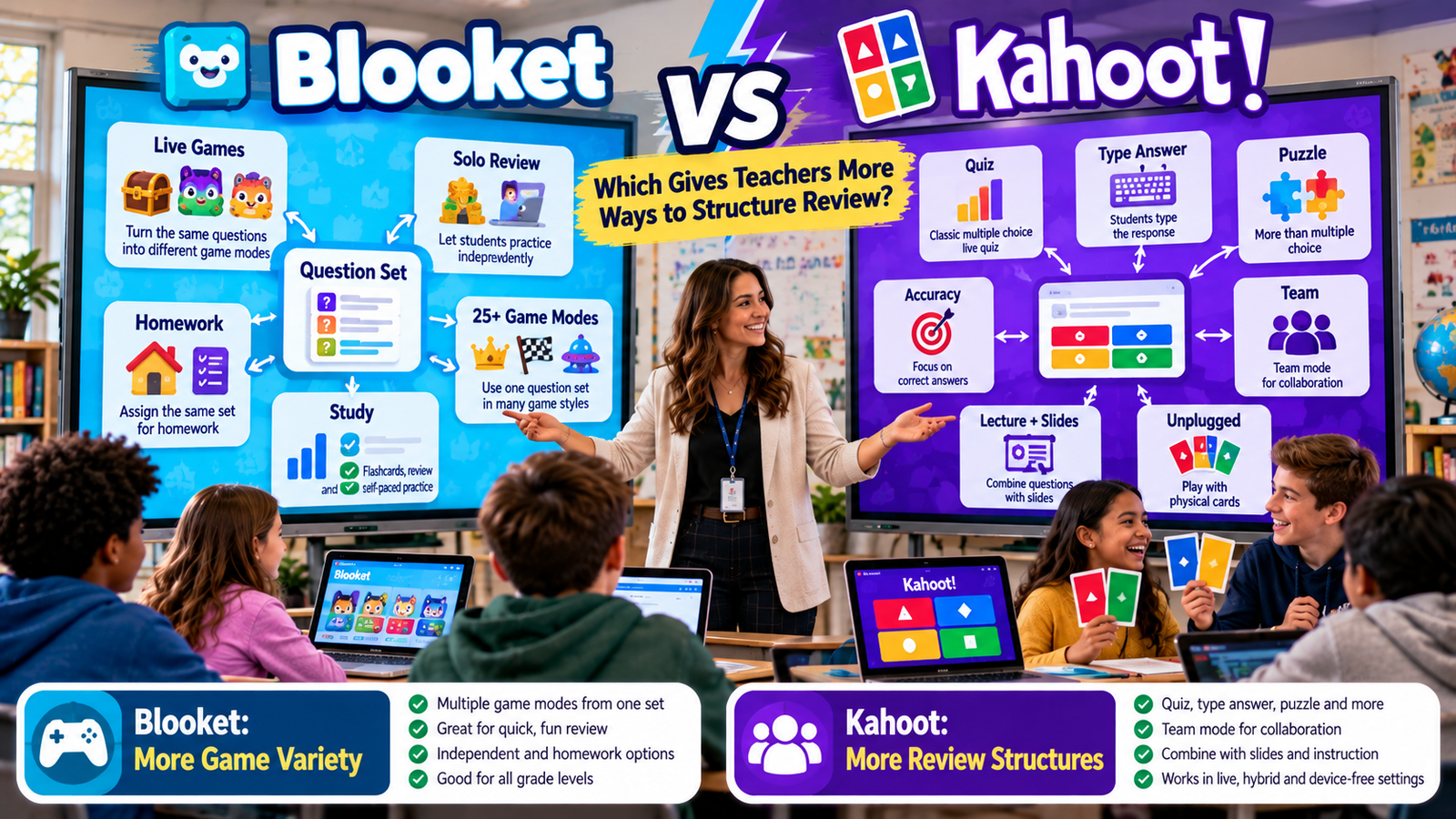
Blooket currently says it has more than 25 game modes, and its Question Sets act as the content foundation for live, solo, and homework activities. Different modes can vary in pacing, difficulty, strategy, question frequency, and whether prompting is synchronized or self-paced. Blooket
Kahoot approaches review through several layers at once. Teachers can vary the question type, the hosting experience, the use of slides, whether students work individually or collaboratively, whether speed contributes to scoring, and whether students even need individual devices. Current Kahoot question formats include knowledge-testing and opinion-gathering formats, while its hosting experiences include Classic, Accuracy, Confidence, Team, Lecture, and Unplugged structures. Kahoot! Help Center
That creates the central distinction:
Blooket primarily changes the game around the review.
Kahoot can change the structure of the review itself.
Understanding that difference makes the comparison much more useful than simply counting games.
Gimkit App offers practical guides, resources, and tips for teachers and students exploring interactive learning and educational games.
Blooket vs Kahoot at a Glance
Review dimension
Blooket
Kahoot
Core content object
Question Set
Kahoot
Current question-format breadth
Multiple Choice + Typing Answer
Wider testing, opinion, and presentation formats
Game variety
Very broad; Blooket says 25+ modes
Multiple hosting/game experiences
Live competition
Strong
Strong
Accuracy-first live review
Depends on chosen mode and classroom setup
Dedicated Accuracy experience
Team-based review
Available in particular modes
Dedicated Team experience plus Unplugged team options
Teacher presentation + review
Less central to product design
Lecture experience + slides
Self-paced review
Solo modes, Study, homework
Assignments and self-study options
Homework structure
Students currently choose among available solo game modes
Learner-paced assignment structure
Device-free classroom review
No equivalent official experience identified in reviewed Blooket documentation
Dedicated Unplugged experiences
Main structural strength
Variety of game experiences
Variety of review formats
Kahoot feature availability can vary by account and subscription level, particularly for advanced question types and experiences. Blooket also reserves some modes and functionality for Plus users. Kahoot! Help Center
The Fundamental Difference: Game Variety vs. Review Variety
Blooket’s design begins with the Question Set.
The teacher has academic content and selects a game environment around it.
That means one set can feel dramatically different depending on the chosen mode.
The mathematics, vocabulary, science content, or history facts remain stable.
The game changes.
Blooket’s current official game-mode guide describes more than 25 modes across live, solo, and homework use and distinguishes modes through characteristics such as ideal time, difficulty, gameplay skills, question frequency, and synchronized versus self-paced prompting. Blooket
Kahoot gives the teacher another level of control.
The teacher can change not only how students play, but also what answering the review requires them to do.
One question can require multiple-choice recognition.
Another can require typed recall.
Another can require arranging items into order.
Another can ask for a numerical estimate.
Another can ask students to identify a region on an image.
Slides can then explain the material before the next question appears. Kahoot! Help Center
That makes Kahoot closer to a flexible interactive review environment, whereas Blooket is especially strong as a reusable game-based practice environment.
How Blooket Structures Review
Blooket currently describes Question Sets as the building blocks of its games. Teachers can create their own sets or use existing sets and then host, play solo, or assign them depending on the mode. Blooket
The structure is intentionally simple:
Question Set → game mode → review experience
That simplicity is useful.
A teacher does not have to redesign the question architecture simply because students need another review session.
Instead, the teacher can alter the surrounding game.
The academic content stays recognizable while the activity feels new.
This is particularly valuable for material that genuinely benefits from repeated retrieval, such as vocabulary, multiplication facts, terminology, definitions, and short factual recall.
Blooket vs Kahoot-Small Scope
Blooket vs Kahoot comes down to the kind of classroom experience you want. Kahoot keeps learning fast, competitive, and quiz-focused, while Blooket adds game modes and playful mechanics that can make practice feel more like a game. Both are useful for engaging students, but the better choice depends on your teaching style, learning goals, and how much game variety you want in the classroom.
How Kahoot Structures Review
Kahoot gives teachers three broad content-building categories in its current creator:
A review does not have to consist entirely of scored questions.
The teacher can combine assessment with:
content presentation;
student reflection;
discussion;
explanatory material;
different response formats.
Kahoot’s current testing formats include tools such as Quiz, True/False, Type Answer, Slider, Puzzle, and Pin Answer, while opinion-oriented options include formats such as Word Cloud and Open-ended depending on plan. Kahoot! Help Center
So a Kahoot review can move through several kinds of thinking without leaving the activity.
Question Types: Kahoot Has the Clearer Structural Advantage
Blooket currently documents two main question types.
Multiple Choice can include between two and four answer options and can support multiple correct choices.
Typing Answer requires students to produce a response instead of selecting it. Teachers can configure exact matching or allow the correct word or phrase to appear within a longer student response. Blooket
Those two formats are enough for many classroom review tasks.
They support both recognition and short recall.
Kahoot currently goes considerably further.
Its knowledge-testing question types include multiple structures rather than two. Its support documentation lists formats including Quiz, True/False, Type Answer, Slider, Puzzle, and Pin Answer, with availability depending on the teacher’s subscription. Kahoot! Help Center
That gives Kahoot an important instructional advantage:
The teacher can change the kind of thinking required without changing platforms.
Recognition Review vs. Recall Review
Multiple-choice review asks students to recognize the correct answer from options.
Typed-answer review requires students to retrieve the answer independently.
Both have legitimate uses.
Blooket supports this distinction through Multiple Choice and Typing Answer. Blooket
Kahoot also supports conventional quiz questions and Type Answer. Its current documentation specifically positions Type Answer as a way to test recall without giving students answer choices. Kahoot! Help Center
This means both platforms can support a useful progression:
recognize → retrieve
A teacher might first verify that students can identify a concept, then later remove the cues.
Kahoot simply offers more possibilities beyond those two stages.
Kahoot Can Make Sequencing Part of the Review
Some knowledge is not best tested with a single correct option.
Students sometimes need to understand order.
That might mean ordering historical events, arranging scientific stages, placing procedural steps correctly, or sequencing elements of a process.
Kahoot’s Puzzle format is designed around arranging answers in the correct order. Kahoot! Help Center
That changes the review task fundamentally.
Instead of asking:
Which answer is correct?
the teacher can ask:
Can you reconstruct the correct sequence?
Blooket’s documented question types do not currently provide a native equivalent to that structure. Blooket
For procedural and chronological review, that gives Kahoot more native flexibility.
Kahoot Can Structure Review Around Estimation
Kahoot’s Slider question type lets participants place an answer along a numerical scale.
Its current documentation describes uses involving years, values, numbers, simple equations, and other numerical estimates. The scoring system can consider precision around the correct answer rather than treating the task as a conventional fixed-choice question. Kahoot! Help Center
That lets teachers review questions such as:
Approximately when did this happen?
About how large is this value?
Which estimate is reasonable?
This tests something different from direct recall.
It tests numerical judgment.
For subjects where estimation matters, Kahoot therefore offers a stronger native structure.
Kahoot Can Make Image Identification the Answer
Pin Answer lets participants select a region on an image rather than choosing a text answer. Kahoot! Help Center
That can improve the alignment between the review format and the knowledge itself.
For example, a teacher can ask students to identify:
a country on a map;
a part of a diagram;
a location on an image;
an anatomical region;
a visual feature.
Instead of turning a visual concept into four text answers, students interact with the image itself.
Blooket supports media inside questions, but its current documented answer structures remain Multiple Choice and Typing Answer. Blooket
Kahoot Can Turn Review Into Discussion
Review is sometimes diagnostic rather than purely right-or-wrong.
A teacher may want to know:
Which concept feels hardest?
What idea do students remember first?
How would students explain this in their own words?
Kahoot’s current creator supports opinion-gathering formats such as Word Cloud and Open-ended questions, depending on plan availability. Word Cloud collects short responses and displays them visually, while Open-ended allows longer free responses. Kahoot! Help Center
This allows the review to generate discussion.
The teacher can use student thinking as instructional content.
Blooket’s question system is more narrowly centered around checking responses.
That makes Kahoot the stronger platform when review should include reflection and discussion, not only correct-answer retrieval.
Blooket’s Major Advantage: Many Different Game Experiences
The fact that Kahoot has more question structures does not make Blooket less flexible.
Its flexibility exists somewhere else.
Blooket currently states that it offers over 25 game modes covering live play, solo play, homework, and combinations of those contexts. Blooket
These modes can vary substantially in style.
Blooket’s own previews describe differences in speed, accuracy, strategy, difficulty, ideal play time, question frequency, and pacing structure. For example, Battle Royale currently uses synchronized prompting, while Blook Rush is described as self-paced. Blooket
That means a teacher can keep the same Question Set but dramatically alter:
classroom energy;
pacing;
competition;
strategy;
student independence.
This is an enormous advantage when the academic content needs repeated practice but students are tired of the same delivery experience.
Blooket Can Change Pacing Through Mode Selection
Pacing is part of review design.
In a synchronized activity, students move through the content together.
That can be useful when the teacher wants:
shared attention;
everyone seeing the same question;
easier whole-class discussion.
In self-paced review, students can move independently.
That can be useful when:
students answer at different speeds;
faster students should not spend excessive time waiting;
the teacher wants more question attempts within the session.
Blooket’s official mode previews explicitly distinguish modes through synchronized and self-paced prompting. Blooket
So although Blooket has fewer question formats, the modes themselves create meaningful review-structure differences.
Kahoot Classic: The Familiar Whole-Class Review
Kahoot’s Classic experience is designed for individual competition, with participants answering questions on their own devices while competing for score. Kahoot! Help Center
This remains one of the platform’s clearest classroom structures.
The teacher controls the flow.
Students respond.
Feedback and score create the shared rhythm.
Classic works especially well when the teacher wants a familiar whole-class check with competition and immediate feedback.
But modern Kahoot is no longer limited to that traditional structure.
Kahoot Accuracy Changes What Counts as Success
Kahoot’s current Accuracy experience explicitly prioritizes correctness rather than response speed.
Its official documentation says players earn for correct answers without response time being part of the scoring calculation. The experience is positioned as a more relaxed, inclusive structure for learning activities where correctness matters more than speed. Kahoot! Help Center
This is a significant difference.
Traditional quiz competition can create an unintended incentive:
answer quickly, even if confidence is low.
Accuracy experience changes that.
The success condition becomes:
get the mathematics, vocabulary, or concept right.
For teachers who want the energy of a live Kahoot without making rapid reaction the primary advantage, this is a powerful structural option.
Blooket Can Emphasize Accuracy, but Through Different Means
Blooket’s modes can differ in how strongly they emphasize speed, accuracy, or strategy.
Its game-mode previews explicitly describe some modes with combinations such as Speed & Accuracy or other skill profiles. Blooket
Teachers can also choose Typing Answer, Study, or modes that fit a less frantic review objective.
However, the official Blooket material reviewed here does not describe a universal hosting experience equivalent to Kahoot Accuracy where scoring itself is systematically redesigned around correctness regardless of response speed.
So the difference is:
Blooket: choose the mode and classroom structure that better supports accuracy.
Kahoot: choose a dedicated accuracy-first hosting experience.
Kahoot Confidence Adds a Metacognitive Layer
Kahoot’s current Confidence experience adds another step before submission: students indicate how confident they are in their answer.
Correct answers with confidence can produce bonuses, while confident mistakes can create penalties under the experience’s scoring rules. Kahoot! Help Center
This changes the review question from:
Do you know the answer?
to:
Do you know how certain you are about the answer?
That can be useful for identifying:
misconceptions held with high confidence;
correct answers produced with uncertainty;
topics where students underestimate or overestimate their knowledge.
This is a different type of review evidence from simple correctness.
Blooket’s current core question system does not provide an equivalent built-in confidence-rating structure.
Kahoot Team Experience Changes Review From Individual to Collaborative
Kahoot’s current experience system includes a dedicated Team experience that allows students to work in teams rather than only as individual competitors. Kahoot! Help Center
That changes what happens before an answer is submitted.
Students can:
discuss;
justify;
disagree;
reach a shared conclusion.
The review now includes peer explanation.
Blooket can also support team structures in particular game modes; its current Battle Royale description explicitly includes team-versus-team gameplay. Blooket
The distinction is structural.
In Blooket, teamwork can be tied to the selected game.
In Kahoot, teamwork can operate as a broader hosting experience.
Kahoot Lecture Turns Review Into Interactive Instruction
One of Kahoot’s most important current differences is its Lecture experience.
Kahoot describes Lecture as an education-focused interactive presentation environment in which teachers can synchronize slides, embed live assessments, and collect feedback during a presentation. Availability depends on account and plan. Kahoot! Help Center
This is particularly useful when review uncovers gaps.
Instead of:
question → wrong answers → next question
the teacher can structure:
question → explanation → example → another question
That transforms review into review plus reteaching.
Blooket’s design is far more centered around Question Sets and game modes.
Kahoot can act more naturally as a live instructional presentation system.
Slides Make Kahoot More Than a Quiz
Kahoot’s creator currently supports slides alongside questions. Kahoot! Help Center
That allows teachers to include:
definitions;
examples;
diagrams;
instructions;
concept summaries;
transitional explanations.
A review session can therefore be designed as an instructional sequence rather than a continuous stream of questions.
For students who need reminders between knowledge checks, this is a meaningful advantage.
The platform can therefore support several stages of learning inside one activity.
The teacher does not need to choose between teaching and testing as completely separate systems.
That makes Kahoot particularly strong when the class is reviewing material that is not yet fully secure.
Blooket Is Stronger When Students Already Know the Material
There is another classroom scenario.
The students already understand the concept.
They do not need another presentation.
They need more retrieval.
This is where Blooket becomes particularly efficient.
The teacher can select a Question Set, choose a mode, and begin.
Next time, the academic content can remain the same while the mode changes.
The preparation cost stays relatively low.
The experience changes enough to reduce repetition fatigue.
For practice-heavy review, that can be more valuable than building a highly structured interactive presentation.
Kahoot Is Stronger When Different Cognitive Tasks Matter
Consider a test review where students need to:
recognize a term, retrieve it without choices, put events in sequence, estimate a number, and explain an idea.
Kahoot has current native question structures capable of supporting these different demands. Kahoot! Help Center
That means the teacher can test more than one type of knowledge.
A student who succeeds on multiple choice but struggles with Type Answer may have recognition without reliable recall.
A student who knows individual steps but cannot arrange them correctly may have partial procedural knowledge.
The structure itself can reveal these differences.
Blooket Study Mode: The Same Set Without Heavy Gameplay
Blooket’s Study mode is explicitly designed for focused solo practice.
Its current documentation says Study presents questions in a flashcard-style structure without the complex game mechanics found in other modes, with immediate feedback after each answer. Blooket
This is important because Blooket does not require teachers to gamify every review.
The same Question Set can be used when students simply need focused self-paced practice.
That gives Blooket a useful spectrum:
game-heavy review ↔ focused question review
Blooket Solo Review Extends Beyond Study
Blooket also supports solo gameplay with various modes.
Current official solo documentation lists several game modes that can be played independently, although the exact set can change as Blooket updates the platform. Blooket
This means classroom content can move from live review into independent student practice without requiring the teacher to recreate the Question Set.
That is valuable for:
early finishers;
stations;
independent review;
additional practice outside whole-class time.
Blooket Homework Gives Students Unusual Game Choice
Blooket’s current homework system gives students a significant amount of choice.
The teacher assigns the Question Set, sets the due date and Correct Goal, and shares the assignment.
Students can then choose from available solo game modes to complete the homework and can switch modes if they change their mind. Blooket
This creates a distinctive homework structure.
The academic requirement remains controlled by the teacher.
The motivational wrapper can be selected by the student.
Two students can therefore complete the same academic assignment through different gameplay experiences.
Why Blooket Homework Choice Matters
Student choice can help when the content genuinely needs repetition but learners have different game preferences.
One student may prefer a strategic mode.
Another may prefer something more direct.
The correct-answer goal stays stable.
The game around it changes.
This is one of Blooket’s strongest review-design advantages because it introduces autonomy without requiring multiple teacher-created assignments.
Kahoot Self-Paced Review Is Structured Differently
Kahoot also supports live and self-paced use.
Its documentation describes a distinction between live hosting and learner-paced assignments where questions and answers appear directly on participants’ devices. Kahoot! Help Center
The central idea is:
complete the review independently at your own pace.
This is different from Blooket’s current homework model, where students select among available solo game wrappers.
Blooket gives more game-choice autonomy.
Kahoot gives teachers a more consistent asynchronous review format.
Device-Free Review Is a Significant Kahoot Advantage
One of Kahoot’s newest and most distinctive review structures is Unplugged.
Kahoot’s current support documentation says Unplugged experiences allow participants to take part using one shared screen without needing individual student devices. Kahoot! Help Center
Kahoot currently supports structures including Classic Unplugged and Team Tiles Unplugged.
Students can respond through classroom mechanisms such as discussion, answer cards, hand signals, movement, or whiteboards while the teacher manages the session from the host device. Kahoot!
That gives Kahoot a major structural option for:
phone-restricted classrooms;
limited-device environments;
younger students;
screen-time reduction;
accessibility-sensitive settings;
discussion-oriented review.
I did not find an equivalent official Blooket device-free hosting experience in the current Blooket documentation reviewed for this article.
Unplugged Changes More Than the Technology
Removing student devices also changes the pedagogy.
Kahoot’s current Classic Unplugged guidance emphasizes discussion and group review rather than speed pressure, while Team Tiles introduces turn-based team participation. Kahoot!
This means Unplugged is not merely:
Kahoot without phones.
It creates a different review structure.
Students can talk before answering.
The class can reach a shared response.
The pace becomes more teacher-controlled.
That is a meaningful addition to Kahoot’s review toolkit.
Which Platform Is Better for a Fast 5–10 Minute Review?
When the teacher already has the content and wants a quick practice burst, Blooket has a strong advantage.
Its current game-mode previews provide ideal-time guidance for individual modes, and many modes are designed around relatively short activity windows. Blooket
The workflow is straightforward:
select set → select mode → play
This makes Blooket highly practical for:
warm-ups;
short review bursts;
lesson closers;
quick retrieval practice.
Kahoot can also run short reviews effectively, but its biggest structural advantages are often most useful when the teacher deliberately uses varied question formats or presentation features.
Which Platform Is Better for a Longer Structured Review?
Kahoot has the stronger architecture when the teacher wants a longer session combining review and instruction.
A teacher can move between:
content → question → discussion → content → another type of question
Lecture experience and slides are specifically designed for this kind of interleaving. Kahoot! Help Center
That makes Kahoot especially useful for unit review, exam preparation, and sessions where misconceptions need to be corrected as they emerge.
Vocabulary Review: Blooket vs Kahoot
Vocabulary often requires repeated retrieval.
Blooket is especially strong when the teacher wants students to revisit the same terms across different game environments.
Its broad mode catalog can make the same Question Set feel new without changing the vocabulary itself. Blooket
Kahoot becomes stronger when the teacher wants vocabulary practice to vary cognitively.
The review might progress from:
Quiz recognition → Type Answer recall → Word Cloud associations → Open-ended explanation
Current Kahoot question formats can support those different structures, depending on plan. Kahoot! Help Center
So the distinction is:
Blooket: repeated exposure through game variety.
Kahoot: varied vocabulary thinking through question variety.
Math Review: Blooket vs Kahoot
Blooket is particularly attractive for repeated math-fact or short-answer practice.
The Question Set can remain stable while game mode and pacing vary.
That can help students complete high volumes of familiar retrieval without every session feeling identical.
Kahoot offers more structural variety for other kinds of math review.
Its current question formats can support generated answers, numerical sliders, ordering, and accuracy-first live play. Kahoot! Help Center
That makes Kahoot stronger when the teacher wants students to do different things mathematically rather than simply answer more questions.
Science Review: Blooket vs Kahoot
For science terminology and factual recall, Blooket can be very effective.
The same content can be repeated across many modes.
Kahoot becomes more flexible when science review involves:
identifying something in an image;
arranging a process;
answering open-ended questions;
viewing diagrams on slides;
receiving explanations between checks.
Pin Answer, Puzzle, Open-ended, and Lecture structures make those options possible depending on plan access. Kahoot! Help Center
History Review: Blooket vs Kahoot
Blooket is highly suitable for repeated review of:
dates;
figures;
events;
terms;
factual relationships.
The advantage is repeated exposure without repeating the identical game.
Kahoot becomes especially strong when history review needs structure beyond isolated facts.
Puzzle can test chronology.
Slides can add historical context.
Open-ended questions can invite explanation or interpretation. Kahoot! Help Center
This makes Kahoot more adaptable when the review moves from remembering history toward explaining historical relationships.
Which Platform Is Better for Test Review?
The answer depends on what “test review” means.
If students need a high volume of repeated factual retrieval, Blooket’s mode variety can make repetition more sustainable.
If the test itself requires several forms of thinking, Kahoot’s larger question-format system may better approximate that complexity.
A Kahoot review can combine recognition, generated recall, sequencing, numerical estimation, image identification, and accuracy-focused play. Kahoot! Help Center
So:
High-volume review: Blooket has a strong fit.
Multi-format review: Kahoot has the stronger fit.
Which Is Better for Low-Pressure Review?
Kahoot now has particularly explicit options for reducing pressure.
Accuracy experience removes speed from scoring emphasis. Kahoot! Help Center
Classic Unplugged removes individual student-device pressure and allows more discussion time. Kahoot!
Blooket can also provide lower-pressure review through Study and carefully selected solo activities. Blooket
The difference is that Kahoot currently offers more dedicated official structures designed specifically around changing the pressure dynamics of live review.
Which Is Better for Competitive Review?
Blooket has a major strength here because competition can take many different forms depending on the game.
Blooket’s current mode descriptions include different combinations of speed, accuracy, player interaction, and strategy. Blooket
Kahoot Classic also provides direct individual competition and leaderboard-style scoring. Kahoot! Help Center
But if the teacher wants the review to feel like a changing game tournament, Blooket offers the broader set of distinct game identities.
Which Is Better for Collaborative Review?
Both can work.
Blooket supports collaboration within specific modes, such as team-based Battle Royale. Blooket
Kahoot has a dedicated Team experience and now also offers Team Tiles Unplugged for device-free team competition. Kahoot! Help Center
Kahoot therefore has the stronger current case when collaboration itself needs to be a reusable review structure independent of one specific game.
Which Is Better for Review Plus Reteaching?
Kahoot.
Lecture experience and slides create the strongest difference.
A teacher can identify a misconception, stop the assessment flow, present content, explain an example, and then return to another knowledge check within the same overall environment. Kahoot! Help Center
Blooket is better optimized for practice through gameplay.
Kahoot is better equipped for instruction interleaved with review.
Which Is Simpler for Teachers?
Simplicity depends on the goal.
For a straightforward game-based review, Blooket’s narrower question architecture can actually be an advantage.
There are fewer structural decisions.
Create or choose the Question Set.
Select the mode.
Start the activity.
Kahoot offers more choices.
That means more instructional possibilities, but also more decisions around:
question type;
presentation;
hosting experience;
scoring;
collaboration;
pacing.
If a teacher does not need those options, Blooket may feel faster.
If those options solve instructional problems, Kahoot’s complexity becomes useful.
Which Is Easier to Reuse Frequently?
Blooket has an especially strong model for frequent repeated review.
The teacher can preserve one Question Set and rotate game modes.
That can reduce preparation time substantially.
Kahoot content is also reusable, but teachers who want to take full advantage of Kahoot’s structural flexibility may invest more time creating varied question types and slides.
This leads to another useful contrast:
Blooket reduces repetition mainly through mode rotation.
Kahoot reduces repetition through a combination of question design, hosting experience, and instructional structure.
Free and Paid Features Matter
A fair Blooket vs Kahoot comparison must consider plan access.
Some Blooket modes are currently labeled Plus-only in its official mode list. Blooket
Kahoot’s current question-type documentation similarly notes that access to several advanced formats depends on subscription plan and account type. Kahoot! Help Center
That means the platform’s maximum theoretical capability is not necessarily the same as what a particular teacher can use.
Before choosing based on one feature, verify whether it is included in your actual account.
Blooket vs Kahoot Review Spectrum
Review goal
Better structural fit
Same questions, many different game experiences
Blooket
High-volume repetitive retrieval
Blooket
Multiple response formats
Kahoot
Accuracy-first live review
Kahoot
Review plus presentation
Kahoot
Device-free review
Kahoot
Game-centered solo practice
Blooket
Student-selected homework game experience
Blooket
Sequencing review
Kahoot
Estimation-based questions
Kahoot
Image-location response
Kahoot
Student reflection/opinion
Kahoot
Rapid mode changes with low redesign effort
Blooket
This table is a feature-fit summary rather than a claim that either platform is universally better.
A Practical Teacher Decision Framework
If your main problem is:
“Students need to practice the same content repeatedly, but they are tired of the same activity,”
Blooket’s game variety is especially useful.
If your main problem is:
“I need the review to test several different kinds of understanding,”
Kahoot’s question formats are stronger.
If your main problem is:
“Students rush because speed matters too much,”
Kahoot’s current Accuracy experience directly addresses that design problem. Kahoot! Help Center
If your main problem is:
“I need to explain concepts during the review,”
Kahoot’s Lecture experience and slides are a better fit. Kahoot! Help Center
If your main problem is:
“I need students to repeat facts without becoming bored,”
Blooket’s mode ecosystem is exceptionally useful.
If your main problem is:
“Students cannot all use devices,”
Kahoot’s current Unplugged experiences provide a direct solution. Kahoot!
Which Gives Teachers More Ways to Structure a Review?
For this specific comparison, Kahoot currently gives teachers the broader range of review structures.
That conclusion is based on the breadth of its current:
Blooket’s advantage is different and equally clear.
It gives teachers an unusually large number of ways to make a stable Question Set feel like a different game experience, currently advertising more than 25 game modes across its ecosystem. Blooket
So the cleanest distinction is:
Blooket = broader game-format variety.
Kahoot = broader review-architecture variety.
Frequently Asked Questions About Blooket vs Kahoot
Is Blooket or Kahoot better for classroom review?
They serve different review needs. Blooket is especially strong when teachers want to reuse familiar questions in many different game environments. Its official documentation currently says it has more than 25 modes spanning live, solo, and homework use. Blooket
Kahoot is stronger when teachers need the review itself to change structurally. Current Kahoot tools include different question formats, accuracy-first play, team structures, interactive lectures, slides, and device-free experiences. Kahoot! Help Center
For repeated game-based practice, Blooket is extremely strong. For a review combining several forms of retrieval and instruction, Kahoot offers the broader toolkit.
Which has more game modes, Blooket or Kahoot?
Blooket currently makes the clearer numeric claim. Its official Game Mode Previews page states that Blooket has over 25 different game modes across live, solo, and homework use. Blooket
Kahoot organizes flexibility somewhat differently. It offers multiple hosting experiences, including Classic, Accuracy, Confidence, Team, Lecture, and Unplugged, but much of its instructional variety also comes from question types and presentation tools rather than only separate game modes. Kahoot! Help Center
So total mode count alone does not capture the real difference.
Which has more question types?
Kahoot currently provides the broader question-format system.
Its creator includes knowledge-testing formats such as Quiz, True/False, Type Answer, Puzzle, Slider, and Pin Answer, plus opinion-gathering formats such as Word Cloud and Open-ended, with several formats dependent on plan. Kahoot! Help Center
Blooket currently documents two primary question types: Multiple Choice and Typing Answer. Blooket
Therefore, Kahoot gives teachers more native ways to change what students must actually do to answer.
Can Blooket students type answers?
Yes. Blooket’s current Typing Answer format requires students to generate a response rather than select from options. Teachers can configure exact matching or a more flexible “contains” condition. Blooket
This makes Blooket useful for recall-based review rather than only multiple-choice recognition. Kahoot still provides a broader overall response system because Type Answer is only one of several current question structures available there.
Can Kahoot be used without speed-based scoring?
Yes. Kahoot’s current Accuracy experience explicitly prioritizes correct answers rather than response time. Kahoot! Help Center
This makes it useful when a teacher wants students to think more carefully rather than race. It also helps differentiate modern Kahoot from the older assumption that every Kahoot session must reward the fastest correct response.
Does Kahoot support student confidence ratings?
Yes. Kahoot’s current Confidence experience asks participants to indicate confidence in their answer and uses that information as part of the experience. Reports also include dedicated confidence insights. Kahoot! Help Center
That adds a metacognitive dimension that Blooket’s current core question architecture does not directly reproduce.
Can Kahoot work without student devices?
Yes. Kahoot’s current Unplugged experiences allow participation from a shared screen without requiring each student to use a personal device. Current options include whole-class and team-oriented structures, with students able to respond through discussion, cards, hand signals, whiteboards, or similar classroom methods. Kahoot!
The teacher device still needs internet access to run the session, but students themselves do not each need a connected device.
Does Blooket support independent study?
Yes. Blooket’s Study mode is specifically designed for self-paced review without the complex gameplay elements of many other Blooket modes. Questions appear one at a time and students receive immediate feedback. Blooket
Blooket also supports several solo game modes, allowing students to practice Question Sets independently through more heavily gamified experiences. Blooket
Which is better for homework?
Blooket’s current homework workflow gives students substantial choice. Teachers assign the content and Correct Goal, while students can choose among available solo game modes and switch modes if desired. Blooket
Kahoot also supports learner-paced assignments, where students work through a kahoot independently. Kahoot! Help Center
Blooket is particularly strong when the teacher wants students to choose their game wrapper. Kahoot is stronger when a consistent self-paced review structure is preferred.
Which is better for team review?
Both can support teams.
Blooket currently includes team structures within certain modes, including Battle Royale. Blooket
Kahoot has a dedicated Team experience, and its current Unplugged options also include Team Tiles for device-free collaborative play. Kahoot! Help Center
Kahoot therefore provides more general-purpose team structures, while Blooket’s collaboration is more closely tied to individual game designs.
Which is better for vocabulary review?
Blooket is especially useful when students need repeated exposure to the same vocabulary but different game experiences can maintain interest.
Kahoot is more flexible when vocabulary review needs multiple cognitive stages such as recognition, typed recall, word association, and explanation. Current Kahoot formats such as Type Answer, Word Cloud, and Open-ended can support those different goals. Kahoot! Help Center
The choice depends on whether you need more repetitions or more kinds of responses.
Which is better for math review?
For math-fact repetition, Blooket’s game ecosystem is a strong fit because the same questions can be practiced through different modes.
Kahoot becomes especially useful when math review requires different response structures. Type Answer supports generated responses, Slider supports numerical estimation, Puzzle can support ordering, and Accuracy experience can prioritize correctness over response speed. Kahoot! Help Center
Neither structure is inherently better for every math objective.
Can Kahoot include teaching slides between questions?
Yes. Kahoot’s current creator supports slides, and its Lecture experience is specifically designed to combine presentations with interactive questions and real-time feedback. Kahoot! Help Center
This is one of the strongest reasons to choose Kahoot when a review session needs reteaching or explanatory content between checks for understanding.
Which is easier for a quick review?
Blooket often has the simpler workflow when a teacher already has a Question Set and wants a quick, game-centered activity.
Its game-mode previews include characteristics such as suggested time, helping teachers select a mode that fits the available classroom window. Blooket
Kahoot can also be launched quickly, but its largest advantage appears when teachers intentionally use the deeper structural options available through question types and hosting experiences.
Which is better for test preparation?
Blooket is particularly strong for repeated retrieval of established content.
Kahoot has the stronger toolkit when test preparation should mimic different types of thinking rather than only repeated recognition. Teachers can combine conventional quizzes, typed recall, sequencing, numerical estimation, image identification, and accuracy-first hosting. Kahoot! Help Center
For many classrooms, the two platforms could therefore serve different phases of the same review cycle rather than being exact substitutes.
Final Takeaway
The most useful Blooket vs Kahoot comparison comes down to where each platform places its flexibility.
Blooket places most of that flexibility in the game experience.
Its current platform advertises more than 25 modes across live, solo, and homework contexts, and different modes can change pacing, strategy, question frequency, competition, and the overall feel of the activity. Blooket
That makes Blooket particularly strong when students need repeated exposure to the same content but the teacher wants each review session to feel different.
Kahoot places more of its flexibility in the architecture of the review.
Its current tools let teachers vary question format, accuracy versus speed, confidence, individual versus team participation, presentation content, asynchronous review, and even whether students use devices at all. Kahoot! Help Center
That makes Kahoot particularly strong when teachers need a review to do more than repeat questions.
So the clean conclusion for this article’s exact search intent is:
Blooket gives teachers more ways to make the same review feel like a different game.
Kahoot gives teachers more ways to make the review itself work differently.
For quick, repeated, game-centered practice, Blooket is exceptionally flexible.
For mixed question formats, accuracy-first review, collaboration, presentation, discussion, and device-free structures, Kahoot provides the broader review-design toolkit.