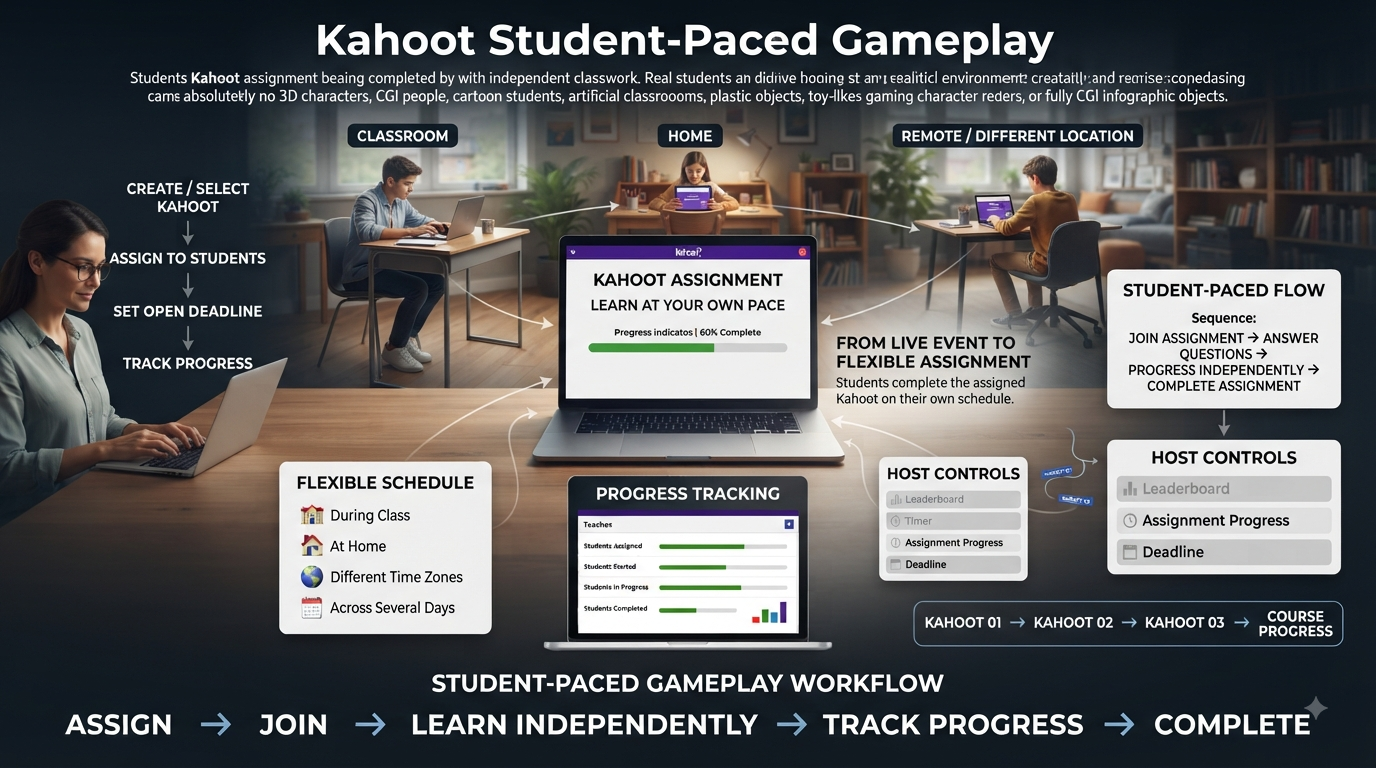
Kahoot Student-Paced Gameplay | Not every question set needs a live room full of players and a host counting down a lobby. Kahoot student-paced gameplay strips away the real-time requirement entirely, letting a kahoot be assigned once and completed by each participant on their own schedule — during class, at home, across time zones, or over several days rather than a single scheduled session. It’s the format that turns a Kahoot from a live event into something closer to a flexible, self-directed assignment.
This guide covers Kahoot student-paced gameplay in full depth: how assignments work mechanically, how students join and progress through them, what a host can and can’t control around leaderboards and timers, how progress gets tracked over an open deadline window, and how the format extends into multi-kahoot courses. It stays focused entirely on this asynchronous, learner-paced structure — the live, host-controlled formats covered elsewhere in this series work under a fundamentally different set of rules.
Looking for comprehensive classroom resources and educational technology insights? Explore GimkitApp for expert guides, teaching strategies, game modes, and the latest updates to enhance student engagement.
What Is Kahoot Student-Paced Gameplay?
Kahoot student-paced gameplay refers to the platform’s assignment-based format, where a kahoot is shared once and completed by each participant independently, at their own pace, rather than everyone progressing through the same questions together in real time. There’s no live host running the session, no shared countdown synchronizing the group, and no requirement that participants even be online at the same moment as each other.
This is often described in Kahoot’s own materials as a “learner-paced” experience, distinguishing it clearly from the live, synchronized gameplay found in every other experience covered elsewhere in this series. A student working through a student-paced assignment sees questions and answer choices on their own device, moves forward individually, and finishes entirely independent of what any other participant is doing at that same moment.
💡 Pro Tip: Think of student-paced gameplay less as “a version of Kahoot” and more as Kahoot functioning as a standalone homework or self-study tool. Once that framing clicks, decisions like whether to use a timer or how to handle a missed deadline become much more intuitive, since they mirror decisions already familiar from assigning any other kind of homework.
How Student-Paced Gameplay Differs From Live Sessions
The defining structural difference in Kahoot student-paced gameplay is the complete absence of real-time synchronization. In a live session, every participant answers the same question at roughly the same moment, with a host controlling or a system automatically advancing the group forward together. In a student-paced assignment, none of that coordination exists — one student might complete the entire kahoot in five minutes while another works through it in short bursts spread across several days, and both experiences are equally valid within the format.
This also means there’s no real-time host presence required at all once an assignment has been created and shared. The host’s role shifts from actively running a session to setting up the assignment correctly upfront and then reviewing results after the fact, rather than actively managing anything while students are actually working through the questions.
⭐ Expert Insight: This shift in the host’s role — from live facilitator to upfront designer and after-the-fact reviewer — is worth planning around deliberately. Because there’s no opportunity to clarify a confusing question in real time the way a live host could, question wording and instructions need to be more self-explanatory in a student-paced assignment than they might need to be in a live session where the host can address confusion on the spot.
How to Assign a Kahoot for Student-Paced Gameplay
Setting up a Kahoot student-paced assignment follows a distinct flow from hosting any live experience:
Locate the kahoot you want to assign, either from your own library or after finding a suitable public set through Discover.
Choose Assign rather than Host live — in the web platform this typically appears as a separate option from the standard hosting flow, and in the mobile app it’s accessed through Play, then Assign challenge.
Set a deadline for when the assignment should close, after which the PIN and link stop accepting new submissions.
Adjust assignment-specific settings as needed, including whether the question timer should be active during the assignment.
Generate the shareable assignment, which produces a link, a PIN, and a QR code that can be distributed through whatever channel fits the classroom or organization — email, a learning management system, a messaging platform, or a printed handout.
Share the assignment with participants through the chosen distribution method.
Monitor progress over time from the Reports section rather than a live host screen, checking in periodically until the deadline passes.
📌 Quick Note: Assignment PINs remain valid for the entire open window up until the set deadline, unlike a live game’s PIN, which only functions for the duration of a single active session. This means the same PIN can be shared once and reused by students returning to the assignment across multiple days.
Ways Students Can Join a Student-Paced Assignment
Kahoot student-paced gameplay supports several join methods, all of which lead to the identical learner-paced experience regardless of which one a student uses. Participants can go to kahoot.it or open the Kahoot app directly and manually enter the assignment PIN along with a nickname or identifier. They can also click a shared link distributed by the host — a common approach when assignments are posted inside a learning management system or shared via email. A QR code offers a third option, letting a participant scan it with a device camera to open the assignment immediately without typing anything.
For hosts building assignments into an existing website or portal, an assigned kahoot can also be embedded directly onto a web page, letting learners start the assignment without navigating away from that page at all.
✅ Best Practice: Match the join method to how your students already access other coursework. A class already accustomed to clicking assignment links inside a learning management system will have a smoother experience with a shared link than with a manually typed PIN, while a QR code tends to work best for in-person settings like a classroom poster or a printed worksheet.
Timer Settings in Student-Paced Gameplay
One of the more consequential settings available specifically within Kahoot student-paced gameplay is the ability to turn off the question timer entirely. Because there’s no live group to keep synchronized, removing the timer doesn’t disrupt anyone else’s pacing the way it might in a live session — it simply gives each individual student unlimited time to consider a question before answering.
This option exists specifically to shift the assignment’s focus toward accuracy and genuine understanding rather than any element of guesswork introduced by time pressure. For homework-style use cases in particular, where the goal is usually reinforcing content rather than testing quick recall, disabling the timer tends to produce more meaningful results and a calmer experience for students working independently, often without a teacher present to help manage any stress a countdown might introduce.
⚠ Common Mistake: Leaving the default timer active on an assignment meant purely for reinforcement or practice. Since there’s no competitive live element to preserve, an active countdown in a student-paced assignment often does nothing but add unnecessary pressure to what’s meant to be a low-stakes, self-directed learning task.
Leaderboard Visibility in Student-Paced Gameplay
Unlike several of Kahoot’s live formats, where scoreboards and podiums can be hidden or customized by the host, leaderboards in Kahoot student-paced gameplay currently cannot be hidden at all. This is a fixed limitation of the assignment format rather than a setting a host can toggle off, and it’s worth planning around directly for any assignment where peer visibility of results might be a concern.
Two practical workarounds exist for hosts who want to reduce how identifiable a given student’s results are to their peers within this format. A friendly nickname generator can be used instead of requiring students to enter their real names, obscuring identity on the visible leaderboard. Alternatively, a player identifier system can be used, which similarly reduces direct peer visibility into whose specific results appear where, without eliminating the leaderboard mechanism itself.
📌 Quick Note: Because leaderboard visibility can’t be disabled outright, any assignment involving sensitive content, struggling students, or a general classroom preference for less competitive framing benefits specifically from one of these two identity-obscuring workarounds rather than assuming the leaderboard issue can simply be turned off.
Player Identification and Combining Reports Across Multiple Assignments
For organizations and schools using Kahoot’s player identifier feature, Kahoot student-paced gameplay supports combining results from multiple separate assignments into a single unified report. This is particularly useful for tracking an individual student’s progress across a series of assignments given over the course of a unit or semester, rather than reviewing each assignment’s results in complete isolation.
Sending an assignment via email specifically, using the player identifier system, requires the host to hold a specific subscription tier — this isn’t available universally across every account type, so it’s worth confirming access to this particular distribution method before planning an assignment workflow around it.
Monitoring Progress and Sending Reminders
Kahoot student-paced gameplay includes built-in progress monitoring accessible from the Reports section of the host’s account, specifically under the Assigned kahoots tab. From there, a host can see exactly who has started, who has completed the assignment, and who hasn’t yet engaged with it at all, well before the deadline actually arrives.
For participants who appear not to have started, hosts can send a direct reminder from within the report page itself, rather than needing to track down and contact stragglers through a separate channel entirely. This built-in nudge feature is one of the more practical advantages of the assignment format over simply sharing a live game link and hoping everyone completes it independently.
✅ Best Practice: Check the Assigned kahoots report at least once roughly midway through the assignment window, rather than waiting until close to the deadline. A mid-window check gives enough runway to send reminders and still have meaningful time left before the deadline, rather than discovering low completion rates only when it’s too late to meaningfully act on them.
Resuming an Assignment
Kahoot student-paced gameplay is built to accommodate participants working across multiple sessions rather than requiring a single sitting to complete an assignment. When player identifier or email access is used specifically, learners can resume an in-progress assignment through a dedicated learning area without needing to log back in through the standard flow each time.
One firm limitation worth knowing: a participant cannot rejoin an assignment using the same nickname if their original session was interrupted, even if their prior result has since been removed from the report entirely. This means a student who needs to restart from scratch for any reason will need to select a new nickname rather than reusing their original one.
Assigning Full Courses for Extended Student-Paced Learning
Kahoot student-paced gameplay extends beyond single kahoots into full courses — sequences combining multiple kahoots, videos, and documents into one larger learning experience assigned and completed at the learner’s own pace. When assigning a course, a host can choose to release the entire course at once, letting learners access every module from the start and progress through all of them within a single open assignment window, or release modules individually over time in a structured drip-learning sequence.
For large-scale assignments, particularly courses approaching or exceeding roughly a thousand participants, the underlying reporting system automatically splits into multiple linked reports behind a single shared assignment link to maintain performance — a technical detail worth knowing so an additional report appearing partway through a large assignment doesn’t get mistaken for a duplicate or an error.
🔍 Did You Know? Course-based student-paced assignments support automated reminders that can be toggled on or off during setup, extending the same reminder functionality available for single kahoot assignments across an entire multi-module course without requiring a host to manually track and nudge participants through each individual module.
Kahootopia and Class Islands for Student-Paced Assignments
Kahoot’s Kahootopia system offers an alternative way to deliver student-paced gameplay, framed around collaborative class islands rather than a standalone assignment link. A kahoot assigned to a class island appears there as a gift box marked with a timer icon before students complete it, giving the assignment a visual presence within a shared, ongoing classroom space rather than existing only as an isolated link shared once and then forgotten.
This island-based approach to student-paced gameplay carries the same core mechanics as a standard web-platform assignment — students complete questions independently, at their own pace, up until a due date — but wraps that experience in a persistent, motivational structure tied to rewards and progress specific to the island itself. Once a due date passes, students who haven’t submitted lose the ability to do so, mirroring the deadline behavior of standard assignments.
📌 Quick Note: Kahootopia-based assignments allow students to replay a completed kahoot afterward purely for additional practice, but it’s worth knowing that the first submission is generally the one counted for official reporting purposes — later replays function as reinforcement rather than a way to improve a recorded score.
Turning Student-Paced Assignments Into a Regular Classroom Routine
Because Kahoot student-paced gameplay doesn’t require live coordination, it lends itself naturally to becoming a recurring, low-friction part of a broader teaching routine rather than a one-off activity. A short, untimed student-paced kahoot assigned at the end of each week, for instance, can function as a lightweight formative check that requires no class time at all to administer, with results reviewed independently by the teacher before the next class session begins.
This kind of routine use benefits significantly from reusing the same question set structure or format week over week, since students quickly learn what to expect and spend less mental effort adjusting to a new format each time, focusing instead on the actual content being reviewed. Building a small library of similarly structured student-paced assignments — consistent question counts, consistent settings, consistent distribution method — reduces setup friction for the host as much as it reduces cognitive load for students.
✅ Best Practice: If building student-paced gameplay into a recurring routine, standardize the settings (timer on or off, join method, deadline length) across every instance rather than varying them assignment to assignment. Consistency here removes an entire category of confusion for both the host managing setup and the students completing the work.
Combining Student-Paced Gameplay With In-Class Instruction
Student-paced gameplay doesn’t have to exist entirely separate from classroom time — a common and effective pattern combines it directly with in-person or live instruction rather than treating it as a purely take-home tool. Assigning a short, student-paced kahoot as the very first activity of a class period, worked through individually on personal devices as students arrive and settle in, can function as an efficient warm-up that doesn’t require the full class to be present or synchronized before it begins.
Similarly, ending a class period with a student-paced assignment due before the next session gives every student a personalized on-ramp into the following day’s material, regardless of how quickly or slowly each individual works through it. This blended approach captures much of the flexibility that makes student-paced gameplay valuable, while still keeping it tightly connected to the broader arc of classroom instruction rather than existing as a disconnected, purely independent task.
⭐ Expert Insight: The most effective use of student-paced gameplay in a classroom setting often isn’t as a full replacement for live sessions, but as a complement to them — using the independent, self-paced format specifically for the parts of instruction that benefit from individual timing, while reserving live sessions for the moments that genuinely benefit from shared, synchronized energy.
Ideal Use Cases for Kahoot Student-Paced Gameplay
Kahoot student-paced gameplay is particularly well suited to a specific set of situations where live, synchronized play isn’t practical or desirable:
Homework and take-home review, letting students reinforce material outside class time entirely on their own schedule.
Remote or asynchronous learning environments, where participants genuinely aren’t online at the same time and a live session isn’t realistically possible.
Low-connectivity situations, since each participant works independently rather than depending on a stable shared connection throughout a synchronized live session.
Differentiated pacing needs, allowing students who need more time on certain questions to take it without holding back the rest of a group the way a live session would require.
Makeup work for absent students, letting someone who missed a live session complete equivalent content independently rather than being excluded from the activity entirely.
⭐ Expert Insight: Student-paced gameplay works especially well as a low-stakes formative checkpoint between live sessions — assigning a short, untimed review kahoot a day or two before a bigger live game gives a host early visibility into where the group’s understanding actually stands, informing exactly what to emphasize once the live session begins.
For the latest gaming news, expert reviews, and walkthroughs, readers can also visit IGN, one of the world’s leading gaming websites.
Situations Where Student-Paced Gameplay May Not Fit
The independence that defines Kahoot student-paced gameplay works against it in situations that specifically benefit from shared, synchronized energy. An icebreaker meant to build group excitement, a session where real-time host guidance is genuinely needed to clarify confusing content, or any activity where the social experience of playing together matters as much as the content itself calls for a live format instead, where participants progress and react together in the same moment.
⚠ Common Mistake: Assigning content as a student-paced task purely out of convenience when a live, synchronized session would actually serve the pedagogical goal better. The flexibility of self-paced assignment shouldn’t come at the cost of genuine group engagement when that engagement is actually the point of the activity.
Common Mistakes When Using Student-Paced Gameplay
Leaving the timer active without a clear reason. Since there’s no live group to keep paced together, an active countdown on a student-paced assignment often just adds unnecessary pressure without any corresponding benefit.
Assuming the leaderboard can be hidden the way it can in some live formats. Because this isn’t currently possible in student-paced gameplay, hosts working with sensitive content or peer-visibility concerns need to plan around a nickname generator or player identifier from the start, not as an afterthought.
Not checking the Assigned kahoots report until right before the deadline. Waiting too long to review progress removes the opportunity to meaningfully use the reminder feature before it’s effectively too late to matter.
Forgetting that a student can’t rejoin with their original nickname after an interruption. A participant who needs to restart may show up under an unfamiliar new nickname in the report, which can look confusing if a host isn’t expecting it.
Frequently Asked Questions
What’s the main difference between Kahoot student-paced gameplay and a live game?
Student-paced gameplay lets each participant complete a kahoot independently, at their own speed, without a real-time host or a shared countdown synchronizing the group. A live game requires everyone to progress through questions together at the same time, while student-paced assignments can be started and finished whenever fits each individual’s schedule, up until a set deadline.
Can I turn off the timer for a student-paced assignment?
Yes. Kahoot student-paced gameplay specifically allows the question timer to be disabled, giving participants unlimited time to answer each question. This is commonly used for homework-style assignments where the goal is accuracy and understanding rather than any element of speed or time pressure.
Is it possible to hide the leaderboard in a student-paced assignment?
No, not directly. Leaderboards currently cannot be hidden in Kahoot’s assignment format. Hosts concerned about peer visibility into results can use a friendly nickname generator or a player identifier system instead, both of which reduce how identifiable individual results are without removing the leaderboard mechanism itself.
How do I check whether students have completed a student-paced assignment?
Progress can be monitored from the Reports section of your account, specifically under the Assigned kahoots tab. This view shows who has started, who has completed the assignment, and who hasn’t engaged with it yet, and it includes a built-in option to send a direct reminder to anyone who hasn’t started.
Can a student resume a student-paced assignment after starting it on a different device?
In some cases, yes. When player identifier or email access is being used, learners can resume an in-progress assignment through a dedicated learning area without logging back in through the standard flow. Without that setup, resuming generally requires returning through the same original join method used to start the assignment.
Professional Recommendations & Expert Reviews
Kahoot Student-Paced Gameplay gives learners greater control over the pace at which they move through an interactive activity.
Kahoot Student-Paced Gameplay can create a more flexible experience than activities that require everyone to answer simultaneously.
Kahoot Student-Paced Gameplay allows students to spend additional time considering questions when needed.
Kahoot Student-Paced Gameplay can support learners who benefit from a less rushed classroom environment.
Kahoot Student-Paced Gameplay encourages students to take greater responsibility for their progress.
Kahoot Student-Paced Gameplay can make independent review easier to organize.
Kahoot Student-Paced Gameplay supports practice sessions where students work through material at different speeds.
Kahoot Student-Paced Gameplay gives teachers another option for flexible classroom instruction.
Kahoot Student-Paced Gameplay can help reduce pressure caused by strict response timing.
Kahoot Student-Paced Gameplay encourages students to focus more carefully on the content of each question.
Kahoot Student-Paced Gameplay can be useful when students have different levels of familiarity with a topic.
Kahoot Student-Paced Gameplay allows learners to review concepts without always having to match the pace of classmates.
Kahoot Student-Paced Gameplay can provide teachers with a practical format for individual practice.
Kahoot Student-Paced Gameplay encourages students to think about their answers before submitting them.
Kahoot Student-Paced Gameplay can make revision sessions more comfortable for learners who need additional processing time.
Kahoot Student-Paced Gameplay supports differentiated learning by accommodating variations in working speed.
Kahoot Student-Paced Gameplay can help teachers assign review activities without requiring constant whole-class coordination.
Kahoot Student-Paced Gameplay encourages students to become more aware of their own learning progress.
Kahoot Student-Paced Gameplay can support homework or independent practice when appropriate.
Kahoot Student-Paced Gameplay gives educators flexibility when planning activities outside a live classroom session.
Kahoot Student-Paced Gameplay can help students revisit material after direct instruction.
Kahoot Student-Paced Gameplay supports repeated practice when learners need additional exposure to important concepts.
Kahoot Student-Paced Gameplay encourages teachers to choose question sets that match the intended learning objective.
Kahoot Student-Paced Gameplay can be particularly useful for formative practice before an assessment.
Kahoot Student-Paced Gameplay helps students identify topics they understand confidently and areas that require more review.
Kahoot Student-Paced Gameplay encourages learners to take ownership of mistakes and use them as learning opportunities.
Kahoot Student-Paced Gameplay can support reflection because students have more control over how they approach the activity.
Kahoot Student-Paced Gameplay helps teachers provide flexible opportunities for knowledge retrieval.
Kahoot Student-Paced Gameplay can reduce the emphasis on competing against classmates.
Kahoot Student-Paced Gameplay encourages students to focus on personal improvement.
Kahoot Student-Paced Gameplay supports learners who may feel uncomfortable with highly competitive activities.
Kahoot Student-Paced Gameplay can create a calmer alternative for certain review situations.
Kahoot Student-Paced Gameplay allows educators to incorporate interactive practice without making speed the central factor.
Kahoot Student-Paced Gameplay can help teachers support students with different learning needs.
Kahoot Student-Paced Gameplay encourages careful reading and thoughtful decision-making.
Kahoot Student-Paced Gameplay can improve the quality of practice when students are encouraged to understand why answers are correct.
Kahoot Student-Paced Gameplay supports independent revision across different subjects.
Kahoot Student-Paced Gameplay can help teachers extend learning beyond a single classroom period.
Kahoot Student-Paced Gameplay encourages students to manage their time while completing educational activities.
Kahoot Student-Paced Gameplay can help learners develop greater confidence in working independently.
Kahoot Student-Paced Gameplay supports flexible lesson planning when classroom time is limited.
Kahoot Student-Paced Gameplay gives educators another way to reinforce concepts without repeating the entire lesson.
Kahoot Student-Paced Gameplay can provide useful evidence of individual understanding when results are reviewed appropriately.
Kahoot Student-Paced Gameplay encourages teachers to use performance information to guide future instruction.
Kahoot Student-Paced Gameplay supports continuous learning by allowing students to practice beyond traditional lesson structures.
Kahoot Student-Paced Gameplay can complement teacher-led instruction, group activities, and other forms of classroom practice.
Kahoot Student-Paced Gameplay demonstrates that interactive learning does not always need to depend on simultaneous competition.
Kahoot Student-Paced Gameplay shows how giving learners greater control can support autonomy, concentration, and more comfortable knowledge practice.
Kahoot Student-Paced Gameplay becomes most effective when teachers select appropriate content, provide clear expectations, and use the resulting performance information to support learning rather than simply measure completion.
Summary
Kahoot student-paced gameplay reshapes the platform around independence rather than real-time coordination — assignments that open once and stay accessible until a deadline, multiple flexible join methods, an optional timer that can be removed entirely, built-in progress tracking with reminder capability, and support for extending the same model across full multi-kahoot courses. For homework, remote learning, differentiated pacing, or any situation where a live, synchronized session simply isn’t the right tool, this format gives hosts a genuinely flexible alternative that still produces the same kind of trackable, reportable results Kahoot’s live experiences are known for.