Kahoot Lecture Hosting Experience | Every experience covered so far in this series shares one trait: the game moves forward on its own, question by question, at a pace largely outside the host’s direct control. The Kahoot lecture hosting experience breaks from that pattern entirely. Here, nothing advances until the person standing at the front of the room decides it should — no countdown pushing students to rush, no automatic transition cutting off a good discussion mid-sentence. It’s Kahoot rebuilt specifically for the rhythm of actual teaching rather than the rhythm of a game.
This guide covers the Kahoot lecture hosting experience in complete depth — how host-controlled pacing works, what happens to scoring and the podium by default, how slide syncing and advanced question types fit into a real lesson, and the specific settings that make this format genuinely different from Kahoot’s faster, game-first experiences. It stays entirely within this one format’s boundaries; its closest sibling experience, built for business and professional presentations rather than education, is substantial enough to deserve its own separate treatment elsewhere.
Looking for comprehensive classroom resources and educational technology insights? Explore GimkitApp for expert guides, teaching strategies, game modes, and the latest updates to enhance student engagement.
What Is the Kahoot Lecture Hosting Experience?
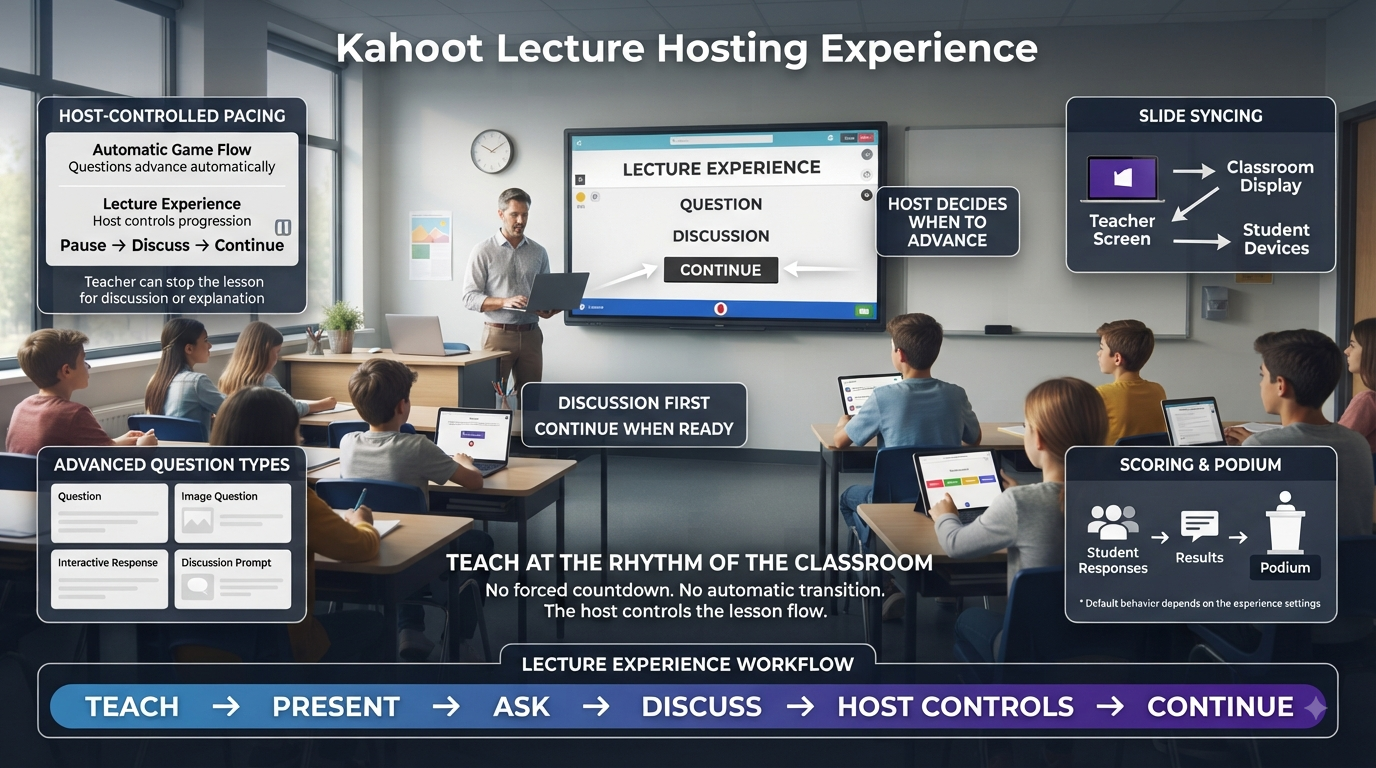
The Kahoot lecture hosting experience is a host-paced format built specifically for classroom teaching, professional development sessions, and any educational setting where the person presenting needs full control over timing rather than letting a countdown timer dictate the flow. Rather than questions and slides advancing automatically, the host decides exactly when to move forward, making this experience function more like a structured, interactive lecture than a competitive game.
This single structural difference — host control instead of automatic pacing — is what defines the entire format. Where other experiences are built around players racing against a shared timer, the Kahoot lecture hosting experience removes that dynamic entirely, freeing an educator to pause on a difficult concept, let a discussion breathe, or move quickly through material the class already understands, all within the same session.
💡 Pro Tip: Think of Lecture hosting experience less as “a slower version of a Kahoot game” and more as a presentation tool that happens to include Kahoot’s interactive question types. That framing shift helps clarify when to reach for this format instead of a faster-paced, game-first experience.
How Host-Controlled Pacing Actually Works
In the Kahoot lecture hosting experience, the host controls when the next question or slide appears using a Next button positioned on the right side of the host screen. Clicking Next before each question lets the presenter smoothly guide the pace of a session in step with an ongoing conversation, rather than being forced to keep up with a countdown running independently in the background.
Navigation isn’t limited to clicking through the interface manually. The same forward progression can be controlled using a keyboard’s next arrow key or the space bar, or through a physical presentation clicker — the same kind commonly used to advance slides in a standard lecture-hall presentation. This flexibility matters in a real classroom, where a host is often moving around the room rather than standing at a keyboard the entire time.
⭐ Expert Insight: Using a physical clicker with Lecture hosting experience closes much of the gap between this format and a traditional lecture presentation tool, letting an educator walk the room, gesture, and engage directly with students while still controlling exactly when the next question or slide appears — something that’s awkward or impossible in faster, self-paced Kahoot formats.
Scoreboards and the Podium: Hidden by Default
A defining feature of the Kahoot lecture hosting experience is that scoreboards are hidden by default throughout the session. Unlike faster-paced formats where a leaderboard reappears after every question, Lecture hosting experience keeps the focus squarely on the material and the conversation happening around it, deliberately avoiding the distraction of a shifting competitive ranking popping up between questions.
This same philosophy extends to the end of a session. The host decides whether to show a final podium at all, rather than one appearing automatically the way it does in more competitive formats. If shown, the podium can be revealed with a single click, giving the host full discretion over whether celebrating a competitive outcome fits the tone of that particular session.
📌 Quick Note: Because both the scoreboard and the podium are opt-in rather than automatic in Lecture hosting experience, a host who wants to include a small competitive element — say, revealing final standings at the very end of a longer PD session — still can, without that competitive framing intruding on the material throughout the rest of the presentation.
Slide Syncing With Google Slides and PowerPoint
The Kahoot lecture hosting experience includes a slide sync function that connects directly with Google Slides and PowerPoint presentations, letting an educator combine their existing slide deck with Kahoot’s interactive question types inside a single, unified session. Content is imported once, and the sync function keeps the presentation aligned with the source file, meaning last-minute edits to the original slides carry through without requiring the entire Kahoot session to be rebuilt from scratch.
This integration is particularly valuable for educators who already have a substantial library of lecture material built in a standard slide format and don’t want to recreate that content natively inside Kahoot just to add interactivity. Instead, the existing deck stays the primary content vehicle, with Kahoot-native questions inserted at the points where the educator wants live feedback or assessment.
✅ Best Practice: Use slide sync to keep collaboration simple across a teaching team. Because the Kahoot session pulls from the original Google Slides or PowerPoint file rather than a separate copy, multiple educators working from a shared deck can update the source material once and have every linked Lecture hosting experience session reflect the latest version automatically.
Advanced Question Types and Formative Assessment
Lecture hosting experience supports advanced question types specifically suited to assessing prior knowledge and gauging real-time understanding, rather than only the fast, simple question formats built for quick competitive rounds. This makes the format particularly well suited to formative assessment — checking where a class currently stands on a topic before diving deeper, or gauging comprehension partway through a longer explanation before moving on.
Because points and the scoreboard can be hidden throughout the format, a host running formative assessment through Lecture hosting experience can genuinely separate the act of gathering honest feedback from any sense of competitive scoring — students respond to gauge their own or the class’s understanding, not to chase a leaderboard position, which tends to produce more honest, exploratory answers on genuinely difficult material.
🔍 Did You Know? Lecture hosting experience is specifically positioned as flexible enough to open a new topic with a knowledge-check question before any content has been taught at all, using student responses to shape how deeply or quickly the educator moves through the material that follows — a use case that has no real equivalent in Kahoot’s faster, competitive formats.
For the latest gaming news, expert reviews, and walkthroughs, readers can also visit IGN, one of the world’s leading gaming websites.
Accessibility and Inclusivity Features Within Lecture Hosting Experience
The Kahoot lecture hosting experience includes specific accessibility-oriented options, including fewer animations and the ability to hide the leaderboard entirely at the end of a session. These options exist to create a more inclusive and accessible learning environment, reducing visual distraction and competitive framing for students who benefit from a calmer, more predictable presentation style.
Combined with the host’s full control over pacing, these accessibility features make Lecture hosting experience a particularly strong option for classrooms with a wide range of learning needs, where a fast-moving, animation-heavy, competitively scored format might create unnecessary barriers to genuine participation.
How to Host a Kahoot in Lecture Experience
Running a session in the Kahoot lecture hosting experience follows this sequence:
Log in to your Kahoot account and locate the kahoot you want to host, either from your Library tab or the Discover page.
Click on the kahoot to open its details page.
Click the Host live button, then select Lecture experience from the carousel of options at the bottom of the screen.
Click Start to generate the session and let participants join.
Advance through content deliberately, using the Next button, keyboard controls, or a clicker to move to each subsequent question or slide only when you’re ready.
Choose whether to reveal the scoreboard at any point during the session, since it stays hidden by default throughout.
Decide whether to show the final podium once the session concludes, revealing it with a single click if desired, or skipping it entirely to keep the focus on discussion.
⚠ Common Mistake: Assuming Lecture hosting experience is available to every account type by default. Availability depends specifically on account type and plan level — some plans include full access, while others offer only a trial version, so it’s worth confirming access ahead of a session rather than discovering a limitation live in front of a class.
Live Q&A Within a Lecture Hosting Session
Lecture hosting experience supports a Live Q&A feature that gives an audience a way to submit questions directly from their own devices throughout a session, without interrupting the presentation’s natural flow. Rather than pausing to take verbal questions at set intervals, participants can submit questions whenever something comes to mind, and the host decides when and how to address them.
This feature is especially useful in longer lecture or training sessions, where verbally interrupting a presenter to ask a question can feel disruptive, but a written question submitted quietly through a device doesn’t carry the same social friction. It gives quieter students, in particular, a lower-pressure way to participate than raising a hand in front of the full group.
Ideal Use Cases for the Kahoot Lecture Hosting Experience
The Kahoot lecture hosting experience is purpose-built for a specific category of teaching and presenting situations:
Introducing new, complex topics, where the host needs to control pacing carefully and pause for explanation rather than racing through material against a timer.
Professional development and training sessions for colleagues, where a more measured, discussion-oriented format fits the tone better than a fast-paced competitive game.
Sharing research or long-form presentations, where Kahoot’s interactivity adds engagement without turning a formal presentation into a game show.
Formative assessment embedded directly into ongoing instruction, using advanced question types to check understanding at the exact moments that matter within a lesson, rather than only at the very end.
Classrooms needing calmer, more accessible pacing, where hidden scoreboards, optional podiums, and reduced animation genuinely improve access rather than just changing the aesthetic.
✅ Best Practice: Build a Lecture hosting experience session around natural pause points in your existing lesson plan — right after introducing a new concept, or right before transitioning to a new subtopic — rather than spacing questions evenly throughout. Because pacing is entirely host-controlled, there’s no benefit to artificially even spacing the way there might be in a timed, self-running format.
Structuring a Lesson Around Lecture Hosting Experience
Because pacing in the Kahoot lecture hosting experience is entirely host-controlled, the format rewards a genuinely different kind of preparation than a fast-paced game does. Rather than writing a flat sequence of questions meant to be answered in quick succession, effective use of this experience means thinking in terms of a lesson’s actual structure — where does a knowledge check belong before new material is introduced, where does a discussion question fit naturally after a key concept, and where might a quick poll help gauge the room before moving into a harder section.
This shift in preparation mindset is worth planning deliberately rather than treating Lecture hosting experience as simply “the slow version” of a faster format built from the same kind of flat question list. A session built around natural teaching transitions — question, explanation, discussion, next question — tends to feel far more coherent to participants than one where interactive questions feel bolted onto an otherwise unrelated presentation flow.
💡 Pro Tip: When converting an existing lecture into a Lecture hosting experience session, work backward from your slide deck’s natural section breaks rather than forward from a fixed question count. Placing one well-chosen question at each major transition point tends to produce a more effective session than scattering many questions evenly throughout regardless of where the actual content naturally pauses.
Managing Longer Sessions and Multi-Part Lectures
Lecture hosting experience is well suited to sessions considerably longer than a typical five-to-ten-minute Kahoot game, including full class periods, extended training workshops, or multi-part professional development series. Because nothing in the format forces a fixed pace or a fixed session length, a host can comfortably spend significant time on a single difficult question, circle back to revisit an earlier point once new context has been introduced, or split a longer lecture across multiple linked sessions without losing the interactive thread connecting them.
This flexibility does introduce a planning consideration worth taking seriously: because there’s no automatic pacing mechanism keeping a session on schedule, a host needs to track time deliberately rather than relying on the platform to naturally end things within an expected window. A Lecture hosting experience session with too many planned discussion points can run considerably longer than intended if a host doesn’t monitor the clock independently.
⚠ Common Mistake: Treating a Lecture hosting experience session’s length as self-regulating the way a timed, self-paced format’s is. Without a built-in pacing mechanism, an extended discussion on one early question can easily consume time meant for several later ones, so keeping a rough internal schedule — even an informal one — helps avoid running out of class time before reaching planned material.
Comparing Lecture Hosting Experience to a Traditional Slide Presentation
It’s worth being explicit about what Lecture hosting experience adds on top of a traditional, non-interactive slide presentation, since the value isn’t simply “the same lecture, but on Kahoot.” A standard presentation offers no built-in way to check whether the audience actually absorbed a point before moving forward — a presenter has to rely on visible engagement cues, or simply trust that the material landed. Lecture hosting experience closes that gap by letting genuine assessment questions sit directly inside the same flow as the informational slides, without requiring a separate tool or a disruptive pause to gather feedback through some other means.
This matters most in situations where a presenter genuinely doesn’t know, going in, how much the audience already understands. A knowledge-check question at the start of a new unit can meaningfully reshape how much time gets spent on foundational material versus more advanced content, in a way a traditional slide deck has no mechanism to support on its own.
⭐ Expert Insight: The biggest practical difference between Lecture hosting experience and a standard presentation isn’t the interactivity itself — plenty of presenters already pause for verbal questions — it’s that the responses are collected from every single participant simultaneously rather than only from whoever is willing to speak up in front of the group, giving a far more complete and honest picture of where the room actually stands.
Situations Where Lecture Hosting Experience May Not Fit
The deliberate, host-paced structure that makes Lecture hosting experience valuable for teaching complex material works against it in situations calling for fast energy and player-driven competition. A quick five-minute review game meant to build excitement before a test, or any session where the goal is letting students move through content at their own individual pace rather than the host’s, calls for a different structural approach than the one Lecture hosting experience is built around.
⚠ Common Mistake: Defaulting to Lecture hosting experience for a session that’s genuinely meant to be a fast, energetic review game. The host-controlled pacing that makes this format excellent for teaching new material can feel sluggish and mismatched when the actual goal is quick, high-energy competitive recall.
Preparing Participants for Their First Lecture Hosting Experience Session
Students and colleagues who’ve only ever encountered Kahoot through its faster, competitive formats sometimes arrive at a first Lecture hosting experience session with mismatched expectations, anticipating a quick game rather than an extended, host-paced interactive lesson. A brief explanation at the start — framing the session as an interactive lecture rather than a game, and noting that scores and rankings likely won’t appear the way they’re used to — helps set the right tone before the first question is even shown.
This matters especially for questions that are genuinely meant to surface honest uncertainty rather than test mastery. A student expecting a competitive, scored game may hesitate to answer a formative check-in question honestly if they’re still bracing for a leaderboard to appear afterward. Making the hidden-scoreboard, discussion-first nature of the format explicit up front tends to produce more genuine participation throughout the rest of the session.
📌 Quick Note: For recurring Lecture hosting experience sessions with the same group — a weekly training series, for instance — this framing conversation only needs to happen once. After the first session, participants generally adapt quickly to the format’s different rhythm and stop expecting the competitive cues associated with Kahoot’s other experiences.
Common Mistakes When Hosting Lecture Experience
Not testing the clicker or keyboard controls beforehand. A host relying on physical navigation tools for the first time during a live session risks awkward pauses fumbling with controls instead of smoothly advancing through content.
Forgetting that the scoreboard stays hidden unless manually revealed. Hosts new to this format sometimes assume a scoreboard will appear automatically the way it does in other experiences, then are caught off guard when it doesn’t show up without a deliberate choice to display it.
Overloading a single session with too many questions. Because pacing is entirely host-controlled and can move slowly by design, packing in too many questions can make a session run far longer than a scheduled class period or meeting allows.
Ignoring the slide sync feature and rebuilding existing content from scratch. Educators with an established slide deck sometimes recreate their material natively inside Kahoot unnecessarily, when syncing an existing Google Slides or PowerPoint file would save significant preparation time.
Frequently Asked Questions
How is pacing controlled in the Kahoot lecture hosting experience?
The host controls exactly when each question or slide appears using a Next button on the host screen, keyboard controls like the arrow key or space bar, or a physical presentation clicker. Nothing advances automatically, which lets a host pause for explanation, discussion, or questions at any point without a countdown timer forcing the session forward.
Does Lecture hosting experience show a scoreboard during the session?
No, not by default. Scoreboards are hidden throughout a Lecture hosting experience session unless the host specifically chooses to display them, keeping the focus on the material and discussion rather than a shifting competitive ranking appearing after each question.
Can I use my existing PowerPoint or Google Slides presentation with Lecture hosting experience?
Yes. A built-in slide sync function connects directly with both Google Slides and PowerPoint, letting an educator combine an existing presentation with Kahoot’s interactive question types in one session. Because the sync pulls from the original file, later edits to that source presentation carry through automatically.
Is Lecture hosting experience available on every Kahoot plan?
Availability depends on account type and plan level. It’s included in Kahoot’s education-focused K-12 and higher-education plans, though some plans only offer a trial version rather than full ongoing access, so it’s worth checking plan-specific availability directly through Kahoot’s pricing pages before relying on it for a real session.
Will there be a final podium at the end of a Lecture hosting experience session?
Only if the host chooses to show one. Unlike faster, competitive formats where a podium appears automatically, Lecture hosting experience leaves that decision entirely up to the presenter, who can reveal it with a single click at the end of the session or skip it entirely to keep the focus on content rather than competition.
Professional Recommendations & Expert Reveiws
Kahoot Lecture Hosting Experience begins with preparing an interactive activity that complements the main lesson.
Kahoot Lecture Hosting Experience helps teachers introduce questions at useful points during a lecture.
Kahoot Lecture Hosting Experience can break longer explanations into shorter, more engaging learning segments.
Kahoot Lecture Hosting Experience encourages students to remain attentive throughout teacher-led instruction.
Kahoot Lecture Hosting Experience gives educators a practical way to check understanding during a lecture.
Kahoot Lecture Hosting Experience allows teachers to identify whether students are following important concepts.
Kahoot Lecture Hosting Experience can turn passive listening into active participation.
Kahoot Lecture Hosting Experience helps students process information by responding to questions about recently discussed material.
Kahoot Lecture Hosting Experience encourages teachers to connect questions directly with the central ideas of a lecture.
Kahoot Lecture Hosting Experience supports quick knowledge checks without completely interrupting the lesson structure.
Kahoot Lecture Hosting Experience can be useful when introducing a new topic and checking students’ initial understanding.
Kahoot Lecture Hosting Experience helps teachers discover misconceptions before continuing to more advanced material.
Kahoot Lecture Hosting Experience encourages educators to use questions as checkpoints throughout instruction.
Kahoot Lecture Hosting Experience can make large-group teaching more interactive.
Kahoot Lecture Hosting Experience gives students an opportunity to demonstrate understanding even when the class is relatively quiet.
Kahoot Lecture Hosting Experience supports greater engagement during information-heavy lessons.
Kahoot Lecture Hosting Experience encourages teachers to keep activities short when the primary goal remains lecture-based instruction.
Kahoot Lecture Hosting Experience helps educators avoid overwhelming students with too many interactive interruptions.
Kahoot Lecture Hosting Experience works best when every question has a clear instructional purpose.
Kahoot Lecture Hosting Experience allows teachers to reinforce important facts immediately after explaining them.
Kahoot Lecture Hosting Experience can help students recall information while it is still fresh in their minds.
Kahoot Lecture Hosting Experience encourages learners to pay closer attention because they know their understanding may be checked.
Kahoot Lecture Hosting Experience can create natural pauses where teachers explain difficult answers in greater detail.
Kahoot Lecture Hosting Experience supports formative assessment without requiring a separate formal test.
Kahoot Lecture Hosting Experience helps teachers use student responses to decide whether to continue, clarify, or revisit a topic.
Kahoot Lecture Hosting Experience encourages educators to prepare questions before the lecture begins.
Kahoot Lecture Hosting Experience can improve lesson organization when questions are placed at intentional transition points.
Kahoot Lecture Hosting Experience helps create a rhythm between explanation, participation, feedback, and further instruction.
Kahoot Lecture Hosting Experience supports stronger retention by giving students multiple opportunities to retrieve important information.
Kahoot Lecture Hosting Experience can make revision within a lecture feel more active and purposeful.
Kahoot Lecture Hosting Experience encourages teachers to use a mixture of straightforward and thought-provoking questions.
Kahoot Lecture Hosting Experience helps educators determine whether students are memorizing information or actually understanding the underlying concept.
Kahoot Lecture Hosting Experience can encourage students to reflect on their answers when explanations follow each question.
Kahoot Lecture Hosting Experience supports discussion when several students select different responses to the same question.
Kahoot Lecture Hosting Experience gives teachers an opportunity to address misconceptions before they become established.
Kahoot Lecture Hosting Experience can be especially useful near the end of a lecture for reviewing its main points.
Kahoot Lecture Hosting Experience encourages students to connect individual questions with the broader lesson.
Kahoot Lecture Hosting Experience supports more active participation without requiring every student to speak aloud.
Kahoot Lecture Hosting Experience can make traditional presentations feel more responsive to student understanding.
Kahoot Lecture Hosting Experience helps teachers recognize when students need additional examples or explanations.
Kahoot Lecture Hosting Experience encourages educators to treat incorrect responses as useful instructional signals.
Kahoot Lecture Hosting Experience can provide a smooth transition from lecture content into review or discussion.
Kahoot Lecture Hosting Experience supports better preparation when teachers align questions with specific learning outcomes.
Kahoot Lecture Hosting Experience helps educators avoid questions that test information unrelated to the lesson.
Kahoot Lecture Hosting Experience can strengthen student involvement during subjects that traditionally rely heavily on lectures.
Kahoot Lecture Hosting Experience supports continuous refinement as educators learn where questions work best within their lessons.
Kahoot Lecture Hosting Experience helps combine traditional teaching with interactive assessment in a balanced way.
Kahoot Lecture Hosting Experience demonstrates that interactive questions can make lecture-based instruction more responsive without replacing explanation or teacher expertise.
Kahoot Lecture Hosting Experience shows that successful hosting depends on thoughtful timing, relevant questions, clear instructions, useful feedback, and a strong connection between gameplay and the lesson objective.
Summary
The Kahoot lecture hosting experience takes the platform’s interactive question mechanics and rebuilds the pacing entirely around the person teaching, rather than a countdown timer. Host-controlled navigation, scoreboards and podiums hidden by default, slide sync with existing presentation tools, advanced question types for genuine formative assessment, and dedicated accessibility features all combine to make this format fit for actual instruction — introducing new material, running professional development, or sharing longer research presentations — in a way that Kahoot’s faster, competitive formats simply aren’t designed to support.