How Long Do Gimkit Join Codes Stay Active? If you’ve ever typed a Gimkit code into the join page and gotten stuck — either it won’t let you in, or you’re wondering how much time you have left to share it with your class — you’re really asking two different questions at once: how long is this code good for, and why isn’t it working right now. This guide answers both, in full, using how Gimkit’s join system actually behaves.
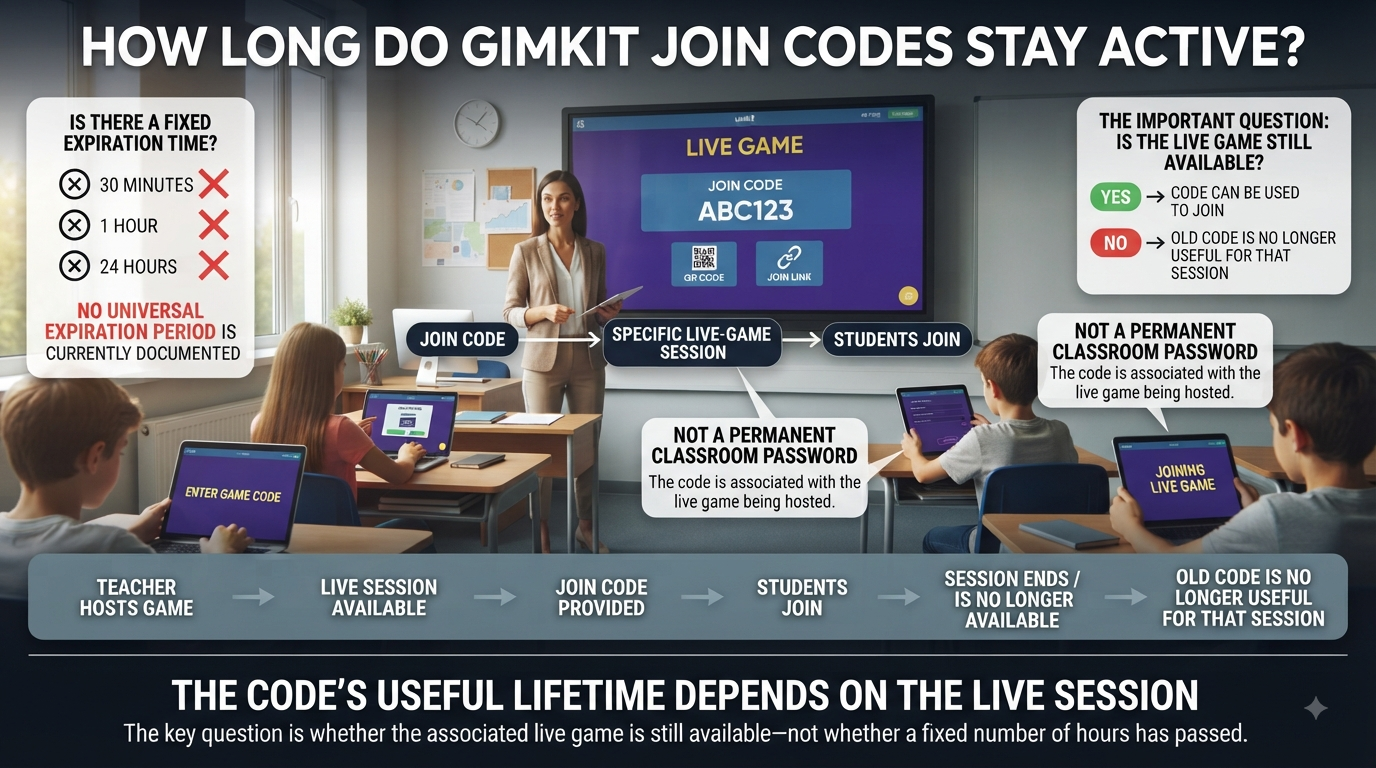
Short answer: Gimkit does not run a fixed countdown clock on join codes. There’s no official “expires after 30 minutes” or “expires after 24 hours” rule. A code’s lifespan is tied entirely to the session it belongs to — once that session ends, the code stops working, no matter how much or how little time has passed.
The rest of this guide unpacks exactly what that means in practice, for both the two situations where Gimkit codes come up: live, teacher-hosted games and self-paced Assignments.
Looking for comprehensive classroom resources and educational technology insights? Explore GimkitApp for expert guides, teaching strategies, game modes, and the latest updates to enhance student engagement.
A Gimkit Code Is an Identifier for a Session
The easiest way to understand Gimkit join-code duration is to stop treating the code as the actual game.
Imagine a teacher opens a live game. Gimkit creates a particular session for that activity and provides information students can use to access it. The short join code is one way of identifying that session.
The important relationship is:
Join code → specific live session → current session status → participation availability
The code itself does not contain the game. It points participants toward the session that exists behind it.
This explains why saving a code does not make the game permanent.
If a teacher writes a code on a whiteboard, takes a screenshot, or sends it to students in a message, those actions preserve only the text of the code. They do not preserve the live session indefinitely.
Once the associated session is finished or otherwise closed to new participants, the old code does not magically become a reusable key for a future game.
This is also why a teacher starting another live session should not assume that students can continue using the previous session’s code.
What Actually Determines How Long a Gimkit Code Works?
There is no single number of minutes that can be applied to every live-game code.
Instead, several conditions determine whether the code remains useful.
1. The associated live session must still exist
A code connected to an active session can continue to identify that session. If the session has ended, the code no longer provides access to that finished game.
2. The session must still accept participants
A live game can exist without necessarily accepting additional players. The host’s participation settings can therefore affect whether a student can enter even when the game itself has already started.
3. The host’s current game matters
If the teacher has moved from one live session to another, students should use the information associated with the current session rather than relying on an older code.
4. The type of Gimkit activity matters
A live game and a self-paced Assignment are not governed by exactly the same access model. A live-game code is connected to a particular session, while an Assignment has its own availability conditions.
5. The session’s lifecycle matters more than the code’s age
A code being ten minutes old does not automatically make it invalid.
Likewise, a code being only two minutes old does not guarantee that it will work.
The important question is what has happened to the session during that period.
Is There a Fixed Gimkit Join-Code Expiration Time?
This is where many online explanations become unnecessarily confusing.
There is not a universal rule such as “every Gimkit join code expires after 10 minutes, 30 minutes, one hour, or 24 hours.”
A live-game code should instead be viewed in relation to the session that generated it.
That means the following assumptions are unreliable:
“The code is old, so it must have expired.”
Not necessarily.
“The code is new, so it must still work.”
Not necessarily.
“Every code lasts exactly one hour.”
There is no basis for treating that as a universal rule.
The age of the characters is not the same thing as the current availability of the session.
This distinction is particularly important when teachers leave a lobby open before students arrive. The fact that the code was generated earlier does not, by itself, mean that the code has reached an automatic expiration deadline.
Why Code Age and Code Availability Are Different
Consider two hypothetical situations.
Example A: An older but active code
A teacher creates a live game and leaves the lobby available while students prepare their devices.
Thirty minutes pass.
The session is still open and participation is still permitted.
The code is older than it was when first displayed, but its age alone does not make it unusable.
Example B: A newer but unavailable code
A teacher creates a live game and begins playing.
A student receives the code shortly afterward but tries to enter after the host has closed the session or stopped accepting new participants.
The code may be only a few minutes old, yet it may no longer provide access.
These examples demonstrate the more useful rule:
Time elapsed is not the same thing as session availability.
That is why asking “How many minutes does a Gimkit code last?” can be misleading without explaining what kind of session is involved and what state it is currently in.
The Lifecycle of a Gimkit Live-Game Code
Instead of thinking about expiration as a countdown, it is more useful to think about a code moving through different session states.
Stage 1: Code Created
The teacher launches the process for hosting a live game.
A session is established and the information students need to enter it becomes available.
At this point, the code represents a newly created live-game session.
Stage 2: Lobby Available
The game has not yet transitioned into active gameplay, and students are being allowed to enter.
This is the clearest situation in which the code is functioning as an active invitation to the live session.
The important point is that the code remains useful because the session behind it is available.
Stage 3: Gameplay Begins
The teacher starts the game.
The code does not necessarily become meaningless at this exact moment.
Whether additional students can enter depends on the host’s settings and the rules governing late participation.
This is one of the most common reasons students misunderstand code expiration.
They see the game has started and assume:
“The code expired.”
But starting gameplay and code expiration are not necessarily the same event.
Stage 4: Gameplay Continues
The session is still running.
Existing players are participating, while the possibility of additional participation depends on the host’s configuration.
At this stage, the code remains associated with the same live session. The critical variable is whether the session is still accepting the relevant type of entry.
Stage 5: Session Ends
Eventually, the live session is finished.
At this point, the important relationship changes:
Active session → completed session
The code no longer functions as an invitation into an ongoing game because there is no longer an active game session behind it in the same sense.
This is the point where keeping an old code becomes practically useless.
Does Starting a Gimkit Game Make the Code Expire?
Not automatically.
Starting a game and ending access are two different concepts.
A live game can move from a waiting lobby into active gameplay without the underlying session immediately disappearing.
The factor students need to understand is late participation.
If the host permits students to join after gameplay has started, the existing session can continue accepting them.
If the host has disabled that possibility, a student who arrives after the game begins may be unable to enter.
From the student’s perspective, both situations can look like:
“The code stopped working.”
Technically, however, the explanation can be different.
The code may still identify the session while the session is simply not accepting additional players.
That distinction prevents a lot of unnecessary code replacement.
Join in Late Is Not the Same as Code Expiration
The Join in Late setting deserves special attention because it is one of the biggest sources of confusion surrounding Gimkit codes.
Imagine that a teacher displays a code.
A student writes it down.
The game begins.
Five minutes later, another student enters the code and cannot join.
It is tempting to conclude:
“The code expired.”
But that conclusion can be wrong.
The more useful question is:
“Is the game still accepting late participants?”
If late participation has been disabled, the problem is not necessarily that the characters of the code have expired. Rather, the session is no longer accepting that new entry.
This difference matters because replacing the code may not solve anything.
The teacher could display a completely different code, but if the underlying session is configured not to accept late players, the real issue remains the participation setting.
For the latest gaming news, expert reviews, and walkthroughs, readers can also visit IGN, one of the world’s leading gaming websites.
Can a Gimkit Code Stay Active for a Long Time?
Potentially, a live-game code can remain relevant as long as the associated session remains available and participation conditions allow it.
There should not be a simplistic assumption that every code has a hidden universal countdown.
However, that does not mean a live-game code should be treated as permanently reusable.
There is an important difference between:
“It does not have a universal fixed expiration timer.”
and:
“It never expires.”
The second statement is misleading.
A code is tied to a particular session. When that session is no longer available, the code cannot be treated as an active invitation to that game.
Therefore:
No universal fixed lifetime does not mean permanent access.
An older code does not automatically mean an expired code.
A recent code does not guarantee that its session is still accepting participants.
A saved code does not preserve the session.
A new game should be treated as a new session with its own access information.
What Happens When a Teacher Ends the Game?
Ending the live session is fundamentally different from simply waiting in the lobby.
While the session remains available, the code can continue to identify that session.
Once the session is finished, there is no longer an active game waiting behind the code for students to enter.
This creates an important distinction:
Situation
What the Code Represents
Lobby is active
An available live-game session
Gameplay is underway
The current live-game session
Late entry permitted
The session may still accept additional players
Late entry restricted
The session exists, but new participation may be blocked
Game has ended
The previous live session is finished
Teacher creates another game
A different live session is created
The final two rows are especially important.
Starting another game does not turn an old code into the code for the new game.
Can the Same Gimkit Code Be Used for Another Game?
Students should not expect an old live-game code to become the access code for a completely new session.
A live-game code is associated with the session for which it was generated.
If a teacher finishes one game and launches another, students should use the access information associated with the new session.
This is why keeping a screenshot of a previous code is not a reliable classroom strategy.
A screenshot preserves the characters.
It does not preserve:
the previous lobby,
the previous game state,
the previous player roster,
the previous session,
or the previous host activity.
In other words:
Saving the code is not saving the game.
What If a Teacher Runs Several Games in One Class?
This is one of the most practical situations where students become confused.
Suppose a teacher runs three rounds during a single class period.
Round One
The teacher launches the first live session.
Students receive Code A.
The first round ends.
Round Two
The teacher starts another live session.
Students receive Code B.
Round Three
A final live session is created.
Students receive Code C.
A student who continues using Code A may assume Gimkit is malfunctioning because they successfully used it earlier.
But the problem is that the student is referencing the wrong session.
This is why the current session matters more than the fact that a code worked earlier in the same classroom.
Why Old Codes Create So Much Confusion
A code looks like ordinary text.
That makes it easy to copy, memorize, photograph, or save.
But its meaning is dynamic.
For example:
123456
looks like a permanent piece of information.
But conceptually, it is closer to:
123456 → this particular live session
If that session is finished, the text remains visible in your notes, but its original purpose is gone.
This is why a code can be:
correct in appearance,
correctly typed,
previously valid,
and still no longer useful.
The characters did not necessarily become “wrong.”
The context behind them changed.
Does a Screenshot Preserve a Gimkit Join Code?
A screenshot preserves the code visually, but it does not preserve the active session.
This distinction is simple but important.
A screenshot can preserve:
the characters of the code,
the appearance of the join screen,
other information visible at the time.
A screenshot cannot preserve:
an active live session,
the teacher’s current game,
permission to enter a finished game,
a future session,
or the original game’s availability.
Therefore, a screenshot is useful as a temporary reference, but it should not be treated as a permanent access credential.
Does Writing a Code Down Make It Last Longer?
No.
Writing a code in a notebook, copying it into a messaging app, saving it in browser notes, or putting it into a document does not extend its lifetime.
The code’s availability is controlled by the session behind it.
Think of it this way:
Recording the address does not keep the building open.
This is why students should not depend on old classroom notes when a teacher is starting a fresh live activity.
What If the Code Worked Earlier but Doesn’t Work Now?
That situation does not automatically mean that Gimkit has changed the code.
Several things could have happened between the two attempts.
The most important possibility is that the session changed state.
For example:
Earlier:
Live session available → code usable
Later:
Game ended → previous code no longer provides access
Or:
Earlier:
Live session → late participation permitted
Later:
Live session → late participation restricted
The visible symptom can be identical:
“The code doesn’t work.”
But the underlying reason is different.
This is why the first question should be about the current state of the session, not merely whether the characters were entered correctly.
Live Game Codes vs Gimkit Assignments
Another major source of confusion is treating every Gimkit access method as though it follows the same lifecycle.
It does not.
A live game is built around a real-time session.
An Assignment is designed for students to complete work within an availability period established by the teacher.
These are different concepts.
Live Game
A live game generally revolves around:
a host,
an active session,
a lobby,
real-time participation,
gameplay,
and a session ending.
The access code is therefore closely connected to the live session.
Assignment
An Assignment is not dependent on students all entering the same live lobby at the same moment.
Its availability can instead depend on:
the teacher’s assignment configuration,
the availability period,
the due date,
and the student’s access through the relevant class or assignment pathway.
This means that asking:
“When does my Gimkit Assignment code expire?”
requires a different answer from asking:
“When does my live-game join code stop working?”
The two should not be merged into one generic “Gimkit code expiration” rule.
Why Assignment Availability Should Not Be Used to Explain Live Codes
Suppose a student has a homework-style Gimkit activity available until Friday.
That does not mean a live-game code should also remain active until Friday.
The Assignment’s availability is part of the teacher’s assignment setup.
A live game has a session lifecycle.
These are fundamentally different mechanisms.
A useful mental model is:
Live Game = session-based access
Assignment = availability-based access
That distinction makes many Gimkit code questions much easier to answer accurately.
What Happens to a Code When the Session Is No Longer Available?
Once the associated live session is no longer available for participation, the code should no longer be treated as an active entry route.
The characters may still exist in:
a screenshot,
a notebook,
a browser history entry,
a classroom slide,
a text message,
or a student’s memory.
But the session they referred to is no longer available in the same way.
This is why the phrase “expired code” can sometimes be technically imprecise.
In everyday conversation, people naturally say:
“The code expired.”
What they often really mean is:
“The session associated with this code is no longer available for me to enter.”
That wording gives a much clearer picture of what is happening.
Does Waiting Too Long Automatically Kill the Code?
Not simply because time has passed.
This is one of the most important points in the entire topic.
A code does not become meaningless merely because someone waited a certain number of minutes.
The relevant factors are the session’s current condition and the host’s participation rules.
So:
Waiting ≠ automatic expiration
Instead:
Session state + participation settings = practical availability
This is why there is no useful universal answer such as:
“Gimkit codes last exactly 30 minutes.”
That type of statement reduces a session-based system to a countdown that may not actually describe how the access works.
What About a Code From Yesterday?
A code from yesterday should not be assumed to be usable simply because it is written correctly.
The more important issue is that it was associated with a previous live session.
If that session has already finished, the old code should not be expected to reopen yesterday’s game.
This is different from saying that the characters have become invalid because 24 hours have passed.
The better explanation is:
The original live session is no longer the current active session.
Therefore, students should use the access information provided for the teacher’s current activity.
What About a Code From Earlier Today?
The same principle applies.
A code from ten minutes ago and a code from yesterday can both be outdated if they refer to sessions that are no longer current.
Meanwhile, an older code may remain relevant if the corresponding session is still available.
So the date or clock time alone is not a reliable test.
A better hierarchy is:
Which session does the code belong to?
Is that session still active?
Is the session accepting the participant?
Is this the current game the teacher intends students to enter?
That sequence is more useful than simply checking how old the code is.
How Teachers Should Think About Code Duration
For teachers, the simplest operational rule is:
Treat each live-game code as belonging to the current session, not as a reusable classroom code.
This prevents several common problems.
When launching a game
Share the code associated with the session currently being hosted.
When changing games
Expect the new live session to have its own access information.
When running multiple rounds
Make it obvious when students need to switch from the previous session to the new one.
When finishing class
Do not assume an old code will remain useful for another lesson.
This approach avoids students arriving the next day with a screenshot of a code from a completely different session and wondering why it no longer works.
How Students Should Interpret an Old Code
Students can use a simple rule:
An old code is a reference, not a guarantee of access.
If the teacher is currently displaying a different code, use the current one.
If the teacher says the previous game is over, do not expect the previous code to reopen it.
If a teacher says the same live session is still running, the code may still be relevant depending on the session’s participation settings.
The key is to connect the code to the current activity, rather than treating it as an independent password.
Can a Student Reuse the Current Code After Disconnecting?
This is a different situation from trying to reuse an old code after a game has ended.
If a student’s connection is interrupted while the original live session is still active, the student is dealing with a reconnection situation, not a new-game situation.
The important distinction is:
Reconnecting to an active session
The original session still exists.
Returning to an ended session
The original session is no longer available as an ongoing game.
These should not be confused.
A temporary loss of connection does not mean that a teacher has created a new game.
Therefore, a current session and an old completed session should be treated very differently.
A Simple Code-Lifecycle Example
Imagine a teacher creates a live game at 9:00 AM.
9:00 AM — Session created
The teacher displays the code.
The session is available.
9:05 AM — Students are entering
The same code continues to identify the session.
9:10 AM — Game begins
The code remains associated with that session.
Whether new students can enter depends on the host’s settings.
9:20 AM — Gameplay continues
The session remains active.
The code has not become a different code merely because 20 minutes have passed.
9:30 AM — Teacher ends the game
The live session is finished.
The previous code should no longer be treated as an active doorway to that game.
9:35 AM — Teacher launches another game
A new session is created.
Students should use the access information for the new session rather than relying on the old one.
This example demonstrates why session lifecycle is a better explanation than a simple countdown timer.
Common Misunderstandings About Gimkit Code Duration
Myth 1: Every code expires after 10 minutes
There is no sound basis for treating 10 minutes as a universal expiration period.
The important issue is the state of the associated live session.
Myth 2: Every code expires after one hour
Again, a one-hour lifetime should not be presented as a universal rule for live-game codes.
Session availability matters more than an arbitrary clock limit.
Myth 3: Starting the game automatically kills the code
Not necessarily.
The game can continue as an active session after gameplay begins. Participation by new students depends on the applicable host settings.
Myth 4: A screenshot keeps the code alive
It does not.
A screenshot preserves text, not the live session behind the text.
Myth 5: A code from yesterday can be reused today
An old code should not be assumed to work for today’s game. A new live session is a different session.
Myth 6: If the code is typed correctly, entry must work
Correct characters do not guarantee that the associated session is currently accepting the participant.
Myth 7: Assignment access and live-game access expire in the same way
They do not follow the same basic lifecycle.
Live games revolve around active sessions; Assignments depend on their own availability configuration.
The Difference Between an Expired Code and a Closed Door
The phrase “expired code” makes it sound as though the code itself has an internal clock.
A better conceptual model is a door.
The code identifies the door.
The session determines whether that door currently leads somewhere available.
If the lobby is active, the door can be open.
If participation is restricted, the door may be closed to new entrants.
If the session has ended, there is no longer an active game behind that door.
This analogy is more accurate because it separates the identifier from the availability state.
Why Teachers Should Avoid Treating Live Codes Like Permanent Links
A permanent classroom resource and a temporary live-game session serve different purposes.
A teacher may want students to access:
a recurring resource,
a homework activity,
a reference page,
or a self-paced assignment.
Those situations can call for a persistent access method.
A live game, however, exists for a particular interactive event.
That event has:
a beginning,
an active period,
and an ending.
Therefore, its join information should be treated as session-specific.
This is also why a teacher should not build an entire semester’s classroom workflow around one old live-game code.
What Teachers Should Tell Students About Code Duration
A simple classroom explanation can prevent most confusion:
“Use the code for the live game I am currently hosting. If I start a new game, I will give you the new code.”
That is more useful than telling students:
“This code expires in exactly X minutes.”
The first explanation teaches students how the system actually works.
The second can create a false expectation that the code is controlled by a universal countdown.
Teachers can also clarify whether students who arrive late are allowed to enter, because late-entry settings can affect how students interpret an otherwise correct code.
What Students Should Remember
Students do not need to memorize complicated technical rules.
Five principles cover most situations:
A live-game code belongs to a specific session.
Its age alone does not determine whether it works.
The session must still be available for participation.
Starting a game does not automatically mean the code has expired.
A new live game should be treated as a new session with new access information.
These rules are enough to avoid most of the confusion surrounding Gimkit code duration.
Gimkit Join Code Duration: Quick Reference
Question
Best Explanation
Do Gimkit live-game codes have one universal expiration time?
No fixed universal lifetime should be assumed.
Does an older code automatically become invalid?
No. Session status matters more than age alone.
Does starting the game automatically invalidate the code?
No. The session can continue after gameplay begins.
Can late students still enter?
That depends on whether late participation is allowed.
What happens when the game ends?
The old live session is no longer available as an ongoing game.
Can an old code become the code for a new game?
No. A new session should be treated separately.
Does a screenshot preserve the game?
No. It only preserves the characters shown in the screenshot.
Can a student reconnect to an active session?
This is different from trying to reuse a completed session’s old code.
Do Assignments follow the same access model?
No. Assignment availability is governed separately.
Is “expired code” always the most precise explanation?
Not necessarily. The session may simply no longer be available or accepting new participants.
Frequently Asked Questions About Gimkit Join Code Duration
How long do Gimkit Join codes stay active?
There is no single universal number of minutes or hours that accurately describes every live-game join code. A live code is associated with a particular game session, so its practical availability depends on whether that session is still active and accepting participants.
The important distinction is between code age and session status. A code does not become unusable merely because a certain number of minutes have passed.
Do Gimkit join codes expire after 10 minutes?
You should not treat 10 minutes as a universal expiration period for Gimkit live-game codes. A code’s availability is connected to the session it identifies rather than a simple ten-minute countdown.
If a code stops working after a short period, the reason should be investigated through the current state of the live session rather than assuming that exactly ten minutes have elapsed.
Do Gimkit codes expire after one hour?
There is no universal one-hour rule that should be applied to all live-game codes.
The better way to determine whether a code remains useful is to consider whether the original live session is still active and whether participation is still allowed.
Does a Gimkit code expire when the game starts?
Not automatically.
Starting gameplay changes the state of the session, but it does not necessarily mean that the session itself has ended. Whether another student can enter after the game starts depends on the host’s late-participation settings.
Therefore, “the game started” and “the code expired” should not be treated as identical events.
Why does my old Gimkit code no longer work?
An old code may no longer be useful because the live session associated with it has ended, the session is no longer accepting new participants, or the teacher has moved on to a different live session.
The age of the code alone does not explain every failure.
The key question is whether the code still corresponds to the session the teacher is currently running.
Can I use yesterday’s Gimkit code today?
You should not assume that you can.
A live-game code belongs to a particular session. If yesterday’s game has finished, keeping yesterday’s code does not recreate that session.
When a teacher starts a new live game, students should use the access information associated with that new session.
Can I save a Gimkit code and use it later?
You can save the characters for reference, but saving them does not guarantee future access.
A screenshot, note, or message preserves the code as text. It does not preserve the live session that the code originally identified.
Therefore, an old saved code should never be treated as a permanent live-game access key.
Does a Gimkit code stop working as soon as the teacher ends the game?
Ending the associated live session is the important event because the code is tied to that session.
Once the game has been concluded, the old code should not be expected to provide access to that completed live activity.
If the teacher later creates another game, that should be treated as a separate session.
Can the same Gimkit code be used for multiple games?
A live-game code should be understood as identifying a particular session, not as a permanent classroom code that automatically transfers from one game to another.
When a teacher starts a new live session, students should use the access information provided for that current session.
Does Join in Late affect how long a Gimkit code works?
It can affect whether a student can actually enter a live session after gameplay has started.
This is important because a student may see a code that is still associated with an active game but be unable to enter because late participation is not currently permitted.
That situation is better described as a participation restriction than as proof that the code itself has reached a universal expiration time.
Why can a code be correct but still not let me into the game?
The code identifies the session, but successful participation also depends on the state and settings of that session.
A correct code may therefore be insufficient if the relevant game is no longer active or is not accepting additional participants.
This is why code correctness and session availability should be considered separately.
Does refreshing the page change the expiration of a Gimkit code?
Refreshing a student’s browser does not create a new live-game session for the teacher.
The important factor remains the status of the original session. If the student is trying to return to an active session, refreshing is fundamentally different from trying to access a game that the teacher has already ended.
Do Gimkit Assignment codes expire like live-game codes?
Not necessarily, because Assignments and live games operate through different access models.
A live game revolves around a particular real-time session. An Assignment is associated with teacher-defined availability and completion conditions.
Therefore, the expiration rules for an Assignment should be considered separately from the lifecycle of a live-game join code.
Can a teacher keep a Gimkit live-game code active all day?
The useful question is not simply whether the code has been displayed all day.
What matters is whether the associated live session remains active and available for participation during that period.
A teacher should therefore treat the code as belonging to the current live session rather than assuming that it is a permanent classroom identifier.
What is the easiest way to know whether a Gimkit code is still current?
The most reliable classroom reference is the current session information provided by the host.
If the teacher has launched a new game, students should use the information associated with that new session rather than relying on an earlier code.
This eliminates confusion caused by old screenshots, notes, or messages.
Final Takeaway: Think Session, Not Stopwatch
The most important thing to understand about How Long Do Gimkit Join Codes Stay Active? is that a live-game code should not be reduced to a simple countdown.
A Gimkit join code is associated with a particular live session. Its practical usefulness depends on whether that session remains active and whether the session is currently allowing the relevant participants to enter.
That explains why:
an older code can still be relevant while its session remains available,
a newer code can stop being useful when its session ends,
starting gameplay does not automatically mean the session has ended,
late-entry settings can affect participation,
saved screenshots do not preserve live sessions,
old codes do not become access codes for newly created games,
and Assignments should be evaluated through their own availability model rather than through live-game assumptions.
So if someone asks, “How long does a Gimkit join code last?”, the strongest answer is not simply a number.
It is:
A live Gimkit join code is tied to its particular game session. Its availability depends on the state of that session and its participation settings, not on a universal expiration countdown.
That session-based perspective gives students a clearer understanding of what a code actually represents and helps teachers avoid treating temporary live-game access information as though it were a permanent classroom credential.
Professional Recommendations & Expert Reviews
How Long Do Gimkit Join Codes Stay Active depends mainly on the live game session they are connected to rather than on a universal fixed expiration timer.
How Long Do Gimkit Join Codes Stay Active is best understood by looking at the status of the specific game that generated the code.
How Long Do Gimkit Join Codes Stay Active can vary because different game sessions may have different schedules and settings.
How Long Do Gimkit Join Codes Stay Active generally means asking how long students can use a particular code to access its associated session.
How Long Do Gimkit Join Codes Stay Active is not normally determined by a standard number of minutes that applies to every game.
How Long Do Gimkit Join Codes Stay Active is closely connected to whether the host’s game is still available for players to join.
How Long Do Gimkit Join Codes Stay Active can therefore change when the host ends or closes the associated session.
How Long Do Gimkit Join Codes Stay Active should not be confused with a permanent access code that works independently of a live game.
How Long Do Gimkit Join Codes Stay Active depends on the session rather than simply on the moment when the code was first displayed.
How Long Do Gimkit Join Codes Stay Active can be affected by whether the game is still accepting players.
How Long Do Gimkit Join Codes Stay Active is why an old code may stop working even when a student has saved it.
How Long Do Gimkit Join Codes Stay Active can also become relevant when students try to rejoin a session after temporarily leaving.
How Long Do Gimkit Join Codes Stay Active should be considered separately from whether a student’s browser or device is working correctly.
How Long Do Gimkit Join Codes Stay Active is not necessarily the explanation when one student cannot join but others can.
How Long Do Gimkit Join Codes Stay Active can be checked by first confirming that the host’s game is still active.
How Long Do Gimkit Join Codes Stay Active becomes easier to troubleshoot when the host confirms the current session before sharing an older code.
How Long Do Gimkit Join Codes Stay Active can vary between separate sessions even when the same teacher creates both games.
How Long Do Gimkit Join Codes Stay Active means students should normally use the code provided for the current session rather than relying on a previous one.
How Long Do Gimkit Join Codes Stay Active is especially important in classrooms where several games may be hosted during the same lesson.
How Long Do Gimkit Join Codes Stay Active can cause confusion when students accidentally enter a code from an earlier activity.
How Long Do Gimkit Join Codes Stay Active should therefore be considered whenever a student reports that a previously working code no longer works.
How Long Do Gimkit Join Codes Stay Active is not the same as asking how long a student account remains active.
How Long Do Gimkit Join Codes Stay Active concerns access to a particular game session rather than the overall lifetime of an account.
How Long Do Gimkit Join Codes Stay Active can also differ from the amount of time a teacher plans to spend teaching the lesson.
How Long Do Gimkit Join Codes Stay Active depends on the lifecycle of the relevant game session.
How Long Do Gimkit Join Codes Stay Active means that starting a game does not automatically make the code invalid at that exact moment.
How Long Do Gimkit Join Codes Stay Active can allow students to join according to the host’s current game state and settings.
How Long Do Gimkit Join Codes Stay Active is why students should pay attention to the teacher’s instructions about when to join.
How Long Do Gimkit Join Codes Stay Active becomes less confusing when teachers clearly identify which code belongs to the current activity.
How Long Do Gimkit Join Codes Stay Active can be affected when the host transitions away from the current session.
How Long Do Gimkit Join Codes Stay Active should not be interpreted as a guarantee that every code remains usable for the same length of time.
How Long Do Gimkit Join Codes Stay Active can depend on the type of session and how that session is managed.
How Long Do Gimkit Join Codes Stay Active is why there is no single universal duration that should be applied to every classroom situation.
How Long Do Gimkit Join Codes Stay Active can be understood more accurately by thinking of the code as an entry key associated with a particular session.
How Long Do Gimkit Join Codes Stay Active also explains why a code from yesterday’s activity should not be expected to work for today’s new game.
How Long Do Gimkit Join Codes Stay Active can become important when teachers schedule multiple activities throughout the day.
How Long Do Gimkit Join Codes Stay Active is easier to manage when a new code is shared whenever a new session requires one.
How Long Do Gimkit Join Codes Stay Active can also matter when students return after a temporary connection problem.
How Long Do Gimkit Join Codes Stay Active does not automatically mean that a student must receive a new code every time they experience a technical problem.
How Long Do Gimkit Join Codes Stay Active should be checked against the current game status before troubleshooting the student’s device.
How Long Do Gimkit Join Codes Stay Active can be misunderstood when a student assumes that the code itself has an independent expiration clock.
How Long Do Gimkit Join Codes Stay Active is better explained by connecting the code to the availability of its game session.
How Long Do Gimkit Join Codes Stay Active can also depend on whether the host has ended the activity or moved on to another session.
How Long Do Gimkit Join Codes Stay Active matters when teachers want students to join at different points during an activity.
How Long Do Gimkit Join Codes Stay Active should be considered alongside the host’s joining and session settings.
How Long Do Gimkit Join Codes Stay Active can help explain why a code may work for one group of students but fail later after the session changes.
How Long Do Gimkit Join Codes Stay Active is therefore more closely tied to game availability than to a fixed expiration period.
How Long Do Gimkit Join Codes Stay Active can be managed efficiently by keeping the current code visible while students are joining.
How Long Do Gimkit Join Codes Stay Active becomes less problematic when teachers avoid repeatedly sharing outdated codes.
How Long Do Gimkit Join Codes Stay Active can also be affected by confusion between a live game code and other forms of access or invitation.
How Long Do Gimkit Join Codes Stay Active should be answered by identifying what type of code and game session the student is using.
How Long Do Gimkit Join Codes Stay Active is therefore a session-specific question rather than one with a single universal answer.
How Long Do Gimkit Join Codes Stay Active can be important for teachers planning lessons because students need reliable instructions for joining at the right time.
How Long Do Gimkit Join Codes Stay Active can also matter when a teacher pauses between classroom activities and later returns to the same session.
How Long Do Gimkit Join Codes Stay Active should always be considered alongside whether the game is still open and accepting participation.
How Long Do Gimkit Join Codes Stay Active is not determined simply by how old the code looks or how long it has been written on a board.
How Long Do Gimkit Join Codes Stay Active depends on the status of the associated game rather than the appearance of the code itself.
How Long Do Gimkit Join Codes Stay Active can therefore be answered most accurately by checking the live session instead of relying on a fixed time estimate.
How Long Do Gimkit Join Codes Stay Active is why a code can remain useful while its session is available but become unusable once that session is no longer accepting players.
How Long Do Gimkit Join Codes Stay Active ultimately depends on the lifecycle and availability of the associated live game rather than a universal expiration period.