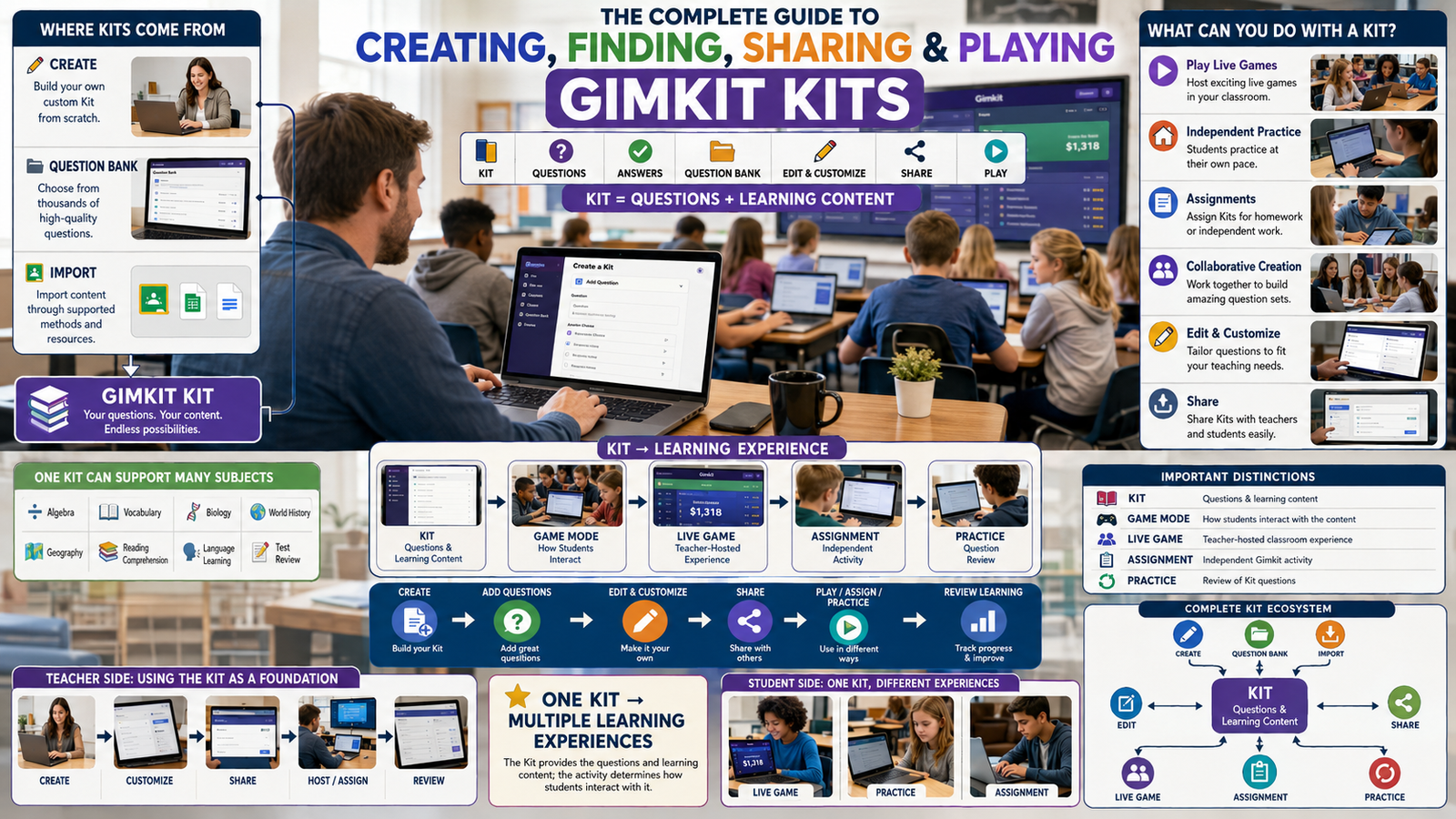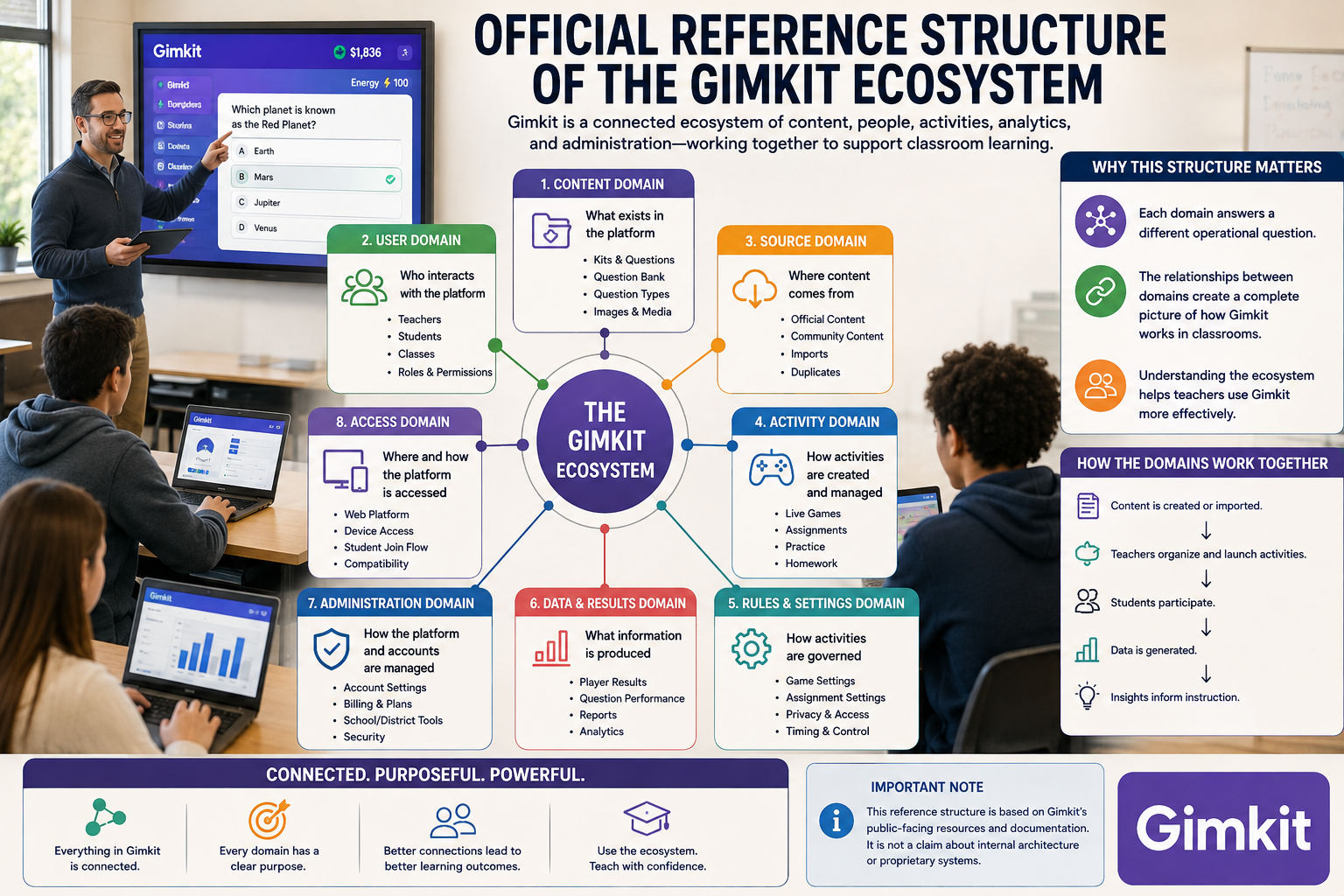
Introduction
Official Reference Structure of the Gimkit Ecosystem | Gimkit’s public-facing ecosystem is easiest to understand as a set of connected reference domains, each answering a different operational question: what exists in the platform, who interacts with it, where content comes from, how activities are governed, what information is produced, and how the platform is administered.
That distinction matters because Gimkit is not one uniform tool. Its documented resources span content, gameplay, classroom organization, student activity, analytics, account administration, and platform access. The relationships between those areas are more useful than a flat list of features.
Looking for comprehensive classroom resources and educational technology insights? Explore GimkitApp for expert guides, teaching strategies, game modes, and the latest updates to enhance student engagement.
The Ecosystem Has Several Distinct Reference Domains
| Reference domain | What it describes | Why it matters |
|---|---|---|
| Content | Educational material used inside Gimkit | Defines what students work with |
| Gameplay | Rules and interactive environments surrounding that material | Defines the experience |
| Classroom | Teacher–student organization | Defines recurring instructional relationships |
| Activity | A particular instance of student participation | Defines what is happening now |
| Evidence | Information produced by participation | Defines what can be reviewed afterward |
| Administration | Accounts, permissions, plans, and organizational control | Defines who can access and manage the system |
| Discovery | Publicly available Kits, resources, and platform information | Defines how users find material |
| Platform guidance | Official documentation and support information | Defines how Gimkit itself describes its current behavior |
This model deliberately separates the thing being used from the circumstances in which it is used.
A Kit, for example, is a content object. A classroom session is an activity. A teacher account is an administrative identity. A report is evidence generated after participation. Treating these as equivalent “features” obscures how the platform actually fits together.
A Better Way to Read Gimkit’s Structure
Instead of starting with a feature list, use five questions:
| Question | Reference area |
|---|---|
| What exists? | Platform objects and resources |
| Who controls it? | Roles, accounts, and permissions |
| Where does it operate? | Classroom and activity contexts |
| What does it produce? | Student activity and evidence |
| How is it maintained? | Content, account, and administrative management |
This creates a more durable reference framework because individual modes, settings, or interface labels can change without changing the underlying relationship between these domains.
1. Platform Objects Are Not the Same as Platform Actions
One of the easiest ways to misunderstand Gimkit is to place everything into one category.
The platform contains both objects and actions.
Objects
These are things that can persist or be managed:
- Kits
- Questions
- Classes
- Assignments
- Accounts
- Reports
- organizational groups
Actions
These are things users do with those objects:
- create
- edit
- copy
- host
- join
- assign
- complete
- review
- manage
That distinction is surprisingly important.
For example:
Kit = an object
while:
Hosting a Kit = an action
Likewise:
Class = an organizational object
while:
Adding a student to a Class = an action
A reference structure becomes much clearer when these two dimensions are not mixed together.
2. Gimkit Has a Content Identity and an Activity Identity
A second useful distinction is between content and activity.
Content can exist before students interact with it.
An activity exists because that content has been placed into a particular student-facing context.
Conceptually:
This explains why the same educational material can participate in different workflows without becoming a completely different piece of content.
The content has an identity of its own.
The activity has its own identity.
The evidence produced by that activity is yet another layer.
3. The Platform Has Multiple Ownership Boundaries
Not everything inside Gimkit belongs to the same person or serves the same ownership model.
A teacher may create educational material.
A student may generate activity data through participation.
A school may manage organizational access.
Gimkit itself controls the platform and its service infrastructure.
These relationships should not be collapsed into one generic concept of “ownership.”
| Boundary | Example relationship |
|---|---|
| Content creator | Educator creates instructional material |
| Participant | Student interacts with that material |
| Class organizer | Educator manages recurring student relationships |
| Organization | School or department manages broader access |
| Platform provider | Gimkit operates the service |
This becomes particularly important when discussing privacy, visibility, sharing, or account administration.
4. The Student Is an Actor, Not a Platform Object
From a reference perspective, students should be treated as participants in the ecosystem, not simply another stored feature.
A student can:
- enter an activity;
- answer questions;
- interact with gameplay;
- complete assigned work;
- generate performance evidence;
- participate through different access arrangements.
The platform’s educational workflow therefore revolves around an interaction:
teacher-designed environment ↔ student participation
That relationship is more informative than simply saying that Gimkit “has student accounts.”
5. The Educator Has a Different System Role
The educator occupies several positions simultaneously.
An educator can act as:
- content creator;
- activity organizer;
- classroom manager;
- host;
- assignment creator;
- reviewer of results;
- administrator of their own account.
This makes the educator role broader than simply “the person who starts the game.”
The ecosystem can therefore be viewed through two primary human actors:
| Actor | Main relationship |
|---|---|
| Educator | Designs and manages learning activity |
| Student | Experiences and responds to learning activity |
Additional organizational roles can sit above or around those relationships when Gimkit is used at institutional scale.
6. Gimkit’s Organizational Layer Sits Above Individual Classroom Activity
A classroom activity is relatively small.
An institution can contain many educators, classes, students, and learning resources.
That creates a hierarchy:
This is why organizational access should not be confused with classroom membership.
A school-wide license and a teacher’s Class solve completely different problems.
One governs access to the service.
The other organizes students for instruction.Official Reference Structure of the Gimkit Ecosystem make you experienced to make successful way in gimkit ecosystem.
7. Discovery Is a Separate Dimension of the Ecosystem
Gimkit is not only a place where teachers create their own material.
The platform also contains mechanisms through which users can encounter existing content.
This introduces a discovery layer.
A useful distinction is:
| Content state | Meaning |
|---|---|
| Created | Someone has authored the material |
| Stored | The material exists in the user’s workspace |
| Discoverable | Other users may be able to find it |
| Reusable | It can serve as a starting point for another activity |
| Modified | A user has adapted the material |
| Retired | The material is no longer part of the active workflow |
These states describe the lifecycle of content visibility and use, rather than gameplay itself.
That is an important area for a reference library because content discovery and gameplay are separate concerns.
8. The Ecosystem Contains Both Persistent and Temporary Information
Not everything created during Gimkit use has the same lifespan.
Some information is intended to persist.
Other information exists primarily around a particular activity.
| More persistent | More activity-specific |
|---|---|
| Kits | Current session state |
| Classes | Current participants |
| Account settings | Live-game conditions |
| Organizational membership | Immediate gameplay events |
| Saved reports | A particular activity’s outcomes |
This distinction helps explain why a teacher can reuse a Kit while a specific classroom session eventually ends.
The resource can persist even when the activity does not.
9. Time Is an Important Part of Gimkit’s Architecture
Gimkit can be understood across three time horizons.
Before activity
The educator prepares the environment.
During activity
Students interact with it.
After activity
The resulting evidence can be reviewed.
But there is also a fourth horizon:
Across activities
The same content, class organization, and teacher workflow can be used again.
That produces:
The last step is what turns individual Gimkit activities into an ongoing classroom system.
10. Evidence Has a Different Status From Content
This distinction deserves special attention.
A question is instructional content.
A student’s response is interaction evidence.
A report is a representation of that evidence.
They are related, but they are not interchangeable.
| Layer | Example |
|---|---|
| Content | Question and possible answers |
| Interaction | Student responds |
| Raw event | Response is recorded |
| Aggregation | Performance information is organized |
| Report | Teacher-facing representation |
| Interpretation | Teacher decides what the evidence means |
This prevents an important analytical mistake:
A report should not automatically be treated as a diagnosis of learning.
It is evidence that supports professional judgment.
11. The Platform’s Data Flow Can Be Viewed Independently of Its Interface
Interface labels can change.
A more durable reference model looks like this:
This is not a claim about Gimkit’s private backend implementation.
It is a public-facing conceptual model for understanding how an educational activity moves through the platform.
That distinction is essential for an authoritative reference page: a user-facing workflow can be described from official documentation without pretending to know undocumented internal software architecture.
12. Gimkit Should Be Read as Interconnected Layers, Not a Single Feature Tree
A conventional feature tree would imply that everything sits underneath one parent in a simple hierarchy.
Gimkit is better represented as a network of relationships.
For example:
Some entities therefore participate in more than one relationship.
That is why a flat “Gimkit features” list does not adequately represent the ecosystem.
13. The Most Useful Reference Unit Is the Relationship
For this reason, a high-quality Gimkit reference should prioritize relationships such as:
| Relationship | What it explains |
|---|---|
| Educator → Content | Who creates learning material |
| Content → Activity | How material becomes usable |
| Student → Activity | Who participates |
| Class → Student | How recurring groups are organized |
| Activity → Evidence | What participation produces |
| Evidence → Review | How teachers inspect outcomes |
| Account → Access | What a user can use |
| Organization → Accounts | How institutional access is managed |
| Content → Discovery | How material becomes findable |
| Content → Reuse | How existing material can support future work |
This is where a reference library provides value beyond an ordinary feature article.
It explains not only what Gimkit contains, but how the pieces relate.
14. A Reference Page Should Distinguish Documented Facts From Interpretation
For an authoritative resource, this boundary is essential.
Documented fact
Gimkit officially explains that a particular capability exists or works in a particular way.
Conceptual interpretation
The reference author organizes those documented capabilities into a useful framework.
Undocumented assumption
A claim about Gimkit’s internal technology, algorithms, database design, or private architecture that Gimkit has not publicly confirmed.
Only the first two belong in a trustworthy public reference.
The third should not be presented as fact.
15. What “Official Reference” Should Mean Here
The word official needs careful handling.
A page on a third-party site should not imply that it is published or endorsed by Gimkit unless that relationship actually exists.
Instead, “official reference structure” can describe a page that is:
- grounded in Gimkit’s own public documentation;
- careful about current terminology;
- explicit about what is documented;
- conservative about undocumented technical claims;
- maintained as Gimkit changes.
That is much stronger than simply using the word “official” as a marketing signal.
For current feature behavior, Gimkit’s own Help Center remains the primary source of truth.
For the latest gaming news, expert reviews, and walkthroughs, readers can also visit IGN, one of the world’s leading gaming websites.
16. The Reference Architecture
The cleanest master model is:
This structure deliberately avoids turning every individual Gimkit feature into a separate explanatory section.
Instead, it identifies the major relationships that make the platform understandable.
17. The Practical Reference Checklist
When evaluating any Gimkit feature or workflow, these questions provide a reliable framework:
| Question | Why ask it? |
|---|---|
| What is it? | Establish the entity |
| Who uses it? | Establish the actor |
| What does it connect to? | Establish relationships |
| When does it matter? | Establish context |
| What does it produce? | Establish output |
| Is it persistent or activity-specific? | Establish lifecycle |
| Is it available to every account? | Establish access |
| Is it publicly documented? | Establish confidence |
| Can the information change? | Establish maintenance requirements |
This framework is particularly useful for a reference library because it prevents feature descriptions from becoming disconnected facts.
18. The Core Ecosystem Map
The entire public-facing structure can now be compressed into one reference model:
The model is intentionally conceptual rather than technical. It describes the relationships visible from the educator-facing ecosystem without claiming access to Gimkit’s private implementation.
Reference Principle
A strong understanding of Gimkit comes from knowing which layer a piece of information belongs to.
A question belongs to content.
A student belongs to a classroom relationship.
A game session belongs to activity delivery.
A response belongs to participation evidence.
A report belongs to post-activity review.
A Pro entitlement belongs to access.
A school Group belongs to organizational administration.
Once those boundaries are clear, the ecosystem becomes considerably easier to navigate—and individual Gimkit features can be understood in context rather than as isolated tools.
That is the purpose of a reference structure: not to repeat every feature explanation, but to show where each part belongs and how the parts connect.
19. Gimkit Has Two Different Kinds of Access
Access in Gimkit is not a single yes/no condition.
There is a difference between having access to Gimkit itself and having access to a particular capability.
For example, Gimkit currently distinguishes between its free Basic offering and Pro access. The official Help Center says Basic includes hosting games, Classes, and reports, while Pro expands access to additional game modes and capabilities such as Assignments.
That creates a useful reference distinction:
| Access layer | Question it answers |
|---|---|
| Account access | Can this person use Gimkit? |
| Role access | Is the account an Educator or Student? |
| Plan access | Which capabilities are available? |
| Organizational access | Is access being provided through a larger school/group arrangement? |
| Activity access | Can the person enter this particular activity? |
These layers should never be treated as interchangeable.
A person may have a Gimkit account without having every paid capability, and a student may participate in an activity without needing the same account relationship as the educator who created it. Gimkit’s current account documentation specifically says student accounts are not required for ordinary live games and assignments, while accounts are needed for Classes and for earning XP and purchasing cosmetics.
20. Authentication and Participation Are Separate Concepts
This is one of the most useful distinctions for understanding Gimkit.
Authentication asks:
“Who is this user?”
Participation asks:
“Can this person take part in this activity?”
Those questions do not always have the same answer.
Gimkit’s current documentation states that students can play live games and assignments without logging in, while student accounts become relevant for specific persistent features such as Classes and cosmetic progression.
So the conceptual model is:
That is an important distinction for educators because requiring participation does not automatically mean requiring a student account.
21. Persistent Identity Becomes More Important When the Workflow Becomes Recurring
A one-time classroom interaction can tolerate relatively lightweight access.
A recurring classroom workflow benefits from persistent identity.
This is where Classes become structurally important—not because they are simply another Gimkit feature, but because they establish an ongoing relationship between students and an educator.
The current Classes documentation says students join a Class through its link and authenticate with Google or email; depending on the teacher’s Auto-Accept setting, the student may be added automatically or require teacher approval.
That gives us:
The distinction is architectural rather than cosmetic.
22. A Class Is an Organizational Boundary
A Class should not be understood merely as a list of names.
Its more important role is to create a controlled grouping of students around an educator’s workflow.
Current Gimkit documentation identifies several consequences of that relationship, including consistent student names in live games, assignment progress tracking, multiple completion information, and saved assignment progress.
So the Class relationship can be represented as:
The Class therefore becomes a bridge between people and activities.
23. A Class Can Influence More Than One Workflow
The significance of a Class is that it can connect several parts of Gimkit rather than serving only one purpose.
| Class relationship | Practical effect |
|---|---|
| Student identity | More consistent identification |
| Live activity | Students can participate through the class relationship |
| Assignment | Progress can be organized by class |
| Repeated work | Multiple completion information can be reviewed |
| Saved progress | Students can continue certain Assignment work later |
Gimkit’s documentation specifically notes that students using Classes with Assignments can save progress and resume later.
That makes Classes a cross-workflow organizational layer.
24. Gimkit’s Activity Layer Is More Flexible Than Its Content Layer
A Kit represents educational material.
An activity determines the circumstances under which that material is experienced.
This means one content resource can participate in different instructional situations.
Conceptually:
The important idea is not the labels themselves.
It is the separation between:
what students are working with
and
how that work is delivered.
That separation is one of the foundations of the Gimkit ecosystem.
25. Game Mode Is a Delivery Logic, Not Merely a Visual Theme
A mode changes more than appearance.
Gimkit’s current hosting documentation shows that the selected mode influences the available game options and the way the resulting activity operates. The Game Options screen can include choices such as classes, nickname generation, goals, and whether students can join late, with options varying by mode.
Therefore:
Mode selection → determines the activity environment → which influences available configuration.
This is why a reference architecture should place Game Mode before Game Options, rather than treating both as unrelated settings.
26. Configuration Is Context-Dependent
There is no universal Gimkit configuration that applies identically to every activity.
The current hosting documentation explicitly notes that Game Options differ depending on the mode being played.
That gives configuration a conditional structure:
| Level | Determines |
|---|---|
| Kit | Content |
| Mode | Activity rules/environment |
| Options | Specific behavior |
| Context | Who and how students participate |
This is important because it prevents a common documentation mistake: describing a setting as if it were universally available when it may depend on the selected mode or workflow.
27. The Lobby Is a Boundary Between Configuration and Participation
The Lobby has a special structural role.
Before the game starts, configuration is still under the teacher’s control.
Once students begin joining, the activity becomes a live participant environment.
Gimkit’s current hosting documentation describes the Lobby as the place where students gather before the game begins; it also provides the host with participant visibility and, depending on the mode, controls such as choosing player or spectator participation. Students can enter using a QR code, join link, or game code.
So:
The Lobby is therefore an operational boundary, not simply a waiting screen.
28. Student Access Can Be Direct or Relationship-Based
Gimkit provides more than one conceptual route into an activity.
A student may receive access directly through an activity link or code.
Or access may be connected to an existing Class relationship.
The current hosting documentation explains that students without Classes can join using the game code, while students using Classes can join through the Class-connected workflow.
Likewise, Assignments can be shared directly by link or surfaced through connected Classes.
This gives the ecosystem two broad access patterns:
| Access model | Structure |
|---|---|
| Direct | Teacher → Activity → Student |
| Class-connected | Teacher → Class → Student → Activity |
The second model adds organizational context to the interaction.
29. Assignments Introduce a Time-Bound Layer
An Assignment adds another dimension that a basic content object does not have:
time.
The Assignment can have a due date, while its completion is determined through the goals configured when it is created. Gimkit’s current documentation explains that the cash and optional question goals are set during creation and cannot later be changed.
That creates a useful model:
The important structural difference is that an Assignment contains predefined conditions for completion.
30. An Assignment Has Both an Activity Identity and a Tracking Identity
The same Assignment can be viewed from two perspectives.
Activity perspective
What should the student do?
Tracking perspective
What is the student’s current status?
Gimkit’s current Assignment results system distinguishes statuses such as:
- Completed
- Working On It
- Has Not Started
and allows results to be filtered by Class when Classes are connected.
This means the Assignment isn’t merely a task.
It is also a tracking object.
31. Repeated Completion Creates a History Dimension
A particularly useful part of the current Assignment structure is that repeated work can create multiple recorded completion results.
Gimkit’s documentation says Classes allow teachers to see multiple completion information for each student, including how many times the student completed an Assignment and how they performed on each completion.
This creates a progression:
The significance is not merely “students can retry.”
It is that a recurring learning activity can produce a temporal performance record.
That is a different information structure from a single live-game result.
32. Practice Occupies a Different Position From Assessment-Oriented Activity
Gimkit’s current Assignment documentation describes Practice as a way for students to work through questions without the usual scoring, game mechanics, modes, or reporting.
That makes Practice conceptually distinct.
| Activity orientation | Primary purpose |
|---|---|
| Gameplay | Interactive participation |
| Assignment | Structured independent completion |
| Practice | Question-focused rehearsal |
The distinction is useful because these workflows should not all be treated as different versions of the same assessment.
Their instructional purpose can be different even when they draw from the same underlying content.
33. The Same Content Can Serve Different Instructional Purposes
This produces one of the most useful ecosystem relationships:
The content does not necessarily define the instructional purpose by itself.
The surrounding workflow does.
That is why a reference page should document relationships between content and delivery, rather than assuming the content object alone explains the learning experience.
34. Content Organization Has Its Own Administrative Layer
As a teacher’s library grows, another relationship becomes relevant:
content → organization
Gimkit currently provides folders for organizing Kits, with the official Help Center documenting folder creation and a current limit of 30 folders.
This belongs to content administration rather than gameplay.
A useful hierarchy is:
The important point is that organization does not change the educational content itself.
It changes how the creator manages that content.
35. Retirement Is Also Part of Content Administration
A mature content library needs a way to distinguish active material from material that is no longer needed.
Gimkit currently handles this through an archive state before permanent deletion. An archived Kit remains accessible and can later be unarchived; deletion becomes available after archiving.
This gives content administration a safer lifecycle:
with the additional possibility:
This is a library-management relationship, not a gameplay mechanic.
36. The Account Layer Controls the Boundaries Around the Ecosystem
The account layer sits around almost everything else.
Gimkit currently documents two account types—Educator and Student—with different reasons for creating each. Educator accounts are required for creating Kits and hosting games; student accounts are optional for ordinary live-game and Assignment participation but become relevant for Classes and cosmetic progression.
This creates an important outer boundary:
The account type therefore influences what relationship a user can establish with the rest of the platform.
37. Paid Access Is a Capability Layer, Not a Separate Ecosystem
Gimkit Pro should not be represented as a completely separate platform.
It is better understood as an access layer applied to the same ecosystem.
The current official Pro documentation describes Basic as providing core free functionality while Pro unlocks additional modes and capabilities such as Assignments, image uploads, and audio questions.
Conceptually:
That distinction makes the architecture clearer than treating “Free Gimkit” and “Gimkit Pro” as two unrelated products.
38. Organizational Licensing Sits Above Individual Plans
Gimkit’s Groups model introduces another layer above individual educator access.
The official Pro documentation describes Groups as the system for school and department licenses.
So the access hierarchy can be represented as:
This is an important distinction for schools because individual subscription decisions and institutional licensing decisions operate at different levels.
39. Personalization Exists at More Than One Level
Gimkit also has settings that affect the experience without changing the underlying educational content.
For example, the current Help Center documents custom game language and currency settings. These can be configured in Game Settings and affect what students see during hosted games.
This belongs to a presentation/configuration layer:
It is useful to keep this separate from content authoring because changing the presentation does not necessarily mean changing the questions themselves.
40. The Ecosystem Therefore Has a “Core” and “Surrounding” Layer
After separating these relationships, a stronger model emerges.
Core instructional flow
Surrounding infrastructure
The surrounding layer enables and governs the core flow.
It does not replace it.
41. The Full Relationship Model
Putting the new distinctions together:
This is a more useful ecosystem representation than a simple feature hierarchy because it shows dependency and relationship.
42. The Reference Rule for Future Gimkit Documentation
Whenever a new Gimkit capability appears, it can be placed into the ecosystem by asking five questions:
| Question | Classification |
|---|---|
| Does it change the material? | Content |
| Does it change the student experience? | Activity / Gameplay |
| Does it organize people? | Classroom / Organization |
| Does it control access? | Account / Licensing |
| Does it record or expose outcomes? | Evidence / Review |
If it does none of these, it may belong to a supporting layer such as settings, discovery, cosmetics, or platform administration.
This provides a scalable way to maintain the reference library as Gimkit evolves.
Reference Insight
The strongest way to understand Gimkit is not by memorizing its menu structure.
Menus can move.
Names can change.
Features can be introduced, removed, or redesigned.
The deeper structure is more stable:
Identity establishes who is involved. Access determines what they can use. Content supplies what is being worked on. Activity determines the context. Participation creates evidence. Review turns evidence into information for the educator. Organization and administration keep the whole system manageable over time.
That relationship-based model is what makes the ecosystem understandable even as the product continues to evolve.
FAQs — Gimkit Ecosystem Reference Structure
1. What are the main parts of the Gimkit ecosystem?
The Gimkit ecosystem can be understood through several connected layers rather than as a simple list of features. The major layers include content, users and identities, access, activities, participation, evidence, organization, and administration. These layers answer different questions: what is being used, who is using it, how access is controlled, what happens during an activity, what information results from participation, and how the overall system is managed.
2. Is a Gimkit Kit the same thing as a Gimkit activity?
No. A Kit represents the educational content, while an activity represents a particular context in which that content is used. This distinction is important because the same underlying content can participate in different instructional workflows. In other words, the content and the experience built around that content should be treated as separate layers of the ecosystem.
3. Does a student need a Gimkit account to participate?
Not necessarily. Gimkit’s current documentation states that students can participate in Live Games and Assignments without creating or signing into a student account. A student account becomes relevant for persistent features such as joining Classes and maintaining certain account-based progress or cosmetic information.
This is why authentication and participation should not be treated as identical concepts. A student can sometimes participate in an activity without having the same persistent account relationship as the educator running it.
4. What is the difference between a Gimkit account, a Class, and an activity?
They represent three different layers of the ecosystem.
| Element | Primary role |
|---|---|
| Account | Establishes a user’s identity and access |
| Class | Organizes an ongoing educator–student relationship |
| Activity | Represents a particular learning or gameplay event |
A useful way to think about them is:
Account → establishes identity
Class → establishes organization
Activity → establishes participation
Keeping these boundaries separate makes the overall Gimkit structure much easier to understand.
5. How does information move through the Gimkit ecosystem?
At a high level, the public-facing workflow can be represented as:
Content → Activity → Participation → Evidence → Review
The important point is that each stage has a different role. Content provides what students work with; an activity establishes the context; participation produces observable activity; and the resulting information can then be reviewed by the educator.
This should be understood as a conceptual reference model, not a description of Gimkit’s private backend architecture.
6. Why is the Gimkit ecosystem better understood as a network than a simple feature list?
Because many parts of Gimkit have relationships with multiple other parts.
For example, content can connect to activities; activities connect to students; Classes can organize students across recurring workflows; accounts determine identity and access; and activity outcomes can produce information for later review.
A simple feature list tells you what exists.
A relationship-based reference structure tells you where each component fits and how the components interact.
That second approach is much more useful when trying to understand the platform as a complete ecosystem rather than learning individual features in isolation.
7. How should readers verify whether a Gimkit feature is still current?
Gimkit changes over time, so feature-level information should be checked against its current official Help Center when precision matters. This is particularly important for Game Modes, account capabilities, subscription access, settings, and classroom workflows, because availability and behavior can change as the platform evolves. A strong reference resource should therefore distinguish stable conceptual relationships from details that may change with product updates.
The safest rule is simple:
Use the ecosystem model to understand the structure; use current official documentation to verify time-sensitive feature details.