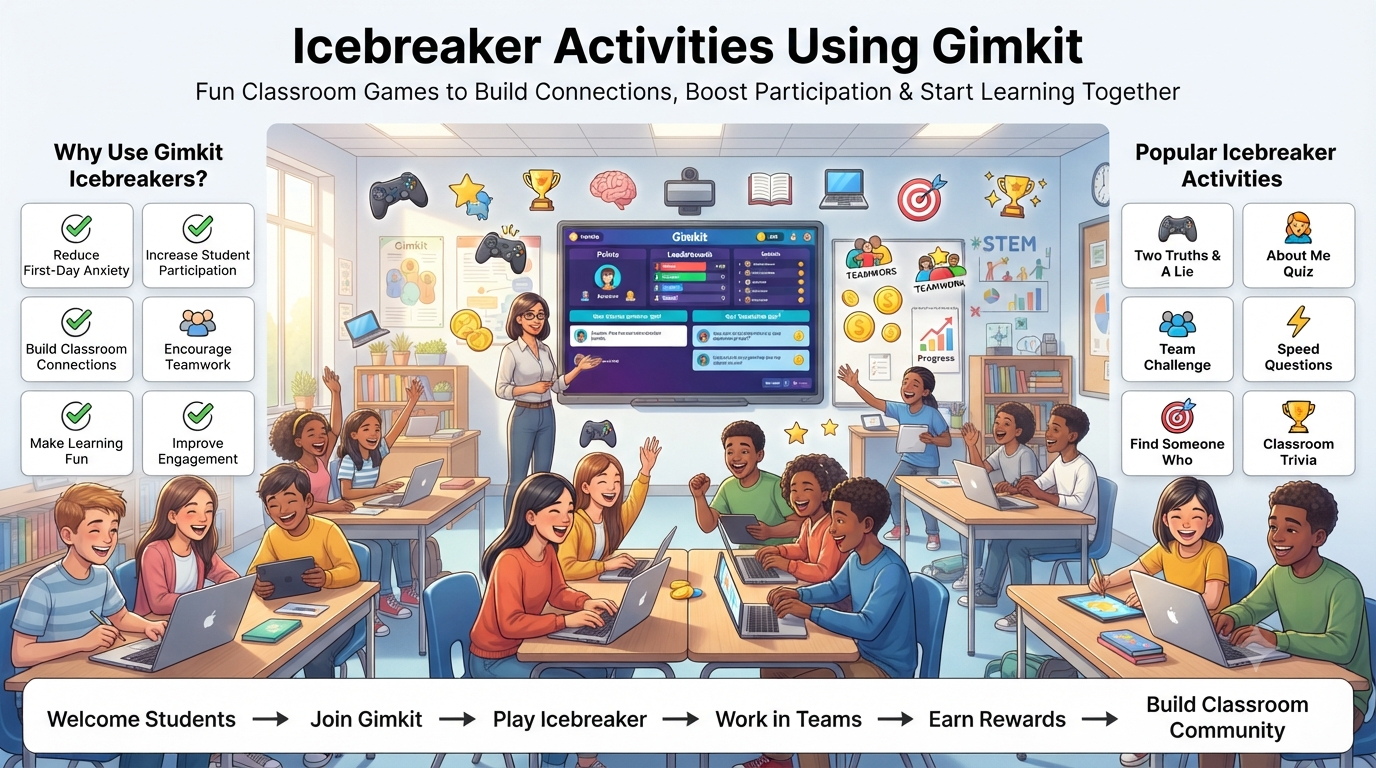
Icebreaker Activities Using Gimkit :Starting a new class doesn’t have to feel awkward. Icebreaker activities using Gimkit help students relax, connect with classmates, and participate from the very first lesson. Instead of asking everyone to introduce themselves one by one, teachers can turn introductions into exciting game-based experiences where every student joins, answers questions, earns rewards, and interacts naturally.
This guide goes far beyond a list of activity ideas. You’ll discover proven classroom strategies, ready-to-use icebreaker games, grade-specific recommendations, teacher workflows, common mistakes to avoid, practical examples, troubleshooting tips, and professional best practices that make every session more enjoyable and productive.
Quick Answer: Icebreaker activities using Gimkit are interactive classroom games that help students get to know one another through fun quizzes, team challenges, and collaborative gameplay. They improve participation, reduce first-day anxiety, and create a positive classroom environment while keeping students actively engaged.
At a Glance
Topic
What You’ll Learn
🎯 Purpose
How Gimkit makes classroom introductions fun and meaningful
👩🏫 Best For
Teachers, schools, tutors, clubs, and training sessions
🎓 Grade Levels
Elementary, Middle School, High School, College, and Adult Learning
⏱️ Activity Length
5–30 minutes depending on classroom goals
🤝 Main Benefits
Student engagement, teamwork, communication, confidence, and classroom community
📚 Difficulty
Beginner Friendly
Why Teachers Love Using Gimkit for Icebreakers
Traditional introductions often put students on the spot, making many feel nervous or reluctant to participate. Gimkit changes that experience by allowing everyone to join simultaneously in a low-pressure, game-based environment. Instead of worrying about speaking in front of the class, students naturally interact while answering fun questions and completing challenges.
Teachers also appreciate that a single activity can accomplish multiple goals at once. Besides helping students learn names and interests, it introduces classroom expectations, encourages teamwork, identifies participation levels, and creates positive energy before academic lessons even begin.
Key Benefits at a Glance
✅ Breaks the ice without awkward introductions
✅ Encourages every student to participate
✅ Builds classroom confidence from day one
✅ Helps students remember classmates’ names
✅ Promotes teamwork and communication
✅ Creates a welcoming classroom atmosphere
✅ Works for both in-person and virtual classrooms
✅ Easy to customize for any subject or age group
Is This Guide Right for You?
This guide is designed for educators who want practical ideas—not just theory.
It will help you if you are:
Teachers preparing first-day classroom activities
Students looking for fun class participation ideas
School administrators planning orientation events
Tutors teaching small groups
College instructors introducing new cohorts
Corporate trainers running team-building sessions
Youth leaders organizing educational group activities
Explore the latest classroom resources, expert tutorials, and educational technology insights on GimkitApp, your complete destination for everything related to Gimkit and modern learning tools.
What Makes This Guide Different?
Many articles simply list a few Gimkit games and stop there. This guide takes a much more practical approach by showing when, why, and how to use each activity successfully. Every recommendation is based on classroom usability, student engagement, and teacher workflow rather than random game suggestions.
As you continue reading, you’ll learn how to choose the right game mode, adapt activities for different age groups, avoid common classroom mistakes, keep reluctant students involved, and create icebreakers that students genuinely enjoy rather than simply complete.
What You’ll Discover
✔ The best Gimkit icebreaker activities for every grade level
✔ Step-by-step classroom implementation guides
✔ Teacher-tested engagement strategies
✔ Ready-to-use question ideas
✔ Recommended game modes for different situations
✔ Classroom management tips during gameplay
✔ Common mistakes and professional solutions
✔ Best practices for creating memorable first impressions
Expert Teaching Tip The most successful icebreaker isn’t the one with the highest score—it’s the one where every student feels comfortable participating. Focus on creating conversations, laughter, and collaboration before introducing competition. Students who feel welcomed early are often more confident and engaged throughout the rest of the school year.
What Are Icebreaker Activities Using Gimkit?
Icebreaker activities using Gimkit are short, interactive classroom games designed to help students get to know one another through fun questions, friendly competition, and teamwork. Instead of relying on traditional introductions, teachers use customizable Gimkit quizzes to create a relaxed environment where students naturally interact while learning about their classmates.
The biggest advantage is that students participate without feeling pressured. Because the focus is on gameplay rather than public speaking, even quieter learners are often more willing to join the conversation and engage with the class.
Quick Definition
Icebreaker Activities Using Gimkit:
Classroom-friendly games created in Gimkit that encourage students to introduce themselves, share interests, collaborate with classmates, and build positive relationships through interactive learning.
Why Do Icebreakers Matter?
A classroom becomes more productive when students feel comfortable with one another. Icebreakers create those early connections that encourage communication, collaboration, and confidence throughout the school year.
Instead of spending valuable class time on awkward introductions, teachers can turn the first few minutes into an engaging activity where everyone participates equally.
Benefits Beyond Introductions
🎯 Builds trust among classmates
👥 Encourages teamwork from day one
💬 Improves classroom communication
😊 Reduces first-day nervousness
🧠 Helps students remember names faster
📖 Creates a positive learning environment
🚀 Increases participation in future lessons
How Gimkit Makes Icebreakers More Effective
Traditional icebreakers usually involve students speaking one at a time. While this works for small groups, larger classrooms often leave many students waiting, distracted, or feeling uncomfortable.
Gimkit changes the experience by keeping every student involved at the same time. Each learner answers questions, earns rewards, and interacts continuously, creating an energetic atmosphere where participation feels natural instead of forced.
Traditional Icebreakers
Icebreaker Activities Using Gimkit
One student speaks at a time
Everyone participates simultaneously
Some students stay quiet
Nearly every student stays involved
Can become repetitive
Dynamic and game-based experience
Limited interaction
Continuous engagement and teamwork
Teacher-centered
Student-centered participation
What Makes a Great Gimkit Icebreaker?
Not every classroom game is an effective icebreaker. The best activities focus on helping students connect rather than simply collecting points.
A successful activity should encourage conversation, curiosity, and collaboration while remaining easy enough for every student to enjoy.
Essential Ingredients
✅ Simple and easy-to-understand questions
✅ Friendly competition instead of intense rivalry
✅ Equal opportunities for every student
✅ Short play sessions (5–15 minutes)
✅ Positive classroom interaction
✅ Age-appropriate content
✅ Easy customization for different subjects
Where Can Teachers Use These Activities?
One reason Gimkit is popular among educators is its flexibility. Icebreaker activities fit naturally into many classroom situations throughout the academic year—not just on the first day of school.
Perfect Classroom Scenarios
Situation
How Gimkit Helps
🎒 First day of school
Students learn names and interests
📅 New semester
Reconnects classmates after breaks
👋 Welcoming transfer students
Helps new learners feel included
👥 Group project launch
Builds teamwork before collaboration
💻 Online classes
Encourages interaction in virtual learning
🏫 School orientation
Creates a welcoming atmosphere
📚 Club meetings
Helps members become familiar quickly
🎓 Teacher workshops
Engages adult learners through collaboration
A Simple Classroom Example
Imagine a seventh-grade teacher meeting a class of 30 students for the first time. Instead of asking each student to introduce themselves individually, the teacher launches a Gimkit game with questions like:
What’s your favorite hobby?
Which superpower would you choose?
What’s your favorite subject?
Cats or dogs?
Beach vacation or mountain trip?
Within ten minutes, students have laughed together, discovered shared interests, learned classmates’ names, and become noticeably more comfortable participating. By the time the lesson begins, the classroom already feels more connected and welcoming.
Real-World Insight:
Many experienced teachers use a short Gimkit icebreaker before teaching academic content because students who interact early are often more willing to ask questions, join discussions, and collaborate during future lessons.
Common Misconceptions
Many educators assume icebreakers are only useful during the first week of school. In reality, they can strengthen classroom relationships throughout the entire year.
Myth vs Reality
Myth
Reality
Icebreakers are only for the first day.
They work anytime students need to reconnect.
Only younger students enjoy them.
High school, college, and adult learners also respond well when activities are meaningful.
They waste instructional time.
Well-designed icebreakers improve participation and save time later through better collaboration.
Every activity must be competitive.
Cooperative games often create stronger classroom relationships than highly competitive ones.
Key Takeaway
Icebreaker activities using Gimkit are far more than simple classroom games. They help students feel welcomed, encourage meaningful interaction, and establish a positive learning environment before academic instruction begins. When designed thoughtfully, these activities improve participation, strengthen classroom relationships, and lay the foundation for a more collaborative and engaging school year.
Benefits of Using Gimkit for Icebreaker Activities
The biggest benefit of using Gimkit for icebreaker activities is that it helps students build meaningful classroom connections while keeping everyone actively involved. Instead of passive introductions, learners participate through interactive gameplay, making the experience more enjoyable, memorable, and inclusive.
For teachers, these activities do much more than fill the first few minutes of class. They establish a positive classroom culture, encourage collaboration, and create an environment where students feel comfortable participating throughout the school year.
Benefits at a Glance
Benefit
How It Helps the Classroom
🤝 Builds Relationships
Students get to know classmates naturally.
🎯 Increases Participation
More students join without feeling pressured.
😊 Reduces Anxiety
Creates a relaxed and welcoming atmosphere.
🧠 Improves Memory
Helps students remember names and shared interests.
One of the biggest classroom challenges is encouraging participation from quieter students. Traditional introductions often favor confident speakers, while others hesitate to contribute.
Gimkit creates a more balanced environment because every student answers questions individually during gameplay. Participation feels private, enjoyable, and less intimidating, allowing more learners to become involved from the very beginning.
Why it works: Students focus on the game instead of worrying about speaking in front of the entire class.
2. Reduces First-Day Classroom Anxiety
The first day of school can feel overwhelming, especially when students don’t know each other. Icebreaker games reduce that pressure by shifting attention away from formal introductions and toward collaborative play.
As students answer lighthearted questions and celebrate small wins together, nervousness gradually gives way to curiosity, laughter, and conversation.
Activities That Help Reduce Anxiety
Favorite foods
Dream vacations
Pet preferences
Fun hobbies
Superpower questions
“Would You Rather” challenges
These simple topics make it easier for students to open up without sharing anything too personal.
3. Builds Stronger Classroom Relationships
Positive relationships rarely happen by accident—they develop through repeated, meaningful interactions. Gimkit encourages those interactions in a way that feels natural rather than forced.
Students discover shared interests, celebrate successes together, and often continue conversations after the activity ends. These early connections make future group work, discussions, and collaborative projects much more comfortable.
Relationship-Building Outcomes
✅ Students learn classmates’ names faster
✅ Shared interests become conversation starters
✅ New friendships begin naturally
✅ Team activities become more effective
✅ Classroom trust develops earlier
4. Creates Higher Engagement from the First Minute
The opening minutes of class often determine students’ energy levels for the rest of the lesson. Beginning with an interactive Gimkit activity immediately captures attention and encourages active participation.
Instead of waiting passively for instructions, students are already thinking, answering, competing, and communicating.
Without an Icebreaker
With a Gimkit Icebreaker
Students arrive quietly
Students become active immediately
Limited interaction
Continuous participation
Slow classroom energy
Positive momentum from the start
Teacher leads everything
Students actively contribute
5. Supports Different Learning Styles
Every classroom includes students who learn differently. Some enjoy speaking, while others prefer reading, observing, or interacting digitally.
Gimkit accommodates multiple learning preferences by combining visual elements, reading, decision-making, friendly competition, and collaboration within a single activity.
This flexibility helps more students feel successful regardless of their personality or learning style.
6. Makes Learning Feel Less Like Work
Students are generally more willing to participate when learning feels enjoyable. Because Gimkit presents questions as part of a game, many learners remain engaged longer than they would during traditional classroom introductions.
The excitement of earning in-game rewards keeps motivation high while still supporting meaningful classroom objectives.
Professional Insight:
The goal isn’t to replace learning with games. Instead, teachers use game mechanics to create an environment where students are naturally motivated to participate, communicate, and collaborate.
7. Works Across Every Grade Level
One reason teachers continue using Gimkit throughout the year is its adaptability. The same platform can support young learners, teenagers, university students, and even adult training groups by simply adjusting the question style and activity design.
Audience
Best Icebreaker Focus
Elementary
Colors, animals, hobbies, favorite foods
Middle School
Sports, music, interests, teamwork
High School
Goals, opinions, collaboration, problem-solving
College
Networking, introductions, discussion starters
Adult Training
Team building, communication, workplace collaboration
8. Saves Teachers Time
Planning engaging introductions can be surprisingly time-consuming. Once a teacher creates a Gimkit icebreaker, it can be reused, updated, or adapted for future classes with only minor changes.
Over time, educators build a collection of ready-to-use activities that make first-day planning faster while maintaining a fresh experience for students.
Time-Saving Advantages
Reuse existing question sets
Edit activities in minutes
Adapt games for different classes
Easy to duplicate for future semesters
Minimal classroom setup required
Expert Recommendations for Maximum Impact
To get the best results from Gimkit icebreakers, experienced educators recommend focusing on classroom relationships rather than competition.
Best Practices
✔ Keep activities between 5–15 minutes
✔ Choose simple, conversation-friendly questions
✔ Mix individual and team-based games
✔ Celebrate participation instead of only high scores
✔ End each activity with a short class discussion
✔ Encourage students to talk about interesting answers afterward
Common Mistakes to Avoid
Even well-designed activities can lose their impact if they’re not planned carefully.
Choose activities everyone can complete comfortably
Using the same game repeatedly
Rotate formats and question styles
How to Prepare a Successful Gimkit Icebreaker Activity
A successful Gimkit icebreaker activity starts long before students join the game. The most engaging sessions are carefully planned with clear goals, age-appropriate questions, the right game mode, and a simple classroom workflow. Good preparation helps every student participate confidently while keeping the activity fun, organized, and meaningful.
Quick Answer:
Plan your objective first, choose an appropriate game mode, write simple and inclusive questions, keep the activity short, and focus on interaction rather than competition.
Icebreaker Planning Checklist
Before launching your game, make sure these essentials are ready.
✅ Checklist
Why It Matters
Define your classroom goal
Keeps the activity focused
Select the right game mode
Matches your teaching style
Prepare engaging questions
Encourages conversation
Test the game beforehand
Prevents technical issues
Set a reasonable time limit
Maintains student attention
Explain simple instructions
Reduces confusion
Check internet and devices
Ensures smooth gameplay
Step 1: Decide the Purpose of Your Icebreaker
Every successful activity begins with a clear objective. While the overall goal is to help students connect, different classes may require different approaches.
Common Icebreaker Goals
Learn students’ names
Discover hobbies and interests
Encourage teamwork
Welcome new students
Build classroom confidence
Introduce classroom expectations
Start conversations naturally
Pro Tip:
Never create questions first. Decide what you want students to accomplish, then build your questions around that goal.
Step 2: Choose the Right Game Mode
Different Gimkit game modes create different classroom experiences. Some encourage teamwork, while others work better for quick introductions.
Recommended Game Modes
Game Mode
Best For
Difficulty
Classic
First-day introductions
⭐ Beginner
Team Mode
Collaboration
⭐ Beginner
The Floor Is Lava
High-energy classrooms
⭐⭐ Moderate
Snowbrawl
Team building
⭐⭐ Moderate
Tag Domination
Active participation
⭐⭐⭐ Advanced
Best Choice for Most Teachers
🏆 Classic Mode
Why?
Easy to understand
Quick to launch
Works for every age group
Keeps everyone involved
Minimal explanation required
Step 3: Write Questions Students Actually Enjoy
Questions determine whether students simply play—or genuinely connect.
Instead of testing knowledge, focus on fun, relatable topics that encourage conversations after the game ends.
Great Question Categories
Favorites
Favorite food
Favorite movie
Favorite animal
Favorite sport
Favorite season
Fun Choices
Cats or dogs?
Pizza or burgers?
Beach or mountains?
Summer or winter?
Morning or night?
Personality Questions
Dream vacation?
Hidden talent?
Superpower choice?
Favorite hobby?
Weekend activity?
Classroom Questions
Favorite subject?
Best way to study?
Group work or solo work?
Reading or videos?
Science or art?
Expert Recommendation:
Avoid controversial, personal, or embarrassing questions. The goal is to help students feel comfortable—not uncomfortable.
Step 4: Keep Questions Short and Easy
Long questions slow down gameplay and reduce excitement.
Good Example ✅
Which animal would you choose as a pet?
Better Than ❌
If you had unlimited money and could own any animal in the world while considering its habitat and maintenance, which would you choose?
Simple questions create faster answers and better classroom energy.
Step 5: Decide Between Individual or Team Play
Both approaches work well, but each creates a different classroom atmosphere.
Individual Play
Team Play
Builds confidence
Builds collaboration
Students answer independently
Students communicate more
Great for introductions
Great for team building
Easier to organize
Better for larger classes
Professional Recommendation
First day of school → Individual Mode
Second or third class → Team Mode
Group projects → Team Challenges
This gradual progression helps students become comfortable before collaborating closely.
Step 6: Set the Right Time Limit
One of the biggest mistakes teachers make is allowing icebreakers to run too long.
Students should finish while they’re still excited.
Recommended Duration
Class Type
Ideal Time
Elementary
5–8 minutes
Middle School
8–10 minutes
High School
10–15 minutes
College
10–15 minutes
Workshops
10–20 minutes
Remember: Leave students wanting one more round rather than wishing the game would end.
Step 7: Prepare Students Before Starting
A one-minute explanation prevents several minutes of confusion later.
Tell Students
✔ What the activity is
✔ How to join
✔ How long it will last
✔ What the goal is
✔ Whether they’ll play individually or in teams
✔ That participation matters more than winning
Simple expectations create a smoother experience for everyone.
Common Preparation Mistakes
Even experienced teachers occasionally overlook small details that affect the activity.
❌ Mistake
✅ Better Solution
Writing too many questions
Limit to 10–20 engaging questions
Choosing difficult topics
Keep questions fun and relatable
Ignoring technical setup
Test devices before class
Explaining rules during gameplay
Give instructions first
Making winning the only focus
Celebrate participation and teamwork
Teacher Workflow (5-Minute Setup)
Define Goal
      ↓
Choose Game Mode
      ↓
Create Questions
      ↓
Test the Game
      ↓
Explain Instructions
      ↓
Students Join
      ↓
Play
      ↓
Quick Discussion
      ↓
Begin Lesson
This simple workflow keeps transitions smooth and minimizes downtime.
Classroom Success Formula
Simple Questions
➜ Easy Instructions
➜ High Participation
➜ Positive Interaction
➜ Confident Students
➜ Better Classroom Community
Professional Recommendations & Expert Reviews
Icebreaker Activities Using Gimkit help students feel comfortable during the first days of class.
Icebreaker Activities Using Gimkit encourage classmates to interact in a fun and welcoming environment.
Icebreaker Activities Using Gimkit make introductions more engaging than traditional classroom activities.
Icebreaker Activities Using Gimkit support positive classroom relationships from the very beginning.
Icebreaker Activities Using Gimkit encourage participation from both outgoing and quiet students.
Icebreaker Activities Using Gimkit help reduce first-day classroom anxiety through interactive gameplay.
Icebreaker Activities Using Gimkit support learning classmates’ names in an enjoyable way.
Icebreaker Activities Using Gimkit encourage students to discover shared interests through customized questions.
Icebreaker Activities Using Gimkit make classroom conversations feel natural and enjoyable.
Icebreaker Activities Using Gimkit support creating an inclusive learning environment for everyone.
Icebreaker Activities Using Gimkit encourage teamwork during early classroom activities.
Icebreaker Activities Using Gimkit help teachers observe student participation styles.
Icebreaker Activities Using Gimkit support building trust between students and teachers.
Icebreaker Activities Using Gimkit encourage respectful classroom communication from the start.
Icebreaker Activities Using Gimkit make orientation sessions more memorable and interactive.
Icebreaker Activities Using Gimkit support friendly classroom competition without creating unnecessary pressure.
Icebreaker Activities Using Gimkit encourage students to share fun facts about themselves.
Icebreaker Activities Using Gimkit help establish a positive classroom atmosphere.
Icebreaker Activities Using Gimkit support collaborative learning through interactive challenges.
Icebreaker Activities Using Gimkit encourage students to participate even if they are shy.
Icebreaker Activities Using Gimkit help teachers introduce classroom expectations creatively.
Icebreaker Activities Using Gimkit support active engagement from the first lesson.
Icebreaker Activities Using Gimkit encourage meaningful classroom discussions after each activity.
Icebreaker Activities Using Gimkit help students become familiar with classroom technology.
Icebreaker Activities Using Gimkit support stronger classroom connections through shared experiences.
Icebreaker Activities Using Gimkit encourage positive interactions among new classmates.
Icebreaker Activities Using Gimkit help create enjoyable learning memories early in the school year.
Icebreaker Activities Using Gimkit support flexible activities for different grade levels.
Icebreaker Activities Using Gimkit encourage curiosity through personalized classroom questions.
Icebreaker Activities Using Gimkit help students become more confident participating in class.
Icebreaker Activities Using Gimkit support building communication skills through interactive learning.
Icebreaker Activities Using Gimkit encourage collaborative problem-solving during classroom games.
Icebreaker Activities Using Gimkit help maintain high classroom energy throughout the activity.
Icebreaker Activities Using Gimkit support welcoming new students into established classrooms.
Icebreaker Activities Using Gimkit encourage students to appreciate different perspectives.
Icebreaker Activities Using Gimkit help teachers learn more about student interests and preferences.
Icebreaker Activities Using Gimkit support creating stronger classroom communities.
Icebreaker Activities Using Gimkit encourage laughter and positive classroom experiences.
Icebreaker Activities Using Gimkit help transition students into regular academic lessons.
Icebreaker Activities Using Gimkit support balanced classroom participation from every learner.
Icebreaker Activities Using Gimkit encourage students to interact beyond their usual friendship groups.
Icebreaker Activities Using Gimkit help teachers identify natural leaders and collaborators.
Icebreaker Activities Using Gimkit support respectful competition while maintaining classroom inclusion.
Icebreaker Activities Using Gimkit encourage creative thinking through personalized question sets.
Icebreaker Activities Using Gimkit help students develop confidence speaking and participating.
Icebreaker Activities Using Gimkit support stronger peer relationships through enjoyable classroom activities.
Icebreaker Activities Using Gimkit encourage active listening during discussions after gameplay.
Icebreaker Activities Using Gimkit help establish positive classroom routines from the beginning.
Icebreaker Activities Using Gimkit support meaningful interaction without distracting from learning objectives.
Icebreaker Activities Using Gimkit encourage students to view learning as an enjoyable experience.
Icebreaker Activities Using Gimkit help teachers introduce collaborative learning in a relaxed environment.
Icebreaker Activities Using Gimkit support long-term classroom engagement by creating positive first impressions.
Icebreaker Activities Using Gimkit encourage every student to contribute regardless of academic ability.
Icebreaker Activities Using Gimkit demonstrate that interactive introductions can strengthen classroom participation and communication.
Most Frequently Asked Faqs
1. What are the best icebreaker activities to play using Gimkit?
The best Gimkit icebreaker activities encourage students to introduce themselves, build confidence, and interact naturally while learning classmates’ names and interests. Instead of focusing on academic content, use questions about hobbies, favorite books, sports, goals, fun facts, or “Would You Rather?” scenarios. These activities create a welcoming classroom atmosphere and help students feel comfortable participating from the very beginning.
As students become more familiar with one another, teachers can gradually transition from social icebreakers to subject-specific review games without losing engagement.
Popular icebreaker ideas:
Two Truths and a Lie.
Would You Rather?
Find Someone Who…
Fun Facts Challenge.
Favorite Things Quiz.
Classroom Scavenger Hunt.
2. How do I create a fun icebreaker game in Gimkit for the first day of school?
Start by creating a short quiz with 10–15 lighthearted questions that encourage conversation rather than testing knowledge. Include prompts about hobbies, favorite foods, dream careers, summer experiences, or interesting personal facts. Choose a beginner-friendly game mode, keep the pace relaxed, and explain the rules before starting so every student feels confident participating.
After the game ends, discuss a few interesting answers as a class. This reflection helps students connect with one another and turns the activity into a meaningful classroom-building experience.
Best practices:
Use simple, non-academic questions.
Limit the game to 10–15 minutes.
Explain the rules clearly.
Encourage respectful participation.
Discuss results afterward.
Celebrate every student’s involvement.
3. Which Gimkit game mode works best for classroom icebreaker activities?
The ideal game mode is one that emphasizes participation and conversation rather than intense competition. Classic modes are often the easiest for new students because the rules are simple and the gameplay is familiar. Teachers may also choose collaborative modes that encourage teamwork, communication, and shared problem-solving instead of individual rankings.
For first-day activities, prioritize game modes that reduce pressure and allow every student to participate comfortably regardless of experience.
Recommended features:
Easy-to-understand gameplay.
Collaborative participation.
Balanced pacing.
Minimal competitive pressure.
High student interaction.
Simple scoring system.
4. Can Gimkit icebreaker activities be used for virtual or online classes?
Yes. Gimkit works well in virtual, hybrid, and remote classrooms because students can join from any supported device using a game code. Online icebreaker activities help learners become comfortable communicating with classmates, especially when they have never met in person. Teachers can combine gameplay with video conferencing platforms to encourage discussion before and after each session.
Using interactive questions, breakout room discussions, and post-game reflections creates stronger connections among remote learners while maintaining high engagement.
Virtual classroom tips:
Share the game code before class.
Test devices before starting.
Encourage webcam participation when appropriate.
Discuss results after each game.
Keep activities short and interactive.
Combine gameplay with class discussions.
5. How long should a Gimkit icebreaker activity last to keep students engaged?
Most classroom experts recommend keeping icebreaker activities between 10 and 15 minutes. This timeframe is long enough for students to interact, build confidence, and learn about one another without reducing time for the main lesson. Short, energetic activities maintain attention better than extended sessions, particularly during the first days of school.
Teachers should adjust the duration based on student age, class size, and learning objectives, but ending while engagement remains high usually produces the best educational outcomes.