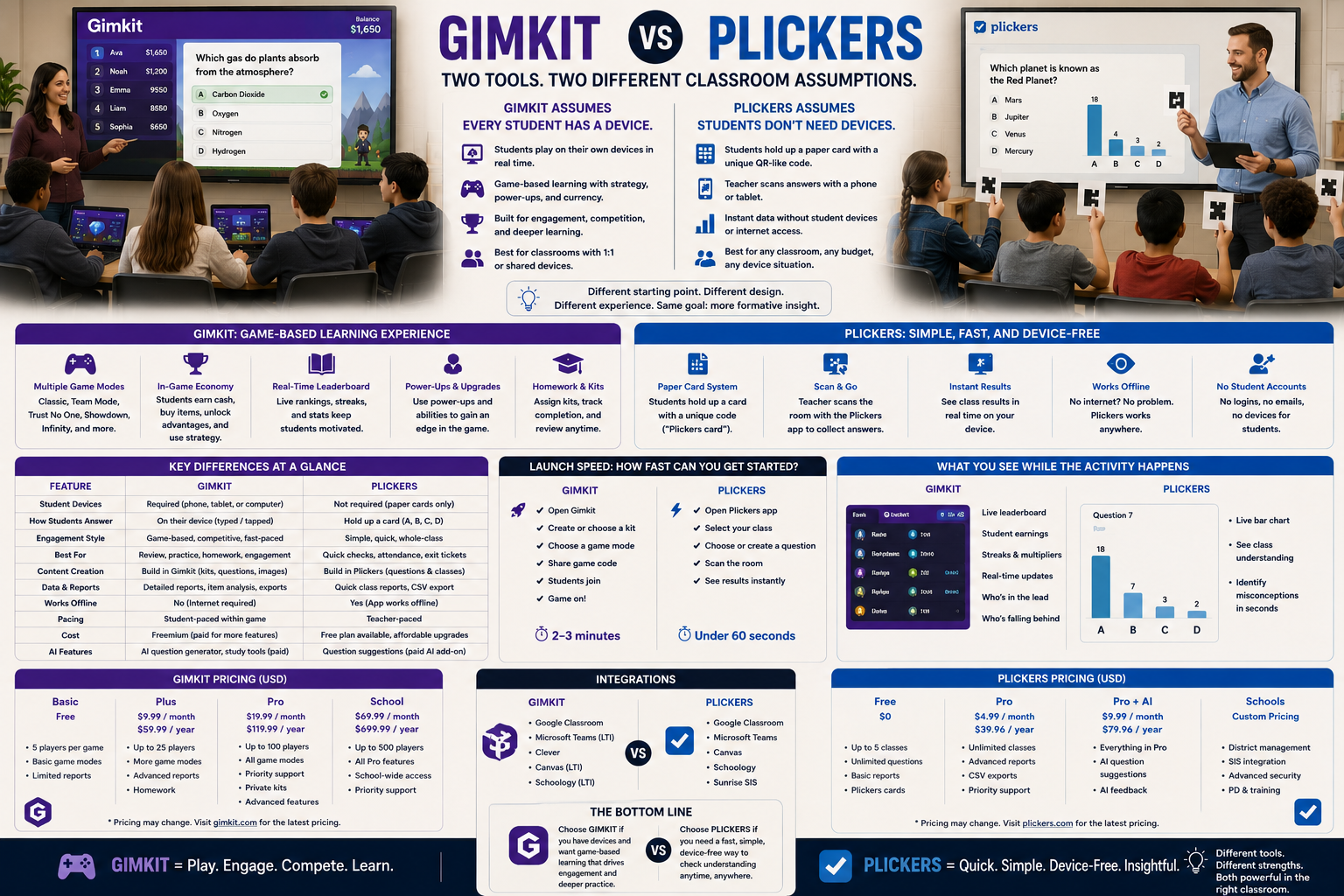
Gimkit vs Plickers is arguably the most lopsided comparison in this entire series, and that’s exactly what makes it useful. These two tools aren’t competing for the same classroom setup. Gimkit assumes every student has a device. Plickers assumes none of them need one.
Once that single fact is on the table, almost every other difference between the two platforms follows directly from it — how each one is built, how much it costs, how fast a teacher can launch a question, and even what a teacher sees while the activity is happening. This guide goes deeper into all of that than a typical side-by-side, because the gap between these two tools is wide enough that a shallow comparison actually undersells how differently they solve a classroom problem.
Looking for comprehensive classroom resources and educational technology insights? Explore GimkitApp for expert guides, teaching strategies, game modes, and the latest updates to enhance student engagement.
Names highlighted green/red as the room is scanned
Wi-Fi requirement for students
Effectively required
None at all
Free tier limit
Basic: unlimited students, ~3 rotating game modes
Free: Sets capped at 5 questions each
Paid tier
Pro: roughly $60/year
Pro: $71.88/year (about $5.99/month on the annual plan)
Best conceptual fit
“A full game-based practice platform”
“A fast check with zero technology barrier”
That device row is the entire story. Everything else in this comparison — pacing, pricing, question variety, even how a teacher physically moves around the room — is a downstream consequence of it.
Plickers Solves a Problem Gimkit Can’t Touch: No Devices, No Problem
Plickers exists because plenty of classrooms simply don’t have one device per student — and even in classrooms that do, passing out devices for a two-minute check can cost more time than the check itself.
Plickers’ answer to that problem is genuinely clever. Each student is assigned a printed card with a unique shape, and the four sides of that card correspond to answer choices A, B, C, and D. The student holds up the card and rotates it so their chosen letter faces up. The teacher opens the Plickers app on a single phone or tablet, points the camera around the room, and the app scans and tallies every card it sees in seconds — with each student’s name highlighting green for a correct answer or red for an incorrect one right on the teacher’s screen as the scan happens.
No student ever touches a screen. No login, no wifi requirement at the student level, no charged device to hand out. The cards themselves are free to print directly from Plickers’ own site, and once a class set exists, it’s reusable indefinitely — there’s no recurring cost tied to the physical cards themselves, only to the software features layered on top of the scanning system.
That’s a genuinely different category of tool from Gimkit, and it’s worth being direct about it: if a classroom doesn’t have devices for students, Gimkit simply isn’t usable in that room the way Plickers is.
Gimkit Assumes the Opposite Starting Point
Gimkit’s entire structure depends on every student having their own device and their own connection to the game. The game modes, the in-game economy, the individual progress — none of it works if students are sharing a device or don’t have one at all.
That’s not a flaw in Gimkit; it’s simply the tradeoff for everything Gimkit is trying to do. A student needs a live, individual connection to the game for their answers to translate into currency, energy, or progress they personally control across any of Gimkit’s roughly thirteen active 2D game modes. There’s no version of Gimkit that works with printed paper cards, because the entire platform is built around a real-time digital game state that a card physically cannot represent or update.
So this comparison isn’t really “which platform is better.” It’s “which classroom does each platform assume it’s walking into” — and the two platforms are answering to genuinely different sets of constraints a school might be operating under.
Speed and Simplicity vs Depth and Sustained Engagement
Because Plickers removes the entire step of getting students onto devices, it’s built for speed. A teacher can ask a quick question, scan the room, and see results almost immediately — making it well suited to fast checks sprinkled throughout a lesson rather than a standalone extended activity. There’s no join code to distribute, no waiting for a class of laptops to boot up or connect to wifi, and no risk of a technical hiccup pulling a student out of the activity partway through.
Gimkit is built for the opposite kind of moment. It assumes the class is going to spend real, sustained time inside a game — often ten, fifteen, or more minutes — with the game mode providing the structure that keeps students engaged for that length of time. Trying to use Gimkit for a thirty-second check would waste most of what the platform is built to do; trying to use Plickers for fifteen minutes of sustained gameplay isn’t really what it’s designed for either, since its entire mechanic is built around one quick scan per question rather than a continuously evolving game state.
Question Format: Fixed Choices vs Flexible Structures
Plickers’ card system works because the answer format is fixed — four physical sides of a card correspond to four possible answers. That constraint is exactly what makes the scanning system work, but it also means question formats are limited to that structure; there’s no equivalent to short answer, open response, or anything the card itself can’t physically represent. A teacher building content in Plickers is always designing around that four-option ceiling, whether the actual pedagogical need calls for it or not.
Gimkit isn’t bound by a physical object, so its question formats can be more varied — multiple choice, short answer, and other formats depending on the Kit and game mode. That flexibility is only possible because Gimkit lives entirely in software with no physical response mechanism to design around, which also means a single Kit can mix question types in a way a Plickers Set never can.
Anonymity, Individual Accountability, and the Room Itself
Plickers’ scanning method has an interesting side effect: because the teacher physically scans the room, they can often see, in the moment, roughly where correct and incorrect answers are coming from, without needing to read anything off a shared screen. Some teachers use this to quickly identify who needs support without singling a student out verbally — the color-coded names appear directly on the teacher’s own device as the room is scanned, visible only to the teacher, not projected for the whole class to see.
Gimkit’s individual data lives entirely inside the platform’s reporting — a teacher reviewing a game session sees accuracy and participation after the fact, or live through the host dashboard, but not through physically scanning a room of raised cards. Both approaches give a teacher a sense of who’s struggling, but they arrive at that information through completely different physical processes: one is a literal walk around the room with a camera, the other is a dashboard a teacher checks from wherever they happen to be standing.
Setup and Content Building: A Reusable Physical Object vs a Digital Kit
Setting up Plickers for the first time involves a genuinely different kind of work than setting up Gimkit. A teacher signs up, adds student names, and prints a set of Plickers cards — a one-time physical setup that, once done, doesn’t need to be repeated for that class. Building question content happens in “Sets,” organized collections of questions that a teacher can pull up and project during a lesson.
Building a Gimkit Kit is a purely digital process from start to finish — questions typed or imported directly into the platform, with no physical printing step at all. There’s nothing to hand out, laminate, or replace if a card gets lost or damaged over the course of a school year, which is a maintenance consideration Plickers carries that Gimkit simply doesn’t.
For the latest gaming news, expert reviews, and walkthroughs, readers can also visit IGN, one of the world’s leading gaming websites.
Pricing: What Free Actually Limits
Both platforms offer a workable free tier, but the ceiling sits in a very different place for each.
Plickers’ free tier is fully functional for basic use, but each Set of questions is capped at 5 questions, and some content-management features — like the built-in image search for building questions, or privately sharing Packs of content with other teachers — are Pro-only. Plickers Pro costs $8.99 a month on a monthly plan, or works out to $5.99 a month (roughly $71.88 a year) when paid annually, and includes a 14-day free trial before the first charge. Schools and departments ordering five or more annual memberships at once get access to bulk group-order discounts, which lowers the effective per-teacher cost for larger rollouts.
Gimkit’s free Basic plan is unlimited on student count but restricts most of its 2D game modes and detailed reporting to a small rotating selection. Gimkit Pro, at roughly $60 a year, unlocks the full mode catalog, Assignments, larger kit imports, and detailed reports.
The two platforms land in a similar yearly price range once a teacher upgrades, but the free-tier restriction is shaped completely differently: Plickers limits the length of each question Set, while Gimkit limits which game modes are available. A teacher who mainly runs short, five-question checks may never actually need Plickers Pro at all — a ceiling Gimkit’s mode-based free tier doesn’t really have an equivalent to, since accessing the platform’s signature variety usually does require upgrading.
Reporting: A Quick Tally vs a Full Game Record
Plickers’ reporting reflects what it’s built for — a running record of quick question results over time, useful for spotting patterns in a fast-check format across a term. It’s not trying to be a deep, game-session-level report, because the activity itself isn’t a sustained session; it’s a series of short scans stitched together into a history a teacher can review later.
Gimkit’s reporting reflects a full game or assignment session — question-level accuracy, participation, and performance within that specific Kit. It’s a more detailed record, but it’s also describing a fundamentally longer, more involved activity than a Plickers scan typically represents.
Classroom Management: Two Very Different Physical Experiences
It’s worth naming directly how differently each activity actually feels to run.
Running Plickers means a teacher is physically moving through the room, camera up, scanning cards — an active, walking presence that keeps the teacher engaged with the physical space and makes off-task behavior easy to spot in the moment. There’s no screen for students to get distracted by beyond the card in their hand.
Running Gimkit means a teacher is largely managing the activity from a host device or dashboard while students are each looking at their own screen, immersed in whatever game mode is running. That’s a fundamentally more hands-off management style for the teacher during the activity itself, trading direct physical engagement with the room for the depth and sustained motivation the game layer provides.
Where Plickers Has the Advantage
Plickers’ advantage is clear and specific:
Classrooms without one device per student
Extremely fast checks that don’t justify pulling out devices
Zero setup time for students — no logins, no app, no connection
Situations where a teacher wants an instant, room-wide read without any screen time
A lower yearly cost for teachers who only need short, five-question checks and never upgrade
Active, in-the-room classroom management rather than screen-based supervision
Where Gimkit Has the Advantage
Gimkit’s advantage is just as clear:
Classrooms with reliable one-to-one device access
Sustained, extended practice sessions built around a game
A need for varied question formats beyond a fixed four-choice card
Individual, ongoing game progress that a paper card simply can’t represent
An unlimited student count on the free tier, regardless of class size
No physical materials to print, maintain, laminate, or replace over time
The Real Question to Ask
The question that actually decides a Gimkit vs Plickers choice isn’t which platform is more engaging. It’s:
Do my students have devices, and do I have fifteen minutes for a sustained activity — or do I need a fast, zero-technology check right now?
If it’s the second, Plickers is solving a problem Gimkit was never built to solve, and it solves it well. If it’s the first, Gimkit’s game-based structure offers a depth of engagement that a card-scanning system was never trying to provide. These two tools aren’t rivals so much as answers to two different classroom realities.
Frequently Asked Questions
Can Plickers be used without any student devices at all?
Yes — that’s the entire premise of Plickers. Students respond using printed cards that the teacher scans with a single phone or tablet, so no student needs a device, login, or internet connection. This is the opposite of Gimkit, which requires every student to have their own device connected to the game.
Why can’t Gimkit work the same way as Plickers?
Gimkit’s game modes depend on a live, individual digital connection so that a student’s answers can translate into in-game currency, progress, or resources in real time. A printed card has no way to represent an evolving game state, which is why Gimkit’s model requires individual devices while Plickers’ card-based system deliberately avoids them.
Is Plickers as good for sustained practice as Gimkit?
Not really, and it isn’t trying to be. Plickers is built for fast, low-friction checks, not extended sessions with a game layer on top. Gimkit is specifically built for sustained, repeated practice through its game modes, which makes it the stronger choice when a teacher needs students engaged for an extended stretch of class time.
Does Plickers support the same variety of question types as Gimkit?
No. Plickers’ card system is limited to a fixed set of answer choices because the physical card only has four sides to rotate. Gimkit isn’t bound by a physical object, so it can support a wider range of question formats depending on the Kit and the game mode being used.
Which platform is better for a classroom without one-to-one devices?
Plickers is clearly the better fit in that situation, since it was specifically designed to work without any student devices at all. Gimkit assumes individual device access for every student, so classrooms without that infrastructure won’t be able to run a full Gimkit game session the way they could a Plickers check.
Which platform is cheaper, and what does the free tier actually restrict?
Both paid tiers land in a similar yearly price range — Plickers Pro at roughly $72/year, Gimkit Pro at roughly $60/year — but the free-tier limits work differently. Plickers caps each question Set at 5 questions; Gimkit has no student cap at all but limits which game modes are unlocked. A teacher running only short checks may never need to upgrade Plickers, while unlocking Gimkit’s full mode variety usually does require Pro.
Do the physical Plickers cards cost anything or expire?
The cards themselves are free to print from Plickers’ own site and, once printed, are reusable indefinitely for that class — there’s no recurring cost tied to the cards. The only ongoing cost is the optional Pro software subscription, which unlocks features like longer Sets and content-sharing rather than anything related to the physical cards.
Final Verdict
Gimkit vs Plickers isn’t really a contest between similar tools — it’s a comparison between two platforms built for opposite technology assumptions. Plickers removes devices from the equation entirely and trades depth for speed, accessibility, and a genuinely low-friction, low-cost setup. Gimkit assumes full device access and trades simplicity for a sustained, game-driven practice experience with far more format and mode variety.
Choose Plickers when devices aren’t available, budget is tight, or a quick check is all a moment needs. Choose Gimkit when the classroom has the technology for it and the goal is extended, game-based practice. The right choice here isn’t about which platform is better — it’s about which classroom you’re actually standing in.