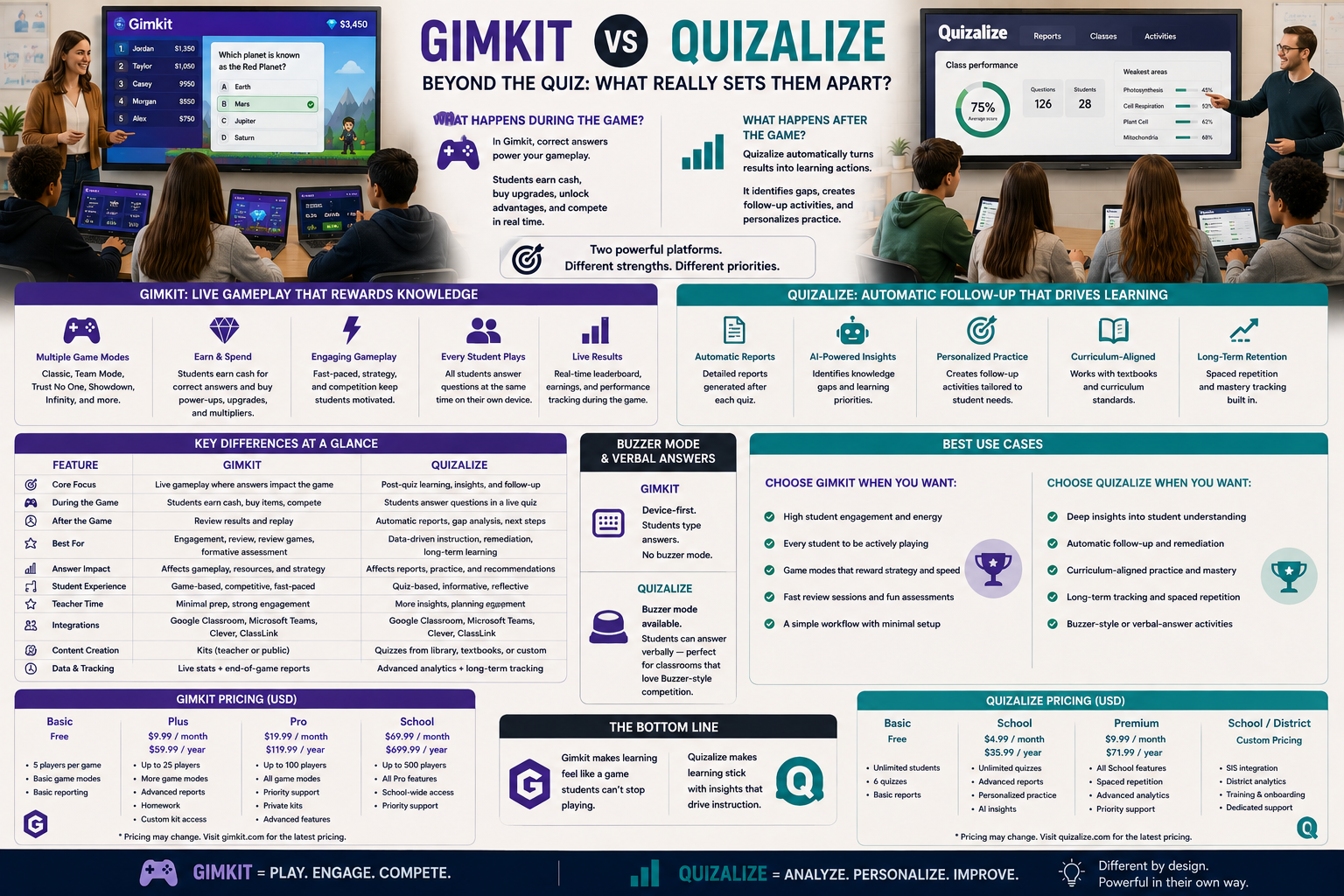
Gimkit vs Quizalize looks, on the surface, like two live quiz games with music, colors, and a leaderboard. The real difference shows up after the game ends.
Quizalize’s most distinctive feature isn’t the live quiz itself — it’s what the platform automatically does with the results. Gimkit’s most distinctive feature isn’t the quiz either — it’s what happens to a correct answer while the game is still running. Those are two completely different design priorities, and this comparison is built around that gap — along with the pricing, integrations, and long-term tracking details that actually decide which one fits a school’s workflow.
Looking for comprehensive classroom resources and educational technology insights? Explore GimkitApp for expert guides, teaching strategies, game modes, and the latest updates to enhance student engagement.
Gimkit vs Quizalize at a Glance
Teaching function
Gimkit
Quizalize
Signature feature
Game modes that turn answers into gameplay
Automatic reteach grouping after a quiz
Team structure
Optional, multiple formats
Default team-based live scoring
Post-quiz output
Game results and reports
Auto-sorted small groups by missed question
Homework/practice mode
Assignments through Kits
Self-paced practice with instant explanations
In-game variety
Multiple distinct game modes
One core live quiz format
Long-term tracking
Kit/session-level reports
Mastery Dashboards tied to curriculum tags
Classroom platform sync
Not a core feature
Google Classroom and Microsoft Teams sync
Free tier
Basic: unlimited students, ~3 rotating game modes
Basic: 1 class, 50 live students, 3 AI quizzes/month
Paid tier
Pro: roughly $60/year
Lite: about $4.49/month (~$30/year annual)
Best conceptual fit
“Make practice feel like a game”
“Turn quiz results into ready-made small groups”
That “post-quiz output” row is the real starting point for understanding this comparison, but the pricing and integration rows below explain why a school’s existing tech stack often ends up deciding the match as much as the pedagogy does.
Quizalize’s Defining Feature Isn’t the Quiz — It’s the Regrouping
Most live quiz platforms end the same way: a leaderboard, a report, and the teacher deciding what to do next on their own. Quizalize tries to shortcut that last step.
After a quiz finishes, Quizalize can automatically organize students into small groups based on which specific questions or concepts they got wrong — sometimes referred to as reteach groups. Instead of a teacher scanning a spreadsheet of results and manually deciding who needs help with what, the platform proposes the grouping itself, built directly from the answer data.
That turns the sequence from:
Quiz → results → teacher manually sorts data → teacher forms groups
into something closer to:
Quiz → results → groups already suggested → teacher pulls students directly
For a teacher running small-group instruction regularly, that’s not a minor convenience — it removes one of the most time-consuming steps in a formative-assessment cycle. Quizalize extends this further with Mastery Dashboards: quiz questions can be tagged to a curriculum, so results feed a longer-term view of which standards a student has actually mastered, not just how one quiz went.
Gimkit Doesn’t Try to Solve That Problem
Gimkit’s reporting tells a teacher how a student or class performed within a specific Kit or game session, but it isn’t built to automatically propose instructional groupings from that data. A teacher can see who struggled and on which questions, but turning that into small reteach groups is still a manual step Gimkit leaves to the teacher.
That’s not a flaw in Gimkit — it simply reflects a different priority. Gimkit’s engineering effort goes into the game layer itself: what happens to a correct answer while play is still happening. Quizalize’s engineering effort goes into what happens after the answers are already in, and into tracking that data against a curriculum over time.
Quizalize’s live quiz format is built around teams from the start — students are typically split into a small number of teams, and individual correct answers contribute to a combined team score displayed as the game runs. That team framing is baked into the default experience, not an extra setting to configure.
Gimkit can absolutely run team-based games, but teams are one configuration choice among several rather than the default shape of the platform. A teacher can just as easily run a fully individual game or a whole-class cooperative mode across any of Gimkit’s roughly thirteen active 2D game modes, and switching between those formats is a deliberate setup decision rather than Gimkit’s built-in starting point.
That makes Quizalize the more “ready-made” team experience, and Gimkit the more adjustable one.
Homework and Independent Practice: Two Different Philosophies
Quizalize’s self-paced practice mode is built around immediate, individual feedback — a student answers a question, sees whether they were right, and typically receives an explanation before moving to the next item. Assignments can include quizzes, worksheets, videos, and web links, can allow multiple attempts, and can be open for a set time window — effectively letting a teacher digitize an entire mini-lesson plan for students to complete at home. The emphasis is on correcting misunderstanding in the moment, one question at a time, without a game layer sitting on top of it.
Gimkit’s self-paced practice runs through Assignments, where a Kit is completed independently but the experience still carries the game-mode structure — currency, progress, or in-game rewards depending on the mode selected. The emphasis stays on sustaining engagement through game mechanics, even outside a live class session.
This is a genuine philosophical split. Quizalize treats independent practice as a chance to correct misunderstanding immediately and cleanly, and as another data point feeding its Mastery Dashboards. Gimkit treats independent practice as an extension of the same game-based motivation that drives its live sessions.
Game Variety: Where Gimkit Pulls Far Ahead
If the comparison shifts to “how many different ways can students play,” Gimkit is the clear leader.
Quizalize’s core experience is essentially one format: a live team quiz, plus the self-paced practice mode built around the same underlying questions. It doesn’t offer the kind of structurally different game modes — economy-building, cooperative exploration, resource management — that define Gimkit’s platform.
Gimkit’s game modes genuinely change the mechanics of play from one to the next. A mode built around collecting and spending in-game currency plays nothing like a mode built around cooperative movement through a shared environment. That range gives a teacher far more ways to reshape the same Kit into a different experience depending on the day.
So while Quizalize concentrates its effort into making one format extremely useful after the fact, Gimkit spreads its effort across making many formats engaging while they’re happening.
Content Library: A Practical Quizalize Advantage
Quizalize maintains a library of pre-made quizzes across subjects and grade levels that a teacher can use directly or adapt, which lowers the setup cost for a teacher who doesn’t have time to build a quiz from scratch. Its free Basic plan even includes a small monthly allowance of AI-generated quizzes, and higher tiers add AI-generated feedback on student responses.
Gimkit offers its own Question Bank for finding and reusing questions from existing public Kits, along with CSV import for teachers bringing in their own material, plus an AI Question Generator of its own. Both platforms reduce the burden of building content from zero, but Quizalize’s library leans toward ready-to-use quizzes with AI-assisted feedback layered on top, while Gimkit’s tools lean toward assembling and reusing question-level content inside a Kit a teacher still builds and configures.
Classroom Integrations: A Quizalize Strength
One area where Quizalize goes further than a typical live-quiz tool is platform syncing. Accounts can connect with Google Classroom, and results can be pushed automatically into Microsoft Teams and a connected gradebook, which matters for schools that already run their daily workflow through one of those systems and don’t want a separate silo of quiz data to check manually.
This isn’t a headline feature Gimkit markets around in the same way, which makes Quizalize the more natural fit for a school specifically trying to consolidate reporting into an existing LMS or gradebook rather than checking a separate app for game results.
For the latest gaming news, expert reviews, and walkthroughs, readers can also visit IGN, one of the world’s leading gaming websites.
Reporting: Grouping-Ready Data vs Game-Session Data
The reporting difference mirrors everything else in this comparison.
Quizalize’s reports are built with the next instructional step already partly done — results are organized in a way that points directly toward regrouping students for targeted follow-up, and Mastery Dashboards track that performance against curriculum standards over the course of a term, not just a single session. The report isn’t just a record of what happened; it’s a suggestion of what to do next.
Gimkit’s reports are built around the game session itself — accuracy, question-level results, and participation within that specific Kit or game. They tell a teacher clearly how the activity went, but turning that into a next instructional step, or tracking it against a curriculum over time, is left to the teacher’s own judgment rather than something the platform proposes automatically.
Pricing: What Each Free Tier Actually Limits
Both platforms lead with a free plan, but the ceiling is shaped differently.
Quizalize’s free Basic plan covers one class, multiple-choice questions, a limited number of saved quizzes, up to 50 students playing live at once, and a small monthly allowance of AI-generated quizzes and feedback. The paid Lite tier, around $4.49 a month (roughly $30 a year billed annually), unlocks unlimited classes, team-based games, all question types, Mastery Dashboards, and full reporting — with a 30-day free trial to test it first. Schools and districts negotiating larger rollouts get custom pricing.
Gimkit’s free Basic plan is unlimited on student count but restricts most of its 2D game modes and detailed reporting to a small rotating selection. Gimkit Pro, at roughly $60 a year, unlocks the full mode catalog, Assignments, larger kit imports, and detailed reports.
The practical difference: Quizalize’s cheapest paid tier is noticeably less expensive per year than Gimkit’s, but Quizalize’s free tier is more restrictive out of the gate — capped at one class and 50 live students — while Gimkit’s free tier has no student cap at all, just a smaller selection of game modes.
Where Quizalize Has the Advantage
Quizalize’s advantage is clearest in a few specific situations:
A teacher who regularly runs small-group reteaching and wants that grouping done automatically
A quick, ready-made quiz pulled from an existing content library, with AI-generated quizzes and feedback
A default team-based format that doesn’t need extra configuration
Independent practice built around immediate correction rather than game mechanics
Long-term mastery tracking against curriculum standards, not just a single session
A school that wants results synced automatically into Google Classroom or Microsoft Teams
Where Gimkit Has the Advantage
Gimkit’s advantage is clearest in different situations:
A need for genuinely different game structures, not one format reused repeatedly
Extended, sustained practice sessions rather than a single quiz round
Flexibility to run individual, team, or cooperative play depending on the lesson
Practice content built specifically around game-based motivation, including outside of live class
An unlimited student count on the free tier, regardless of class size
The Real Question to Ask
The question that actually decides a Gimkit vs Quizalize choice isn’t which platform has a better leaderboard. It’s:
Do I need the platform to help me decide what to do after the quiz, or do I need the widest possible range of ways to make practice itself engaging?
If it’s the first, Quizalize’s automatic reteach grouping and Mastery Dashboards are solving a real, specific instructional problem most quiz platforms ignore. If it’s the second, Gimkit’s range of game modes gives a teacher far more to work with during the activity itself.
Frequently Asked Questions
What makes Quizalize’s reteach grouping different from a normal quiz report?
A normal quiz report gives you the results and shows which questions students got wrong. The teacher then has to look through those results and decide which students need help with the same topic.
Quizalize makes this step easier by grouping students according to the questions they missed. So instead of spending time sorting through the report yourself, you can quickly see which students are struggling with the same material and bring them together for targeted reteaching.
Does Gimkit offer anything similar to automatic reteach grouping?
Not in the same way. Gimkit gives teachers useful performance data for individual students and the class, but it doesn’t automatically take that information and create reteach groups for you.
If you want to use Gimkit for reteaching, you can absolutely do it, but the teacher needs to look at the results, identify the students who need help with similar topics, and create those groups manually.
Is Quizalize always team-based, or can students play individually?
Quizalize can use teams in its live quiz experience, with students’ answers contributing to a team score. Gimkit gives teachers more choice in this area.
Depending on the mode and setup, Gimkit can be used for individual play, team competition, or cooperative gameplay. So if you want to change how students participate from one activity to another, Gimkit gives you more flexibility.
Which platform has more variety in how a game actually plays?
This is where Gimkit has a clear advantage. Its different game modes can completely change how the activity feels. Some focus on earning and managing resources, others involve exploration, while some are built around working together.
Quizalize keeps things more focused on the quiz itself. It has its live quiz experience and self-paced practice, but it doesn’t have the same range of completely different game mechanics that Gimkit offers.
Which platform is cheaper, and which free tier is more generous?
Quizalize is generally cheaper if you’re looking specifically at the entry-level paid option. However, its free plan comes with limits, including restrictions on classes and the number of students who can participate live.
Gimkit’s free plan is more generous when it comes to the number of students, since it doesn’t put the same kind of student limit on participation. The trade-off is that many of Gimkit’s different game modes are locked unless you move to a paid plan.
So Quizalize can be more affordable for teachers who need a simpler quiz platform, while Gimkit’s free version can be attractive for larger classes that don’t want a student-count limit.
Does either platform connect to Google Classroom or a gradebook?
Quizalize has an advantage here because it is designed to work more closely with classroom management and grading tools. It can connect with Google Classroom and support workflows involving Microsoft Teams and gradebooks, making it easier for schools that already use those systems.
Gimkit is more focused on the actual game and learning activity. Its strength is the gameplay experience rather than being a central gradebook or LMS integration tool.
Which platform is better for homework practice specifically?
That depends on what you want students to get from the homework.
Quizalize’s self-paced practice is more focused on learning from mistakes. Students can get immediate feedback and explanations when they answer incorrectly, and assignments can also include things such as worksheets, videos, and web resources.
Gimkit takes a different approach. Its Assignments keep the game-like experience going even when students are working independently. That can make homework feel more engaging and less like a traditional worksheet or quiz.
So Quizalize is stronger when the priority is feedback and correction, while Gimkit is stronger when keeping students motivated through game-based practice is the main goal.
Final Verdict
Gimkit vs Quizalize comes down to where each platform puts its effort. Quizalize puts its effort into what happens after a quiz — automatically turning results into ready-made reteach groups, tracking mastery against curriculum standards over time, and syncing that data into the tools a school already uses. Gimkit puts its effort into what happens during practice — offering a wide range of game structures to keep that practice engaging, at an unlimited student count even on its free tier.
Choose Quizalize when the priority is closing the loop between quiz results and targeted small-group instruction, with long-term tracking and LMS integration built in. Choose Gimkit when the priority is variety and sustained engagement during the practice itself. Both are solving real problems — they’re just not the same problem.