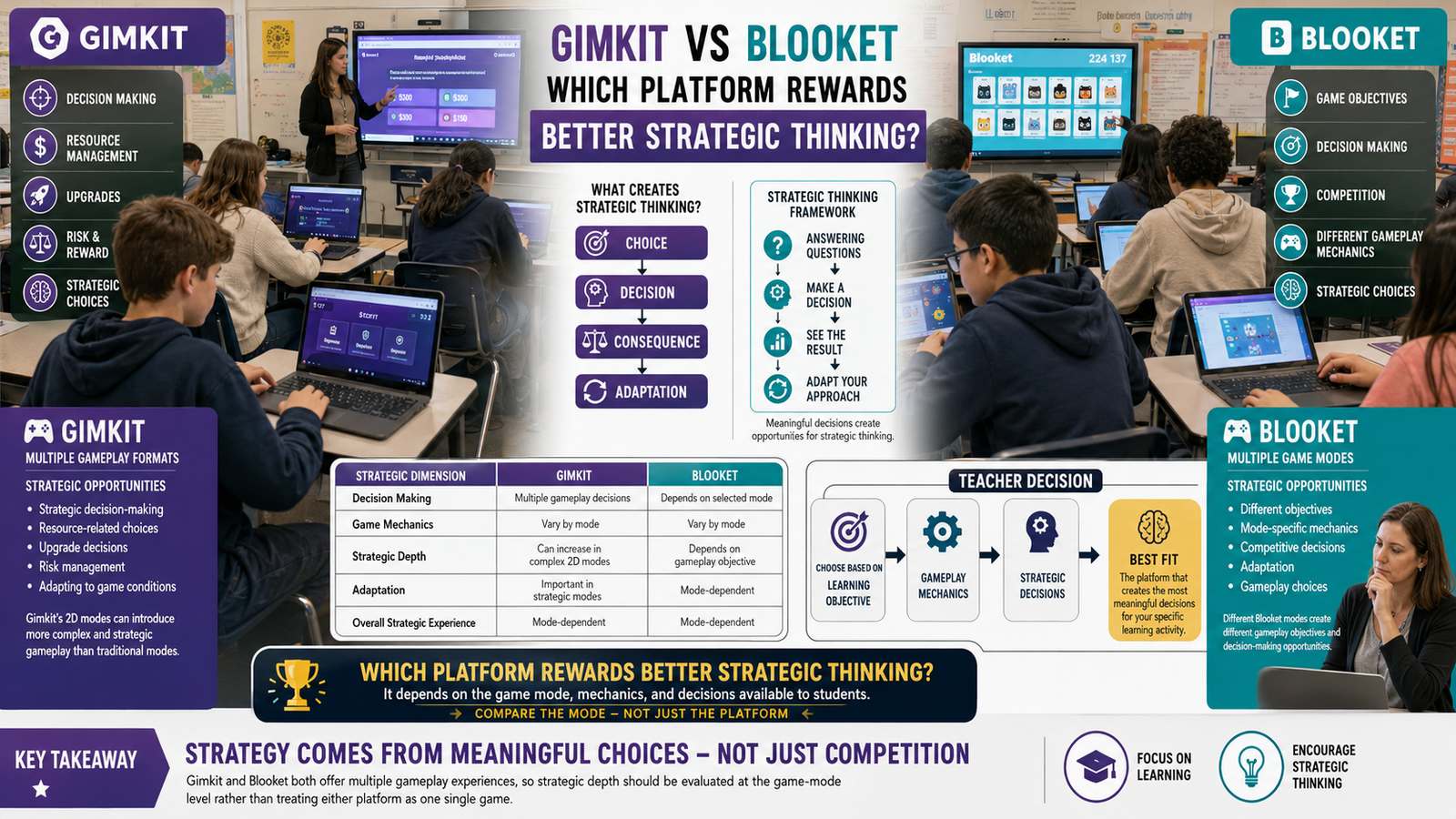
Gimkit vs Factile is a comparison between two very different definitions of “classroom game.”
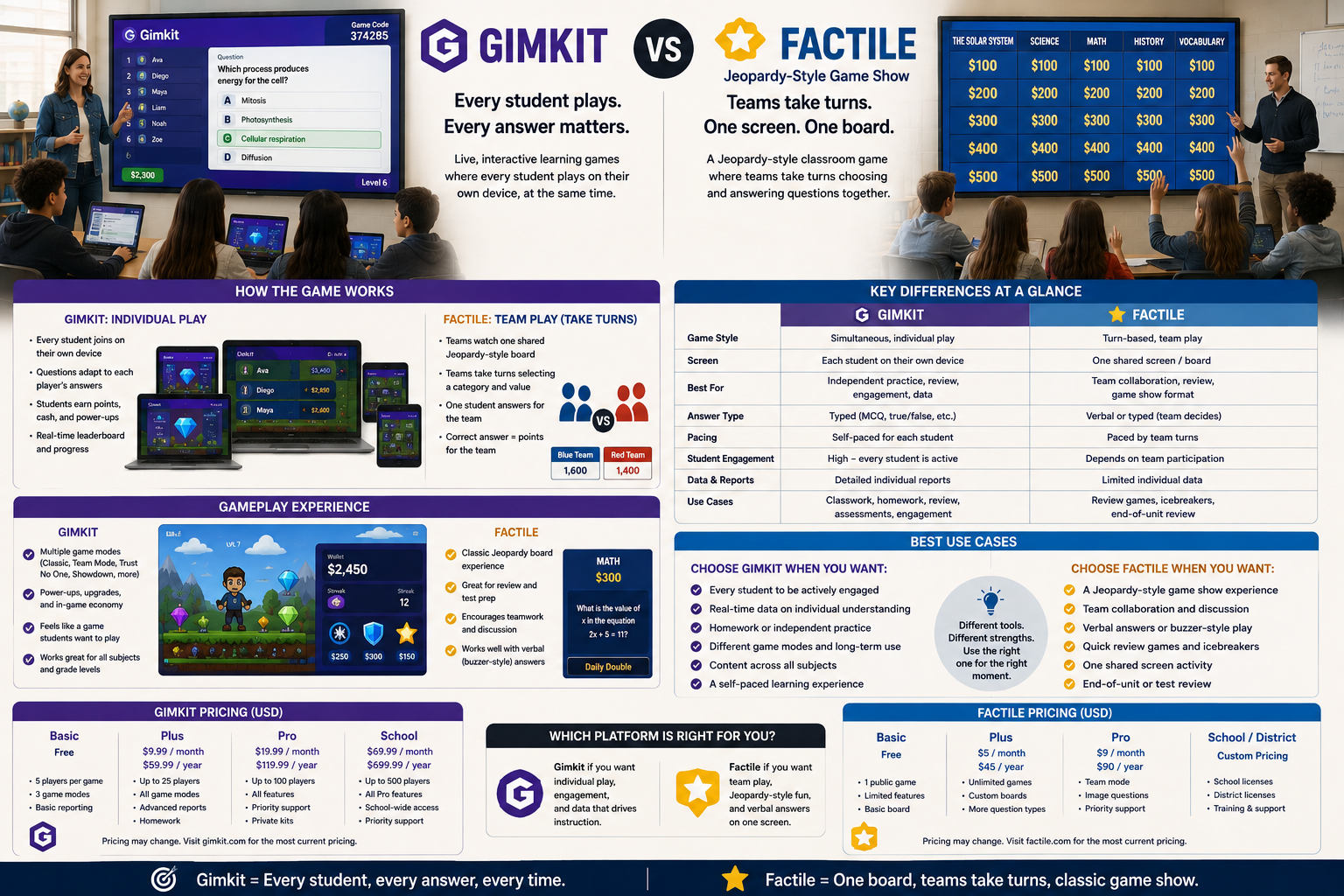
Factile recreates a familiar format: a Jeopardy-style game show board, played by teams taking turns, on a single shared screen. Gimkit does something structurally different — every student plays simultaneously, on their own device, inside a game that reacts individually to their answers.
Once that distinction is clear, the rest of the comparison falls into place quickly — including two pieces most side-by-side reviews skip: what each platform actually costs, and what happens the moment you need buzzer-style, verbal-answer play instead of typed answers on a device.
Looking for comprehensive classroom resources and educational technology insights? Explore GimkitApp for expert guides, teaching strategies, game modes, and the latest updates to enhance student engagement.
Gimkit vs Factile at a Glance
Teaching function
Gimkit
Factile
Format
Individual/team game modes on personal devices
Jeopardy-style board on a shared screen
Turn structure
All students answer simultaneously
Teams take turns selecting a category and point value
Screen setup
Every student has their own device
One shared display, teacher controls the board
Core mechanic
Answer → game resource → progress
Select a category/points → answer → team score
Team requirement
Optional
Effectively required
Content structure
Kits (question sets)
Category boards with point values
Answer input
Typed/selected on each student’s device
Verbal (buzzer-style) or device-submitted, teacher’s choice
Ready-made content
Question Bank of shared Kits
2 million+ public game templates
AI content generation
AI Question Generator
AutoGen (OpenAI-based question generation)
Free tier
Basic: unlimited students, ~3 rotating game modes
Free: up to 3 games, 5 teams, no ads
Paid tier
Pro: roughly $60/year
Home/School Basic: around $48/year
Best conceptual fit
“Everyone plays at once, individually”
“Run a game show the whole class watches together”
That single row — turn structure — is the real dividing line between these two platforms, but the format difference has ripple effects on pricing, device requirements, and even how answers get submitted, which is where the real-world decision usually gets made.
Factile Recreates a Specific, Familiar Format on Purpose
Factile isn’t trying to reinvent classroom gaming. It’s trying to digitize a format teachers already trust: the Jeopardy-style game show board, organized into categories and escalating point values, played by teams who take turns choosing a square and answering.
That format comes with built-in structure a teacher doesn’t have to invent:
Categories organize content into clear topic groups
Point values let a teacher weight harder questions more heavily
Turn order gives every team a visible, fair chance to participate
A shared board keeps the whole class watching the same thing at once
Buzzer Mode turns any browser-connected phone, tablet, or computer into a virtual buzzer, so teams can “buzz in” the way contestants do on the actual TV show
Questions can carry formatted text, images, video, sound, or math equations, and the same game content can double as flashcards or a self-study multiple-choice version
Because the format is so recognizable, Factile’s biggest strength is how little explanation it needs. Most students and teachers already understand how a Jeopardy-style board works before the platform ever explains a rule. Teachers who don’t want to build a board from scratch can also pull from a library of more than two million existing public games to use as a starting template, or use Factile’s AutoGen AI tool to generate question content faster.
Gimkit Doesn’t Use Turns — And That Changes Everything
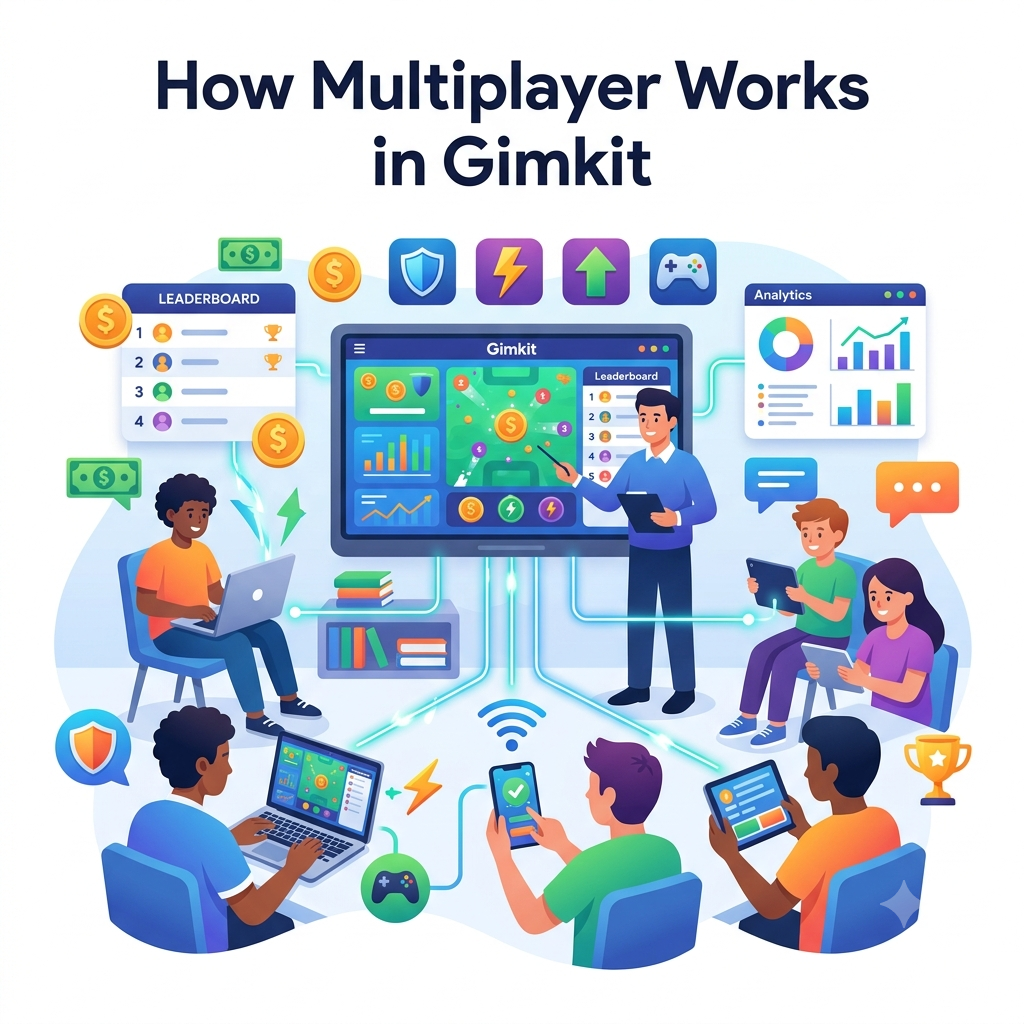
Gimkit’s structure has no equivalent to “select a category, then wait for your turn.” Every student is answering constantly, on their own device, at their own pace, for the entire session.
That single difference reshapes the whole experience:
There’s no idle time waiting for other teams to take their turn
Every student is generating game progress continuously, not intermittently
The game reacts to each individual student’s answers, not just a team’s collective score
A single very active student can’t “carry” the team the way a strong player might dominate turns on a shared board
This is the real tradeoff at the center of Gimkit vs Factile: a turn-based shared board keeps everyone watching the same moment together, while a simultaneous individual format keeps everyone doing something the entire time.
Shared Screen vs Personal Devices: A Practical Classroom Difference
Factile is built around a single shared display — a projector or interactive whiteboard the whole class watches while teams take turns selecting squares and answering. Students may respond verbally, by hand-raise, or through a connected device acting as a virtual buzzer, depending on how the teacher runs the round, but the board itself lives in one shared place.
Gimkit assumes each student has their own device and is looking at their own game environment, not a shared board. That has direct classroom-management consequences: Factile naturally centers attention on one shared point at the front of the room, while Gimkit spreads attention across as many screens as there are students.
Neither approach is automatically better — a shared screen keeps a class visibly unified during a review game, while individual devices keep every student individually accountable for their own answers rather than watching teammates play.
Team Structure: Required vs Optional
Factile’s format is built around teams from the ground up. The game show board, the turn order, and the scoring are all organized around a small number of competing teams — the format doesn’t really function as an individual, everyone-plays-at-once activity the way Gimkit’s modes can.
Gimkit treats teams as one configuration option among several. A teacher can run a fully individual game where everyone competes for themselves, a team-based mode where students combine scores or resources, or a cooperative mode where the entire class works toward one shared objective across any of its roughly thirteen active 2D game modes. Team play is available in Gimkit, but it’s a choice rather than the platform’s default identity.
That makes Factile the more specialized tool for team-based review, and Gimkit the more flexible tool when a teacher isn’t sure yet whether teams, individuals, or full-class cooperation fits the lesson best.
Content Structure: Categories and Points vs Kits and Game Modes
Building content also works differently on each platform.
Factile organizes content into a board of categories, each containing questions assigned increasing point values — a structure borrowed directly from game shows, where harder or deeper questions are worth more. That structure gives a teacher an easy way to signal difficulty visually, before a single question is even revealed. Templates make this faster: a teacher can import images, add graphics, and even build a board directly from a PowerPoint file, or skip building entirely and adapt one of Factile’s millions of existing public boards.
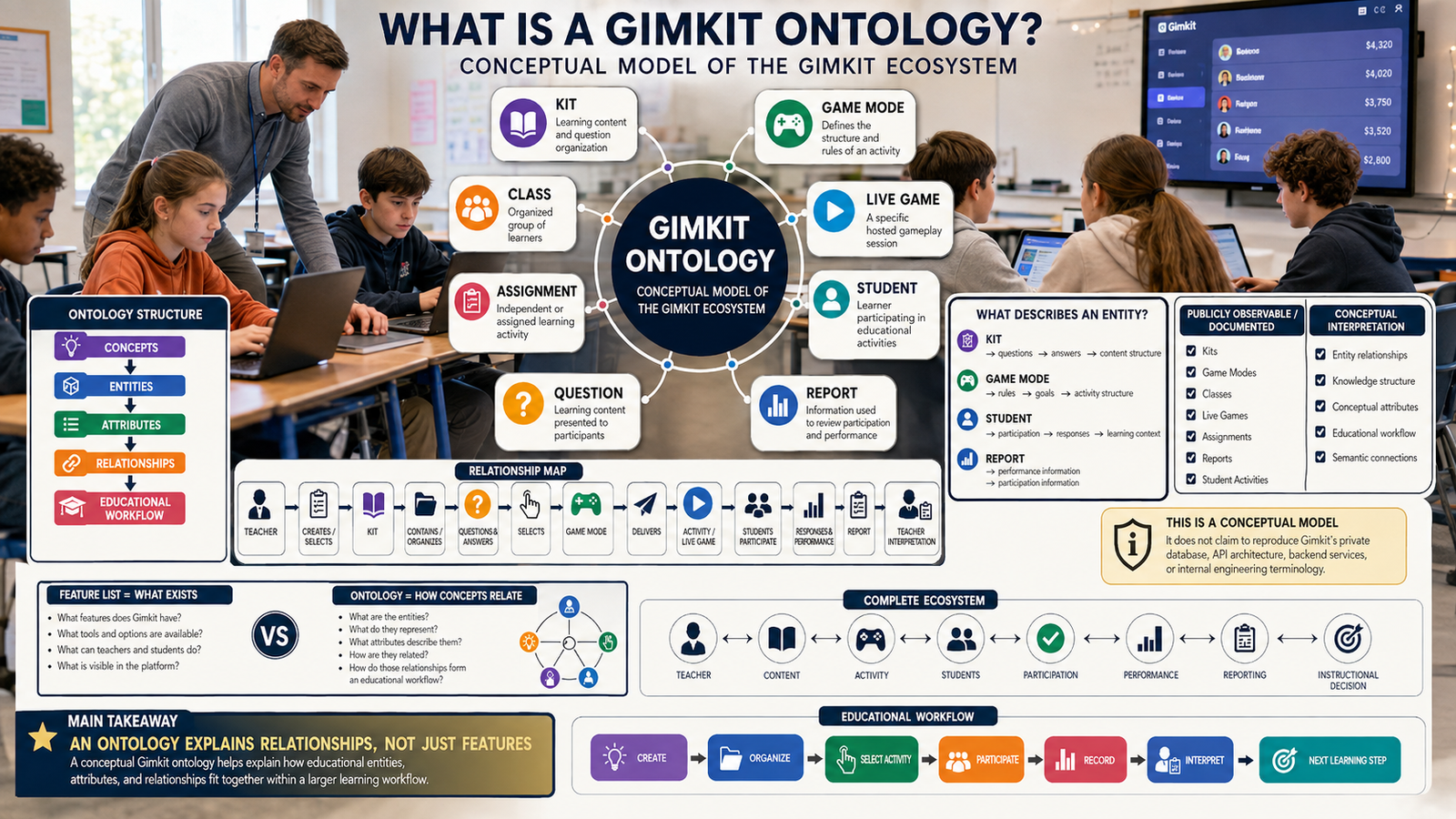
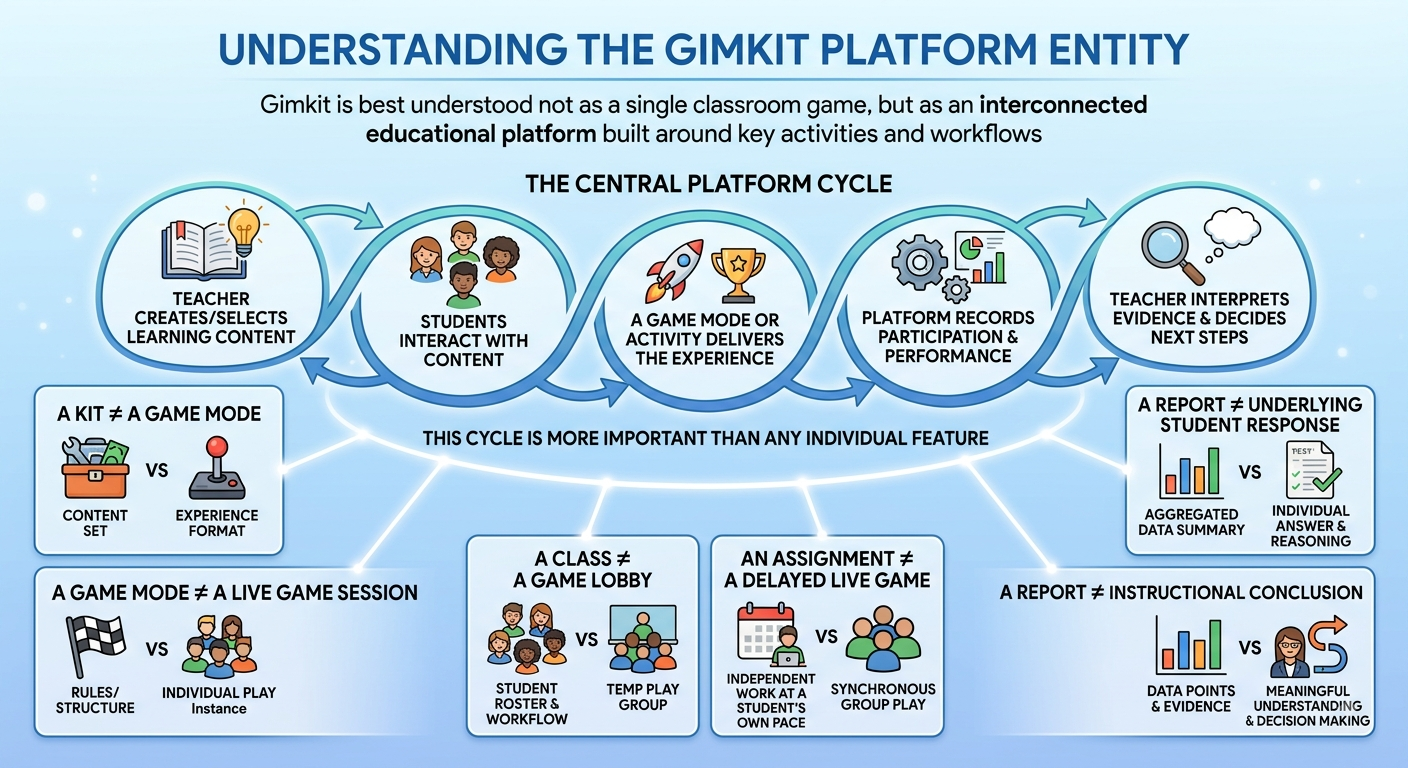
Gimkit organizes content into a Kit — a flat set of questions without an inherent points-and-categories board — and then lets a game mode determine how those questions translate into gameplay. Difficulty isn’t shown on a shared board; it’s just embedded in the individual questions themselves. Gimkit’s own AI Question Generator and its Question Bank of shareable Kits serve a similar time-saving role to Factile’s AutoGen and public template library, just applied to a flat question set instead of a category board.
This means a teacher building a Factile board is naturally thinking in terms of topic categories and escalating difficulty, while a teacher building a Gimkit Kit is thinking in terms of a straightforward question set that a chosen game mode will shape into an experience.
Pacing: Teacher-Controlled Turns vs Continuous Play
Because Factile is turn-based, the teacher has direct, moment-to-moment control over pacing — deciding when to move to the next team, how long to give for an answer, and when to reveal whether a response was correct. That control is useful for classes that need a highly structured, teacher-guided rhythm.
Gimkit’s continuous, simultaneous format puts less of that pacing in the teacher’s hands moment-to-moment, since students are progressing individually and constantly rather than waiting for a turn. The teacher’s control shifts from moment-to-moment turn management to overall game settings — how long the round runs, what resources are available, and how the game mode is configured before it starts.
For the latest gaming news, expert reviews, and walkthroughs, readers can also visit IGN, one of the world’s leading gaming websites.
Reporting: Team Scores vs Individual Performance Data
Factile’s scoring is built around the team level, since that’s the unit the game is actually played at. A teacher can see which team won and how the board played out, but the format doesn’t naturally produce detailed individual-student data the way a platform built around individual play would.
Gimkit’s reporting reflects its individual, simultaneous structure — because every student is answering continuously and independently, the platform can report on individual accuracy, question-level performance, and participation even inside a team-based mode. That makes Gimkit more useful when a teacher needs to know exactly how one specific student performed, not just how their team did overall.
Pricing: What Free Actually Covers
Both platforms offer a free way in, but the ceiling sits in a different place.
Factile’s free plan runs ad-free but caps out at three games and five teams — enough to try the format, but limiting for a teacher who wants to build and keep a library of boards. The paid Home/School Basic tier, priced around $48 a year, removes the game cap and adds unlimited games, richer question media (images, video, equations), and Buzzer Mode. Business and classroom-scale Pro plans layer on further customization and question-bank features.
Gimkit’s free Basic plan is unlimited on student count but restricts most of its 2D game modes and detailed reporting to a small rotating selection. Gimkit Pro, at roughly $60 a year, unlocks the full mode catalog, Assignments, larger kit imports, and detailed reports.
In practice, the free tiers fail teachers in different ways: Factile’s free plan caps how many games you can keep, while Gimkit’s free plan caps which game modes you can play. Which limitation matters more depends on whether a teacher plans to build a rotating game-show library or wants access to Gimkit’s full variety of play styles.
Where Factile Has the Advantage
Factile’s advantage shows up clearly in a few specific situations:
A whole-class review session where keeping everyone watching one shared board matters
A format students and parents already recognize without explanation
A team-based review where visible turn order and fairness matter
A classroom without one device per student, since Factile centers around a single shared display
A verbal, buzzer-style review that mimics the actual TV game show experience
Quickly adapting one of millions of existing public game templates instead of building from scratch
Where Gimkit Has the Advantage
Gimkit’s advantage shows up clearly in different situations:
A one-to-one device classroom where every student can play individually
A review session that needs to keep every student actively engaged the entire time, not waiting for a turn
A need for individual-level performance data, even within a team format
Flexibility to switch between individual, team, or fully cooperative play depending on the lesson
A wider range of game mechanics beyond the single category-board format
The Real Question to Ask
The question that actually settles a Gimkit vs Factile decision isn’t which platform looks more polished. It’s:
Do I want the whole class watching one shared board and taking turns, or do I want every student playing simultaneously on their own device?
If it’s the first, Factile’s Jeopardy-style format is built exactly for that experience. If it’s the second, Gimkit’s individual, continuous game structure is the better fit. Some teachers use both — Factile for a whole-class review day that feels like an event, Gimkit for regular practice sessions where every student needs to stay active the entire time.
Frequently Asked Questions
Can Factile be played with individual students instead of teams?
Factile is mainly designed around team-based gameplay. Students usually play together on a shared board, taking turns and competing for points. You can involve individual students, but it isn’t really built around giving every student their own separate game experience.
Gimkit works differently. Each student can join from their own device and answer questions continuously at their own pace. So, if your main goal is to have every student actively playing at the same time, Gimkit is the more natural choice.
Does Gimkit have a shared game-show board like Factile?
Not really. Factile is built around the classic game-show setup where everyone can see the same board, choose categories, select point values, and take turns answering.
Gimkit doesn’t follow that structure. Students normally have their own screens and move through questions individually. The game focuses more on continuous gameplay, rather than having the whole class control one shared board.
Which platform works better without one device per student?
Factile has an advantage here. Because the class can play around one shared screen, you don’t necessarily need a separate device for every student. Teams can take turns, and Buzzer Mode can also be used for a more interactive classroom setup.
Gimkit is more dependent on individual devices because each student normally needs their own screen to answer questions and participate. So if your classroom has limited devices, Factile can be the easier option.
Does Factile provide individual student performance data?
Factile is more focused on the team as a whole, because teams are a major part of how the game is played. That means its scoring naturally focuses more on team performance.
Gimkit gives you a different kind of view because students answer questions individually. You can see things such as how accurately a student answered and how they performed across questions. That’s useful when the teacher wants to see not just which team won, but which students actually understood the material.
Which platform is cheaper?
There isn’t a huge difference between the two when you compare their paid plans, so the better choice really depends on what you need.
The free versions also have different limitations. Factile’s free option can work well if you only need a small number of active games and mainly want the classic game-board experience. Gimkit’s free version is more restrictive when it comes to available game modes.
So rather than simply asking which one is cheaper, it’s better to ask which platform gives you the features you actually need.
Is one platform more “classic” or traditional than the other?
Definitely. Factile is much closer to the traditional game-show experience. The board, categories, points, turns, and Buzzer Mode all make it feel familiar, almost like bringing a classroom version of a TV quiz show into the room.
Gimkit feels more like an actual multiplayer game. Instead of copying the traditional game-show format, it adds its own gameplay mechanics around answering questions, earning rewards, and continuing to play.
So if you want “Jeopardy-style classroom gameplay,” Factile makes more sense. If you want “students playing an educational game on their own devices,” Gimkit is usually the better fit.
Final Verdict
Gimkit vs Factile ultimately comes down to format, not quality. Factile recreates a trusted, turn-based game show experience on a shared screen, backed by buzzer-style play and a massive template library. Gimkit builds a continuous, individual game economy across personal devices, backed by a wider range of game mechanics.
Choose Factile when the goal is a whole-class event built around teams, a shared board, and a format everyone already knows. Choose Gimkit when the goal is keeping every student individually active, with data to match, for the length of the session. The two platforms aren’t competing over the same classroom moment — they’re built for two different ones.