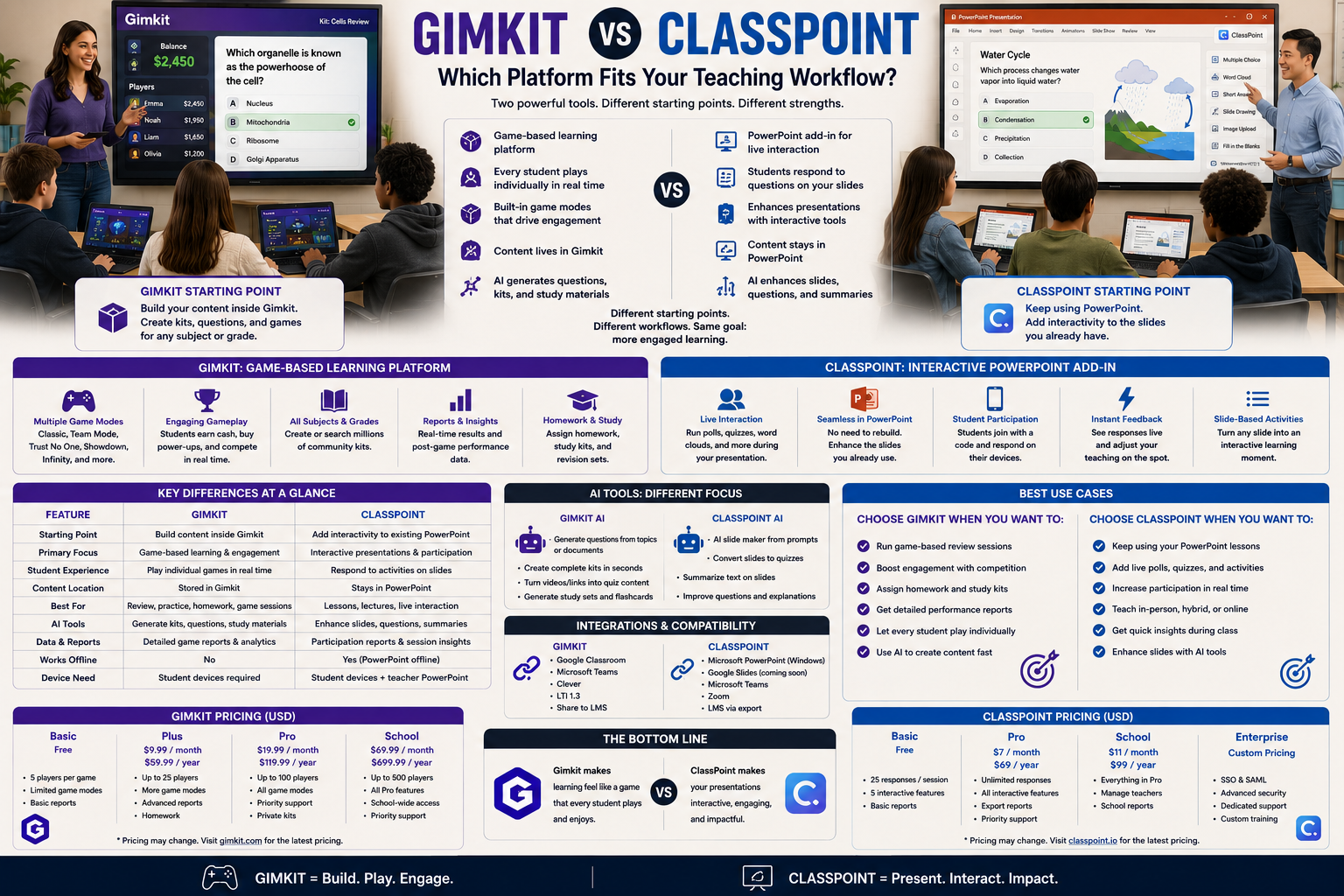
Gimkit vs ClassPoint is a comparison between two completely different starting points. Gimkit asks a teacher to build content inside its own platform. ClassPoint asks a teacher to keep using PowerPoint — and simply adds interactivity on top of the slides that already exist.
That difference in where the content lives changes almost everything about how each platform fits into a teacher’s actual workflow, right down to what each one costs and where its AI tools point.
Looking for comprehensive classroom resources and educational technology insights? Explore GimkitApp for expert guides, teaching strategies, game modes, and the latest updates to enhance student engagement.
Gimkit vs ClassPoint at a Glance
Teaching function
Gimkit
ClassPoint
Where content lives
Gimkit’s own Kit system
Directly inside PowerPoint slides
Setup starting point
Build or import a Kit
Add interactive elements to existing slides
Core identity
A standalone game-based practice platform
A PowerPoint add-in for live interactivity
Student activity
Plays inside a Gimkit game environment
Responds to slide-embedded questions in real time
Presentation content
Not a core feature
Full presentation slides, native
Extra live tools
Limited
Annotation, name picker, timer, whiteboard, web browser in-slide
AI content generation
AI Question Generator
ClassPoint AI (generates quiz questions from a slide)
Gamification
Full game modes and economy
Lightweight star-based rewards system
Free tier
Basic: unlimited students, ~3 rotating game modes
Basic: 25 max class size, 5 questions per PPT
Paid tier
Pro: roughly $60/year
Pro: $96/year, 200 max class size
Best conceptual fit
“Practice inside a game”
“Make the lesson I already built interactive”
That “where content lives” row explains why so many teachers end up choosing based on their existing habits, not just features — and the pricing rows below show that habit-fit also comes with real cost differences once a class outgrows the free tier.
ClassPoint’s Core Idea: Don’t Replace the Slides, Enhance Them
Most teachers already have a slide deck. Rebuilding that content inside a new platform is real, unpaid work — and it’s exactly the friction ClassPoint is designed to remove.
ClassPoint works as an add-in directly inside PowerPoint. Instead of exporting content into a separate quiz platform, a teacher adds interactive question types — multiple choice, short answer, fill in the blanks, word cloud, slide drawing, and others — directly onto the slides they’ve already built. When the teacher presents, students join with a code and respond in real time to those embedded elements, without the lesson ever leaving PowerPoint. ClassPoint AI can also analyze an existing slide and generate quiz questions from it automatically, cutting down the manual work of writing checkpoint questions for content a teacher has already built.
That means the presentation itself stays the primary object. The interactivity is a layer added to it, not a separate destination students are sent to.
Gimkit’s Core Idea: The Platform Is the Destination
Gimkit works the opposite way. There’s no equivalent of “add a game element to your existing PowerPoint.” A teacher builds or imports a Kit inside Gimkit itself, chooses one of its roughly thirteen active 2D game modes, and launches students into Gimkit’s own environment — separate from any slides, presentation, or existing lesson material the teacher may have already prepared.
That’s not a limitation so much as a different design philosophy. Gimkit isn’t trying to enhance an existing lesson; it’s trying to be a dedicated, self-contained space for game-based practice, built around its own content and its own mechanics.
Presentation Content: A Genuine ClassPoint Advantage
Because ClassPoint lives inside PowerPoint, it can carry everything a normal presentation carries — full instructional slides, diagrams, images, animations, and whatever else a teacher has already built — with interactive checkpoints inserted wherever they’re needed.
Gimkit doesn’t really have an equivalent to this. Its Kits are structured as question sets, not instructional slide decks, so there’s no natural place inside Gimkit for a teacher to walk through several slides of direct teaching before reaching a question. If a lesson needs to combine real instructional content with interactive checkpoints, that’s a job ClassPoint is built for and Gimkit isn’t attempting.
Live Classroom Tools Beyond Questions
ClassPoint’s add-in format also brings a set of live teaching tools that exist independently of any specific question — because it’s operating inside the same software teachers already present from.
These typically include a random name picker for calling on students fairly, an on-screen timer, annotation and inking tools that let a teacher draw or write directly on a slide while presenting, unlimited whiteboard slides, draggable objects, and even a web browser that can be searched right inside a live PowerPoint presentation. None of these require a “question” to exist — they’re general live-teaching utilities layered onto the presentation itself.
Gimkit doesn’t provide this category of tool, because it isn’t operating as a layer on top of a presentation. Its entire feature set is oriented around the game session itself — game modes, in-game economy, and reporting — rather than general-purpose live-classroom utilities a teacher might use throughout a lesson regardless of whether a game is running.
Gamification: Full Game Economy vs Lightweight Star Rewards
Both platforms use some form of gamification, but at very different depths.
ClassPoint’s gamification is intentionally lightweight — students earn star-based rewards for participating in and answering interactive slide elements correctly, which adds a motivational layer without turning the presentation into a full game. It’s designed to sit quietly underneath a normal lesson rather than becoming the lesson itself.
Gimkit’s gamification is the platform’s entire reason for existing. Correct answers translate into currency, energy, or progress that reshapes what a student can do next inside the game, and that system varies substantially across its many game modes. ClassPoint’s stars are a participation incentive; Gimkit’s economy is the core mechanic the whole session is built around.
Where Gimkit Pulls Ahead: The Actual Game Layer
The tradeoff for ClassPoint’s PowerPoint-native approach is that it isn’t building a game economy the way Gimkit is.
ClassPoint’s interactive elements are checkpoints — a poll, a quiz question, a word cloud — inserted into a presentation, with light gamification layered on top through stars. They don’t feed into an ongoing game state the way a Gimkit correct answer feeds into currency, energy, or progress that a student then uses to do something else. There’s no equivalent inside ClassPoint to Gimkit’s economy-based or exploration-based game modes, because ClassPoint isn’t trying to be a game platform — it’s trying to be a more interactive presentation tool.
So if the instructional goal is sustained, repeated practice with a genuine game layer sitting on top of the questions, that’s Gimkit’s territory specifically, and it’s not something ClassPoint is attempting to replicate.
Setup Cost: Starting From Zero vs Starting From What Already Exists
This is one of the most practical differences for a busy teacher.
Using ClassPoint typically means starting from a presentation that may already exist, and adding interactive elements onto specific slides — the baseline lesson content doesn’t need to be rebuilt from scratch. The setup cost is mostly about deciding where interactivity should go, not building content from nothing, and ClassPoint AI can generate a first draft of questions straight from the slide content itself.
Using Gimkit typically means starting from Gimkit’s own Kit-building interface, even if a teacher imports questions from a spreadsheet or the Question Bank. There’s no way to simply “add Gimkit” onto an existing PowerPoint the way ClassPoint’s checkpoints get added onto existing slides — the Kit and the presentation remain two separate things.
For a teacher whose material already exists as a slide deck, that difference in setup cost is often the deciding factor before any other feature comparison even matters.
Pricing: What Free Actually Limits
Both platforms offer a genuinely usable free plan, but the caps sit in different places.
ClassPoint’s free Basic plan caps class size at 25 students, limits each presentation to 5 questions, includes only basic gamification, and allows 3 saved classes — workable for a small class doing occasional checkpoints, but tight for a full-size classroom running interactivity throughout a lesson. The paid Pro plan, at $96 a year, raises the class-size cap to 200, removes the per-presentation question limit, unlocks all question types, and includes 500 AI quiz-generation credits a month. A Premium tier above that, priced on request, raises the class cap to 500 and adds features like grouping and live Q&A.
Gimkit’s free Basic plan is unlimited on student count but restricts most of its 2D game modes and detailed reporting to a small rotating selection. Gimkit Pro, at roughly $60 a year, unlocks the full mode catalog, Assignments, larger kit imports, and detailed reports.
The shape of the limitation is almost inverted between the two: ClassPoint’s free tier caps how many students can join and how many questions a presentation can hold, while Gimkit’s free tier has no student cap at all but limits which game modes are unlocked. A larger class leans a school toward paying for ClassPoint sooner; wanting Gimkit’s full mode variety leans a school toward paying for Gimkit sooner.
For the latest gaming news, expert reviews, and walkthroughs, readers can also visit IGN, one of the world’s leading gaming websites.
Reporting: Slide-Level Responses vs Game Session Data
ClassPoint’s reporting reflects individual responses tied to specific slides within a presentation — which students answered which embedded question, and how. It’s a record of engagement across a lesson, organized around the presentation’s own structure, and responses are saved for later review.
Gimkit’s reporting reflects performance within a Kit or game session — accuracy, question-level results, and participation inside the chosen game mode. It’s a record of how the game went, not how a broader presentation-based lesson landed, because Gimkit was never delivering that kind of lesson to begin with.
Where ClassPoint Has the Advantage
ClassPoint’s advantage is clearest in specific situations:
A teacher who already has a PowerPoint deck and doesn’t want to rebuild it elsewhere
A lesson that needs full instructional slides, not just isolated questions
General live-teaching tools like a name picker, timer, whiteboard, or in-slide web browser, independent of any quiz
Minimizing the setup cost of adding interactivity to material that already exists, with AI-generated questions pulled straight from the slide
A smaller class where the free tier’s 25-student cap is enough
Where Gimkit Has the Advantage
Gimkit’s advantage is clearest in different situations:
A dedicated game-based practice session, not a presentation with checkpoints
Sustained repetition where a genuine in-game economy or progression matters
Content built specifically as a reusable question set, independent of any slide deck
A student experience built around playing a game, not responding inside a presentation
A larger class that needs an unlimited free-tier student count
The Real Question to Ask
The question that actually decides a Gimkit vs ClassPoint choice isn’t which one has more features. It’s:
Do I already have a lesson built in PowerPoint that just needs interactivity, or do I need a dedicated game-based practice session built around its own content?
If it’s the first, ClassPoint’s PowerPoint-native approach removes the most friction. If it’s the second, Gimkit’s standalone game platform is doing a job ClassPoint was never designed to do.
Frequently Asked Questions
Do I need to leave PowerPoint to use ClassPoint?
No. That’s actually one of ClassPoint’s biggest advantages. It works directly inside PowerPoint, so a teacher can take an existing presentation and add interactive questions, polls, and activities without opening a completely separate teaching platform.
Gimkit works differently. It’s a standalone game platform, so students leave the presentation and join the Gimkit game separately. If your lesson is already built around PowerPoint, ClassPoint fits into that workflow much more naturally.
Can Gimkit be used to enhance an existing PowerPoint presentation?
Not in the same way. Gimkit isn’t a PowerPoint add-in, so you can’t simply place Gimkit activities on top of your existing slides.
Instead, you create or import your question content into a Kit and then run it through one of Gimkit’s game modes. You can still use PowerPoint alongside Gimkit, but the two remain separate.
So if the goal is “make my existing PowerPoint interactive,” ClassPoint is the better fit.
Which platform has a true in-game economy or progression system?
Gimkit is much stronger in this area. In many of its game modes, students earn things such as money, energy, upgrades, or other rewards by answering questions. Those rewards actually affect what happens in the game, so students aren’t just collecting points — they’re using what they earn to progress.
ClassPoint has its own reward system, including stars, but it doesn’t turn the lesson into an ongoing economy or exploration game. Its rewards are more of an extra motivation layer on top of the presentation.
Does ClassPoint offer tools beyond quiz questions?
Yes, and this is another area where ClassPoint and Gimkit are quite different.
ClassPoint includes tools that are useful during a normal classroom presentation, such as a random name picker, timer, annotation tools, whiteboard features, draggable objects, and an integrated web browser. These tools don’t depend on running a quiz.
Gimkit is much more focused on the game itself. Its features are designed around students answering questions, earning rewards, competing, and progressing through the selected game mode.
Which platform requires less setup for a teacher who already has slides?
If you already have a PowerPoint presentation ready, ClassPoint is usually easier. You don’t have to rebuild the whole lesson somewhere else. You can simply add interactive elements to the slides you’re already using.
ClassPoint can also use AI to help create questions from slide content, which can save even more time.
With Gimkit, you’ll generally need to prepare the questions as a Kit inside Gimkit before starting the game. So it adds another step if your lesson already exists entirely in PowerPoint.
Which platform is cheaper, and where do the free tiers actually limit you?
Gimkit’s Pro plan is cheaper per year than ClassPoint’s Pro plan, but price isn’t the only thing to look at because their free plans have very different restrictions.
ClassPoint’s free plan limits the class size and the number of questions you can add to a presentation. Gimkit doesn’t put the same kind of student-count restriction on its free plan, but it limits access to many of its different game modes.
So the better free option depends on what is holding you back: ClassPoint becomes restrictive for larger classes or longer interactive presentations, while Gimkit becomes restrictive if you want access to its full range of game modes.
Final Verdict
Gimkit vs ClassPoint ultimately comes down to where the lesson already lives. ClassPoint meets a teacher inside the presentation they’ve already built and adds interactivity — plus AI-generated questions, live-teaching utilities, and light star-based gamification — on top of it. Gimkit asks a teacher to build a dedicated Kit and launches students into its own standalone game environment with a full in-game economy behind it.
Choose ClassPoint when the priority is enhancing an existing PowerPoint lesson with minimal rebuilding, especially for smaller classes on the free tier. Choose Gimkit when the priority is a genuine, sustained game-based practice session built around its own content and mechanics, with no cap on how many students can join for free. The two aren’t solving the same problem — one enhances what already exists, the other builds something separate from scratch.