Kahoot Experiences Explained | Log into Kahoot, click “Host live,” and the first thing that appears isn’t a single “start” button — it’s a carousel of options, each one changing how the exact same set of questions actually plays out. That carousel is the experience system, and understanding how it’s organized is the piece most Kahoot users skip past on their way to just picking whatever looks familiar.
This guide explains what a Kahoot experience actually is, how the system is structured, where it lives in the hosting flow, and how it relates to the questions and reports around it. It stays at the overview level on purpose — the deep mechanics of any single experience, along with guidance on choosing between them for a specific purpose, are big enough topics to deserve their own dedicated coverage elsewhere. What’s here is the foundation those deeper guides all build on.
Looking for comprehensive classroom resources and educational technology insights? Explore GimkitApp for expert guides, teaching strategies, game modes, and the latest updates to enhance student engagement.
What Is a Kahoot Experience?
A Kahoot experience is the format layer that determines how a live or self-paced game actually functions — how scoring works, what players see, whether teamwork is involved, and how the host controls pacing. The underlying kahoot (the set of questions itself) stays identical no matter which experience is selected; only the gameplay wrapped around it changes.
This is a deliberate design choice, and it’s the single most important thing to understand about the system. A teacher doesn’t need three separate quizzes to get three different classroom dynamics — one well-built kahoot can be hosted through several different experiences across a semester, producing a noticeably different session each time without a single question being rewritten.
💡 Pro Tip: If you’ve only ever hosted the default experience that appears first in the carousel, it’s worth knowing that everything else in that carousel works with question sets you’ve already built — there’s no extra content creation required to try a different one.
Kahoot Experiences vs. Game Modes vs. Question Content
Kahoot’s own documentation uses “experience” and “game mode” somewhat interchangeably, which understandably causes confusion for anyone trying to search for clear answers. In practice, both terms point to the same layer of the system — the format the questions are played through — as distinct from two other layers that are easy to conflate with it:
Question content is the actual quiz — the questions, answer options, images, and correct answers that make up a specific kahoot.
Experience (or game mode) is the format wrapped around that content — how it’s scored, presented, and paced.
Hosting settings are the smaller configuration choices available within a chosen experience, such as whether a timer is used or whether player nicknames are visible.
Keeping these three layers separate matters because troubleshooting or planning a session usually only requires changing one of them. A session that felt too competitive doesn’t necessarily need new questions — it might just need a different experience.
⭐ Expert Insight: When evaluating a Kahoot experience for the first time, ask which of the three layers is actually driving the outcome you want to change. Most first-time hosts default to rewriting the quiz when the real fix was one carousel option away.
Where Kahoot Experiences Live in the Hosting Flow
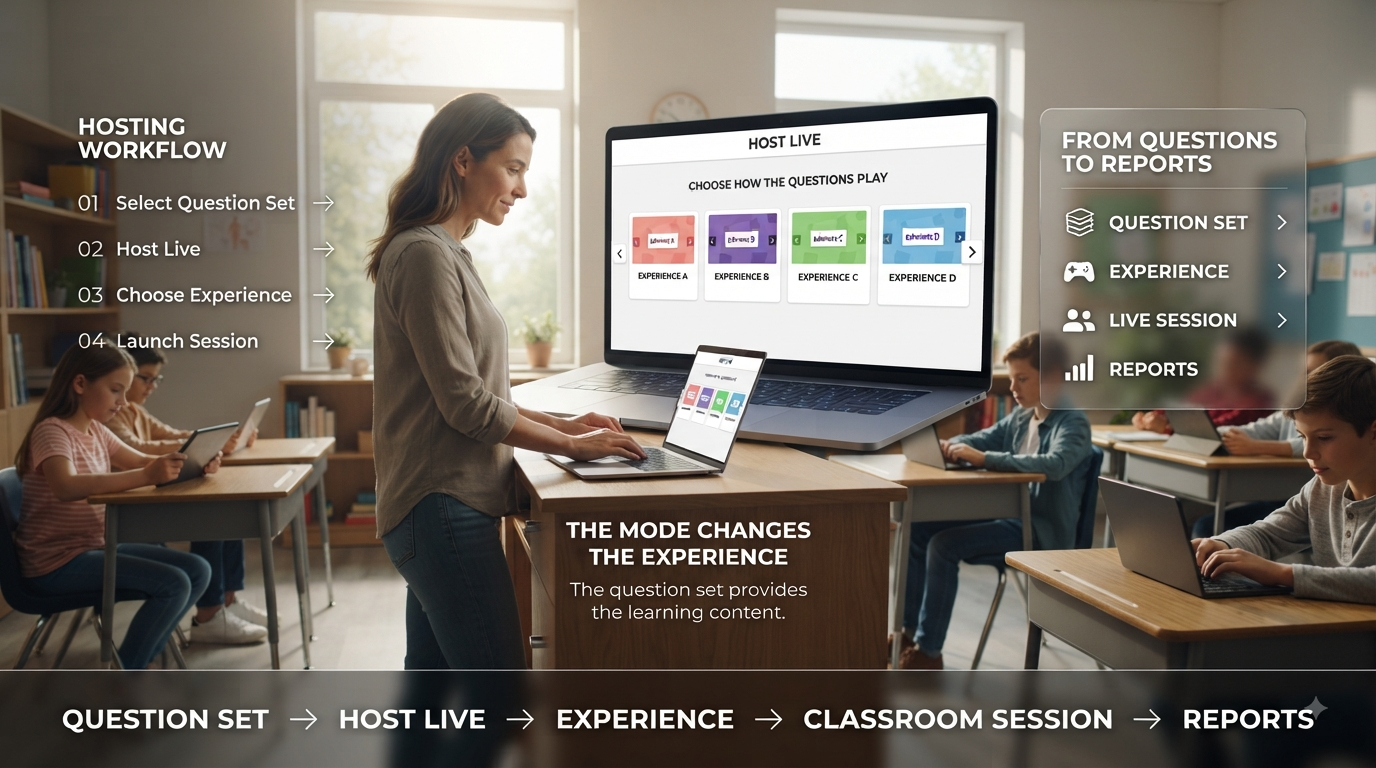
Every available experience appears in a carousel displayed at the bottom of the host’s screen, which shows up immediately after clicking “Host live” on a chosen kahoot. This carousel is the single access point for the entire experience system — there’s no separate settings page or hidden menu; everything is presented side by side at the moment of hosting.
The carousel isn’t static. Kahoot periodically adds new experiences, particularly newer collaborative and mini-game formats, meaning the list a host sees today may include options that didn’t exist even a few months earlier. Established formats tend to stay near the front of the carousel, while newer or more specialized ones are often positioned further along.
📌 Quick Note: Because the carousel updates over time, an experience mentioned in an older tutorial or blog post may have moved position, been renamed, or been joined by newer alternatives. Checking the live carousel directly is more reliable than relying on a screenshot from a guide written months earlier.
How the Kahoot Experience Library Is Organized
Rather than a single flat list, the current library of Kahoot experiences falls into a few broad functional categories. This section names them at a high level — the specific mechanics of each individual experience are substantial enough topics to be covered in their own dedicated guides, so what follows is a map of the territory rather than a full explanation of each stop on it.
Scoring-focused experiences change how points are calculated and displayed, adjusting the balance between speed, accuracy, and strategic risk-taking. These are the formats most similar to Kahoot’s traditional quiz-game feel, just with different rules underneath.
Collaborative and team-based experiences shift the unit of competition from the individual to the group, restructuring how players are organized and how success is measured across a session.
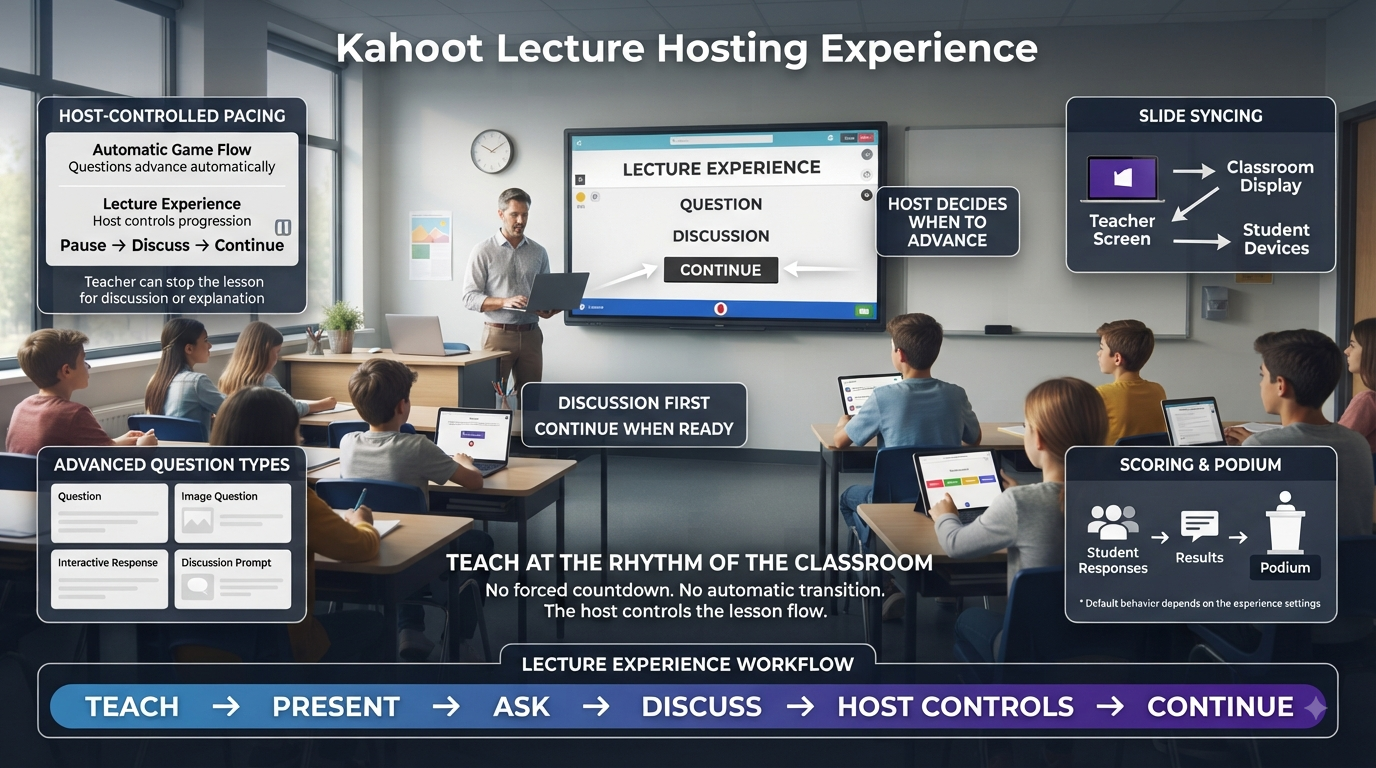
Presentation-oriented experiences are built for hosts who want more manual control over pacing — useful in settings like training sessions, lectures, or any context where a fully player-driven, fast-paced quiz isn’t the goal.
Themed mini-game experiences — collaborative formats with names like Robot Run, Chill Art, Tallest Tower, Treasure Trove, The Lost Pyramid, Submarine Squad, Color Kingdoms, and Cosmic Conquest — wrap the same question-answering mechanic in a visual, cooperative theme, generally emphasizing shared classroom goals over individual leaderboards.
🔍 Did You Know? Several of Kahoot’s themed mini-game experiences are built around a shared objective rather than a competitive ranking, which reflects a broader shift in the experience library toward formats that reduce competitive pressure rather than amplify it.
For the latest gaming news, expert reviews, and walkthroughs, readers can also visit IGN, one of the world’s leading gaming websites.
Why Kahoot Built a System With Multiple Experiences
A single scoring format can’t serve every classroom situation well, and the existence of a multi-experience system reflects that directly. Some sessions genuinely benefit from competitive energy and fast reflexes; others need exactly the opposite — a calmer, more reflective pace where speed doesn’t distort what the results actually show about understanding.
Rather than forcing every host toward one universal format, Kahoot’s experience system separates “the questions” from “the feel of the session,” letting the same content serve a competitive review game on Monday and a low-pressure, inclusive check for understanding on Friday. This flexibility is also why so much of Kahoot’s more recent development effort has gone into expanding the experience carousel rather than only adding new question types.
✅ Best Practice: Think of the experience library less as a set of separate products and more as a single toolkit — the value comes from having options available for different moments, not from finding one “best” experience and using it exclusively.
How Experiences Interact With Reports and Data
Every live session, regardless of which experience was used to host it, generates a report afterward that’s accessible from the account’s Reports section. The baseline structure — a summary view, a participant-level breakdown, and a question-by-question view — stays consistent across the library, which means switching between experiences doesn’t mean learning an entirely new way to read results.
What does change is which experience-specific details get layered on top of that baseline. Some experiences add extra data points relevant to their particular mechanic, which show up as additional cards or columns within the otherwise familiar report structure rather than replacing it. This consistency is intentional — it means a host comparing performance across two different experience types is still working from a report format they already understand, even if a few extra rows or metrics look unfamiliar the first time.
⚠ Common Mistake: Assuming that every experience type will produce an identical report layout down to the smallest detail, then being confused when an unfamiliar section appears. The core structure is shared, but a report is always specific to the experience type used for that session, and it’s labeled accordingly so the type is never ambiguous.
How the Experience Carousel Is Presented on the Host Screen
The carousel itself is worth understanding as an interface, not just as a concept, since navigating it efficiently saves real time at the start of a class period. Each experience appears as its own card within the carousel, typically showing a short label and a small icon or preview image that hints at its theme or mechanic. Scrolling or swiping through the carousel reveals the full current list, and selecting a card is what determines which experience that particular session will use.
Because the carousel sits at the very last step before a game goes live — after a kahoot has already been chosen — it’s structurally positioned as a final decision point rather than something configured earlier in the process. This placement reinforces the separation between content and format described earlier: by the time a host reaches the carousel, the question set is already locked in, and the only remaining choice is which experience to wrap around it.
📌 Quick Note: First-time hosts sometimes assume the first card in the carousel is the “default” or “recommended” option in some official sense. In practice, position in the carousel reflects how Kahoot has chosen to order the library at a given time, not a ranking of which experience is best for any particular session.
Experience Availability Across Kahoot Account Types
Not every experience in the library is available to every account. Kahoot’s free tier provides access to a solid core of the carousel, while certain experiences and specific settings within them are reserved for paid tiers, including Kahoot+ for individuals and the business or higher-education plans built for organizations. A small number of settings — such as whether player characters are shown or hidden — can also default differently depending on account type, independent of whether the experience itself is fully accessible.
This tiering matters most when following a tutorial or recommendation written from a different account type than the one actually being used. A guide describing an experience-specific setting that isn’t visible on a free account isn’t necessarily describing an error — it may simply reflect a feature gated to a paid plan.
⭐ Expert Insight: Before assuming a described option is missing or broken, it’s worth checking account type first. Mismatched expectations between account tiers are one of the more common sources of “this isn’t working like the guide said” confusion around the experience system.
Planning a Session Around the Experience System
Because switching between experiences requires no rebuilding of content, the practical planning question for most hosts isn’t “which questions do I need” but “which format serves this particular session.” Building a habit of treating those as two separate decisions — content first, format second — tends to produce more intentional sessions than defaulting to whatever experience was used last time simply out of familiarity.
This also means a single, well-built kahoot can realistically serve an entire semester’s worth of varied sessions. The same question set covering a unit’s vocabulary could open the unit through a low-pressure, exploratory session, support a mid-unit competitive review once students are more confident with the material, and close with a calmer, more reflective format before an assessment — all without a single question being rewritten, purely by changing which experience is selected from the carousel each time.
✅ Best Practice: When building a new kahoot, resist the urge to design it around a single experience in mind. Question sets that work well across multiple formats — clear wording, reasonable answer-option counts, sensible use of images — tend to age better and get reused more often than ones built with only one specific experience’s quirks in mind.
The Direction of the Experience System Over Time
The steady expansion of the experience library — from a single competitive quiz format toward a growing set of collaborative, accuracy-focused, and presentation-oriented alternatives — reflects a broader pattern worth understanding even at the overview level. Rather than treating “quiz game” as a single fixed product, Kahoot has increasingly treated it as a platform capable of hosting many different classroom dynamics through the same content layer.
🔍 Did You Know? The pace of new additions to the experience carousel has generally trended toward collaborative and inclusivity-focused formats in recent additions, alongside the platform’s more traditional competitive roots — a signal of where host demand and classroom feedback have been pushing the system rather than a replacement of the older formats, which remain available alongside the newer ones.
Common Misconceptions About Kahoot Experiences
“Different experiences require different question sets.” They don’t. The same kahoot can be hosted through multiple different experiences without any changes to the underlying questions.
“The experience carousel is fixed and doesn’t change.” It isn’t. New experiences are added over time, and the available options can shift, meaning it’s worth periodically checking the carousel rather than assuming last semester’s list is complete.
“More competitive experiences are always more engaging.” Engagement depends heavily on the group and the goal of the session — some of the most consistently praised feedback around newer, less competitive experiences comes specifically from students who found earlier, faster-paced formats stressful rather than motivating.
“Switching experiences is complicated.” Selecting a different option is done directly from the same carousel used to start any session — there’s no separate setup process required to try something new.
Frequently Asked Questions
What exactly is a Kahoot experience?
A Kahoot experience is the gameplay format applied to a set of questions — it controls scoring, pacing, player interaction, and what’s displayed during a live session. The questions themselves don’t change between experiences; only the rules and presentation wrapped around them do, which is why the same kahoot can produce very different sessions depending on which experience is selected.
Is “experience” the same thing as “game mode” in Kahoot?
Largely, yes. Kahoot’s own materials use both terms to describe the same layer of the system — the format a set of questions is played through. Some users encounter one term in older guides and the other in current interface labels, but both refer to the same carousel of options available when hosting a live session.
Do I need to create separate kahoots for each experience?
No. Any existing kahoat can be hosted through any available experience without rebuilding the question set. This is one of the system’s core design principles — content and format are kept separate, so trying a new experience with material you’ve already built takes no additional setup.
Does the experience carousel look the same for every account type?
Not necessarily. Some experiences are limited to certain account tiers, such as business or higher-education plans, and certain settings within an experience — like character visibility — can default differently depending on account type. The core carousel structure is shared, but the exact options visible can vary by account.
How often does Kahoot add new experiences to the library?
There’s no fixed schedule, but the experience library has expanded steadily over time, particularly with newer collaborative mini-game formats. Because of this, it’s worth checking the live host carousel periodically rather than relying on an older guide’s list, since newer options may not have existed when that material was written.
Professional Recommendations & Expert Reviews
Kahoot Experiences Explained helps teachers understand how interactive activities can support classroom learning.
Kahoot Experiences Explained shows how question-based activities can make lessons more engaging.
Kahoot Experiences Explained encourages teachers to connect interactive activities with clear learning objectives.
Kahoot Experiences Explained helps students participate actively during classroom review.
Kahoot Experiences Explained supports repeated practice without making every lesson feel identical.
Kahoot Experiences Explained demonstrates how interactive learning can create a more energetic classroom environment.
Kahoot Experiences Explained encourages students to remain focused while working through educational questions.
Kahoot Experiences Explained can support revision across different subjects and grade levels.
Kahoot Experiences Explained helps teachers use competition carefully as part of classroom engagement.
Kahoot Experiences Explained encourages educators to select activities according to student needs.
Kahoot Experiences Explained supports learning experiences where students receive opportunities to demonstrate their understanding.
Kahoot Experiences Explained helps teachers identify concepts that may require additional explanation.
Kahoot Experiences Explained encourages students to learn through participation rather than passive observation.
Kahoot Experiences Explained supports quick classroom review when instructional time is limited.
Kahoot Experiences Explained helps teachers create interactive warm-ups before introducing new material.
Kahoot Experiences Explained can also support reinforcement after a lesson has been completed.
Kahoot Experiences Explained encourages educators to balance entertainment with meaningful academic practice.
Kahoot Experiences Explained helps students become more comfortable responding to questions in a group setting.
Kahoot Experiences Explained supports classroom participation by giving learners a clear activity structure.
Kahoot Experiences Explained encourages teachers to prepare questions that accurately reflect the material being taught.
Kahoot Experiences Explained helps educators make revision sessions more dynamic.
Kahoot Experiences Explained supports learning when questions are appropriately challenging for the participating students.
Kahoot Experiences Explained encourages teachers to consider pacing before beginning an interactive session.
Kahoot Experiences Explained helps students stay engaged when activities are organized around meaningful academic content.
Kahoot Experiences Explained demonstrates how immediate participation can encourage students to pay closer attention.
Kahoot Experiences Explained helps educators recognize the importance of clear instructions before gameplay begins.
Kahoot Experiences Explained supports smoother classroom management when students understand expectations.
Kahoot Experiences Explained encourages teachers to use results as information about student understanding rather than focusing only on rankings.
Kahoot Experiences Explained helps educators identify areas where learners may need additional practice.
Kahoot Experiences Explained supports formative assessment by making question-based review more interactive.
Kahoot Experiences Explained encourages teachers to discuss difficult questions after the activity.
Kahoot Experiences Explained helps students learn from mistakes instead of viewing incorrect answers only as failures.
Kahoot Experiences Explained supports stronger classroom communication when teachers use results to guide discussion.
Kahoot Experiences Explained encourages educators to adjust future activities according to student performance.
Kahoot Experiences Explained helps teachers create different interactive experiences throughout a learning unit.
Kahoot Experiences Explained supports collaboration when activities are designed for shared classroom participation.
Kahoot Experiences Explained encourages healthy competition while keeping academic goals at the center.
Kahoot Experiences Explained helps educators consider whether individual or group participation is more appropriate for a particular lesson.
Kahoot Experiences Explained supports flexible teaching because interactive activities can be used at different stages of instruction.
Kahoot Experiences Explained encourages teachers to avoid relying on competition as the only source of motivation.
Kahoot Experiences Explained helps create learning environments where participation and understanding remain important.
Kahoot Experiences Explained supports students who benefit from frequent opportunities to practice and demonstrate knowledge.
Kahoot Experiences Explained encourages educators to review activity effectiveness after each session.
Kahoot Experiences Explained helps teachers discover which types of interactive activities work best for their classrooms.
Kahoot Experiences Explained supports gradual improvement as educators become more familiar with interactive teaching strategies.
Kahoot Experiences Explained encourages teachers to combine interactive activities with explanation, discussion, practice, and reflection.
Kahoot Experiences Explained helps educators use technology as a supplement to effective teaching rather than a replacement for it.
Kahoot Experiences Explained demonstrates that successful interactive learning depends on thoughtful preparation, appropriate questions, clear expectations, and meaningful follow-up.
Kahoot Experiences Explained shows how interactive question activities can strengthen participation, review, confidence, and classroom engagement when they are used purposefully.
Summary
The Kahoot experience system exists to solve a simple problem: no single gameplay format fits every classroom moment, so instead of forcing one format on every session, Kahoot separates the questions from the format wrapped around them and lets hosts choose between a growing library of experiences from the same carousel. Understanding that separation — content stays constant, experience changes the feel — is the foundation for everything else in the system, from scoring-focused formats to collaborative mini-games to presentation-style hosting. The specific mechanics of each individual experience, and how to match one to a particular teaching goal, build directly on this foundation.