Scope: This guide concerns school technology adoption and instructional workflows, not the in-game upgrades or resource economy of a particular Gimkit mode. Game-specific upgrades vary by mode and should be checked in the current host interface.
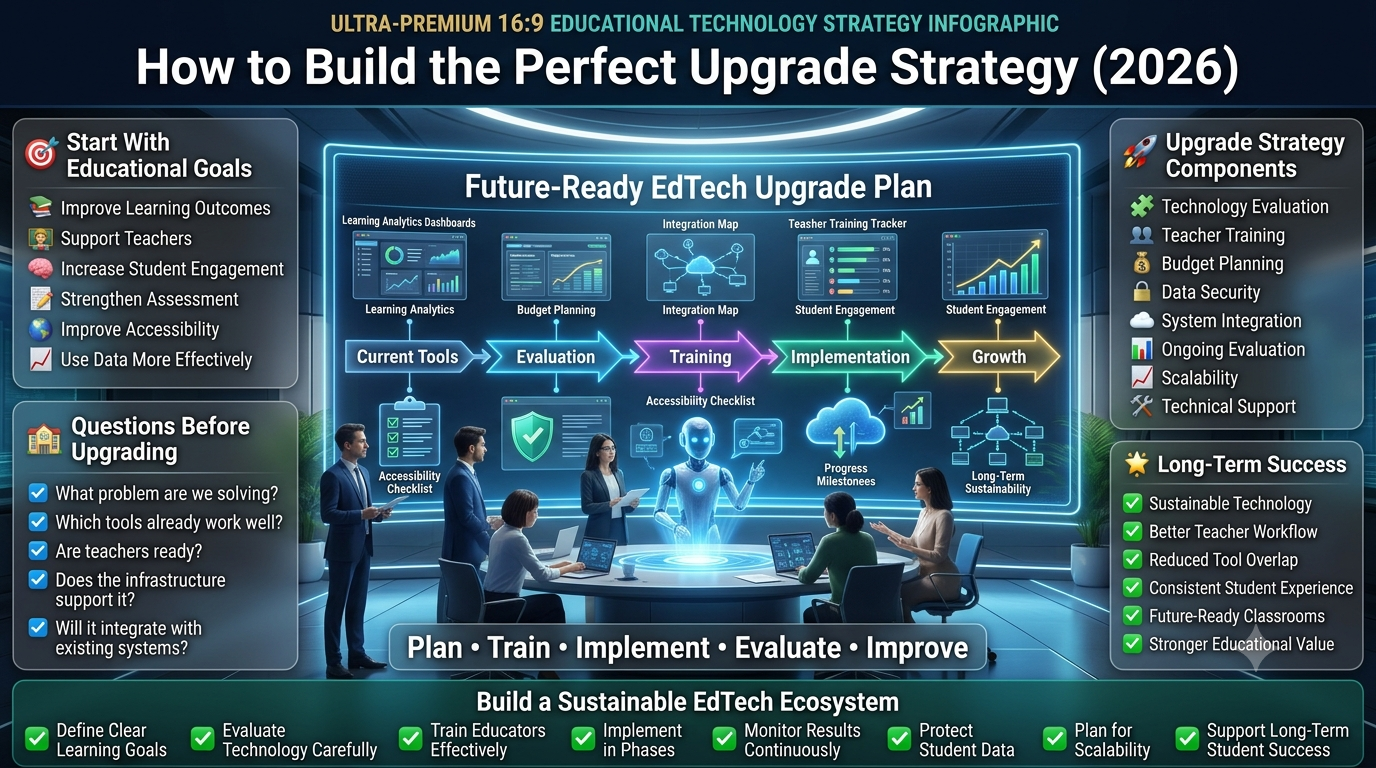
How to Build the Perfect Upgrade Strategy?Educational technology evolves rapidly, but adopting every new platform or feature rarely leads to better learning outcomes. Schools that achieve long-term success typically follow a structured upgrade strategy rather than making decisions based on trends or marketing claims. A thoughtful approach ensures that every technology investment improves teaching, supports students, and aligns with educational objectives instead of adding unnecessary complexity.
Many classrooms begin with a single engagement platform such as Gimkit, using Gimkit Live, Gimkit Join, Gimkit and the Gimkit App to strengthen classroom review and participation. As instructional needs expand, teachers may consider adding AI-powered learning tools, collaborative workspaces, digital assessment systems, accessibility technologies, or advanced reporting platforms. Without a clear strategy, however, schools can quickly accumulate overlapping tools that create confusion for both educators and students.
An effective upgrade strategy starts with identifying educational goals rather than searching for the newest technology. Schools should evaluate existing challenges, determine which instructional problems need solving, assess teacher readiness, review technical infrastructure, and prioritize platforms that complement current workflows instead of replacing effective practices unnecessarily.
Successful technology upgrades also require careful planning beyond software selection. Professional development, data security, integration with existing systems, budget planning, ongoing technical support, and continuous evaluation all influence whether a new platform delivers meaningful educational value.
This guide explores How to Build the Perfect Upgrade Strategy, covering instructional planning, technology evaluation, phased implementation, teacher training, budgeting, scalability, long-term sustainability, and future-ready decision-making to help schools create an educational technology ecosystem that continues supporting student success well beyond 2026.
Start With Educational Goals Instead of Technology
The strongest upgrade strategies begin by identifying what educators want students to achieve rather than selecting technology first.
Schools should define measurable instructional objectives before evaluating software, ensuring every new platform addresses a genuine educational need.
Goal-Driven Planning
Planning Step
Educational Benefit
Identify learning objectives
Clear direction
Analyze classroom challenges
Better problem-solving
Prioritize student outcomes
Improved decisions
Define success indicators
Measurable progress
Align with curriculum
Stronger instruction
Review existing tools
Avoid unnecessary duplication
Technology should always support learning objectives instead of becoming the objective itself.
Evaluate Existing Classroom Technology
Before introducing additional platforms, schools should understand how current tools are performing.
Evaluating strengths, limitations, teacher satisfaction, student engagement, and instructional outcomes helps determine whether an upgrade is truly necessary or whether existing systems simply require better implementation.
Technology Audit
Evaluation Area
Why It Matters
Teacher Usage
Adoption levels
Student Engagement
Classroom effectiveness
Technical Reliability
Consistent performance
Reporting Quality
Instructional insights
Integration
Workflow efficiency
User Feedback
Continuous improvement
Regular technology reviews prevent unnecessary spending while maximizing existing resources.
Implement Changes Gradually
Large-scale technology changes can overwhelm teachers, students, and IT teams if introduced too quickly.
A phased implementation strategy allows schools to evaluate results, collect feedback, solve technical issues, and refine instructional practices before expanding adoption across additional classrooms or grade levels.
Phased Rollout
Phase
Primary Focus
Pilot Testing
Initial evaluation
Teacher Feedback
Practical improvements
Classroom Expansion
Controlled growth
School-Wide Adoption
Consistent implementation
Performance Review
Continuous refinement
Long-Term Support
Sustainable success
Gradual implementation reduces disruption while improving long-term adoption.
Invest in Teacher Training
Even the most advanced educational platform delivers limited value if teachers lack confidence using it.
Professional development should focus on instructional integration rather than simply explaining software features. Educators benefit most when training demonstrates how technology improves classroom learning, assessment, collaboration, and student engagement.
Professional Development
Training Focus
Educational Impact
Platform Navigation
Greater confidence
Instructional Integration
Better teaching
Classroom Management
Efficient implementation
Assessment Strategies
Improved evaluation
Troubleshooting Skills
Reduced downtime
Continuous Learning
Long-term success
Teacher expertise remains the most valuable educational resource in any technology initiative.
Budget Planning for Sustainable Technology Upgrades
A successful upgrade strategy is built on financial sustainability rather than one-time purchases. Schools should evaluate not only the initial subscription cost of a platform but also long-term expenses such as renewals, professional development, technical support, device compatibility, and future expansion.
Budget planning should focus on educational value instead of simply selecting the lowest-priced solution. A platform that improves instruction, reduces teacher workload, and supports long-term learning outcomes may provide greater value than several inexpensive tools with overlapping features.
Budget Planning Factors
Financial Consideration
Educational Benefit
Annual Subscription Costs
Predictable budgeting
Teacher Training
Higher adoption rates
Technical Support
Reliable operation
Future Expansion
Long-term flexibility
Device Compatibility
Reduced hardware costs
Return on Investment
Better resource allocation
Careful budgeting allows schools to invest confidently while maintaining long-term financial stability.
Choose Platforms That Can Grow With Your School
Educational needs evolve as schools expand, curricula change, and new technologies emerge. Selecting platforms that can scale over time helps avoid frequent migrations and unnecessary disruptions.
Scalable platforms support increasing numbers of students, additional classrooms, expanded reporting capabilities, and integration with future educational technologies without requiring complete system replacement.
Scalability Considerations
Scalability Feature
Long-Term Advantage
Growing Student Capacity
Supports enrollment growth
Multi-Class Management
Easier administration
Expanded Analytics
Better decision-making
Flexible Licensing
Simplified budgeting
Feature Expansion
Future readiness
Cross-Device Support
Greater accessibility
Planning for future growth protects technology investments over many academic years.
Prioritize System Integration
Modern schools often use multiple digital systems simultaneously. Educational platforms should work together smoothly rather than operating as isolated tools.
Strong integration reduces duplicate work, improves data accuracy, simplifies teacher workflows, and creates a more consistent learning experience for students.
Integration Priorities
Integration Area
Practical Benefit
Student Accounts
Simplified access
Gradebook Connections
Reduced manual entry
Learning Platforms
Unified instruction
Assessment Systems
Better reporting
Administrative Software
Efficient management
Cloud Services
Reliable synchronization
Connected systems improve productivity while reducing administrative complexity.
Measure Success With Meaningful Metrics
Technology upgrades should be evaluated using educational outcomes rather than installation statistics alone.
Successful implementation should demonstrate improvements in classroom participation, teacher efficiency, learning progress, instructional quality, and student satisfaction over time.
Success Indicators
Metric
What It Measures
Student Engagement
Classroom participation
Teacher Adoption
Platform utilization
Learning Progress
Academic improvement
Instructional Efficiency
Time savings
Technical Reliability
System stability
User Satisfaction
Overall experience
Regular evaluation ensures technology continues supporting educational goals instead of becoming outdated or underused.
Prevent Technology Fatigue
Introducing too many new platforms within a short period can overwhelm both teachers and students.
Technology fatigue often occurs when educators constantly learn new systems while learners repeatedly adapt to changing interfaces and classroom routines. A thoughtful upgrade strategy balances innovation with stability.
Reducing Technology Fatigue
Strategy
Educational Benefit
Introduce tools gradually
Easier adjustment
Limit unnecessary platforms
Reduced complexity
Maintain familiar workflows
Greater confidence
Gather user feedback
Better implementation
Provide ongoing support
Higher adoption
Review technology regularly
Sustainable improvement
Schools benefit most when technology simplifies learning rather than increasing workload.
Create a Long-Term Innovation Roadmap
Educational technology planning should extend beyond the current school year.
A long-term innovation roadmap helps schools anticipate curriculum changes, emerging technologies, infrastructure upgrades, teacher development needs, and evolving student expectations while maintaining a clear educational vision.
Rather than reacting to every new trend, schools following a roadmap make strategic decisions that support continuous improvement over many years.
Innovation Planning
Planning Area
Long-Term Value
Curriculum Alignment
Consistent instruction
Emerging Technology Review
Future readiness
Professional Development
Skilled educators
Infrastructure Planning
Reliable systems
Student Needs Analysis
Better learning experiences
Continuous Evaluation
Sustainable progress
Long-term planning transforms technology adoption from isolated purchases into an evolving educational strategy.
30+ Expert Tips for Building the Perfect Upgrade Strategy
A successful educational technology upgrade is not measured by the number of new platforms a school adopts. Instead, it is measured by how effectively those tools improve teaching, strengthen student learning, simplify classroom workflows, and remain sustainable over time. The best upgrade strategies are carefully planned, data-informed, and centered on educational goals rather than technology trends.
Strategic Planning
Define educational objectives before purchasing new tools.
Solve instructional problems instead of chasing trends.
Review your current technology ecosystem first.
Establish measurable success indicators.
Create a realistic implementation timeline.
Platform Selection
Evaluate usability alongside feature lists.
Prioritize platforms with reliable technical support.
Consider long-term scalability before investing.
Select tools that integrate with existing systems.
Compare educational value instead of price alone.
Teacher Readiness
Provide practical professional development.
Allow teachers time to adapt gradually.
Encourage collaboration between teaching teams.
Collect educator feedback throughout implementation.
Offer continuous technical support.
Student Experience
Keep digital workflows simple and consistent.
Introduce changes gradually.
Protect accessibility for all learners.
Minimize unnecessary platform switching.
Focus on improving learning rather than increasing screen time.
Evaluation
Monitor classroom outcomes regularly.
Review platform usage data responsibly.
Measure instructional efficiency.
Update implementation plans when needed.
Celebrate successful improvements.
Long-Term Sustainability
Budget for future renewals.
Review emerging technologies annually.
Maintain strong cybersecurity practices.
Continue refining instructional strategies.
Remember that technology should always support excellent teaching.
Best Practices
✔ Upgrade with purpose, not pressure.
✔ Prioritize educational outcomes over feature quantity.
✔ Build teacher confidence before expanding implementation.
✔ Evaluate technology continuously.
✔ Keep students at the center of every decision.
A thoughtful upgrade strategy creates lasting educational value while reducing unnecessary complexity.
Common Mistakes Schools Should Avoid
Technology upgrades often succeed or fail because of implementation rather than the software itself.
Frequent Mistakes
Mistake
Better Practice
Purchasing tools without clear goals
Begin with instructional needs
Introducing too many platforms at once
Implement gradually
Ignoring teacher feedback
Include educators in planning
Choosing features over usability
Prioritize classroom practicality
Neglecting ongoing training
Provide continuous professional development
Failing to evaluate outcomes
Measure educational impact regularly
Professional Recommendations
✔ Align technology with curriculum objectives.
✔ Build strong communication throughout implementation.
✔ Maintain consistent technical support.
✔ Review data before making future upgrades.
✔ Treat technology as part of a continuous improvement process.
Successful upgrades strengthen learning because they improve educational practice—not simply because they introduce new software.
Instant Guidance & Expert Point of views
How to Build the Perfect Upgrade Strategy begins with understanding that every successful strategy starts by setting a clear objective. Whether the goal is earning more points, improving accuracy, or maximizing rewards, a focused plan produces better results than making random decisions.
How to Build the Perfect Upgrade Strategy requires evaluating available upgrades before spending resources. Understanding the strengths of each option helps create a balanced approach that supports consistent progress throughout the activity.
How to Build the Perfect Upgrade Strategy emphasizes investing in upgrades that generate long-term value instead of choosing short-term advantages that quickly lose effectiveness as the game progresses.
How to Build the Perfect Upgrade Strategy encourages players to prioritize upgrades that increase earning potential early, creating a stronger foundation for purchasing more advanced improvements later.
How to Build the Perfect Upgrade Strategy involves balancing offensive and defensive improvements so progress remains steady without sacrificing overall performance during competitive gameplay.
How to Build the Perfect Upgrade Strategy highlights the importance of monitoring progress regularly and adjusting decisions according to changing game conditions instead of following a fixed plan every time.
How to Build the Perfect Upgrade Strategy demonstrates that patience often produces better outcomes than spending resources immediately, allowing players to unlock higher-value upgrades at more strategic moments.
How to Build the Perfect Upgrade Strategy requires paying attention to performance patterns, identifying which upgrades consistently improve results and which provide only limited benefits.
How to Build the Perfect Upgrade Strategy encourages efficient resource management by avoiding unnecessary purchases that delay access to more valuable long-term improvements.
How to Build the Perfect Upgrade Strategy becomes more effective when players learn how different upgrades interact, creating combinations that produce stronger overall performance than individual improvements alone.
How to Build the Perfect Upgrade Strategy explains that adapting to different game modes is essential because every environment rewards different upgrade priorities and playing styles.
How to Build the Perfect Upgrade Strategy highlights the importance of maintaining flexibility instead of relying on a single upgrade path for every learning session or challenge.
How to Build the Perfect Upgrade Strategy demonstrates that successful players observe previous results, refine their decisions, and continuously improve their approach through practical experience.
How to Build the Perfect Upgrade Strategy encourages making calculated decisions rather than emotional ones, especially when resources are limited and every upgrade influences future opportunities.
How to Build the Perfect Upgrade Strategy shows that balancing immediate rewards with long-term progression creates a more sustainable path toward consistent success.
How to Build the Perfect Upgrade Strategy involves recognizing when to save resources instead of making small purchases that provide minimal overall improvement.
How to Build the Perfect Upgrade Strategy highlights that understanding game mechanics allows players to predict which upgrades will provide the greatest value during different stages of gameplay.
How to Build the Perfect Upgrade Strategy demonstrates that reviewing performance after every session helps identify successful upgrade combinations that can be repeated in future games.
How to Build the Perfect Upgrade Strategy encourages experimenting with different upgrade paths because testing multiple strategies often reveals more effective approaches than relying on assumptions.
How to Build the Perfect Upgrade Strategy explains that maintaining steady progression is generally more effective than focusing entirely on high-risk decisions that may produce inconsistent results.
How to Build the Perfect Upgrade Strategy highlights the importance of timing, as purchasing the right upgrade at the right moment often provides greater benefits than buying it too early or too late.
How to Build the Perfect Upgrade Strategy demonstrates that experienced players continuously refine their strategies by analyzing outcomes, identifying weaknesses, and making incremental improvements over time.
How to Build the Perfect Upgrade Strategy encourages thoughtful planning before every session so upgrade decisions remain aligned with learning objectives and overall gameplay goals.
How to Build the Perfect Upgrade Strategy shows that consistency, resource management, strategic timing, and adaptability work together to create stronger long-term performance than relying on chance alone.
How to Build the Perfect Upgrade Strategy ultimately succeeds when players combine careful planning, continuous learning, efficient resource allocation, strategic decision-making, and regular performance evaluation to maximize both educational progress and overall gameplay effectiveness.
How to Build the Perfect Upgrade Strategy emphasizes that reviewing available upgrades before each session helps players create a plan that matches their objectives instead of making rushed decisions during gameplay.
How to Build the Perfect Upgrade Strategy highlights that every upgrade should contribute to overall progress, ensuring resources are invested in improvements that deliver measurable value throughout the game.
How to Build the Perfect Upgrade Strategy demonstrates that experienced players remain flexible, adjusting their upgrade priorities as challenges evolve and new opportunities become available.
How to Build the Perfect Upgrade Strategy shows that tracking successful upgrade combinations over multiple sessions helps identify patterns that consistently improve performance and learning outcomes.
How to Build the Perfect Upgrade Strategy explains that balancing risk and reward is essential because aggressive upgrade choices may provide rapid progress but can also reduce long-term stability if resources are not managed carefully.
How to Build the Perfect Upgrade Strategy reveals that understanding the relationship between gameplay mechanics and upgrade efficiency allows players to make smarter, data-driven decisions instead of relying on guesswork.
How to Build the Perfect Upgrade Strategy encourages continuous experimentation with different upgrade paths, enabling players to discover strategies that best match their preferred playstyle and educational goals.
How to Build the Perfect Upgrade Strategy confirms that the strongest strategies are built through planning, adaptability, efficient resource management, and regular performance analysis, creating consistent improvement across every learning session.
Frequently Asked Questions
Interactive school technology upgrade budget worksheet
This calculator estimates the first-year and ongoing costs of a proposed classroom technology change. It does not determine whether the technology improves learning: that requires a controlled instructional pilot and careful interpretation of results. Enter your own local costs; the example values are illustrative, not vendor prices.
Interpretation: First-year cost includes license, training time, setup and annual support. Ongoing annual cost includes license and support only; actual renewal and retraining costs may differ. Divide by classrooms to compare alternatives at the same scale, but never treat the lowest cost per classroom as proof of the best educational outcome.
Frequently asked questions about classroom technology upgrades
How should a teacher decide whether an existing tool needs replacing?
Start with a concrete classroom problem: students cannot access a lesson reliably, reporting does not answer an instructional question, or teachers spend too long preparing activities. Document what currently happens, how often the problem occurs, and whether training or workflow changes could solve it without a purchase. Compare an improved version of the existing process against the proposed replacement, rather than comparing a poorly supported current tool with a polished vendor demonstration.
What should a small pilot measure?
Use a baseline, a defined instructional objective and a short implementation period. Record completion rates, common misconceptions, teacher preparation time, student accessibility barriers and technical incidents. Where possible, compare similar classes or repeated lessons, acknowledging that differences in teaching, content and students make simple before-and-after comparisons imperfect. Collect anonymous aggregate data when possible; avoid exporting identifiable student information into a spreadsheet without school authorization.
Does greater game participation prove better learning?
No. Participation is useful context, but it is not equivalent to retention or transfer of knowledge. A student may answer many questions quickly while still misunderstanding the concept. Pair participation data with question-level error analysis, independent checks for understanding and later retrieval opportunities. For a Gimkit pilot, the assessment reports guide explains how to distinguish response patterns from stronger claims about learning.
What if a vendor promises integration with existing systems?
Ask for a documented demonstration using the school's actual device types, account policies and permitted data flows. Confirm whether the promised integration is included in the selected plan, whether it requires administrator configuration and how failures are handled. Do not assume that a marketing claim about compatibility means the tool can access the school's learning-management system or gradebook without additional approval.
How can a school protect students during a new-tool pilot?
Apply the school's privacy, accessibility and procurement review before inviting students. Minimize personal information, check age-appropriate account requirements, offer an equivalent non-digital route when necessary, and explain the activity's educational purpose. Review retention, deletion and third-party sharing terms with the designated school staff. Do not upload real student records into a public demonstration or an unapproved AI tool.
When should a pilot stop or roll back?
Define stop conditions in advance: repeated access failures, unacceptable privacy risks, inaccessible essential tasks, excessive teacher workload or costs beyond the agreed cap. A rollback plan should preserve lesson continuity, not just technical configuration. Keep export options and existing materials available until the replacement is reliable. A pilot that reveals a problem has still produced useful evidence for the next decision.
How often should a school review a technology upgrade?
Review technical problems during the pilot, instructional outcomes at the end of the teaching unit and total cost before renewal. Do not change tools mid-unit solely because a dashboard metric looks disappointing. When usage is low, investigate whether the problem is training, timetable constraints, accessibility, curriculum fit or the tool itself. Record the reason for each keep, improve or retire decision so the same debate does not repeat next year.
Final Verdict
Building the perfect upgrade strategy requires balancing innovation with educational purpose. The strongest technology plans begin with clearly defined learning goals, carefully evaluate existing systems, introduce changes gradually, support teachers through professional development, and measure success using meaningful educational outcomes. Schools that treat technology as a long-term instructional investment rather than a short-term trend are better positioned to create sustainable improvements in teaching and learning.
Conclusion
Understanding How to Build the Perfect Upgrade Strategy helps schools make confident technology decisions that support both educators and students. Successful upgrades are guided by thoughtful planning, collaboration, continuous evaluation, responsible budgeting, and a commitment to improving classroom learning. As educational technology continues evolving, institutions that combine strategic decision-making with strong instructional leadership will be best prepared to create adaptable, future-ready learning environments that deliver lasting academic value.
Official Gimkit documentation for an upgrade pilot
Before paying for or replacing classroom software, confirm how the current product supports your teaching plan. The official Gimkit hosting guide describes the hosting workflow, while the official game-report guide explains evidence available after a game. Use these as product-specific references, not proof that a subscription or platform change will improve learning outcomes.
For a small-scale pilot, write down a single learning objective, compare question-level evidence before and after the intervention, record preparation time and device barriers, and ask teachers and students about usability. If the results are inconclusive, extend the evaluation rather than asserting that the upgrade succeeded. Compare the findings with the site’s daily teaching integration guide and revision-session planning guide to decide whether changing lesson design would be more useful than purchasing another platform.