99math student progress becomes useful only when the data helps a teacher make a better instructional decision.
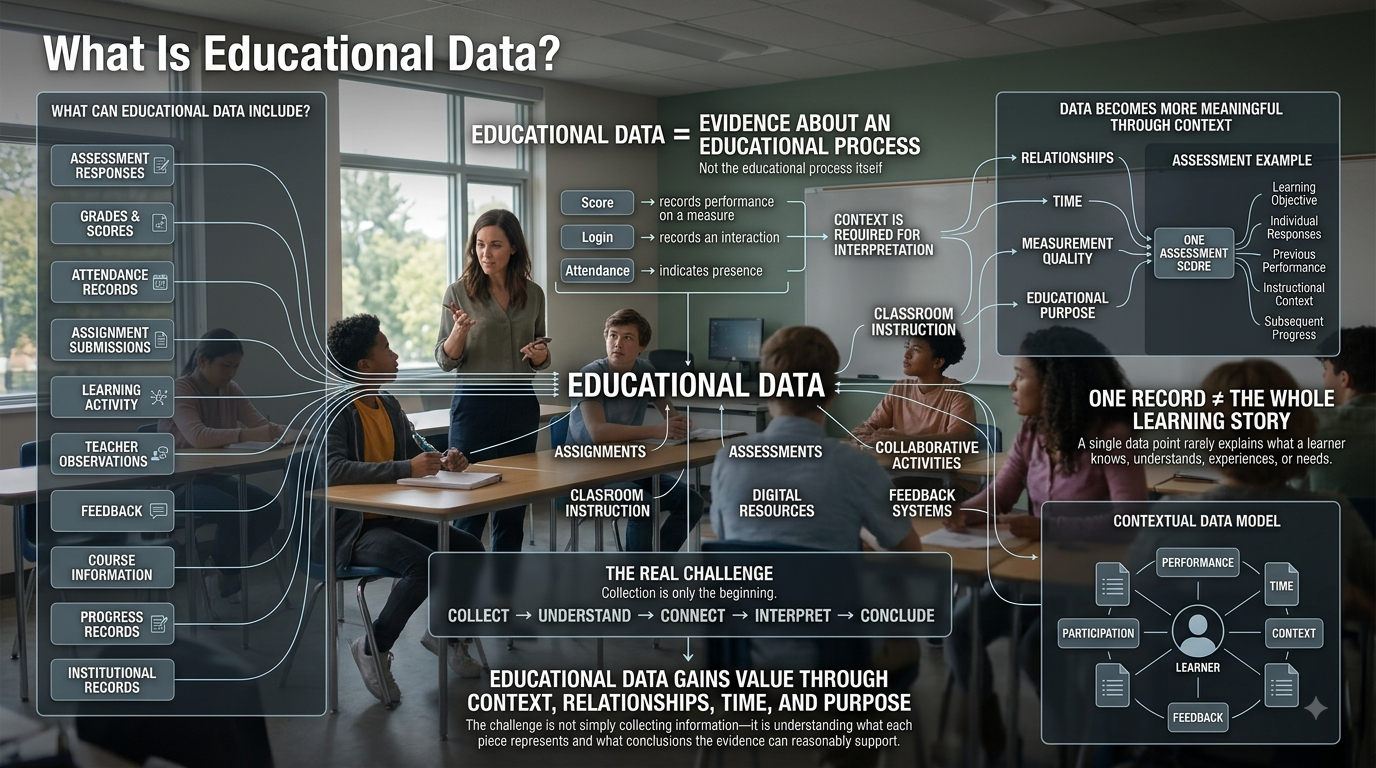
A dashboard can show percentages, speed, weak skills, class comparisons, and progress over time. But simply having more numbers does not improve mathematics instruction. The value comes from understanding what each number can tell you, what it cannot tell you, and what should happen next.
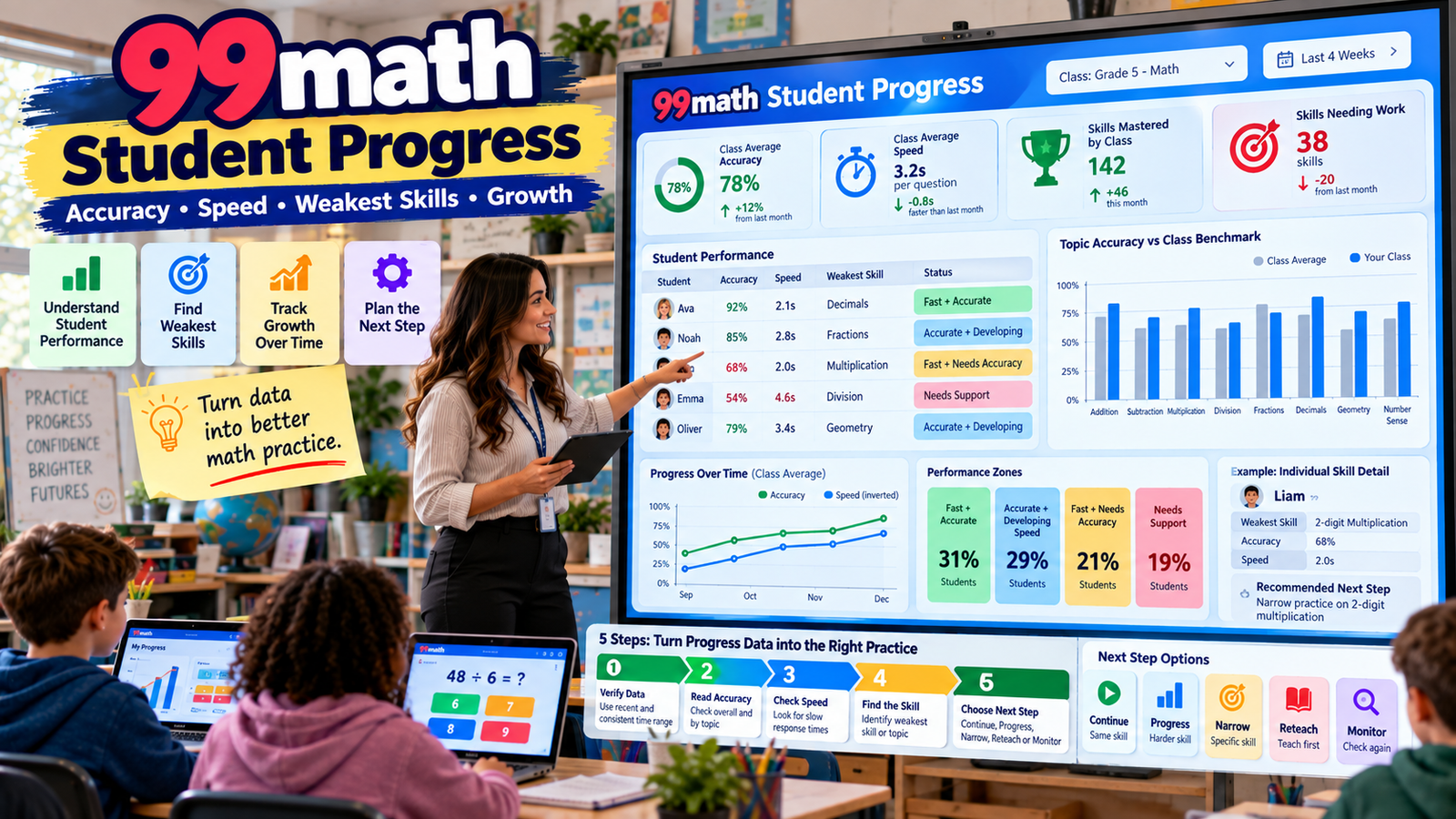
99math currently presents teacher reporting around several distinct signals. Its public product information says teachers can see accuracy and speed for individual students, compare topic accuracy with a class benchmark, identify a student’s weakest skill by name, and track progress over the year, including mastered skills and areas that still need work. Its current reporting interface also distinguishes four broad performance patterns: Fast and accurate, Accurate but slow, Fast but inaccurate, and Slow and inaccurate. 99math
These categories are useful because one score rarely explains a student’s real learning need.
A student who answers slowly but accurately does not need the same response as a student who answers rapidly but incorrectly.
A student who performs poorly once does not automatically have a long-term math gap.
A student who is repeatedly weak in one exact skill across several activities deserves more attention than a student whose one bad result appears nowhere else.
The strongest use of 99math progress data is therefore not:
“Which student has the highest number?”
It is:
“What does the pattern suggest, how confident am I that the pattern is real, and what instructional response makes sense?”
Gimkit App offers practical guides, resources, and tips for teachers and students exploring interactive learning and educational games.
What 99math Currently Shows Teachers
Current 99math reporting highlights several types of information:
Report signal
Main question it helps answer
Accuracy
Is the student solving correctly?
Speed
How efficiently is the student responding?
Topic performance
Which mathematical area is stronger or weaker?
Class benchmark
Is the difficulty individual or more widespread?
Weakest skill
Which specific skill deserves closer attention?
Mastered skills
Which practice may no longer need heavy repetition?
Progress over time
Is performance improving, stable, or declining?
99math’s public site specifically says its reports show topic accuracy against the class benchmark, each student’s weakest skill, and progress over the year. It also presents accuracy and speed together in one student-performance view. 99math
Its current group-game documentation additionally says post-game reports include individual performance, mistakes made during the game, skill information for the selected topic, and an overall class skill-level result. 99math blog
These signals are most useful when interpreted together rather than independently.
Accuracy Should Usually Come First
When opening a progress report, begin with the simplest instructional question:
Are the answers correct?
Accuracy provides the foundation for interpreting almost everything else.
Speed matters, but speed without correctness can be misleading.
Imagine two students.
Student A
Answers quickly and gets almost everything right.
Student B
Answers even faster but makes frequent errors.
Both students may appear fast.
Only one is demonstrating dependable fluency.
This is why 99math currently separates Fast and accurate from Fast but inaccurate rather than treating fast performance as automatically strong. 99math
moving students forward after one unusually strong result;
holding students back after improvement is already stable.
No universal number of sessions works for every situation.
The important principle is consistency across evidence.
Understanding “Mastered Skills”
99math currently presents mastered skills as part of its progress-over-the-year reporting. 99math
The platform’s mastery signal is useful.
Teachers should still ask one additional question:
Can the student use that skill outside the exact 99math context?
For example:
Can multiplication fluency support:
written work;
fractions;
area;
problem solving?
Can decimal fluency transfer into:
percentages;
measurement;
multi-step problems?
Digital mastery becomes educationally stronger when it transfers.
Mastery Should Sometimes Mean Less Practice
Reports are often viewed only as tools for identifying weakness.
They should also help identify unnecessary repetition.
If a student is consistently:
accurate;
efficient;
stable;
successful outside the game,
then continuing heavy practice on the same skill may produce diminishing returns.
A strong report can therefore tell you:
Stop spending so much time here.
That frees instructional time for something more valuable.
Use Reports to Identify Who Needs Teacher Attention First
99math describes its reporting system as helping teachers see who needs help first. 99math
That is especially valuable because teacher attention is limited.
A sensible priority might be:
students with large, repeated accuracy problems;
students whose weak prerequisite blocks current work;
groups sharing one misconception;
students whose performance has plateaued;
students whose data look inconsistent and need verification.
This is not a ranking of students’ worth or ability.
It is a way to allocate instructional time.
A Simple Priority Framework
Accuracy
Trend
Possible response
Low
Declining
High priority investigation
Low
Flat
Intervention likely needed
Low
Improving
Continue support and monitor
High
Stable
Consider progression
High
Speed improving
Fluency may be strengthening
Highly inconsistent
Unclear
Gather more evidence
This is an instructional framework, not an official 99math scoring rule.
Distinguish “Needs Practice” From “Needs Teaching”
This may be the most important decision reports can support.
Needs practice
The student understands the skill but needs more fluent retrieval.
Needs teaching
The student does not yet understand the mathematics or procedure sufficiently.
The first can benefit from repeated practice.
The second may not.
If a student repeatedly practices an incorrect method, the game can simply make the incorrect method more familiar.
Look at:
accuracy;
speed;
mistake pattern;
weakest skill;
repeated results;
non-game evidence.
Then decide which problem you actually have.
Signs of a Likely Fluency Need
A pattern may suggest fluency rather than conceptual weakness when:
accuracy is strong;
responses are slower;
performance improves with repetition;
errors are limited;
the student explains the process correctly outside 99math.
This is the classic:
understands it, but it is not automatic yet
profile.
The next mathematical content choice belongs to Article #4.
Signs of a Possible Conceptual Problem
A report may suggest the need for direct teaching when:
accuracy remains low;
the same error repeats;
the student is both slow and incorrect;
related prerequisite performance is weak;
the student cannot explain the process elsewhere.
A dashboard alone cannot prove the exact misconception.
Confirm it through:
conversation;
written work;
another example;
a different assessment format.
The report tells you where to investigate.
Recognizing Possible Rushing
A rushing pattern may include:
unusually fast response;
weak accuracy;
mistakes on familiar material;
better performance when competition pressure is reduced.
Do not assume every fast inaccurate result comes from rushing.
A misconception can also produce rapid wrong answers.
Inspect the pattern first.
Class-Level Performance
99math’s current group-game documentation says teachers receive both student-level performance information and an overall class skill-level result. 99math blog
Class data can answer broader questions:
Is the class ready to move on?
Does the topic need another lesson?
Is a small group enough?
Is one prerequisite weak across the room?
Individual data tell you who.
Class data help tell you how broadly to respond.
Why Class Averages Can Mislead
Imagine a class with five students:
Student
Accuracy
A
98%
B
96%
C
94%
D
52%
E
50%
The average is 78%.
“78% class accuracy” hides the real pattern.
Three students are extremely strong.
Two students need substantial support.
Averages summarize.
They also hide variation.
Whenever possible, inspect the distribution underneath the average.
Compare Like With Like
A student earning 95% on easy addition and 78% on challenging fraction work has not necessarily “regressed.”
The content changed.
Similarly:
3 seconds per task on multiplication facts and 7 seconds on equation solving should not automatically be compared directly.
When reading progress, ask:
Is the skill the same?
Is the difficulty similar?
Is the activity comparable?
Did practice change from isolated to mixed?
A progress graph needs context.
Do Not Create Universal Speed Thresholds
Avoid rules such as:
“More than five seconds is bad.”
Different mathematical tasks naturally require different thinking time.
Age matters.
Complexity matters.
Question structure matters.
Use speed comparatively:
Is this student becoming more efficient on comparable work while accuracy remains strong?
That is a much safer interpretation.
Establish a Baseline
A baseline gives later data meaning.
An early valid activity can establish:
starting accuracy;
approximate efficiency;
weak skill;
class pattern.
Future reports can then answer:
What changed?
A baseline is not a target students must beat every single time.
It is simply a starting reference.
Watch for Plateaus
A plateau might look like:
63 → 65 → 64 → 65 → 64
Repeated practice is happening.
Meaningful change is not.
This can tell the teacher:
More of the same may not be enough.
Possible next actions include:
inspect errors;
narrow the target;
reteach;
return to a prerequisite;
change the practice format.
A plateau is not useless data.
It is evidence about the limits of the current approach.
Watch for Regression
Suppose a student performs:
88 → 85 → 76 → 69
Do not immediately conclude that learning has been lost.
Ask:
Did difficulty increase?
Did isolated practice become mixed?
Did the question type change?
Is the student rushing?
Is the decline repeated?
A downward trend deserves investigation.
Not panic.
The Best Fluency Trend: Faster Without Becoming Less Accurate
A strong fluency pattern can look like:
Accuracy: stable and high
while:
Average response time: gradually improves
That suggests familiar mathematics is becoming easier to retrieve.
Contrast that with:
Speed rises sharply
while:
accuracy falls
That can indicate rushing rather than improved fluency.
99math’s separate presentation of speed and accuracy is valuable because the two metrics can move in different directions. 99math
Accuracy Often Improves Before Speed
For many students, healthy progress happens in stages.
First:
answers become correct.
Later:
correct answers become faster.
Teachers should not demand simultaneous improvement in every metric.
Accuracy is the foundation.
Efficiency can follow.
Use Reports for Temporary Instructional Groups
Suppose a report shows:
four students weak in fraction comparison;
three students accurate but slow with multiplication;
most students secure.
A teacher does not need to reteach the whole class.
Temporary groups can address each need.
The important word is temporary.
Groups should change when evidence changes.
Name Groups by the Skill, Not the Student
Better teacher language:
Fraction Comparison Group
Multiplication Fluency Group
Decimal Place-Value Group
Avoid:
Low Group
Weak Students
Slow Group
Skill-based language keeps the focus on something that can change.
Whole-Class Reteaching Should Require Whole-Class Evidence
Whole-class reteaching is justified when evidence is genuinely broad.
For example:
most students struggle;
one error appears repeatedly across the room;
class benchmark performance remains low;
difficulty persists.
If only a few students need support, reteaching the entire lesson can waste time for students who are already secure.
Reporting helps the teacher choose the correct scale of response.
Reports Can Tell You When to Move On
Data-driven teaching is not just finding problems.
It also means recognizing success.
If:
the class is consistently accurate;
efficiency is appropriate;
weak skills are shifting elsewhere;
students apply the skill successfully,
the report may support progression.
Do not use data only as a reason to add more work.
Use it as a reason to stop unnecessary work too.
Professional Judgment Still Matters
A dashboard does not see:
what was taught;
how the student felt;
whether the Wi-Fi failed;
whether a device was malfunctioning;
what the student wrote on paper;
how the student explains an answer verbally.
Teachers have context the platform does not.
Use 99math data as one source of evidence.
The report supports teacher judgment.
It does not replace it.
Cross-Check Important Findings
Before making an important instructional conclusion, verify it.
A quick cross-check might involve:
asking the student to solve two examples;
reviewing recent written work;
asking for a verbal explanation;
comparing another activity;
checking related skills.
If every source points toward the same weakness, confidence increases.
If they disagree, investigate why.
Do Not Use 99math Reports as Clinical or Diagnostic Labels
99math performance data can help identify classroom mathematics needs.
It cannot, by itself, diagnose:
dyscalculia;
learning disabilities;
intelligence;
cognitive ability;
special-education eligibility.
Those questions require appropriate professional evaluation and multiple sources of evidence.
Keep 99math data within its appropriate scope:
practice-performance information used to guide teaching.
Check Data Quality Before Analyzing It
The most sophisticated interpretation is useless if the report itself represents the wrong student or incomplete activity.
Before important analysis, verify:
student identity;
activity completion;
intended topic;
duplicate entries;
correct reporting period.
99math’s current support center specifically documents report problems involving incomplete activities, nicknames, and duplicate student entries. 99math Support
Data quality comes before data interpretation.
Why a 99math Report May Be Missing
99math’s current support documentation says reports are created only for completed group games or individual assignments.
If a teacher ends a group game before all its rounds are completed, a report is not generated. 99math Support
That means a missing report does not automatically imply:
data corruption;
an account failure;
a broken class;
deleted information.
The first question is:
Was the activity completed under the platform’s reporting rules?
Why the Same Student May Appear Twice
99math currently says duplicate report entries can occur when a student completes an assignment using a game link or code without logging into the student account.
In that case, the results do not update to the student’s normal account and can create a separate entry. 99math recommends that students log in before assignments to avoid this. 99math Support
From a reporting perspective, duplicate identities can distort trends.
One student’s data can look like two incomplete students.
Resolve identity problems before drawing conclusions.
Nicknames Can Also Complicate Reports
99math’s current support guidance says students who are not logged in can appear by nickname instead of their normal full account name in reports. 99math Support
The operational login instructions already belong to earlier articles.
The reporting rule here is simple:
Verify unfamiliar names before treating them as separate learners.
When Report Deletion Is Appropriate
99math currently lets teachers delete a report from the Reports tab through the three-dot menu. 99math Support
Possible legitimate reasons include:
an accidental test session;
clearly invalid participation;
a report that does not belong in the intended progress record.
Do not delete a valid weak report simply because it lowers the student’s trend.
Honest baselines make later improvement meaningful.
Preserve Valid Early Struggle
Suppose the first report shows 52% and three weeks later the student reaches 84%.
The early low result gives context to the improvement.
Deleting every weak but valid result produces a prettier dashboard but a worse learning record.
Progress reporting should reflect reality.
Not cosmetic perfection.
Practice Data and Formal Assessment Are Different
99math describes itself as a fluency-focused math platform. 99math Support
That makes its reports especially useful for formative questions:
Who needs help?
Which skill appears weak?
Is fluency improving?
Which students may be ready to progress?
Is a problem individual or classwide?
Practice results are not automatically equivalent to:
unit tests;
standardized assessments;
written reasoning;
conceptual interviews.
Use the data for the job it is good at.
Five Possible Actions After Reading a Report
A useful report should lead to a decision.
Continue
The skill is appropriate and progress is occurring.
Progress
Performance appears sufficiently secure to move forward.
Narrow
A broad topic contains one identifiable weak subskill.
Reteach
The pattern suggests misunderstanding rather than mere fluency weakness.
Monitor
One unusual result is not enough to justify a larger change.
This framework is more useful than automatically assigning more problems.
Report-to-Instruction Matrix
Report pattern
Likely response to consider
Strong accuracy + strong efficiency
Progress
Strong accuracy + slower response
Continue fluency work
Fast + weak accuracy
Investigate errors / accuracy focus
Slow + weak accuracy
Check prerequisite or reteach
One narrow weakness
Target that skill
Most of class weak
Classwide response
Small group weak
Small-group support
One unusual low result
Monitor
Clear upward trend
Continue current approach
Long plateau
Change approach
The table is an instructional framework, not a 99math scoring formula.
A Sustainable Weekly Report Routine
Teachers do not need to analyze every possible statistic after every game.
A useful weekly process can be:
First: scan the class pattern
Is there an obvious common problem?
Second: find major outliers
Who is substantially away from the broader class pattern?
Third: inspect weak skills
Do several students share one exact need?
Fourth: check trend
Is the issue improving, stable, or worsening?
Fifth: choose one action
Continue, progress, narrow, reteach, or monitor.
The purpose is turning data into action efficiently.
Use Longer Windows for Bigger Decisions
Single-session reports are useful for immediate teaching.
Longer progress windows are better for identifying:
persistent gaps;
growing mastery;
plateaus;
stable improvement;
skills that repeatedly return as weaknesses.
99math currently explicitly presents progress over the year as part of its reporting offering. 99math
A longer review asks:
What can I see now that one activity could never show me?
Talking to Students About Progress Data
Progress conversations should make students feel that the data points toward something changeable.
Avoid:
“You’re slow.”
Try:
“You’re getting these correct. Now we’re working on making recall easier.”
Avoid:
“You’re bad at fractions.”
Try:
“Fraction comparison keeps appearing as the hardest part. That’s what we’re targeting.”
Avoid:
“You dropped.”
Try:
“This result is lower than your recent pattern. Let’s work out why.”
Data should clarify a learning goal.
Not define the learner.
Talking to Families About Progress
99math’s current Premium documentation says Premium provides in-depth printable reports for individual students and classes, including versions that can be shared with parents or other staff. 99math Support
When discussing progress with families, explain:
which mathematical skill was practiced;
what the report shows;
whether the pattern is repeated;
what the teacher plans to do next;
what the report cannot establish by itself.
A useful family-facing statement might be:
“Across several practice sessions, accuracy has improved consistently. Recall is still slower than the student’s other skills, so we are continuing focused fluency work before increasing difficulty.”
That is more useful than simply reporting a game score.
Printable Reports Should Support a Purpose
A printable report can be useful for:
parent conferences;
instructional meetings;
intervention review;
collaboration between teachers.
It is less useful when printed simply because a print button exists.
The report should support a conversation or decision.
Data should reduce uncertainty.
Not create paperwork.
Premium Reporting Details Can Change
99math currently includes printable individual and class reports among Premium features. 99math Support
That is a volatile product feature.
The instructional principles in this guide remain the same even if subscription details change.
Whether information is viewed:
digitally;
in a printable report;
through teacher notes;
the important process remains:
verify → interpret → act → recheck.
Using Progress Data for Differentiation
Progress data can make differentiation more precise.
Instead of:
“This student probably needs easier math.”
use evidence such as:
weak accuracy in one prerequisite;
strong performance in related areas;
repeated weak-skill identification.
Now the response can be:
“This student needs focused support on one prerequisite while continuing grade-level instruction elsewhere.”
That is much better than broadly lowering expectations.
Data Can Also Tell You to Remove Support
Differentiation should be responsive.
If a student who previously needed targeted practice becomes:
consistently accurate;
efficient;
stable;
the teacher should reconsider whether additional special practice is still necessary.
Support should not become permanent simply because it once existed.
Progress data can help students exit an intervention as well as enter one.
Do Not Overreact to Small Differences
Not every student below a benchmark needs intervention.
Natural performance variation exists.
Consider:
size of the gap;
persistence;
instructional importance;
other evidence.
A small one-time difference may need observation.
A large repeated difference in a critical prerequisite deserves more attention.
Respond proportionately.
Sometimes the Skill Is the Problem, Not the Student
If most students struggle with the same work, do not automatically conclude that many students suddenly became weak.
Ask whether:
the skill was taught sufficiently;
prerequisite knowledge is secure;
difficulty increased;
the practice happened too early.
Reports can reveal instructional timing problems as well as student needs.
Be Careful Comparing Different Topics Over Time
Imagine class accuracy is:
91% addition
then:
76% fractions
It would be inaccurate to say:
“The class dropped 15 percentage points.”
The content changed.
Difficulty changed.
The comparison is not equivalent.
Long-term progress is strongest when comparing:
the same skill;
closely related skills;
clearly defined milestones.
When 99math and Classroom Evidence Disagree
Suppose 99math shows weak performance but written work appears strong.
Do not simply choose one source.
Investigate.
Possible explanations include:
competition pressure;
rushing;
device issues;
unusual questions;
one bad day.
Conflicting evidence tells you that performance may be context-dependent.
That itself is important information.
When Multiple Sources Agree
Suppose:
99math shows weak decimal comparison;
written work shows the same problem;
the student struggles to explain decimal magnitude verbally.
Now the evidence converges.
That is a much stronger basis for action than the dashboard alone.
The bigger the decision, the more valuable multiple sources become.
Use Reports to Ask Better Questions
Useful report questions include:
Why is this student accurate but slow?
Why are several students missing exactly the same skill?
Why did speed increase while accuracy dropped?
Why does this skill keep appearing as weak?
Why has progress plateaued?
Why is game performance different from written performance?
A high-quality report is valuable partly because it improves the quality of the teacher’s questions.
Do Not Teach Students to Optimize the Dashboard
Metrics can create unintended behavior.
Students may learn to:
click faster to improve speed;
repeat easy content for high accuracy;
avoid challenging skills because lower performance looks bad.
The teacher must keep the true objective visible:
better mathematics.
Numbers matter only when they represent meaningful improvement.
Together, they create a more useful fluency picture.
The Complete 99math Progress Cycle
A responsible progress workflow can look like this:
Practice
The student completes meaningful work.
Verify
Make sure the report belongs to the right learner and valid activity.
Read
Look at accuracy, speed, weak skills, mistakes, and class context.
Compare
Check earlier performance and other classroom evidence.
Interpret
Decide whether the student likely needs practice, teaching, progression, or monitoring.
Act
Choose one instructional response.
Recheck
Use future evidence to see whether the response worked.
This closes the loop.
Without the final recheck, the teacher never learns whether the intervention actually helped.
More Data Is Not the Goal
A teacher can have dozens of reports and still make weak instructional decisions.
The better question is:
What decision am I trying to make?
Then find the evidence relevant to that decision.
If you want to know whether a student is ready to progress, look for stable mastery.
If you want to find an intervention target, look for repeated weak-skill patterns.
If you want to determine whether the whole class needs reteaching, inspect class distribution and common mistakes.
Purposeful data review is more useful than endless data review.
Common 99math Progress-Tracking Mistakes
Mistake
Better approach
Treating one low result as a permanent weakness
Look for repeated evidence
Assuming slow means confused
Check accuracy first
Assuming fast means fluent
Check correctness
Reading only class averages
Inspect individual distribution
Treating “weakest skill” as automatically deficient
Check absolute performance
Comparing unrelated topics directly
Compare comparable work
Ignoring duplicate names
Verify student identity
Assuming every missing report is a bug
Check activity completion
Using progress data as formal diagnosis
Keep conclusions within scope
Giving more practice after every weak score
Decide whether teaching is needed
Repeating mastered skills indefinitely
Progress when evidence is stable
Deleting valid weak reports
Preserve honest baselines
Frequently Asked Questions About 99math Student Progress
What does a 99math student progress report show?
99math currently says teachers can see accuracy and speed for individual students, topic accuracy compared with a class benchmark, each student’s weakest skill, and progress over time that includes mastered skills and areas needing further work. Group-game reporting also includes student performance, mistakes, and class-level information. 99math
The strongest way to use these data is together. Accuracy tells you whether the mathematics is correct. Speed adds information about fluency. Weak-skill data narrows the mathematical target. Class benchmarks provide context. Long-term trends show whether performance is genuinely changing. No single metric should become a complete judgment of the student.
How should teachers interpret accuracy and speed together?
Start with accuracy, then use speed to understand how efficiently correct mathematics is being produced. 99math currently presents four broad patterns: fast and accurate, accurate but slow, fast but inaccurate, and slow and inaccurate. 99math
Fast and accurate performance may suggest strong fluency. Accurate but slow performance may indicate correct understanding with developing automaticity. Fast but inaccurate performance deserves investigation for rushing, guessing, or systematic errors. Slow and inaccurate performance may suggest prerequisite or conceptual difficulties. These should remain temporary instructional profiles rather than permanent labels for students.
Does slow 99math performance mean a student does not understand math?
No. A student can understand a skill very well while taking longer to retrieve an answer. If accuracy is consistently strong but response time is slower, the student may need fluency practice rather than reteaching.
The teacher should look for whether the student can explain the mathematics correctly, whether speed gradually improves, and whether the same performance appears outside 99math. Slow and accurate is fundamentally different from slow and inaccurate. Speed should be interpreted within the context of correctness, task difficulty, and the student’s broader mathematical performance.
What does “weakest skill” mean in 99math reports?
99math currently says its reports identify each student’s weakest skill by name. 99math
The term should be interpreted carefully. “Weakest” is relative to a student’s other performance. If a student scores 98%, 96%, and 92% across three areas, the 92% skill is technically the lowest, but it may still be strong. Teachers should consider the absolute performance level, class benchmark, persistence over time, repeated errors, and importance of the skill for future mathematics before deciding that intervention is necessary.
How should I use the 99math class benchmark?
The class benchmark helps distinguish individual difficulties from broader classroom patterns. 99math currently says teachers can compare topic accuracy against the class benchmark. 99math
If one student is significantly below a strong class pattern, targeted support may be appropriate. If most of the class performs poorly, the issue may require classwide review. The benchmark should not be used as a permanent ability ranking or public comparison tool. It reflects performance within a specific practice context and should be combined with individual history and other classroom evidence.
Why do I only see a sample report in 99math?
99math currently says reports are generated only after completed group games or individual assignments. If a group game ends before all rounds are completed, no report is created for that activity. 99math Support
Therefore, check activity completion before assuming there is a technical problem. A missing report does not necessarily mean the account or class is broken. If the activity was completed correctly but the expected report still does not appear, then use 99math’s current support process to investigate further rather than rebuilding the class or student accounts.
Why does a student appear twice in a 99math report?
99math says duplicate entries can occur when students complete an assignment through a game link or code without first logging in. Their result is then not updated to the normal student account, producing a separate report entry. 99math Support
This matters because split identities can make progress look incomplete or inconsistent. Before interpreting a student’s long-term trend, verify that all relevant work belongs to the same learner account. Good data interpretation begins with clean identity data.
Can one low 99math result prove that a student has a learning gap?
No. One result shows performance in one practice event. It cannot by itself establish a persistent learning problem.
Look for repetition. Does the same weak skill appear again? Do similar errors occur in written work? Can the student explain the mathematics? Does the class benchmark provide context? A pattern repeated across several sources is much more persuasive than one unusually low session. The more significant the instructional decision, the more important it is to confirm the pattern with additional evidence.
How often should teachers review 99math progress?
There is no universal schedule that fits every classroom. Immediate reports can support short-term decisions, while periodic reviews are better for identifying larger trends.
A practical system might use quick weekly scans for weak skills, outliers, and classwide problems, with longer reviews for mastery, plateaus, and progress over the year. 99math currently promotes year-long progress tracking as part of its reporting experience. 99math The goal is to review often enough that the information changes instruction, but not so often that teachers react to every minor fluctuation.
When should students move to harder practice?
Strong evidence for progression includes consistent accuracy, appropriate efficiency, stable performance across comparable practice, and successful transfer beyond the game.
One high result can be encouraging, but repeated strong results provide better evidence. The detailed choice of the next mathematical skill belongs to the separate 99math Math Games & Skills guide. From a reporting perspective, look for dependable rather than accidental mastery before increasing difficulty.
What should teachers do when 99math progress plateaus?
A plateau suggests that repeating the same practice may no longer be enough.
Check whether one exact skill or error is responsible. Ask whether a prerequisite is missing, whether students need direct teaching, or whether the practice target is too broad. Then change the instructional response and watch later data. A plateau is not simply a disappointing graph—it is evidence that the current approach may have reached its limit.
Should 99math reports be used for grades?
99math describes itself as a fluency-focused practice platform, so its reports are particularly useful for formative decisions. 99math Support
Live-game or practice results may be affected by speed pressure, competition, device familiarity, and repeated exposure. Teachers who use such information for formal grading should follow their school or district assessment policies and make sure the grade reflects what the activity genuinely measures. For everyday use, progress reports are especially valuable for identifying skills needing support, monitoring fluency, and deciding when students may be ready to progress.
Does 99math offer printable student reports?
Current 99math Premium documentation says Premium includes in-depth reports for individual students and entire classes, including printable versions that can be shared with parents or other staff members. 99math Support
Because subscription features can change, teachers should verify current plan information before relying on a particular Premium feature. Printable reports are most valuable when they support a real purpose such as a parent conference, intervention meeting, or collaborative planning conversation—not simply because they can be printed.
How can 99math reports support differentiation?
Use reports to identify the scale and specificity of need. One student with a repeated weak skill may need targeted support. Several students with the same issue may benefit from a temporary small group. A whole-class weakness may justify classwide instruction.
Use accuracy, speed, weak-skill information, benchmark context, and trends together. Keep groups flexible and skill-specific. Avoid turning temporary performance groups into fixed labels. Effective differentiation should change when the evidence changes.
What is the most important 99math progress metric?
There is no single metric that tells the entire story.
Accuracy is often the best starting point because correct mathematics matters first. Speed adds fluency context. Weak-skill information helps identify where difficulty lies. The class benchmark provides comparison context. Trends show whether performance is improving.
The strongest interpretation comes from the relationship among these signals, not from finding one perfect number.
Final Takeaway
99math student progress reports are most valuable when teachers treat them as evidence for decisions, not as scoreboards.
Start with accuracy.
Then interpret speed.
Use both together to distinguish:
Fast and accurate Accurate but slow Fast but inaccurate Slow and inaccurate
Use the class benchmark to determine whether a weakness is individual or widespread.
Use weakest-skill information to narrow the instructional question.
Use mistake patterns to distinguish isolated errors from systematic problems.
Use progress over time to determine whether learning is becoming stable.
Use mastery information to know when repetition may no longer be necessary.
And before interpreting anything important, verify the data itself. 99math currently requires activities to be completed before reports are generated, and assignment work completed without the expected login can produce duplicate report identities. 99math Support