Gimkit vs Socrative: Teachers comparing Gimkit and Socrative can easily end up comparing the wrong things.
Both platforms allow teachers to put questions in front of students. Both can be used during class. Both can produce student responses and provide teachers with information about how learners are performing.
But that surface-level similarity hides a much more important difference.
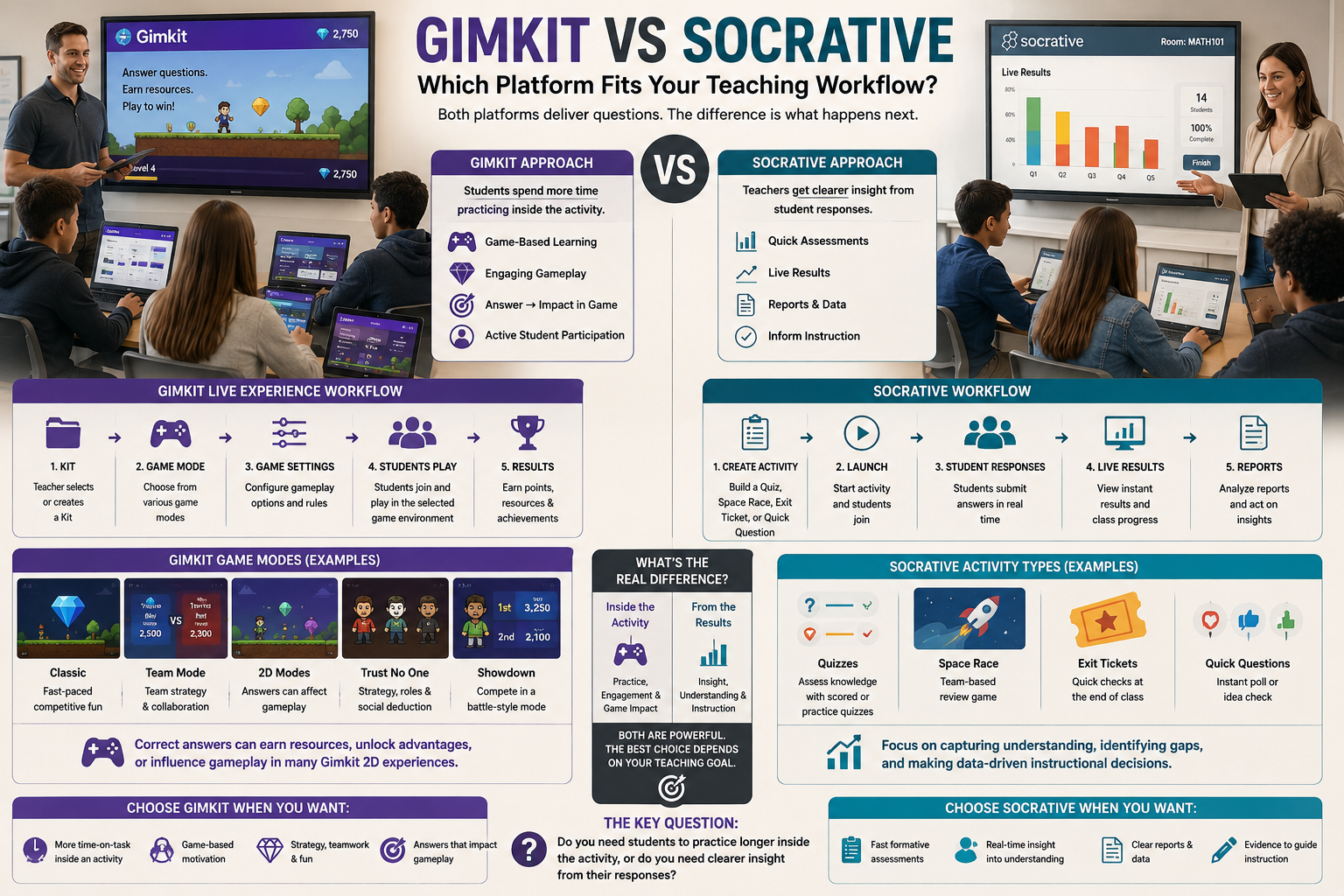
Gimkit is built around what students do with knowledge while they are playing. Socrative is built around what teachers can learn from student responses.
That difference changes how the two platforms fit into a teaching workflow.
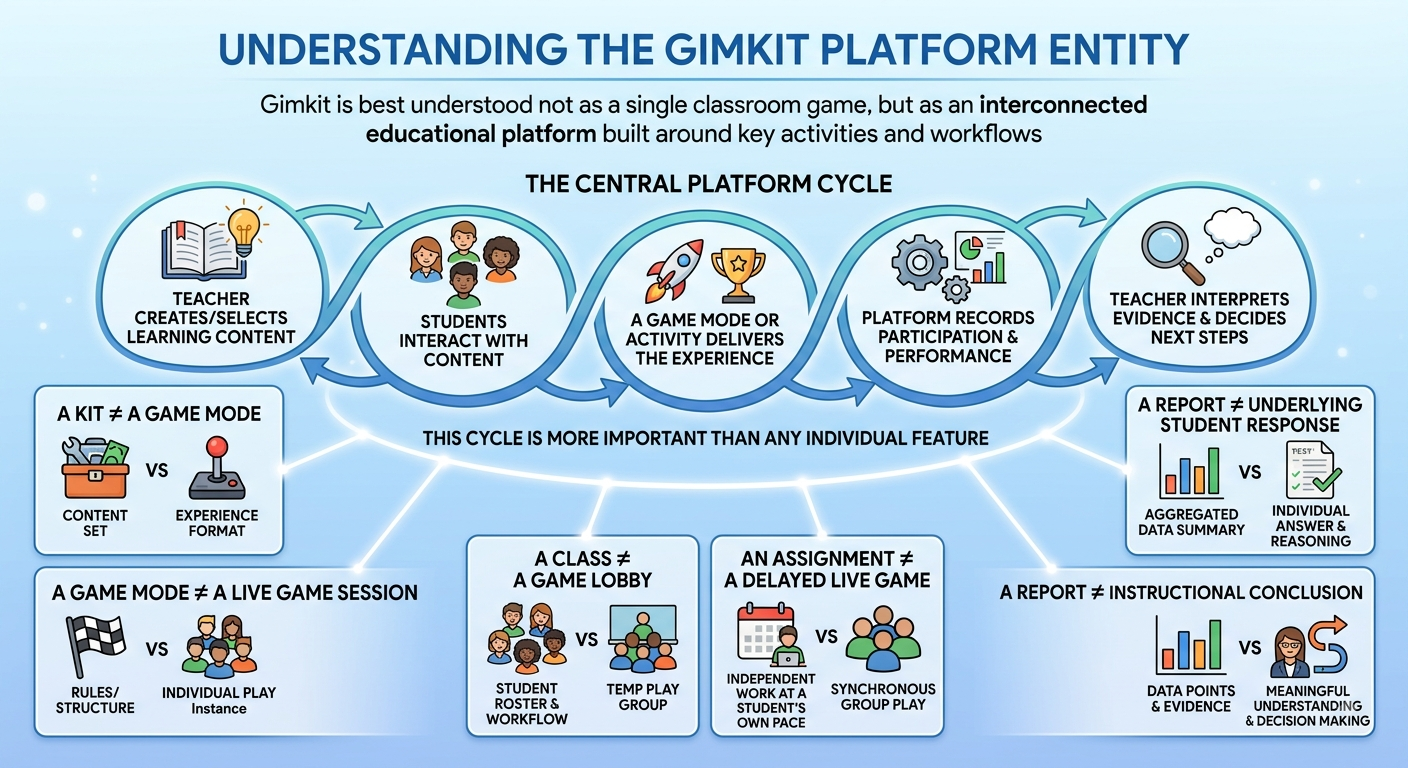
Gimkit’s live experience begins with a kit, game mode, and game settings, after which students participate inside the selected game environment. Its game modes can range from conventional activities to 2D experiences where correct answers can affect resources, movement, or other gameplay mechanics.
Socrative takes a different route. Its workflow is organized around activities such as Quizzes, Space Race, Exit Tickets, and Quick Questions, followed by live results and reports that help teachers evaluate student understanding.
So the central question for this comparison isn’t:
Which platform has more features?
A better question is:
Do you need students to spend more time practicing inside an activity, or do you need a clearer system for capturing, interpreting, and acting on their responses?
That distinction gives us a much more useful way to understand Gimkit vs Socrative.
Learn more about interactive classroom learning, educational games, and modern teaching resources through Gimkit Live Learning & Earning Show.
Gimkit vs Socrative at a Glance
Rather than starting with pricing, game modes, or a long feature checklist, it helps to look at the job each platform is trying to perform.
Teaching function
Gimkit
Socrative
Primary classroom role
Game-based learning and practice
Assessment and instructional feedback
Main workflow
Kit → game mode → gameplay → responses
Activity → student responses → results → analysis
Student activity
Participates inside a game
Completes an instructional/assessment activity
Teacher emphasis
Sustaining participation and practice
Understanding student performance
Response data
Supports the game and reports
Central to the assessment workflow
Live monitoring
Available
Core part of the experience
Reports
Available
Major part of workflow
Exit-ticket workflow
Not its defining structure
Dedicated experience
Quick teacher question
Possible through activities
Dedicated Quick Question workflow
Competitive activity
Deeply integrated
Available through Space Race
Game-world mechanics
Strong in selected modes
Not the central model
Assessment workflow
Secondary to gameplay
Central
Remediation workflow
Practice through gameplay
Results can inform targeted follow-up
Best conceptual fit
“Let students practice”
“Let me see what students understand”
The distinction is important because Socrative’s competitive element should not be confused with Gimkit’s game-first architecture.
Socrative’s Space Race, for example, allows students to work through a quiz in teams or individually while their progress is displayed as a race. But underneath that race is still a quiz and its associated response data. Socrative’s current documentation describes team selection, time limits, live progress and report generation as part of the Space Race workflow.
Gimkit approaches the relationship between question and activity differently. In its 2D modes, the answer can directly supply something the student needs to continue playing. Gimkit’s documentation specifically describes hosts being able to adjust the balance between answering questions and gameplay by controlling rewards earned from correct answers.
That is a fundamental architectural difference.
The Most Important Difference: What Happens to the Student Response?
The cleanest way to compare Gimkit and Socrative is to follow a student’s answer after it has been submitted.
Consider a student who answers a question correctly.
Gimkit
The correct answer can become part of the game’s economy.
Depending on the mode, the student may receive something that helps them continue, progress, compete, explore, or complete an objective.
The response therefore has two roles:
Learning response + gameplay input
That is especially visible in Gimkit’s 2D modes.
For example, in One Way Out, students answer questions to gain energy, then use that energy to move around a spaceship, collect keys, use gadgets, and work together toward an escape objective.
The question is therefore not isolated from the activity.
It feeds the activity.
Socrative
In Socrative, the response has a different destination.
The answer primarily becomes evidence.
The teacher can use that evidence to understand:
which answers students selected
how students performed
where difficulties occurred
how an activity went
what should happen next
Socrative’s current workflow provides reports for quizzes, Space Races, Exit Tickets, and Quick Question–Short Answer activities.
That creates a different chain:
Learning response → result → teacher interpretation → instructional decision
This is one of the biggest reasons the platforms should not be evaluated using the same criteria.
Gimkit Turns Knowledge Into a Gameplay Resource
Gimkit becomes particularly distinctive when correct answers don’t merely increase a score but unlock something the student needs inside the activity.
This creates a relationship between knowledge and action.
Think about the difference between these two situations.
Conventional response model
Answer correctly → receive result → move to next question
Gameplay resource model
Answer correctly → receive resource → use resource → make decision → continue activity
The second model creates another layer between questions.
That layer can be valuable when the instructional objective involves repetition and sustained participation.
Gimkit’s 2D game system is designed around this idea. The platform describes 2D modes as experiences where students explore worlds, with some modes emphasizing strategy, collaboration, interaction, or other forms of gameplay.
More importantly, teachers can influence the balance between the educational input and the game.
Gimkit’s game options allow hosts to change how much gameplay is generated by student answers. In 2D modes, teachers can adjust rewards earned from correct questions, which means the teacher can make the game require more or fewer answered questions to generate progression.
That makes the relationship between practice frequency and gameplay progression configurable.
And this is something that deserves more attention than simply saying that Gimkit is “fun.”
Socrative Turns Knowledge Into Instructional Evidence
Socrative’s strength lies in almost the opposite direction.
The platform makes it relatively easy for a teacher to move from:
student response
to
classroom evidence
to
instructional action.
Its standard workflow includes creating or selecting a quiz, launching an activity, watching results, and generating reports afterward.
That makes Socrative particularly interesting for teachers who don’t just want students to answer questions—they want the answers to become part of their assessment loop.
For example, a teacher could run an activity and then use the resulting information to decide whether to:
continue with the next topic
revisit a concept
give additional practice
change the next lesson
identify students who need more support
create a follow-up activity
This is a different definition of classroom technology.
The platform is not primarily trying to make the question itself more entertaining.
It is trying to make the teacher’s response to student performance more informed.
The Assessment Loop Is Where Socrative Becomes Different
One of Socrative’s defining characteristics is the amount of attention it gives to what happens after students submit their answers.
Its current activity system includes:
Quizzes
Space Race
Exit Tickets
Quick Questions
and its Results/Reports workflow lets teachers review completed activities.
That makes Socrative especially suitable for an instructional cycle such as:
Why Exit Tickets Matter in the Gimkit vs Socrative Comparison
One of the most useful ways to see this distinction is through the humble exit ticket.
An exit ticket isn’t primarily about entertainment.
Its purpose is to answer:
What did students leave today’s lesson understanding?
Socrative has a dedicated Exit Ticket activity. Its standard format includes questions about how well students understood the material, what they learned, and a teacher-defined question. Responses appear in the Results area, where the teacher can use them for follow-up decisions.
That creates a very specific classroom use case.
Imagine a teacher has just finished a lesson on a difficult concept.
They don’t necessarily need another 20-minute game.
They need evidence.
The teacher wants to know:
Who understood it?
Who didn’t?
What part caused difficulty?
What should I change tomorrow?
That is exactly the type of instructional moment where Socrative’s assessment-oriented structure becomes valuable.
Gimkit can certainly be used for review and practice, but an assessment workflow like this is not the core reason someone would choose Gimkit.
Socrative’s Quick Question Approach Changes the Teacher’s Workflow
Another important distinction is Socrative’s Quick Question workflow.
Instead of always preparing a complete game or quiz in advance, a teacher can use a quick classroom question as part of an ongoing lesson. Socrative lists Quick Questions alongside Quizzes, Space Race, and Exit Tickets as launchable activity types.
This matters because teaching is often unpredictable.
A teacher might explain something and suddenly realize:
“I’m not sure everyone understood that.”
Rather than waiting until the end of the lesson, the teacher can stop and collect a response.
That makes the platform useful as an instructional feedback instrument, not merely a destination for prepared quizzes.
Gimkit’s workflow is different because the teacher normally begins by selecting a kit and then selecting a game mode and its settings before launching the activity.
Again, neither workflow is inherently better.
They are optimized for different moments.
Gimkit vs Socrative: Two Different Classroom Loops
At this point, the difference can be represented very simply.
Gimkit’s dominant loop
Question → correct answer → gameplay benefit → action → continued practice
This distinction is much more useful than saying one platform is “more engaging” or the other is “better for teachers.”
Because the two platforms are solving different problems.
Gimkit asks:
How can the activity keep students practicing?
Socrative asks:
What can the teacher learn from the students’ responses?
That is the foundation for the rest of this comparison.
Where the Two Platforms Actually Meet
Despite these differences, Gimkit and Socrative are not opposites.
There are several areas where their functions overlap.
Both can be used for classroom questions.
Both can support live participation.
Both can introduce competition.
Both can provide teachers with information about student performance.
Both can be adapted to different classroom situations.
But the purpose behind those capabilities is different.
Socrative’s Space Race is a good example.
It introduces a competitive visual layer, but students are still progressing through a quiz. Teachers can assign teams, choose a time limit, monitor progress, and generate reports after the activity.
Gimkit’s game modes can go further into the activity itself.
In a mode such as One Way Out, students don’t simply race through questions. Their answers provide energy for movement and contribute to a collaborative objective within the game world.
So both platforms can create a “race.”
But the race is doing different educational work.
Socrative uses the race as a delivery format for assessment activity.
Gimkit can use the question as an input into the game itself.
That distinction will become especially important when we examine student motivation, teacher workload, data interpretation, remediation, and lesson planning in the next parts.
What This Means for Teachers
If your main concern is:
“How can I turn practice into a sustained activity?”
Gimkit deserves serious consideration.
If your main concern is:
“How can I quickly collect useful evidence about student understanding and use it to guide instruction?”
Socrative becomes much more compelling.
And if your classroom needs both?
The platforms can potentially occupy different positions in the same teaching workflow rather than competing for exactly the same job.
That is the key to this comparison.
Gimkit is strongest when the student response needs to keep the activity moving.
Socrative is strongest when the student response needs to inform what the teacher does next.
The Teacher Needs More Than a Score
Imagine a teacher asks:
Which statement best explains photosynthesis?
Twenty-five students respond.
The teacher now has several possible questions:
How many students were correct?
Which answer was the most common incorrect choice?
Did the same students struggle repeatedly?
Was the question too difficult?
Was the wording confusing?
Should the teacher reteach the concept?
Should the next activity be easier or harder?
Which students need additional practice?
A simple score answers only the first question.
An effective formative-assessment workflow tries to answer the rest.
This is where Socrative’s design becomes particularly relevant.
Its Results and Reports system is built around reviewing student responses after activities, while its live activity workflows allow teachers to observe responses as an activity is taking place. Socrative documents reports for quizzes, Space Race, Exit Tickets, and Quick Question–Short Answer activities.
Gimkit also provides game results and student performance information, but its reporting exists within a platform whose primary experience is still centered around playing the selected game mode.
That difference affects what the teacher is likely to do with the data.
Gimkit vs Socrative for Formative Assessment
Formative assessment is not simply “giving students questions.”
Socrative fits naturally into this cycle because assessment is a central part of its platform architecture.
Its activity types include Exit Tickets, Quick Questions, Quizzes, and Space Race, while reports provide teachers with a way to review the resulting performance.
Gimkit can also be used formatively, particularly when teachers want students to practice and reveal areas of difficulty through gameplay.
Response → Gameplay → Continued practice → Performance information
Neither workflow prevents the other use case.
The distinction is about which workflow the platform makes more natural.
Live Results: What the Teacher Sees While Students Are Working
Live classroom data can be extremely useful.
A teacher may be standing at the front of a classroom and realize that students are responding very differently to the same question.
Some students are confident.
Some are guessing.
Some are consistently choosing the same misconception.
Others may simply be taking longer.
A platform that allows the teacher to see this while the activity is happening can turn a normal quiz into an instructional checkpoint.
Socrative’s live activity workflow is specifically designed around teachers monitoring student responses during activities. Its documentation describes live results for activities and allows teachers to monitor how students are progressing.
Gimkit also gives hosts visibility into the game and student progress while a live game is running.
But the information has a different context.
In Gimkit, the teacher is observing students inside a game.
In Socrative, the teacher is more directly observing students inside an assessment activity.
That distinction sounds subtle, but it changes what the teacher is likely to look for.
When Live Data Is More Valuable Than the Final Score
Consider a teacher running a 15-question activity.
If the teacher waits until the end, they may discover that the class performed poorly on questions 8, 10, and 13.
That is useful.
But if the teacher can identify the problem while students are still working, the response can happen immediately.
For example:
Question 4: Most students answer correctly.
Question 5: Several students choose the same incorrect answer.
Question 6: The same misconception appears again.
At that point, the teacher has a choice.
Continue?
Pause?
Explain?
Give another example?
Ask a different question?
This is where formative assessment becomes more than a score-reporting exercise.
The real value is timing.
Socrative’s live-response model is well suited to this type of instructional adjustment because the teacher can monitor activity results as students participate.
Socrative’s Exit Ticket Workflow Is Built for the End of the Lesson
The exit ticket is a particularly useful example because it represents a very different teaching philosophy from a game session.
An exit ticket usually happens after instruction.
The teacher isn’t trying to sustain a game.
The teacher is trying to collect evidence before students leave.
Socrative provides a dedicated Exit Ticket activity with questions designed to help teachers gauge student understanding and gather feedback about the lesson. The responses are then available through the Results workflow.
That makes the sequence straightforward:
Teach → Exit Ticket → Review responses → Plan next lesson
The activity has a clear instructional endpoint.
Gimkit can certainly be used for end-of-class review, but that is a different concept.
Its natural workflow is closer to:
Teach → Play → Practice → Review performance
The distinction is not about which one is more engaging.
It is about whether the teacher’s final objective is practice or diagnosis.
Quick Questions: When You Don’t Want to Build a Full Activity
Another area where Socrative becomes useful is spontaneous questioning.
Teachers do not always know in advance which concept will need checking.
A student asks a question.
The teacher explains something.
Then the teacher thinks:
“Let’s see whether everyone actually understands this.”
A prepared 20-question quiz would be excessive.
A quick response from the class may be enough.
Socrative’s Quick Question activity is designed for exactly this type of immediate classroom interaction. Its launch options include Quick Question alongside Quizzes, Space Race, and Exit Tickets.
This creates an important distinction between planned assessment and in-the-moment assessment.
Planned
Teacher prepares → students complete → results are reviewed.
In-the-moment
Teacher notices uncertainty → asks → collects responses → decides what to do.
Socrative supports both patterns.
Gimkit is much more naturally associated with launching an already-defined kit into a selected game experience.
That doesn’t make Gimkit inflexible.
It simply means the two platforms approach classroom interaction from different starting points.
Reports: Turning a Classroom Session Into Something You Can Review Later
Live results disappear into the moment unless the teacher can revisit them.
That is why reports matter.
A teacher may want to look back after class and ask:
Which questions were difficult?
Which students need additional work?
How did the class perform overall?
What should I reteach?
Did the activity reveal a misconception?
Which concepts should appear in the next practice session?
Socrative’s reporting system is a major part of its overall workflow. Its documentation identifies reports for different activity types and describes options for reviewing and exporting results.
This makes the platform useful beyond the classroom moment.
The activity becomes part of a larger record of instruction.
That is a meaningful distinction.
Gimkit’s Data Has a Different Job
Gimkit does not lack performance information.
Student responses and game performance are important to the platform because students need to answer questions to progress through its activities.
But the information is embedded in the context of the game.
This means a teacher may naturally ask questions such as:
Who is progressing?
Who is answering accurately?
Who is participating?
Who is succeeding within the game?
Those are useful questions.
But a teacher running a formative-assessment workflow may ask something more diagnostic:
Which concept is causing the class difficulty?
What misconception is appearing?
Which question should I reteach?
What evidence should determine tomorrow’s lesson?
The distinction is therefore not data vs no data.
It is game performance data vs assessment-oriented instructional data.
That is a much more accurate way to compare the two.
Gimkit vs Socrative: What Happens After a Wrong Answer?
This is one of the most revealing comparisons.
Suppose a student gets a question wrong.
In Gimkit
The incorrect response can affect what happens inside the game.
The student may lose an opportunity to progress or fail to earn the reward associated with a correct response, depending on the selected mode.
The student then continues participating.
The system is effectively saying:
Try again and keep playing.
This makes incorrect answers part of the practice loop.
For the latest gaming news, expert reviews, and walkthroughs, readers can also visit IGN, one of the world’s leading gaming websites.
In Socrative
The incorrect response primarily becomes evidence for the teacher and student.
The teacher can see the result and use it to determine whether additional explanation or practice is necessary.
The system is effectively saying:
This response tells us something about what the student understands.
That creates two very different uses for mistakes.
Gimkit:
Mistake → consequence → continued gameplay
Socrative:
Mistake → evidence → possible instructional response
Both are valuable.
But they serve different purposes.
Mistakes Are Not Just Failures
This distinction becomes particularly important when teaching difficult concepts.
A wrong answer can be:
a careless mistake
a vocabulary problem
a misconception
a misunderstanding of the question
a calculation error
a knowledge gap
a guessing pattern
A good formative-assessment system helps the teacher distinguish between these possibilities.
The platform itself cannot always diagnose the reason automatically.
That still requires teacher judgment.
But the platform can make the evidence collection easier.
This is one reason Socrative’s assessment-centered structure can be attractive to teachers who want to use classroom questioning as an ongoing diagnostic process.
Gimkit, meanwhile, can make the repetition following that diagnosis more engaging.
And this suggests an important possibility:
Socrative can help identify what needs practice; Gimkit can provide a game-based environment in which that practice happens.
That is not a claim that teachers must use both.
It is simply an example of how their different strengths can complement each other.
Which Is Better for Finding Misconceptions?
This question needs a careful answer.
Neither platform can magically determine a student’s misconception from a multiple-choice answer.
The quality of the question and answer choices still matters enormously.
If the teacher writes weak distractors, a wrong answer may provide little useful information.
If the teacher writes carefully designed distractors that represent common misunderstandings, the response pattern becomes much more informative.
For example:
Why does ice float on water?
Possible answers could represent different conceptual misunderstandings.
If many students select the same distractor, the teacher has a clue about the misconception affecting the class.
Socrative’s response-oriented workflow is particularly well suited to this kind of diagnostic use because the teacher can inspect student answers and results as evidence.
Gimkit can also surface incorrect responses during practice.
But its central objective is not to turn every distractor into a diagnostic assessment instrument.
That distinction matters when designing questions.
The Question Design Matters More Than the Platform
A sophisticated platform cannot rescue a poorly designed question.
Consider these two questions:
Weak
Do you understand fractions?
Yes / No
This provides very little diagnostic information.
Stronger
Which fraction is equivalent to 3/4?
A student response gives more useful evidence.
Even more diagnostic
Which fraction is equivalent to 3/4?
6/8
4/6
9/16
3/8
Now the incorrect options can potentially reveal different misunderstandings.
The important lesson is:
The platform distributes the question. The question determines how much the response can tell you.
That principle applies to both Gimkit and Socrative.
Socrative for Reteaching: The Data-to-Action Connection
The real value of formative assessment appears when the teacher does something with the result.
Suppose a class completes a Socrative activity.
The results show that:
90% understand concept A
82% understand concept B
47% understand concept C
93% understand concept D
A teacher now has a reasonable basis for changing the lesson.
There is little reason to spend another 20 minutes reteaching A.
Concept C deserves attention.
The next lesson might therefore begin with:
Concept C explanation → targeted examples → practice → new check
That is the assessment loop working as intended.
The platform didn’t teach the concept.
It helped the teacher determine where teaching time was needed.
This is one of Socrative’s strongest conceptual advantages.
Gimkit for the Practice That Follows Diagnosis
Now imagine the teacher has identified that Concept C is the problem.
The next question becomes:
How do I get students to practice it enough?
This is where Gimkit can become attractive again.
The teacher can create a focused kit containing questions specifically related to Concept C and use a game mode that encourages repeated participation.
Instead of practicing the entire curriculum equally, students can spend more time on the area that the assessment identified as weak.
That produces a potentially powerful instructional sequence:
Socrative → identify the gap
Teacher → explain the gap
Gimkit → practice the gap
Socrative or another check → verify improvement
Again, this is not a requirement to use two platforms.
It demonstrates the different jobs each platform can perform.
Gimkit vs Socrative for Different Assessment Moments
Assessment moment
Gimkit
Socrative
During game-based practice
Strong
Possible
Quick understanding check
Possible
Strong
Spontaneous classroom question
Possible
Strong
End-of-lesson exit ticket
Less central
Strong
Extended practice
Strong
Available
Live response monitoring
Strong
Strong
Assessment reports
Available
Central workflow
Diagnosing response patterns
Useful
Strong fit
Reteaching decisions
Indirect
Strong fit
Practice after diagnosis
Strong fit
Available
Game-based reinforcement
Strong
More limited
Formal assessment replacement
Not ideal
Not automatically
This table highlights something important:
The platforms overlap, but their strongest use cases are not identical.
The Teacher Workload Question
Another factor that matters is what happens before and after the activity.
A teacher’s workload includes much more than launching a student activity.
There is:
Preparation
→ creating questions
→ organizing content
→ choosing an activity
Delivery
→ starting the session
→ monitoring students
→ handling classroom issues
Interpretation
→ reviewing responses
→ identifying weak areas
Follow-up
→ reteaching
→ assigning practice
→ checking improvement
Socrative’s strength becomes particularly visible in the interpretation and follow-up stages because its workflow is built around results and reports.
Gimkit’s strength becomes particularly visible in the delivery and practice stages because the selected game mode can become the structure through which students continue engaging with the questions.
This gives us a better way to describe their difference:
Gimkit puts more of the instructional energy into the student activity. Socrative puts more of the workflow into understanding the resulting evidence.
When Socrative Is the More Practical Choice
Socrative may be the better fit when the teacher’s immediate problem is:
“I need to know what my students understand.”
That includes situations such as:
checking understanding during instruction
collecting exit-ticket responses
reviewing quiz performance
identifying areas for reteaching
using quick questions during a lesson
examining results after an activity
maintaining an assessment-oriented workflow
Its value comes from reducing the distance between student response and teacher decision.
When Gimkit Is the More Practical Choice
Gimkit may be the better fit when the teacher’s immediate problem is:
“I need students to practice this content and stay involved while doing it.”
That includes:
extended review
repeated practice
game-based reinforcement
competitive practice
strategic gameplay
game-based assignments
lessons where the activity itself needs to maintain momentum
Here, the platform’s value comes from reducing the distance between:
question → practice → continued participation
The Important Difference: Diagnose vs Reinforce
This is perhaps the cleanest distinction we’ve reached so far.
Socrative is particularly strong at:
Diagnosing
What do students know?
What did they miss?
What should I address?
Gimkit is particularly strong at:
Reinforcing
How can students practice?
How can I keep them participating?
How can I make repeated practice feel like an activity rather than a worksheet?
This does not mean Socrative cannot reinforce learning or Gimkit cannot reveal weaknesses.
It means those outcomes are closer to each platform’s central design.
Gimkit vs Kahoot!: Content Creation, Question Design, Data & Accessibility
The difference between Gimkit and Kahoot! becomes even clearer when you stop looking at the student-facing game and examine what happens behind the activity.
For teachers, creating an effective classroom activity involves much more than choosing a game mode. The real workflow includes building question sets, reusing existing material, organizing content, adding media, reviewing student responses, interpreting reports, and making sure the activity can be used by students with different learning and accessibility needs.
This is an area where Gimkit and Kahoot! take noticeably different approaches.
Building Question Sets: How Much Control Does the Teacher Have?
A useful comparison starts with the content-authoring workflow.
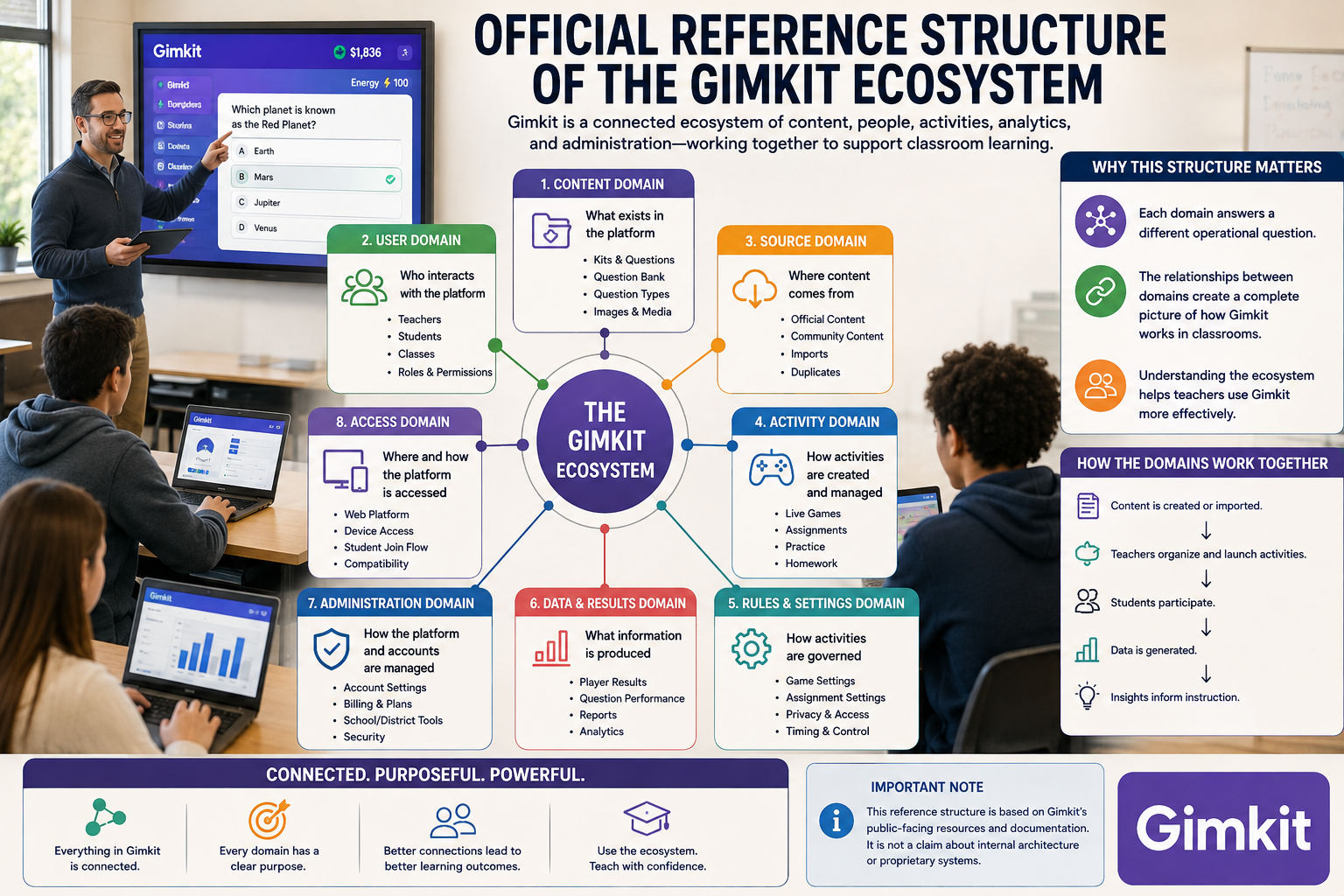
Gimkit organizes its instructional content around Kits. Teachers can create a Kit from scratch, add questions, include correct and incorrect answers, use media, and select different question formats. Gimkit also provides tools for importing content and reusing questions from other Kits.
Kahoot! similarly provides a dedicated creator environment, but its ecosystem places greater emphasis on building different types of interactive content and adapting an existing Kahoot! into different learning experiences.
This creates two slightly different authoring mindsets.
Gimkit’s approach
The teacher can think:
“I need a question set that I can use across different game experiences.”
A Kit becomes the underlying content that can be reused across Gimkit’s activities.
Kahoot!’s approach
The teacher can think:
“I need to build an interactive learning activity around this content.”
The creation process is more closely connected with the particular Kahoot! experience the teacher intends to deliver.
Neither approach is inherently superior.
The distinction is that Gimkit separates the content set from the game experience particularly clearly, while Kahoot! provides a broader creator ecosystem around the interactive activity.
Gimkit’s Question Bank vs Kahoot!’s Question Bank
Creating every question manually is unnecessary when useful material already exists.
This is where question-reuse systems become important.
Gimkit currently provides a Question Bank that lets teachers search questions from public Kits and add selected questions to their own Kits. Teachers can search across Kits or within their own content while editing or creating a Kit.
That makes the workflow relatively straightforward:
Find question → add question → continue building Kit
Gimkit also allows teachers to import flashcard sets and supports CSV-based Kit creation, giving teachers additional ways to bring existing content into the platform.
Kahoot! also has a question-bank system, although availability depends on the user’s plan and account type. Its current creator resources include question-bank functionality alongside templates and other content-creation tools.
Content-reuse comparison
Content task
Gimkit
Kahoot!
Build questions manually
✓
✓
Reuse existing questions
Strong
Strong
Search question bank
✓
✓
Import structured content
CSV supported
Available through supported creator workflows
Import flashcard-style content
Supported
Broader study ecosystem
Reuse content across activities
Strong
Strong
Collaborative question creation
KitCollab
Collaborative options depend on workspace/plan
The important difference isn’t simply whether both platforms have a question bank.
It’s how much the teacher can treat the question set as reusable instructional content.
Gimkit’s KitCollab Changes the Content-Creation Workflow
One of Gimkit’s more distinctive content-authoring features is KitCollab.
Instead of the teacher being the only person creating questions, students or other teachers can submit questions to a Kit. The teacher can review and approve those submissions before they become part of the Kit. Gimkit documents KitCollab as supporting both real-time and asynchronous participation.
That creates a different classroom workflow:
Teacher creates topic → students contribute questions → teacher reviews → approved questions enter the Kit
This can be useful when the instructional objective includes students thinking about what makes a good question.
For example, after completing a science unit, a teacher could ask students to create questions about the concepts they have learned.
The activity then becomes more than answering questions.
Students must consider:
What is important?
What would make a useful question?
Which answer is correct?
Which alternatives are plausible?
Is the question too easy or too difficult?
That makes the creation of assessment content itself part of the learning process.
This is fundamentally different from simply importing a pre-existing quiz.
Media and Question Construction
Another difference appears when teachers want questions to contain more than plain text.
Gimkit’s current Kit creator supports adding media to questions, while certain media capabilities—including audio questions and image uploads—depend on the subscription level.
This matters for subjects where the stimulus itself is important.
Consider:
identifying a historical image
interpreting a diagram
recognizing a visual pattern
listening to a pronunciation
analyzing a graph
solving a mathematics problem containing equations
The question isn’t always just:
“What is the correct answer?”
Sometimes the question needs a stimulus before the student can answer it.
Authoring perspective
Content requirement
Gimkit
Kahoot!
Text-based questions
✓
✓
Images
✓
✓
Multimedia-based activities
✓
Strong
Audio-supported content
Available on supported plans
Available through supported features
Equations/math notation
✓
✓
Custom visual presentation
Moderate
Broader customization options
The key consideration is not the number of media features.
It is whether the teacher needs the media itself to carry instructional meaning.
Content Organization: Reusing One Set for Different Purposes
One of the biggest advantages of separating content from activity is reuse.
A teacher may have one set of 40 questions on a topic.
Those same questions might be useful for:
classroom practice
revision
independent work
homework
intervention
end-of-unit review
Gimkit’s Kit structure is particularly suited to this type of reuse. A Kit can be played, edited, copied, placed into folders, used for practice, and connected with assignments depending on the account and activity.
Kahoot! also supports reuse and adaptation of existing content, with templates, question banks, slides, themes, and other creator tools forming part of its current authoring ecosystem.
The important distinction
Gimkit: One content set can become the foundation for different gameplay contexts.
Kahoot!: One content set can become the foundation for different interactive learning formats.
This is subtle, but useful when planning a larger curriculum.
Reporting: What Happens After Students Finish?
The activity itself is only half of the teacher’s job.
The more important question may be:
What can the teacher learn from the results?
Both platforms provide reporting, but their reports are connected to their respective activity models.
Gimkit provides reports for live games and assignments. For assignments, teachers can view results by student and class, filter results, and open individual student reports.
This gives teachers a way to move from:
Game completed → results collected → student performance reviewed
Kahoot! also provides reporting for live games and assigned activities. Current Kahoot! reports can show participant counts, individual results, performance analytics, and difficult-question information; question-level analysis can also show the percentage of players who answered each question correctly.
That makes post-activity analysis an important part of the comparison.
Gimkit vs Kahoot! for Teacher Data
The most useful distinction is what the data is helping the teacher understand.
Gimkit data is naturally connected to:
game participation
assignment completion
individual results
question practice
performance within the selected activity
Kahoot! data is naturally connected to:
question accuracy
individual performance
difficult questions
participation
assignment progress
question-level response patterns
Kahoot!’s current reporting tools specifically allow teachers to inspect question accuracy and see how participants distributed their answers across questions.
That can be particularly useful when the teacher’s next decision is:
“Which concept should I reteach?”
rather than simply:
“Who won?”
Reports Should Not Be Confused With Grades
This distinction is important.
A platform report tells you what happened during the activity.
It does not automatically tell you:
why a student answered incorrectly.
For example, if 60% of students miss a question about photosynthesis, the report identifies a pattern.
The teacher still has to investigate whether the problem was:
vocabulary
conceptual misunderstanding
confusing wording
insufficient prior knowledge
careless response
lack of reading time
an ambiguous answer choice
Therefore:
Analytics identify patterns; teachers interpret the patterns.
This is true regardless of which platform is used.
Accessibility: A Major Difference
Accessibility deserves its own section because it affects whether an activity works equally well for all students.
Kahoot! has significantly expanded its documented accessibility controls. As of August 2026, Kahoot! says it aims to comply with WCAG 2.2 Level AA and documents support for screen readers, adjustable text through browser zoom, increased contrast, accessible image descriptions, keyboard navigation, read-aloud functionality, and options designed to reduce time pressure.
That is a meaningful consideration for schools evaluating platforms at an institutional level.
Kahoot!’s Approach to Time Pressure
One particularly notable accessibility option is Kahoot!’s Accuracy experience.
In the standard Classic experience, speed can affect scoring.
In Accuracy, scoring is based on correctness rather than speed, and Kahoot! provides an Unlimited time accessibility option.
That changes the underlying interaction.
Instead of:
Know it + answer quickly
the activity can become:
Know it + take the time required to answer
For students who need additional processing time, this can be a significant difference.
Kahoot! also allows assigned activities to have the question timer turned off, according to its current accessibility documentation.
Questions on the Student’s Own Screen
Another practical accessibility consideration is where students see the question.
Kahoot! currently allows teachers to display questions and answer choices directly on participants’ devices during live games. Kahoot! specifically highlights this for large classrooms, remote learning, and accessibility because students do not have to continuously look between a shared display and their own device.
This can change the physical experience of the classroom.
Traditional shared-screen setup
Teacher display → question
Student device → answer
Personal-screen setup
Student device → question + answer
That can reduce the visual distance between the learner and the content.
It is especially relevant when:
students sit far from the classroom display
the room has glare
learners have visual difficulties
the class is remote
students need to process information independently
Read-Aloud and Language Support
Kahoot! also documents screen-reader and read-aloud support, including read-aloud capabilities across supported contexts and languages. Its current documentation states that read-aloud support covers up to 37 languages, including languages such as Arabic and Hindi.
For multilingual classrooms, this can be more than a convenience.
It can change the barrier from:
“Can the student understand the written question quickly enough?”
to:
“Can the student access the question in an appropriate format?”
That makes accessibility part of content delivery, not simply a technical checkbox.
Gimkit vs Kahoot! for Inclusive Content Design
The comparison therefore becomes more nuanced.
Accessibility consideration
Gimkit
Kahoot!
Flexible question formats
✓
✓
Personal-device question display
Available through activity setup
Strong documented support
Reduced time pressure
Depends on mode
Strong documented options
Accuracy without speed scoring
Mode dependent
Dedicated Accuracy experience
Screen-reader support
Available features vary
Extensively documented
Read-aloud
Supported features vary
Strong documented support
Contrast/accessibility controls
Available features vary
Extensive documented controls
Keyboard accessibility
Not the primary differentiator
Documented support
This does not mean that Gimkit cannot be used with diverse learners.
It means that, based on the platforms’ current official documentation, Kahoot! has a more extensively documented accessibility framework, which can matter when accessibility requirements are part of school or district procurement.
The Teacher’s Real Content-Design Decision
At this stage, the comparison can be reduced to a deeper question:
Do you want to build content primarily as a reusable game question set, or as a broader interactive learning resource?
Gimkit is compelling when the teacher wants a reusable Kit that can feed into different gameplay contexts.
Kahoot! becomes particularly compelling when the teacher wants to combine questions with a wider collection of interactive learning and presentation possibilities.
Neither approach eliminates the teacher’s responsibility to create good questions.
A poorly written question remains poorly written whether it appears inside a game or a presentation.
A Better Way to Compare the Two Platforms
Instead of asking:
“Which platform has more question features?”
ask:
1. How will I create the content?
If the teacher already has spreadsheets, flashcards, or existing question sets, Gimkit’s import and reuse options can reduce duplication.
2. How will I reuse it?
If the same content needs to appear in different game contexts, Gimkit’s Kit-centered structure can be useful.
3. What data do I need afterward?
If question-level accuracy analysis is particularly important, Kahoot!’s current reporting tools provide detailed question analysis.
4. Who needs to access the activity?
If accessibility accommodations are a major requirement, Kahoot!’s extensive current accessibility documentation gives teachers and institutions more clearly defined controls to evaluate.
5. Is student content creation part of the lesson?
If yes, Gimkit’s KitCollab provides an interesting route for making question creation collaborative.
Content Creation Decision Matrix
If your priority is…
Better fit
Build reusable question sets
Gimkit
Import question data from CSV
Gimkit
Search public Kits for reusable questions
Gimkit
Let students contribute questions
Gimkit
Analyze question accuracy
Kahoot!
Detailed accessibility controls
Kahoot!
Read-aloud and assistive-access options
Kahoot!
Reduce dependence on classroom display
Kahoot!
Build content around a reusable Kit
Gimkit
Build a broader interactive learning resource
Kahoot!
The important takeaway is that content creation is not just about how quickly a teacher can write ten questions.
It is about what happens to those questions afterward.
A strong platform should help the teacher move from:
Create → reuse → deliver → analyze → improve
with as little unnecessary duplication as possible.
What This Means for Teachers in Practice
Imagine two teachers preparing the same unit.
Teacher A
Has a large spreadsheet of existing questions and wants to turn that material into repeated game-based practice.
For this workflow, Gimkit’s Kit structure, CSV import, Question Bank, and content-reuse tools can be particularly useful.
Teacher B
Wants students to complete interactive questions while also prioritizing accessibility, personal-device viewing, flexible timing, and detailed question-level analysis.
For that workflow, Kahoot!’s current accessibility and reporting capabilities may provide a stronger fit.
Neither teacher has chosen the “better” platform in the abstract.
They have chosen the platform that creates less friction between their instructional goal and the tool.
And that is a much more useful way to evaluate Gimkit vs Kahoot!.
Gimkit vs Kahoot!: Pricing, Setup, Classroom Management
After comparing the actual learning interaction, classroom use, student experience, practice workflows, content creation, reporting, and accessibility, there is one final layer that matters before choosing between Gimkit and Kahoot!: how practical each platform is to adopt, manage, and maintain over time.
A platform can be excellent during a single lesson but become less attractive if teachers struggle with setup, account requirements, pricing, classroom organization, or limitations around how activities can be assigned.
This final section therefore focuses on the operational side of the comparison and brings the entire Gimkit vs Kahoot! decision together.
Gimkit vs Kahoot! for Getting Started
The first practical question is simple:
How quickly can a teacher go from an empty account to a usable classroom activity?
Both platforms are designed to let teachers create or use existing content rather than requiring technical expertise.
Gimkit’s workflow revolves around creating or selecting a Kit, then choosing how that content will be used. This keeps the underlying content relatively separate from the individual game experience.
Kahoot! similarly allows teachers to create or discover content and then select an appropriate way to deliver it.
The difference becomes more noticeable after the first activity.
Gimkit workflow
Create/find Kit → choose game experience → launch or assign → review results
Both are relatively approachable, but the decision-making happens at different points.
With Gimkit, selecting the game mode can substantially change the nature of the activity.
With Kahoot!, selecting the experience can change how students interact with the questions without necessarily changing the underlying question set.
Classroom Management
Classroom management is often overlooked in software comparisons.
A teacher may have excellent content, but the activity still needs to work with:
multiple students
different devices
students joining at different times
remote learners
students completing work independently
classroom transitions
repeated assignments
Gimkit’s live-game model is particularly useful when the teacher wants the class to participate in a shared game environment.
The teacher can create a game, provide students with the joining information, and then manage the activity from the host interface.
For independent practice, Gimkit’s assignment functionality provides a different workflow where students can complete the activity without everyone needing to be physically participating in the same live session.
Kahoot! similarly supports both live participation and assigned/self-paced experiences.
This makes both platforms considerably more flexible than a tool designed exclusively for live classroom quizzes.
Live Play vs Independent Work
One of the most important decisions is whether students should participate at the same moment.
Live activity
Teacher controls the session.
Students participate together.
The class shares the same instructional moment.
Independent activity
Students complete the activity according to their own schedule or pace.
The teacher reviews results afterward.
Both Gimkit and Kahoot! can support these two broad workflows.
Classroom requirement
Gimkit
Kahoot!
Live classroom activity
Strong
Strong
Self-paced assignment
Strong
Strong
Whole-class participation
Strong
Strong
Independent practice
Strong
Very strong
Remote participation
✓
✓
Flexible scheduling
✓
✓
Post-activity reporting
✓
Strong
The important difference is therefore not whether the platforms support live and independent learning.
It is what students actually do during those experiences.
Gimkit generally preserves more of its game-oriented identity.
Kahoot! offers a wider range of question-centered and study-oriented experiences.
Gimkit vs Kahoot! for Classroom Control
Teachers also need control over how an activity behaves.
This can include:
selecting the game or experience
controlling the session
changing settings
deciding how students participate
determining whether students work individually or collaboratively
managing timing
choosing how results are presented
Gimkit gives teachers significant control through its game-mode and game-setting system.
That is useful because different Gimkit modes can create very different classroom experiences.
A teacher can therefore choose a mode according to the lesson rather than treating every Kit as the same type of activity.
Kahoot! takes a similar philosophy but provides a wider variety of experiences that can change how students interact with the same basic question-and-answer model.
Which Platform Requires More Teacher Decision-Making?
Interestingly, having more choices can create its own problem.
A platform with many modes and settings may give teachers more control, but it can also require more preparation.
Gimkit
The teacher may need to decide:
Which game mode?
Which settings?
How much strategy?
How long should the activity run?
Kahoot!
The teacher may need to decide:
Which experience?
Live or assigned?
Speed or accuracy?
Individual or team-based?
Which study format?
Neither is necessarily easier.
The difference is that both platforms require teachers to understand the purpose of the available experiences before choosing one.
More options are useful only when teachers know what each option is intended to accomplish.
Pricing: Why Plan Differences Matter
Pricing is one of the areas that should be treated carefully because both companies can change plans, feature availability, limits, and pricing over time.
Some Gimkit capabilities are restricted to paid plans, while Kahoot! also uses different subscription tiers with feature differences.
That means a simple statement such as:
“Platform A is cheaper.”
can become misleading.
A better comparison is:
What does the teacher actually need, and which plan provides those capabilities?
For example, a teacher might only need:
basic question creation
live games
simple review
Another teacher may need:
assignments
advanced reports
multimedia
broader content creation
accessibility options
institutional administration
Those are completely different purchasing decisions.
Free vs Paid: What Should Teachers Look At?
Instead of comparing headline prices alone, evaluate the following:
Pricing consideration
Why it matters
Number of students
Determines whether a classroom can participate comfortably
Available game modes
Some experiences may require specific plans
Assignment features
Important for homework and independent practice
Reporting
Advanced analytics may be plan dependent
Question types
Useful for subjects requiring specialized formats
Multimedia
Important for visual/audio lessons
Content creation
Matters for teachers building large libraries
Collaboration
Important for departments and teams
Accessibility features
Critical for inclusive classrooms
School-wide administration
Important for institutions
This approach is much more useful than declaring one platform the universal winner based on subscription price.
Always verify the current official pricing page before purchasing, because plan names, limits, and included features can change.
Gimkit vs Kahoot! for Different School Sizes
The best platform for one teacher may not be the best platform for an entire school.
A single teacher can make a decision based mostly on:
classroom size
subject
lesson objective
preferred teaching style
A school or district has additional concerns.
It may need to consider:
account administration
privacy
accessibility
teacher management
content sharing
reporting
procurement
integrations
support
subscription management
This changes the evaluation criteria.
Individual teacher
“Which tool works best for my students?”
Department
“Which tool can multiple teachers use consistently?”
School
“Which platform fits our instructional and technical requirements?”
District
“Which platform can be administered, supported, and governed at scale?”
Therefore, a platform that feels perfect for one classroom should not automatically be adopted institution-wide without a broader evaluation.
Gimkit vs Kahoot! for Subject Areas
Another useful way to make the decision is by subject.
The same platform can behave differently depending on what students are learning.
Mathematics
Gimkit can work well when repeated practice is the objective and students benefit from continued game-based engagement.
Kahoot! can be useful when teachers want quick checks of mathematical concepts, vocabulary, formulas, or problem-solving steps.
Science
Both can support review, but the teacher should consider whether questions require:
diagrams
images
terminology
data interpretation
conceptual explanations
Languages
Kahoot! can be useful for vocabulary and language review, particularly where timing, accuracy, pronunciation, or accessibility matter.
Gimkit can add repetition and game motivation to vocabulary practice.
History
Both can work well for recall-based review, but teachers should avoid reducing historical learning to memorizing isolated facts.
Test preparation
The more the activity resembles careful practice and accuracy checking, the more useful a question-centered experience can become.
The more it resembles repeated motivational review, the more attractive a game-oriented experience may become.
The Risk of Gamification Overload
This is perhaps the most important caution in the entire comparison.
Gamification can solve one problem:
Students are losing motivation.
But it can create another:
Students become more interested in the reward than the subject.
This can happen with any gamified educational platform, including Gimkit.
A student might begin thinking:
“How can I get more points?”
instead of:
“Why is this answer correct?”
That does not mean game mechanics are bad.
It means the teacher should make sure the mechanics serve the instructional objective.
For example, if the objective is repeated vocabulary retrieval, game-based repetition can be helpful.
If the objective is evaluating a complex argument, a highly competitive game may not be the ideal primary learning environment.
The Risk of Speed-Based Competition
Kahoot! has its own potential issue.
When classroom activities emphasize speed, students can become focused on answering first rather than thinking carefully.
That can favor:
fast readers
students comfortable with pressure
students who already know the material
students who process questions quickly
It can be less suitable when the instructional objective requires:
reflection
careful reading
extended processing
reasoning
accuracy without time pressure
This is precisely why Kahoot!’s Accuracy experience and accessibility options matter.
The teacher can change the scoring philosophy rather than treating speed as the default measure of success.
Gimkit vs Kahoot!: The Strongest Use of Each Platform
At this point, the comparison can be reduced to the job each platform performs best.
Gimkit’s strongest role
Game-based practice
The teacher wants students to answer questions repeatedly while remaining inside a larger interactive game.
Kahoot!’s strongest role
Flexible interactive questioning
The teacher wants students to interact with questions through different live, self-paced, accuracy-focused, team, or study experiences.
That distinction is more meaningful than saying one platform is simply “more fun.”
Gimkit vs Kahoot!: What Each Platform Adds to a Lesson
Think about a normal lesson:
Explain → practice → check → correct → practice again
Gimkit can add a strong game layer to the practice stage.
Kahoot! can add a flexible interactive layer to the check and practice stages.
That gives each platform a natural place in instructional design.
Gimkit
Practice → repetition → game progression → continued participation
Again, these are tendencies rather than strict rules.
Both platforms can be used in multiple ways.
Final Decision Matrix
If you need to make the decision quickly, this is the most practical summary.
Your main requirement
Better fit
Game-centered learning
Gimkit
Strategy during practice
Gimkit
Persistent gameplay
Gimkit
Repeated game-based practice
Gimkit
Student-created question contribution
Gimkit
Reusable Kit-based content
Gimkit
Quick classroom questioning
Kahoot!
Accuracy over speed
Kahoot!
Accessibility controls
Kahoot!
Question-level analysis
Kahoot!
Multiple study formats
Kahoot!
Broad interactive learning ecosystem
Kahoot!
Team participation
Both
Live classroom competition
Both
Independent practice
Both
Longer game-oriented sessions
Gimkit
Short knowledge checks
Kahoot!
Gimkit vs Kahoot!: Final Verdict
There is no meaningful universal winner.
The strongest platform depends on what the teacher wants the activity to accomplish.
Choose Gimkit when:
You want the questions to become part of a larger game.
You want students to:
practice repeatedly
make strategic decisions
earn progress
interact with game mechanics
remain engaged through a longer activity
experience learning through gameplay
Choose Kahoot! when:
You want questions to remain the primary interaction.
You want:
quick classroom checks
flexible learning experiences
accuracy-focused activities
broader self-study options
detailed question-level reporting
stronger documented accessibility controls
different ways to deliver the same instructional content
Choose both when:
Your teaching workflow requires both.
You can use Kahoot! for checking and diagnosing and Gimkit for extended practice and game-based reinforcement.
The important point is not to use both simply because they are popular.
Use both only when they solve different instructional problems.
The Real Question Teachers Should Ask
The best question is not:
“Is Gimkit better than Kahoot!?”
It is:
“What do I need students to do after they answer?”
If the answer is:
Earn, decide, progress, compete, and keep playing → Gimkit.
If the answer is:
Review, receive feedback, demonstrate accuracy, study, and move to the next learning activity → Kahoot!.
That is the clearest way to understand the difference.
Neither platform replaces strong teaching.
Neither guarantees learning simply by making a lesson more engaging.
The strongest results come when the teacher starts with the learning objective, selects the appropriate interaction, writes high-quality questions, observes student responses, and then uses those responses to decide what students need next.
Final one-line comparison
Gimkit turns questions into gameplay; Kahoot! turns questions into flexible interactive learning experiences.
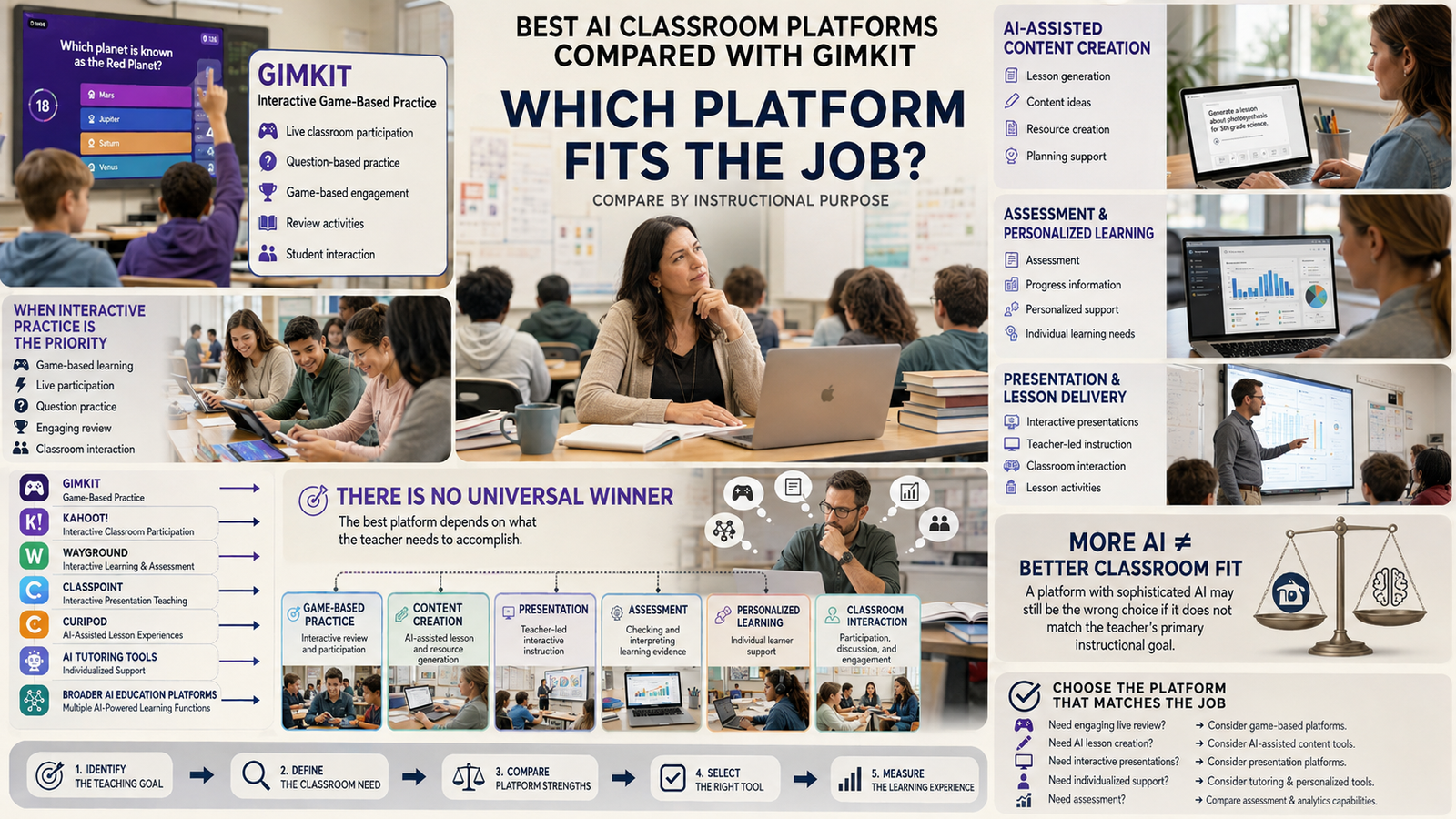
And that is ultimately the most useful conclusion for teachers choosing between the two.