Best AI Classroom Platforms Compared With Gimkit | Choosing an AI-powered classroom platform is not really about finding the tool with the biggest AI feature list.
The better question is:
What do you need the platform to help you accomplish, and which tool does that job best?
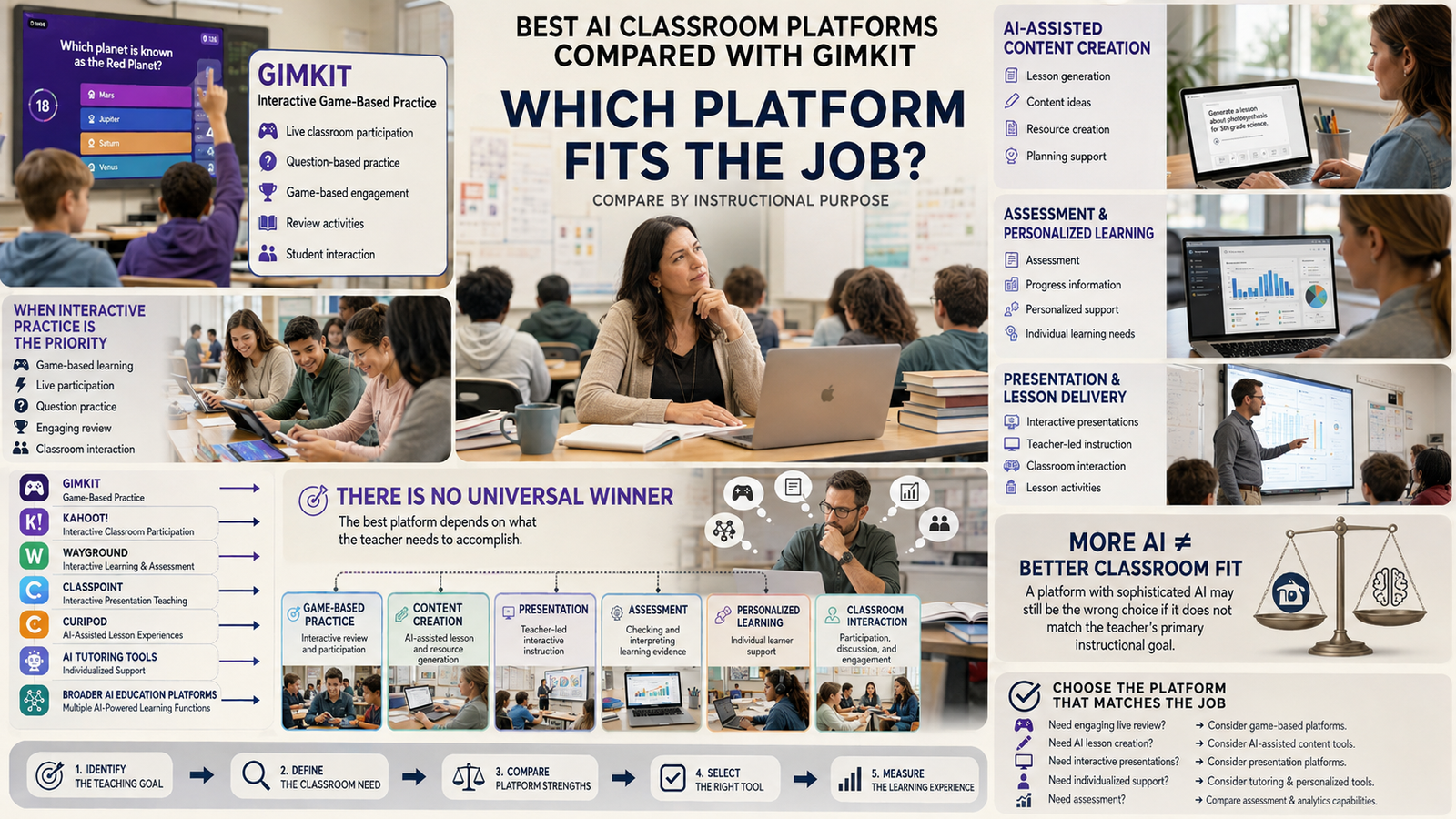
That distinction matters because Gimkit, Kahoot!, Wayground, ClassPoint, Curipod, AI tutoring tools, and broader AI education platforms do not all solve the same classroom problem.
Gimkit is strongly associated with interactive, game-based question practice and live classroom participation. Other platforms put more emphasis on AI-assisted content creation, presentation-based teaching, assessment, personalized learning, lesson generation, or individualized support.
So there is no meaningful universal winner.
A platform can have more sophisticated AI and still be a worse choice for a teacher who primarily wants an engaging live review game. Likewise, Gimkit can be an excellent choice for interactive practice while another platform is much better for generating an entire lesson or providing individualized AI support.
Looking for comprehensive classroom resources and educational technology insights? Explore GimkitApp for expert guides, teaching strategies, game modes, and the latest updates to enhance student engagement.
Quick Answer
Gimkit is a strong choice when your priority is interactive, game-based classroom practice, retrieval practice, review, competition, and active student participation.
Kahoot! is one of the closest alternatives when you want interactive quizzes combined with increasingly extensive AI-assisted content creation. Its current AI tools can generate content from topics, PDFs, URLs, Wikipedia articles, and synced presentation material, with teacher review and editing built into the workflow.
Wayground, formerly Quizizz, is more relevant when you want a broader assessment, practice, assignment, and instructional workflow rather than only a live game experience.
ClassPoint is particularly relevant for teachers who already teach through PowerPoint and want AI-generated questions directly from presentation slides.
Curipod is better understood as an AI-assisted interactive lesson platform, where lesson generation, activities, student responses, AI feedback, and teacher-led discussion can happen within the same lesson experience.
The right choice therefore depends on whether your priority is game-based engagement, AI content creation, assessment, presentation-based teaching, lesson generation, personalization, or individualized support.
What Is an AI Classroom Platform?
An AI classroom platform is an educational technology product that uses artificial intelligence to support one or more parts of teaching or learning.
That can include:
Generating questions
Creating lessons
Creating activities
Adapting learning materials
Generating explanations
Providing student feedback
Analyzing responses
Supporting differentiated instruction
Personalizing practice
Helping teachers prepare content
Turning existing resources into interactive activities
The important point is that “AI classroom platform” is not one clearly defined product category.
AI can perform very different jobs.
AI as a Content Creator
The platform generates:
Questions
Quizzes
Activities
Lesson materials
Practice exercises
Study resources
AI as a Teacher Assistant
The AI helps teachers:
Rewrite questions
Adjust difficulty
Improve wording
Adapt content
Generate variations
Organize materials
AI as an Assessor
The system analyzes:
Student responses
Correct and incorrect answers
Learning gaps
Performance patterns
Assessment evidence
AI as a Tutor
The AI interacts directly with students by providing:
Explanations
Hints
Guided practice
Personalized assistance
Follow-up questions
AI as a Personalization Engine
The system may adapt:
Difficulty
Content
Practice paths
Recommendations
Learning activities
AI as a Classroom Interaction Layer
AI can also help turn existing instructional material into:
Interactive questions
Polls
Presentations
Discussions
Activities
Live classroom exercises
This is why simply asking “Which platform has the best AI?” is not enough.
You first need to identify what you want the AI to do.
Where Does Gimkit Fit?
Gimkit occupies a different position from many AI-first education platforms.
Its central value is tied to interactive question-based learning and game-based classroom participation.
That means the student experience is a major part of the platform’s purpose.
A teacher may use an AI platform to:
Create → Adapt → Prepare
Then use Gimkit to:
Deliver → Practice → Engage
Then use the resulting performance information to:
Identify gaps → Reteach → Practice again
This creates an important distinction.
An AI platform may help you create the material.
Gimkit may help you turn that material into an interactive classroom activity.
Those functions can overlap, but they do not have to be identical.
AI Platforms vs. Gimkit: What Should You Actually Compare?
A useful comparison should examine the complete teaching workflow rather than counting features.
The most important dimensions are:
Evaluation area
What to ask
AI content creation
Can it generate useful educational material?
Teacher workflow
Does it actually save preparation time?
Live teaching
Does it work smoothly during class?
Student participation
Do students actively participate?
Game mechanics
Is gameplay central or optional?
Assessment
Does the teacher receive useful evidence?
Feedback
Does the platform help students understand mistakes?
Personalization
Can learning adapt to individual needs?
Content control
Can teachers review and edit everything?
Content reuse
Can materials be reused easily?
Classroom control
Can teachers control pacing and activity settings?
Accessibility
Can different learners participate effectively?
Reliability
Does it work consistently on available devices and networks?
Privacy
Does it meet school or district requirements?
Cost
Does the total value justify the price?
This prevents one of the biggest mistakes in educational technology comparisons:
Assuming that more AI automatically means a better classroom platform.
For the latest gaming news, expert reviews, and walkthroughs, readers can also visit IGN, one of the world’s leading gaming websites.
The Most Important Question: What Is Your Teaching Goal?
Before comparing platforms, define the job you need the technology to perform.
Your primary goal
What to prioritize
Gimkit’s relevance
Live review
Fast participation and engaging practice
Strong
Game-based competition
Game mechanics and active participation
Strong
Retrieval practice
Repeated question-based practice
Strong
AI question generation
AI creation and editing workflow
Compare AI-focused platforms
Lesson generation
AI-assisted lesson creation
Consider lesson platforms
Presentation-based teaching
Interactive slides and lesson delivery
Consider ClassPoint/Kahoot!
Broader assessment
Assignments, practice, reports and assessment
Consider Wayground
Individual tutoring
Personalized explanations and support
Consider AI tutoring tools
Adaptive learning
Individualized learning paths
Consider adaptive platforms
Teacher productivity
Automated preparation and content work
Compare broader AI platforms
The important lesson is simple:
Gimkit does not need to win every category to be the right choice.
Gimkit vs. Kahoot!: The Closest AI-Enabled Comparison
Kahoot combines interactive quizzes with live classroom participation.
Gimkit turns question-based classroom practice into an interactive game experience.
Kahoot’s AI tools can help teachers generate and customize quiz content.
7
Among mainstream classroom platforms, Kahoot! is one of the most natural comparisons to Gimkit because both support interactive question-based learning and live participation.
But the comparison becomes more interesting because Kahoot!’s current AI capabilities extend well beyond basic question generation.
Kahoot!’s official documentation currently describes AI generation from:
Topics
PDF files
Web pages and URLs
Wikipedia articles
Synced Google Slides
Synced Microsoft PowerPoint slides
Teachers can also review and customize generated content before using it. Current AI features include configurable difficulty and length, and availability can depend on account type or plan.
Kahoot! also now has an AI Assistant inside its creator/editor, functioning as an AI co-creator for editing and improving questions and slides.
Kahoot! vs. Gimkit
Area
Kahoot!
Gimkit
Interactive quizzes
Strong
Strong
Live classroom participation
Strong
Strong
Game-based learning
Strong
Core strength
AI content creation
Major strength
Evaluate current capabilities
Source-based AI generation
Broad
Compare current workflow
AI-assisted editing
Strong
Compare current capabilities
Competitive practice
Strong
Core strength
Teacher workflow
Broad
More closely tied to game-based practice
Best fit
AI-assisted interactive learning
Game-centered interactive practice
Which Should You Choose?
Choose Kahoot! when your priority is a combination of interactive learning and a broad AI-assisted creation workflow.
Choose Gimkit when the central requirement is turning question practice into a strongly game-driven classroom experience.
Neither is automatically better.
The better choice depends on what happens after the questions are created.
Gimkit vs. Wayground: Game-Based Practice vs. Broader Assessment
Quizizz is now called Wayground, reflecting the platform’s expansion beyond its original quiz-focused identity. The company describes the platform as a broader space for planning, instruction, practice, and assessment. Existing Quizizz accounts and resources continue under the new platform.
This makes Wayground particularly relevant when the teacher is asking:
Do I want a game-based review tool, or do I need a broader assessment and instructional workflow?
That is a more useful comparison than simply asking which platform has more features.
Wayground vs. Gimkit
Need
Gimkit
Wayground
Live game-based review
Strong
Strong depending on activity
Repeated practice
Strong
Strong
Interactive assessment
Strong
Broad use case
Assignments
Evaluate current workflow
Important use case
Practice beyond live games
Strong
Broad workflow
AI-assisted preparation
Compare current capabilities
Important consideration
Game mechanics
Core identity
One part of broader experience
Broader instructional workflow
More focused
Broader positioning
Best Fit
Gimkit is more naturally aligned with live, game-based practice.
Wayground becomes more compelling when the teacher wants interactive assessment to extend into assignments, practice, instructional resources, and broader classroom workflows.
Gimkit vs. ClassPoint: Game Platform vs. Presentation Workflow
Gimkit is designed around live, interactive question practice and student participation.
ClassPoint adds interactive teaching and assessment features to PowerPoint-based lessons.
ClassPoint can use presentation content to help teachers create interactive questions.
5
ClassPoint represents a different type of alternative.
Instead of beginning with a dedicated game environment, ClassPoint is closely integrated with PowerPoint-based teaching.
Its AI quiz generator can create questions from PowerPoint slides and supports multiple question formats, including multiple choice, short answer, and fill-in-the-blank questions. It also supports question generation based on Bloom’s taxonomy.
That makes the classroom workflow fundamentally different.
A Gimkit-oriented teacher may think:
“How can I turn this content into an engaging game?”
A ClassPoint-oriented teacher may think:
“How can I make the presentation I already teach from more interactive?”
ClassPoint vs. Gimkit
Area
ClassPoint
Gimkit
Starting point
PowerPoint presentation
Interactive game
AI role
Generate questions from slides
Compare current capabilities
Live participation
Integrated into presentation
Central to gameplay
Presentation workflow
Core strength
Not the primary purpose
Game mechanics
Not central
Core strength
Best fit
Interactive PowerPoint teaching
Game-based review
Choose ClassPoint If…
Your teaching already revolves around PowerPoint and you want to add AI-generated questions and interaction without moving students into a separate game-centered workflow.
Choose Gimkit If…
You want the activity itself to become a dedicated interactive game-based learning experience.
Gimkit vs. Curipod: Interactive Lessons vs. Interactive Games
Curipod is another important comparison, but it should not be presented as a direct one-to-one Gimkit replacement.
Curipod is built around interactive lessons, with AI-assisted lesson generation and activities that can include multiple choice, short answers, polls, drawing, AI feedback, and other forms of student interaction.
During a live Curipod lesson, students can join with a code or QR code, respond to activities, and receive AI feedback where supported. Teachers can also moderate responses and use student answers to drive classroom discussion.
There is overlap, but the platforms are designed around different experiences.
Curipod Is More Relevant When You Need:
AI-assisted lesson creation
Interactive presentations
Student writing
AI feedback
Classroom discussion
Multiple activity types
A broader lesson structure
Gimkit Is More Relevant When You Need:
Game-based practice
Question-based review
Competition
Repeated retrieval practice
High-energy participation
A dedicated interactive game environment
Direct Alternatives vs. Functional Alternatives
This distinction makes platform comparisons much more useful.
Direct Alternatives
A direct alternative can reasonably replace Gimkit for a similar classroom task.
Examples include:
Kahoot!
Wayground
Other interactive quiz platforms
Other game-based classroom-response systems
Functional Alternatives
A functional alternative solves a related educational problem through a different workflow.
Examples include:
AI lesson platforms
Presentation-based teaching tools
AI assessment platforms
Adaptive learning systems
AI tutoring platforms
A functional alternative may look completely different from Gimkit and still be the better choice for a particular teacher.
The strongest alternative is not necessarily the platform that looks most like Gimkit. It is the platform that solves the same educational problem—or the teacher’s actual problem—more effectively.
AI Question Generation: What Actually Matters?
AI question generation is one of the closest areas of comparison between Gimkit and AI-enabled classroom platforms.
But “has an AI question generator” tells you almost nothing about the quality of the overall workflow.
Evaluate these areas instead.
1. Source Flexibility
Can the AI work from:
Topics
Teacher prompts
PDFs
Web pages
URLs
Slides
Existing lesson materials
Student notes
Kahoot!’s current AI documentation, for example, supports several of these source types, including topics, PDFs, URLs, Wikipedia articles, and synced slides.
2. Teacher Control
Can the teacher:
Choose difficulty?
Edit questions?
Change answers?
Remove weak questions?
Regenerate questions?
Control question length?
Adjust the learning objective?
Review everything before students see it?
3. Accuracy
AI-generated educational content should never automatically be treated as classroom-ready.
Teachers should verify:
Facts
Correct answers
Wording
Difficulty
Distractors
Curriculum alignment
Age suitability
Bias
Ambiguity
Kahoot!’s current documentation explicitly warns that AI-generated material can be inaccurate or biased and tells users to review content for accuracy and suitability.
4. Delivery
After the AI creates the questions, what happens?
Can the questions immediately become:
A live game?
An assignment?
A presentation?
Independent practice?
A lesson?
A formative assessment?
This is where platforms become meaningfully different.
AI Generation Quality Is Not the Same as Classroom Quality
Consider two hypothetical platforms.
Platform A can generate a complete lesson, worksheet, question set, and feedback.
Platform B has fewer AI creation features but produces a much more engaging live review experience.
Platform A may be better for:
Teacher preparation
Platform B may be better for:
Classroom practice
Neither result is contradictory.
They are solving different problems.
This is why AI should be evaluated as part of the complete instructional workflow, not as an isolated feature.
The Teacher Workflow Is the Real Comparison
A better way to compare classroom platforms is:
Step 1: What am I teaching?
Start with the learning objective.
Step 2: What should students do?
Do they need to:
Recall?
Practice?
Discuss?
Explain?
Apply?
Collaborate?
Demonstrate understanding?
Learn independently?
Step 3: How much preparation is required?
If AI can reduce preparation time without reducing content quality, that has real value.
Step 4: How will students participate?
This is where game-based, presentation-based, assignment-based, tutoring, and adaptive platforms diverge.
Step 5: What evidence will the teacher receive?
The platform should provide enough useful information to determine what students understand and where gaps remain.
Step 6: What happens next?
The strongest workflow connects results to an instructional decision:
Assess → Identify → Reteach → Practice → Reassess
That is much more meaningful than:
Feature → Feature → Feature
Before Class, During Class, and After Class
One of the easiest ways to evaluate a platform is to examine the entire classroom journey.
Before Class
Ask whether the platform makes it easier to:
Create content
Import content
Generate questions
Edit AI output
Align content with objectives
Differentiate material
Reuse resources
Prepare the activity
During Class
Evaluate:
Joining process
Student participation
Teacher controls
Pacing
Question visibility
Engagement
Competition
Collaboration
Feedback
Classroom management
Technical reliability
After Class
Look for:
Student results
Incorrect responses
Learning gaps
Assessment evidence
Reports
Follow-up practice
Reusable content
Teacher workload
A platform that is excellent before class but frustrating during class may not actually improve teaching.
Likewise, a highly engaging platform that gives almost no useful evidence afterward may not be ideal for every learning objective.
Which Platform Is Best for Live Classroom Engagement?
For live teaching, evaluate the experience from the student’s perspective, not only the teacher’s dashboard.
Ask:
How quickly can students join?
Is participation simultaneous?
Is the interface easy to understand?
Does the activity maintain attention?
Does competition help or distract?
Can students work at an appropriate pace?
Does the teacher retain enough control?
Can the activity support formative review?
Can the teacher react when students struggle?
Does the platform work reliably on the devices available?
This is one area where Gimkit’s game-based identity remains particularly relevant.
Game mechanics are not merely an additional feature when they are central to the experience. They influence how students experience question-based practice.
At the same time, engagement should not be treated as the only measure of educational value.
Engagement Is Not the Same as Learning
A platform can be extremely fun and still fail to produce useful learning.
The better question is:
Does the interaction support the learning objective?
For example:
A competitive game may work well for:
Retrieval practice
Vocabulary review
Concept reinforcement
Test preparation
Repeated practice
A presentation-based lesson may work better for:
Introducing a new concept
Teacher explanation
Guided discussion
Visual instruction
An AI tutor may be better for:
Individual misconceptions
Personalized explanations
Independent study
Guided practice
A broader assessment platform may be better for:
Assignments
Ongoing practice
Monitoring performance
Follow-up instruction
The best technology is therefore not necessarily the most entertaining.
It is the one that creates the right learning experience for the objective.
Accessibility and Classroom Inclusivity
A feature-rich platform can still be a poor classroom choice if some students cannot participate effectively.
Consider:
Device compatibility
Screen readability
Connectivity requirements
Interface simplicity
Accessibility options
Speed dependence
Age appropriateness
Different learning needs
Alternative participation methods
Competition can motivate some learners while creating unnecessary pressure for others.
That does not make competition inherently bad.
It means teachers should use game mechanics intentionally.
The goal should be meaningful participation, not simply maximum stimulation.
Privacy, Student Data, and School Policies
AI platforms can process educational content, student responses, accounts, prompts, or other information.
Before adopting a platform—especially at school or district level—review its current:
Privacy policy
Data practices
Student-data controls
Account requirements
Administrative controls
AI data-use terms
Retention practices
School/district requirements
Do not assume that two AI education platforms handle data in exactly the same way.
Policies and product capabilities can change, so school-wide decisions should be based on the platform’s current official documentation, not an old comparison article.
Cost: Compare Total Value, Not Just Price
A platform’s price does not tell you its actual value.
Consider:
Free-plan limitations
Paid features
AI usage limits
Student limits
Teacher accounts
School licensing
Administrative features
Integrations
Training time
Preparation time saved
Assessment value
Whether additional tools are still required
A more expensive platform can provide better value if it replaces several separate workflows.
A cheap platform can provide poor value if teachers still need multiple additional tools to accomplish the same job.
The useful question is:
How much valuable teaching work does this platform accomplish for its total cost?
When Should You Replace Gimkit?
Do not replace Gimkit simply because another platform advertises more AI.
Run the alternative through a real lesson.
Use the same content and compare:
Preparation time
Question quality
Editing effort
Student joining experience
Engagement
Teacher control
Feedback
Assessment evidence
Repeatability
Overall workload
Then ask:
Can this platform perform the same classroom job with equal or greater educational value and less friction?
If yes, it may be a genuine replacement.
If it performs a different job better, it may be a complementary tool.
If it has impressive AI but does not improve the actual teaching workflow, switching may accomplish very little.
When Should You Use Gimkit With an AI Platform?
In many classrooms, the best answer is not either/or.
It can be:
AI + Gimkit
For example:
Stage 1 — Prepare
Use AI to help generate or adapt material.
Stage 2 — Review
The teacher checks:
Accuracy
Difficulty
Wording
Distractors
Relevance
Curriculum alignment
Stage 3 — Deliver
Use Gimkit for interactive practice.
Stage 4 — Analyze
Review student performance.
Stage 5 — Respond
Use the evidence to decide whether to:
Reteach
Give additional practice
Change difficulty
Address misconceptions
Move to the next concept
This approach treats AI as a support layer, not automatically as a replacement for every classroom tool.
A Practical AI Classroom Platform Decision Matrix
If your priority is…
Start by evaluating…
Why
Game-based review
Gimkit and direct alternatives
Gameplay is central
Interactive quizzes
Gimkit, Kahoot!, Wayground
Strong overlap
AI question creation
Kahoot! and AI-enabled quiz platforms
Creation workflow matters
PowerPoint-based teaching
ClassPoint
AI works directly with presentation content
Interactive AI lessons
Curipod
Lesson structure and AI activities
Broader assessment
Wayground and assessment platforms
Workflow extends beyond live games
Personalized learning
Adaptive/AI learning platforms
Individual pathways matter
AI tutoring
AI tutoring platforms
Student receives individualized support
Maximum live engagement
Gimkit and comparable game-based platforms
Game mechanics matter
Broad teacher productivity
Full AI classroom platforms
Preparation and workflow automation matter
This is a decision framework, not a permanent ranking.
Features, pricing, plans, integrations, AI capabilities, and product positioning can change. Always verify current availability before making a purchase or school-wide adoption decision.
How to Compare AI Classroom Platforms Fairly
If you want a genuinely useful comparison, use the same classroom scenario for every platform.
1. Use the Same Learning Objective
For example:
“Students should be able to identify and explain the five major causes of the American Revolution.”
Do not change the objective between platforms.
2. Use the Same Source Material
Give each platform the same:
Topic
PDF
Slides
Questions
Lesson notes
3. Measure Preparation
Record:
Time to create
Time to review
Time to edit
Time to correct
Time to prepare students
4. Test the Student Experience
Observe:
Joining
Participation
Clarity
Pacing
Engagement
Accessibility
Competition
Collaboration
5. Evaluate Learning Evidence
Ask:
What did students get wrong?
What misconceptions appeared?
Can the teacher identify weak areas?
Is follow-up practice easy?
Does the platform support the next instructional decision?
6. Measure Total Effort
The final question is:
Did the platform make teaching better?
Not:
Did the platform have more features?
That is the difference between a feature comparison and a useful educational evaluation.
AI-Generated Questions Still Need Teacher Judgment
AI can reduce preparation time, but it should not eliminate teacher review.
Before using AI-generated educational content, check:
Factual accuracy
Correct answers
Question clarity
Appropriate difficulty
Age suitability
Distractor quality
Duplicate questions
Ambiguous wording
Curriculum alignment
Bias or inappropriate assumptions
This matters particularly for assessment.
A question can sound completely natural and still measure the wrong skill.
The best use of AI is therefore:
AI generates → Teacher evaluates → Teacher adapts → Students learn
not:
AI generates → Publish automatically
Current Kahoot! guidance makes the same basic point: AI-generated material can be inaccurate or biased, and the teacher remains responsible for reviewing the content.
What Does “Best” Actually Mean?
There is no single meaning of “best” in classroom technology.
Best for Game-Based Review
The platform should make question practice engaging, interactive, and easy to run.
Gimkit is highly relevant here.
Best for AI Content Creation
The platform should generate useful material quickly while giving teachers strong editing and review control.
Kahoot! is particularly relevant to this comparison because of its current AI creation workflow.
Best for Presentation-Based Teaching
The platform should make an existing lesson presentation interactive without creating unnecessary workflow friction.
ClassPoint is particularly relevant here.
Best for Interactive AI Lessons
The platform should help teachers create and run lessons containing multiple activity types and AI-supported interaction.
Curipod fits this category more naturally than a dedicated game platform.
Best for Broader Assessment and Practice
The platform should connect activities, assignments, practice, and assessment more broadly.
Wayground is an important comparison in this category.
Best Overall
The best platform is the one that provides the strongest fit for your actual classroom objective.
Not the one with the longest feature list.
Which Teachers Should Choose Gimkit?
Gimkit is a particularly logical choice when the teacher wants students to actively participate in question-based learning.
It can be especially useful for:
Live review
Retrieval practice
Vocabulary practice
Concept reinforcement
Test preparation
Repeated question practice
Classroom competitions
High-participation activities
Game-supported motivation
The strongest case for Gimkit is not simply:
“It has questions.”
It is:
“It turns question practice into an interactive classroom experience.”
That difference is important.
Which Teachers Should Consider an AI Classroom Platform Instead?
An AI-focused platform may make more sense when the main problem occurs before or beyond interactive game-based practice.
Choose an AI-Focused Platform for Faster Preparation
If teachers spend substantial time creating:
Differentiated questions
Lesson materials
Activities
Practice resources
Assessment content
AI-assisted creation can provide significant workflow value.
Choose an AI Learning Platform for Personalization
If students have significantly different levels of prior knowledge, adaptive or AI-supported environments may offer capabilities that a game-centered platform does not prioritize.
Choose an AI Tutor for Individual Support
Students who need:
Explanations
Hints
Guided practice
Conversational support
may benefit more from an AI tutoring system.
Choose an Assessment Platform for Broader Evidence
If the main requirement is:
Monitoring performance
Identifying learning gaps
Assignments
Practice
Follow-up instruction
a broader assessment platform may be more appropriate.
then a broader AI classroom platform may provide more value than a focused game platform.
The Biggest Mistake: Choosing AI Instead of Choosing a Solution
The educational technology market increasingly uses AI as a selling point.
But teachers should resist the temptation to ask:
“Which tool has the most AI?”
Instead ask:
“Which part of my teaching workflow is currently inefficient, ineffective, or difficult?”
Then choose the technology that solves that problem.
If the problem is:
“Creating questions takes too long.”
Look at AI generation.
If the problem is:
“Students are disengaged during review.”
Look closely at interactive game-based platforms.
If the problem is:
“I need better individualized support.”
Look at AI tutoring and adaptive learning.
If the problem is:
“My presentation is passive.”
Look at interactive presentation platforms.
If the problem is:
“I need broader assessment and follow-up.”
Look at assessment-oriented platforms.
That is a much more reliable decision process.
Why AI Does Not Make Game-Based Learning Obsolete
The growth of AI does not automatically eliminate the value of game-based learning.
AI can make the preparation layer faster.
Game-based platforms can still provide value in the participation and practice layer.
A realistic workflow can therefore look like:
AI
↓
Content Preparation
↓
Teacher Review
↓
Question / Activity Design
↓
Interactive Classroom Practice
↓
Student Responses
↓
Learning Evidence
↓
Reteaching or Further Practice
The technology does not have to come from one product.
In many cases, the strongest educational technology stack is the one where each tool has a clear job.
A Final Checklist Before Choosing an AI Platform
Before switching from Gimkit or adopting an AI classroom platform, ask:
Does it match my learning objective?
Does its AI solve a real classroom problem?
Can I review and edit AI-generated content?
Is the student experience appropriate for my class?
Does it support the participation model I want?
Can I obtain useful learning evidence?
Does it reduce preparation time?
Does it create additional technical work?
Can students access it reliably?
Does it support accessibility needs?
Does it meet relevant privacy requirements?
Is the total cost reasonable?
Does it replace Gimkit?
Does it complement Gimkit?
Or does it solve an entirely different problem?
Will it still be useful beyond one particular activity?
If the answers are mostly favorable, the platform is worth testing with a real lesson, not merely judging from its marketing page.
Frequently Asked Questions
Is Gimkit an AI classroom platform?
Gimkit is best understood primarily through its interactive, game-based learning and question-practice experience rather than defining it solely as an AI platform.
If you’re comparing Gimkit with AI classroom platforms, the more useful question is what each platform actually helps teachers and students accomplish.
Compare:
Game-based learning
Interactive participation
Question practice
Teacher workflow
Assessment
Feedback
Current AI capabilities
The presence or absence of an AI label should not be the deciding factor.
Is Kahoot! better than Gimkit for AI learning?
Neither platform is universally better.
Kahoot! is particularly relevant when you want interactive learning combined with AI-assisted content creation. Its current AI tools can generate content from multiple source types and provide teacher editing and customization options.
Gimkit is particularly relevant when game-based participation and interactive question practice are the central priorities.
Choose based on your teaching objective rather than AI branding.
What is the best AI alternative to Gimkit?
There is no universal best alternative.
The most relevant choice depends on the job you need the platform to perform:
Kahoot! — strong comparison for AI-assisted interactive quizzes
Wayground — broader assessment, practice, and instructional workflow
ClassPoint — AI-assisted questions within PowerPoint
Curipod — AI-assisted interactive lessons
AI tutoring/adaptive platforms — individualized student support
The best alternative is the one that solves your specific classroom problem with the least unnecessary friction.
Can AI classroom platforms replace Gimkit?
Sometimes.
A platform can reasonably replace Gimkit when it can perform the same core classroom job with comparable or better educational value.
But an AI tutoring system does not automatically replace a live game.
Likewise, an AI lesson generator does not automatically replace an interactive review platform.
Evaluate a replacement based on:
Classroom functionality
Student engagement
Teacher workload
Assessment value
Accessibility
Reliability
Learning objective
Overall educational value
If another platform solves a different problem better, it may be more useful alongside Gimkit rather than instead of it.
Should teachers use AI to create questions for Gimkit?
AI can be useful for generating:
Question ideas
Variations
Explanations
Distractors
Practice material
Difficulty variations
But teachers should review everything before giving it to students.
Check:
Accuracy
Correct answers
Clarity
Difficulty
Curriculum alignment
Age suitability
Distractor quality
AI should reduce preparation workload while preserving teacher judgment.
Is an AI classroom platform better than a game-based learning platform?
Not necessarily.
They may be optimized for different parts of the learning process.
An AI classroom platform may be stronger for:
Content creation
Lesson generation
Personalization
Tutoring
Assessment
Teacher productivity
A game-based platform may be stronger for:
Live participation
Retrieval practice
Competition
Repeated practice
Engagement
The right question is not which category is universally better.
It is:
Which type of learning experience does this lesson require?
Should a teacher use more than one educational platform?
Sometimes, yes.
Using multiple platforms makes sense when each has a clearly defined role.
For example:
AI → Prepare content
Teacher → Review and adapt
Gimkit → Interactive practice
Assessment → Identify gaps
Teacher → Reteach
However, adding tools simply because they have impressive features can create unnecessary complexity.
The goal should be better teaching, not a larger technology stack.
Final Verdict: AI Classroom Platforms vs. Gimkit
There is no single winner.
The strongest choice depends on the educational job you need the technology to perform.
Choose Gimkit when:
Game-based review is central
Students need active participation
Retrieval practice is the goal
Competition supports the lesson
You want question practice to feel interactive
Live classroom engagement is a major priority
Consider Kahoot! when:
You want interactive quiz-based learning
AI-assisted content creation is important
You want to generate content from different source types
You value a broad creation workflow
Consider Wayground when:
Assessment and practice extend beyond a live game
You need broader instructional workflows
Assignments and ongoing practice are important
Consider ClassPoint when:
Your lessons already revolve around PowerPoint
You want AI-generated questions from presentation content
You want to keep interaction inside the presentation workflow
Consider Curipod when:
You want AI-assisted lesson creation
Interactive lesson activities matter
Student responses and AI feedback are part of the workflow
You want presentation, interaction, and discussion in one lesson experience
Use Gimkit + AI when:
AI can reduce preparation
Gimkit provides the better live practice experience
Different tools clearly solve different parts of the instructional workflow
The most important principle is this:
Don’t choose an AI classroom platform simply because it has more AI. Choose the platform whose capabilities solve a real teaching or learning problem better.
That is the more useful way to compare AI classroom platforms with Gimkit—and it is also the approach most aligned with Google’s current people-first guidance: create content that is genuinely useful, substantial, original, trustworthy, and satisfying for the reader rather than content produced primarily to manipulate search rankings. Google’s current guidance for AI search likewise emphasizes unique, valuable, non-commodity information and warns against creating large quantities of pages merely to capture search variations.
Bottom line: Gimkit remains highly relevant when the classroom problem is engaging interactive practice. AI-first platforms become more valuable when the problem is content creation, lesson generation, personalization, tutoring, assessment, or broader teacher workflow automation. And in many real classrooms, the strongest solution is not replacement—it is using each technology where it provides the most educational value.