Kahoot Accuracy Experience Guide | Take the countdown timer’s influence on scoring away entirely, and a Kahoot session changes character almost completely. That’s the premise behind the Kahoot Accuracy experience — a format built specifically for classrooms and groups where the instinct to answer fast, common in Kahoot’s original scoring system, was working against the actual goal of the session rather than for it.
This guide covers the Kahoot Accuracy experience in full depth: exactly how its scoring differs from a speed-based system, how partially correct answers are handled, what the simplified podium actually shows, the accessibility settings built into the format, and the specific situations where Accuracy experience is the right tool. It stays focused entirely on this one experience — the mechanics of other formats in Kahoot’s library, however related they might seem, are their own separate territory.
Looking for comprehensive classroom resources and educational technology insights? Explore GimkitApp for expert guides, teaching strategies, game modes, and the latest updates to enhance student engagement.
What Is the Kahoot Accuracy Experience?
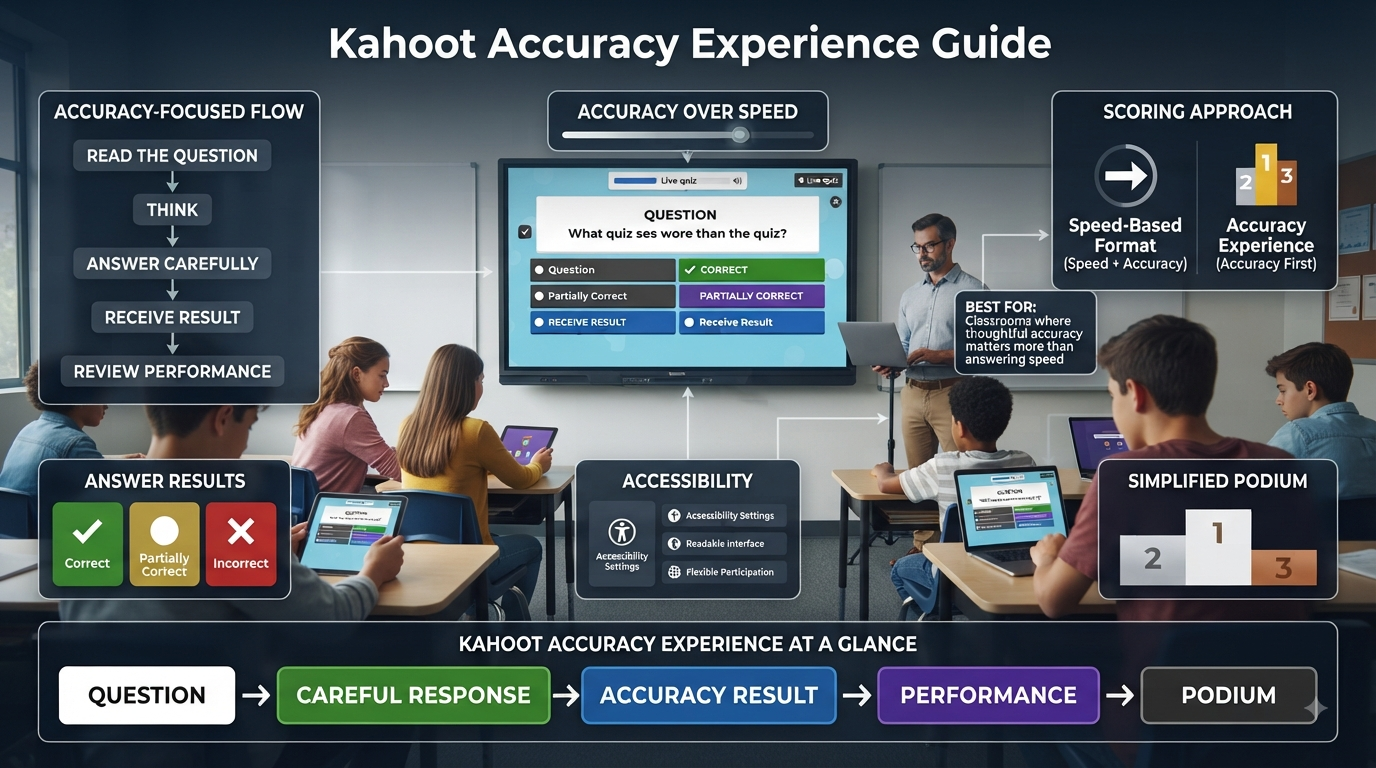
The Kahoot Accuracy experience is a live game format where correctness is the only factor that determines success — how quickly a player responds has no bearing on their result at all. Every participant works within the same time window, and what matters at the end of a question is simply whether the selected answer was right, not how fast it was submitted.
This single change in the underlying rule reshapes the entire feel of a session. Where a speed-based format rewards quick reflexes as much as content knowledge, the Kahoot Accuracy experience removes that variable completely, positioning itself as a more relaxed, inclusive, and learning-focused alternative for hosts who want the engagement of live gameplay without the pressure of a race.
💡 Pro Tip: Introduce Accuracy experience explicitly as a different kind of game the first time a class encounters it, rather than assuming students will intuit the rule change on their own. Many students arrive at their first Accuracy session already conditioned by faster-paced formats to rush their answers out of habit, even though doing so offers no advantage here.
How Scoring Works in the Kahoot Accuracy Experience
Scoring in the Kahoot Accuracy experience is deliberately simple: each correct answer earns exactly one point, full stop. There’s no sliding scale tied to response time, no bonus for answering within the first few seconds, and no penalty for taking nearly the full time window to decide. A player who answers instantly and a player who answers just before time runs out receive the identical point value for an identical correct answer.
This flat, binary scoring approach is the core mechanical difference separating Accuracy experience from Kahoot’s original format, and it’s the reason the experience exists at all — to strip speed out of the equation entirely and let a session measure understanding on its own terms.
⭐ Expert Insight: Because every correct answer is worth the same single point regardless of timing, final scores in Accuracy experience map far more directly onto actual comprehension than scores from a speed-influenced format do. A host reviewing results afterward can trust that a higher score genuinely reflects more correct answers, not some combination of correct answers and quick reflexes layered together.
Partially Correct and Almost Correct Answers in Accuracy Experience
The Kahoot Accuracy experience extends its correctness-focused philosophy into how it treats answers that aren’t perfectly clean hits. For multi-select questions, where a player is expected to choose more than one correct option, a partially correct selection is still counted as correct under Accuracy experience scoring rather than being marked as a full miss. Similarly, for slider-style questions where an exact numeric answer is expected, a response that lands close to — but not precisely on — the correct value is treated as an almost-correct answer and counted the same way.
This is a meaningfully more forgiving approach than a strict all-or-nothing evaluation would be, and it reflects the same underlying goal driving the rest of the experience: measuring genuine understanding rather than penalizing minor imprecision that doesn’t necessarily indicate a lack of comprehension.
📌 Quick Note: This partial-credit behavior is specific to how Accuracy experience evaluates multi-select and slider questions — it’s a built-in property of the experience itself, not a setting that needs to be separately configured by the host before a session begins.
The Simplified Podium in Accuracy Experience
Where a traditional Kahoot podium celebrates a single highest-scoring winner, the Kahoot Accuracy experience takes a different approach entirely. Its podium is described as simplified, showing how many answers each player got correct rather than displaying a points-based score, and rather than crowning one individual winner, it presents a podium built around the players who achieved the highest number of correct answers.
This shift matters for the overall tone of a session. Because the podium is framed around correct-answer counts instead of a single competitive score, multiple players can appear at the top together if they share the same number of correct answers, softening the sense of a single winner-takes-all outcome that defines the traditional Kahoot podium experience.
✅ Best Practice: For classrooms specifically trying to reduce competitive pressure — SEL-focused sessions, peer-support activities, or groups where a traditional podium tends to discourage struggling students — the simplified, correctness-based podium in Accuracy experience is one of the format’s most directly useful features, not just a side effect of its scoring change.
Unlimited Time: The Built-In Accessibility Option
A standout feature specific to the Kahoot Accuracy experience is an Unlimited Time setting, available as a toggle in the lobby before a session goes live. When enabled, participants can take as long as they genuinely need to answer each question, rather than working within any fixed countdown window at all.
This option is presented specifically as an accessibility feature, and it’s currently only available within Accuracy experience — a natural fit, since a format already built around removing speed as a scoring factor is the logical place to also remove the time pressure of a countdown entirely for participants who need that flexibility.
🔍 Did You Know? Unlimited Time is a lobby-level setting that must be turned on before a Kahoot Accuracy experience session starts — it isn’t something that can be toggled on retroactively once players have already begun answering questions, so it’s worth deciding on this setting during setup rather than mid-session.
Character and Nickname Settings in Accuracy Experience
The Kahoot Accuracy experience gives hosts direct control over whether players are represented by animated characters or by plain nicknames alone on the shared screen. Any host can disable characters specifically within this experience, leaving only nicknames visible during gameplay and on the results screen.
For accounts on Kahoot’s business or higher-education tiers, this isn’t just an optional toggle — characters are disabled by default within Accuracy experience for those account types, reflecting a more formal or workplace-appropriate presentation style suited to professional and institutional use.
⚠ Common Mistake: Assuming a missing character display in Accuracy experience means something is broken, particularly on a business or higher-education account. In most cases this reflects the account tier’s default setting rather than a technical issue, and it can be adjusted from within the experience’s own settings if a different presentation is preferred.
For the latest gaming news, expert reviews, and walkthroughs, readers can also visit IGN, one of the world’s leading gaming websites.
How to Host a Kahoot in Accuracy Experience
Running a live session in the Kahoot Accuracy experience follows a short, familiar sequence, with just one extra decision point compared to other formats:
Log in to your Kahoot account and locate the kahoot you want to host, either from your Library tab or the Discover page.
Open the kahoot’s details page and click the Host live button to begin.
Select Accuracy experience from the carousel of options at the bottom of the host screen.
Review the lobby settings, including whether to enable Unlimited Time and whether to disable characters, before players begin joining.
Click Start to generate the game PIN and let participants join from their own devices.
Click Start again once the group has fully joined, to begin the live round of questions.
Progress through the game as normal, with each correct answer adding a single point regardless of response speed.
Reach the simplified podium at the end, showing players ranked by number of correct answers rather than a traditional points-based score.
✅ Best Practice: Because Unlimited Time and character visibility are both configured from the lobby before a game truly begins, it’s worth building a habit of pausing at the lobby screen specifically to confirm both settings match the intended session, rather than clicking straight through to Start out of routine.
Question Types Supported in Accuracy Experience
The Kahoot Accuracy experience supports the platform’s standard range of question formats, including multiple-choice, multi-select, and slider-style questions, each evaluated using the same correctness-first scoring logic described earlier. Multi-select and slider questions specifically benefit from the experience’s more forgiving partial-credit handling, making Accuracy experience a particularly good fit for question sets that lean on those formats rather than simple single-answer multiple choice alone.
Ideal Use Cases for the Kahoot Accuracy Experience
The Kahoot Accuracy experience tends to produce its best results in situations where speed genuinely shouldn’t be part of the evaluation at all:
Reviewing core concepts before an exam, where the goal is confirming genuine understanding rather than rewarding whoever clicks fastest.
Social-emotional learning contexts, where removing competitive pressure supports peer collaboration and reduces the stress some students associate with fast-paced, ranked gameplay.
Mixed-ability groups, where a speed-based format would consistently favor the same faster-reacting students regardless of actual content mastery.
Sessions including participants who need Unlimited Time, since the accessibility toggle is specific to this experience and directly supports learners who process questions at a different pace than their peers.
Collaborative or introductory sessions, where the goal is building comfort and confidence with new material rather than establishing a competitive ranking.
⭐ Expert Insight: Teachers who’ve shifted review sessions from a speed-based format to Accuracy experience often report a genuinely different classroom atmosphere — quieter, more focused, and structured around thinking through an answer carefully rather than racing to submit one — which is a meaningful signal that the experience is doing exactly what it was designed to do.
Situations Where Accuracy Experience May Not Fit
Accuracy experience’s calm, correctness-first structure isn’t automatically the right choice for every session. Groups looking specifically for high-energy competitive excitement, warm-up activities meant to build fast-paced enthusiasm, or contexts where a traditional single-winner podium fits the occasion’s tone may find Accuracy experience’s deliberately understated pacing and simplified podium less suited to their goals. Other formats in Kahoot’s broader experience library are built specifically around that kind of competitive, high-speed energy, each with its own dedicated mechanics.
Reports From Accuracy Experience Sessions
Like other live formats, a Kahoot Accuracy experience session generates a report once it ends, accessible from the account’s Reports section and labeled with the Accuracy experience game type so it’s never confused with results from a different format. The report includes the same baseline structure familiar from other Kahoot sessions — a summary overview, participant-level detail, and a question-by-question breakdown — giving hosts a way to review exactly which questions the group struggled with, independent of the simplified podium shown at the end of the live game itself.
📌 Quick Note: Because Accuracy experience scoring never factors in response time, the report’s question-by-question accuracy data is an unusually direct reflection of actual content difficulty across the group, without speed effects muddying which questions were genuinely hard versus which were simply answered slowly.
Comparing the Feel of a Session, Not Just the Rules
It’s one thing to describe Accuracy experience’s rules on paper — flat one-point scoring, no timer pressure on results, a simplified podium — and another to understand how those rules actually change what a live session feels like from inside the room. Teachers who’ve run the same review content through both a speed-based format and Accuracy experience consistently describe a noticeably different energy: quieter, more focused, with visibly more students taking a moment to actually think before selecting an answer rather than reaching for the first plausible option out of habit.
This shift isn’t accidental — it’s the direct, intended consequence of removing the reward for speed. When a fast wrong guess and a fast right guess no longer carry different competitive stakes than a slow, careful one, the incentive structure of the entire session changes, and behavior tends to follow. For a host evaluating whether Accuracy experience is worth building into a regular rotation, this behavioral shift is often the most concrete evidence to look for during a first trial session.
⭐ Expert Insight: Watch student body language during a first Accuracy experience session rather than just the final scores. A visible shift toward slower, more deliberate answer selection — fewer instant taps, more pauses — is a strong sign the format is doing exactly what it’s designed to do, even before the results screen confirms it numerically.
Using Accuracy Experience for Formative Assessment
Because Accuracy experience scoring isolates correctness so cleanly from response speed, it lends itself particularly well to formative assessment — the ongoing, low-stakes checks for understanding that inform how a lesson should adapt in real time, rather than final graded evaluations. A host running a quick Accuracy experience check partway through a lesson can trust that a low score on a specific question reflects a genuine gap in understanding across the group, not simply a question that happened to have a shorter or more confusing time window than others.
This reliability matters in practice. A teacher deciding whether to reteach a concept, move on, or slow down for the remainder of a class period is making that decision based on what the data actually shows, and Accuracy experience’s speed-neutral scoring removes one of the more common sources of noise in that decision — the possibility that a concept looks weaker than it actually is purely because the associated question was timed too tightly for a fair read on understanding.
📌 Quick Note: Because Accuracy experience separates understanding from response speed so cleanly, it’s worth specifically comparing its question-by-question report data against a similar session run in a speed-based format on related content, when both are available — the contrast often reveals which of a group’s earlier “weak” results were genuinely about content gaps versus simply about pacing pressure.
Accuracy Experience in Professional and Training Settings
While much of Accuracy experience’s framing centers on classroom use, its correctness-first, lower-pressure structure translates directly into professional training and workplace contexts as well. A compliance review, an onboarding knowledge check, or a post-training comprehension quiz all benefit from the same core advantage that makes the experience useful in a classroom — an accurate read on what participants actually understood, without a handful of quick-reflexed employees skewing results at the expense of colleagues who answered just as correctly but a little more deliberately.
The simplified, correctness-based podium also tends to suit workplace settings better than a traditional competitive one might, particularly in contexts where a single visible “winner” among colleagues could feel awkward or create unwanted social dynamics in a professional environment. Framing results around correct-answer counts rather than a single competitive score keeps the tone appropriately measured for that kind of setting.
✅ Best Practice: For training and professional contexts specifically, consider pairing Accuracy experience with the Unlimited Time setting even when it isn’t strictly needed for accessibility reasons — removing time pressure entirely tends to produce more thoughtful, honest responses in a workplace knowledge check than a countdown timer would, even a generous one.
Common Questions Hosts Have Before Their First Accuracy Experience Session
New hosts approaching Accuracy experience for the first time tend to circle around a similar set of practical concerns before actually running a session. Will removing the timer make the game feel slow or boring compared to a faster-paced format? In practice, the countdown window is still present by default — Accuracy experience removes the speed component from scoring, not the sense of forward momentum through the question set, unless Unlimited Time has been specifically enabled. Will students who are used to competitive Kahoot sessions push back against the change in tone? Most reports from experienced hosts suggest the opposite happens after an initial adjustment period — students who found competitive formats stressful tend to respond positively once they understand the rules have genuinely changed in their favor.
Another common concern involves grading or scoring integration — whether a one-point-per-question system translates cleanly into a gradebook. Because Accuracy experience’s scoring is a simple, direct count of correct answers, it maps onto standard grading structures more transparently than a speed-adjusted score would, making it a reasonable option for hosts who want live gameplay data that doubles as usable formative or summative assessment input.
Common Mistakes When Hosting Accuracy Experience
Not explaining the rule change to returning Kahoot users. Students already familiar with a speed-based format sometimes rush through Accuracy experience out of habit, not realizing there’s no benefit to answering quickly under this particular scoring system.
Forgetting to enable Unlimited Time when it’s genuinely needed. Because this setting must be turned on in the lobby before a session starts, overlooking it means participants who need extra processing time are still working within a fixed countdown despite hosting in the accessibility-friendly experience.
Assuming characters are missing due to a bug on business or higher-education accounts. This is typically the account tier’s default setting for Accuracy experience specifically, not a technical error, and it can be changed if a different presentation is preferred.
Using Accuracy experience when the actual goal is high-energy competition. The format’s calm, simplified structure works against — rather than for — sessions specifically designed to build fast-paced excitement.
Frequently Asked Questions
How is scoring different in Kahoot Accuracy experience compared to a speed-based format?
Accuracy experience awards exactly one point per correct answer, with response time playing no role at all in the score. A player who answers instantly and one who answers just before time expires receive identical credit for an identical correct answer, making the format’s scoring a much more direct reflection of actual understanding rather than reaction speed.
Does Accuracy experience give credit for partially correct answers?
Yes. On multi-select questions, a partially correct selection still counts as correct under Accuracy experience scoring rather than being marked entirely wrong. Slider questions follow similar logic, where an answer that lands close to the exact correct value is treated as almost correct and counted the same way, reflecting the format’s more forgiving evaluation approach.
What does the podium look like in Accuracy experience?
Rather than a traditional single-winner podium based on points, Accuracy experience shows a simplified version ranking players by how many answers they got correct. Multiple players can share the top spot if they have matching correct-answer counts, which softens the competitive framing compared to a standard Kahoot podium screen.
Can participants get unlimited time to answer in Accuracy experience?
Yes, through a specific Unlimited Time accessibility toggle available in the lobby settings before a session begins. Once enabled, participants can take as long as needed to answer each question. This setting is currently exclusive to Accuracy experience and must be turned on before the game starts, not adjusted mid-session.
Why don’t I see player characters during my Accuracy experience session?
Characters can be manually disabled by any host within Accuracy experience settings, leaving only nicknames visible. For business and higher-education account types specifically, characters are disabled by default in this experience, which is typically the reason they’re missing rather than a technical issue.
Professional Recommendations & Expert Reviews
Kahoot Accuracy Experience focuses on how correctly answering questions influences the overall learning experience.
Kahoot Accuracy Experience encourages students to prioritize understanding instead of selecting answers randomly.
Kahoot Accuracy Experience helps teachers recognize whether students are accurately understanding the material.
Kahoot Accuracy Experience makes correct responses an important part of meaningful classroom participation.
Kahoot Accuracy Experience encourages learners to read questions carefully before responding.
Kahoot Accuracy Experience helps students connect classroom knowledge with their answers.
Kahoot Accuracy Experience can reveal areas where students have misunderstood an important concept.
Kahoot Accuracy Experience gives teachers an opportunity to identify common mistakes during review.
Kahoot Accuracy Experience supports learning when incorrect responses become opportunities for explanation.
Kahoot Accuracy Experience encourages students to think carefully rather than relying entirely on speed.
Kahoot Accuracy Experience helps create a stronger connection between interactive activities and academic understanding.
Kahoot Accuracy Experience can make teachers more aware of concepts that require additional instruction.
Kahoot Accuracy Experience encourages learners to reflect on why an answer was correct or incorrect.
Kahoot Accuracy Experience supports stronger retention when students review mistakes after an activity.
Kahoot Accuracy Experience helps students develop more careful response habits.
Kahoot Accuracy Experience encourages teachers to write questions with clear wording and reliable answers.
Kahoot Accuracy Experience becomes more valuable when every question has a clear connection to the lesson objective.
Kahoot Accuracy Experience can help distinguish between genuine understanding and lucky guesses.
Kahoot Accuracy Experience encourages students to use knowledge rather than simply follow other participants.
Kahoot Accuracy Experience supports thoughtful participation during competitive classroom activities.
Kahoot Accuracy Experience helps teachers identify topics where several students make similar errors.
Kahoot Accuracy Experience can guide follow-up explanations after the activity.
Kahoot Accuracy Experience encourages students to treat mistakes as useful information about their learning.
Kahoot Accuracy Experience helps learners become more aware of their own strengths and weaknesses.
Kahoot Accuracy Experience supports gradual improvement through repeated practice.
Kahoot Accuracy Experience encourages teachers to balance easier questions with questions that require deeper understanding.
Kahoot Accuracy Experience can strengthen confidence when students see their accuracy improve over time.
Kahoot Accuracy Experience helps educators determine whether additional revision is needed before moving forward.
Kahoot Accuracy Experience encourages students to slow down when a question requires careful interpretation.
Kahoot Accuracy Experience supports better academic habits by rewarding knowledge and attention.
Kahoot Accuracy Experience can make formative assessment more informative for teachers.
Kahoot Accuracy Experience helps educators recognize misconceptions that may otherwise remain unnoticed.
Kahoot Accuracy Experience encourages post-activity discussion around difficult questions.
Kahoot Accuracy Experience supports deeper learning when students explain their reasoning.
Kahoot Accuracy Experience helps teachers adjust future lessons according to observed performance.
Kahoot Accuracy Experience encourages students to focus on learning rather than treating the leaderboard as the only goal.
Kahoot Accuracy Experience can improve participation when students feel that mistakes are part of the learning process.
Kahoot Accuracy Experience supports a classroom culture where careful thinking is valued.
Kahoot Accuracy Experience encourages educators to avoid poorly worded questions that create unnecessary confusion.
Kahoot Accuracy Experience helps ensure that incorrect answers provide meaningful feedback rather than simply reducing scores.
Kahoot Accuracy Experience can support vocabulary, mathematics, science, history, and other academic subjects.
Kahoot Accuracy Experience encourages teachers to use relevant questions that accurately represent what students have been taught.
Kahoot Accuracy Experience helps students practice retrieving information under realistic classroom conditions.
Kahoot Accuracy Experience supports better preparation when students review recurring mistakes between activities.
Kahoot Accuracy Experience encourages learners to recognize patterns in their incorrect responses.
Kahoot Accuracy Experience can help teachers identify whether students need reteaching, additional practice, or greater challenge.
Kahoot Accuracy Experience supports continuous improvement by turning response data into useful learning information.
Kahoot Accuracy Experience encourages students to combine subject knowledge with careful reading and thoughtful decision-making.
Kahoot Accuracy Experience demonstrates that accurate responses are most valuable when they reflect genuine understanding rather than guessing or memorization alone.
Kahoot Accuracy Experience shows that accuracy can strengthen the educational value of interactive quizzes when teachers use mistakes, patterns, and results to guide future instruction.
Summary
The Kahoot Accuracy experience takes Kahoot’s familiar live-game format and strips away the one variable — response speed — that shapes results the most in a traditional session. One point per correct answer, forgiving treatment of partially correct and almost-correct responses, a simplified correctness-based podium, and a built-in Unlimited Time accessibility option combine to make this experience genuinely suited to inclusive, learning-focused sessions rather than competitive, fast-paced ones. For any host whose goal is measuring what students actually know rather than how quickly they can click, Accuracy experience is built specifically to deliver exactly that.