Gimkit Sign Up: How to Create an Account in 2026
Create a Gimkit account using the official registration service, understand the difference between Educator and Student roles, and determine when a new account is actually required.
This independent guide explains the documented Google and email signup methods, first-time account decisions, school-managed Google restrictions, optional student registration, free account creation and essential identity considerations. It also includes an advanced anonymous enrollment-planning application.
GimkitApp.com is independent of Gimkit. We do not create official accounts or collect signup credentials.
How do you sign up for Gimkit?
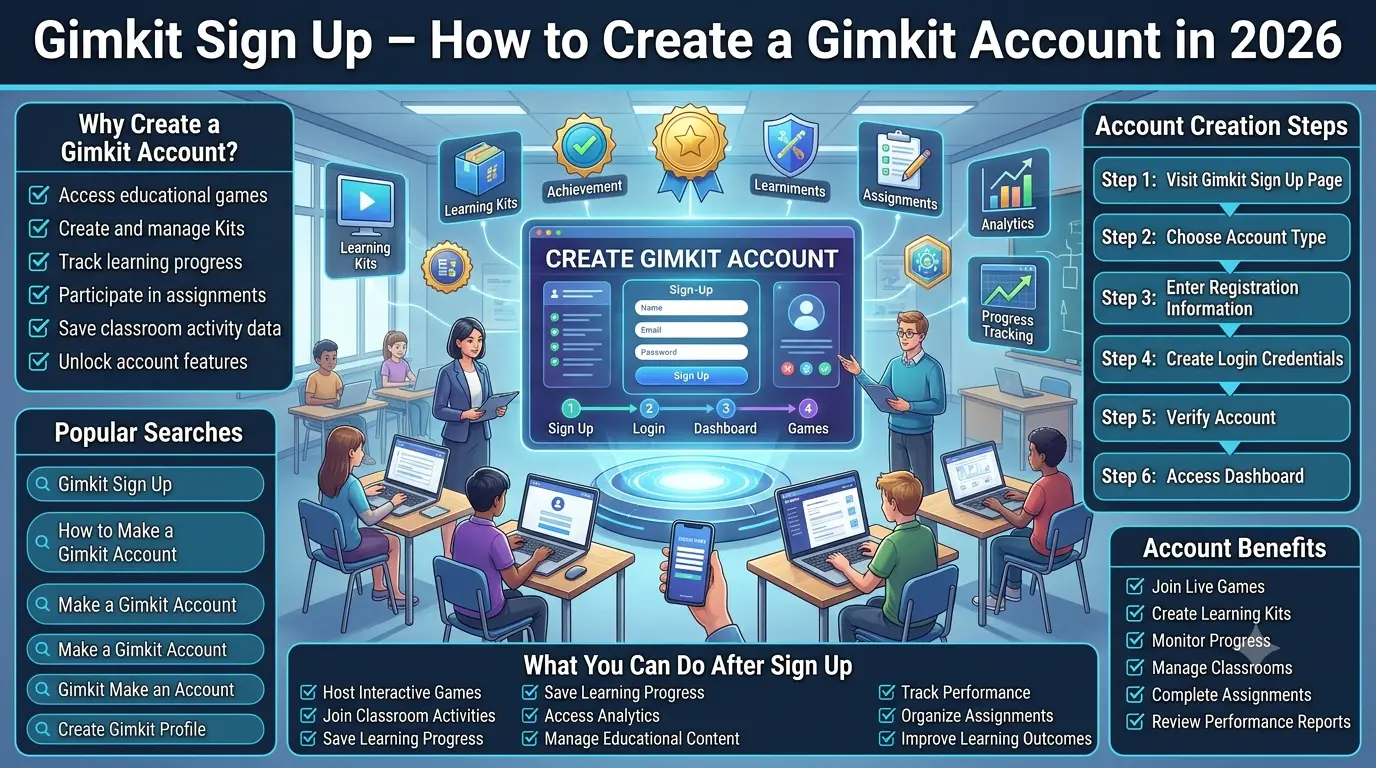
To create a Gimkit account, visit the official registration page at www.gimkit.com/signup, choose Google or email, select Educator or Student, and complete the account setup instructions displayed by Gimkit. Creating the account is free. The exact screens and requests for information are controlled by the official service, so users should follow the current interface rather than an unofficial form that attempts to collect their credentials.
The decision to create an account should begin with its purpose. Gimkit's official documentation states that educators need accounts to create Kits and host games. Student accounts, however, are optional for ordinary live-game and assignment participation. Students need accounts when they want to use certain persistent features, including Classes and account-based XP and cosmetic activity. These differences make registration a purpose-dependent action rather than a universal requirement for everyone who uses Gimkit.
A Gimkit signup guide should distinguish first-time registration from several neighbouring activities. Opening a new account is not the same as entering an existing account, joining a live session, solving a forgotten-password problem, purchasing a Pro subscription or configuring a teacher's classroom. These tasks can occur at different moments in a user's overall experience, but they do not share the same primary objective. This page focuses specifically on establishing a new account identity and understanding when that identity is needed.
An educator who has never registered and intends to build instructional content has a clear account requirement. A learner who has received an invitation to an ordinary live activity may not need to register at all. Another learner who intends to become part of a persistent Gimkit Class has a different need. A school using Google Workspace for Education may also have organisation-level application-access requirements that affect some managed student identities. Registration advice becomes more reliable when these situations are separated instead of presented as one universal procedure.
The official Gimkit Account FAQ also distinguishes free account creation from paid access. A free Gimkit Basic account can continue without the user purchasing Gimkit Pro. New Educator accounts are described as starting with a fourteen-day Pro trial before continuing on Basic if no paid plan is selected. This information may help first-time educators understand the onboarding experience, but it does not make subscription selection part of creating a basic account.
Why the exact official signup destination matters
A first-time account process involves identity information. Users may choose a Google account or provide information through an email-based registration flow. That information belongs on the official Gimkit website, not inside a third-party educational article. The documented registration destination is https://www.gimkit.com/signup. A similarly named website should not be assumed to have permission to collect account credentials merely because its design resembles the platform.
The distinction between an official registration service and an independent reference is especially important in educational environments. Teachers may share an instructional guide with learners, and families may encounter tutorials through search results. A responsible guide can explain the choices and direct readers to the verified source. It should not display a fake registration form that accepts passwords, promise to create an account remotely or imply that an external tool can verify the user's identity against Gimkit.
Why account creation and game participation are separate concepts
A hosted game is an activity, while an account is a persistent identity within a service. The two may interact, but one does not automatically imply the other. Gimkit's official guidance explicitly permits students to participate in ordinary live games and assignments without signing into an account. This means that a teacher-hosted event should not automatically trigger instructions for every student to register.
The difference becomes meaningful when persistent features enter the picture. Classes and account-linked XP and cosmetic activity require a Student account under the official FAQ. These reasons are separate from joining a one-time activity. The registration decision should therefore identify the feature the learner wants, rather than use broad labels such as “regular player” to assume the account is compulsory.
How to interpret a new account correctly
A new account is established only when the official service completes its registration process. Clicking a link on an informational article does not create an identity. Selecting an account type in a hypothetical simulator does not create one either. A genuine registration is confirmed by the authenticated state and instructions supplied by Gimkit itself.
This page's Enrollment Matrix is a planning application. It evaluates anonymous stated needs, compares account-requirement categories and flags potential school-managed Google policy conditions. It cannot connect to a real user profile, validate a password or confirm that the person represented in a scenario has successfully registered.
Step-by-step Gimkit account creation
Step 1: Open the official Gimkit signup page
Begin at the official registration destination, gimkit.com/signup. This is the route specified in Gimkit's current account-creation Help article. Do not substitute a third-party website merely because it appears in a search result with similar branding. The official site controls the account process and determines which prompts are presented.
Before entering information, consider whether this is genuinely a new-registration task. Someone who already has an account should not automatically create another just because they cannot remember an earlier login method. A learner whose only goal is ordinary participation may not require an account in the first place. Establishing the correct purpose avoids creating unnecessary identities and prevents a signup guide from becoming a misleading universal entry requirement.
The official address is more important than a screenshot of its layout. Product interfaces can change over time, and different users may encounter slightly different screens depending on account method, browser or organisational context. Following the actual instructions on the legitimate service is more dependable than expecting every visual element to appear exactly as depicted in an older guide.
Step 2: Select Google or email
Gimkit documents continuing with Google or email to create a new account. These methods identify how the initial account-creation process is carried out. The appropriate choice depends on the identity the user intends to maintain and, in a managed educational environment, the method the institution permits.
Google registration can be convenient for users who already hold a suitable Google identity. However, a school-administered Google account may be governed by organisation-level restrictions. Being able to sign in to Google does not automatically prove that the same account has permission to authenticate with every third-party educational service. A school-managed user should consider that possibility before interpreting a blocked application as a password problem.
Email registration is another documented method. The official service determines the required fields and any associated messages. An independent guide should not invent a mandatory verification screen, universal password rule or guaranteed processing time. The correct approach is to read the real prompts and complete them only within the official platform.
Step 3: Choose Educator or Student
Gimkit officially describes two account types: Educator and Student. The choice should correspond to the user's actual role and intended use. An educator planning to create Kits or host games needs an Educator account. A learner creating an identity for persistent student features should use the Student option.
These account types should not be expanded into unofficial categories such as Premium Student, School Superuser, Public Guest Account or Classroom Administrator unless Gimkit explicitly documents such roles as standard signup choices. A person may have administrative responsibilities in their organisation, but those responsibilities do not automatically create another official Gimkit account type.
Role selection is different from choosing a paid plan. Educator describes the identity's role, while Basic and Pro concern access conditions for relevant educator features. A free Educator account remains an Educator account. A Student account does not become an Educator account simply because someone wishes to view an educator-oriented interface.
Step 4: Complete the information requested by Gimkit
After selecting the method and account type, complete the registration prompts displayed by Gimkit. The official documentation describes proceeding through the account setup and receiving an introductory tour. It does not justify claiming that every signup uses an identical set of fields or the same number of steps.
Users should provide real personal information only where it is requested by the authorised service and appropriate under their circumstances. This independent page does not need a user's name, email address, password, school identifier or date of birth to explain account requirements. The Enrollment Matrix deliberately collects none of those fields.
In a school context, it may also be appropriate to confirm institution-level permission before completing the process. A successful technical registration does not independently establish that every school policy has been satisfied. Responsibility for institutional approval remains with the relevant school, district or authorised administrator.
Step 5: Recognise successful onboarding
Gimkit's official account guidance describes a brief introduction and access to the capabilities associated with the newly created account. The authenticated platform itself is the source of confirmation. A separate article or browser-based planner cannot determine whether Gimkit accepted the registration.
The practical meaning of successful signup is that an identity has been established through the official service. The later tasks associated with that identity are separate workflows. Educators may subsequently create educational resources or run activities, while students may use supported persistent features. This article does not reproduce the detailed procedures of those later tasks.
An onboarding tour may help the user understand the account, but it is not a guarantee that all possible features are available under every plan or role. The actual account state and product documentation determine which actions can be performed.
Step 6: Understand the free account and educator trial distinction
Creating and maintaining a Gimkit account is free. Gimkit Basic provides an ongoing free tier, while Pro offers additional educator entitlements. According to the official Account FAQ, new Educator accounts begin with a fourteen-day trial of Gimkit Pro and continue on Basic when the trial ends unless a paid subscription is selected.
This trial is a relevant onboarding detail, but the signup process should not be presented as requiring a paid purchase. The existence of an optional subscription does not change the statement that basic account creation is free. It is also important not to describe the initial trial experience as proof that every feature will remain available indefinitely on Basic.
The full comparison of plan pricing, feature restrictions and subscription decisions belongs to the separate pricing-related pages. For registration purposes, the essential fact is simple: creating the identity and choosing an optional subscription are different decisions.
Educator and Student: the official account types
Both roles can have an account, but account necessity depends on the person's actual purpose.
Educator account
Appropriate for educators who intend to create Kits and host activities. An Educator account can remain on the free Basic offering.
Student account
Relevant for persistent student features, including Classes and account-based XP or cosmetic activity.
No Student account
A legitimate condition for ordinary supported game and assignment participation, not a third signup role.
Educator accounts: an identity for authoring and hosting
The official Gimkit account documentation identifies creation of Kits and hosting games as activities requiring an account. This makes an Educator identity a real prerequisite for the teacher's core authoring and hosting responsibilities. Someone beginning with those goals should select the appropriate registration route instead of relying on student guest participation or attempting to use a learner-oriented role.
Account necessity should not be confused with paid access. An educator can create an account without purchasing Gimkit Pro. The free Basic tier remains available, while a Pro trial or subscription may affect the features encountered during later use. Those entitlement details are independent of whether a new educator needs a registered identity.
Institutional circumstances can still matter. A teacher may be expected to use a managed work identity, and the school may have policies about approved educational services. A third-party guide cannot decide those policies. Its appropriate role is to distinguish the documented Gimkit account requirement from the separate identity-management requirements imposed by an organisation.
Student accounts: a purpose-dependent decision
The official Account FAQ is clear that students do not need accounts simply to participate in ordinary live games or assignments. A general message instructing every learner to register before every activity would therefore exaggerate the platform's requirements. Teachers and families can make more informed choices when they identify whether the intended feature actually depends on a persistent student identity.
Students need accounts for Gimkit Classes and account-based XP and cosmetic activity according to the FAQ. These uses depend on a continuing account relationship and are materially different from entering a one-time live game. A learner may reasonably choose to register for those features while another learner participating in an ordinary event may not need to do so.
The signup page should not promise unverified universal student analytics, saved performance histories or academic reporting capabilities merely because an account exists. Such claims would need feature-specific documentation. Registration establishes the identity; it does not prove that every possible data feature is available to every student.
Why no-account participation is not another account type
A learner participating without a registered account is not selecting a hidden third registration role. They are simply using a supported activity pathway that does not require student authentication. This distinction matters because descriptions such as “guest account” can imply that the person has a persistent profile managed by the platform.
The Enrollment Matrix therefore has a result category for situations where a new account is not required for the declared purpose. That category is an outcome of the requirement analysis, not a simulated official role. It also does not mean that a person has been admitted into an actual game. Student joining procedures remain the responsibility of the separate join resource.
When a role-purpose mismatch requires clarification
A scenario describing a Student who wants to create Kits and host educator activities contains a role mismatch. The correct response is not to declare that all students need Educator accounts or to count the user automatically as a verified teacher. The intention and actual eligibility should first be clarified using official account guidance.
Likewise, an Educator account may be used for legitimate educator tasks, but its role should not be treated as an all-purpose replacement for student identity. The Enrollment Matrix identifies incompatible declared combinations as needing clarification instead of forcing them into the new-account-required or unnecessary-account totals.
This conservative handling makes the matrix more reliable than a tool that always produces a green decision regardless of the input. The application does not authenticate an individual's role, but it can recognise when the supplied categories do not support a straightforward recommendation.
Gimkit sign up with Google or email
Google registration and the identity-provider relationship
Continuing with Google means the registration process uses a Google identity through the authentication flow provided by the official service. The choice may be appropriate for users who already rely on a permitted Google account. However, not every Google identity has the same management conditions. Some are personal accounts while others are administered by schools or organisations.
This distinction affects what can reasonably be inferred when the registration process cannot proceed. An account that works with Google services may still be restricted from authorising a third-party application under organisation-level controls. The user should not automatically assume that a failed authorisation indicates an incorrect password or a problem with the Gimkit signup page.
The registration guide needs to describe the identity choice without requesting Google credentials itself. The official Google and Gimkit interfaces handle real authentication. The local Enrollment Matrix uses broad categories such as personal Google and school-managed student Google to highlight policy considerations while avoiding any actual identity data.
Email registration as a documented alternative
Gimkit also documents creating an account using email. This gives users an official pathway that does not require them to select Google as the initial method. The email route should be followed directly on Gimkit, including any prompts the service displays. A third-party guide should not invent a mandatory verification timer, special password length or guaranteed sequence of screens.
The selected address should be appropriate for the intended account and accessible to its legitimate owner. In an institutional context, an educator may also need to consider whether the school expects registration through a particular address. These are practical first-time identity decisions rather than detailed procedures for recovering access to an account later.
Email registration should not be represented as a guaranteed bypass for school data policies. A school may regulate the use of educational services independently of the specific authentication method. The mere availability of an email field does not authorise a learner to disregard those policies.
Choosing between a personal and institution-managed identity
A personal account is managed under the user's own identity arrangements, while a school-managed identity is subject to the rules of its institution. The distinction can matter when an educator changes schools, when a district controls access to third-party applications or when student accounts are required for a persistent classroom relationship.
There is no sound universal rule that every person should register with a personal address or that every educator must use an institutional Google account. The right choice depends on the user's circumstances and the policies that apply. An independent guide should encourage users to confirm the approved method when the decision affects school-managed information.
The Enrollment Matrix records whether the proposed registration method is Google or email, and whether the Google identity fits the specific school-managed condition documented by Gimkit. It does not check the real address or authorise one identity over another.
Why a method choice should not become a login troubleshooting guide
Signup method selection concerns establishing a new identity. Existing-account access problems concern an identity that is already registered. The two questions may involve similar words—Google, email and password—but their workflows are different. A page about first-time registration should not reproduce detailed password recovery or login-error procedures simply because users encounter both topics during their broader experience.
This guide therefore stops at method selection and the need to follow official prompts. Its policy discussion is limited to deciding whether a managed Google route is appropriate at signup. Specific existing-account recovery steps remain outside the page's ownership.
Gimkit registration and Google Workspace for Education
What the official Trusted application guidance actually covers
Gimkit's Help Center documents a Google Workspace for Education policy change affecting school-administered Google accounts for students under eighteen who use Google Single Sign-On with Gimkit. Under that specific condition, a Google Workspace administrator may need to mark Gimkit as Trusted to permit the relevant authentication. The guidance concerns organisational application-access settings rather than a general ban on students signing up.
This is an important distinction because overly broad explanations can mislead both educators and learners. Not every Google user is subject to the same school-managed policy. A teacher using a personally managed account, a learner using an approved alternative and a student without an account may have different circumstances. The official article identifies the affected combination rather than asserting one universal registration restriction.
The requirement also should not be confused with a feature of the Gimkit account role. Trusted status is configured in the organisation's Google Workspace administration environment. It is not a new account type inside Gimkit, a preference a student can simply toggle, or a value an independent website can verify through an ordinary HTML form.
Who can confirm an institution's Trusted status?
The appropriate authority is the school's or district's authorised Google Workspace administrator. Gimkit's official guidance directs affected users to their administrators when they need to know whether the application has been designated Trusted. The setting belongs to organisational controls, and its actual value cannot be inferred from whether a user likes or frequently uses the service.
An educator preparing a new account plan may know that a group of learners uses school-managed Google identities but not whether Gimkit has already been approved. In that situation, the accurate status is unconfirmed. It would be misleading to mark every such learner approved or blocked solely because the identity is school-managed.
The Enrollment Matrix therefore separates the presence of the managed-under-eighteen condition from the declared Trusted status. A user may indicate that the administrator has confirmed approval, that the application is restricted or that the status is unknown. The result is explicitly based on that declaration and never presented as a Google Workspace API check.
Why school policy is different from a password error
An organisational access restriction may prevent a third-party application from being authorised even when the user knows the correct credentials. In such a case, repeatedly attempting the same login or changing a password is not equivalent to obtaining approval. The relevant decision may rest with the school administrator.
This does not mean every registration problem involving Google is caused by the Trusted setting. Account configuration, organisational rules and other conditions can differ. The specific policy issue should be considered only when the described identity fits the affected scenario. Avoiding exaggerated explanations is especially important when assisting students who cannot control their organisation's account settings.
The local matrix does not diagnose Google authentication errors. It identifies when a new-registration scenario warrants an institutional policy check. This is narrower, more defensible and distinct from the account Login page's specialist troubleshooting workflow.
Why an email choice does not remove institutional responsibilities
A learner who cannot use an institution-managed Google account may see email registration offered by Gimkit. The availability of that method does not automatically establish that a different account is allowed under the school's educational technology policies. A school may have expectations about student data, approved services or account use that apply regardless of the technical authentication path.
The responsible interpretation is to confirm the institution's position when approval is relevant. The matrix does not recommend switching identity methods simply to get around an organisational restriction. It distinguishes the technical Google Workspace condition from the broader question of authorised educational use.
This principle also helps avoid unnecessary registration. If the student only needs ordinary participation in a live activity, Gimkit's official guidance says a personal Student account may not be required at all. An educator can evaluate the intended activity without treating every managed identity concern as a demand for another new account.
Do not turn the under-eighteen condition into an invented universal age rule
The under-eighteen reference in Google's managed application policy describes a particular authentication setting. It should not be rewritten as proof that Gimkit universally prohibits users under eighteen or that an independent guide can determine legal eligibility from a simple age question. Those would be different claims requiring their own applicable terms and policies.
The Enrollment Matrix does not collect exact ages or dates of birth. It includes one broad managed-under-eighteen scenario because that corresponds to the condition described in the official Google Workspace guidance. The application does not decide consent requirements, certify eligibility or substitute for decisions made by guardians, schools or service providers.
How the policy condition changes a registration plan
A registration plan can contain two independent questions. First, does the intended Gimkit feature require a registered account? Second, is the proposed identity method appropriate and authorised for the person represented? A student using Classes may need an account while still requiring a Google Workspace Trusted confirmation before using a managed identity.
Conversely, a student participating without registration in an ordinary live game does not automatically need to resolve every account-creation policy in order to participate through an officially supported unauthenticated route. The activity and the institution's rules still matter, but account necessity remains a separate dimension.
The matrix preserves both conclusions. It calculates account requirements from role and purpose, then attaches relevant policy cautions. It does not silently convert policy uncertainty into a different kind of Gimkit account.
When you do not need to make a Gimkit account
Ordinary live-game participation
A learner invited to an ordinary live Gimkit game is not automatically required to create a Student account. The official Account FAQ distinguishes participating in an activity from using persistent account features. That distinction is especially useful for classroom sessions in which the teacher manages the hosted game and the students only need the supported participation route.
This article does not explain how to enter a game code, use a QR invitation or recognise a game lobby. Those steps belong to the dedicated joining resource. The relevant signup decision is simply whether account registration is a prerequisite for the intended activity. For ordinary live participation, Gimkit states that students can take part without logging in.
An educator should therefore avoid assuming that every short activity requires a class-wide registration programme. If account-based features are part of the objective, that is a different scenario and should be described explicitly.
Ordinary assignment participation
Gimkit's official Account FAQ also states that students can participate in assignments without accounts. This is relevant because the word assignment may sound like an ongoing record that necessarily belongs to a registered learner, but the official guidance does not establish that requirement for every ordinary assignment.
Some assignments may be connected to separate Class arrangements or other conditions. Those feature-specific details should be checked in the relevant official workflow. The signup page should not rewrite the general rule into a claim that every student completing homework must register.
The matrix includes assignment participation as a separate purpose so a teacher can describe a group whose goal does not necessarily require new Student accounts. It does not open assignments, track completions or reproduce the assignment-sharing workflow.
Reading educational documentation
A person researching Gimkit does not necessarily need an account. Parents, teachers and students may want to understand the service before deciding to create an identity. Reading publicly accessible explanatory material is different from accessing a personalised account feature.
The tool therefore includes a basic information-browsing purpose. That choice does not increase the new-account-required total merely because the person is described as a student or educator. An account requirement follows a particular official feature, not the general fact that someone is interested in the platform.
This prevents the model from recommending unnecessary registration where the proposed activity does not establish a need for it.
Existing account holders
Someone who already has a Gimkit account is outside the narrow question of making a new identity, even if they are temporarily unable to access it. The appropriate response is to recognise that the identity exists and distinguish any later access issue from new registration.
The Enrollment Matrix counts existing-account scenarios separately. It does not treat them as requiring duplicate registrations. Nor does it claim to verify that the stated account exists. It relies on user-supplied scenario information and describes the resulting category.
Detailed identity recovery and credential problems remain separate specialist topics, so this page does not turn its enrollment planner into a password-reset simulator.
Account-linked features that change the decision
Classes and account-based XP and cosmetic activity are reasons for students to maintain registered identities under the official FAQ. These purposes differ from ordinary guest participation. When those features are intended, an account may be genuinely required even if a different one-time activity could be completed without one.
The signup guide needs only this requirement-level distinction. It does not calculate XP, list cosmetic shop inventory, manage Classes or present a new gameplay dashboard. Those subjects have their own ownership in the site's article architecture.
The question to resolve before registration is therefore not whether accounts are universally good or bad. It is whether the exact feature the user intends to access depends on a registered identity.
Gimkit Registration Requirement & Enrollment Matrix
Model anonymous registration scenarios, compare genuine account requirements, identify first-time signup needs and document conditional Google Workspace policy checks. This is a local planning application, not an actual signup service.
Enrollment Requirement Matrix
Purpose → account necessity → proposed method → policy caution
1. Define a signup scenario
| Scenario | People | Registration decision | Identity/policy note | Action |
|---|
Enrollment decision brief
All values are hypothetical or user-declared. No account, identity, school policy or official Gimkit service is inspected.
How the Enrollment Matrix interprets signup scenarios
Role and purpose are separate inputs
The matrix begins with two different facts: the declared role of the group and the purpose for which Gimkit would be used. A role alone does not determine the entire account requirement. A student seeking an ordinary live game has a different need from a student using persistent Classes. An educator intending to create Kits has a documented account requirement, while somebody simply reading public documentation does not automatically need to register.
The application evaluates these conditions independently of the chosen identity method. This prevents a Google signup choice from being mistaken for evidence that a new account is necessary. The account-necessity question comes first, while technical identity and policy cautions come afterward.
Existing accounts do not become duplicate signup requirements
When a scenario is marked as already having an account, the matrix categorises it as an existing-account case instead of adding those people to the new-registration total. The application does not verify that the accounts exist, but it preserves the meaning of the user's declaration.
This distinction is important in group planning. A school may have several educators who already hold accounts and several newcomers who need registration. Counting the existing accounts as new signups would exaggerate the work. The model avoids that arithmetic error without attempting to provide an account inventory or access-recovery service.
Scenario size is anonymous aggregation
The People represented field allows a group with shared conditions to be modelled together. A single scenario may represent one educator or a larger cohort with the same intended feature and account situation. The arithmetic adds those anonymous counts to the relevant category.
The tool never requests actual rosters. The number is not proof that all people in a real cohort share the entered conditions. The user is responsible for ensuring the scenario accurately represents the group being discussed. An anonymous model can clarify aggregate requirements without storing identities in a third-party article.
New-registration and no-registration results follow explicit rules
A new Educator who intends to create Kits or host games is counted as needing an account. A new Student whose purpose is an ordinary live game or assignment is counted as not requiring a new account for that stated goal. A new Student using Classes or account-based XP and cosmetic features is counted as requiring an account, subject to the actual official conditions.
Information browsing does not trigger a registration requirement. Incompatible role-purpose combinations are labelled for clarification. These rules are intentionally limited to the specific account requirements supported by the official documentation used in this guide.
Why the model identifies mismatched purposes
A scenario describing a Student whose primary purpose is educator content creation does not support an automatic Student account recommendation. The purpose implies an educator-oriented workflow, while the declared role identifies a learner. Without clarification, the model cannot legitimately decide which identity the person should establish.
The matrix reports a role-purpose mismatch rather than hiding the inconsistency. That is a better result than pretending a fictional account category exists. The warning is not an official registration error; it is an explanation of why the supplied scenario needs a more coherent definition.
School Google policy is an additional condition
For school-administered Google identities used by students under eighteen, Gimkit's official Google Workspace guidance describes the Trusted application requirement. The matrix attaches a relevant caution when the proposed method is Google and the declared identity fits that condition.
A user can indicate that Trusted status is unknown, reported approved or reported restricted. None of those entries is verified. The matrix therefore uses language such as “reported” and “confirm with the administrator.” It cannot query the school's Google Workspace settings or grant authorisation.
Why the model does not recommend bypassing a restriction
An organisation's application policy is not necessarily limited to one technical signup button. Switching from a managed Google route to another identity method may not resolve the relevant school permissions. The matrix consequently does not tell students to use private email accounts to evade a managed restriction.
When the scenario indicates a managed student identity and uncertain or restricted approval, the result directs attention toward the authorised school contact. The rule describes a policy consideration, not a technical authentication diagnosis. This maintains a careful boundary between registration planning and existing-account troubleshooting.
How the totals are computed
Each scenario has a declared number of people. The matrix assigns the entire count to one of four mutually exclusive outcome groups: new account required, account not required for the stated purpose, account already exists, or clarification required. It does not count one group twice simply because a policy caution also applies.
The policy note remains separate from the arithmetic. A group may need new accounts while its proposed Google method still requires administrative confirmation. This makes the totals easier to interpret because registration necessity and route suitability are not combined into a misleading single approval score.
What the exports mean
Copy and TXT exports produce a readable summary of the scenarios and their conditional decisions. CSV exports preserve the individual rows with their declared values and computed outcomes. These outputs can be useful as anonymous planning records, but they are not official Gimkit account lists or evidence that any registration has occurred.
The export functions operate locally in the browser. The matrix does not upload its data to Gimkit or persist it in a cloud account. If the page is reloaded, the current model returns to its initial sample state. Users who need a record should export it before leaving.
Practical examples of first-time Gimkit account decisions
Case 1: A group of new educators preparing to create resources
A professional development coordinator is introducing Gimkit to eight educators who do not already have accounts. The intended purpose is to create Kits or host educational activities. Under official account guidance, these actions require Educator accounts. The group can therefore be modelled as eight new registrations, provided the declaration that none of the educators already holds an account is accurate.
The coordinator proposes email-based registration using addresses permitted by the organisation. The matrix identifies the account requirement and records the chosen route without validating the addresses. It does not create eight accounts or determine whether the school's email policies are satisfied.
This scenario demonstrates why aggregate signup planning can be useful without collecting names. The coordinator can estimate the number of new identities required while leaving individual authentication entirely to Gimkit's official service.
Case 2: Students participating in a one-time live activity
A teacher describes twenty-four students who will participate in an ordinary live game. The students do not have Gimkit accounts, but the intended feature is ordinary game participation. Gimkit's official Account FAQ says students may participate in such games without registering.
The matrix therefore classifies this scenario as account not required for the stated goal. It does not imply that students can ignore actual game invitations or classroom instructions, nor does it create a participation link. It only resolves the registration prerequisite.
The result prevents the number twenty-four from being incorrectly added to a new-account requirement simply because the group happens to consist of learners using an educational platform.
Case 3: A student cohort using persistent Classes
A school plans to use Gimkit Classes with a group of students who have not registered. Unlike ordinary guest participation, the persistent Class feature involves student accounts according to official guidance. This establishes a reason for new Student identities.
The coordinator can model the group with the Class purpose and Student role. The matrix counts the declared cohort as needing registration while keeping school policy and authentication method conditions distinct.
The tool does not create a Class, invite students or manage acceptance settings. Those actions belong to official Gimkit Class controls. Page 14 answers only the earlier question of whether registered student identities are needed.
Case 4: Managed Google accounts for students under eighteen
A district intends to register students who use school-administered Google identities. The group matches the under-eighteen Google Workspace scenario described in Gimkit's official Trusted application guidance. The school has not confirmed whether Gimkit is marked Trusted.
The matrix can identify both the account requirement associated with the intended persistent feature and the unresolved Google Workspace policy condition. The second result does not remove or create the first. Instead, it explains that the proposed authentication method may require administrative action.
The user is directed toward the authorised school administrator for confirmation. The matrix cannot inspect real admin settings or promise that registration will succeed.
Case 5: An educator who already owns an account
An educator plans to host a new activity but already has a Gimkit account. The person is not a new-registration case simply because a new educational activity is planned. The same general account identity can support subsequent authorised use according to the platform's conditions.
The matrix places this person in the existing-account category. It does not claim to know whether the person is currently signed in, has the necessary permissions or can remember their credentials.
This distinction prevents a planning tool from recommending repeated account creation when the relevant identity is already established.
Case 6: A learner interested in cosmetic progression
A learner wants to use account-linked XP and cosmetic features rather than simply play one temporary game. The official Account FAQ identifies those features as reasons for a Student account. The registration decision therefore differs from the ordinary live-participation example.
The matrix assigns the new Student account requirement if the scenario has no existing account. It does not estimate XP earnings, predict available cosmetics or simulate the official shop. Those subjects belong to separate gameplay and rewards resources.
The example illustrates how a change in intended feature can change the need for registration even when the user role remains Student.
Case 7: A family researching the platform before use
A parent is evaluating Gimkit's suitability for a learner and has not decided whether an account-based feature will be used. Reading public information does not independently establish an account requirement. It would be misleading for an educational guide to demand registration before the family can understand the documented product.
The matrix classifies basic information browsing as not requiring a new account. This does not evaluate the platform's suitability for the learner and does not constitute parental consent or school approval.
It simply separates research from registration and avoids treating an interest in educational technology as equivalent to a request for an authenticated profile.
Case 8: A student selects an educator-only purpose
A hypothetical scenario identifies the group as Students but chooses creation and hosting as its main purpose. That combination requires clarification because official documentation associates authoring and hosting with educator accounts. The matrix does not automatically change the people's roles or declare that students can obtain every educator capability by selecting a different button.
Instead, the row receives a clarification result. The user can revise the intended purpose or identify whether the situation actually concerns authorised educators. This approach avoids hiding logically incompatible inputs behind a confident but unsupported recommendation.
Case 9: A mixed group with several different account needs
A school programme includes educators who need accounts, students who will participate without accounts, and students who already have persistent Class identities. The matrix can store these as separate anonymous rows and calculate the totals for each category.
This is more accurate than entering the entire programme as one group with a single requirement. Different roles and purposes produce different outcomes. The tool makes those distinctions visible and preserves the assumptions behind the calculation.
The resulting brief is an explanatory planning record rather than a roster. It describes requirements under the stated conditions but does not identify real people or verify their account status.
Case 10: The school changes the proposed registration method
An educator initially expects students to register through school-managed Google accounts, then learns that the institution may require a different approved method. The account requirement associated with the intended feature may remain unchanged even though the identity route needs reconsideration.
The matrix allows the proposed method to be changed in a scenario before it is added. The resulting note describes the selected identity context without treating one method as universal. An organisation-level restriction should still be confirmed rather than bypassed.
This case demonstrates that account necessity and technical registration method are related but distinct choices. A useful planning tool keeps both visible.
Common misunderstandings about creating a Gimkit account
Assuming every student must sign up before playing
This assumption conflicts with the official Account FAQ's statement that students can participate in ordinary live games and assignments without accounts. Creating a permanent identity may be appropriate for persistent features, but it should not be presented as a general prerequisite for all participation.
A clearer explanation begins with the intended activity, then asks whether that activity depends on a registered Student identity. This avoids unnecessary signup instructions and prevents a registration page from competing with the actual game-joining guide.
Assuming a paid plan is required to register
Gimkit account creation is free. The availability of Gimkit Pro and an educator trial does not make payment a prerequisite for opening an account. A new educator may encounter trial-related features during onboarding, but the decision to subscribe is a separate matter.
A responsible signup guide therefore avoids subscription advertisements disguised as registration instructions. It explains the free account requirement and leaves detailed pricing decisions to the appropriate specialist content.
Assuming account roles are interchangeable
Educator and Student are distinct official account types. The appropriate choice depends on the genuine role and intended use. A learner seeking ordinary participation does not need to select Educator merely because the educator interface appears to contain more controls.
The Enrollment Matrix highlights role-purpose mismatches rather than turning them into a generic recommendation. Its analysis is conditional and cannot authenticate the person's real role.
Assuming every Google account has identical permissions
Google identities can be personally managed or controlled by institutions. Gimkit's official Google Workspace documentation identifies a specific Trusted application condition affecting certain under-eighteen school-managed student accounts. This should not be generalised to every Google user.
Where a managed account is involved, the relevant administrator may need to confirm application access. A separate website cannot read those settings or provide authoritative approval.
Assuming a registration form on any Gimkit-themed site is official
The documented registration endpoint belongs to gimkit.com. Educational articles may describe the process, but they should not request actual signup passwords or pretend to establish accounts on behalf of the service.
Users should confirm the domain before entering credentials. A third-party simulator can help explain account necessity without becoming an intermediary for identity information.
Assuming a simulator has verified real account eligibility
A browser application that asks the user to select a role and purpose can produce a conditional recommendation. It cannot determine whether a specific person meets every applicable eligibility condition, whether a school has granted approval or whether the official service accepted registration.
The Enrollment Matrix is transparent about this limitation. Its outputs describe the supplied scenario and the documented general account requirements, not a platform-issued account verdict.
Assuming existing-account access requires another signup
A user who already has an account should not automatically make a duplicate because they are temporarily unable to access the original. Registration and account recovery are different tasks, and duplicating identities may complicate later management.
This signup article recognises the distinction but does not reproduce a password recovery wizard. The appropriate official existing-account service remains responsible for authentication and access support.
Assuming an apparently successful signup satisfies every school policy
Technical access and institutional approval are different questions. A platform may permit an identity to be created while a school maintains rules about which services or account methods are appropriate for learners.
An educator working with managed student identities should confirm relevant organisational requirements. The Enrollment Matrix can flag uncertainty, but it cannot make the policy decision on the institution's behalf.
Gimkit Sign Up frequently asked questions
Is Gimkit sign up free?
Yes. Gimkit officially states that opening and maintaining an account is free. Gimkit Basic is an ongoing free offering. Optional Pro access is separate from the creation of a basic account.
What is the official Gimkit registration website?
The official account-creation destination documented by Gimkit is https://www.gimkit.com/signup. The registration process should be completed on the official service, not through an independent educational guide.
How do I make a Gimkit account?
Open the official signup page, continue with Google or email, select Educator or Student and complete the instructions displayed by Gimkit. Actual fields and confirmations are determined by the current official interface.
Can I create a Gimkit account with Google?
Yes. Google is one of the documented signup methods. If the identity is managed by a school, relevant organisational access controls may apply. The official authentication experience should be used.
Can I register using email instead?
Yes. Gimkit documents an email registration method. Follow the current official prompts. This option should not be interpreted as automatic permission to bypass an institution's educational technology policies.
What account types does Gimkit offer?
The official Account FAQ identifies two standard account types: Educator and Student. Other labels sometimes used in unofficial articles should not be treated as additional signup roles without official documentation.
Do teachers need accounts to use Gimkit for creating and hosting?
Yes. Official account guidance says an account is required to create Kits and host games. Educators who intend to perform those activities should use the appropriate official registration route.
Do all students need Gimkit accounts?
No. Students can participate in ordinary live games and assignments without accounts according to the official FAQ. Accounts are needed for some persistent student features, such as Classes and account-based XP or cosmetics.
Do students need an account for Gimkit assignments?
The general official guidance says students can complete ordinary assignments without accounts. Specific Class-connected situations may involve separate requirements. Assignment operations belong to the relevant official documentation.
Do students need accounts to use Classes?
Yes. Gimkit identifies Classes as an account-dependent student feature. The detailed Class invitation and roster processes are separate from first-time registration.
Is an account necessary for XP and cosmetics?
Gimkit's Account FAQ states that students need accounts to earn XP and purchase cosmetics. The details of progression, inventory and purchases are separate features and are not calculated by this signup guide.
Does a Student account work like an Educator account?
No. The two roles are intended for different uses. Educator accounts support authoring and hosting. Student accounts support relevant learner features. The user should select the role appropriate to their actual circumstances.
Do I need to buy Gimkit Pro to create an account?
No. Account creation is free. Gimkit Pro is an optional paid add-on for educator accounts. Creating an account and purchasing a subscription are separate decisions.
Do new Educator accounts receive a Pro trial?
The official Account FAQ describes a fourteen-day Pro trial for new Educator accounts, followed by the free Basic tier if no paid plan is selected. The current official account documentation should be consulted for any changes.
Is a Google Workspace administrator always necessary?
No. The documented Trusted application condition concerns certain school-administered Google student identities, particularly students under eighteen using Google SSO. It should not be applied indiscriminately to every Google account.
What does Trusted mean for managed Google identities?
Trusted refers to an application-access status controlled through Google Workspace for Education administration. The authorised school administrator can confirm whether Gimkit has the relevant setting. This page cannot inspect it.
Can the Enrollment Matrix confirm Trusted status?
No. The matrix uses a status selected by the user. It does not connect to Google Workspace or authenticate an administrator. Its output is a conditional planning note.
Does the under-eighteen Google condition mean Gimkit bans minors?
No such universal conclusion follows from that policy. It concerns a particular Google Workspace for Education application-access situation. Eligibility and consent must be evaluated through the applicable official terms and school policies.
Can email signup automatically bypass school restrictions?
No. A school may regulate the use of educational services independently of the technical sign-in method. The appropriate response is to confirm the institution's approved route rather than assume another method is permitted.
Does clicking a button in the Enrollment Matrix create an account?
No. The matrix is an independent anonymous planning application. Its Add Scenario button creates only a local model row, not a real account on Gimkit.
Does the matrix collect email addresses or passwords?
No. It asks for anonymous group descriptions and scenario categories. Do not enter identifying information into the label field. Real signup credentials belong only on the official service.
What does Account Not Required mean in the matrix?
It means that the selected ordinary participation or information-browsing goal does not establish a new-account requirement under the rules used by the model. It is not confirmation that a user has joined a game or completed an assignment.
Why does the matrix have a Clarification category?
Some role-purpose combinations do not support a direct recommendation. For example, a Student role combined with educator authoring tasks needs clarification. The model avoids inventing an account type or silently changing the declared role.
Can the matrix represent several people at once?
Yes. Each row contains an anonymous group size between one and five hundred. The totals aggregate declared scenarios without requiring a roster or personal identifiers.
Can I export the enrollment analysis?
Yes. The matrix provides a copyable decision brief, TXT export and CSV export. The files contain the local scenario information and computed categories, not actual Gimkit account records.
Will the matrix remember scenarios after I reload the page?
No. The data is kept in the current page session and returns to the sample state when the page reloads. Use an export if you need to keep the anonymous planning information.
What if I already created an account?
If an account already exists, you are outside the first-time registration workflow. The matrix records that scenario separately. It does not provide a password-reset process or confirm the account's authenticated state.
Does successful registration prove school approval?
No. Technical account creation and institutional authorisation are different questions. Where school-managed identities or educational policies apply, the responsible organisation should confirm its requirements.
How is Sign Up different from Login?
Sign Up establishes a new account identity. Login authenticates an existing account. Password recovery and access troubleshooting belong to existing-account workflows rather than new registration.
What should a first-time user remember most?
Use the official Gimkit signup destination, choose the real Educator or Student role, understand whether the intended feature needs an account, and confirm any applicable school-managed identity requirements before supplying personal information.
What happens after first-time registration?
Once a real account exists, maintaining its security becomes a separate responsibility from choosing the signup route. A user may need to understand password hygiene, appropriate device practices and protection of the email identity associated with the account. Those issues should not be mixed into the initial registration procedure as though they were additional signup screens.
For a specialist discussion of maintaining an existing identity, use the site's guide to protecting a Gimkit account. This destination has a different purpose: ongoing account security rather than the requirement to register as an Educator or Student.
Registration is complete only through Gimkit's official service. This independent guide and its Enrollment Matrix are designed to explain the decision that precedes that action, not to operate as an account provider.
Official Gimkit documentation used in this guide
The following sources support the specific account-creation statements made above. They document registration methods, account types, student account necessity, relevant educator trial conditions and the managed Google Workspace application-access policy. They do not authorise this independent article to create real accounts or inspect private identity records.
Create an account only when the purpose requires one.
Gimkit account creation is free. Educators need accounts for creating Kits and hosting, while ordinary student participation does not automatically require registration. Google and email are the documented signup methods, and school-managed identity policies should be checked where they apply.