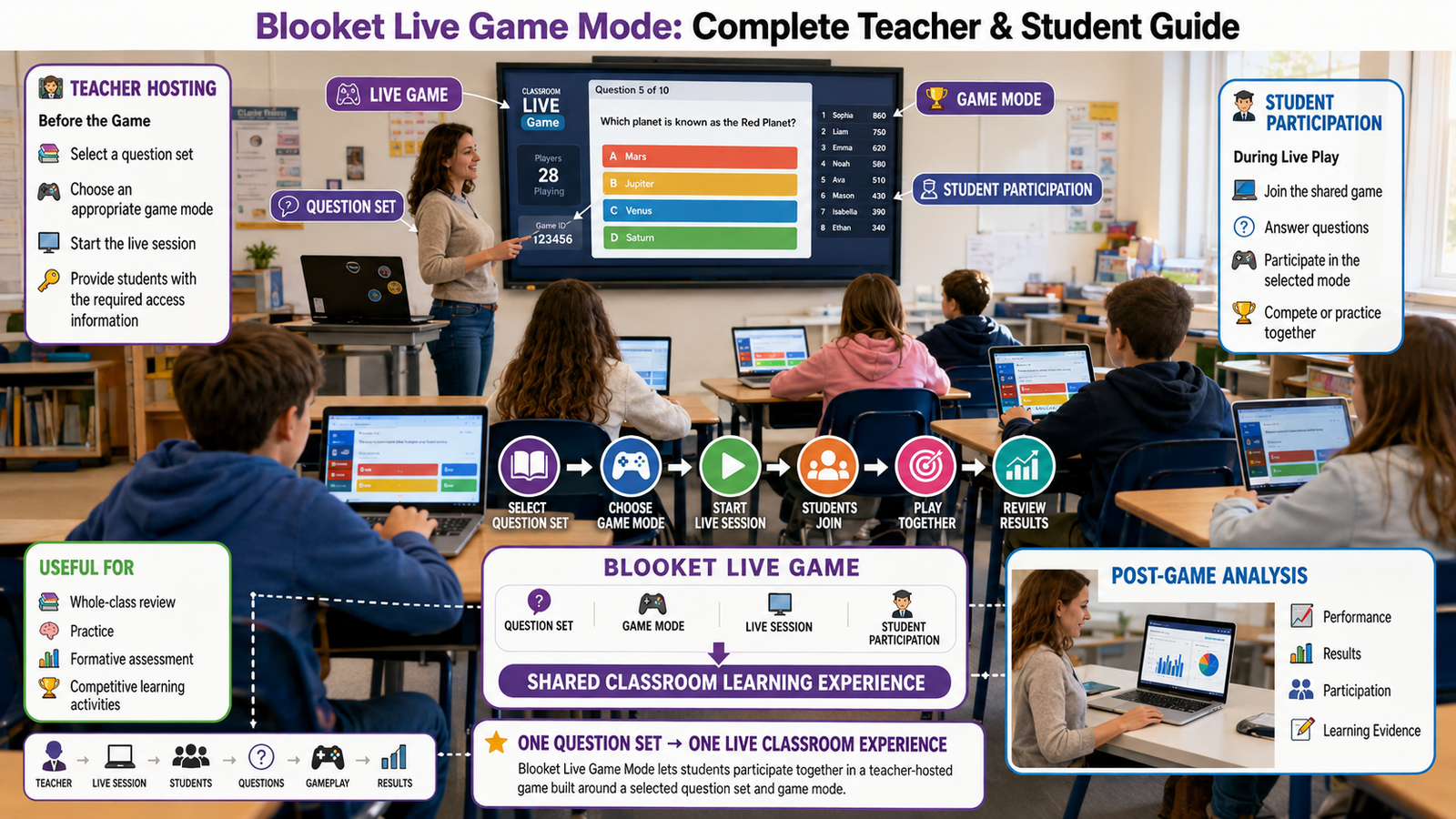
Blooket Live Game Mode lets a teacher host an interactive game that students join and play together during a classroom session. Instead of completing an activity independently, students participate in a shared game session built around a selected question set and game mode. This makes live play particularly useful for whole-class review, practice, formative assessment, and competitive learning activities.
The basic workflow is straightforward: the teacher prepares or selects a question set, chooses an appropriate game mode, starts the live session, and has students join using the provided game access information. Blooket is designed around this combination of question sets, game modes, gameplay, and post-game analysis.
Looking for comprehensive classroom resources and educational technology insights? Explore GimkitApp for expert guides, teaching strategies, game modes, and the latest updates to enhance student engagement.
What Is Blooket Live Game Mode?
Blooket Live Game Mode refers to the teacher-hosted form of Blooket gameplay in which students participate in the same classroom game session rather than completing the activity independently. The teacher controls the session while students answer questions and interact with the selected game experience.
The important distinction is how the activity is delivered, not simply which game mode is selected. Blooket offers multiple game experiences, but a live classroom session connects those experiences to a shared, teacher-led activity.
This makes live play especially suitable when the goal is to get an entire class participating at the same time.
How Live Blooket Gameplay Works
A typical live session follows this sequence:
Question Set → Game Mode → Teacher Hosts → Students Join → Students Answer → Game Progresses → Results/Feedback
The question set supplies the learning content, while the selected game mode determines how students interact with that content. Blooket’s own platform describes the process as getting a question set, choosing a game mode, then playing and analyzing the results.
That separation is useful for teachers because the same academic content can potentially be used with different gameplay experiences depending on the lesson objective.
How to Start a Blooket Live Game
A teacher generally begins by selecting an existing question set from Blooket’s library or preparing a custom set, then selecting an available game mode for the activity. Blooket presents these as the core setup stages before students begin playing.
A practical classroom workflow is:
Choose or create the question set.
Select the game mode that fits the lesson.
Start the live game.
Share the game access information with students.
Have students enter the session.
Wait until the class is ready.
Begin the activity and monitor participation.
Review the resulting performance information after the game.
Pro Tip: Prepare the question set before class rather than spending valuable instructional time creating questions immediately before the live session.
How Students Join a Blooket Live Game
Students join a teacher-hosted Blooket session through Blooket’s game-entry interface. Blooket provides a dedicated game-joining flow where students enter the relevant game information to access a session.
For a classroom, the simplest workflow is for the teacher to display or communicate the required joining information while students use their individual devices to enter the game.
The teacher should give students clear instructions before starting, particularly if the class includes younger learners or students who have not used Blooket before.
What Students Do During a Live Game
Once students have joined, they participate through their own devices while the teacher manages the hosted activity.
The exact gameplay experience depends on the selected game mode. Some modes emphasize competition, others focus more on strategy, resource management, progression, or other forms of interaction. Therefore, Blooket Live Game Mode is not one single gameplay style; it is the live delivery format used with the selected Blooket game experience.
Why Use Blooket Live Games in the Classroom?
Live Blooket sessions are particularly useful when a teacher wants immediate participation from a group rather than assigning an activity for students to complete independently.
Common classroom uses include:
Reviewing material before a test
Practicing recently taught concepts
Running a lesson warm-up
Checking understanding during a lesson
Creating an engaging whole-class review
Adding competition to repetitive practice
Reinforcing vocabulary, facts, or concepts
The strongest use case is usually not simply “making a quiz fun.” The teacher should select the question content and game experience based on the learning objective.
Expert Insight: The game is the engagement layer; the question set is the academic layer. A highly engaging game cannot compensate for poorly designed questions, so teachers should give equal attention to both.
Choosing the Right Game Mode for a Live Session
Blooket provides an expanding collection of game modes, and the available experiences can change as the platform evolves.
For that reason, teachers should choose a mode based on the purpose of the lesson rather than assuming that one mode is automatically best.
Consider:
Classroom Goal
What to Prioritize
Quick review
Simple, fast-paced gameplay
Competitive practice
Strong competition and clear progression
Strategy-focused activity
A mode that rewards planning and decision-making
Vocabulary practice
A mode that allows repeated question exposure
Formative review
A mode that keeps students actively answering
Younger learners
Easy-to-understand mechanics and manageable pacing
The Blooket Game Modes category can provide deeper coverage of individual modes, while this live-game guide focuses on how those modes function within a teacher-hosted classroom session.
Best Practices for Hosting a Blooket Live Game
A successful live session depends as much on classroom preparation as on the platform itself.
Prepare the Questions First
Make sure the question set matches what students have already learned or what you want to assess. Avoid introducing a large amount of unfamiliar material through a fast-paced game unless the activity is deliberately designed for discovery.
Explain the Game Before Starting
Students should understand what they are expected to do before the first question appears. A short explanation can prevent repeated interruptions once gameplay begins.
Test the Setup
Open the game before asking the whole class to join. Check that the selected question set and game mode are correct and that the teacher is ready to begin.
Monitor More Than the Leaderboard
Competition can be useful, but the educational objective should remain central. Watch for students who consistently struggle, rush through questions, or disengage from the activity.
Review the Results
Blooket emphasizes post-game reports and performance feedback as part of its learning workflow. Use that information to identify concepts that may need reteaching or additional practice.
Common Problems During a Live Blooket Game
Live classroom activities can encounter practical problems even when the game itself is configured correctly.
A Student Cannot Join
First check that the student is using the correct game-entry information and that the session is still active. If several students experience the same problem, investigate the classroom network or session setup rather than troubleshooting each device individually.
Students Are Unsure What to Do
This usually indicates that the game rules were not explained clearly enough before starting. Pause briefly, explain the objective, and restart or continue according to the situation.
The Game Becomes Too Competitive
Competition can increase engagement, but it can also distract from learning. If students focus exclusively on winning, remind them that accurate answers and understanding the material are the primary goals.
Students Finish With Different Levels of Understanding
A live game can reveal differences in performance that are easy to miss during ordinary classroom discussion. Use the results as a signal for follow-up instruction rather than treating the final ranking as the complete measure of learning.
Blooket Live Game vs Asynchronous Play
The key difference is the timing and delivery of participation.
Live Game
Asynchronous Activity
Students participate in a teacher-hosted session
Students can complete the activity independently
Well suited to whole-class activities
Useful for homework or flexible practice
Immediate classroom interaction
Greater flexibility around timing
Teacher can manage the session in real time
Students work at their own pace
Strong fit for live review and competition
Strong fit for independent practice
Blooket itself distinguishes between live and asynchronous gameplay, making the distinction important when deciding how an activity should be delivered.
Blooket Live Game Teacher Checklist
Before hosting:
Question set is ready
Questions match the lesson objective
Appropriate game mode is selected
Teacher understands the game flow
Students know how to join
Devices and classroom connectivity are ready
Students understand the activity rules
Teacher is prepared to monitor participation
Results will be reviewed after the activity
The Best Way to Use Blooket Live Game Mode
The most effective approach is to treat Blooket Live Game Mode as a classroom delivery method, not as the learning objective itself. Start with what students need to learn or practice, build an appropriate question set, select a game experience that supports that objective, and then use the live session to create active participation.
That approach keeps the technology in its proper role: questions provide the learning content, the game mode provides the interaction, and the teacher uses the resulting performance to guide what happens next.
Managing a Blooket Live Game in a Real Classroom
Starting a live game is only the first part of the experience. Once students have joined, the teacher’s role shifts from setup to classroom management. The goal is to keep students participating, understand what is happening during the session, and make sure the game supports the lesson rather than becoming a distraction.
A well-managed session usually has three priorities: clear instructions, appropriate pacing, and active monitoring.
Set Expectations Before Gameplay
Students should know what matters before the game begins. Explain the basic objective, how they should participate, and whether the activity is being used for practice, review, or assessment.
This is especially useful when students are unfamiliar with Blooket. A short explanation before launching the activity can prevent repeated questions once everyone starts playing.
Keep the Pace Appropriate
Fast gameplay can create excitement, but speed is not always beneficial for learning. If students need time to think through questions, the teacher should avoid treating the activity purely as a race.
The exact rhythm will depend on the selected game mode and classroom objective.
Watch for Students Who Fall Behind
The visible game experience can make highly engaged students easy to notice, while quieter students may receive less attention. Teachers should therefore look beyond rankings and consider whether students are actually understanding the questions.
A student who repeatedly answers incorrectly may need clarification even if the game itself continues normally.
💡 Pro Tip: Use live gameplay as an observation opportunity. When several students struggle with the same concept, make a note for a short explanation or follow-up activity after the game.
Using Blooket Live Games for Formative Assessment
A live Blooket session can be more useful when teachers treat student responses as instructional feedback rather than simply a final score.
For example, a teacher reviewing a mathematics topic might notice that students perform well on basic calculations but struggle when the same concept appears in a word problem. That difference can inform the next lesson.
The workflow becomes:
Teach → Practice → Play → Observe Responses → Identify Gaps → Reteach → Practice Again
This makes the live game part of a broader learning cycle instead of an isolated classroom activity.
Live Game Results vs Student Understanding
A game ranking should not automatically be interpreted as a complete measure of learning.
Gameplay can be influenced by factors such as:
Accuracy
Response speed
Game mechanics
Strategic decisions
Chance or progression mechanics
Familiarity with the selected game experience
For that reason, teachers should combine game performance with other evidence when making instructional decisions.
Using Question Sets Effectively in Live Games
The quality of a live session depends heavily on the questions students receive. A strong game mode cannot fix questions that are unclear, overly difficult, unrelated to the lesson, or repetitive.
Before hosting, review the question set for:
Question Quality Check
What to Look For
Relevance
Questions match the lesson objective
Clarity
Students can understand what is being asked
Difficulty
Questions are appropriate for the class
Variety
The set does not test the same idea repeatedly
Accuracy
Answers and explanations are correct
Coverage
Important concepts receive sufficient attention
For a short classroom review, fewer well-designed questions may be more effective than filling the session with unnecessary repetition.
How to Make Live Blooket Games More Educational
The easiest way to increase educational value is to connect the game to what happens before and after the session.
Before the Game
Prepare students by teaching or reviewing the relevant concepts. Explain unfamiliar terminology and make sure the question set reflects the intended learning target.
During the Game
Monitor responses and engagement. If a major misconception becomes obvious, decide whether it should be addressed immediately or saved for a follow-up explanation.
After the Game
Use the available performance information to determine what students understood and where additional practice may be needed.
This creates a complete instructional workflow rather than treating Blooket as a standalone entertainment activity.
For the latest gaming news, expert reviews, and walkthroughs, readers can also visit IGN, one of the world’s leading gaming websites.
Common Mistakes Teachers Make With Live Blooket Games
Choosing a Game Mode Before Defining the Objective
A common mistake is starting with the question, “Which game mode should I use?” A better starting point is, “What should students learn or practice?”
Once the objective is clear, selecting the appropriate gameplay experience becomes easier.
Using Too Many Questions
More questions do not automatically create a better lesson. Excessive length can reduce attention and leave little time for discussing mistakes.
Ignoring Incorrect Answers
If students repeatedly miss the same concept, simply continuing the game wastes an opportunity for instruction.
Focusing Only on the Winner
The highest-ranked student is not necessarily the student who gained the most from the activity. Look for class-wide patterns as well.
Introducing the Rules Too Late
Students should understand the basic objective before gameplay begins. Explaining important rules after the activity has already started can create confusion and interruptions.
Blooket Live Game for Different Classroom Situations
The same live format can serve different instructional purposes when the question set and game experience are adjusted accordingly.
Classroom Situation
Recommended Approach
Lesson warm-up
Use a short set focused on prior knowledge
End-of-lesson review
Reinforce the concepts taught that day
Test preparation
Focus questions on commonly tested material
Vocabulary practice
Use repeated exposure to important terms
Concept check
Include questions that reveal misconceptions
Team or class competition
Emphasize participation while maintaining clear rules
Remediation
Use targeted questions around specific weak areas
The important variable is not simply whether the game is live. The educational value comes from how the teacher connects the live activity to the instructional purpose.
Student Engagement Without Losing the Learning Goal
Competition can make students more attentive, but engagement should not be confused with learning.
A student may be highly motivated to improve a game position while paying little attention to why an answer is correct. Teachers can reduce this problem by occasionally asking students to explain reasoning, discuss difficult questions, or revisit concepts that generated many incorrect responses.
For example, after a challenging question, the teacher might briefly ask:
“What made this answer correct?”
That small discussion turns a game interaction into an opportunity for deeper understanding.
Advanced Teacher Workflow for Blooket Live Games
For repeated classroom use, teachers can build a consistent workflow instead of creating every session from scratch.
1. Define the learning objective
Determine exactly what students should practice or demonstrate.
2. Prepare the question set
Remove ambiguous, outdated, or unnecessary questions.
3. Select the gameplay experience
Choose a mode that fits the objective and student group.
4. Prepare the classroom
Make sure students know how to join and what they are expected to do.
5. Host the session
Launch the game and monitor participation.
6. Observe learning signals
Pay attention to repeated errors, difficult concepts, and participation patterns.
7. Review performance
Use available results and observations after gameplay.
8. Plan the follow-up
Reteach, practice, group students, or move forward based on what the activity revealed.
This workflow is more sustainable than treating each Blooket game as a one-off activity.
When a Live Blooket Game May Not Be the Best Choice
Live gameplay is not automatically the right format for every lesson.
It may be less suitable when:
Students need substantial time to write detailed responses.
The activity requires extended individual reflection.
Internet or device access is unreliable.
The learning objective depends heavily on open-ended discussion.
Students are likely to focus more on competition than the academic content.
The class needs highly individualized pacing.
In these situations, another instructional method or a different Blooket delivery approach may provide better results.
⚠ Common Mistake: Don’t force every lesson into a game simply because gamification is available. Choose live gameplay when its interaction and pacing genuinely support the learning objective.
Quick Decision Guide for Teachers
If Your Goal Is…
Consider Live Blooket When…
Whole-class review
You want students participating together
Quick knowledge check
Questions can be answered efficiently
Exam revision
You want an engaging practice session
Immediate participation
Students have compatible devices and access
Independent reflection
A slower individual format may work better
Detailed written assessment
A conventional assessment may be more appropriate
The best choice depends on the relationship between learning objective, question design, gameplay, classroom conditions, and student needs.
Technical Preparation Before a Blooket Live Game
A smooth live Blooket session depends on more than choosing a question set and game mode. Teachers should also consider the classroom’s devices, internet connection, screen setup, and student readiness before starting.
A quick technical check can prevent small problems from interrupting the lesson.
Teacher-Side Preparation
Before students join, verify that:
The correct Blooket account is being used.
The intended question set is selected.
The desired game experience is configured correctly.
The teacher’s device has a stable internet connection.
The classroom display is working if students need to see instructions.
Students know which device they should use.
The teacher has enough time to complete the activity without rushing.
Student-Side Preparation
Students should have access to a suitable device and a reliable connection. If devices are shared in the classroom, assign them before the activity begins so that joining the game does not consume unnecessary lesson time.
📌 Quick Note: A five-minute preparation check can be more valuable than trying to solve multiple technical problems after the whole class has already joined.
Accessibility and Classroom Inclusion
Not every student interacts with a fast-paced game in exactly the same way. Teachers should consider whether the selected activity, question wording, pacing, and classroom setup allow all students to participate meaningfully.
Pay attention to:
Students who need additional reading time
Students using smaller screens
Students with limited device familiarity
Students who may struggle with rapid competition
Students who need clearer verbal instructions
Students participating from different learning environments
The objective should be participation and learning, not simply maximizing speed.
When necessary, provide instructions verbally as well as visually and avoid assuming that every student will understand the game mechanics immediately.
Using Blooket Live Games in Remote or Hybrid Learning
A live Blooket activity can also fit remote or hybrid instruction when students can access the required session and communicate with the teacher through the classroom platform being used.
The instructional structure remains similar:
Teacher prepares → Students receive joining instructions → Students participate → Teacher monitors → Results inform follow-up
The main difference is that classroom management becomes more dependent on clear digital instructions.
For remote sessions, tell students exactly where to find the game information, when to join, what to do if they disconnect, and where to ask for help.
Privacy and Responsible Classroom Use
Teachers should use classroom game platforms responsibly and follow the applicable policies of their school or district.
Student information should be handled appropriately, particularly when usernames, scores, reports, or other participation information are visible to classmates.
Good classroom practice includes:
Avoiding unnecessary personal information
Using appropriate student identifiers
Following school technology policies
Explaining participation expectations clearly
Avoiding public embarrassment based on rankings or scores
Treating game results as instructional information rather than labels about student ability
The exact privacy and account requirements can change, so schools should rely on current platform documentation and their own technology policies when precision is required.
How to Improve a Blooket Live Session Over Time
The first live game does not need to be perfect. Teachers can improve future sessions by reviewing what happened and adjusting the process.
After each activity, consider four questions:
Did students understand the content?
Did the game mechanics support the lesson?
Was the pacing appropriate?
What should change next time?
For example, if students enjoyed the activity but rushed through important questions, the next session might use a different pacing strategy or a more suitable gameplay experience.
If students answered many questions incorrectly, the problem may not be the game itself. The teacher may need to review the lesson content, simplify the questions, or provide additional practice.
A Better Blooket Live Game Optimization Cycle
Experienced teachers can treat each session as part of an improvement cycle:
Plan → Host → Observe → Review → Adjust → Host Again
Plan
Define the learning objective and prepare the question set.
Host
Run the live activity while maintaining clear classroom expectations.
Observe
Look for participation patterns, recurring mistakes, confusion, and engagement problems.
Review
Examine available results and compare them with what was observed during gameplay.
Adjust
Improve the question set, instructions, game selection, pacing, or classroom procedure.
Host Again
Use the improved approach in the next relevant lesson.
This creates a repeatable teaching system instead of relying on trial and error.
Blooket Live Game: Best-Practice Framework
For teachers who use Blooket regularly, the following framework provides a simple standard:
Stage
Best Practice
Learning Goal
Decide what students should learn or practice
Question Set
Use accurate, relevant, appropriately difficult questions
Game Selection
Match the gameplay experience to the lesson
Preparation
Check devices, connection, and joining instructions
Launch
Explain the activity before students begin
Gameplay
Monitor participation and understanding
Intervention
Address important confusion when appropriate
Results
Review available performance information
Follow-Up
Reteach, reinforce, or move forward based on evidence
Improvement
Adjust future sessions using what was learned
The strength of this framework is that it keeps instructional purpose ahead of game mechanics.
When to Use Blooket Live Game Mode
Blooket Live Game Mode is a strong option when a teacher wants students to participate in a shared, interactive activity around a prepared question set.
It is particularly useful for:
Whole-class review
Retrieval practice
Lesson reinforcement
Vocabulary review
Knowledge checks
Test preparation
Short classroom competitions
Engagement-focused practice
It is less suitable when the primary objective requires lengthy written responses, extended individual reflection, complex open-ended work, or highly individualized pacing.
The decision should therefore be based on the learning task, not simply on whether students enjoy game-based activities.
Blooket Live Game Mode: Final Teacher Decision
Before choosing a live Blooket session, ask:
Question
If the Answer Is Yes
Do students need to practice existing knowledge?
A live game may work well
Do you want the class participating together?
Live play is a natural fit
Can the content be represented effectively through questions?
Blooket can support the activity
Do you need a quick review format?
A live session may be efficient
Do students need extended written reasoning?
Consider another assessment format
Does the activity require individualized pacing?
A non-live approach may be better
Is competition likely to distract from learning?
Adjust the activity or choose another method
Blooket Live Game Mode: Complete Workflow
The complete process can be reduced to one practical sequence:
1. Define the learning objective
↓ 2. Prepare or select the question set
↓ 3. Choose an appropriate game experience
↓ 4. Check technical readiness
↓ 5. Explain the activity to students
↓ 6. Start the live session
↓ 7. Monitor participation and understanding
↓ 8. Review performance information
↓ 9. Identify learning gaps
↓ 10. Plan the next instructional step
This is the core workflow teachers can reuse across different subjects and classroom situations.
Final Takeaway
Blooket Live Game Mode is most valuable when it is used as part of a deliberate teaching workflow rather than as a standalone classroom distraction. The teacher’s job is not simply to start a game; it is to connect the question set, gameplay experience, classroom objective, student participation, and post-game instruction.
The strongest implementation follows a simple principle:
Teach with a purpose → play with a purpose → review with a purpose.
When those three stages are connected, a live Blooket activity can become a practical tool for review, practice, formative feedback, and classroom engagement while keeping the educational objective at the center.
Frequently Asked Questions About Blooket Live Game Mode
1
1. What is Blooket Live Game Mode?
Blooket Live Game Mode is a teacher-hosted classroom experience in which students participate in a shared game session using a selected question set and game mode. It is designed for real-time interaction, making it particularly useful for review activities, knowledge checks, practice, and lessons where active participation is important.
The key distinction is that the teacher is directing a shared classroom experience rather than simply assigning questions for students to complete independently. Students use their own devices while participating in the same teacher-led activity.
A live Blooket session typically involves:
A teacher-selected question set.
A chosen game mode.
A teacher-hosted session.
Students joining from their devices.
Real-time participation.
Performance information that can support instructional decisions.
2. How does a teacher start a live Blooket game?
A teacher generally begins by selecting or creating an appropriate question set and then choosing an available game mode for the intended classroom activity. After launching the hosted session, the teacher provides students with the required joining information so they can enter from their own devices.
The preparation should begin with the learning objective, not the game mode. Once the teacher knows what students need to review or demonstrate, the question set and gameplay experience can be selected accordingly.
A strong preparation sequence is:
Define the learning objective.
Select or create the question set.
Choose an appropriate game mode.
Launch the live session.
Give students the joining instructions.
Explain expectations before gameplay.
Monitor performance during the activity.
Review the results afterward.
3. Can Blooket Live Games be used for assessment?
Yes. Blooket Live Games can support formative assessment by giving teachers information about how students respond to questions during an interactive activity. This can help identify concepts that appear well understood and areas where additional instruction may be needed.
However, a game score should not automatically be treated as a complete measure of academic mastery. Gameplay can involve factors such as speed, strategy, competition, and familiarity with the particular game mechanics. For stronger assessment decisions, teachers should combine game performance with other evidence.
Use live-game data to:
Identify common misconceptions.
Locate concepts needing review.
Check immediate understanding.
Guide follow-up instruction.
Support formative assessment.
Identify students who may need additional practice.
4. What is the best Blooket game mode for a live classroom?
There is no universally best game mode. The most appropriate choice depends on the learning objective, subject, student age, lesson structure, desired pacing, and level of competition suitable for the classroom.
A mode that works extremely well for energetic review may not be appropriate for a lesson requiring careful reflection or detailed conceptual reasoning. Teachers should therefore choose the gameplay experience after determining what students need to learn or practice.
Consider:
The learning objective.
Question difficulty.
Class size.
Student age.
Available lesson time.
Desired level of competition.
Whether collaboration or individual performance is preferred.
5. How can teachers make Blooket Live Games more effective?
The strongest results come when Blooket is treated as an instructional tool rather than the entire lesson. Teachers should use purposeful questions, establish a clear objective, select an appropriate game experience, monitor student understanding, and use the resulting information to guide what happens next.
A live game can create energy and participation, but its educational value depends largely on what surrounds the gameplay. A short, focused session followed by explanation, correction, discussion, or targeted practice can be more valuable than simply making the game longer.
An effective workflow is:
Begin with a specific learning goal.
Use accurate, well-designed questions.
Choose gameplay that supports the goal.
Explain expectations before starting.
Monitor patterns during the session.
Address widespread misconceptions.
Review available performance information.
Use the findings to plan the next instructional step.
Conclusion
Blooket Live Game Mode is most effective when teachers use it intentionally: start with the learning objective, prepare meaningful questions, choose gameplay that fits the lesson, and manage the session around student understanding rather than competition alone.
The strongest live sessions do more than keep students engaged. They give teachers an opportunity to observe participation, identify learning gaps, reinforce important concepts, and decide what students should do next.
Used this way, Blooket becomes more than a classroom game. It becomes a practical part of a broader teaching workflow—prepare, play, observe, review, and improve.