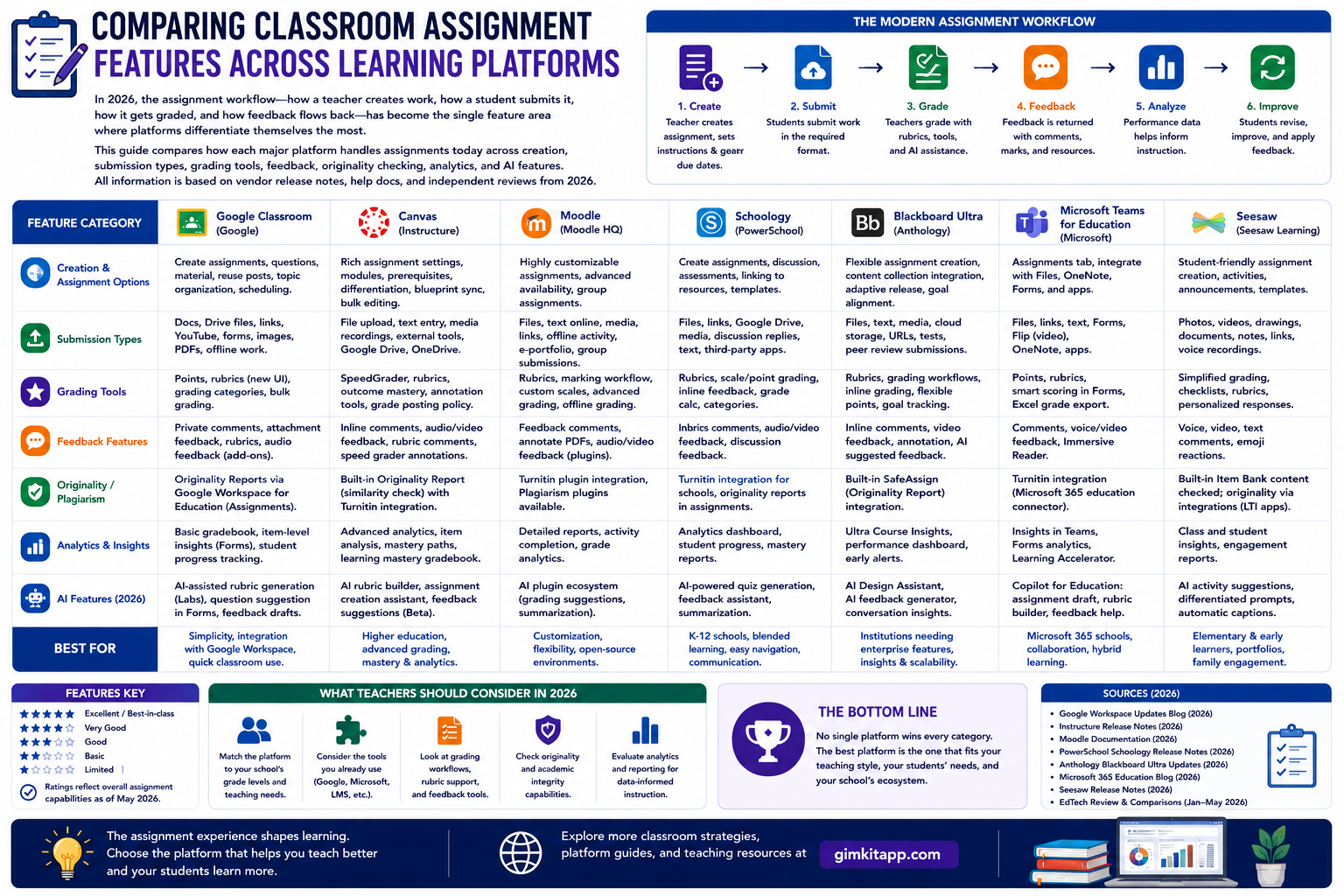
Comparing Classroom Assignment Features Across Learning Platforms: Choosing the right learning platform is no longer a simple choice between “free” and “paid.” In 2026, the assignment workflow — how a teacher creates work, how a student submits it, how it gets graded, and how feedback flows back — has become the single feature area where platforms differentiate themselves the most. Google Classroom, Canvas by Instructure, Moodle, Schoology (PowerSchool), Blackboard Ultra (Anthology), Microsoft Teams for Education, and Seesaw have all shipped major assignment-related updates over the past twelve months, many of them centered on AI-assisted grading, rubric generation, and richer submission types.
This guide walks through how each major platform actually handles assignments today — creation, submission types, grading tools, feedback, plagiarism/originality checking, analytics, and AI features — so you can compare them on the details that matter for day-to-day classroom use, not just marketing claims. Every claim below is grounded in each vendor’s own release notes, help documentation, or independent, dated reviews published in 2026.
Looking for comprehensive classroom resources and educational technology insights? Explore GimkitApp for expert guides, teaching strategies, game modes, and the latest updates to enhance student engagement.
Quick Comparison Table
Platform
Best For
Core Assignment Model
AI Grading Help
Rubrics
Plagiarism/Originality
Native Video/Audio Submission
Pricing Model
Google Classroom
K-12 and higher-ed Google Workspace schools
Assignment stream + Classwork tab
Gemini-suggested written feedback, Gemini rubric generation
Built-in customizable rubrics
Unlimited originality reports (Workspace for Education)
Native audio/video recording (BETT 2026 update)
Free (core); paid Education Plus / Teaching & Learning add-on for AI
Canvas LMS
Higher education, large K-12 districts
Assignments + SpeedGrader
Optional AI assistance (tiered rollout 2026)
Rubrics with outcomes alignment
Turnitin/Vericite integration
Via Studio/media integrations
Tiered institutional licensing (new 2026 model)
Moodle
Institutions wanting open-source control
Assignment activity module
Gemini integration via Activity Chooser (institution-dependent)
Rubrics + marking guides
Turnitin plugin (optional)
Kaltura Media submission type (new 2026)
Free (self-hosted) or paid Moodle Cloud/partners
Schoology (PowerSchool)
K-12 districts needing SIS integration
Assignments tied to Course materials
PowerBuddy for Learning (AI assistant)
Digital rubrics
Turnitin integration available
Via Google/Microsoft assignment apps
District/institutional licensing
Blackboard Ultra
Higher education, especially large universities
Tests and Assignments module
AI Conversations, AI-assisted grading tools
Rubrics with achievement badges
Integrated SafeAssign
Via Video Studio (mobile recording added 2026)
Institutional licensing
Microsoft Teams for Education
Schools in the Microsoft 365 ecosystem
Assignments app inside Teams
Learning Accelerators (Reading/Math/Search Progress), AI rubric & instruction drafting
AI-generated rubric creation
Via Turnitin LTI integration
Native Reading Progress video/audio recording
Free with Microsoft 365 Education licenses
Seesaw
Early elementary (K-5), portfolios
Activities → Learning Journal
Limited; focused on human/peer/parent feedback
Skill-tracking (paid tier)
Not a core feature
Native drawing, video, audio, photo submissions
Free tier; ~$120/teacher/year paid
1. Google Classroom: The AI-Infused Default for K-12
Google Classroom remains the most widely deployed classroom tool in K-12 education worldwide, largely because it’s bundled free with Google Workspace for Education and requires almost no onboarding. Through 2026, Google has pushed the fastest pace of assignment-related updates of any platform, almost all of it centered on Gemini AI integration.
How assignments work in Classroom
Assignments live inside the Classwork tab, where teachers can create Assignments, Quiz assignments, Questions, Material posts, or reuse posts from other classes. Each assignment supports file attachments from Drive, YouTube links, and now native audio/video recordings and screen recordings captured directly in the assignment creation flow — a capability Google added specifically to let teachers and students attach native audio and video recording for assignments and feedback, along with screen recording for demonstrations.
Grading and feedback
Grading happens through the same Classwork interface, with support for point-based grading, rubrics, and — new for 2026 — standards-based grading, where teachers can tag each assignment to a state or national standard they’ve selected in class settings.
The most talked-about 2026 addition is AI-suggested feedback. Google introduced AI-suggested feedback for written assignments, a feature designed to help educators provide personalized support more efficiently, letting teachers generate feedback drafts tailored to a student’s work, grade level, and a focus area the teacher specifies. This sits alongside a parallel rubric feature: educators can now instantly generate a Classroom-ready rubric during the assignment creation workflow using context from the assignment itself, reviewing and editing the proposed criteria before adding it.
The Gemini layer
Google has gone further than any competitor in embedding a conversational AI assistant directly into the assignment workflow. A dedicated Classroom app inside Gemini lets teachers update assignment titles and descriptions across multiple classes in draft mode, build seating charts, and locate old assignments, while students 18 and older — and now younger students whose admins have enabled access — can click a starter prompt on an assignment, select the specific class and assignment, and have Gemini pull in the assignment’s title, instructions, and curriculum materials as grounding context.
The Classroom homepage itself was redesigned in mid-2026 around this AI layer: a dashboard now gives actionable insights, highlights student classwork interactions, tracks assignment completion, and surfaces a feature spotlight for discovering instructional tools, organized into three modules — Recently Due, Class Insights (AI-powered performance flags), and Feature Spotlight.
Originality and SIS integration
Classroom includes unlimited originality reports and a school-owned repository of past student work to help students integrate citations and avoid unintentional plagiarism, plus gradebook sync to PowerSchool, Infinite Campus, Skyward SMS, Skyward Qmlativ, and Follett Aspen.
Known limitations
Classroom’s long-standing critique still applies in 2026: it was originally built as a lightweight wrapper around Drive rather than a full LMS, and Wikipedia’s overview of the platform still notes recurring complaints about its lack of automatic quizzes and tests common in full learning management systems, and the fact that assignments can’t be edited once released. For schools that need advanced test-item banks, learning pathways, or granular grading workflows, Classroom is often paired with — or replaced by — a heavier LMS like Canvas or Schoology at the secondary/higher-ed level.
2. Canvas LMS: The Higher-Ed and Enterprise Standard
Canvas, built by Instructure, is the dominant LMS in North American higher education and a major player in large K-12 districts. Its assignment tooling is built around depth and configurability rather than the “just works” simplicity of Google Classroom.
Core assignment architecture
Canvas separates assignment creation (with rich configuration for submission types, peer review, group assignments, and differentiated due dates) from grading, which happens in SpeedGrader — a dedicated grading interface that lets instructors move between submissions, annotate documents, apply rubrics, and leave audio/video/text feedback without leaving the page. Feature reviews consistently cite assignment management, discussion forums, and analytics for tracking student performance as Canvas’s core strengths, and the platform’s grade book, assignment submission tools, and analytics are frequently highlighted as intuitive and simplifying course delivery.
2026 changes: tiered structure and AI
The biggest structural change in 2026 is Instructure’s move to a simplified tiered licensing model. Instructure announced a new tiered structure for Canvas designed to make it easier for institutions to access expanded capabilities across the ecosystem, with no migration required and full institutional control over when new functionality is enabled. Under this model, ongoing enhancements include optional AI assistance for teaching and feedback, streamlined multi-step workflows like course creation and grading, and a more intuitive overall experience, rolling out progressively so institutions can preview and enable individual changes at their own pace. This is a materially different AI rollout philosophy than Google’s: Canvas is opt-in and workflow-by-workflow, while Google has largely pushed Gemini features by default to eligible domains.
Canvas ships near-monthly release notes (publicly documented via the Instructure Community), reflecting an unusually fast, incremental cadence of grading and assignment refinements compared to competitors that batch updates into quarterly releases.
Security note worth knowing
Institutions evaluating Canvas in 2026 should be aware of a publicized incident: in late April 2026, Canvas was affected by a data breach and outage, with Instructure disclosing that certain user data — including names, email addresses, student ID numbers, and messages among users — had been compromised, though the company found no evidence that passwords, birth dates, government IDs, or financial information were involved. Instructure’s incident response was relatively fast: unauthorized access occurred April 25, was detected four days later, and access was revoked with third-party forensics engaged immediately afterward. This doesn’t change Canvas’s feature set, but it’s a relevant, current fact for any institution doing vendor due diligence in 2026.
Pricing reality
Unlike Google Classroom’s flat free tier, Canvas operates on a subscription model with custom institutional pricing based on size, course count, and required features, typically billed annually with advance commitments and no monthly flexible billing, though individual teachers can create free accounts without institutional affiliation.
3. Moodle: The Open-Source Power User’s Choice
Moodle remains the most configurable and most “activity-modular” of the major platforms, largely because it’s open source and self-hostable (or available through managed partners). Its Assignment activity module is a distinct building block that institutions add to a course page, rather than a fixed tab like Classroom’s Classwork.
Submission and grading flexibility
Moodle’s Assignment activity is unusually rich in submission types. It allows submission of files, text, video, and Mahara eportfolios, and can be used for both formative and summative assessment. Grading tools go deep: feedback options include written comments (with recorded audio or video), a “Record RTC” tool for up to two minutes of recorded audio or video feedback, PDF annotation directly on a student’s submission, uploaded feedback files, and an offline grading worksheet that can be downloaded, marked up, and re-uploaded. Instructors can also annotate submitted documents directly, with Moodle automatically converting compatible file types like .doc, .docx, .odt, .rtf, .ppt, .pptx, and .odp to PDF for annotation.
What’s new in Moodle 5.2/5.3 (2026)
Moodle’s most significant 2026 release, version 5.2, introduced multi-grader workflows: institutions can now assign each student to a specific grader individually or in bulk, letting a single homework activity be graded and corrected by several assessors while remaining flexible enough to fit any organizational structure — a capability MoodleHQ describes as “Phase 1” of a feature it plans to keep expanding. A smaller but practical addition lets teachers add a text note directly in the system whenever a due date or attempt is waived for a student or group, making exceptions traceable instead of living in a separate email chain. All of this becomes standard in the next long-term-support release, since the same features included in Moodle 5.2 will be present in Moodle 5.3, due in October 2026.
On the submission-type side, many institutions have integrated Kaltura video directly into the standard workflow: video submissions are now integrated directly into the standard Moodle Assignment activity, letting instructors select “Kaltura Media” as a submission type so students can record or upload video or audio responses, which instructors then review and grade inside the standard Assignment grading interface. Several institutions have also begun layering Gemini AI on top of Moodle at the integration level: Google Gemini can be enabled directly within the platform, with instructors adding direct links to Gemini Notebooks or Gemini Gems and getting basic usage data, accessible as a new option in the Activity Chooser.
Plagiarism detection and grading workflow
Moodle doesn’t ship a native originality checker but integrates cleanly with third parties: the Turnitin platform integrates into the Moodle Assignment activity as an optional toggle, including both the Similarity Checker for plagiarism detection and Feedback Studio for grading and feedback. For grade release control, Moodle’s Grading Workflow setting can hide assignment grades from students until every submission has been graded, or manage workflow across multiple graders — though these settings must be configured before grading begins, since they can’t be changed retroactively.
Why institutions choose Moodle
Because Moodle is open source, institutions get full control over hosting, data residency, and customization — a meaningful difference from the SaaS-only models of Google, Canvas, and Blackboard. The tradeoff is that feature availability (like Gemini integration or Kaltura) often depends on what each institution’s IT team has chosen to enable, so “what Moodle can do” varies more between schools than with any other platform on this list.
4. Schoology (PowerSchool Learning): The SIS-Native K-12 Platform
Schoology, now branded as PowerSchool Learning Management, differentiates itself through tight integration with student information systems (SIS) — a critical feature for K-12 districts managing report cards, attendance, and grades across multiple systems.
Assignment and gradebook design
Schoology’s assignment model ties directly into course materials, with users citing its ability to organize student work, collect and analyze assignment data, and create digital rubrics to grade student work as core strengths, along with its usefulness for reducing the time teachers spend grading and letting students who are absent or traveling keep up with class material without being able to claim they “lost” an assignment.
2026 platform additions
PowerSchool ships monthly release notes for Schoology (January through at least October 2026), a cadence similar to Canvas’s. Recent additions relevant to assignments include an Assignment Tab specifically for students on the homepage, group enrollment imports for group admins, admin-managed profile photo imports, and gradebook flags that remain visible even after grading is complete — improvements aimed at giving clearer student views, less manual admin work, and more transparency in grading conversations with families. Schoology has also introduced PowerBuddy for Learning, an AI assistant layer referenced across its 2026 release notes, alongside standards-based tools like a standards Explorer Coverage Map and click-to-place drag-and-drop interaction types for more accessible assessments.
Third-party assignment integration
Rather than building competing video/audio recording tools, Schoology leans on its ecosystem: Microsoft Assignments or Google Assignments can be used directly within Schoology, with both Google Drive and Microsoft Office file systems supported natively, and the platform integrates powerfully with PowerSchool SIS while also supporting all other major SIS systems through OneRoster 1.2.
The tradeoff
User reviews are candid about the interface: some reviewers describe the platform’s older UI patterns — like the need to hover a cursor over a line until a green indicator appears before adding an assignment at the top of a queue — as unintuitive and “very DOS, super old-fashioned,” with add-ins that sometimes need troubleshooting. Districts that prioritize SIS integration and social-learning features tend to accept this tradeoff; districts that prioritize a modern, minimal UI often lean toward Google Classroom or Canvas instead.
5. Blackboard Ultra: The Enterprise University Standard
Blackboard, owned by Anthology, has spent the past several years migrating its entire user base from the “Original” course view to Ultra, a redesigned interface with modernized assignment and testing tools. This migration reaches a hard deadline soon: institutions will no longer be able to use the Original Course View for active teaching after December 31, 2026, with all courses required to run on Ultra starting January 1, 2027.
Assignment configuration
Blackboard Ultra’s “Tests and Assignments” module received substantial updates through 2026. Instructors can now specify the expected submission type for an assignment as file-only, text-only, or both, a level of control that reduces confusion for students used to more flexible platforms. Group work grading also became more precise: group submission grades can now be set on a per-member basis, better reflecting individual contribution rather than assigning one grade to an entire group.
Grading interface improvements
Anthology’s 2026 releases focused heavily on grading clarity. Improvements include more accurate “Needs Grading” and “New Submission” flags for grade uploads and Grid-view grades, a grading interface that displays more of a student’s submitted work at once, and direct grade entry from either the Grid view or the Submissions page that correctly updates flag statuses. Administrators also gained the ability to hide a test or assignment from students without kicking out students who already have it open — a small but practically important fix for exam-day workflows.
AI and content tools
Blackboard’s AI push centers on AI Conversations, a feature instructors can bound: the interaction length of AI Conversations can be limited by the instructor, with a dynamic message counter warning students as they approach the maximum number of messages. On the content-creation side, instructors can now record Video Studio videos directly from the Blackboard mobile app using the device’s camera and microphone, adding video content to course pages without needing a desktop.
Migration and conversion support
For institutions still converting legacy courses, Anthology improved data portability: the Include Activity Data option in the Bulk Copy and Convert process now supports submissions for Group Assignments as well as individual assignments, and grading information and feedback carry over after conversion — though Bb Annotate inline comments and document markup do not transfer to Ultra courses. Import flexibility also improved for institutions arriving from elsewhere: when administrators import course packages from Canvas LMS, D2L Brightspace, or Moodle, Blackboard now delivers those courses directly in Ultra Course View, ready to use with no extra conversion steps.
Assessment of fit
Blackboard Ultra is built for scale and compliance-heavy environments — large universities with complex accreditation and reporting needs. Its assignment tools are comparably deep to Canvas’s, and the two are frequently shortlisted against each other in higher-ed procurement processes.
6. Microsoft Teams for Education: Assignments Inside the Collaboration Hub
Microsoft’s approach is distinct from every other platform on this list: rather than building a standalone LMS, Microsoft embeds an Assignments app inside Teams (and, for schools using another LMS, inside that LMS via an LTI integration), so the assignment workflow lives alongside chat, video calls, and OneNote Class Notebooks.
The core value proposition
Microsoft is explicit that Assignments is meant to meet teachers where they already are: whether a school uses Teams for Education or an LMS like Canvas or Schoology, Assignments works in both — built into every class team in Teams, and available through the Microsoft 365 LTI app inside an LMS.
AI features built into the grading flow
Microsoft has added AI assistance at nearly every step of assignment creation: drafting instructions, building rubrics, and grading. AI suggestions appear while a teacher is writing instructions, building a rubric, or grading student work, and every suggestion is editable — teachers decide what stays. Crucially for privacy-conscious districts, AI features in Assignments run within the Microsoft 365 education boundary, meaning student data stays within the school’s tenant and is not used to train AI models. More specifically, AI instructions for educators streamline assignment creation and editing with options to add detail, increase inclusivity, and engage young readers, while a separate AI grading rubric creation feature helps teachers build effective, consistent rubrics for evaluating student work.
No competitor has a direct equivalent to Reading Progress, Microsoft’s built-in literacy assignment tool. Reading Progress lets students read aloud while AI detects fluency patterns like mispronunciations and omissions, showing individual and class-wide progress in Insights. Teachers can source reading passages several ways: by uploading Word or PDF files, generating passages using AI, or browsing an extensive sample library from ReadWorks — with the ability to preview passages and set limits on the number of attempts a student can make, plus adjustable pronunciation sensitivity. On the analysis side, mispronunciations, omissions, insertions, and self-corrections are automatically detected, and both teacher and student can track fluency progress over time through visual data and reports. Comprehension checking has also been added: Reading Progress can now generate AI comprehension questions for reading passages automatically, helping teachers assess understanding without writing questions from scratch. The tool supports genuine language-classroom use as well, with Teams Assignments supporting 37 different languages, giving language teachers and students plenty of choice for foreign-language reading practice.
Beyond reading, Microsoft’s broader Learning Accelerators suite extends the same idea to other subjects: Math Progress offers AI-generated math problems with auto-grading and progress tracking, alongside Search Progress, Speaker Progress, and Reflect for social-emotional check-ins.
Fit and limitations
Teams for Education is the natural choice for districts already standardized on Microsoft 365 — it’s free with existing licenses and avoids introducing a second ecosystem. Its assignment/gradebook tooling is less deep than Canvas’s or Schoology’s for complex, multi-section higher-ed grading scenarios, but its literacy and language-learning tools (via Reading Progress) are genuinely unmatched among the platforms compared here.
7. Seesaw: The Elementary Portfolio Specialist
Seesaw takes a fundamentally different approach from the LMS-style platforms above: it’s built around a student-facing Learning Journal — a running portfolio of work — rather than a gradebook-first assignment queue, and it’s aimed squarely at early elementary classrooms.
How Seesaw assignments differ
Seesaw is a digital platform for teachers to assign classwork, engage with students, and provide feedback, and it’s a standout choice specifically for incorporating teacher, parent, and student feedback together. Assignment content is intentionally multimodal and built for young learners who may not type well yet: assignments can incorporate video, photos, text, images, files, or drawings, and teachers can give feedback using any of six built-in feedback tools, with students able to give peer-to-peer feedback using the same toolset.
Family engagement as a core assignment feature
Unlike any other platform in this comparison, family visibility is treated as a first-class assignment feature rather than an add-on report. Family engagement tools give parents direct visibility into student work and teacher feedback, helping learning continue at home without requiring extra meetings or emails. A built-in translation tool is also available so families can read notes, captions, comments on student work, and teacher messages in their own language.
Where Seesaw intentionally stops
Seesaw’s product philosophy is to do one thing well rather than compete as a full LMS. Teachers can monitor progress and spot early knowledge gaps, but Seesaw is not built for advanced analytics or grading assignments at scale — a deliberate tradeoff rather than a flaw, since Seesaw is not designed for higher education, online courses, corporate training, or compliance programs. Independent comparisons echo the same limitation from a different angle: teachers needing advanced quiz types, rubric-based grading, or standardized test-prep tools may outgrow Seesaw’s capabilities, and districts consolidating multiple platforms into one comprehensive LMS often move away from it for that reason.
Common pairing pattern
Because of this scope decision, Seesaw is frequently used alongside another platform rather than as a replacement: many teachers use Google Classroom and Seesaw complementarily — Google Classroom handles traditional assignments and grading, while Seesaw captures creative student work and portfolios, a combination that works especially well in elementary schools wanting both structured assignments and creative expression.
Pricing and availability
Seesaw is free at a basic tier, with a paid membership around $120 per teacher per year, and is recommended for grades K–12, available on Android, iOS, Kindle Fire, Chrome, and web. Note that Seesaw doesn’t include a free, built-in grading tool by default — the paid membership is required to track student progress toward customizable skills.
Feature-by-Feature Deep Comparison
Submission types supported
Platform
Text
File Upload
Native Audio/Video
Drawing/Annotation
Third-Party LTI Tools
Google Classroom
✅
✅
✅ (2026 update)
Via Drive/Jamboard-style tools
✅
Canvas
✅
✅
Via Studio integration
Via annotation tools
✅ Extensive
Moodle
✅
✅
✅ (Kaltura Media, 2026)
✅ PDF annotation
✅
Schoology
✅
✅
Via Google/MS apps
Limited native
✅
Blackboard Ultra
✅ (configurable)
✅ (configurable)
✅ Video Studio (mobile, 2026)
Via Bb Annotate
✅
Teams for Education
✅
✅
✅ Reading Progress
Via OneNote
✅ Via M365 LTI
Seesaw
✅
✅
✅ Native, all ages
✅ Native drawing tool
Limited
AI grading and feedback assistance
Platform
AI Feedback Drafting
AI Rubric Generation
Data Boundary Commitment
Google Classroom
✅ (Gemini-suggested feedback)
✅ (Gemini rubric generation)
Google Workspace for Education data terms
Canvas
✅ (tiered rollout, optional)
Institution-dependent
Instructure data agreements
Moodle
Via Gemini integration (institution-configured)
Institution-dependent
Self-hosted / partner-dependent
Schoology
✅ (PowerBuddy for Learning)
Institution-dependent
PowerSchool data agreements
Blackboard Ultra
✅ (AI Conversations, bounded)
Institution-dependent
Anthology data agreements
Teams for Education
✅ (instructions + grading)
✅ (AI rubric creation)
Stays within Microsoft 365 education tenant; not used to train AI models
Seesaw
Minimal
Not a core feature
Standard vendor terms
Grading workflow depth
Most granular multi-grader support: Moodle 5.2’s new assign-graders feature, letting institutions split grading across several assessors per assignment.
Best per-student group grading: Blackboard Ultra’s per-member group submission grading.
Fastest AI-assisted feedback drafting: Google Classroom and Microsoft Teams both generate editable feedback drafts grounded in the actual assignment context.
Most transparent grade-release control: Moodle’s Grading Workflow, which can withhold all grades until every submission is graded.
How to Choose: A Practical Framework
Rather than asking “which platform has the most features,” ask which of these five questions matters most for your context:
1. Are you K-12 or higher education?
Google Classroom, Schoology, Seesaw, and Teams for Education skew K-12; Canvas and Blackboard Ultra skew higher education and large enterprise training, though both serve K-12 districts too.
2. Do you need deep SIS integration?
Schoology’s native PowerSchool SIS integration and OneRoster support make it a strong default for districts that live inside a student information system for grading and attendance.
3. Is literacy or language instruction a priority?
Microsoft’s Reading Progress has no direct equivalent elsewhere on this list — if reading fluency tracking matters, Teams for Education deserves a serious look even for schools not otherwise on Microsoft 365.
4. Do you need open-source control over data and hosting?
Moodle is the only platform here that can be fully self-hosted, which matters for institutions with strict data-residency or customization requirements.
5. Are your youngest learners the primary users?
Seesaw’s drawing-first, portfolio-first design is built for students who can’t yet type fluently — a use case none of the traditional LMS platforms optimize for.
The Broader Trend: AI Is Now the Assignment Battleground
Looking across every platform covered here, one pattern is unmistakable: 2025–2026 assignment feature development has been dominated by AI-assisted grading, rubric generation, and feedback drafting, not new submission formats or gradebook mechanics. Google’s Gemini-in-Classroom rollout, Canvas’s tiered “optional AI assistance,” Schoology’s PowerBuddy, Blackboard’s bounded AI Conversations, and Microsoft’s Learning Accelerators all represent the same underlying shift: platforms are racing to reduce the time teachers spend on repetitive grading and feedback-writing, while trying to keep a human reviewing and editing every AI suggestion before it reaches a student.
Two things are worth watching as this trend continues. First, data boundaries are becoming a genuine differentiator in vendor marketing — Microsoft explicitly advertises that Teams AI features don’t train on student data and stay within a school’s tenant, and expect Google, Instructure, and Anthology to make similar commitments more prominent as districts ask harder procurement questions. Second, content authenticity tools are emerging alongside AI grading tools: Google’s push toward SynthID watermark verification for AI-generated content, mentioned at BETT 2026, hints that the next wave of assignment features may focus as much on verifying what a student produced as on grading it.
Mobile Experience for Assignments
Mobile access has quietly become a deciding factor for many schools, since a growing share of grading and even assignment creation now happens on a phone or tablet between classes rather than at a desk.
Google Classroom offers full-featured iOS and Android apps that mirror desktop functionality closely, including grading, commenting, and — per Google’s own classroom management materials — the ability to assign, grade, and provide feedback across multiple classes on the go.
Canvas provides both a Teacher app and a Student app, with SpeedGrader available in a mobile-optimized form, though some advanced configuration (like building complex rubrics) is still easier on desktop.
Moodle’s mobile app depends heavily on how an institution has configured the platform; core grading and PDF annotation work on mobile, but the experience can vary between Moodle Cloud and self-hosted deployments.
Schoology’s mobile app supports assignment review and basic grading, though several reviewers note the interface feels less modern than Classroom’s or Canvas’s on smaller screens.
Blackboard’s 2026 updates specifically targeted mobile: instructors can now record Video Studio content directly from the Blackboard mobile app, a capability that previously required a desktop browser.
Microsoft Teams for Education benefits from Teams’ broader mobile maturity — Assignments, chat, and Reading Progress reviews are all accessible from the mobile Teams app.
Seesaw was effectively built mobile-first; its drawing and recording tools are optimized for tablets in particular, reflecting its elementary-classroom use case where a shared classroom iPad is often the primary device.
Accessibility Considerations in Assignment Tools
Accessibility compliance (WCAG-aligned features, screen-reader support, and alternative submission formats) increasingly shapes procurement decisions, particularly for public institutions bound by Section 508 or equivalent requirements.
Google Classroom’s screen recording and native audio/video submission options, added in the BETT 2026 update, give students who struggle with typed responses an alternative way to demonstrate understanding without leaving the platform. Microsoft’s Reading Progress serves a related but distinct purpose — supporting students still building reading fluency, including English language learners, by letting them submit spoken rather than written work across 37 supported languages. Moodle’s PDF annotation and offline grading worksheet give instructors flexibility to work in whatever format is most accessible to them, including fully offline grading for low-bandwidth situations. Seesaw’s drawing-first submission model was explicitly designed around the reality that many young learners can express understanding visually well before they can type or write fluently.
None of the platforms compared here publish a single definitive “accessibility scorecard” that’s independently audited and dated for 2026, so institutions with strict compliance requirements should request current VPAT (Voluntary Product Accessibility Template) documentation directly from each vendor rather than relying on marketing claims.
Data Privacy and Security in Assignment Workflows
Because assignment tools handle student work product — sometimes including audio and video of children speaking, drawing, or performing — data handling practices deserve specific attention beyond general platform security.
Microsoft’s public commitment is currently the clearest and most specific among the platforms compared: AI features in Assignments run within the Microsoft 365 education boundary, meaning student data stays within a school’s own tenant and is not used to train Microsoft’s AI models. Google’s Gemini-in-Classroom features are gated behind admin-level controls in the Workspace Admin console, giving IT administrators the ability to enable or disable Gemini access by organizational unit rather than rolling it out uniformly. This matters in practice: Google’s own documentation notes that some Gemini features are age-restricted, with the standalone Gemini Classroom app in Gemini currently limited to users 18 and older even as in-Classroom Gemini features have expanded to younger students under admin control.
Canvas’s April 2026 data breach — in which names, email addresses, student ID numbers, and internal messages were compromised, though passwords and financial data were reportedly not affected — is a useful reminder that even mature, well-resourced EdTech vendors are active targets, and that institutions should treat vendor security posture as an ongoing evaluation rather than a one-time checkbox during initial procurement. Any district or university currently running Canvas, or evaluating it, should request Instructure’s current incident-response documentation and ask directly about the timeline and remediation steps taken since the breach.
Across every platform, the practical advice for administrators is consistent: read the current data processing agreement rather than the marketing page, confirm whether AI features are opt-in or opt-out by default, and check whether AI-generated content (feedback drafts, rubrics, comprehension questions) is retained, logged, or used for model improvement in any form.
Cost Comparison at a Glance
Pricing structures differ enough between these platforms that a side-by-side estimate is more useful than vendor list prices alone, which are frequently custom-quoted.
Platform
Entry Point
Typical Paid Tier
Who Usually Pays
Google Classroom
Free with any Workspace for Education account
Education Plus / Teaching & Learning add-on (per-user, annual) for Gemini AI features
District or institution
Canvas
No public list price
Custom institutional contract, new tiered model (2026)
Institution, annual commitment
Moodle
Free if self-hosted
Moodle Cloud or managed-hosting partner fees
Institution or IT department
Schoology
No public list price
District-wide institutional licensing
District
Blackboard Ultra
No public list price
Institutional licensing, typically higher-ed scale
University/institution
Teams for Education
Free with Microsoft 365 Education A1
Included in A3/A5 tiers for advanced features
District or institution
Seesaw
Free basic tier
~$120/teacher/year for skill tracking and grading
Individual teacher or school
Because Canvas, Schoology, and Blackboard Ultra all negotiate custom institutional contracts, the only reliable way to get an accurate price is a direct vendor quote scoped to your student count and required feature tier — publicly listed “starting prices” for these three platforms are not standard practice in 2026.
Migration Considerations
Switching platforms mid-year is disruptive, so most institutions plan transitions around natural breaks — end of semester or summer recess. A few migration realities are worth flagging regardless of which direction a school is moving:
Google Classroom does not support a standard, structured export format for course content, meaning a move away from Classroom typically requires manually recreating assignments, materials, and quizzes in the destination platform rather than a clean bulk import — a meaningful planning consideration for any school evaluating a switch. Blackboard, by contrast, has recently improved import support in the other direction: administrators importing course packages from Canvas, D2L Brightspace, or Moodle now get those courses delivered directly and immediately in Ultra Course View, without extra manual conversion steps. Canvas offers similarly structured course export/import tooling that many competing platforms are built to accept, which is part of why it’s often the default choice when a district is consolidating multiple legacy systems into one LMS.
For any migration, a reasonable sequence is: inventory active courses, assignments, and materials in the current system; recreate course structures and grading categories in the new platform ahead of time; migrate or recreate assignment templates and rubrics; run a training period with a small pilot group of teachers before a full rollout; and time the actual cutover to a semester or year boundary wherever possible.
Frequently Asked Questions
Is Google Classroom free for all schools?
The core assignment, grading, and classwork features are free with any Google Workspace for Education account. The newest Gemini AI features — including AI-suggested feedback and rubric generation — currently require Google Workspace for Education Plus or the Teaching and Learning add-on.
Which platform has the best plagiarism/originality detection?
Google Classroom includes unlimited originality reports natively at no extra cost within Workspace for Education. Canvas, Moodle, Schoology, and Blackboard Ultra all rely on Turnitin (or similar) integrations rather than a fully native tool, though Blackboard’s SafeAssign is a comparable built-in alternative.
Can I use Microsoft Assignments if my school uses Canvas or Schoology instead of Teams?
Yes. Microsoft explicitly designed Assignments to work through the Microsoft 365 LTI app inside another LMS, so schools can get Reading Progress, Math Progress, and AI rubric tools without switching their primary LMS.
Is Seesaw a replacement for a full LMS?
Generally no. Seesaw is best understood as a portfolio and family-engagement layer for early elementary classrooms, frequently used alongside — not instead of — a traditional LMS like Google Classroom or Schoology once grading needs become more complex.
Do any of these platforms guarantee AI features won’t train on student data?
Microsoft makes this the most explicit public commitment for Teams for Education’s AI features. Always verify current data-processing terms directly with each vendor before enabling AI features district-wide, since policies are actively evolving through 2026.
What Teachers Actually Notice Day to Day
Feature lists and release notes tell part of the story, but the details that shape whether teachers enjoy using a platform daily tend to be smaller and more procedural. A few patterns emerge consistently across the vendor documentation and reviews referenced throughout this guide.
Time-to-first-grade matters more than total feature count. Teachers gravitate toward whichever platform gets them from “student submitted” to “grade recorded” with the fewest clicks. This is a large part of why SpeedGrader remains one of Canvas’s most-cited strengths, and why Google’s bulk grading and reusable comment banks are frequently mentioned as time-savers by administrators evaluating Classroom for their schools.
Reused content beats rebuilt content. Every platform in this comparison now supports some form of reusing past assignments, rubrics, or comments across classes and terms — Google’s “reuse a post” option, Canvas’s assignment templates, Moodle’s ability to duplicate activities, and Schoology’s shared content links between colleagues. Teachers consistently rate this as more valuable in practice than flashier one-off AI features, since it compounds in time saved every single term.
Notification fatigue is a real design constraint. Platforms that surface too many automated flags — missing work alerts, at-risk indicators, AI-generated insights — risk teachers tuning them out entirely. Google’s own “Class Insights” module acknowledges this tension directly in its documentation, noting that whether the AI-flagged data is useful depends heavily on how a given teacher runs their class.
Parent and family visibility changes behavior on both ends. Seesaw’s family-first design and Google Classroom’s parent/guardian email summaries both reflect a growing recognition that assignment completion improves when families can see it happening in near real time, not just at report-card time.
Where This Is Heading
A few forward-looking signals are visible in 2026 vendor roadmaps that are worth watching even though they aren’t fully shipped yet.
First, rubric generation is converging toward a single workflow pattern across vendors: describe the assignment in plain language, let AI draft criteria, then let the teacher edit before anything reaches students. Google, Microsoft, and Canvas have all landed on a nearly identical shape for this feature within months of each other, suggesting it’s becoming a baseline expectation rather than a differentiator — the real competition going forward will likely be about how well the AI-drafted rubric matches an individual teacher’s actual grading standards, not whether the feature exists at all.
Second, content-authenticity verification is starting to appear alongside content-generation tools. Google’s plans to let educators check whether student- or teacher-submitted media carries an invisible SynthID watermark — indicating it was created or edited using Google AI tools — point toward a future where assignment platforms need to help verify not just originality (plagiarism from other humans) but AI provenance (content generated by a machine). Expect other major vendors to introduce comparable authenticity-checking features as AI-generated coursework becomes more common.
Third, the AI feature rollout philosophy itself is diverging by vendor, and that divergence is likely to persist. Google has generally pushed Gemini features by default to eligible domains once an admin enables the underlying service. Canvas has explicitly committed to a workflow-by-workflow, opt-in model that lets institutions preview and enable changes individually. Blackboard bounds AI Conversations with hard message limits set by the instructor. Which philosophy a school prefers — fast defaults versus granular opt-in control — may end up mattering as much as any individual feature when institutions choose between these platforms over the next admissions and renewal cycle.
Sources
This guide draws on official vendor documentation and release notes (Google Workspace Updates, Instructure/Canvas release notes and PR Newswire announcements, MoodleDocs and Moodle Academy partner write-ups, PowerSchool/Schoology release notes, Anthology/Blackboard release notes, Microsoft Learn and Microsoft Community Hub, and Seesaw’s own help documentation), alongside independently published, dated 2026 reviews and comparisons from Common Sense Education, G2, Gartner Peer Insights, Tech & Learning, and Wikipedia. All feature claims are sourced from documentation published or updated in 2026 to reflect the current state of each platform as closely as possible; institutions should verify current pricing and feature availability directly with each vendor, as EdTech release cycles move quickly.
For the latest gaming news, expert reviews, and walkthroughs, readers can also visit IGN, one of the world’s leading gaming websites.