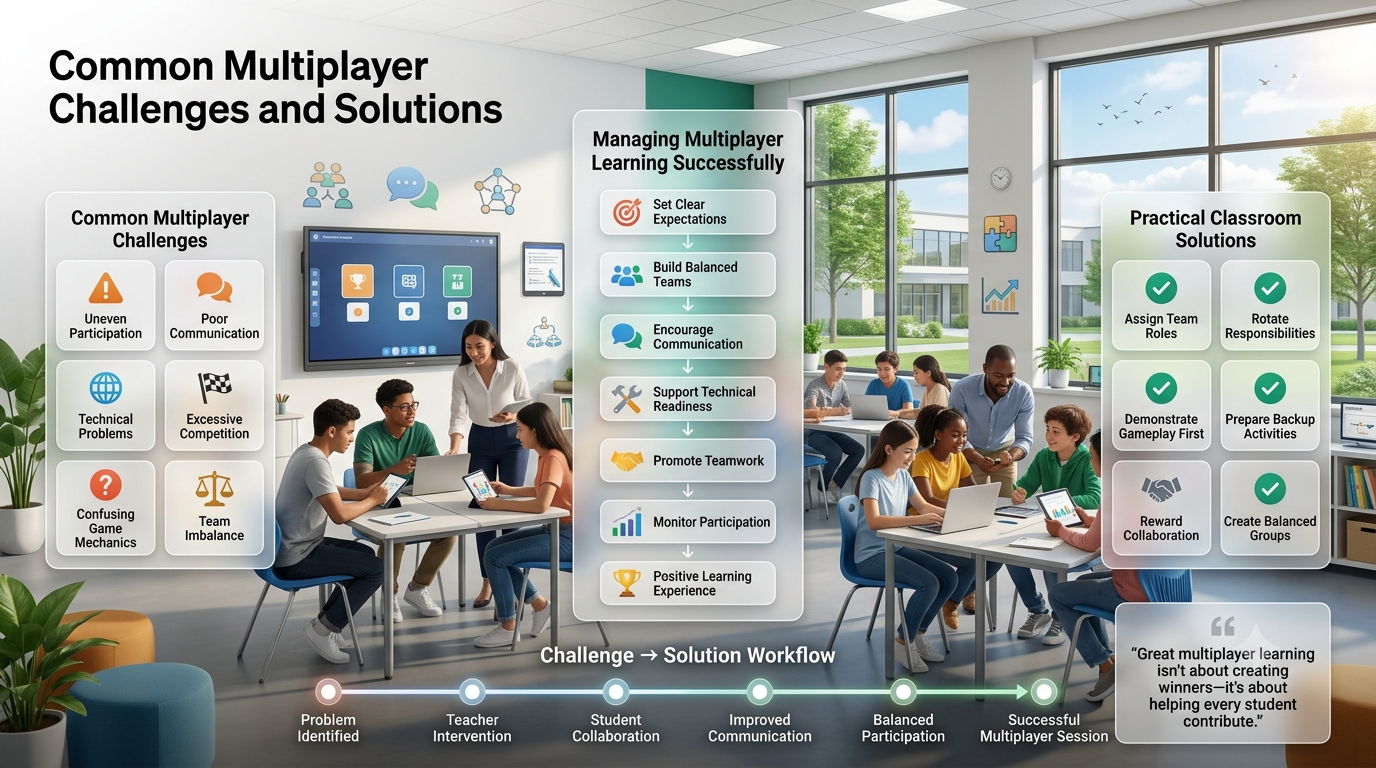
Common Multiplayer Challenges and Solutions-Multiplayer sessions in Gimkit are designed to promote engagement, but they also introduce challenges that can reduce learning if teachers do not plan ahead. Most issues—such as uneven participation, technical interruptions, communication problems, or overly competitive behavior—can be minimized with thoughtful game setup, clear expectations, and the right choice of game mode. Understanding these challenges allows teachers to create smoother, more collaborative experiences for every student.
Successful multiplayer gameplay depends on balancing competition with cooperation. While Gimkit rewards quick thinking and strategic decision-making, classrooms contain students with different learning speeds, confidence levels, and technology access. Recognizing these differences before launching a game helps maintain fairness while keeping everyone actively involved.
Common Challenge
Why It Happens
Practical Solution
Uneven participation
Stronger students dominate
Assign team roles and rotate responsibilities
Poor communication
Students work independently
Encourage planning before gameplay
Technical issues
Internet or device problems
Test devices and keep backup activities ready
Excessive competition
Students focus only on winning
Reward teamwork and collaboration instead of rankings
Confusing game mechanics
Students are unfamiliar with the mode
Demonstrate gameplay before starting
Team imbalance
Random grouping creates unfair teams
Build balanced teams based on ability levels
Uneven Student Participation
One of the most common multiplayer challenges is that a small number of students become highly active while quieter learners contribute very little. In team-based modes, confident students may naturally take control, leaving others with limited opportunities to make decisions or answer questions.
Teachers can solve this by assigning rotating responsibilities such as navigator, strategist, communicator, question reader, or answer verifier. Rotating these roles during longer sessions ensures that every learner contributes to both gameplay and problem-solving. This approach also develops leadership, collaboration, and communication skills alongside academic learning.
Best Practice: Rotate team roles every 5–10 minutes so every student experiences multiple responsibilities.
Communication Breakdowns Between Team Members
Many collaborative game modes require students to share information quickly. Without clear communication, teams often duplicate tasks, miss objectives, or make poor strategic decisions that reduce overall performance.
Before launching the game, allow teams a few minutes to discuss their strategy. Encourage students to communicate respectfully, listen to different viewpoints, and make collective decisions instead of acting independently. Brief planning sessions significantly improve teamwork throughout the match.
Communication Checklist
Decide who leads each objective.
Share discoveries immediately.
Ask teammates before changing strategy.
Encourage every member to speak.
Review mistakes together after each round.
Technical Problems During Live Games
Technology-related interruptions are unavoidable in many classrooms. Slow internet connections, disconnected devices, outdated browsers, or login issues can disrupt gameplay and reduce student engagement.
Teachers should prepare by testing classroom devices beforehand, confirming internet stability, and having students join the game several minutes before instruction begins. Keeping an alternative independent activity available ensures learning continues if unexpected technical issues occur.
Common technical fixes include:
Refresh the browser if the game freezes.
Close unnecessary browser tabs.
Restart the device when connection problems persist.
Switch networks if available.
Update the browser to the latest version.
Highly Competitive Students Dominating the Experience
Competition increases motivation for many learners, but excessive focus on winning can discourage students who need more time to process information. Some players may prioritize personal scores over team objectives, reducing collaboration.
Teachers can shift attention toward cooperative success by recognizing behaviors such as helping teammates, communicating effectively, solving problems together, and demonstrating persistence. Celebrating collaborative achievements creates a healthier classroom culture than rewarding only the highest scores.
Competitive Focus
Collaborative Alternative
Highest individual score
Best teamwork
Fastest player
Most supportive teammate
Personal leaderboard
Team achievement
Winning only
Learning progress
Individual rewards
Shared class goals
Students Becoming Distracted During Gameplay
Because Gimkit includes engaging mechanics and fast-paced gameplay, some students may focus more on in-game actions than on answering questions carefully. This can reduce the educational value of multiplayer sessions.
Teachers should regularly pause gameplay to discuss strategies, review incorrect answers, and connect game events with lesson objectives. Short reflection breaks remind students that learning—not simply winning—is the primary goal.
Professional Insight: Reflection discussions after each round often improve knowledge retention more than extending gameplay for additional minutes.Gimkit live show is open learn and earn instantly , also you will join our official Gimkit App platform for proper touch .
Unbalanced Teams Affecting Fairness
Randomly assigned groups sometimes place all high-performing students together while leaving another team struggling. Such imbalance often reduces motivation because outcomes become predictable.
Creating balanced teams based on academic ability, confidence, communication skills, and leadership experience produces more engaging matches. Mixing stronger and developing learners encourages peer teaching while keeping games competitive for everyone.
Balanced Team Formula
One confident leader
One strong academic contributor
One collaborative communicator
One developing learner
Optional rotating strategist for larger groups
Students Confused by Complex Game Modes
Advanced multiplayer modes often introduce unique objectives beyond simply answering questions. New players may become confused if gameplay begins without explanation, causing frustration and reducing participation.
Before starting, teachers should demonstrate objectives, controls, scoring systems, and win conditions using a short practice round. Students become more confident when they understand both the educational goals and the gameplay mechanics before competition begins.
Expert Recommendations for Successful Multiplayer Sessions
Experienced educators consistently achieve better results by treating multiplayer games as structured learning activities rather than entertainment alone. Clear expectations, balanced teams, regular reflection, and purposeful collaboration transform Gimkit into an effective instructional tool instead of simply a classroom game.
Professional Multiplayer Success Checklist
✅ Explain objectives before launching the game.
✅ Create balanced teams instead of relying solely on random assignment.
✅ Assign collaborative roles to every student.
✅ Test classroom technology beforehand.
✅ Reward teamwork as much as correct answers.
✅ Pause periodically for discussion and feedback.
✅ Rotate responsibilities during longer sessions.
✅ End each session with a learning reflection.
Following these strategies helps teachers overcome the most common multiplayer challenges while creating an engaging, inclusive, and academically meaningful classroom experience.
Best Practices for Successful Multiplayer Collaboration
The most successful Gimkit multiplayer sessions are built on thoughtful classroom management rather than the game itself. Teachers who establish clear expectations, balance teams strategically, and connect gameplay to learning objectives consistently see higher participation and better academic outcomes. Instead of treating multiplayer games as a reward, they integrate them into regular instruction where collaboration becomes part of the learning process.
A well-planned multiplayer lesson encourages every student to contribute regardless of ability level. Effective collaboration develops communication, leadership, critical thinking, and problem-solving skills while reinforcing subject knowledge. When students understand both the educational objective and their role within the team, gameplay becomes purposeful rather than simply competitive.
Prepare Students Before the Game Starts
Successful collaboration begins before anyone joins the game. Students should understand the lesson objectives, game rules, scoring system, and expectations for teamwork. Spending just a few minutes preparing learners reduces confusion later and allows more time for meaningful participation.
Teachers should also explain how collaboration will be evaluated. If students know that communication, respectful discussion, and teamwork matter as much as winning, they naturally focus on helping one another instead of competing individually.
Pro Tip: Run a short practice round whenever introducing a new multiplayer mode so students can learn the mechanics without worrying about their scores.
Create Balanced Teams Instead of Random Groups
Random team assignment is quick, but it doesn’t always produce the best learning experience. A balanced group typically includes students with different strengths, allowing teammates to support one another throughout the activity.
Team Building Strategy
Benefit
Mix high and average performers
Encourages peer learning
Combine different communication styles
Improves discussion quality
Rotate team members regularly
Prevents fixed social groups
Include student leaders in different teams
Creates balanced competition
Consider learning needs
Promotes inclusion for all students
Balanced teams usually produce more engaging matches because every group has opportunities to succeed without one team dominating from start to finish.
Assign Roles That Encourage Accountability
When every student has a defined responsibility, participation naturally increases. Role assignments prevent one or two students from controlling the entire game while others remain passive observers.
Some effective classroom roles include:
Team Leader – Coordinates decisions and keeps everyone focused.
Question Analyst – Reads and discusses each question carefully.
Strategy Planner – Suggests the best in-game actions.
Communicator – Shares updates between teammates.
Time Manager – Keeps the team moving efficiently.
Rotating these roles across multiple sessions ensures that students practice different leadership and collaboration skills over time.
Balance Competition with Learning
Competition can increase motivation, but excessive focus on leaderboards may reduce collaboration and discourage struggling learners. Teachers should emphasize learning progress alongside game performance by celebrating teamwork, thoughtful discussions, and improvement.
One effective strategy is to recognize achievements beyond winning. Teams that communicate effectively, support classmates, or demonstrate excellent problem-solving deserve recognition even if they do not finish first. This creates a classroom culture where success is measured by both academic growth and collaborative behavior.
Professional Workflow for Collaborative Gimkit Lessons
Experienced teachers often follow a consistent workflow that keeps multiplayer sessions organized and productive.
Learning Objective
        │
        ▼
Explain Rules & Expectations
        │
        ▼
Create Balanced Teams
        │
        ▼
Assign Team Roles
        │
        ▼
Practice Round
        │
        ▼
Live Multiplayer Session
        │
        ▼
Reflection & Discussion
        │
        ▼
Review Learning Outcomes
This structured approach minimizes classroom disruption while maximizing both engagement and knowledge retention.
Common Mistakes Teachers Should Avoid
Even experienced educators occasionally encounter challenges when running multiplayer activities. Avoiding a few common mistakes can significantly improve the overall learning experience.
Mistake
Better Practice
Starting without explaining objectives
Review expectations before every game
Using the same teams repeatedly
Rotate teams regularly
Rewarding only winners
Celebrate collaboration and improvement
Ignoring quieter students
Assign participation-focused roles
Skipping post-game discussion
Reflect on strategies and learning outcomes
Choosing overly complex modes for beginners
Start with simpler collaborative modes
Small instructional adjustments often make a much bigger difference than changing the game mode itself.
Expert Recommendation
Teachers who consistently achieve the best classroom outcomes view Gimkit multiplayer sessions as collaborative learning experiences rather than simple review games. By combining balanced teams, clearly assigned responsibilities, purposeful reflection, and supportive classroom management, multiplayer gameplay becomes an effective tool for strengthening academic understanding, communication skills, and student engagement simultaneously.
Advanced Multiplayer Challenges That Teachers Often Overlook
While most discussions about Gimkit multiplayer focus on teamwork, internet connectivity, or classroom behavior, experienced educators often encounter another set of challenges that are less obvious but equally important. These issues usually appear after teachers become comfortable hosting multiplayer sessions and begin using Gimkit regularly across different classes.
Unlike basic technical problems, these advanced challenges affect learning quality, classroom security, accessibility, lesson effectiveness, and long-term student engagement. Understanding them allows teachers to create multiplayer experiences that are not only enjoyable but also academically reliable and inclusive for every learner.
Poor Question Quality Reduces Educational Value
One of the biggest yet least discussed multiplayer challenges is the quality of the question set itself. Even the most engaging game mode cannot produce meaningful learning if students are answering poorly written, repetitive, misleading, or unbalanced questions.
Questions that are too easy encourage guessing instead of thinking, while questions that are excessively difficult often frustrate learners before collaboration even begins. Ambiguous wording, inconsistent difficulty, and factual inaccuracies can also create disagreements among teammates because students become uncertain whether they misunderstood the concept or the question itself.
A high-quality Gimkit session begins long before students join the game. Teachers should review every question for clarity, curriculum alignment, and appropriate difficulty. Including a balanced mixture of recall, application, reasoning, and higher-order thinking questions keeps gameplay academically meaningful instead of becoming a race to click answers as quickly as possible.
Power-Up Abuse Shifting Attention Away From Learning
Power-ups make multiplayer games exciting, but they can unintentionally become the primary objective rather than supporting learning. Some students spend more time discussing upgrades, earnings, or attack strategies than thinking about the academic content presented in each question.
When classroom conversations revolve around maximizing in-game advantages instead of solving problems collaboratively, the educational purpose gradually weakens. Students may begin answering questions merely as a way to purchase stronger abilities rather than demonstrating genuine understanding.
Teachers can prevent this by selecting game settings that fit the lesson objective, discussing responsible use of power-ups before gameplay begins, and pausing periodically to reconnect game decisions with academic concepts. Power-ups should enhance engagement without replacing the learning process that the activity is intended to support.
Fake Player Names Create Classroom Management Problems
Joining with humorous or anonymous nicknames may appear harmless, but it quickly creates confusion during multiplayer sessions. Teachers struggle to identify participants, attendance becomes difficult to verify, and inappropriate usernames can distract the entire class.
In larger classrooms, duplicate nicknames may also prevent teachers from accurately monitoring participation or identifying which student needs assistance. During competitive activities, anonymous names make it difficult to provide individual feedback or recognize positive contributions.
Establishing a consistent naming convention before every session greatly simplifies classroom management. Many teachers require students to join using their first name followed by an initial, class number, or assigned student identifier so every participant can be recognized immediately.
Unauthorized Lobby Access
Live game codes occasionally spread beyond the intended classroom through messaging apps or social media. When this happens, unexpected participants may enter the session, interfere with gameplay, inflate player counts, or intentionally disrupt classroom activities.
Although such situations are uncommon, teachers should remain aware that publicly shared game codes can reduce both classroom security and instructional efficiency. Hosting multiplayer games only after students are prepared to join, monitoring the participant list before starting, and generating a fresh code whenever suspicious activity appears helps maintain a controlled learning environment.
Protecting classroom access is not simply a technical concern—it is part of maintaining a safe and focused digital learning space.
Chromebook Hardware Limitations
Many schools rely on Chromebooks because they are affordable, easy to manage, and well suited for web-based learning. However, older devices with limited memory or slower processors may struggle during visually intensive multiplayer modes, especially when large numbers of students participate simultaneously.
Performance limitations often appear as delayed animations, temporary freezing, longer loading times, or reduced browser responsiveness rather than complete system failure. These issues can frustrate students who believe they answered correctly but experience delayed feedback due to hardware limitations.
Teachers can reduce these problems by encouraging students to close unnecessary tabs, restart devices before class, and avoid running multiple browser applications simultaneously. Scheduling occasional device restarts also helps free system resources before demanding multiplayer activities.
An engaging multiplayer session should remain accessible to every learner regardless of physical ability, learning differences, or assistive technology requirements. Fast-paced gameplay can unintentionally disadvantage students who require additional processing time, screen readers, enlarged text, keyboard navigation, or alternative input devices.
Accessibility extends beyond technology. Visual color choices, reading complexity, time pressure, and interface design all influence whether every student can participate comfortably.
Teachers can improve accessibility by selecting readable question formats, allowing additional response time when appropriate, pairing students strategically, and ensuring classroom expectations support inclusion rather than speed alone. Designing multiplayer activities with accessibility in mind benefits the entire class instead of only students with documented accommodations.
Occasionally, multiplayer issues are not caused by internet connectivity or server performance but by outdated browser data stored locally. Cached files that no longer match the latest version of the website may prevent pages from loading correctly, create login problems, or display outdated game information.
Because these files accumulate gradually, teachers and students often misdiagnose the problem as a network failure. Clearing cached browser data or performing a hard refresh frequently restores normal operation without requiring additional troubleshooting.
Developing basic browser maintenance habits reduces many seemingly mysterious technical interruptions before they affect classroom instruction.
Duplicate Accounts Creating Tracking Confusion
Students sometimes join the same multiplayer session more than once after refreshing their browser, switching devices, or reconnecting following a temporary disconnection. Duplicate entries create confusion when teachers monitor participation because multiple versions of the same student may appear on the leaderboard.
Besides affecting classroom organization, duplicate accounts can distort participation statistics and make post-game reports less reliable.
Teachers should encourage students to reconnect using their original session whenever possible and verify participant lists before officially beginning competitive activities.
Automatic Device Updates Interrupting Live Sessions
Modern operating systems regularly install security updates without requiring significant user interaction. Unfortunately, scheduled updates occasionally activate during classroom instruction, forcing unexpected restarts or temporarily reducing device performance while background installation continues.
Although these interruptions are outside the teacher’s control, they can significantly disrupt multiplayer lessons when several classroom devices update simultaneously.
Whenever possible, schools should schedule updates outside instructional hours, while teachers can encourage students to restart school devices before class so pending updates complete prior to gameplay.
Multiple Browser Tabs Creating Session Conflicts
Students frequently open several copies of the same multiplayer session without realizing it. Multiple active tabs may compete for browser resources, produce synchronization conflicts, generate duplicate audio, or display inconsistent game states.
This behavior becomes especially common when students repeatedly refresh the page after experiencing a temporary loading delay.
Encouraging learners to keep only one active Gimkit tab open during gameplay reduces unnecessary technical complications and helps maintain accurate synchronization with the live session.
Digital Citizenship Challenges During Multiplayer Learning
Technology-rich classrooms require more than technical knowledge—they also require responsible digital behavior. Multiplayer games provide opportunities for collaboration, but they also introduce situations where students must demonstrate respect, honesty, and appropriate online communication.
Examples include sharing game codes responsibly, avoiding disruptive behavior, respecting classmates during competition, and recognizing that academic integrity remains important even inside educational games.
Teachers who establish digital citizenship expectations before gameplay often experience fewer classroom disruptions while simultaneously helping students develop responsible online habits that extend beyond Gimkit itself.
Parent Interruptions During Remote Learning
Remote and hybrid classrooms introduce challenges rarely encountered during face-to-face instruction. Students participating from home may experience interruptions from family members, household responsibilities, background conversations, or environmental distractions beyond the teacher’s control.
These interruptions often reduce concentration, delay responses, and create uneven participation among remote learners despite identical lesson objectives.
Providing clear schedules, encouraging quiet learning spaces whenever possible, and recording important instructions before gameplay begins helps minimize the educational impact of unavoidable home interruptions.
Session Analytics Being Ignored After Gameplay
Many teachers conclude the lesson immediately after the winner is announced, overlooking one of Gimkit’s most valuable instructional features: performance analytics.
Post-game reports reveal learning gaps, difficult concepts, commonly missed questions, response accuracy, and classroom trends that are often invisible during live gameplay. Ignoring this information means losing opportunities to improve future lessons and provide targeted intervention for struggling learners.
Effective teachers treat multiplayer analytics as assessment data rather than simple game statistics. Reviewing reports after every session transforms gameplay into a continuous cycle of instruction, feedback, and improvement.
Valuable Insights Hidden Inside Session Reports
Frequently missed concepts
Individual participation trends
Question difficulty patterns
Class-wide misconceptions
Curriculum areas requiring reteaching
Student improvement over multiple sessions
Students Memorizing Patterns Instead of Concepts
Repeated exposure to identical question sets may encourage students to remember answer positions or visual patterns instead of understanding the underlying concepts. Over time, learners may achieve higher scores without demonstrating genuine academic growth.
This effect becomes more noticeable when the same quizzes are reused frequently with little variation. While students appear successful during gameplay, their performance on independent assessments may not improve accordingly.
Rotating question wording, introducing application-based scenarios, changing answer order, and regularly updating quiz content encourages conceptual learning rather than mechanical memorization.
Teacher Dashboard Overload During Large Multiplayer Sessions
As class sizes increase, monitoring every team simultaneously becomes increasingly difficult. Teachers must observe participation, answer student questions, monitor progress, identify technical problems, encourage collaboration, and maintain classroom behavior—all while supervising the live dashboard.
Managing so many responsibilities at once creates cognitive overload that may prevent teachers from noticing struggling learners or emerging technical issues until after the activity ends.
Developing a structured observation routine can significantly reduce dashboard overload. Rather than attempting to monitor every metric continuously, experienced teachers periodically rotate their attention between participation, gameplay progress, technical performance, and learning outcomes. This organized approach allows educators to respond more effectively while maintaining focus on instructional goals instead of becoming overwhelmed by live classroom data.
Frequently Asked Questions About Gimkit Multiplayer Challenges and Collaboration
Why am I experiencing high “ping” or “rubber-banding” even on fast fiber internet?
High ping or rubber-banding isn’t always caused by slow internet. Even with a fast fiber connection, network congestion, unstable Wi-Fi, VPN usage, background downloads, browser extensions, or temporary server routing issues can increase latency. Since Gimkit runs in a web browser, having too many tabs or browser processes open may also affect responsiveness.
To improve performance, connect through a wired Ethernet connection whenever possible, close unnecessary applications and browser tabs, pause cloud backups or large downloads, and restart your router before class. If multiple students experience the same issue simultaneously, the problem may be related to the game server rather than your local network. Testing another website or online service can help determine whether the issue is isolated to Gimkit or affects your internet connection generally.
Why am I stuck on an endless “Searching for Match” or “Lobby Full” loop?
An endless matchmaking or lobby loop usually indicates that the game cannot successfully place your device into an active session. This may happen if the host has already reached the player limit, the lobby has closed, the session has expired, or there is a temporary synchronization issue between your browser and the server.
Start by refreshing the page and re-entering the game code. Verify that the host has not ended the session and that new players are still allowed to join. If you’re the host, consider creating a new lobby if the existing one appears unresponsive. Switching browsers or opening the game in a private browsing window can also resolve problems caused by cached data or browser extensions.
Why is my in-game voice chat or microphone completely broken in party lobbies?
Unlike many multiplayer games, Gimkit is primarily designed for classroom learning and does not include built-in voice chat for players. Most teachers and students communicate using external platforms such as Zoom, Google Meet, Microsoft Teams, or Discord during remote learning sessions.
If your microphone isn’t working during an online class, first check your browser’s microphone permissions, ensure the correct input device is selected, and confirm that no other application is already using the microphone. Restarting the browser and reconnecting to the meeting platform often resolves common audio issues. For classroom collaboration, it’s generally more reliable to use a dedicated video conferencing tool alongside Gimkit rather than expecting voice communication within the game itself.
Why does my game stutter or drop frames specifically when other players enter the screen?
Frame drops often occur because your browser suddenly has to render more animations, player movements, visual effects, and real-time updates. Older computers, low-memory Chromebooks, outdated graphics drivers, or running multiple applications simultaneously can all reduce performance during busy multiplayer moments.
Closing unnecessary tabs, disabling hardware-intensive browser extensions, updating your browser, and reducing the number of background applications can significantly improve gameplay. Restarting the device before class also frees system memory. If many students experience identical slowdowns at the same time, it could indicate temporary server load rather than a problem with individual devices.
What should I do if a server-side outage or DDoS attack is kicking everyone out?
If every player is being disconnected repeatedly, the issue is unlikely to be caused by individual devices. Large-scale server outages, maintenance, or network attacks can temporarily interrupt online services for entire classrooms or regions.
In these situations, repeatedly reconnecting usually doesn’t solve the problem. Instead, confirm whether other teachers or classmates are experiencing the same issue. Wait a few minutes before trying again, avoid creating multiple replacement lobbies immediately, and switch to an alternative classroom activity if necessary. Once the service becomes stable again, students can typically rejoin using a newly generated game code if the original session has ended.
Expert Tip: Always prepare a short offline review activity or discussion exercise as a backup whenever multiplayer games are part of your lesson plan.
Which Gimkit game mode is best for team collaboration?
The most effective collaborative game mode depends on what students are expected to learn rather than simply how entertaining the game is. Modes that require players to coordinate strategies, divide responsibilities, and communicate frequently create stronger collaboration than modes focused solely on individual scores.
Teachers looking to maximize teamwork often choose team-oriented objectives or collaborative classroom activities where students discuss answers before making decisions. KitCollab is especially valuable because students contribute their own questions, allowing the class to build learning materials together while promoting ownership of the lesson. For classrooms emphasizing communication and cooperative problem-solving, team-based 2D modes also encourage continuous interaction throughout the game instead of isolated individual play.
How many students should be on a Gimkit team?
For most classrooms, teams of three to five students provide the best balance between collaboration and accountability. Small groups make it easier for every learner to participate, share ideas, and contribute to decision-making without conversations becoming disorganized.
When creating teams, avoid grouping students randomly every time. Mixing different academic abilities, communication styles, and confidence levels often produces stronger collaboration than allowing friendship groups to form naturally. Rotating team members throughout the semester also gives students opportunities to develop communication skills with a wider range of classmates while preventing one group from consistently dominating classroom competitions.
Can multiplayer games improve academic performance?
Yes—when multiplayer activities are intentionally connected to learning objectives rather than used only as entertainment. Collaborative gameplay encourages students to explain concepts, justify their answers, ask questions, and learn from one another in real time. These discussions reinforce understanding far more effectively than answering questions individually without feedback.
Research in collaborative learning consistently shows that active participation, peer instruction, and immediate feedback improve both engagement and knowledge retention. Teachers can strengthen these benefits by pausing after each round to review difficult questions, discuss common misconceptions, and encourage students to explain their reasoning instead of simply revealing the correct answer.
What should teachers do if students become too competitive?
Competition can increase motivation, but excessive focus on winning may discourage struggling learners or reduce meaningful collaboration. When students care only about climbing the leaderboard, they often rush through questions without thinking carefully or supporting their teammates.
Teachers can create a healthier classroom environment by recognizing behaviors such as effective communication, thoughtful discussion, persistence, leadership, and improvement instead of rewarding only first place. Rotating teams regularly, celebrating collaborative achievements, and including reflection activities after each session remind students that the purpose of multiplayer learning is academic growth rather than simply outperforming classmates.
How can teachers keep every student involved during multiplayer sessions?
Consistent participation requires intentional classroom planning. Assigning specific responsibilities—such as team leader, strategist, communicator, researcher, or answer reviewer—ensures every student contributes instead of allowing one confident learner to make every decision.
Teachers should also monitor team discussions, ask quieter students for their opinions, rotate responsibilities between games, and periodically pause gameplay for brief group reflections. These strategies encourage equal participation while giving students opportunities to develop leadership, communication, and critical-thinking skills. A classroom where every learner has a clear role is generally more productive than one where participation depends entirely on individual confidence.
Is Gimkit multiplayer suitable for different grade levels?
Yes. Gimkit’s multiplayer features are flexible enough to support learners from elementary classrooms through higher education, provided that teachers adjust the activity to match students’ age and academic level. Younger students usually benefit from shorter sessions, simpler questions, and highly structured collaboration, while older students can manage more complex strategies, longer games, and advanced problem-solving tasks.
Regardless of grade level, the most successful multiplayer lessons share several characteristics: clear objectives, balanced teams, age-appropriate questions, opportunities for discussion, and time for reflection after gameplay. When these elements are included, Gimkit becomes more than a review game—it becomes a collaborative learning environment that supports both academic achievement and essential teamwork skills.
Conclusion
Gimkit’s multiplayer features do far more than turn classroom review into an interactive game. When implemented thoughtfully, they create an environment where students communicate effectively, solve problems together, and actively participate in the learning process. Features such as collaborative game modes, team objectives, and KitCollab transform students from passive participants into active contributors, making lessons both engaging and academically meaningful.
The greatest results come from combining balanced teams, clear expectations, purposeful role assignments, and structured reflection after each session. Teachers who prioritize collaboration over simple competition can improve student engagement while strengthening critical thinking, communication, and long-term knowledge retention. Whether you’re introducing multiplayer activities for the first time or refining existing classroom strategies, these best practices will help you build more inclusive, productive, and enjoyable learning experiences.