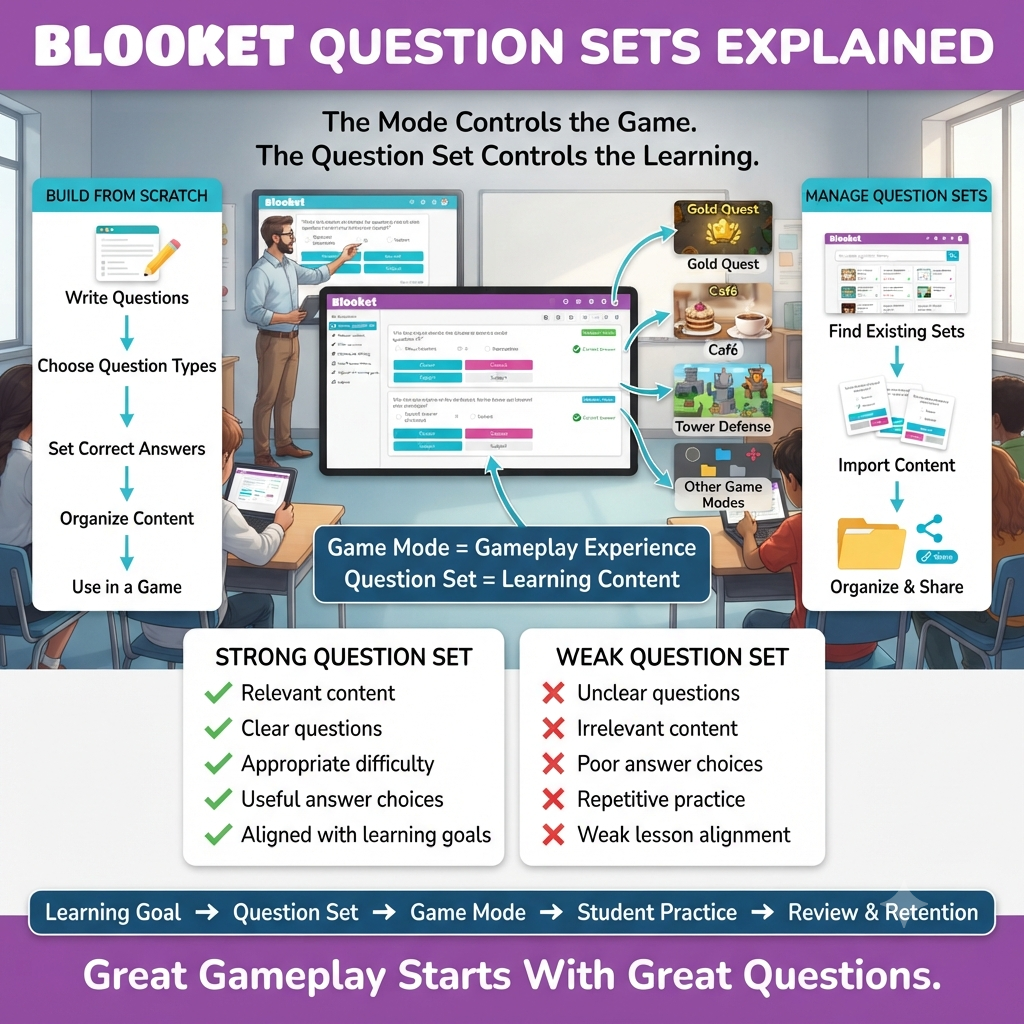
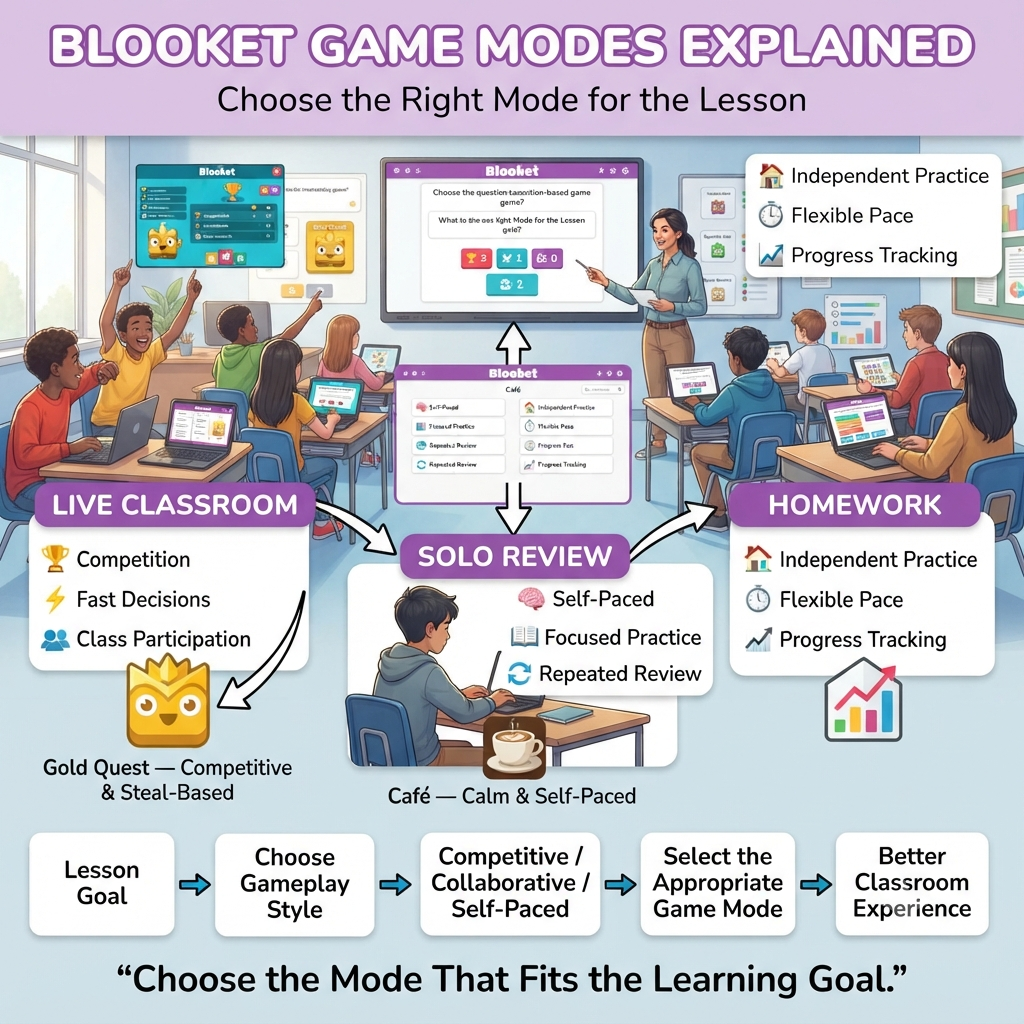
Blooket Question Sets Explained | Every Blooket game mode — Gold Quest, Café, Tower Defense, or any of the two dozen others — runs on top of the same foundation: a Blooket question set. The mode decides how the game feels; the question set decides what students actually learn. Get the set wrong, and even the most exciting mode falls flat. Get it right, and a five-minute Classic round can do more for retention than a worksheet ever could.
This guide focuses entirely on the content side of Blooket — what a question set actually is, the question types available, how to build one from scratch, and how to find, import, organize, and share sets without wasting a planning period. If you’ve ever wondered why one teacher’s Blooket question sets keep students locked in while another’s fall flat by question five, the difference almost always comes down to what’s covered here.
Looking for comprehensive classroom resources and educational technology insights? Explore GimkitApp for expert guides, teaching strategies, game modes, and the latest updates to enhance student engagement.
What Is a Blooket Question Set?
A Blooket question set is a collection of questions and answer choices that acts as the content engine behind every game mode on the platform. Think of it as the quiz itself, stripped of any game mechanics — the same set can be played through Gold Quest one day and assigned as Café homework the next, without changing a single question.
Each Blooket question set includes a title, an optional description, and a series of individual question cards. Every card holds the question text, a set of answer options, a marked correct answer (or answers), an optional image or equation, and a configurable time limit that defaults to 20 seconds per question.
💡 Pro Tip: Write your set’s title with enough detail that you can find it again in six months — subject, topic, and grade level in one line (“7th Grade: Cell Structure Vocabulary”) saves far more time than a vague title like “Science Quiz 3.”
Question Types Available in Blooket Question Sets
Blooket question sets support two core question formats, plus a common variation built from one of them.
Multiple Choice
Multiple Choice is the default and most widely used format. Each question offers between two and four answer options, and at least one must be marked correct — some educators intentionally mark more than one option as correct when a question legitimately has multiple right answers. This format works across every game mode and is the fastest to build at scale.
Typing Answer
Typing Answer questions require students to generate their own response instead of selecting one from a list. Because it isn’t the default format, it has to be selected manually from the question-type dropdown when building the card. This type suits short-answer recall — vocabulary terms, formulas, dates — where guessing from a list would undercut the assessment value.
True/False as a Multiple Choice Variant
Blooket doesn’t have a dedicated True/False question type, but the format is easy to replicate inside Multiple Choice: enter “True” as the first answer, “False” as the second, and leave the third and fourth options blank. Because there are only two real options, it’s worth turning off random answer ordering for these questions so True and False don’t swap positions in a way that feels inconsistent to students.
⭐ Expert Insight: Mixing question types inside a single Blooket question set — rather than sticking to Multiple Choice for all 20 questions — keeps self-paced modes like Factory or Tower Defense from feeling repetitive, since students have to shift their thinking between recognition and recall.
How to Build a Blooket Question Set From Scratch
Creating a set starts from the Create page, where a title and optional description come first, followed by individual question cards added one at a time.
For each card, the core fields are the question text, the answer options, the correct-answer selection, and the time limit. Media support extends both the question and the answers — an image or equation can accompany the question text, which matters most for visual subjects like geography, art, or diagrams in science.
📌 Quick Note: Blooket displays each question on a single screen during gameplay, so long paragraph-style prompts get cut off or force students to scroll under time pressure. Keep the question text short and put any necessary context in the accompanying image instead.
Once a card is saved, the process repeats for every remaining question, and the full set is automatically saved to the creator’s library, ready to be attached to any game mode.
⚠ Common Mistake: Leaving the default 20-second timer on every question regardless of difficulty. A vocabulary-recall question and a multi-step math problem don’t deserve the same amount of time — adjusting the limit per card, rather than per set, produces a much fairer game.
Public vs. Private Blooket Question Sets
Every Blooket question set can be marked either public or private, and this setting can be changed at any time after creation. A private set is visible only to its creator, which suits anything containing sensitive class-specific content or work still in draft form. A public set becomes searchable and playable by anyone browsing Blooket’s library, which is how the platform’s tens of millions of community-created sets accumulate over time.
✅ Best Practice: Keep a set private while you’re actively testing and revising it, then flip it to public once the questions have been run past students at least once — publishing an untested set risks spreading typos or unclear distractors to other classrooms that copy it.
Finding Existing Blooket Question Sets
Building from scratch isn’t required for every lesson. The Discover page lets teachers search the existing library of Blooket question sets by keyword, and results can be narrowed further by subject or grade level. A separate Curriculum section organizes verified, expert-created sets by subject and grade for teachers who want vetted content rather than community submissions of uneven quality.
Any public set found this way can be copied directly into a teacher’s own library, where it becomes fully editable — questions can be added, removed, or corrected without affecting the original creator’s version.
🔍 Did You Know? Because copied sets are fully independent once duplicated, two teachers using “the same” popular Blooket question set may actually be playing meaningfully different versions if one of them has since edited their copy.
Importing Questions Into a Blooket Question Set
For teachers migrating existing material, Blooket supports two import paths that avoid manual re-entry. Questions can be imported directly from Quizlet, converting an existing flashcard set into a playable Blooket question set in a few clicks. Alternatively, a spreadsheet — formatted with the expected columns for question text and answers — can be bulk-imported, which is the faster route when working from a large existing question bank or a colleague’s exported quiz.
Both import methods produce a normal, fully editable Blooket question set afterward, so imported questions can be reordered, retimed, or supplemented with images just like any manually created card.
AI-Generated Blooket Question Sets
Blooket integrates with Khanmigo to generate question sets automatically from a topic prompt. The tool produces a series of AI-generated question cards, each with a question and multiple-choice answers, which then need to be reviewed and edited before use — checking for accuracy is essential, since AI-generated content can misstate facts or produce implausible distractors.
One current limitation worth planning around: questions can’t be added directly to an already-saved AI-generated set through the Khanmigo tool itself. Adding more requires generating a second set on the same topic and then merging it into the first — a Blooket Plus feature.
Organizing a Growing Library of Blooket Question Sets
As a teacher’s library grows past a handful of sets, three organizational tools keep things manageable:
Folders group related Blooket question sets together — by unit, subject, or grading period — so the right one is never buried under dozens of unrelated titles.
The Question Bank allows individual questions to be pulled from any existing set into a new one, which is useful for building a custom review set out of the strongest questions from several smaller quizzes.
Merging combines two full sets into one, which matters most after an AI-generated set needs additional questions, or when two smaller topic-specific sets should become a single cumulative review.
For the latest gaming news, expert reviews, and walkthroughs, readers can also visit IGN, one of the world’s leading gaming websites.
Sharing, Copying, and Printing Blooket Question Sets
A Blooket question set can be shared with colleagues by generating a shareable link from the set’s settings menu — useful for a grade-level team standardizing on the same review material without each teacher rebuilding it independently.
For situations where digital gameplay isn’t practical — a sub day, a testing accommodation, or a take-home study guide — any set can be printed directly as a worksheet, with options to include or exclude the answer key and any attached images.
Best Practices for Writing Strong Questions
A Blooket question set is only as good as the individual questions inside it. A few habits separate sets that hold up under repeated play from ones that feel thrown together:
Write distractors (the incorrect answer options) that reflect real misconceptions rather than obviously wrong filler — a distractor no student would ever pick teaches nothing about where their understanding is weak.
Match the time limit to the cognitive load of the question rather than leaving every card at the default.
Avoid double negatives and overly complex phrasing, since Blooket’s single-screen display doesn’t give students room to reread a convoluted prompt under time pressure.
Vary question types across the set so self-paced modes don’t feel monotonous by question ten.
Common Mistakes When Building Blooket Question Sets
Publishing before testing. A set that hasn’t been played at least once tends to surface timing issues, ambiguous wording, or answer-key errors exactly when a live class is watching.
Overloading a single question with too much text. Because Blooket keeps every question on one screen, long prompts get visually cramped and rushed under a countdown timer.
Ignoring the Question Bank when building similar sets repeatedly. Recreating near-identical questions from scratch across multiple sets wastes time that pulling from existing cards would save.
Skipping the review step on AI-generated sets. Treating Khanmigo output as ready-to-play without checking each question invites factual errors into a live classroom session.
Frequently Asked Questions
What question types can I use in a Blooket question set?
Blooket question sets support Multiple Choice (two to four answer options, with one or more marked correct) and Typing Answer, where students type their own response. True/False questions are built using the Multiple Choice format with only two options entered.
Can I import an existing quiz into Blooket?
Yes. Blooket question sets can be built from an import rather than manual entry, either by pulling questions directly from Quizlet or by bulk-importing a correctly formatted spreadsheet.
What’s the difference between a public and private Blooket question set?
A private set is visible only to its creator, while a public set is searchable and playable by any Blooket user through the Discover page. This setting can be switched at any time after the set is created.
Can I edit a Blooket question set that I copied from someone else?
Yes. Copying a public set creates a fully independent version in your own library, which can be edited freely without changing the original creator’s set.
Is there a way to generate a Blooket question set automatically?
Yes, through Blooket’s integration with Khanmigo, which generates a starting set of AI-written questions from a topic prompt. These should be reviewed and corrected before use, since AI-generated questions can contain inaccuracies.
Professional Recommendations & Expert Reviews
Blooket Question Sets Explained helps teachers understand how question sets provide the academic foundation for interactive games.
Blooket Question Sets Explained shows how carefully prepared questions can turn gameplay into meaningful learning practice.
Blooket Question Sets Explained helps educators choose questions that match their lesson objectives.
Blooket Question Sets Explained encourages teachers to organize questions around specific topics and skills.
Blooket Question Sets Explained demonstrates why strong question quality matters as much as game selection.
Blooket Question Sets Explained helps teachers prepare focused review activities for their students.
Blooket Question Sets Explained supports lessons where students repeatedly practice important concepts.
Blooket Question Sets Explained encourages educators to keep questions relevant to the material being taught.
Blooket Question Sets Explained helps students review information through an interactive format.
Blooket Question Sets Explained can make repeated practice feel more engaging than traditional worksheets.
Blooket Question Sets Explained helps teachers build activities around vocabulary, mathematics, science, history, and other subjects.
Blooket Question Sets Explained encourages educators to consider student ability when preparing questions.
Blooket Question Sets Explained supports differentiated learning by allowing teachers to focus on different levels of difficulty.
Blooket Question Sets Explained helps educators reinforce concepts that students have recently learned.
Blooket Question Sets Explained encourages teachers to include questions that test understanding rather than simple recognition.
Blooket Question Sets Explained supports effective revision before quizzes and assessments.
Blooket Question Sets Explained helps teachers identify areas where students may need additional practice.
Blooket Question Sets Explained encourages educators to revise questions based on classroom performance.
Blooket Question Sets Explained supports flexible lesson planning because the same academic content can be used in different activities.
Summary
A great Blooket question set is what actually determines whether a game mode succeeds, not the other way around. Whether you’re writing questions from scratch, importing from Quizlet, generating a first draft with Khanmigo, or copying and adapting a set from the Discover library, the same fundamentals apply: clear question text, plausible distractors, sensible time limits, and a review pass before the set goes live in front of students. Master the content side, and every game mode built on top of it — from a competitive Gold Quest round to a quiet Café homework assignment — has a real foundation to work with.