Kahoot vs Quizizz:Two students can understand the same lesson and still need very different amounts of time.
One student reads a question, thinks for five seconds, and answers.
Another reads it twice, checks the image, eliminates two choices, and answers after thirty seconds.
A third student wants to skip the question, solve the easier items first, and return later.
That creates one of the most important questions in the Kahoot vs Quizizz comparison:
How much control does each platform give students over their own pace?
This is different from asking which platform has better games.
It is also different from Article #9’s Kahoot vs Gimkit discussion about overall classroom rhythm.
Here, the focus is specifically on learner control.
Can a student:
move ahead without waiting?
take longer without holding up classmates?
skip a difficult item?
return before submitting?
work asynchronously?
retry incorrect questions?
work independently during a live class?
switch from guided instruction into self-paced work?
complete the same lesson at a different rate from classmates?
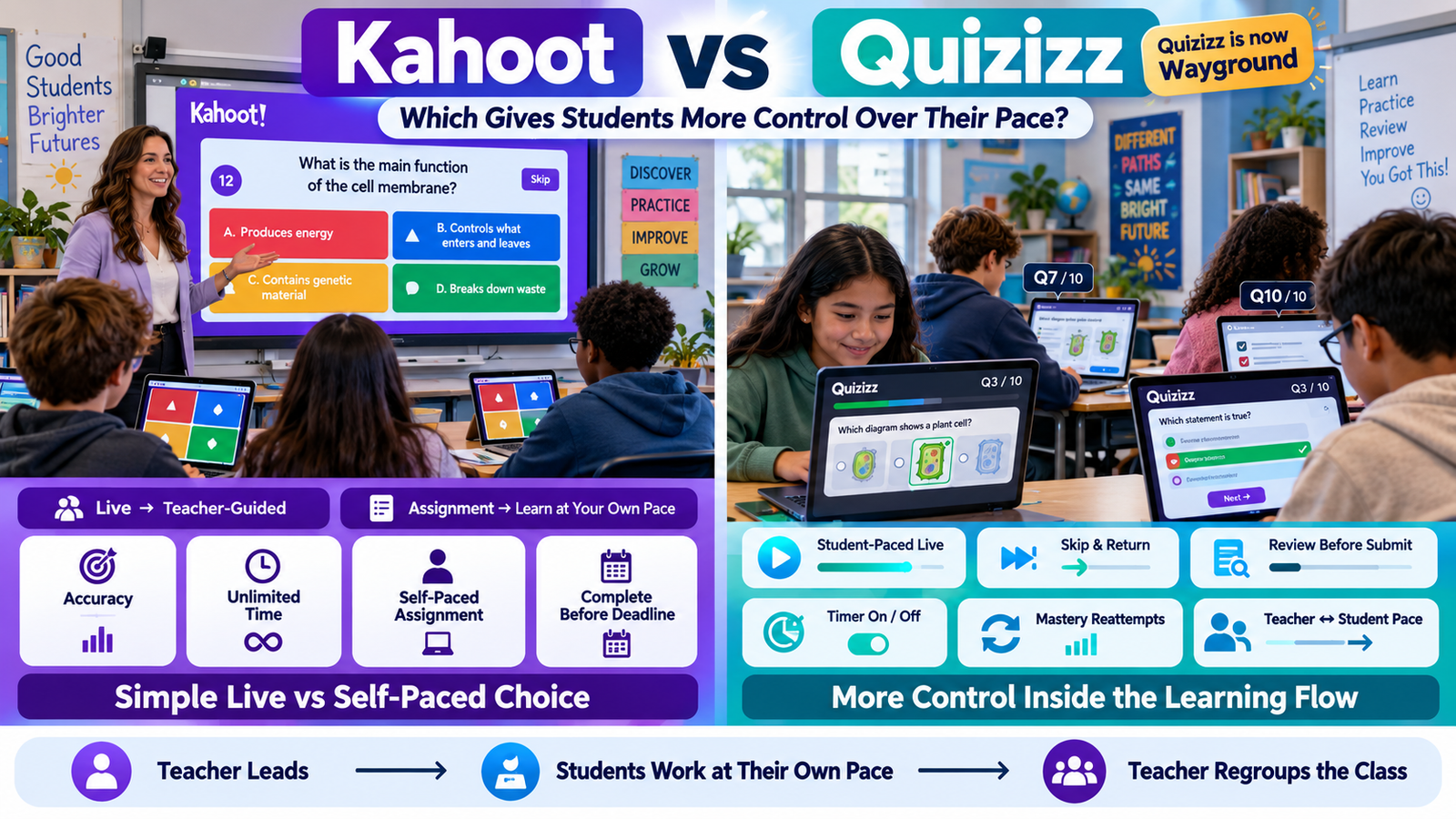
Current Wayground documentation makes pacing an explicit top-level live-session choice: teachers can select either Teacher-Led or Student-Paced mode. In Student-Paced mode, students move through content independently while the teacher monitors their progress. Wayground
Kahoot also supports learner-paced work, especially through Assignments, where participants move question-by-question at their own speed and can complete the activity any time before the host’s deadline. Its traditional hosted live experiences, however, remain much more centered on a shared host-controlled sequence. Kahoot! Help Center
That creates the core distinction:
Kahoot gives students strong pacing freedom when the activity is assigned asynchronously.
Wayground gives teachers more ways to let students control their own pace even while the class is participating in a live session.
That difference becomes extremely important in mixed-readiness classrooms.
Gimkit App offers practical guides, resources, and tips for teachers and students exploring interactive learning and educational games.
Kahoot vs Quizizz at a Glance
Student-pacing question
Kahoot
Quizizz / Wayground
Student-paced homework
Yes
Yes
Student-paced live class
Not the default structure of host-led Classic/Accuracy/Team play
Dedicated Student-Paced live category
Teacher-paced live option
Yes
Yes
Teacher chooses between teacher-led and student-paced live delivery
More experience-dependent
Explicit top-level choice
Students can progress independently during live assessment
Limited compared with Wayground’s dedicated structure
Yes
Remove per-question time pressure
Accuracy can use Unlimited time
Question Timer can be turned off
Skip questions and return later
Not a defining standard Kahoot assignment feature in reviewed docs
Yes, in supported modes
Mark questions for later review
No equivalent standard workflow verified in reviewed sources
Review & Submit in Test/Testing modes
Student chooses question order
Generally sequential
Available in specific assessment workflows
Retry missed questions
Practice after sessions; other study options
Practice/Accuracy/Mastery workflows
Switch from teacher-paced to student-paced inside a live lesson
No equivalent workflow verified in reviewed Kahoot docs
Yes, in Wayground Lessons
Teacher can pause student-paced work and bring class back together
Not the same documented model
Yes, in live Lessons
Independent homework deadline
Yes
Yes
Strongest pacing advantage
Simple asynchronous assignments
Fine-grained live + asynchronous pacing control
Wayground’s exact controls vary by resource and session mode, while Kahoot feature availability can vary by account or subscription. Wayground
First: Quizizz Is Now Wayground
Teachers still search for terms such as:
Kahoot vs Quizizz
Quizizz self paced vs Kahoot
Quizizz homework vs Kahoot
But the current product name is Wayground.
That means when this article discusses present-day Quizizz capabilities, it refers to the current Wayground platform.
Keeping the older keyword in the page title makes sense for search intent, but using the current product name throughout the factual comparison prevents outdated terminology from becoming the article’s main language.
What Does “Control Over Pace” Actually Mean?
Student pacing is more complicated than simply having a timer.
There are several separate forms of pacing freedom.
Response-time control
How long can I spend on this question?
Progression control
Can I move to the next question without waiting for everyone else?
Navigation control
Can I skip a question and return later?
Review control
Can I revisit and change an answer before submitting?
Schedule control
Can I complete the activity later rather than during one scheduled live period?
Retry control
Can I attempt missed material again?
Learning-path control
Can my part of the lesson temporarily move independently while classmates work at different speeds?
A platform might provide one of these and not another.
For example:
Unlimited time is not the same as self-paced progression.
A student may have unlimited time on Question 4 while the entire class still waits on Question 4.
True learner pacing goes further.
Kahoot Live Sessions Are Primarily Shared Experiences
Kahoot’s current live-hosting documentation lists experiences such as Classic, Accuracy, Team, Lecture, and several Student-led experiences. The host can adjust live settings before the game, in the lobby, between questions, and in some cases during the activity. Kahoot! Help Center
For traditional classroom use, however, live Kahoot remains closely connected to a host-controlled activity.
The teacher starts the session.
Students participate in that shared experience.
The host manages progression.
This is valuable when everyone should remain together.
But it gives students less freedom to independently move several questions ahead of classmates during a conventional teacher-hosted review.
Kahoot Can Reduce Time Pressure Without Becoming Fully Student-Paced
This is a very important distinction.
Kahoot’s Accuracy experience can remove response-speed scoring, and current live settings include an Unlimited time option for Accuracy. Kahoot! Help Center
That means a student can be given substantially more thinking time.
But consider the classroom structure.
Everyone may still be working within the same shared question stage.
Student A finishing early does not necessarily mean Student A independently moves three questions ahead.
The teacher has reduced time pressure.
The teacher has not necessarily transferred sequence control to every student.
These are different forms of flexibility.
Unlimited Time Is Valuable Even Though It Is Not Independent Progression
Unlimited time can still solve important problems.
A student may need more time because of:
reading load;
calculations;
language processing;
accessibility needs;
complex reasoning.
For that learner, the problem may not be:
“I want to move ahead faster.”
It may be:
“I do not want the countdown to determine when I must answer.”
Kahoot’s Accuracy experience can address that issue while preserving one shared classroom question. Kahoot! Help Center
So Kahoot provides meaningful pacing flexibility.
It simply expresses that flexibility differently from Wayground.
Kahoot Assignments Give Students Genuine Independent Pace
Kahoot becomes much more student-controlled when the teacher creates an Assignment.
Kahoot currently describes assignments as learner-paced activities where participants:
answer on their own devices;
move question-by-question at their own pace;
can complete the kahoot any time before the deadline;
Student pacing is not only an asynchronous homework feature.
It is part of the live classroom architecture.
The teacher can start a live session while allowing students to move through the questions independently.
The teacher remains present.
The session remains active.
The teacher receives live progress information.
But students do not have to stay on the same item.
Teacher-Led Wayground Keeps Everyone Together
Wayground’s Teacher-Led mode is the synchronized option.
Current documentation says the teacher controls when everyone moves to the next question so students focus on the same content simultaneously. Wayground
This works well when a teacher wants:
guided problem solving;
common discussion;
direct instruction;
immediate classwide feedback.
So Wayground does not force self-paced learning.
Instead, it offers pace as a deliberate choice.
That distinction matters.
A platform with student-paced tools is most useful when the teacher can still take control when instruction requires it.
Self-pacing does not automatically mean casual practice.
Wayground applies student-specific pacing to:
ordinary classroom quizzes;
mastery-focused practice;
formal assessment;
team competition.
This makes pacing a platform-level design choice rather than a single special-purpose mode.
Classic Mode: Students Move Independently
Wayground’s current Classic live mode allows students to progress at their own pace while the teacher sees live results and leaderboard information. Wayground
For a teacher, this creates an interesting hybrid:
live class
plus
independent progression.
Students are not doing homework later.
They are all participating now.
But “now” does not mean “same question.”
That distinction is central to the Wayground experience.
Student-Paced Does Not Mean Teacher-Blind
A common concern is:
“If students all move independently, how do I know what is happening?”
Wayground’s student-paced model is designed so the teacher can monitor live progress while students move individually. Wayground
That gives the teacher useful separation between:
control of student sequence
and
visibility into student progress.
Students gain autonomy.
The teacher does not have to give up oversight.
Wayground Test Mode Shows That Self-Pacing Can Also Be Formal
Wayground’s current Test Mode is a student-paced live mode designed for formal assessment with a lower-distraction environment. Wayground
This is important because some teachers associate self-paced platforms only with games.
But assessment conditions often benefit from individualized pacing.
One student may spend:
30 seconds on Question 1.
Another may spend:
90 seconds.
As long as the assessment rules allow it, there may be no instructional reason for their progress to remain synchronized.
Test Mode reflects that logic.
Wayground Team Mode Still Lets Individuals Work at Their Own Pace
Wayground’s current Team Mode allows students to answer at their own pace while their performance contributes to the team’s overall score. Wayground
This creates an unusual combination:
individual pace + shared team outcome.
Students do not necessarily need to wait for teammates before answering the next question.
Their independent work still contributes to something collective.
That can reduce one drawback of conventional team quizzes, where the fastest or most vocal student controls the group’s timing.
Mastery Peak Connects Pace With Reattempts
Wayground’s Mastery Peak mode combines student progression with mastery-oriented repetition.
Current documentation says students work toward an accuracy goal and reattempt questions previously answered incorrectly while progressing through the experience. Wayground
The important point for this article is not the game mechanics.
It is that pacing is not simply:
finish as quickly as possible.
A student may need to revisit incorrect material.
Their pathway through the activity can therefore depend partly on performance.
That creates a more mastery-oriented meaning of “pace.”
Fast Is Not Always the Goal
Student control should not be confused with allowing students to rush.
A well-designed self-paced environment permits:
slowing down;
moving ahead;
revisiting;
retrying;
focusing effort where needed.
The goal is appropriate pace, not maximum speed.
This is why controls such as:
timer settings;
skip-and-return;
review before submission;
mastery reattempts
matter more than simply removing teacher advancement.
Wayground Gives Teachers More Question-Timer Choices
Wayground’s current session settings provide several Question Timer behaviors.
Teachers can configure the timer to:
display a countdown while still allowing answers after time expires;
These choices create meaningfully different pacing environments.
A visible timer can provide structure without necessarily blocking a slower student.
A locked timer creates strict timing.
No timer removes question-level time pressure.
The teacher can therefore separate:
pace guidance
from
hard time limits.
A Visible Timer Does Not Have to Be a Deadline
Wayground’s option to show a countdown while still accepting late answers is particularly useful.
The timer can communicate:
“Most students should aim to finish around here.”
without saying:
“Once zero appears, you lose the chance to answer.”
That can help classrooms where students benefit from pacing cues but should not be punished simply for requiring more processing time.
It is a subtle but useful distinction.
Turning the Timer Off Gives Students More Natural Response Time
For deeper questions, disabling the timer can be appropriate.
Students can spend the time they actually need.
This is especially useful for:
long reading prompts;
calculations;
analysis;
multi-step reasoning.
Wayground still lets the teacher control the broader session.
Turning off one question timer does not mean abandoning structure.
It simply shifts timing control away from a countdown.
Wayground Lets Students Skip Difficult Questions
One of Wayground’s strongest learner-control settings is Skip questions and attempt later.
Current session settings say this can be enabled in supported Classic, Team, Test, and Homework modes. Skipped questions are moved so students can revisit them after working through other items. Wayground
This creates a very different assessment strategy.
Instead of being trapped on one difficult question, a student can say:
“I will return to this.”
and continue.
That is not simply faster pacing.
It is pacing strategy.
Why Skipping Can Matter Academically
Students often lose time because of one difficult question.
Without skip functionality, a learner may have to choose between:
guessing;
spending too long;
becoming frustrated.
Allowing a question to be revisited gives the learner another option:
protect time now, return later.
This mirrors a common test-taking strategy used in many assessment environments.
It is especially useful when the teacher is measuring overall understanding rather than ability to answer every question strictly in sequence.
Skip-and-Return Gives Students Control Over Difficulty Order
Question order is usually teacher-created.
Difficulty experience is student-specific.
Question 8 may be easy for one student and difficult for another.
If every learner must follow the same fixed route without skipping, the teacher’s sequence controls everyone’s experience.
When skipping is enabled, the student gains some control over:
when to spend effort on a difficult item.
That is a deeper type of pacing autonomy.
Wayground Review & Submit Goes Further
In supported Test and Testing modes, Wayground offers Review & Submit.
Current documentation says students can mark questions for review, return to them later, and edit their answers before finishing the session. When Review & Submit is enabled, the Question Timer is automatically disabled. Wayground
This is one of the strongest student-control features in the comparison.
The student can manage not only:
how fast
but also:
in what order to finalize the assessment.
Review & Submit Changes the Student’s Role
Without review control, the student experience is:
answer → move on → hope it was right.
With Review & Submit:
answer → mark uncertainty → finish other questions → return → reconsider → submit.
That creates a more deliberate assessment process.
The student becomes responsible for managing their own uncertainty.
That is a different kind of learner autonomy from simply completing homework whenever they want.
Wayground Can Let Students Navigate Assessment Questions More Freely
Wayground’s current student guidance for Common Assessments describes tools including:
This creates a flexible practice environment where the teacher can decide how much autonomy students receive.
Wayground Accuracy Mode Gives Pace a Mastery Goal
Wayground’s asynchronous Accuracy Mode is designed around repeated practice until students work toward a teacher-defined accuracy target.
Current settings include mastery goals and reattempts per question. Wayground
This changes the meaning of completion.
A student’s session does not need to be defined only by:
“Did you reach the final question?”
Instead, it can emphasize:
“Did you reach the required accuracy?”
That is particularly useful for practice where mastery matters more than finishing first.
Kahoot Also Supports Correcting Missed Questions
Kahoot’s study workflow currently includes an option for learners to practice questions they got wrong after a live game or assignment, including a Correct missed questions pathway in supported app use. Kahoot! Help Center
So Kahoot does provide a route from:
attempt → identify mistakes → practice missed material.
This is useful for independent follow-up.
The difference is that Wayground embeds several mastery and reattempt controls more deeply into specific live and asynchronous session modes.
The Biggest Wayground Advantage: Switching Pace During a Lesson
One of the strongest current Wayground features for this entire comparison appears in Lessons.
Wayground says live Lessons can begin under teacher control and then switch into student-paced mode during the same lesson.
The teacher chooses where the student-paced section should end.
Students then progress independently while the teacher monitors completion and accuracy. Wayground
This creates a powerful instructional structure:
I do → we do → you do
without needing to end one activity and launch another.
Teacher-Paced to Student-Paced Is More Than a Convenience
Consider a math lesson.
Stage 1 — Teacher-paced
The teacher models the strategy.
Everyone sees the same example.
Stage 2 — Guided question
The class solves one together.
Stage 3 — Student-paced
Students work through several practice questions independently.
Fast students move ahead.
Students who need more processing time remain on earlier questions.
Stage 4 — Return to teacher control
The teacher brings everyone together.
This is not merely assignment pacing.
It is dynamic pacing inside instruction.
Wayground currently supports this type of transition in live Lessons. Wayground
Teachers Can Pause Student-Paced Wayground Work
Wayground’s current Lesson documentation says teachers can pause student-paced gameplay to discuss a question.
Students are then prompted to look at the teacher’s screen, and annotation tools can be used for explanation. Wayground
This solves one of the biggest problems with self-paced learning:
How do I get everyone back together when I need to teach?
The answer does not have to be:
end the self-paced activity.
The teacher can interrupt independence strategically.
Student Autonomy Does Not Require Teacher Surrender
This Wayground feature demonstrates an important principle.
A classroom does not need to choose permanently between:
teacher control
and
student control.
The teacher can decide:
“You control your pace for the next five slides.”
Then:
“Stop. We need to discuss this.”
Then:
“Continue.”
That kind of flexible release can be more useful than either fully synchronized or fully independent instruction by itself.
Kahoot Does Not Document the Same Mid-Lesson Pace Switching Workflow
In the current official Kahoot sources reviewed for this article, I found strong separation between:
I did not find an equivalent documented workflow where a teacher moves a conventional live lesson into a bounded student-paced section and then brings students back within the same lesson in the same way Wayground documents.
That does not mean Kahoot lacks flexible teaching options.
It means Wayground currently documents this particular pacing workflow more explicitly and deeply.
Interactive Videos Show Another Student-Pacing Difference
In student-paced Classic use, teachers can also configure options such as whether learners may skip video content and whether playback speed can increase.
This extends pace control beyond quizzes.
The question becomes not only:
How fast do I answer?
but:
How independently do I move through instructional media?
That gives Wayground’s pacing model a broader reach across resource types.
Wayground Passages Can Give Students Navigation Control
Wayground’s Passage experience lets students view reading material alongside its questions.
Current documentation says students can navigate between questions and, in that Passage workflow, questions do not necessarily have to be answered in the order presented. Wayground
For reading comprehension, that can matter.
A student may:
answer an easy evidence question first;
return to a more interpretive question;
reread the passage;
switch between the reading and question list.
That is more flexible than a strictly linear one-question-at-a-time path.
Student Pace Is Also About Managing Cognitive Load
A student can become overwhelmed when the system dictates:
this question now, this long, move immediately.
More flexible navigation can reduce that pressure.
For example, allowing a difficult question to be postponed lets the student continue experiencing success elsewhere in the assessment.
That does not necessarily make the test easier.
It changes how the learner manages the test.
This is particularly valuable when the objective is knowledge rather than rigid sequential processing.
But More Student Control Is Not Always Better
A teacher should not automatically maximize every pacing option.
Some students benefit from strong structure.
If every learner can:
skip;
revisit;
move independently;
choose pace;
some may procrastinate on difficult items or manage time poorly.
Other students benefit enormously from that autonomy.
The question is not:
How much control can the platform provide?
It is:
How much control does this activity need?
Teacher-Paced Learning Still Has Important Advantages
Keeping everyone together can be better when:
content is new;
questions depend on a shared explanation;
students need modeling;
misconceptions should be corrected immediately;
the teacher wants discussion after each prompt.
Wayground supports this through Teacher-Led mode. Wayground
Kahoot’s traditional live hosting also fits naturally here. Kahoot! Help Center
Student pacing should not replace teacher-led instruction when synchronization serves learning.
Student-Paced Learning Is Stronger for Practice
Self-pacing is especially valuable after the teacher has already taught the concept.
Students may now need:
repetition;
retrieval;
independent application;
additional practice;
test preparation.
At that stage, forcing thirty learners to progress at one identical speed may provide little instructional value.
Student-paced modes can make better use of the same classroom time.
Mixed-Speed Classes Reveal the Biggest Difference
Imagine a class of 30 students.
Ten complete most questions quickly.
Fifteen work at a typical pace.
Five need substantially longer.
Shared live structure
The teacher constantly balances:
too fast for some
against
too slow for others.
Student-paced structure
Each student proceeds according to individual response time.
The teacher can intervene where needed.
Wayground’s live student-paced modes are designed directly around this second model. Wayground
Kahoot handles it more naturally through assignments or through live settings that reduce time pressure.
The Fast Student Problem
Fast students can disengage if they repeatedly wait after answering.
A live student-paced Wayground session lets them continue. Wayground
Kahoot assignments provide the same advantage outside a synchronized live session. Kahoot! Help Center
The important instructional question is:
Do I want fast students moving ahead?
Sometimes yes.
Sometimes the discussion they would miss is more valuable than additional questions.
The Slow Student Problem
A learner who requires more time can experience synchronized games as constant pressure.
There are two main solutions.
Kahoot solution
Reduce speed pressure through options such as Accuracy and Unlimited time. Kahoot! Help Center
Wayground solution
Use Student-Paced delivery so that individual response speed does not determine classmates’ progression. Wayground
Neither is automatically better.
They reflect different philosophies.
Kahoot Preserves the Social Value of Shared Pace
A shared sequence has benefits.
Students hear:
teacher explanations;
peer reactions;
common discussion.
Everyone builds from the same question at approximately the same moment.
If the teacher values this common classroom conversation, letting every student move independently may weaken it.
Kahoot’s host-led live model remains strong when the social and instructional benefits of synchronization matter.
Wayground Can Combine Individual Pace With Live Teacher Monitoring
Wayground reduces that tradeoff somewhat because Student-Paced mode can still happen during a live session.
The teacher can watch real-time progress instead of waiting until homework is submitted. Wayground
That creates a hybrid:
students progress independently
while
teacher remains present and informed.
This can be particularly useful for workshops, intervention blocks, and differentiated classroom practice.
Question Timer vs Student Pace
These concepts should never be treated as synonyms.
A platform can have:
No question timer
but still require the class to progress together.
Or:
Student-paced progression
while still using timers on individual questions.
Wayground makes these controls separable. Its session settings allow different timer behavior across supported modes while student-paced delivery remains a separate session choice. Wayground
This gives the teacher finer control over the learning environment.
Four Different Pace Designs
A teacher can think about pacing in four possible combinations.
Structure
What it means
Shared pace + timer
Everyone together with time pressure
Shared pace + no timer
Everyone together without countdown pressure
Student pace + timer
Students progress independently but have limits per item
Student pace + no timer
Students control both progression and response time
Kahoot and Wayground can both occupy more than one position in this framework.
Wayground currently exposes more of these combinations directly through its live session and timer settings. Wayground
Formal Testing Requires Different Pacing Rules
A classroom game and a formal test should not automatically use identical pacing.
For formal assessments, students may need to:
skip;
return;
review;
manage a total session window.
Wayground’s Test/Testing workflows can support Review & Submit and skip-and-return options. Wayground
Those tools make its pacing model closer to conventional computer-based testing.
Kahoot’s strongest self-paced workflow is simpler and particularly accessible for ordinary assignments.
Review & Submit Can Reduce the Cost of One Difficult Question
Without review navigation, a student facing one difficult question may lose several minutes.
The teacher can shape independent work more precisely.
Which Is Better for Live Student-Paced Learning?
Wayground has the clearer structural advantage.
Its current live-session architecture explicitly provides Student-Paced modes where learners progress independently while teachers monitor live results. Wayground
Kahoot provides excellent learner-paced Assignments, but its standard hosted live experiences are not documented around the same broad live self-paced structure. Kahoot! Help Center
This is the biggest conclusion of Article #11.
Which Is Better When Everyone Must Stay Together?
Both are strong.
Wayground has Teacher-Led mode.
Kahoot’s traditional live-hosting structure is naturally suited to shared progression. Wayground
If synchronization is the goal, neither platform requires a compromise.
The comparison changes only when students need to move independently.
Which Is Better When Students Need Different Amounts of Time?
There are two good solutions.
Kahoot
Use an assignment when full self-pacing is appropriate, or use Accuracy/Unlimited time when the class should stay synchronized without strict time pressure. Kahoot! Help Center
Wayground
Use Student-Paced live mode or asynchronous modes and configure the Question Timer appropriately. Wayground
Wayground offers more combinations.
Kahoot offers a simpler division between live and assigned use.
Which Is Better for Students Who Want to Skip and Return?
Wayground currently has the clearer advantage.
Its Skip Questions setting can allow students to move past a difficult item and attempt it later in supported modes. Wayground
Review & Submit adds the ability to mark questions for later reconsideration in supported assessment modes. Wayground
I did not find an equivalent general Kahoot assignment workflow documented in the current sources reviewed for this article.
Which Is Better for Students Who Need to Stop and Resume Later?
Kahoot assignments support saved progress in the mobile app and certain browser/workspace configurations, letting students continue later. Kahoot! Help Center
Wayground asynchronous sessions are also built for completion across the assigned window, with start/end settings and homework-style participation. Wayground
For ordinary asynchronous work, both can support greater schedule flexibility than a one-time live session.
Which Is Better for Mastery Rather Than Speed?
Wayground currently provides more explicitly mastery-oriented pacing options through:
Kahoot also supports correcting missed questions after activities and removes speed scoring in its live Accuracy experience. Kahoot! Help Center
So both can move beyond speed.
Wayground currently exposes more formal controls around repeated attempts and mastery thresholds.
Which Is Better for an “I Do, We Do, You Do” Lesson?
Wayground’s live Lessons have the stronger current fit.
The teacher can begin in teacher-paced mode, switch students into a bounded student-paced section, monitor progress, pause them for discussion, and return control as needed. Wayground
That architecture maps directly onto gradual release:
I do → we do → you do → regroup
without creating a separate assignment.
Which Is Better for Teachers Who Want Fewer Settings?
Kahoot can be easier conceptually.
The teacher can make one basic choice:
live together
or
assign for independent completion.
That clarity is valuable.
Wayground’s additional modes and settings offer more control, but more decisions also mean more setup.
A feature is useful only when the teacher actually needs the decision it exposes.
A 10-Minute Classroom Practice Example
Imagine students already know the topic.
The teacher wants ten minutes of independent practice but still wants to see how everyone is doing.
Kahoot approach
The teacher could create a learner-paced assignment.
Students move independently.
The activity functions more like asynchronous/self-paced work. Kahoot! Help Center
Wayground approach
The teacher can begin a live Student-Paced session.
Students move independently while the teacher monitors progress during those ten minutes. Wayground
For this exact scenario, Wayground’s live structure is more naturally aligned.
A Guided Lesson Example
Now imagine a new concept.
The teacher wants:
5 minutes explanation → 5 minutes independent practice → class discussion → more independent practice.
Wayground’s live Lesson system can switch students into student-paced sections and pause them when discussion is needed. Wayground
This creates one continuous learning experience rather than separate tools for instruction and independent work.
A Homework Example
The teacher simply wants:
Finish this review before Friday.
Kahoot’s assignment workflow handles this cleanly.
Students progress at their own pace and complete the activity before the deadline. Kahoot! Help Center
Wayground can also handle the same requirement.
The difference becomes meaningful only when the teacher wants additional controls such as:
In a Wayground assessment configured with supported Skip and Review & Submit controls, the student can postpone and revisit items before submission. Wayground
This provides stronger student management of the testing sequence.
For formal assessments, that can be more important than gamification.
A Mixed-Readiness Example
Suppose the teacher has:
students who need 20 seconds;
students who need 60 seconds;
students who need two minutes.
If everyone must stay synchronized, there is no perfect timer.
Kahoot can reduce pressure with Unlimited time under Accuracy when appropriate. Kahoot! Help Center
Wayground can instead remove the need for one shared pace through a Student-Paced session. Wayground
Those are fundamentally different solutions to the same classroom problem.
A Reading Passage Example
A student reads an article and wants to answer the straightforward evidence questions before tackling a difficult inference question.
Wayground’s Passage workflow can support navigating among questions rather than requiring every item to be completed strictly in order. Wayground
That type of control can help students allocate attention strategically.
It may also better reflect how students manage longer assessment tasks.
A Video Lesson Example
Some students understand a section quickly.
Others need longer.
Wayground Interactive Videos support both Teacher-Led and Student-Paced live delivery. Wayground
This means a video-based lesson can follow either:
one teacher-controlled playback structure
or
individual student progression
depending on the instructional need.
This broadens student pacing beyond conventional quizzes.
Student Pacing and Accountability Must Be Balanced
Self-paced learning has obvious advantages.
But teachers also need to know:
Who is actually progressing?
Who is stuck?
Who is rushing?
Who stopped working?
Wayground’s live student-paced sessions maintain teacher monitoring while students work independently. Wayground
This is an important design principle:
student control works best when teacher visibility remains strong.
More Pace Control Can Reveal More About Student Behavior
If students can skip questions, a teacher may learn:
which questions students avoid.
If they can mark questions for review, a teacher may learn:
where uncertainty exists.
If they work student-paced, a teacher may notice:
which learners consistently need more time.
The pacing system itself can therefore generate useful instructional information.
It is not only a convenience feature.
Do Not Confuse Finishing First With Learning Better
A self-paced environment can accidentally encourage students to race.
Teachers should make expectations clear.
The goal is not:
finish before everyone else.
The goal is:
use the amount of time needed to answer thoughtfully.
This is especially important when the platform includes:
leaderboards;
scores;
power-ups.
Student autonomy should increase control over learning, not create another speed competition.
Pacing Should Match the Cognitive Task
A strong pacing decision begins with the question type.
Factual recall
Faster progression may be reasonable.
Multi-step mathematics
More time may be necessary.
Reading comprehension
Students may need to move between passage and questions.
Formal assessment
Skip/review tools may matter.
Guided instruction
Teacher-paced sequencing may matter more than individual speed.
Mastery practice
Reattempts may matter more than finishing once.
The teacher should choose pacing after defining the thinking students need to do.
A Practical Teacher Decision Framework
Use Kahoot when your priority is:
a simple distinction between live and assigned learning;
host-led shared classroom sessions;
easy learner-paced homework;
removing speed pressure while preserving shared live questions;
straightforward independent completion before a deadline.
Use Wayground when your priority is:
student-paced progress during a live class;
choosing teacher-led or student-paced delivery per session;
switching from teacher-paced to student-paced inside a Lesson;
pausing independent progress for teacher discussion;
skipping questions;
returning to questions;
reviewing answers before final submission;
turning timers off or changing timer behavior;
mastery-oriented reattempts;
fine-grained asynchronous controls.
Student-Pacing Decision Table
Teaching need
Stronger structural fit
Traditional shared live quiz
Kahoot or Wayground Teacher-Led
Simple learner-paced homework
Both
Student-paced live classroom quiz
Wayground
Students work at different rates while teacher monitors
Wayground
Remove speed pressure but keep class together
Kahoot Accuracy
Turn question timer completely off
Wayground
Skip difficult questions
Wayground
Return to skipped questions
Wayground
Mark questions for review
Wayground supported Test workflows
Change answers before final submission
Wayground Review & Submit
Resume an assigned activity later
Kahoot supports this in documented assignment contexts; Wayground homework is asynchronous
Mastery target and repeated attempts
Wayground
Practice missed questions afterward
Both have relevant workflows
Switch from teacher-led to self-paced during same lesson
Wayground
Pause independent learners and bring everyone back
Wayground Lessons
Teacher wants minimal configuration
Kahoot has the simpler mental model
The Most Important Difference
The biggest difference can be stated in one sentence:
Kahoot mainly separates teacher-led live learning from student-paced assignments.
Wayground lets student pacing operate as a live classroom mode as well as an asynchronous mode.Wayground
That is the key information territory of Article #11.
Everything else follows from it.
Frequently Asked Questions About Kahoot vs Quizizz
Is Quizizz still called Quizizz?
Quizizz is now known as Wayground. Teachers still search heavily for “Quizizz,” which is why a comparison may retain Kahoot vs Quizizz as its focus keyword, but current functionality should be described using Wayground terminology.
For teachers, the practical point is that modern comparisons need to evaluate the current Wayground session system rather than treating older Quizizz workflows as permanently frozen. This is especially important for student pacing because Wayground now explicitly organizes live sessions around Teacher-Led and Student-Paced options. Wayground
Is Kahoot or Quizizz better for self-paced learning?
Both support self-paced learning, but Wayground currently provides the broader pacing system. Kahoot Assignments allow learners to complete activities at their own speed any time before a deadline. Questions appear on the learner’s device, and the host does not present them live. Kahoot! Help Center
Wayground supports asynchronous learning too, but it also offers live Student-Paced modes. Students can therefore move independently while the class session is still happening and the teacher monitors progress. Wayground
For homework alone, both are strong. For live student-paced learning, Wayground has the clearer current advantage.
Can students work at their own pace in a live Wayground session?
Yes. Wayground’s current live-session system explicitly offers a Student-Paced option. Students progress independently rather than mirroring the teacher’s screen, while the teacher can monitor their live performance. Wayground
Student-Paced delivery currently includes modes such as Classic, Mastery Peak, Test, and Team, with availability depending on the resource type. This means student pacing is not limited to homework; it can operate during a real-time classroom session.
Can Kahoot students work at their own pace?
Yes, especially through Kahoot Assignments. Participants move through assigned questions at their own speed, and the activity can be completed any time before the host’s deadline. Kahoot! Help Center
Kahoot’s traditional live hosted experiences are more synchronized and host-controlled. Accuracy can remove speed-based scoring and even provide Unlimited time, but that is different from letting every student independently move through several questions at different rates. Kahoot! Help Center
Does unlimited time in Kahoot mean the activity is self-paced?
Not necessarily.
Kahoot’s Unlimited time option in Accuracy removes the per-question time limit, which is valuable for students who need extra processing time. Kahoot! Help Center
However, a class can still remain within the same shared question stage. Student A finishing early does not automatically mean Student A independently advances several questions ahead.
So unlimited response time and independent progression should be treated as two different pacing features.
Can Wayground students skip questions and answer them later?
Yes, in supported modes when the teacher enables the Skip questions and attempt later setting. Wayground currently documents this option for modes including Classic, Team, Test, and Homework across supported resource types. Wayground
Skipped questions can be revisited after other questions have been attempted. This gives students more control over how they allocate their time, especially when one difficult item would otherwise block their progress.
Can Wayground students mark questions for review?
Yes, in supported Test and Testing workflows when Review & Submit is enabled.
Students can mark items for later review, return before submitting, and edit their answers. Wayground says enabling Review & Submit automatically disables the Question Timer. Wayground
This gives students a test-taking workflow closer to many formal digital assessment systems, where the learner manages which questions deserve a second look.
Can Wayground students answer questions in a different order?
In some resource and assessment workflows, yes. Wayground supports skip-and-return behavior, Review & Submit in supported testing modes, and navigation among questions in contexts such as Passages. Wayground
The exact navigation options depend on the resource type and teacher settings, so teachers should verify the mode they plan to use rather than assuming every session provides unrestricted navigation.
Can teachers turn off the Wayground question timer?
Yes. Wayground’s current Question Timer settings include an Off option.
Teachers can also display a countdown while still allowing responses after the timer reaches zero, or enforce a timer that locks submissions when time expires. Wayground
This provides more nuanced control than simply choosing “timed” or “untimed,” because a teacher can use the countdown as pacing guidance without necessarily making it a hard deadline.
Can Wayground switch from teacher-paced to student-paced during a lesson?
Yes. Current Wayground Lesson documentation says teachers can move a live Lesson into Student-Paced mode, choose where that independent section should end, and monitor students as they progress. Wayground
Teachers can also pause student-paced gameplay to discuss a question and redirect student attention to the teacher’s screen. Wayground
This makes Wayground particularly useful for lessons that move between direct instruction and independent practice.
Can Kahoot assignments be completed later?
Yes. Kahoot Assignments are designed for asynchronous completion before a teacher-set deadline. Kahoot! Help Center
Kahoot also documents saved progress and resumability in the mobile app, while browser resume availability depends on the specific subscription/workspace assignment setup. Kahoot! Help Center
That can be useful when students cannot or should not complete the entire activity in one sitting.
Which is better for students who answer much faster than classmates?
Wayground’s live Student-Paced modes directly address this situation because faster learners can continue through the session rather than waiting for every classmate to finish the same item. Wayground
Kahoot can provide similar independence through Assignments, but a conventional teacher-hosted live Kahoot is more likely to retain shared progression. Kahoot! Help Center
Whether moving ahead is desirable depends on whether those students would otherwise miss valuable whole-class discussion.
Which is better for students who need more time?
Both platforms have useful solutions.
Kahoot can reduce shared live time pressure through Accuracy and Unlimited time. Kahoot! Help Center
Wayground can allow students to progress independently in Student-Paced mode and can disable the Question Timer entirely. Wayground
Choose Kahoot when the student should remain with the class but needs additional thinking time. Choose student-paced Wayground when different students should be allowed to move through different questions at different rates.
Does Wayground have self-paced homework?
Yes. Wayground offers asynchronous homework modes designed for independent completion, including Practice, Accuracy, and Testing modes. Wayground
Depending on the mode, teachers can configure settings such as question timers, attempts, late submissions, mastery goals, skip functionality, differentiated versions, and feedback.
This allows self-paced homework to be configured differently depending on whether the goal is practice, mastery, or formal assessment.
Does Kahoot let students correct questions they missed?
Kahoot currently provides post-session study options in supported app workflows, including Correct missed questions, allowing learners to revisit questions they previously answered incorrectly. Kahoot! Help Center
This gives students a useful remediation pathway after live games or assignments.
Wayground also supports various mastery and retry structures, including Mastery Peak and asynchronous Accuracy Mode. Wayground
Which is better for formal testing where students should skip and return?
Wayground has the stronger current documented workflow.
Its Test/Testing modes can use Review & Submit, skip-and-return settings, and question navigation controls depending on configuration. Wayground
These tools let students manage their own test sequence rather than being forced permanently through one linear path.
Kahoot’s learner-paced assignments are strong for straightforward independent assessment, but the official sources reviewed here do not describe the same general level of navigation and review control.
Which platform gives teachers more control over student pacing?
Wayground gives teachers more granular choices around how much pacing control to hand over.
A teacher can choose Teacher-Led or Student-Paced live delivery, configure timers, permit skipping, enable review controls, select mastery-oriented modes, and create asynchronous sessions. Wayground
Kahoot’s model is simpler: hosted live experiences remain strongly teacher-directed, while Assignments provide learner-paced completion. Kahoot! Help Center
Both approaches can be effective; Wayground exposes more intermediate pacing configurations.
Which platform is better for an “I do, we do, you do” teaching model?
Wayground’s live Lessons are especially well suited to that structure.
Teachers can begin with a teacher-paced section, transition into Student-Paced mode for independent work, monitor learners in real time, pause them if a misconception needs discussion, and then continue. Wayground
That makes pacing itself part of the lesson design rather than requiring the teacher to launch entirely separate activities for guided and independent practice.
Final Takeaway
The central Kahoot vs Quizizz pacing question is not:
“Which one supports self-paced learning?”
Both do.
The more useful question is:
“Where and how deeply can students control their pace?”
Kahoot provides a clean two-part model.
For shared classroom play, teachers host a live session.
For learner-paced work, teachers create an Assignment, and students move through it at their own speed before the deadline. Kahoot can also reduce live time pressure through Accuracy and Unlimited time. Kahoot! Help Center
That model is simple and effective.
Wayground goes further by making Student-Paced an explicit live-session architecture.
Students can move through a live class activity independently while the teacher watches progress. Teachers can also configure timers, allow students to skip and revisit questions, enable Review & Submit for supported assessments, use mastery-focused modes, and move live Lessons between teacher-paced and student-paced sections. Wayground
So for this article’s exact search intent:
Kahoot gives students strong pace control in learner-paced Assignments and lets teachers reduce time pressure during synchronized live activities.
Wayground gives students broader control over pace across both live and asynchronous learning, including more control over progression, navigation, review, and reattempts.
For simple:
“Complete this on your own before Friday,”
both platforms work well.
For:
“We are all in class together, but each student should work at the pace that fits them,”
Wayground currently provides the more purpose-built structure.
And for:
“Start together, practice independently, then regroup without leaving the lesson,”
Wayground’s live Lesson pacing controls offer a particularly distinctive workflow. Wayground
The best pacing system is not the one that lets students move fastest.
It is the one that gives each learner enough control to think, progress, revisit, and practice without removing the teacher’s ability to guide the learning when guidance is needed.