Gimkit vs Nearpod: Teachers researching Gimkit vs Nearpod often assume they’re comparing two similar “interactive classroom” tools. They aren’t.
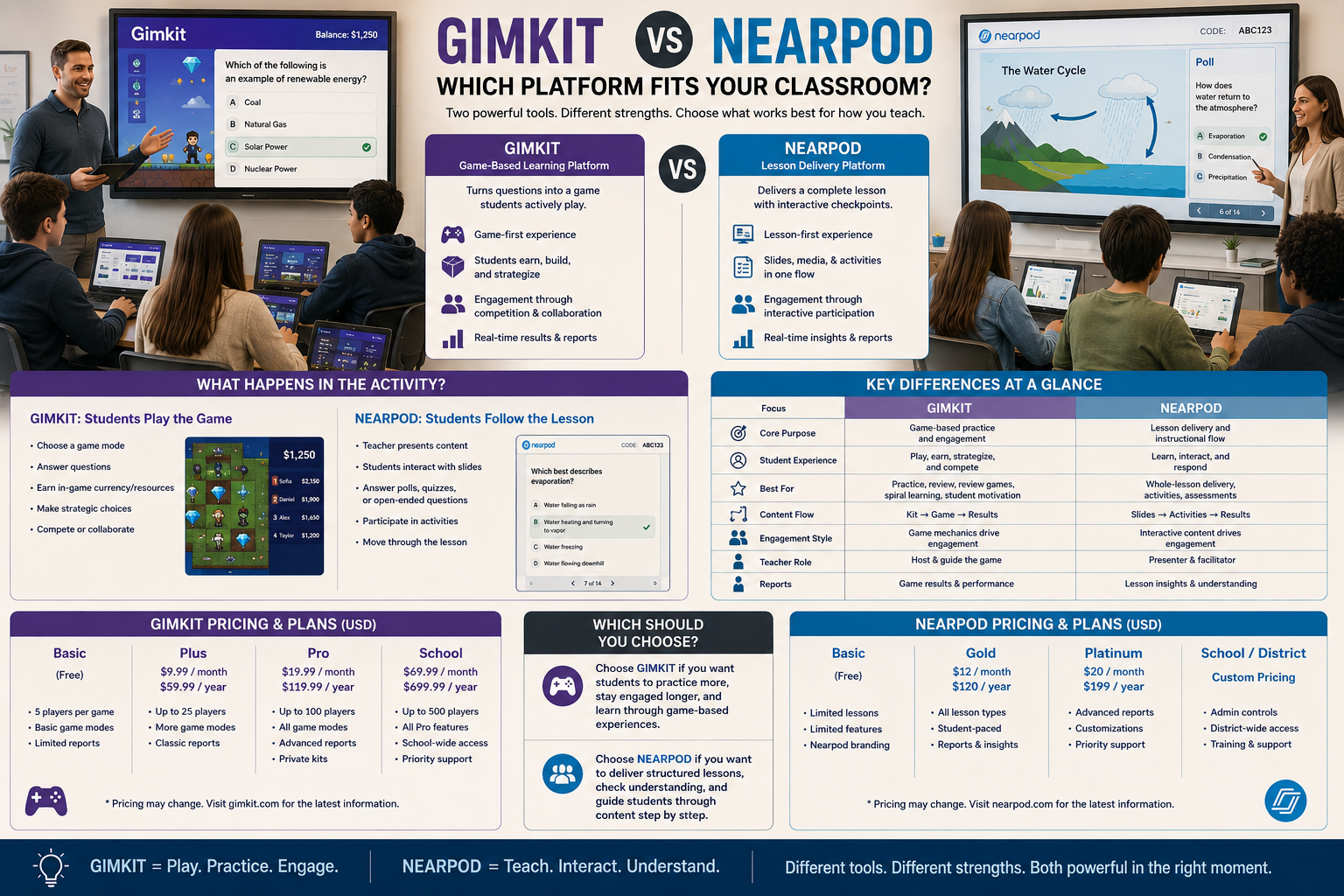
Nearpod is built around delivering a whole lesson, slide by slide, with interactive checkpoints along the way. Gimkit is built around turning questions into a game students actively play. Once you understand that difference, the rest of the comparison becomes much easier to reason through.
This guide looks at Gimkit vs Nearpod from the angle that actually matters to a classroom teacher: what happens to the lesson, what happens to the student while the activity is running, and — because a purchase decision eventually comes down to it — what each platform actually costs and what you get at each price point.
Looking for comprehensive classroom resources and educational technology insights? Explore GimkitApp for expert guides, teaching strategies, game modes, and the latest updates to enhance student engagement.
Gimkit vs Nearpod at a Glance
Teaching function
Gimkit
Nearpod
Primary classroom role
Game-based practice
Interactive lesson delivery
Core content unit
A Kit (question set)
A full lesson (slides + activities)
Main workflow
Kit → game mode → gameplay
Lesson → slides → embedded activities
Teacher pacing
Live-hosted or self-paced game
Teacher-paced or student-paced lesson
Student screen
2D game environment or classic buzzer screen
Synced lesson slide
Non-question content
Limited
Slides, video, 3D/VR, reading passages
Collaboration tools
Team-based game modes
Collaborate Board, Draw It, Live Whiteboard
AI content generation
AI Question Generator
AI Create Question Generator
Free tier ceiling
Basic: unlimited students, ~3 rotating modes
Silver: 40 students, 300 MB storage
Cheapest paid tier
Pro: roughly $60/year
Gold: roughly $159/year
Best conceptual fit
“Let students practice”
“Let me teach and check understanding together”
That single row — “core content unit” — explains almost every other difference in this comparison. Everything else, including the pricing gap, flows downstream from it.
What Nearpod Is Actually Built to Do
Nearpod’s starting point is not a question. It’s a lesson.
A Nearpod lesson is assembled from slides, and those slides can carry ordinary instructional content — text, images, video, reading passages — alongside interactive elements dropped in between them. A teacher might present three slides of direct instruction, insert a poll, continue teaching, insert an open-ended question, then close with a quiz.
That structure matters because it means Nearpod is not asking “how do we turn this into a game?” It’s asking “how do we keep a normal lesson interactive instead of passive?”
Nearpod’s interactive elements typically include:
Polls and open-ended questions
Quizzes and matching pairs
Collaborate Board (a shared digital corkboard students post to)
Draw It (students sketch or annotate an image)
Live Whiteboard for real-time, teacher-guided writing and diagramming
Time to Climb (a competitive game-style quiz mode)
Virtual Reality field trips and 3D objects in supported lessons
Notice that most of these are checkpoints inside a lesson, not the lesson itself. Nearpod also maintains a library of over 22,000 ready-made, standards-aligned lessons that teachers can pull from directly instead of building everything from scratch — a resource bank that doesn’t have a real equivalent on the Gimkit side, since Gimkit’s content is built around teacher- or student-authored question sets rather than pre-built full lessons.
What Gimkit Is Actually Built to Do
Gimkit starts from the opposite direction. Its foundational unit is a Kit — a set of questions — and the entire platform exists to decide what students do with that Kit once it’s launched.
A Gimkit session doesn’t usually contain slides of direct instruction. It contains a game mode that turns correct answers into in-game currency, energy, movement, or progress. The question is the input; the game is the output.
This is why a Gimkit vs Nearpod comparison isn’t really “which app has more features.” It’s a comparison between a practice engine and a lesson-delivery engine that happens to include practice as one of its parts.
Where Gimkit has genuinely expanded is inside that practice engine. As of 2026, Gimkit runs roughly thirteen active 2D game modes built on its Creative sandbox engine, split across two camera styles — top-down modes like Fishtopia (a fishing economy where correct answers buy bait) and Snowbrawl, and side-view platformer modes like Don’t Look Down (students climb while answering) and Knockback. It also runs Trust No One, a social-deduction mode in the style of Among Us, layered on top of question-answering. These aren’t cosmetic skins on the same quiz — each mode changes what a correct answer actually buys a student inside the game world, which is part of why Gimkit sessions can hold a class’s attention for a full block of practice time rather than a five-minute burst.
The Core Difference: Lesson Delivery vs Game-Based Practice
Follow what a teacher is actually doing at the front of the room in each platform.
In Nearpod, the teacher is teaching. The interactive elements exist to confirm that teaching is landing — a poll to check the room’s mood on a topic, a quiz to confirm a concept stuck, a Collaborate Board to surface everyone’s thinking at once. The lesson keeps moving forward through content the teacher controls slide by slide.
In Gimkit, the teacher is running a game session. There isn’t new instructional content being delivered inside the activity itself — the Kit’s questions are almost always review or practice of something already taught. The teacher’s attention is on game settings, pacing, and how much repetition the class needs.
That gives us two very different loops.
Nearpod’s loop: Teach a slide → check understanding → adjust → teach the next slide.
Gimkit’s loop: Answer a question → gain a game resource → use the resource → answer another question.
Neither loop is “the lesson.” Nearpod’s loop is the lesson. Gimkit’s loop is what happens after the lesson, during practice.
Student-Paced vs Teacher-Paced: A Genuine Nearpod Strength
One of Nearpod’s most distinctive features is that the same lesson can run in two different modes without being rebuilt.
Live Participation puts the teacher in control — every student’s screen advances together, slide by slide, which keeps a class synchronized during direct instruction.
Student-Paced releases the same lesson for independent completion — useful for homework, absent students, sub plans, or differentiated groups working through material at their own speed.
Gimkit has an equivalent split between live-hosted games and self-paced Assignments, but the underlying content doesn’t change shape the way a Nearpod lesson does — a Kit is still a set of questions whether it’s played live or assigned, while a Nearpod lesson genuinely doubles as both a teacher-led presentation and a self-contained study resource.
Collaboration Tools: Where Nearpod Goes Somewhere Gimkit Doesn’t
This is one of the clearest points of separation in the Gimkit vs Nearpod comparison.
Nearpod’s Collaborate Board lets every student post text, images, or short responses to a shared board that the whole class can see building in real time. Draw It asks students to annotate or sketch directly onto an image the teacher provides — labeling a diagram, marking a location on a map, or solving a problem by drawing it out. Live Whiteboard extends this further, letting a teacher work through a problem live while students watch or contribute.
Neither of these is a “question with a correct answer.” They’re open-ended, expressive checkpoints that ask what a student thinks, not just what a student knows.
Gimkit’s game modes aren’t built for this kind of open response. Its structure is built around answerable questions — multiple choice, true/false, or short answer with a defined correct response — because those answers need to translate into game outcomes: cash, XP, an upgrade, survival. A game economy can’t easily process “here’s my drawing of the water cycle.”
So if a lesson genuinely needs open-ended, creative, or discussion-style input from students, that’s a job Nearpod is equipped for and Gimkit currently isn’t.
Where Gimkit Pulls Ahead: Sustained, Repeated Practice
The reverse is just as true.
Nearpod’s interactive elements are checkpoints — a lesson typically includes a handful of them spread across many slides. They’re not designed to be the sole activity for fifteen or twenty minutes straight.
Gimkit’s game modes are designed for exactly that. A Kit can run for an extended stretch of class time, with the game mode supplying the reason students keep answering questions well past the point where a single poll or quiz would end. Correct answers accumulate into XP, which converts into in-game currency (GimBucks) that students spend on cosmetics, upgrades, or strategic advantages — a loop that rewards both speed and streaks, so a fast answerer and a consistent answerer can both find a reason to keep playing. If the instructional goal is “I need this class drilling multiplication facts for fifteen more minutes without losing them,” that’s Gimkit’s natural territory, not Nearpod’s.
Content Types: Slides vs Questions
Another practical difference shows up in what each platform can actually contain.
Content type
Gimkit
Nearpod
Direct instruction slides
Not a core feature
Core feature
Video embeds
Limited
Supported
Reading passages
Limited
Supported
VR / 3D exploration
Not available
Available in supported lessons
Pre-built lesson library
Not a core feature
22,000+ ready-made lessons
Question formats
Multiple, game-focused
Multiple, checkpoint-focused
Game-based practice modes
Extensive (13 active 2D modes)
Limited (Time to Climb)
AI-generated question sets
AI Question Generator
AI Create Question Generator
Import from existing sets
Quizlet, CSV, and kit import
Google Slides, PowerPoint, PDF
This table makes the underlying identity of each platform obvious. Nearpod can hold an entire multi-day unit of instructional content, drawn either from what a teacher builds or from its existing library. Gimkit is not trying to hold instructional content at all — it’s trying to hold a well-built question set and give it somewhere game-like to happen.
Pricing: What You Actually Pay For
This is the piece of the comparison that often gets left out, and it matters because the free tiers of each platform are limited in very different ways.
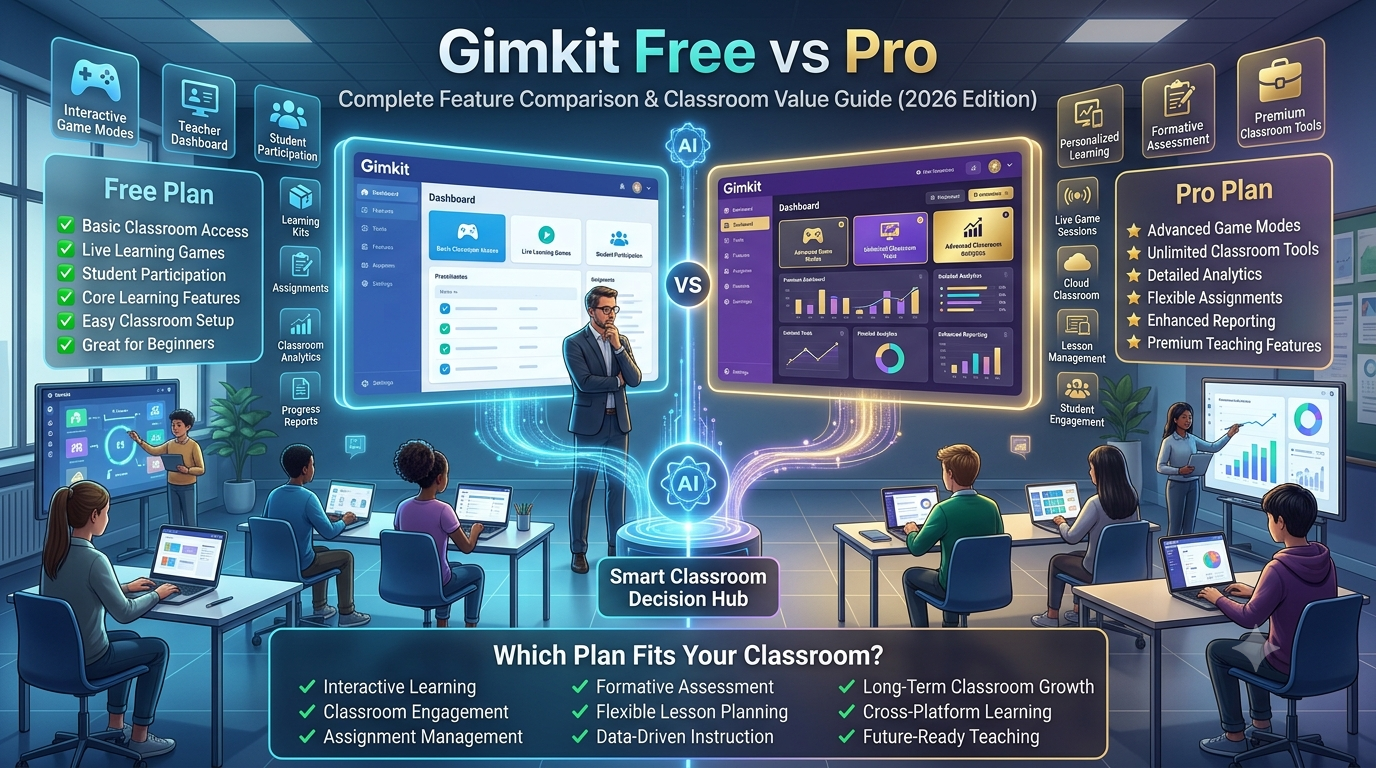
Gimkit’s free Basic plan is unlimited on student count but restricts access to most of the advanced 2D game modes and detailed reporting — only a small rotating selection of modes is available without a subscription. Gimkit Pro runs around $15/month, or roughly $60 a year on the annual plan, and unlocks the full mode catalog, Assignments, larger kit imports, and detailed reports. New educators typically get a free trial period to test Pro before committing.
Nearpod’s free Silver plan is unlimited in duration but capped by student count (roughly 40 students per session) and storage (a few hundred MB), which mainly bites teachers with large classes or video-heavy lessons. Gold, at roughly $159/year, raises the student cap to around 75 and adds a full gigabyte of storage plus the Google Slides add-on. Platinum, at roughly $397/year, raises the cap again and adds more storage and student notes. Schools and districts negotiating for many teachers at once typically get custom pricing rather than paying the per-teacher rate.
Put side by side, Gimkit’s paid tier is meaningfully cheaper per year than Nearpod’s, which tracks with the difference in what’s being sold: a practice engine with game modes versus a full lesson-delivery platform with a resource library, storage-heavy media support, and higher live-session capacity.
For the latest gaming news, expert reviews, and walkthroughs, readers can also visit IGN, one of the world’s leading gaming websites.
Reporting: What Each Platform Tells the Teacher Afterward
Both platforms give teachers information about how students performed, but that information is shaped by what the platform was doing in the first place.
Nearpod’s reports reflect a full lesson session — which slides students engaged with, how they answered checkpoint questions, what they posted to a Collaborate Board, and how a Time to Climb round went. It’s a record of how a lesson landed, not just how a quiz went.
Gimkit’s reports reflect a game session or assignment — accuracy, question-level performance, and participation inside the selected game mode. It’s a record of practice performance, not lesson delivery, because Gimkit was never delivering a lesson to begin with.
When Nearpod Is the More Practical Choice
Nearpod tends to fit best when a teacher’s actual need is:
Delivering new instructional content, not just reviewing old content
Checking understanding during teaching, not only after it
Getting open-ended, creative, or discussion-based responses from students
Running the same material as either a live lesson or a self-paced assignment
Using video, reading passages, or VR as part of the material itself
Drawing on a large pre-built lesson library instead of building from scratch
Running sessions with larger classes or media-heavy content on a paid tier
When Gimkit Is the More Practical Choice
Gimkit tends to fit best when a teacher’s actual need is:
Sustained, repeated practice on already-taught material
Keeping a review session engaging for an extended block of time
Letting correct answers translate into a game outcome students want to chase
Running competitive or collaborative practice built around a question bank
Reinforcing content that’s already been delivered through another method
Getting the full feature set at a lower yearly cost than Nearpod’s paid tiers
The Real Question to Ask
The most useful question isn’t “which platform is better.” It’s:
Am I trying to teach and check understanding, or am I trying to get students to practice something I’ve already taught?
If it’s the first, Nearpod’s slide-based, checkpoint-driven structure is built for that job. If it’s the second, Gimkit’s game-based practice loop is built for that job.
Many classrooms end up using both — Nearpod for delivering and checking new content, Gimkit for the repeated practice that comes after — not because both platforms do the same thing, but because they don’t.
Frequently Asked Questions
Is Gimkit or Nearpod better for a new lesson?
Nearpod is generally the better fit for introducing new content, since it’s built around slide-based instruction with interactive checkpoints in between, backed by a library of over 22,000 pre-built lessons. Gimkit doesn’t deliver new instructional material — its Kits are structured as question sets, which makes it much better suited to reviewing or practicing content a teacher has already taught rather than teaching it for the first time.
Can Gimkit be used for open-ended or creative responses?
Not in the way Nearpod can. Gimkit’s game modes are built around answerable questions that can feed into a game outcome, such as multiple choice or short answer. Nearpod’s Collaborate Board, Draw It, and Live Whiteboard are specifically designed for open-ended, creative, or discussion-style input, which isn’t a strong fit for Gimkit’s game-economy structure.
Does Nearpod have game-based practice like Gimkit?
Nearpod includes Time to Climb, a competitive quiz-style mode, but it isn’t the platform’s central identity the way game modes are for Gimkit. Nearpod’s core design is a full interactive lesson with checkpoints scattered throughout, while Gimkit’s entire structure — including thirteen distinct 2D game modes — is organized around sustained game-based practice sessions.
Which platform works better for homework or independent study?
Both support independent, self-paced use — Nearpod through its Student-Paced mode and Gimkit through Assignments. The difference is what students are doing: a self-paced Nearpod lesson can include full instructional content like video and reading passages, while a Gimkit assignment is focused specifically on working through a question set inside a game format.
Which platform costs less?
Gimkit’s paid Pro tier is priced noticeably lower per year than Nearpod’s Gold or Platinum tiers. That gap reflects what each platform includes: Nearpod’s higher tiers add storage, larger student caps, and media-heavy lesson support, while Gimkit’s Pro tier is mainly unlocking its full library of game modes and reporting on top of an already-unlimited free student count.
Do both platforms have AI tools for building content?
Yes. Both have added an AI question generator that can produce a question set from a topic or prompt, which cuts down the time it takes to build a Kit or a lesson’s checkpoint questions from scratch. Neither AI tool generates the platform’s core content type on its own — Nearpod’s AI still produces questions to slot into a slide-based lesson, and Gimkit’s AI still produces questions to slot into a Kit.
Should a teacher choose one platform over the other?
Not necessarily. Many teachers use Nearpod to deliver and check new content, then use Gimkit afterward for repeated practice on that same material. Because the two platforms are solving different classroom problems — lesson delivery versus game-based practice — treating them as complementary rather than competing tools often produces the most complete instructional workflow.
Final Verdict
Gimkit vs Nearpod isn’t a contest between similar products. Nearpod is a lesson-delivery platform that happens to include interactive checkpoints, a large resource library, and higher-tier support for bigger, media-heavy classes. Gimkit is a game-based practice platform that happens to include reporting, and it gets there at a noticeably lower yearly price once a teacher needs the paid tier.
Choose Nearpod when the goal is teaching and checking understanding in real time. Choose Gimkit when the goal is turning already-taught content into practice students actually want to keep doing. Understanding that distinction — not a feature checklist, and not just the price tag — is what actually determines which platform belongs in a given lesson.