Kahoot Classic Experience Guide | Every other format in Kahoot’s experience library gets compared back to one baseline, and that baseline is the Kahoot Classic experience. It’s the original quiz-game format — the one where speed and accuracy combine into a single score, a leaderboard updates after every question, and a podium crowns a winner at the end. Understanding exactly how that scoring works, down to the math behind it, is what separates a host who can explain a confusing result to a curious student from one who just shrugs and says “that’s how Kahoot scores it.”
This guide covers the Kahoot Classic experience specifically and in full depth — the scoring formula, the streak bonus, question-type support, hosting steps, and the situations where this particular format is the right call. It doesn’t wander into how other experiences in the library compare or differ, since Classic deserves to be understood completely on its own terms first.
Looking for comprehensive classroom resources and educational technology insights? Explore GimkitApp for expert guides, teaching strategies, game modes, and the latest updates to enhance student engagement.
What Is the Kahoot Classic Experience?
The Kahoot Classic experience is the platform’s original, default format for live games, where players compete individually and points are awarded based on a combination of answer correctness and response speed. It’s the experience most people picture when they think of “playing a Kahoot” — a shared screen showing questions, players racing to tap the right answer on their own device, and a scoreboard that shifts after every round.
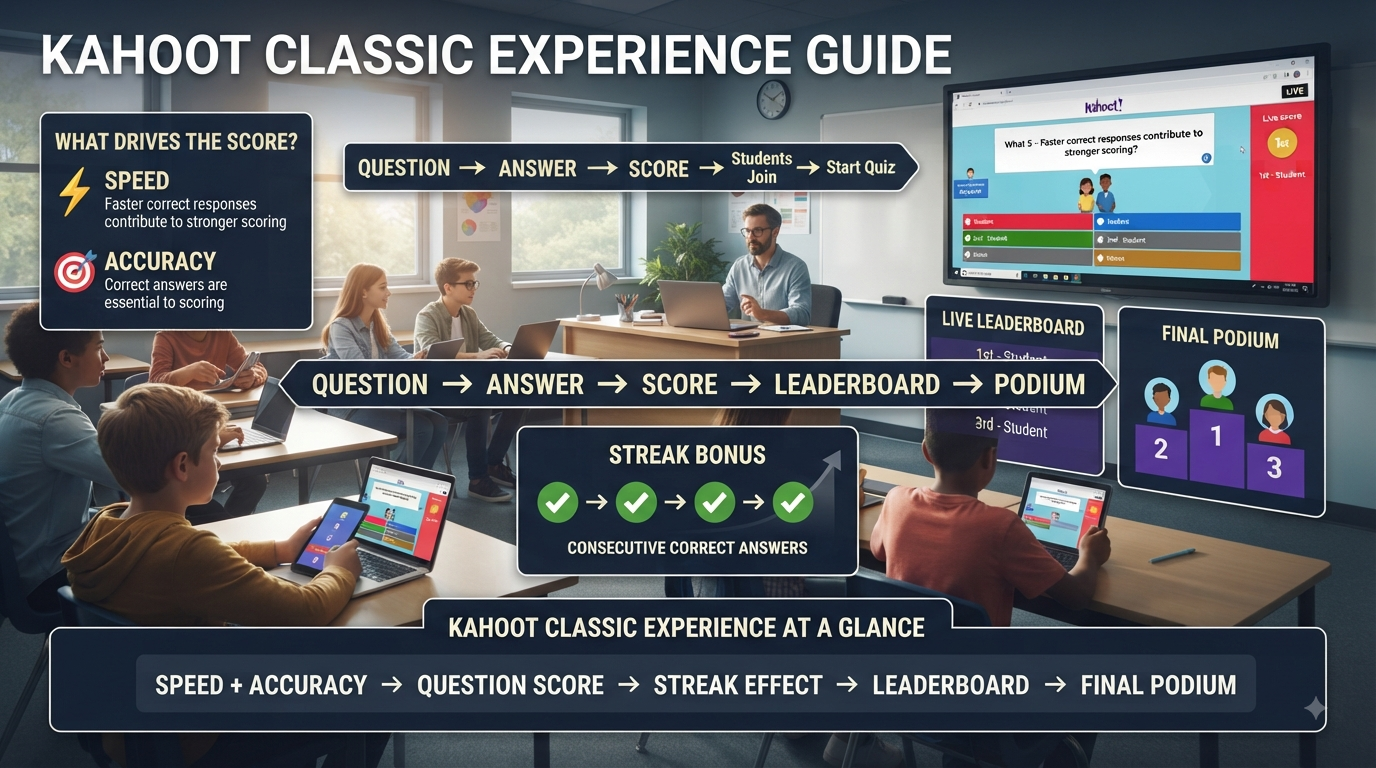
At its core, Classic experience rewards two things simultaneously: getting the right answer, and getting it quickly. Both factors feed into a single point total per question, which is what gives the format its distinctive, high-energy feel compared to more deliberate, untimed formats.
💡 Pro Tip: If you’re new to hosting and unsure where to start, Classic experience is worth learning first — its scoring mechanics show up, in modified form, throughout several other experiences in Kahoot’s library, so understanding it thoroughly makes everything else easier to pick up later.
How Scoring Works in the Kahoot Classic Experience
The scoring formula is the single most important thing to understand about the Kahoot Classic experience, and it’s more precise than most hosts realize. A correct answer can award up to 1,000 points, but that maximum is only achieved by answering essentially instantly. As the countdown timer runs, the available points decrease on a sliding scale — answering right as time expires on a correct answer typically yields roughly half the maximum, around 500 points, rather than the full reward.
An incorrect answer earns zero points in the Kahoot Classic experience, regardless of how quickly it was submitted. There’s no partial credit for a fast wrong guess — speed only matters as a multiplier on top of correctness, never as a replacement for it. This is a detail worth explaining to students directly, since the instinct to answer quickly without reading carefully can backfire completely under Classic scoring.
⭐ Expert Insight: The speed-scoring curve is precisely why some students consistently rank highly in Classic experience despite similar accuracy to their classmates — a genuinely fast, confident reader can out-score a slower but equally accurate one purely on response time, which is worth keeping in mind when interpreting results as a measure of understanding versus a measure of quick recognition.
The Answer Streak Bonus in Classic Experience
Layered on top of base scoring, the Kahoot Classic experience includes an Answer Streak Bonus that rewards consecutive correct answers. Getting two or more questions correct in a row triggers a bonus — an extra 100 points added on top of the normal score for that question — and the bonus continues to apply as long as the streak holds. Missing a question breaks the streak entirely, resetting the bonus back to zero for the next correct answer.
This mechanic changes the psychology of a session in a subtle but real way. A player several questions into a strong streak has more to lose by rushing a guess than someone who just broke theirs, which introduces a light layer of risk-calculation on top of the base speed-versus-accuracy tension already built into Classic scoring.
⚠ Common Mistake: Assuming every player understands how the streak bonus works without ever explaining it. Because the streak bonus isn’t always obvious from the interface alone, students who don’t know it exists may not realize why two players with an identical number of correct answers ended up with noticeably different final scores.
No-Points Questions and How They Interact With Classic Scoring
Not every question in a kahoot has to award points. Certain question types can be configured with points disabled, and when a no-points question appears during a Classic experience session, that particular question is simply excluded from the scoring calculation entirely — everyone who answers correctly still gets marked correct in the results, but no points, and therefore no streak bonus, are attached to it.
This feature matters more than it might first appear, because it lets a host blend genuinely scored quiz questions with discussion-oriented or opinion-based questions inside the same live Kahoot Classic experience session, without those non-scored questions distorting the leaderboard. A poll-style question asking for a class opinion, for instance, can sit comfortably alongside scored content questions without giving anyone an unfair points advantage.
📌 Quick Note: A no-points question still resets a player’s answer streak if they get it “wrong” in the sense of not selecting the intended response, depending on how the question is configured — it’s worth testing a mixed question set once before relying on it live, since streak behavior around no-points questions isn’t always intuitive on first use.
The Scoreboard and Podium in Classic Experience
A defining visual feature of the Kahoot Classic experience is the points scoreboard that appears after every single question, ranking players from highest to lowest score so far. This constant, question-by-question feedback loop is a large part of what makes Classic feel fast-paced and competitive compared to formats that hide scoring until later in a session.
At the end of the game, Classic experience always displays a final podium — the top three scorers, celebrated on screen — regardless of whether anyone actually scored any points at all. Even a session built entirely from no-points questions will still generate a podium screen in Classic experience, though in that specific case the ranking has little practical meaning since there are no points to differentiate players.
✅ Best Practice: For sessions where the podium’s competitive framing feels like the wrong tone — a review of sensitive material, for example — it’s worth knowing that the recurring scoreboard and celebratory podium are core, built-in features of Classic experience specifically, rather than an optional setting that can be toggled off within it.
For the latest gaming news, expert reviews, and walkthroughs, readers can also visit IGN, one of the world’s leading gaming websites.
How to Host a Kahoot in the Classic Experience
Running a live session in the Kahoot Classic experience follows a short, consistent sequence:
Log in and locate the kahoot you want to host, either from your Library tab or the Discover page if using a set you haven’t created yourself.
Open the kahoot’s details page and click the Host live button to begin the hosting flow.
Select Classic experience from the carousel of options presented at the bottom of the host screen — it typically appears as one of the earliest, most established options in that list.
Click Start to generate the game PIN and open the join screen for players.
Wait in the lobby as players enter the PIN on their own devices and appear on the shared screen, then click Start again once everyone has joined.
Progress through questions as the game runs, with the scoreboard automatically appearing between each one.
Reach the final podium screen once the last question resolves, which closes out the live session and generates the corresponding report.
🔍 Did You Know? After a Classic experience session ends, the podium screen includes a “Play again” option that relaunches the same kahoot with ghosts — simulated versions of the original players, based on their own prior answers, that the same live group can then try to beat in a rematch without anyone needing to re-enter the game PIN.
Question Types Supported in Classic Experience
The Kahoot Classic experience supports the platform’s full standard range of question types, which is part of why it remains the most broadly applicable format in the library. This includes multiple-choice questions, true/false questions, and other supported formats such as puzzle, slider, and open-ended question types where available on a given account tier — each one scored using the same underlying speed-plus-accuracy formula described earlier, adapted to fit that question’s specific answer mechanic.
Because scoring logic in Classic experience is applied consistently regardless of question type, a host can freely mix question formats within a single kahoot without worrying about inconsistent scoring behavior between them — a multiple-choice question and a slider question both follow the same fundamental speed-based points curve, just applied to different kinds of input.
Ideal Use Cases for the Kahoot Classic Experience
The Kahoot Classic experience tends to work best in situations where competitive energy genuinely serves the goal of the session rather than working against it:
Content review before an assessment, where the goal is reinforcing recall under mild time pressure similar to what students might face on a real test.
Icebreaker or warm-up activities, where fast pacing and visible competition help build energy at the start of a class or event.
Trivia-style sessions, including non-academic contexts like team events or training sessions, where a clear winner and celebratory podium fit the tone of the occasion.
Large groups, since the scoring system and podium format scale naturally without needing any special configuration for bigger player counts.
✅ Best Practice: Classic experience tends to produce the most positive classroom results with content students already have reasonable familiarity with. Introducing brand-new, unfamiliar material through fast, speed-scored questions can inadvertently reward guessing over genuine understanding, simply because of how quickly players have to commit to an answer.
Situations Where Classic Experience May Not Fit
While Classic experience remains Kahoot’s most versatile format, its speed-based scoring isn’t automatically the right fit for every classroom situation. Sessions where speed shouldn’t factor into performance at all, where teams rather than individuals need to compete, or where a host wants slower, more controlled pacing through each question call for a different structural approach than what Classic experience is built to provide. The library includes other experiences purpose-built for exactly those situations, each with its own dedicated mechanics worth understanding on their own terms.
⚠ Common Mistake: Defaulting to Classic experience purely out of habit for every single session, even when the actual goal — inclusive participation regardless of reaction speed, or team-based collaboration, for instance — doesn’t align with what speed-based individual scoring is designed to reward.
Reading Reports From a Classic Experience Session
Once a Kahoot Classic experience game ends, a report is generated automatically and stored in the account’s Reports section, giving a host a way to review performance after the live energy of the session has settled down. The report breaks down into a summary view covering overall session performance, a participant-level view showing each player’s final score and accuracy, and a question-by-question view showing how the group performed on each individual item.
Because Classic experience scoring blends speed and accuracy into a single number, the report is where a host can separate those two factors back out. A player who finished near the top of the leaderboard but shows middling accuracy in the question-by-question breakdown was likely winning on speed rather than mastery — a distinction the live scoreboard alone doesn’t make clear, but the post-game report does.
⭐ Expert Insight: When using a Classic experience session for anything resembling formal assessment, treat the live podium as entertainment and the downloaded report as the actual data. The report’s per-question accuracy breakdown is a far more honest measure of understanding than final rank, which is inflated by response speed in ways that don’t reflect content mastery.
Classic Experience Across Devices and Group Sizes
One of the reasons Classic experience remains Kahoot’s most commonly used format is how consistently it performs across very different hosting contexts. The same session structure — shared host screen, individual player devices, question-by-question scoreboard, closing podium — works whether players are joining from phones, tablets, or laptops, and whether the host is presenting from a classroom projector or a screen-share in a virtual meeting.
Group size scales similarly well. A Classic experience session with a handful of players and one with several hundred both follow identical scoring rules and the same basic screen flow; the practical difference lies mainly in how long the podium’s top three feels representative of the group, and how a host manages join-time logistics for a much larger lobby. Guest-hosted anonymous games — sessions run without a logged-in host account — support especially high participant counts specifically within Classic experience, reflecting how central this format is to Kahoot’s large-scale event use cases.
📌 Quick Note: For very large Classic experience sessions, it’s worth building in a slightly longer buffer in the lobby before starting, since a bigger group naturally takes longer to fully join and settle before the first question should reasonably begin.
Accessibility Considerations Within Classic Experience
Classic experience includes support for screen readers, allowing both the host and participants to have question and answer text read aloud through their device. This matters specifically within the speed-scored structure of Classic experience, where a player relying on audio to process a question is working against the same countdown timer as everyone reading visually — a gap worth being aware of when interpreting results from a session that included students using this accommodation.
Hosts running a Classic experience session with participants who need this kind of support should factor in slightly longer timers than they might otherwise default to, since the standard speed-scoring curve doesn’t automatically adjust based on how a given player is receiving the question content.
Maintaining Fairness in a Classic Experience Session
Because speed is baked directly into the scoring formula, a few practical habits help keep a Classic experience session feeling fair rather than arbitrary, especially for younger or more sensitive groups:
Explain the scoring curve up front, so players understand that a correct answer given in the final second of the timer still earns real points rather than assuming only the fastest response counts for anything.
Set timers deliberately based on question difficulty rather than leaving every question at a single default, since a timer too short for a genuinely complex question rewards lucky fast guesses over careful thinking.
Address device and connection disparities honestly — a player on a slower device or spottier connection is structurally disadvantaged under speed-based scoring in a way that has nothing to do with their actual knowledge.
Use no-points questions deliberately when a specific question is better suited to open discussion than to a scored, timed race.
✅ Best Practice: For a Classic experience session where fairness matters more than pure competitive energy — a review session for a struggling group, for instance — lengthening every timer well beyond the default reduces how much the final score is driven by reflexes rather than understanding, without needing to change anything else about the format.
The Historical Role of Classic Experience in Kahoot’s Platform
Classic experience isn’t just one format among many — it’s the original mechanic the entire Kahoot platform was built around, with its speed-plus-accuracy scoring formula and Answer Streak Bonus both dating back to the platform’s earlier years as core, defining features rather than recent additions. Every other experience in the broader library was developed as a variation or alternative to this original structure, whether by removing the speed component, adding a team layer, or replacing live scoring with host-controlled pacing.
Understanding Classic experience thoroughly is therefore useful even beyond sessions that use it directly, since its scoring logic — the 1,000-point maximum, the sliding time-based curve, the streak mechanic — reappears in modified form as the scoring baseline referenced throughout Kahoot’s own documentation for several of its newer formats.
Customizing Timers and Settings Within a Classic Experience Session
While the core scoring formula in Classic experience is fixed, hosts retain meaningful control over the settings surrounding it. The settings menu, accessible through the gearwheel icon during setup and even at certain points during live gameplay, allows adjustments to be made before selecting an experience, while waiting in the lobby, between questions, and in some cases during active play itself. Changes made this way persist automatically for the next time that same host runs a session, which saves repeat setup work across multiple classes using similar configurations.
This flexibility means a host isn’t locked into a single fixed pace for an entire Classic experience session. A question that’s clearly tripping up the group can be given more time on the fly, or a session running short on class time can be tightened up mid-game without restarting the entire kahoot. Treating the settings menu as available throughout the session, not just as a one-time setup step before clicking Start, is one of the more underused tools for keeping a Classic experience game responsive to how the actual room is reacting in real time.
Common Mistakes When Hosting Classic Experience
Not explaining the scoring system before starting. Students who don’t understand that speed affects their score, or that an incorrect fast answer scores zero the same as an incorrect slow one, often walk away confused about why the leaderboard looks the way it does.
Ignoring the streak bonus entirely when discussing results. Because the bonus can meaningfully separate two players with an identical number of correct answers, failing to mention it leaves an easily explainable score gap looking mysterious or unfair.
Using Classic experience for sensitive or high-stakes emotional content. The competitive scoreboard-and-podium structure amplifies pressure in a way that doesn’t suit every topic or every classroom’s current mood.
Forgetting that no-points questions still appear on the podium timeline. A host who builds an entire session around discussion questions with points disabled may be surprised when the podium screen still appears at the end, showing an essentially meaningless ranking.
Frequently Asked Questions
How many points can I earn per question in Kahoot Classic experience?
The maximum is 1,000 points for a correct answer submitted essentially instantly. As the countdown timer progresses, the available points decrease on a sliding scale, so a correct answer given right before time runs out typically earns roughly half that maximum. Incorrect answers always score zero points, regardless of how quickly they were submitted.
What is the Answer Streak Bonus in Classic experience?
It’s a bonus of 100 extra points awarded on top of normal scoring once a player answers two or more questions correctly in a row. The bonus continues as long as the streak holds, but a single incorrect answer resets it completely, meaning the next correct answer starts back at standard scoring with no bonus attached.
Does a no-points question affect my score in Classic experience?
No. Questions configured with points disabled are excluded from the scoring calculation entirely — players are still marked correct or incorrect in the results, but no points and no streak bonus apply to that specific question, which lets discussion-style questions coexist with scored ones in the same session.
Will Classic experience always show a podium at the end?
Yes. A final podium screen showing the top three scorers appears at the end of every Classic experience session, regardless of whether anyone actually earned points during the game. Even an all no-points question set will still generate a podium screen, though the ranking carries little meaning in that specific case.
Can I mix different question types in one Classic experience session?
Yes. Classic experience supports the platform’s full range of standard question types within a single kahoot, and each one is scored using the same underlying speed-plus-accuracy formula adapted to its specific format. There’s no need to keep question types separated across different sessions for scoring consistency.
Professional Recommendations & Expert Reviews
Kahoot Classic Experience represents the familiar quiz-based format that many teachers use for interactive classroom review.
Kahoot Classic Experience centers the activity around questions, answers, participation, and a shared classroom experience.
Kahoot Classic Experience gives teachers a straightforward way to turn existing review questions into an interactive session.
Kahoot Classic Experience allows students to participate while seeing their progress develop throughout the activity.
Kahoot Classic Experience works particularly well when a teacher wants a simple and recognizable game structure.
Kahoot Classic Experience keeps the academic questions at the center of the activity.
Kahoot Classic Experience can be useful for checking whether students remember recently taught information.
Kahoot Classic Experience creates a clear rhythm of question, response, feedback, and progression.
Kahoot Classic Experience can make ordinary revision feel more active and participatory.
Kahoot Classic Experience gives teachers an opportunity to combine assessment with classroom engagement.
Kahoot Classic Experience can be introduced after direct instruction to reinforce important ideas.
Kahoot Classic Experience also works well as a quick review activity before an assessment.
Kahoot Classic Experience encourages students to pay attention because each question requires an active response.
Kahoot Classic Experience provides teachers with a structured format that is easy to incorporate into existing lessons.
Kahoot Classic Experience can help break up longer periods of traditional instruction.
Kahoot Classic Experience encourages students to recall information rather than simply reread it.
Kahoot Classic Experience can reveal which concepts students understand confidently and which require more attention.
Kahoot Classic Experience gives teachers useful opportunities to pause and explain difficult questions.
Kahoot Classic Experience supports formative learning when results are used to guide subsequent instruction.
Kahoot Classic Experience can encourage students to remain involved throughout the entire session.
Kahoot Classic Experience creates a shared activity in which the class can work through the same academic content together.
Kahoot Classic Experience can make review more memorable by combining questions with an interactive environment.
Kahoot Classic Experience encourages teachers to select questions that directly support their learning objectives.
Kahoot Classic Experience works best when question difficulty is appropriate for the students taking part.
Kahoot Classic Experience can include a mixture of straightforward recall and questions requiring careful thinking.
Kahoot Classic Experience encourages teachers to avoid making every question unnecessarily difficult.
Kahoot Classic Experience can also prevent review from becoming too easy by gradually increasing the challenge.
Kahoot Classic Experience gives educators flexibility when planning short classroom activities.
Kahoot Classic Experience can be useful for opening a lesson with a quick knowledge check.
Kahoot Classic Experience can also provide an engaging conclusion after a topic has been taught.
Kahoot Classic Experience encourages students to learn from incorrect answers when teachers discuss them afterward.
Kahoot Classic Experience becomes more valuable when gameplay is followed by explanation and reflection.
Kahoot Classic Experience can help teachers identify misconceptions that may not appear during ordinary classroom discussion.
Kahoot Classic Experience gives quieter students another way to demonstrate what they know.
Kahoot Classic Experience can create energy in the classroom while still keeping academic content central.
Kahoot Classic Experience should remain focused on learning rather than allowing rankings to become the only measure of success.
Kahoot Classic Experience can be adapted to different subjects by changing the question content.
Kahoot Classic Experience can support vocabulary review, mathematical practice, scientific concepts, historical knowledge, and many other topics.
Kahoot Classic Experience encourages educators to consider student age, ability, and familiarity when preparing activities.
Kahoot Classic Experience can become more effective when teachers test their question sets before classroom use.
Kahoot Classic Experience benefits from clear instructions so students understand how participation works before the first question appears.
Kahoot Classic Experience can help teachers maintain lesson momentum when the activity has been planned carefully.
Kahoot Classic Experience allows educators to observe student reactions and identify where additional support may be needed.
Kahoot Classic Experience can become part of a regular revision routine without replacing other teaching methods.
Kahoot Classic Experience encourages teachers to combine technology with explanation, discussion, written practice, and independent learning.
Kahoot Classic Experience can support repeated exposure to important concepts while giving students a more engaging way to practice.
Kahoot Classic Experience becomes especially useful when teachers treat results as instructional feedback rather than simply final scores.
Kahoot Classic Experience demonstrates how a familiar quiz structure can provide an accessible starting point for classroom game-based learning.
Kahoot Classic Experience shows that effective use depends less on competition itself and more on thoughtful questions, appropriate pacing, clear expectations, and meaningful follow-up.
Summary
The Kahoot Classic experience earns its status as the platform’s default format by being genuinely versatile — a scoring system built on speed and accuracy, a streak bonus that adds a light strategic layer, full support for every standard question type, and a familiar scoreboard-and-podium structure that scales from a small classroom to a large event without extra configuration. Understanding exactly how its scoring formula behaves, rather than treating it as a black box, is what turns Classic experience from “the default option” into a format a host can explain, defend, and use intentionally whenever competitive, fast-paced energy is genuinely what a session calls for.