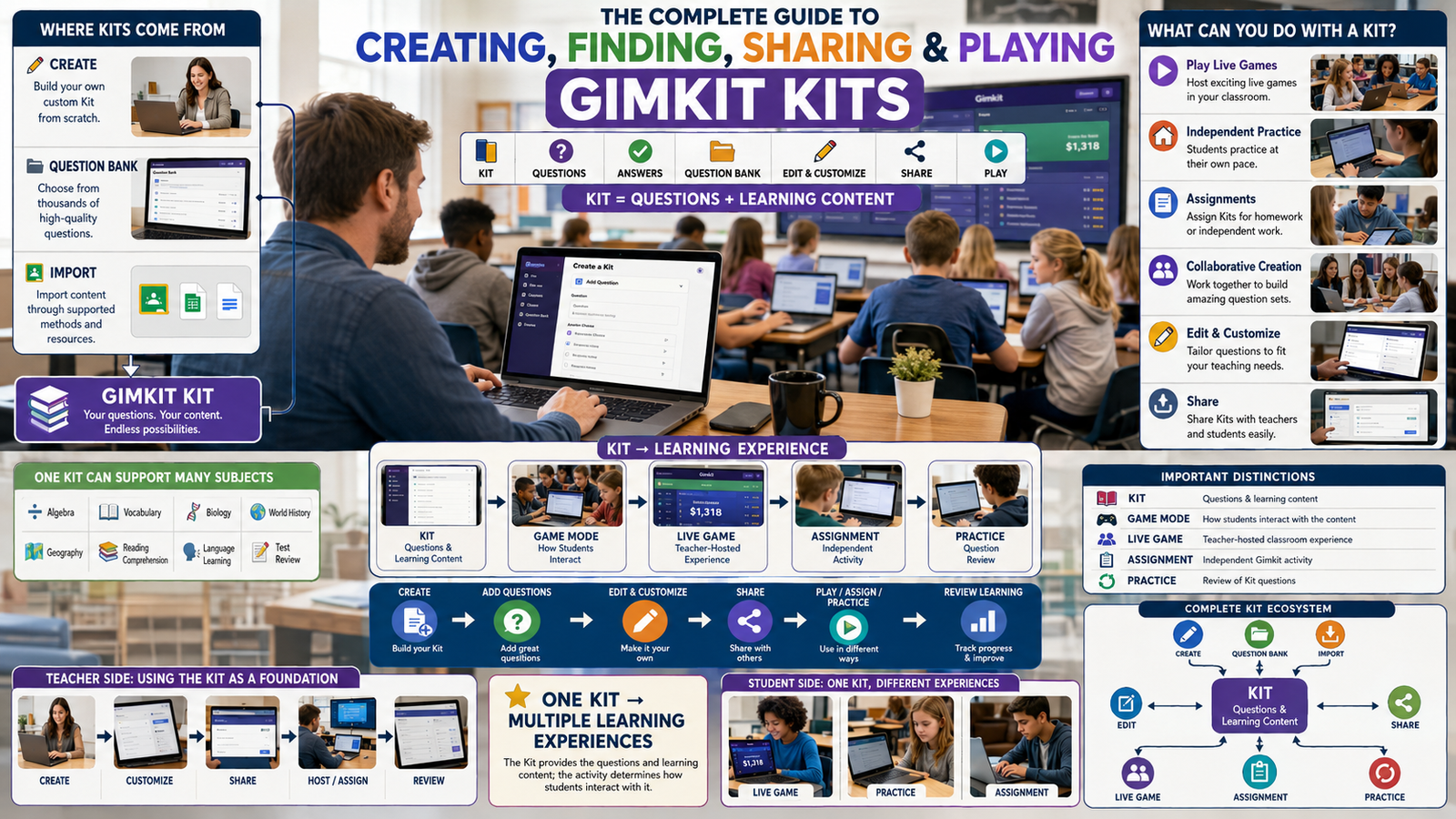
Gimkit Create: Content Creation Routes, Imports & Build Planning
Learn how Gimkit content creation begins, how educators choose between manual authoring and supported reuse methods, and how to prepare source material before entering the official Kit editor.
Understand the New Kit starting point, creation methods, source provenance, spreadsheet preparation, flashcard conversion, question-bank reuse, collaborative contributions and the final review handoff. Then use an original application to design an organised creation plan without pretending to create content inside Gimkit.
What does Gimkit Create mean?
Gimkit Create commonly refers to creating question-based learning content through Gimkit's Kit creation tools. The official workflow starts from the educator dashboard with New Kit, followed by basic Kit information and a choice of supported content-entry methods.
The phrase is sometimes used to describe other creative work on Gimkit, particularly custom map building. Those are different product environments. This article focuses on the creation pathway that converts prepared educational source material into a Kit, rather than custom map development or the management of an existing Kit library.
Official Gimkit documentation identifies several ways to contribute content. Educators can create questions manually, import information prepared in a spreadsheet, paste flashcard-style term-and-definition material, select questions through the Question Bank, or use approved collaborative submissions through KitCollab. These methods are not identical. Each begins with different source material and creates different review obligations.
A useful creator understands those differences before opening the editor. The fastest entry method is not necessarily the most appropriate source for every project. Existing content may be easy to import but still require careful checking for errors, relevance, duplicate concepts and permission to reuse it. Teacher-written material may offer more direct control while requiring more initial drafting.
Choose a creation route
Understand when manual authoring, spreadsheet imports, flashcards, reuse and collaboration represent different starting conditions.
Prepare the sources
Record what content exists, its origin, estimated volume, review status and whether it is appropriate to reuse.
Prepare to build
Generate a creation brief identifying source issues, route-specific steps and work that remains before using the official editor.
Gimkit content creation methods and the choices behind them
1. Begin with the content source, not with the game experience
Creating a Gimkit learning resource starts with identifying the content that will be entered. That content may exist in an educator's notes, in a spreadsheet, in a series of digital flashcards, or in a set of reusable public questions. Each source has a different shape. Choosing the route before recognising that shape can create avoidable conversion work. For example, existing tab-separated terms and definitions are not organised in the same way as a spreadsheet containing multiple-answer choices, and a public question selected from a bank has a different provenance from a teacher's original question.
The New Kit workflow provides an official place to begin. From there, Gimkit supports several methods of adding educational material. This page treats those methods as content-intake routes. It does not claim that a particular route is universally faster, because preparation effort depends on the volume, condition and structure of the original material. The practical task is to describe what information already exists, what transformations are needed, and what must be reviewed before the final Kit is used.
Creating a content plan outside the product may sound less exciting than writing a question immediately, but the distinction becomes valuable when more than one source is involved. An educator who has handwritten notes, an exported vocabulary file and a group of student contributions is managing a sourcing problem before beginning question-level editing. That is the exact problem addressed by the application on this page.
2. The official New Kit starting point
Gimkit's official Create a kit from scratch article instructs educators to select New Kit from their dashboard and provide foundational information including the Kit name, language and subject. It also describes cover-image selection and the possibility of adding questions through different methods. These are documented user-facing steps, not evidence that every account uses identical visual positioning or that every feature is available without restrictions. Current interface details should always be verified through Gimkit's own product and Help Center.
The initial information creates a recognisable identity for the content resource. A title helps the educator find the project, while language and subject communicate its context. A cover image is a presentation attribute, not proof that the content has been checked. The creation workflow should therefore separate metadata entry from content intake and from final editorial review. Completing a title field does not complete the educational material, just as filling a spreadsheet does not guarantee its answers are correct.
For this page, the specific button sequence is described only enough to establish the documented starting point. Detailed Kit metadata management, editing existing Kits and organising libraries belong to the separate Gimkit Kit and Dashboard subjects. Page 10 instead asks what a creator needs to prepare before using the entry methods that follow New Kit.
3. Manual creation from original teaching material
Manual authoring begins when the creator intends to write question material rather than transform an existing structured dataset. Gimkit officially supports adding questions directly within the Kit editor. That route is useful when the source exists as knowledge or unstructured notes rather than a ready-made list of question-and-answer records. It gives the creator direct control over the material entered, but control should not be confused with automatic accuracy. The content still requires checking before it becomes a reliable resource.
As a source-intake decision, manual authoring needs an inventory of what will be drafted. The creator might have several textbook sections, an approved curriculum outline or teacher-owned explanatory notes. The content-source record should identify the material from which questions will be constructed without prematurely generating hundreds of question fields. The actual construction of stems, correct answers, distractors and supported text-input types belongs to the dedicated Questions page.
In the Creation Studio, the manual route signals an initial drafting dependency. Source batches can be marked draft, review required or reviewed. That status indicates the user's declared progress, not a judgment about the correctness of any real question. The studio does not insert questions into Gimkit and does not replace the editor. It provides a structured preparation record so a manual drafting project does not become an untraceable collection of ad hoc sources.
4. Spreadsheet and CSV creation
Gimkit's official CSV documentation describes starting a new Kit, selecting Import from Spreadsheet in the editor, choosing a supplied template, filling that template, downloading a CSV file and uploading it through the official interface. The documentation specifically warns that information in incorrect columns is a common cause of import problems. That makes spreadsheet preparation a source-format problem before it becomes a question-editing problem. The external file must correspond to the template actually offered by the platform.
A creator should not assume that an arbitrary spreadsheet can be renamed with a .csv extension and reliably imported. The field layout, header conventions and placement of values matter. Even when a file opens correctly in spreadsheet software, its contents may not correspond to the columns required by the current Gimkit template. The official documentation is the source of the current import structure; an independent website should not invent its own competing template while claiming guaranteed compatibility.
The Creation Studio therefore treats CSV as an intake route and records the status of a source batch. It does not generate a supposedly official upload file. A CSV exported from the studio is a record of the creation plan, not a Gimkit Kit-import CSV. That difference is made explicit so users cannot mistake the downloadable source register for a ready-to-upload question dataset.
5. Importing existing flashcard material
Gimkit officially documents importing flashcard sets by copying term-and-definition information separated by tabs into an import text box. This provides a distinct pathway for educators whose material already exists as pairs rather than as individually formatted questions. It is particularly relevant when the source comes from an earlier learning-resource project or a supported third-party export. The value of the route lies in transforming an existing text structure, not in automatically verifying that every definition is appropriate.
Flashcard material requires source-sensitive review. A term may have several meanings, a definition may rely on context that is missing from the pair, and an exported list may include repeated or outdated entries. A creator should identify which source produced the pairs and whether the content is appropriate for the intended use. The tool's source register can record a flashcard batch with a planned item count and a review state, without collecting or publishing the terms themselves.
The main editorial distinction is between preparing the transfer and designing the final questions. Page 10 owns the transfer decision, source description and external preparation checks. The separate question-authoring page will own how an imported idea becomes a precisely written question. Keeping those tasks separate avoids a generic editor being repeated on multiple URLs.
6. Selecting material through the Question Bank
Gimkit's official Question Bank guide explains that creators can search for questions from public Kits and add selected questions to a new or existing Kit. This is a reuse route rather than a blank-authoring route. Its source is an existing question resource, and the creator's intake decision concerns which material to incorporate. The Question Bank is not described here as a source whose entire contents must be copied; the documented workflow supports selecting relevant questions.
Reuse introduces a provenance problem that does not arise in exactly the same way when a creator writes everything from original notes. The content was prepared in another context. A question can be factually correct yet unsuitable for the new instructional purpose, terminology or reading level. The creator should therefore distinguish discovery, selection and subsequent review. The fact that a question appears in a public Kit does not guarantee that it matches every curriculum or has been independently verified by Gimkit.
The Creation Studio allows a Question Bank source batch to be recorded, along with its intended contribution and current review status. It does not search Gimkit's public bank, retrieve questions or display copied content. Actual discovery and selection are handled by the official interface. The independent application concentrates on source accountability before the final material is accepted into a creation project.
7. KitCollab as a contribution source
Gimkit's official KitCollab documentation describes a collaborative process in which other people may submit questions and the Kit owner can approve contributions before they are added. It can be used with new or existing Kits and can involve students or other teachers. For a content-creation project, this introduces a submission pathway distinct from the other routes: the material is produced by contributors and passes through a review decision before inclusion.
The main issue for this page is not how to operate a live collaborative session. It is how to account for contributed source material when planning a new creation project. A contribution batch may not yet be reviewed or approved. It may contain several candidates that should not be treated as final content merely because they have been submitted. The review state must remain visible, particularly when a project combines original and contributed sources.
The studio records collaborative intake as one of the officially documented source routes, but it does not invite real contributors, authenticate submission identities or reproduce an approval interface. It is a source-provenance model for an educator preparing content. The actual KitCollab process remains on Gimkit, and the dedicated collaboration documentation supplies the current official controls.
8. Choosing a primary creation route when several sources exist
A project can draw on multiple material sources even when one method represents the principal route of work. For example, a creator may expect to import a prepared spreadsheet while also drafting a few original items and selecting a handful of existing public questions. Describing the project as primarily spreadsheet-based does not mean every source must be a spreadsheet. It means the spreadsheet is the main intended entry pathway, while other sources are supplementary.
This distinction avoids a false binary between pure manual creation and pure import. The official Gimkit ecosystem offers multiple supported ways to add material. An educator may legitimately use more than one method. The creation plan should still document the differences in source format and verification work. Otherwise, items brought from separate origins become difficult to distinguish before review.
The Creation Studio lets users choose a primary route and add batches from other routes. If the selected primary route is absent from the source register, the application flags a planning inconsistency. If supplementary routes are present, they are identified rather than automatically rejected. That logic describes the declared project and does not pretend that Gimkit has a private rule requiring one exclusive import method.
Preparing educational content before creating a Gimkit Kit
9. A source batch is not the same thing as a question
A source batch is a group of material intended for intake through a particular creation route. It might be a spreadsheet file, a section of original notes, a flashcard export or a set of candidate questions selected from public resources. The batch describes origin, volume and preparation state. It does not necessarily contain the finished questions in the form required by the Kit editor. Treating these objects separately gives educators a useful way to organise source work without duplicating question-level authoring.
One batch may contain twenty candidate records, while only some of those are ultimately suitable. Another may contain unstructured notes that require more work before the question count can be established. The studio records an estimated number of candidate items, not a verified count of final accepted questions. The distinction prevents a misleading claim that every planned item has already become a usable question.
This data model is also central to topical separation. The Gimkit Kit article owns the final content container. The Questions article owns the construction of individual assessment items. The Create article owns how source batches move toward a build-ready state through supported creation methods. Each problem has a different unit of work and therefore requires a different application interface.
10. Why source names should be meaningful but non-sensitive
A source register needs labels that identify material without exposing private information. A batch name such as “Approved chapter glossary” is more useful than “File 1” because it suggests a recognisable source. It is also safer than a label containing student names, private account credentials or confidential class records. The source field should describe the type of material, not become a place to store personal information unnecessary for content creation.
Descriptive labels matter when a project has multiple batches of similar material. A creator might have one spreadsheet exported from a textbook-aligned resource and another prepared from original teacher notes. Without a distinction, it becomes difficult to determine which items came from which source if a later review identifies a problem. Source labels can preserve that relationship without copying the underlying questions into a third-party tool.
The studio accepts short names and notes with explicit length limits. It does not parse real student data or require anyone to supply an actual Gimkit link. Because the work takes place locally, the user can prepare a creation plan without treating the independent page as a repository for educational records.
11. Source provenance before transformation
Provenance describes where material originated and what transformations it may have undergone. In a creation workflow, the source of a spreadsheet can matter as much as its apparent structure. A file generated from original teaching notes has a different provenance from a downloaded collection of unknown origin. Both might be importable, but their verification requirements are not necessarily the same.
Provenance becomes easier to lose after content is copied into a new editor. Once several sources have been combined, the finished resource may no longer visibly indicate which candidate originated where. This does not mean every public learning activity needs a formal archival system. It means an educator preparing a mixed-source project can benefit from a simple intake record before the original context disappears.
The studio does not decide legal ownership or verify citations. Its permission field records the user's declaration: self-authored, permission confirmed, review required or unresolved. A self-authored declaration is still supplied by the user, not independently certified by this website. The application can draw attention to unresolved rights questions, but it cannot provide a legal determination.
12. Estimated items versus accepted content
A creator may begin with an estimate of how much content can be drawn from a source. A spreadsheet may contain many rows, but some can be incomplete or redundant. A public Question Bank search may provide numerous candidates, not all of which are useful. A collaborative project may receive submissions that remain subject to approval. These situations make the distinction between expected items and accepted items important.
The studio asks for a planned candidate count. It sums those counts to provide an estimate of intake volume across source batches. It does not call the result a finished question count, a valid import count or a verified Kit size. The final content volume can change after review, consolidation and editing in Gimkit.
Counting candidate material is still useful. A source with a large number of items may warrant careful preparation, while a small batch may represent a supplementary set. The number helps organise the work without pretending that quantity determines quality. The actual educational value of an individual question remains outside this page's specialised source-intake model.
13. Why importability and correctness are separate checks
A CSV can have the right columns and still contain incorrect academic information. A flashcard list can have properly separated terms and definitions while still using confusing terminology. A selected public question can be added through an officially supported route yet remain inappropriate for the intended curriculum. This shows that technical importability and content correctness are separate dimensions of creation quality.
The official CSV guide focuses partly on the technical structure needed for import. That is valuable but does not eliminate the need for editorial checks. Similarly, the official Question Bank workflow makes reuse possible but does not establish that all reused content meets a particular school's standards. A creator must distinguish successful transfer from successful content review.
The studio reflects this separation through declared review states and route-specific warnings. A batch can be structurally prepared while review remains incomplete. A source can have permission resolved while its content accuracy remains unchecked. No hidden score attempts to combine these into an invented assurance of educational quality.
14. Preparing the metadata independently of the source files
A new Kit has basic information such as a name, language and subject, as described by official documentation. Those fields describe the intended resource. The source batches describe where the material will come from. Mixing them creates confusion: a subject label is not proof of the source's provenance, and a spreadsheet filename does not establish the final Kit title.
A creation project can therefore be represented as two related layers. The project layer contains the intended name, subject, language and primary intake route. The source layer contains one or more candidate batches, each with its own origin, estimated volume, permission declaration and review state. This structure is practical even if the final Kit is built entirely within Gimkit.
The Creation Studio implements those two layers explicitly. Editing the project title does not change any source batch, and adding a source does not automatically rewrite the project's primary route. This gives the user a transparent document of the planned build rather than an imitation of the official Kit editor.
15. Handling mixed formats without losing the original source
A creator may have text notes, a worksheet spreadsheet and flashcard pairs relevant to a single new resource. Converting all of these into one format before deciding which method to use can create avoidable work. The materials may already fit different supported creation routes. A mixed-source plan can record those routes and establish which transformations are still necessary.
For instance, a spreadsheet batch can be prepared using Gimkit's supplied CSV template, while tab-separated flashcard material can be handled through the documented import field. Original teacher-written items can be drafted directly. The creator should not assume that the raw files are automatically compatible with each other or that one export template serves every pathway.
The studio flags source-route diversity as a descriptive feature, not an error. It calculates how many of the documented intake categories appear and whether the declared primary route has at least one corresponding batch. The actual transfer still takes place through Gimkit's official controls.
16. Preparing sources when the material is incomplete
Incomplete source material is common. A spreadsheet may have missing answers. A flashcard set may contain undefined terms. An original outline may not yet have been converted into questions. A public resource may be awaiting a decision about whether it can be reused. These are different forms of incompleteness, and treating them all as an import failure hides what actually needs work.
The source register uses review-state declarations such as draft, check required and reviewed. They are intentionally broad because the studio does not inspect the contents of actual spreadsheets or ask the user to upload educational records. A creator can mark a batch as needing additional work without exposing its underlying questions to the independent application.
The report converts these declared states into specific follow-up categories. A draft source needs preparation, a source awaiting review needs checking, and an unresolved permission declaration needs clarification before it is relied upon. These are transparent planning consequences rather than predictions about how the official platform will process the material.
Gimkit Creation Route & Source Provenance Studio
Build an independent content-creation specification. Choose a supported route, register candidate source batches, flag unresolved permissions and preparation work, then produce an editable, exportable build handoff.
Choose a Route → Register Sources → Prepare the Build
No account connection, real question editing, live collaboration, cloud storage or official Kit creation. The outputs are based entirely on your declared plan.
New content-project specification
This is an external creation brief. It does not create or edit a Kit in the official Gimkit account.
Manual creation from scratch
Register candidate material batches
Do not provide real question content, student information, private links, passwords or confidential documents. Record the kind of material and its preparation status only.
Build handoff and source warnings
Generate a transparent preparation report from the current project and source register. This report is not a Gimkit upload file, an approved Kit, or an academic correctness certificate.
Exportable build specification
The CSV export preserves your source register, not Gimkit's question-import template. The official editor's template must be used for actual question imports.
What makes this creation studio distinctive?
The studio works with a project and its external source batches. Its central problem is determining how educational material is prepared for a documented Gimkit creation method. It does not ask users to type questions or correct answers. It does not provide a Kit library, manipulate an official account or control any live game. Its source records are intentionally higher-level than individual question records, allowing provenance and preparation work to be tracked without duplicating the future Questions or Kit applications.
The studio's calculation is transparent. It totals estimated candidate items, counts distinct intake methods, identifies unreviewed batches and checks whether the declared primary route is represented in the source register. It also distinguishes permission uncertainty from content review uncertainty. Those are actual computed results based on the user's data, rather than decorative progress bars or unsupported academic quality scores.
Its route-dependent instruction panel is grounded in the official documentation linked below. The instructions are short planning steps; they are not a simulated Kit editor. A user can select spreadsheet creation and see why Gimkit's supplied CSV template matters, or select KitCollab and see that contributions require approval. The application does not attempt to connect to those official features or pretend that the selected pathway has already been executed.
The exported brief provides a compact handoff. A teacher can preserve which batches require preparation, which sources have unresolved origin declarations, and how the chosen route relates to the registered material. The result is usable outside this page without making promises about actual upload success or platform availability. That separation is central to the article's exclusive function.
Content provenance, reuse permissions and creation safeguards
17. Publicly visible does not always mean unrestricted reuse
Material being visible on the internet does not automatically establish that every use is permitted. A creator may find educational questions, definitions or images in a public source and assume that visibility is the same thing as permission to copy and distribute them. That assumption is not reliable. Different resources can have different rights, licenses, attribution expectations and usage conditions. The correct handling depends on the particular material and the relevant rules.
Gimkit documents ways to find and reuse questions through its own Question Bank and describes visibility controls for Kits. Those platform capabilities should be interpreted within their actual terms rather than used to make a universal copyright claim. A teacher preparing material should still be aware of the origin of content and the context in which it is being reused. When the permission basis is uncertain, recording that uncertainty is preferable to declaring the source automatically approved.
The Creation Studio therefore includes a user-declared permission field and flags unresolved states. It does not give legal advice, search licensing databases or certify ownership. The report describes the state of the user's own declaration. This is a source-governance function, distinct from the task of writing questions or navigating the public Kit library.
18. Reused material should retain a meaningful origin record
Content can become difficult to trace once it has been moved between documents and platforms. A teacher may copy vocabulary pairs from an earlier set, receive a spreadsheet from a colleague and select public questions from Gimkit. If these sources are merged without even a simple descriptive record, later corrections can become harder. The issue is not that every question needs elaborate archival metadata, but that the origin of a substantial source batch can matter when the material is reviewed.
A good origin label identifies the kind of source without collecting irrelevant personal information. “Teacher-created glossary revision” or “licensed course reference” describes an educational input more usefully than a random filename. The record can also indicate whether the source was intended for direct import or requires conversion first. These details support accountability without implying an automatic verification procedure.
The studio stores source labels only in the active browser page session until the user exports them. This makes it practical for planning while avoiding a false claim of cloud storage or Gimkit synchronization. The exported report remains the user's own planning document rather than an official history of the source material.
19. Privacy decisions belong before public sharing
Gimkit's official Help Center describes Kit privacy settings and explains that public Kits can be discoverable and that people with their links can view their questions and answers. That makes visibility a substantive choice, not merely a visual preference. A creator should understand the intended audience before sharing material, particularly when a draft contains content that is not ready for public distribution.
This page does not reproduce the privacy-control interface or claim to change a Kit's actual status. Its project specification contains a planned visibility field so the creator can record whether privacy must be reviewed. If a user selects public as the intended state, the studio notes the implications of reviewing the content and its source permissions. If private is selected, the tool does not pretend to enforce that setting on Gimkit.
The distinction is useful because an independent planning application should never display a switch labelled “Make Kit Private” if it cannot act on the official account. A planning label communicates intention; an operational control changes actual product state. The two are different functions, and the studio explicitly performs only the first.
20. Collaborative submissions require a separate acceptance decision
KitCollab introduces contributions made by people other than the Kit owner. The official documentation describes the owner approving submitted questions before they are added. This gives collaborative material a particular status before acceptance: it is a submitted candidate, not automatically an approved item. That distinction is important when estimating how much source material a creation project contains.
A creator may expect numerous contributions without knowing how many will meet the intended requirements. Counting all submissions as finished content would therefore be misleading. A source batch can record the estimated number of incoming candidates while its review status remains incomplete. The studio does not need the identities or actual text of contributors to represent that condition.
This page intentionally does not design a collaborative question-submission form. Such a form could incorrectly suggest that the independent website participates in Gimkit's KitCollab service. Instead, the contribution source remains a planning object. The real approval workflow is performed within the official product under its documented controls.
21. Technical format checks do not verify subject accuracy
An import file can meet every formatting requirement and still contain mistakes. A CSV might place information in the correct columns while supplying an incorrect answer. Flashcard pairs might be separated with tabs while using an incomplete definition. Publicly selected questions might be formatted correctly but reflect terminology different from the intended course. These are editorial problems rather than file-parsing problems.
This distinction helps creators understand the limits of import success. A successful transfer demonstrates that content was accepted into a particular workflow under the platform's conditions. It does not independently validate every concept. Actual question-level checks require examination of the content itself, which belongs to the dedicated Questions article and the educator's own review process.
The studio treats review as a declared state and does not display a fabricated academic accuracy percentage. A user may mark a source as reviewed, but the independent page has not inspected the underlying questions. The report says so clearly, allowing the creator to keep preparation records without mistaking them for verified assessment evidence.
22. Imported material can carry old assumptions
Existing content often reflects the time and context in which it was originally written. A glossary may contain terminology from an earlier syllabus, an exported spreadsheet may have abbreviations familiar only to the original author, and a public question may reference material that the current audience has not studied. Reuse saves some drafting effort but can also carry forward assumptions that are not obvious from the file's appearance.
These problems do not make importing inherently unreliable. They show why provenance and review are connected. Knowing the source provides clues about which assumptions deserve attention. The intended instructional context can change even if the file is technically valid. The creator should therefore distinguish source reuse from source endorsement.
The source register records whether a batch has been reviewed by the user. It does not attempt to diagnose curriculum mismatches automatically because it lacks the actual academic material and an authoritative syllabus for the intended resource. This is deliberate restraint, not an omitted decorative feature.
23. Source duplication can exist before question duplication
Two different files can contain overlapping material even before their contents are imported. An original spreadsheet may have been exported twice, or a flashcard list may be derived from the same reference as a public question selection. When multiple batches come from similar origins, the creator should understand whether they represent independent content or repeated versions of the same source.
The studio checks repeated source labels as a basic preparation signal. Identical names are not proof of duplicate academic content, and different names do not guarantee originality. The purpose of the warning is simply to encourage the creator to distinguish two records that appear to describe the same source. It is not a plagiarism detector and does not compare the contents of separate files.
Question-level duplicates require a different analysis that examines the actual items. That function remains reserved for the dedicated Questions page. This creation page works at the batch level because its search intent concerns intake planning, source selection and the dependencies of different methods.
24. Reviewing a source is different from publishing a Kit
A source batch can be ready for use before the overall resource is complete. Several batches might be checked while another remains unresolved. The Kit itself may not yet have been created in the official editor. These distinct milestones prevent a false conclusion that a creation project is finished simply because one spreadsheet was imported or one collection of notes was reviewed.
The Creation Studio's handoff report provides a snapshot of declared source preparation. It does not issue a publication certificate. Even when all source batches are marked reviewed, the creator must still enter or import content using Gimkit's actual interface and examine the finished resource as appropriate. The application has no access to the resulting Kit and cannot verify what appears in it.
Separating source preparation from completion is especially important when a project combines multiple intake routes. Each batch may progress at a different pace, but the finished Kit remains a separate object managed on Gimkit. The studio preserves that boundary throughout its labels and exports.
Choosing a suitable Gimkit creation pathway for different source situations
25. An educator starts with original field notes
An environmental studies educator has a set of original field-observation notes but no spreadsheet and no prepared question collection. The material exists as paragraphs, short descriptions and diagrams. The main challenge is not importing a structured file; it is identifying which portions will later be converted into suitable question content. A manual creation route is a reasonable starting assumption because the source has not yet been converted into the specific records required by other methods.
In the studio, the educator can create a manual source batch called “Original field notes,” enter an estimated number of candidate ideas and mark the source as draft. The declared self-authored status records the educator's understanding of the origin. A later review can change the state after the material has been prepared. No real questions are generated by the studio, and the number entered remains an estimate.
This scenario belongs to Page 10 because its concern is choosing the correct intake pathway for unstructured original material. It does not provide examples of actual environmental science questions or answer construction, which are separate authoring tasks.
26. A museum education team has a structured spreadsheet
A museum education team maintains a spreadsheet of exhibit-related facts intended for a public learning resource. The information is already structured, but its columns do not necessarily match Gimkit's official import template. The most relevant creation decision is whether to use the documented spreadsheet route and how to prepare the source for that route. Simply changing the filename to end in .csv is not sufficient evidence of compatibility.
The team can register the spreadsheet source, record the estimated candidate item count and mark the batch as needing format review. The source note can state that the official template must be checked before import. The creation brief then preserves the distinction between the existence of the file and its readiness for the official editor.
The studio does not transform the museum's private content or supply a competing upload template. The actual CSV preparation follows Gimkit's documented procedure. This scenario demonstrates the value of an intake plan when a dataset exists but its import structure remains uncertain.
27. A language tutor reuses term-definition pairs
A language tutor has a text export containing term-and-definition pairs from a previous project. The material is already close to the structure described in Gimkit's official flashcard import documentation. The main task is to establish whether those pairs are appropriate for the new resource and whether the export still preserves the intended tab-separated structure.
In the studio, the tutor chooses the flashcard route and records the source batch as an existing export. The review state can remain open until the tutor confirms the origin and checks whether the material needs modification. The tool does not import the actual terms, nor does it attempt to turn them into multiple-choice questions.
The example is distinct from a question-writing tutorial because its central problem is structured source transfer. The eventual wording of questions and answers remains an independent editorial task performed through the official product and covered by a different article.
28. A curriculum writer selectively reuses public questions
A curriculum writer is preparing a resource that may benefit from a few questions already visible through Gimkit's public Question Bank. The plan does not require importing a complete public Kit. Instead, the writer intends to discover and select suitable items and then examine their relevance before accepting them. This is a reuse pathway rather than a file-format pathway.
The studio can record a Question Bank source batch with an estimated number of candidates, while the user declares the material's review state and source status. The actual search and selection occur in Gimkit. The independent register merely records the intention to reuse material and the need to verify it before inclusion.
The distinction matters because the presence of a question in a public resource does not make it automatically suitable for a different instructional context. The source-intake record helps prevent the selection task from disappearing into the final Kit without a trace of its origin.
29. A teacher coordinates optional collaborative contributions
A teacher intends to invite colleagues to contribute candidate questions through Gimkit's officially documented KitCollab process. The project is not yet ready for final content assembly because the contributions have not been received or approved. The creation problem is therefore one of accounting for incoming candidate material and ensuring the review dependency remains visible.
In the studio, the teacher creates a KitCollab source batch and marks it as draft or awaiting review. The expected candidate count can be left at zero if the volume is unknown. The generated brief records that collaborative submissions should not be treated as accepted content merely because a contribution pathway has been selected.
The application does not host a submission portal or imitate an approval queue. That would create a misleading representation of the official system. Its role is limited to the documented source-planning requirement, with the actual submission and approval handled by Gimkit.
30. A non-profit combines original notes with licensed material
A non-profit education organisation plans a new resource using original explanations and material for which it believes permission has been obtained. The materials have different origins and may enter the official editor through different routes. One batch could be manually drafted while another comes from a prepared spreadsheet. The creation plan needs to distinguish those sources without assuming that every item shares the same provenance.
The studio records each batch separately. The permission field captures the user's declared position and the review field captures preparation progress. A mixed-route warning is not treated as an error; the report explains that several methods are represented. If the selected primary route has no corresponding batch, however, the application flags the inconsistency for clarification.
This scenario illustrates source-governance as an operational need of creation. It is not a classroom effectiveness case study, a Kit organisation tutorial or an assessment question quality analysis. Its primary concern is preserving clarity about incoming material before it is assembled.
31. A team has two exports of the same source
A content-development team receives two files with the same title from different colleagues. One may be an updated copy, while the other may be the earlier version. Without examining the files, the team cannot determine whether they contain identical or different records. The immediate creation issue is that the source register needs to distinguish the versions before both are treated as separate contributions.
The studio can detect that two batch labels are identical and flag the duplication for review. It does not claim to compare the files or identify duplicated academic questions. The team can clarify the labels, remove an unnecessary batch or describe the version difference in a note. Those actions improve source transparency without requiring a fake content-analysis engine.
This is a distinct use case for an intake tool because batch-level duplication arises before question authoring. The existence of two similar filenames is not evidence of duplicate questions, but it is useful information when assembling a source plan.
32. A publisher wants a private first draft
An educational publisher intends to prepare a draft before considering public distribution. The source material is not necessarily confidential, but the creator wants the opportunity to review the content and any permissions before making the finished Kit discoverable. Gimkit documents privacy controls for Kits, so the publication intention is relevant to the creation plan.
In the studio, the publisher selects an intended private state. This records a planned action, not an actual Gimkit privacy change. If the source register includes permission uncertainties, those warnings remain visible regardless of the selected privacy intention. Private visibility should not be treated as a substitute for respecting source rights or checking content accuracy.
The scenario clarifies the boundary between preparation and publishing. The independent application creates a record of intended handling. Actual visibility settings and Kit sharing are performed through the official interface and belong to the specialist Kit management topic.
33. An educator changes the primary route during preparation
A teacher initially expects to create every item manually, but later receives a well-organised spreadsheet that covers much of the intended content. The project now has a different dominant source pathway, although some manual drafting may still be necessary. The change should be reflected in the project specification rather than forcing the new spreadsheet into an outdated description.
The studio allows the primary route to be changed independently of the source register. Existing batches remain in place, so the teacher can document a mixed-source project. The audit examines whether the new primary route is actually represented among the registered batches. It does not automatically delete the original manual material or treat a changed plan as an error.
This is a meaningful difference between a preparation studio and an official content editor. The preparation model helps explain changes in the intended intake strategy, while the official editor handles the actual creation of the finished resource.
34. A creator discovers the item count was only an estimate
A creator expects a source file to contain forty usable records, but closer review shows that some entries are incomplete. The earlier planned number was a reasonable estimate, not a verified final quantity. The source-intake record should be updated rather than treated as a commitment that exactly forty questions must appear in the finished Kit.
The studio permits the candidate-item count to be revised. Its totals update accordingly, and the handoff brief reflects the new estimate. It does not calculate the number of accepted questions because it has no access to the underlying content or the official Kit editor. This prevents a misleading equation between candidate material and finished educational items.
The lesson is that planning quantities should retain their meaning. An intake estimate helps organise work, but a completed Kit is a separate object whose actual content must be checked through the appropriate official workflow.
35. A public source is technically reusable but not yet reviewed
An educator selects material through a supported official reuse mechanism and records it in the creation plan. The source is available to the educator, but the questions have not yet been checked against the intended content boundaries. A technical ability to select or import material should not be confused with the educator's final approval of its academic relevance.
The source register can represent that distinction directly. The permission declaration and the review state are separate fields. A source may have a declared acceptable reuse basis while remaining marked as needing content review. The audit highlights the outstanding review without pretending that a legal or academic problem has already been proven.
This scenario reinforces the central role of the Creation page: clarify source preparation before the official editor is used to finish the resource. The separate Questions page will address the actual item-level standards that determine whether particular questions should remain.
36. Several source methods converge into one planned build
A resource-development team has original notes, a spreadsheet prepared by a colleague and some candidate public questions. The source list is mixed, but the intended output is one new Gimkit Kit. The question is how to preserve the identity and status of each source without assuming that every input must be converted through a single pathway.
The studio offers a direct representation of that situation. Each batch records its intended method and review condition. The project identifies a primary route, while the audit reports supplementary route diversity. If several batches are not reviewed, the report lists the pending work rather than generating a fabricated overall approval score.
The final handoff remains a preparation document. It tells the creator what is planned and which issues have been declared, not what the official platform has already created. This clear boundary allows the source-intake model to be useful without overlapping with Kit editing, question authoring, classroom hosting or account navigation.
Limits of Gimkit creation tools and responsible content preparation
37. Do not invent an official import format
A creation guide should not fabricate spreadsheet columns, upload constraints or file templates and present them as official Gimkit requirements. The official CSV article describes choosing a template inside the relevant workflow. That is the authoritative starting point for actual imports. The contents of a third-party sample spreadsheet may not match the currently offered structure, even if it resembles a familiar question-and-answer table.
For this reason, the Creation Studio's CSV export is clearly identified as a source-register report. It contains project-planning fields such as source name, method, estimated count and review status. It is not a question file intended for upload. This distinction prevents an otherwise helpful export from creating a false promise of Gimkit compatibility.
The site can still provide value by explaining why the actual template matters and what categories of material should be prepared before an import. A technically accurate boundary is more useful than a polished but unsupported imitation of a platform feature.
38. Do not claim that an offline studio has created a Kit
An independent HTML application can store local form values, generate a report and export a file. Those actions do not create a resource inside Gimkit. Actual Kit creation requires the official service and its authorised workflow. If a third-party page labels a local button “Publish Kit” without a supported integration, the interface can mislead people about what has happened.
The studio avoids that design. Its actions are Add Source Batch, Update Creation Plan, Generate Handoff and Export. Each label describes what the page really does. The output does not contain a fabricated Kit ID or pretend to show a successful upload. Even a complete local source plan remains a plan until the user performs the actual creation steps in Gimkit.
This limitation is central to trustworthy tool development. A distinct useful application does not need to imitate every control of a commercial product. It needs to solve the specific problem it claims to solve, with visible logic and honest descriptions of its boundaries.
39. Distinguish user-declared review from verified correctness
A person can mark a batch reviewed, but that action alone does not prove that the source is academically correct, legally reusable or suitable for the final audience. The application records declarations rather than independently inspecting the educational material. It should not output a statement such as “all questions verified” when it has not seen the questions.
The review-state field is therefore described as user-declared. The source-register warnings reflect the values entered, and the report explicitly states that it is a planning record. A reviewed batch may still require further changes during the official Kit creation process. The creator's final academic judgement remains separate from the studio's calculation.
This is particularly important when mixed sources exist. A single reviewed spreadsheet does not validate an unreviewed public-source batch. Source statuses are evaluated independently, making unresolved preparation work visible without imposing a made-up certification system.
40. Avoid overclaiming AI content-generation features
AI-assisted question creation is sometimes discussed in contemporary educational technology resources. Product availability, account requirements, review controls and generated-output behaviour can change, however. A third-party article should not describe an exact Gimkit AI workflow as current unless the relevant details are supported by reliable official documentation. Claims about generated question counts, unrestricted features and guaranteed accuracy require particular care.
For this reason, the studio's five routes are based on the directly verified creation documentation used for this article: manual authoring, CSV intake, flashcards, Question Bank and KitCollab. The application does not add a fake “Generate with AI” control, issue unsupported content suggestions or pretend to connect with an official model. An AI workflow can be documented separately when authoritative evidence establishes its current controls.
This does not diminish the usefulness of the existing routes. It reinforces a core editorial principle: include supported functionality and exclude features that cannot be verified at the required level of detail.
41. Creation routes and account permissions are not interchangeable
Gimkit's official account documentation explains that educators need an account to create Kits and host games. Some content features also have different plan conditions. A supported method's existence in the Help Center does not necessarily mean that every user has unrestricted access to every related media or account feature at all times.
The correct response is to distinguish creation methodology from entitlement. This page describes ways educational material can enter the Kit creation process. It does not calculate account billing, determine subscription benefits or authenticate an educator. Those functions belong to the Login, Pro, Free and Pricing pages assigned elsewhere in the topical system.
A creation plan remains useful even when the creator needs to confirm a feature's availability on the official account. The source batch and review record describe the material itself. Any account-specific action should be confirmed on Gimkit before relying on the planned pathway.
42. Gimkit Create is not Gimkit Creative
The names are similar, but the educational tasks are materially different. In this article, Create refers to bringing question-based educational content into a Kit through documented creation methods. Gimkit Creative is a separate environment for building custom maps and game interactions. Its devices, properties, wires and interactive systems require a different workflow and a different kind of tool.
Confusing these subjects would make both pages less useful. A reader looking for spreadsheet imports should not be directed into a map-device editor, while a reader seeking custom world-building should not be given a source-batch register. The first problem concerns content intake; the second concerns interactive environment construction.
The Creation Studio therefore has no map canvas, wire logic, device configuration or terrain editing. Its originality lies in the creation route and source-provenance workflow. This exclusivity is intentional across the site's locked page architecture.
43. A source register is not a Kit library manager
A source register describes material that may be used to create a resource. A Kit library contains the actual finished or existing resources managed through an account. These are different objects. A batch titled “approved CSV export” is not itself a Gimkit Kit, even if the resulting content may eventually appear in one.
The studio does not display folders, archived Kit states, account ownership controls or a list retrieved from Gimkit. Those functions belong to the Kit and Dashboard articles. Source batches in this tool are local descriptions of input material. Removing one deletes the local record from the studio; it does not delete a question, Kit or file from the official product.
This distinction also improves safety. Users are not asked for account credentials or private resource identifiers. The tool can help organise preparation without claiming the ability to read or mutate real Gimkit content.
44. The quality of a creation workflow depends on honest transitions
Content creation involves several distinct transitions: identifying material, choosing an entry route, preparing the source, transferring it through the official interface and reviewing the resulting content. A third-party application may legitimately help with some of those transitions without controlling all of them. The challenge is to state which steps are supported locally and which require the official service.
The Creation Studio supports the preparation transitions. It records the selected route, source batches, user-declared status and unresolved conditions. It exports a handoff that can guide the creator's next action. It does not implement question submission, Kit publication or official sharing. The user must carry out those tasks in Gimkit under its current documented workflow.
A trustworthy guide preserves this distinction consistently. It does not replace uncertainty with unsupported claims, does not confuse a planning estimate with finished content, and does not make one generic dashboard serve every educational task. Those principles define Page 10's unique content and application ownership.
Creation terminology reference
| Term | Meaning here | Not the same as |
|---|---|---|
| Creation route | A supported way to start entering or reusing educational material. | A guaranteed import result. |
| Source batch | A grouped origin of candidate content. | One finished question. |
| Candidate item | A potential contribution in the planned source. | An accepted Kit question. |
| Primary route | The main intended intake method. | A restriction that excludes supplements. |
| Provenance | Information about a source's origin. | Proof that reuse is permitted. |
| Permission declaration | The user's stated reuse basis. | A legal certification. |
| Review status | The user's declared preparation stage. | Verified academic accuracy. |
| CSV template | Platform-provided structure for spreadsheet import. | The studio's source-register CSV. |
| Flashcard source | Prepared term-definition material. | A complete finished Kit. |
| Question Bank | Documented source for selecting available questions. | An unrestricted external database API. |
| KitCollab | Documented collaborative question contribution process. | The studio's anonymous source entry. |
| Build handoff | An independent plan for entering and checking source material. | A published resource on Gimkit. |
Frequently asked questions about Gimkit Create
What is Gimkit Create used for?
Gimkit Create is commonly used to refer to the process of making question-based content for Gimkit through the Kit creation workflow. The official service provides a New Kit starting point and supported methods of bringing material into the editor. This article focuses on choosing and preparing those methods, not on editing an existing Kit library or constructing a custom Creative map.
Where does official Gimkit Kit creation begin?
Gimkit's official Help Center describes selecting New Kit from the educator dashboard, entering basic information and then adding educational questions through supported methods. The exact current interface should be checked on Gimkit itself. The source-planning studio on this page is independent and does not perform that official action.
Does creating a Kit require a Gimkit account?
Gimkit's official account documentation states that an account is required to create Kits and host games. Student accounts have different requirements depending on the activity. This page does not create accounts or authenticate users. Account registration and sign-in are separate subjects with their own dedicated pages.
Can a creator begin with a spreadsheet?
Yes. Gimkit documents a spreadsheet/CSV creation route. The user should select the appropriate official template and prepare the file according to the offered instructions. An unrelated spreadsheet is not automatically compatible merely because it can be saved as CSV. This page's export is a planning register, not the official question-import format.
Can flashcards be imported into Gimkit?
Gimkit officially documents importing flashcard sets using term-and-definition text separated by tabs. This is a separate intake pathway from spreadsheet/CSV creation. Imported material should still be reviewed for context and correctness. The independent studio records the source plan but does not submit the flashcard text.
Can creators reuse questions from public Kits?
Gimkit's Question Bank provides a documented way to search available public questions and select material for a new or existing Kit. The fact that material is available does not eliminate the need to check it for relevance. This article addresses source-selection preparation, while detailed public Kit discovery remains with the specialist Kit resources.
How does KitCollab relate to content creation?
KitCollab allows contributions to a Kit, with questions approved before inclusion according to Gimkit's documentation. As a source-planning problem, the creator should distinguish incoming submissions from accepted material. The Creation Studio represents the source category but does not collect real submissions or operate the official approval process.
Is Gimkit Create the same as Gimkit Creative?
No. This guide addresses question-content creation routes and source preparation. Gimkit Creative is the environment for building custom maps and game interactions. Those activities use different data, controls and workflows. Page 10 intentionally contains no custom map editor or device-building simulation.
Can multiple source methods contribute to one Kit?
Gimkit documents several creation and reuse methods. A creator may plan to use a primary method alongside supplementary sources where supported by the current official workflow. The independent studio records those mixed sources and highlights the main selected route. It does not guarantee that a particular sequence of imports will work in every account or product version.
What is a source batch in the creation studio?
A source batch is a named group of candidate material, such as a spreadsheet, original notes, flashcard export or planned Question Bank selection. It stores descriptive preparation information rather than the actual finished questions. This is why the studio differs from a question editor and from a Kit management system.
Why does the tool request an estimated item count?
The count helps describe how much candidate material the creator expects from a source. It is not the number of finished questions in Gimkit. Review may reduce or change the content before the official Kit is complete. The report deliberately labels the total as an estimate.
What does a primary route mismatch mean?
It means the selected primary creation method does not appear among the currently registered source batches. This can reflect an incomplete plan or a changed intention. It is a local planning flag, not a Gimkit error message or a claim that the official product would reject the resource.
Why are permission and review separate fields?
A source may have an acceptable declared reuse basis while still containing information that needs academic checking. Conversely, a source may be carefully edited while its permission status remains unclear. Separating these dimensions prevents one kind of preparation from being mistaken for another.
Does a reviewed source guarantee correct questions?
No. The studio does not inspect question content or authenticate the reviewer. It stores the user's own status declaration. Final checking of actual questions must occur through an appropriate editorial process and the official Kit editor. The tool never generates an academic accuracy certificate.
Can the studio detect duplicate academic questions?
No. It checks repeated source labels as a basic source-register signal. It does not compare the contents of worksheets or question sets. Question-level duplication requires access to the actual questions and belongs to a separate specialist workflow.
Is the source-register CSV suitable for upload to Gimkit?
No. The studio exports columns about source batches and planning status. Gimkit's actual question-import process requires the appropriate official CSV template. The files solve different problems and should not be confused.
Can the tool make an official Kit private?
No. The privacy field records the intended visibility decision. It does not change any setting on Gimkit. Users must apply the desired official privacy option within their own account, based on Gimkit's current guidance.
Does the application save changes to the cloud?
No. Its source register and creation plan are kept in the current browser page session. Exports can be saved locally, but the application does not operate a cloud database or sync with an account. Reloading clears the in-memory source entries.
Can an existing question set be created from several sources?
A creator can prepare a mixed-source plan using original notes, exported files and supported reuse pathways. The actual combination of material must be carried out through Gimkit's available content-entry controls. The studio preserves source provenance and review status independently of that process.
What happens if a CSV has the wrong columns?
Gimkit's official CSV help identifies information placed in incorrect columns as a common cause of import problems. The correct response is to use the current supplied template and check the file before uploading. This article does not invent a separate replacement template.
Should creators import everything found in a public question bank?
No such conclusion follows from availability alone. Gimkit supports selecting questions through the Question Bank. A creator should consider whether candidate material is relevant, accurate and appropriate for the intended resource. Page 10 records the reuse pathway, rather than becoming a detailed question-quality guide.
Are media and audio options available for every account?
Official Gimkit documentation describes media options and identifies account-related restrictions for certain features, including audio questions. Availability should be confirmed through the current official service and relevant Help Center material. This planning studio does not unlock or simulate paid features.
Can a collaborator's submission be treated as approved immediately?
Gimkit's KitCollab documentation describes a review and approval process for submitted questions. A creator preparing a source plan should distinguish expected contributions from accepted material. The studio allows the batch to remain unreviewed until the user declares that its preparation state has changed.
Does the studio produce a complete editable Gimkit Kit?
No. It produces a content-creation brief and source register. Actual Kits are created and managed through Gimkit's official account features. This separation ensures that the application does not falsely promise an integration or duplicate the distinct Kit editor topic.
Why is source provenance useful before building?
Provenance identifies where material came from, allowing a creator to distinguish original notes, colleague-provided files, public resources and contributions. It can make later review more understandable when several source batches have been combined. The studio records the declared origin without independently verifying rights or content.
What is the most important distinction in Gimkit content creation?
Choosing a supported entry method, preparing the material and verifying the final content are separate tasks. A successful transfer does not guarantee academic correctness, and a reviewed source record does not establish that an official Kit has been created. A responsible workflow keeps these stages clear and uses Gimkit's own editor for the actual product actions.
Content creation versus complete quiz-game design
This article concentrates specifically on Gimkit content-intake methods, source preparation and the creation handoff. For the separate broader subject of designing interactive quiz activities across classroom platforms, see the existing guide explaining how teachers create interactive quiz games. That resource addresses a different teaching-design question and is not reproduced here.
Gimkit documentation for the supported creation methods
These references support the product-specific statements in this guide. The source-register application, conceptual creation framework and example scenarios are independent constructions and should not be mistaken for official Gimkit capabilities.
Choose the right creation route. Keep the sources clear.
Gimkit content creation becomes easier to understand when source material, intake format and final review are treated as separate responsibilities. Plan the build transparently, then complete the actual creation through Gimkit's official editor.
Return to Creation Studio ↑