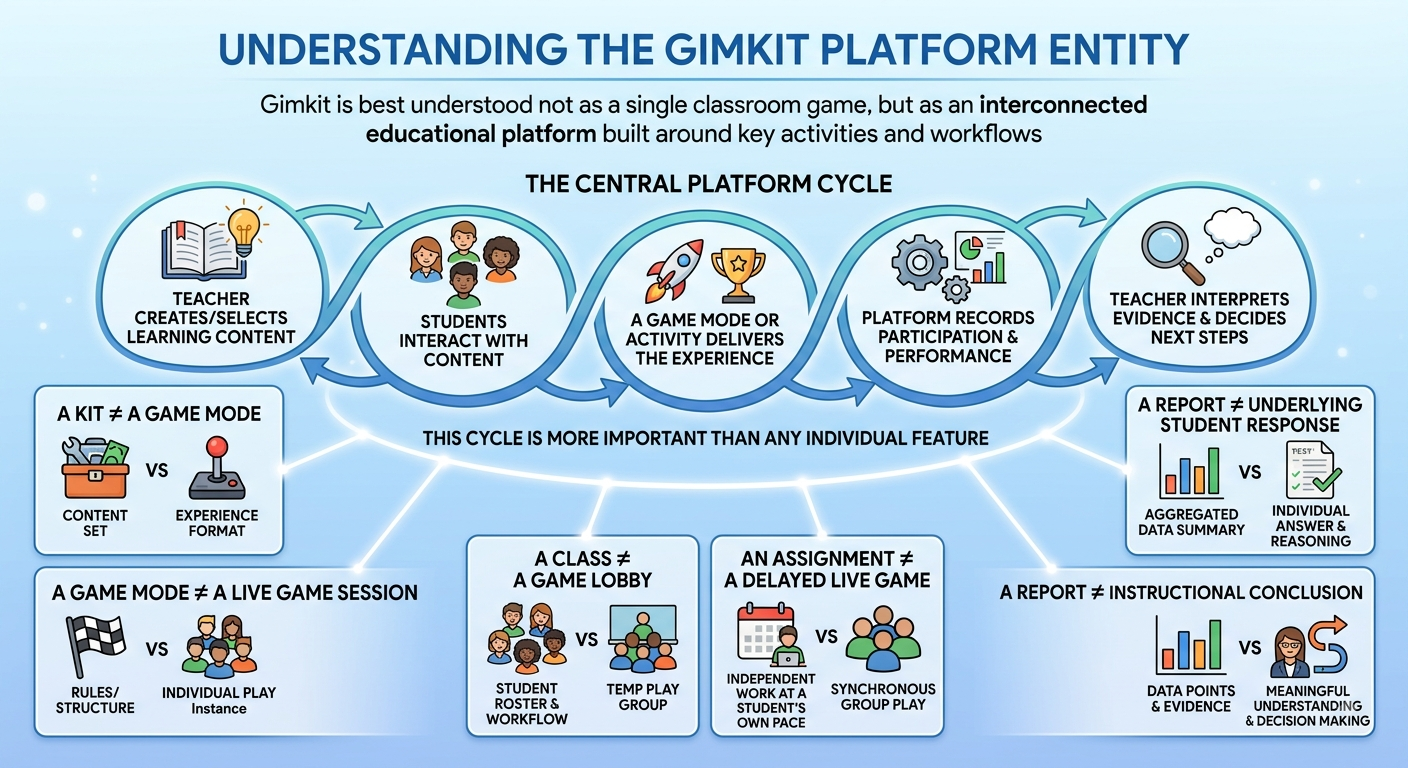
Understanding the Gimkit Platform Entity | Gimkit is best understood not as a single classroom game, but as an interconnected educational platform built around question-based learning, game-based practice, classroom participation, independent activities, performance information, and teacher-managed workflows.
At the center of the platform is a simple relationship:
Teacher creates or selects learning content → students interact with that content → a game mode or activity delivers the experience → the platform records participation and performance information → the teacher interprets the evidence and decides what happens next.
That cycle is more important than any individual feature.
A Kit is not the same thing as a Game Mode. A Game Mode is not the same thing as a live game session. A Class is not the same thing as a game lobby. An Assignment is not simply a delayed Live Game. Likewise, a Report is not the same thing as the underlying student response or the instructional conclusion drawn from it.
Understanding these distinctions makes Gimkit much easier to understand as a complete system rather than as a collection of disconnected features.
Looking for comprehensive classroom resources and educational technology insights? Explore GimkitApp for expert guides, teaching strategies, game modes, and the latest updates to enhance student engagement.
The Gimkit Entity Ecosystem
The platform can be represented through several connected layers:
GIMKIT
│
┌──────────────────┼──────────────────┐
│ │ │
USERS CONTENT ACCESS
│ │ │
Educator / Student Kit → Questions Account / Plan
│
Question Bank
│
↓
EXPERIENCE
│
Game Mode / Practice
│
Game Options
│
↓
DELIVERY
┌─────────┴─────────┐
│ │
Live Game Assignment
│ │
└─────────┬─────────┘
│
Student
│
Response
│
Result
│
Report
│
Teacher Interpretation
│
Instructional Response
│
Next Activity
│
── LOOP ──
The diagram represents the platform as a relationship system.
The flow is not always strictly linear because the same Kit can be reused, Classes can connect to multiple activities, and results can influence the creation or selection of future activities.
Core Gimkit Entities at a Glance
Entity
Definition
Connected to
Gimkit
The overall game-based educational platform
Educators, students, content, activities, results
Educator
User who creates, manages, hosts, or reviews activities
Kits, Classes, Games, Assignments, Reports
Student
Learner participating in activities
Classes, Live Games, Assignments, Questions
Kit
Organized question-based learning content
Questions, Game Modes, Games, Practice
Question
Individual learning or knowledge-checking item
Answers, attempts, results, objectives
Question Bank
Source for discovering reusable questions
Public content, selected questions, Kits
Game Mode
Framework that determines how content becomes a playable experience
Kits, sessions, Game Options
Game Options
Settings that configure the conditions of an activity
Game Modes, sessions
Live Game
Synchronous gameplay session hosted for participating students
Teacher, students, Kit, mode, options
Assignment
Independent activity built around selected content and activity settings
Students, Classes, Kits, results
Practice
Question-focused activity intended primarily for rehearsal
Kits, questions
Class
Teacher-managed organizational structure for students
Educator, students, assignments, activities
Response
Student interaction with an individual question or activity
Question, student, result
Result
Performance information generated from participation
Activity, student, report
Report
Organized presentation of activity or performance information
Results, students, activities
Account
User identity within the platform
Educator or student
Plan
Access level affecting available capabilities
Account, features
The important point is that these entities are related but not interchangeable.
Kits: The Content Foundation
A Kit represents the reusable question-based content that powers many Gimkit activities.
An educator can create or organize questions into a Kit and then use that content in different activity contexts.
This makes the Kit fundamentally different from a Game Mode.
Kit
Game Mode
Contains educational content
Defines the gameplay framework
Organizes questions
Determines how students interact
Can be reused
Can be used with different Kits
Answers what students encounter
Answers how they experience it
The distinction can be summarized simply:
Kit = content
Game Mode = experience
A teacher can therefore keep the same Kit while changing the way students interact with it.
That separation is one of the most important structural characteristics of the platform.
Question Bank and Content Reuse
The Question Bank extends the content ecosystem beyond a single educator’s original material.
Educators can discover questions from available public content and incorporate selected questions into their own Kits.
The resulting relationship can be understood as:
Public content → Question Bank → Selected Question → Kit
This turns the Kit into part of a broader content ecosystem rather than an isolated collection.
However, reusable content should still be reviewed before being used with a particular group of learners.
A question that is technically correct may still be unsuitable because of:
grade level
curriculum alignment
terminology
difficulty
cultural or contextual assumptions
instructional sequence
wording quality
Content reuse is therefore useful, but selection and review remain part of the educator’s role.
Questions: The Atomic Learning Unit
Within a Kit, the question is the fundamental instructional unit.
A question may target:
factual recall
vocabulary
conceptual understanding
application
recognition
review of previously introduced material
The quality of individual questions affects the quality of the entire activity.
A sophisticated game experience cannot completely compensate for unclear or poorly aligned content.
A question is therefore not merely a piece of content inside a Kit. It is the point where instructional intent becomes observable student interaction.
Game Modes: The Experience Layer
A Game Mode determines how a Kit’s questions become a playable experience.
This is why Gimkit and a Gimkit Game Mode should not be treated as interchangeable concepts.
The Kit answers:
What content will students encounter?
The Game Mode answers:
How will students interact with that content?
Different modes can emphasize different aspects of participation, such as competition, strategy, collaboration, pacing, or other gameplay characteristics.
The educator should therefore choose the mode according to the intended learning experience rather than simply selecting the most exciting option.
Students may be able to participate in certain activities without creating or logging into a Gimkit account, while student accounts provide an additional identity layer where applicable.
The important distinction is that student participation and student account identity are not necessarily the same concept.
Class: The Organizational Entity
A Class provides a teacher-managed organizational structure for learners.
It is different from a game lobby.
A Class can support relationships involving students and relevant activities over time, whereas a game lobby exists around a particular live activity.
Class
Game lobby
Teacher-managed organizational structure
Activity-specific participation space
Can persist across activities
Exists around a particular game
Connects teacher and students
Connects participants to the current session
Can support assignment tracking
Primarily supports the current activity
The distinction can be reduced to:
Class = organization
Game lobby = current activity
Live Game, Assignment, and Practice
A Kit can be delivered through different activity pathways.
Feature
Live Game
Assignment
Practice
Timing
Synchronous
Independent
Independent
Teacher role
Hosts
Creates/manages
Not continuously required
Student participation
Together in real time
Individually
Individually
Core content
Kit
Kit
Kit
Game mechanics
Active
Depends on activity configuration
Minimal/question-focused
Due date
Generally not the defining feature
Can be configured
Not the defining feature
Primary use
Classroom participation
Independent work
Rehearsal
Live Game
A Live Game is a synchronous activity in which an educator hosts a session and students participate together.
The general relationship is:
Teacher → Kit → Game Mode → Game Options → Live Game → Students
Assignments can also be connected with Classes for organized learner tracking where supported.
Practice
Practice separates question rehearsal from the full gameplay structure.
It is useful when the primary objective is simply to work through questions rather than participate in a complete game experience.
The central idea is:
The same Kit can support different delivery contexts.
Reports: The Evidence Layer
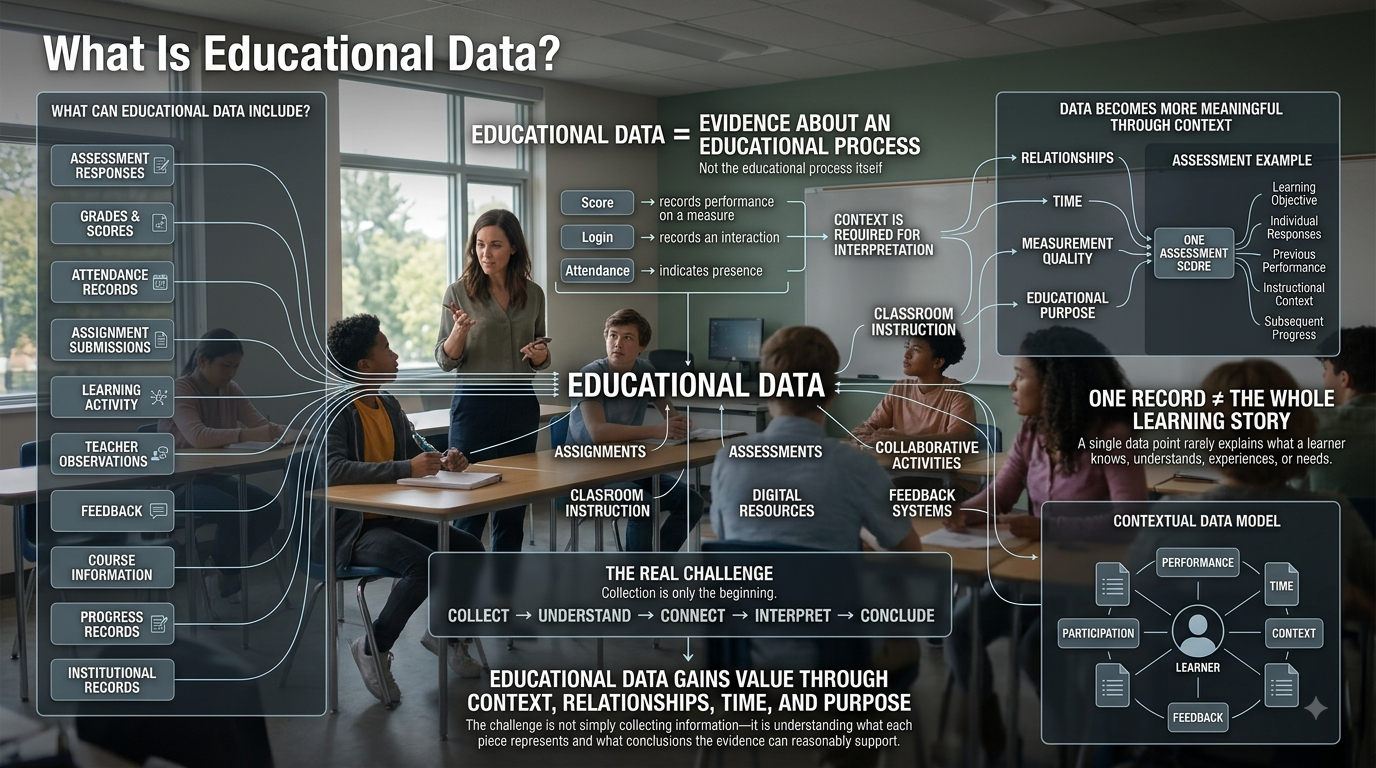
Once students interact with an activity, performance information can be generated.
The relationship is:
Activity → Responses → Results → Reports
These concepts should be separated.
Response
What the student did.
Result
Performance information produced from participation.
Report
An organized representation of activity or performance information.
Interpretation
The educator’s judgment about what the information means.
A report can help answer:
What happened?
It cannot automatically answer:
Why did it happen?
That distinction is essential.
If students perform poorly on a question, possible explanations can include misunderstanding, unclear wording, unfamiliar terminology, insufficient instruction, activity conditions, or other factors.
The report provides evidence.
The educator supplies the instructional interpretation.
Assessment: Performance Evidence Is Not Automatically Valid Assessment
Gimkit can support practice, review, formative checks, and assessment preparation.
However, the existence of a score does not automatically make an activity a valid assessment of a broader learning construct.
The educational value comes from the loop, not merely from completing the game.
This is the difference between:
Activity → End
and:
Activity → Evidence → Decision → Next Activity
The second structure is much closer to an ongoing instructional process.
Gameplay Performance vs. Learning Outcomes
Game performance can be influenced by multiple factors.
A useful model is:
Content knowledge + response performance + gameplay decisions + familiarity with mechanics + activity conditions → observed game outcome
Therefore, winning a game and demonstrating complete learning are not necessarily the same thing.
A student may:
know the answer but respond slowly
understand a concept but struggle with game mechanics
perform strongly because the material is highly familiar
perform poorly because of the conditions of the activity rather than a lack of knowledge
For that reason:
Game performance is evidence about performance in an activity, not a complete measurement of learning.
The teacher should consider the underlying questions, objectives, conditions, and performance patterns before making broader conclusions.
Engagement: XP, Rewards, and Cosmetics
Gimkit also contains an engagement and customization layer.
This can include systems such as:
XP
levels
GimBucks
the Item Shop
the Locker
cosmetic items
The relationship can be represented as:
Gameplay → XP → Progression → Rewards → Customization
This is separate from the evidence layer.
A reward can encourage participation without proving mastery.
Therefore:
Engagement ≠ Learning
and:
Reward ≠ Assessment evidence
The engagement system may support the experience, but educators should not automatically interpret visible gameplay activity or rewards as evidence of academic achievement.
Accounts and Plans: The Identity and Access Layer
Accounts and plans serve a different function from Kits, Questions, and Game Modes.
An account answers:
Who is using the platform?
A plan answers:
Which capabilities are available?
Educator and student accounts represent different user contexts.
Subscription levels can affect feature availability.
However, the meaning of an entity does not fundamentally change because of the plan.
A Kit remains content.
A Class remains an organizational structure.
A Question remains an instructional item.
A Report remains performance information.
Because product plans and feature availability can change over time, plan-specific details should be treated as current product information rather than permanent definitions of the Gimkit ecosystem.
How the Major Entities Connect
Entity A
Relationship
Entity B
Educator
creates
Kit
Kit
contains
Questions
Question Bank
provides
Reusable questions
Educator
selects
Game Mode
Kit
is used with
Game Mode
Game Mode
is configured through
Game Options
Educator
manages
Class
Class
organizes
Students
Educator
creates
Assignment
Assignment
uses
Kit and activity configuration
Student
participates in
Live Game
Student
completes
Assignment
Student
answers
Questions
Activity
produces
Results
Results
are organized into
Reports
Gameplay
can generate
XP and rewards
Account
identifies
User
Plan
determines
Feature access
Teacher interpretation
informs
Next instructional decision
The value of this table is that it shows relationships, not just vocabulary.
The Platform in Functional Layers
The ecosystem becomes easier to understand when grouped into functional layers.
Layer
Core entities
Main question
Identity
Account, Educator, Student
Who is using the platform?
Content
Kit, Question, Question Bank
What content is being learned or reviewed?
Experience
Game Mode, Practice
How is the content experienced?
Configuration
Game Options
Under what conditions?
Organization
Class
Which learners are grouped together?
Delivery
Live Game, Assignment
How does the activity reach learners?
Evidence
Response, Result, Report
What happened?
Engagement
XP, Rewards, Cosmetics
How is participation reinforced?
Access
Basic, Pro
Which capabilities are available?
This layered view prevents unrelated concepts from being treated as if they serve the same function.
The Complete Learning Activity Pipeline
A complete Gimkit workflow can be represented in six stages.
1. Content Creation
Educator → Kit → Questions
The educator creates, selects, or reviews learning content.
2. Experience Design
Kit → Game Mode → Game Options
The educator decides how students will interact with the content.
3. Learner Organization
Educator → Class → Students
Where classroom organization is needed, learners are connected to the relevant teacher-managed context.
Performance information becomes available for review.
6. Instructional Response
Interpretation → Decision → Next Activity
The educator decides whether students need:
additional practice
reteaching
a revised Kit
different questions
another Game Mode
increased or reduced difficulty
new material
The final stage is what turns a single activity into an instructional cycle.
The Same Kit, Different Learning Experiences
Consider a teacher who creates a Kit containing 25 science questions.
The content can remain largely the same while the learning experience changes.
Use case
Content
Delivery
Purpose
Classroom review
Same Kit
Live Game
Whole-class review
Individual practice
Same Kit
Practice
Question rehearsal
Homework
Same Kit
Assignment
Independent completion
Competitive review
Same Kit
Game Mode
High-energy participation
Follow-up
Revised Kit
New activity
Address identified weaknesses
This demonstrates a core property of the platform:
Content can remain relatively stable while the experience changes.
The educator does not necessarily need to rebuild the content every time the instructional context changes.
Choosing the Right Gimkit Structure
Not every lesson needs every available entity.
The appropriate combination depends on the instructional goal.
Goal
Useful entities
Quick classroom review
Kit + Game Mode
Individual practice
Kit + Practice
Homework
Kit + Assignment
Structured learner tracking
Class + Assignment
Competitive review
Kit + Game Mode + Game Options
Performance review
Activity + Results + Reports
Content development
Kit + Questions + Question Bank
Instructional intervention
Results + Reports + Revised Kit or activity
The principle is:
Choose the entity combination according to the educational purpose, not according to the number of features available.
More features do not automatically create a better activity.
Common Design Mistakes
Understanding the ecosystem also reveals several common mistakes.
Choosing the Game Mode Before the Learning Goal
The most exciting mode is not necessarily the most appropriate mode.
Treating Every Question as Equally Valuable
Question quality, alignment, and difficulty matter more than simply increasing question count.
Treating Speed as Mastery
Fast responses can matter in some activities, but speed alone is not a universal measure of understanding.
Treating Game Scores as Complete Assessment
A score reflects performance under specific conditions.
Ignoring Question Quality
Weak content can produce weak evidence regardless of the quality of the gameplay system.
Treating Rewards as Learning Outcomes
Rewards belong to the engagement layer.
Collecting Data Without a Follow-Up Decision
Performance information becomes more useful when it influences what happens next.
Gimkit vs. a Static Quiz Tool
The difference is primarily structural.
Static quiz model
Gimkit ecosystem
Question → Answer
Question → Interactive experience
Usually one dominant format
Multiple activity experiences
Limited gameplay layer
Gameplay is a major interaction layer
Results often serve as the endpoint
Results can inform subsequent activities
Limited progression
Progression and customization may be available
Primarily quiz/practice focused
Game-based practice, review, and participation
Relatively simple relationships
Content, users, activities, classes, and evidence interact
This does not mean Gimkit is automatically better for every educational purpose.
The important difference is that the same educational content can participate in multiple interaction and delivery relationships.
What Gimkit Is Not
Not Simply a Question Bank
Questions are fundamental, but Gimkit adds gameplay, activities, classroom organization, assignments, practice, reporting, and engagement features around them.
Not Simply a Game
Gameplay is central, but the platform also contains content management, learner organization, independent activities, and performance information.
Not Simply an LMS
Gimkit supports classroom activities and assignments, but its identity is centered on interactive, game-based question experiences rather than functioning as a complete learning-management system.
Not an Automatic Assessment-Validity Guarantee
The platform provides mechanisms for creating activities and recording performance. Validity depends on objective alignment, question quality, conditions, and interpretation.
Not Identical to Any One Game Mode
A Game Mode is one component of the broader platform.
The same applies to Kits, Classes, Assignments, Reports, and Rewards.
Common Misunderstandings
“Gimkit is just a quiz game.”
This ignores the broader ecosystem of Kits, Questions, Game Modes, Classes, Assignments, Practice, Reports, and configuration.
“The Kit is the game.”
The Kit contains content. The Game Mode defines the experience.
“A high score proves learning.”
A high score demonstrates performance in a particular activity. It does not automatically establish complete mastery.
“Game Mode and Game Options are the same.”
The Game Mode provides the framework; Game Options configure the conditions.
“Assignments are just Live Games played later.”
Assignments represent an independent delivery pathway with its own activity and tracking structure.
“Rewards are part of assessment.”
Rewards belong to engagement and customization rather than academic assessment evidence.
“A Class is the same as a game lobby.”
A Class is a teacher-managed organizational structure; a lobby is associated with a specific activity.
Advanced Relationship Model
The complete ecosystem can be understood through several connected transitions.
Content to Experience
Learning Objective → Questions → Kit → Game Mode → Game Options → Student Experience
Results → Interpretation → Identified Need → Instructional Response → New Activity
Together, these form:
Content → Experience → Evidence → Decision → New Experience
This is more useful than viewing the platform as a simple list of features.
For the latest gaming news, expert reviews, and walkthroughs, readers can also visit IGN, one of the world’s leading gaming websites.
A Practical Mental Model
If someone needs a simple way to remember the entire platform, five questions are enough.
What are students working with?
Kit → Questions
How are they interacting with it?
Game Mode / Practice
Under what conditions?
Game Options / Activity structure
Who is participating?
Students / Classes / Activity
What happened and what should happen next?
Results → Reports → Teacher interpretation → Next activity
This mental model captures the major relationships without requiring every feature to be memorized separately.
The Complete Gimkit Entity Map
GIMKIT
│
┌──────────────────┼──────────────────┐
│ │ │
IDENTITY CONTENT ACCESS
│ │ │
Educator / Student Kit → Questions Account / Plan
│
Question Bank
│
↓
GAME MODE
│
GAME OPTIONS
│
┌────────────────┴────────────────┐
│ │
LIVE GAME ASSIGNMENT
│ │
│ CLASS
│ │
└────────────────┬────────────────┘
│
STUDENT
│
RESPONSE
│
RESULT
│
REPORT
│
TEACHER INTERPRETATION
│
INSTRUCTIONAL RESPONSE
│
NEXT ACTIVITY
│
─── LOOP BACK ───
This model captures the major relationships while leaving room for different activity configurations.
The Core Semantic Definition of Gimkit
Gimkit is a game-based educational platform in which teacher-managed question content, interactive game modes, configurable activities, classroom organization, independent assignments, practice activities, student participation, performance information, reporting, and engagement features work together to support interactive learning and instructional decision-making.
This definition avoids reducing Gimkit to a single feature.
It identifies the platform through the relationships between its major entities.
A Kit alone does not define Gimkit.
A Game Mode alone does not define Gimkit.
A Report alone does not define Gimkit.
The platform’s identity emerges from how these components work together around learning content, student participation, gameplay, evidence, and instructional decisions.
Final Entity Understanding Check
A complete understanding of the Gimkit ecosystem means being able to distinguish:
Gimkit from an individual Game Mode
Kit from a Game Session
Question from a Kit
Question Bank from a Kit
Game Mode from Game Options
Game Mode from a specific Game Session
Class from a game lobby
Assignment from a Live Game
Practice from a complete game experience
Response from a Result
Result from a Report
Gameplay performance from broader evidence of learning
Engagement from mastery
Account from Plan
Feature access from the underlying educational entity
Once these distinctions are clear, Gimkit stops looking like a pile of disconnected tools.
It becomes a structured ecosystem of content, people, experiences, configurations, activities, evidence, and instructional workflows.
At the highest level, the platform can be understood through one continuous cycle:
That cycle is the core relationship connecting the Gimkit entity ecosystem.
Professional Recommendations & Expert Reviews
Understanding the Gimkit Platform Entity begins with recognizing Gimkit as an interactive learning platform that combines educational questions with game-based experiences.
Understanding the Gimkit Platform Entity means looking at the platform as a complete system rather than focusing only on its games.
Understanding the Gimkit Platform Entity includes understanding how teachers create learning content and use that content within different game experiences.
Understanding the Gimkit Platform Entity involves recognizing the relationship between questions, Kits, game modes, players, and hosts.
Understanding the Gimkit Platform Entity becomes easier when the platform is viewed through the different roles users perform.
Understanding the Gimkit Platform Entity includes the teacher or host role, where an educator can prepare content and organize an interactive session.
Understanding the Gimkit Platform Entity also includes the student or player role, where learners participate and respond to questions during activities.
Understanding the Gimkit Platform Entity depends on understanding that the learning content and the gameplay experience serve different purposes.
Understanding the Gimkit Platform Entity means recognizing that a Kit provides the question-based content used during learning activities.
Understanding the Gimkit Platform Entity includes understanding how game modes determine the way players interact with that content.
Understanding the Gimkit Platform Entity becomes clearer when questions are treated as the individual learning elements within a larger content structure.
Understanding the Gimkit Platform Entity also involves recognizing that gameplay can add competition, progression, strategy, or collaboration around academic content.
Understanding the Gimkit Platform Entity includes the live session as an important connection between the prepared content and participating students.
Understanding the Gimkit Platform Entity requires distinguishing between creating a learning activity and actually hosting that activity for students.
Understanding the Gimkit Platform Entity can help teachers choose suitable game experiences based on the purpose of a lesson.
Understanding the Gimkit Platform Entity also helps explain why the same educational content can feel different when used through different game modes.
Understanding the Gimkit Platform Entity includes account-related elements that allow users to access their available features, content, and activities.
Understanding the Gimkit Platform Entity can involve understanding how teachers organize their prepared materials for repeated classroom use.
Understanding the Gimkit Platform Entity also includes the joining experience through which students enter an active classroom game.
Understanding the Gimkit Platform Entity becomes important when troubleshooting because problems can originate from different parts of the platform experience.
Understanding the Gimkit Platform Entity can help distinguish between problems with account access, game joining, browser performance, connectivity, and the live session itself.
Understanding the Gimkit Platform Entity also involves recognizing that interactive gameplay is designed to support participation rather than replace meaningful instruction.
Understanding the Gimkit Platform Entity can help teachers integrate short game-based activities into lessons without making the entire lesson dependent on gameplay.
Understanding the Gimkit Platform Entity includes the broader idea of combining content, interaction, feedback, and classroom participation within one learning environment.
Understanding the Gimkit Platform Entity becomes more useful when teachers understand what each platform component contributes to the overall learning experience.
Understanding the Gimkit Platform Entity can help users make better decisions about content preparation, game selection, student participation, and classroom management.
Understanding the Gimkit Platform Entity also means recognizing that effective use depends on matching platform features with specific instructional goals.
Understanding the Gimkit Platform Entity provides a clearer foundation for learning more advanced features because users first understand how the main components connect.
Understanding the Gimkit Platform Entity ultimately means viewing Gimkit as an ecosystem of educational content, game experiences, users, sessions, and classroom interactions rather than simply as a quiz game.
Understanding the Gimkit Platform Entity gives teachers and learners a stronger foundation for using the platform effectively because they can understand how its major components work together to create an interactive learning experience.
FAQs About Gimkit Kits, Game Modes & Activities
1. What is the difference between a Kit and a Game Mode?
A Kit contains the learning content, while a Game Mode determines how students interact with that content. A Kit can include questions covering vocabulary, concepts, facts, or application, while the selected Game Mode controls the gameplay structure, pacing, competition, collaboration, and strategic elements.
This separation makes Gimkit flexible because teachers can use the same content in different activity formats rather than rebuilding their questions for every type of classroom experience.
In simple terms:
Kit: What students learn or answer.
Game Mode: How students experience it.
Game Options: How the selected mode is configured.
Game Session: The specific activity students participate in.
2. What is the difference between a Game Mode and a Game Session?
A Game Mode is the reusable gameplay framework that defines how an activity works, while a Game Session is a specific instance where students actually participate using that framework.
For example, a teacher can select a particular Game Mode and configure its settings, then launch a live session for a specific class. The mode defines the structure; the session is the actual event taking place at that moment.
The distinction is:
Game Mode = gameplay framework.
Game Session = specific occurrence.
Game Options = configuration of the session.
Students participate in sessions, not abstract modes.
3. Can the same Kit be used in different Gimkit activities?
Yes. Separating content from delivery allows teachers to reuse a Kit across different supported activities. The same collection of questions can potentially support live review, individual practice, assignments, or other learning experiences depending on the available features and selected settings.
This makes content creation more efficient because teachers can focus on building high-quality questions once and then adapt how students interact with them for different instructional purposes.
Content can be reused for:
Live classroom review.
Individual practice.
Independent assignments.
Different gameplay experiences.
Repeated revision sessions.
Different instructional contexts.
4. Do Gimkit game scores prove that a student has learned the material?
Not necessarily. A Gimkit score represents how a student performed within a particular game under specific conditions. It can provide useful evidence, but it should not automatically be treated as definitive proof of academic mastery.
Scores can be influenced by question difficulty, game mechanics, response speed, strategic decisions, and other factors. Teachers should therefore combine game performance with other evidence such as assessments, classroom work, discussion, and observation.
For stronger assessment decisions, consider:
Accuracy across questions.
Learning objectives.
Question quality.
Patterns of mistakes.
Performance across multiple activities.
Other classroom assessment evidence.
5. What are Gimkit Reports used for?
Gimkit Reports are designed to help educators examine information generated from student activities and use that information to better understand performance. Rather than focusing only on a final game score, reports can help teachers identify patterns in responses, participation, and progress where the relevant reporting features are available.
The most valuable use of reports is instructional: teachers can use evidence from activities to identify concepts that need additional review, recognize areas of strength, and plan subsequent instruction.
Teachers can use reports to:
Review student performance.
Identify learning gaps.
Examine question-level patterns.
Plan targeted review.
Monitor progress over time.
Support formative assessment decisions.
Conclusion
Gimkit is easier to understand when its features are viewed as connected parts of one educational ecosystem rather than as separate tools.
Kits provide the content, Questions represent the individual learning items, Game Modes shape the interaction, and Game Options configure the activity. Classes organize learners, while Live Games, Assignments, and Practice provide different ways to deliver that content. Responses, Results, and Reports provide performance information that teachers can interpret and use when deciding what students should do next.
The most important distinction is that gameplay, engagement, and learning evidence are related but not identical. A strong Gimkit activity therefore depends not only on choosing an interesting mode, but also on having appropriate questions, a clear learning purpose, suitable activity conditions, and a meaningful follow-up.
Viewed this way, Gimkit is not simply a quiz game or question bank. It is a connected system in which content, learners, gameplay, delivery, evidence, and instructional decisions interact.
Understanding these relationships makes it easier for educators to choose the right activity, interpret results responsibly, and use Gimkit as part of a broader learning process rather than treating the game itself as the entire lesson.